Listify

Listify review

A WordPress directory theme with the essentials built in — launch in days, not months.

Listify costs from $4.92/mo · 5 plans

By Ciroapp Editorial Team · Updated Sep 16, 2026

Commission may apply at no extra cost

Listify homepage screenshot

At a glance

Quick overview for Listify: rating, pricing summary, key features, and highlights.

Ciroapp score

4.1/ 5

Listify bundles maps, reviews, Ajax filtering, and WooCommerce monetization into one WordPress theme, and four one-click demo imports skip the blank-page start. Pricing is clear, though there's no free trial and base licenses cover one site. Overall, it's a solid, recommendable choice for building a directory without custom development.

Pros

  • Pros:Four complete demos (Classic, Luminex, Vintage, and Rental) import in one click and come fully populated, so the directory looks finished from day one instead of starting from a blank page.
  • Pros:Monetization is wired in through WooCommerce — paid submissions, listing packages, and featured upgrades can be sold without setting up separate billing tools.
  • Pros:Core discovery features ship with the theme — Google Maps with markers, clustering, and location search, plus Ajax filtering that refines results without page reloads.

Cons

  • Cons:It's a WordPress theme, not a standalone platform — you must supply your own hosting and have some comfort with the WordPress dashboard.
  • Cons:Base licenses cover only one website; running several directories requires stepping up to All-Access (up to 10 sites) at a higher cost.
  • Cons:The entry price is an annual subscription ($59/year), and skipping renewals means paying more upfront for a lifetime plan ($69–$149).
Best for
  • Solopreneurs launching a local business or city guide directory
  • Rental or property listing sites built on WordPress
  • Event directories that need maps, search, and bookings
Money-back guarantee
Yes — 14 days
This section is a summary. Detailed sections about features, use cases, pricing, and reviews follow below.

What is Listify?

Building a directory site from scratch takes weeks of plugin wrangling and design work. Listify bundles the core pieces — maps, reviews, filtering, and paid submissions — into one WordPress theme, so you can import a demo and launch in days instead of months.

Listify is a premium WordPress theme for building directory websites. It's made by Astoundify and runs on the WP Job Manager engine, with WooCommerce handling payments. You can create business, local, rental, or event directories, and visitors can search, review, and claim listings.

It suits solopreneurs, small teams, and agencies who want a ready-made directory without custom development.

Should you choose Listify?

Quick buyer guidance before you compare plans or click through.

Choose it if

  • You want maps, reviews, and filtering bundled in one theme purchase
  • You'd rather start from a fully populated demo than a blank page
  • You plan to charge for listings or featured placements via WooCommerce
  • You want schema support and SEO-friendly markup out of the box
  • You prefer buying direct, with maker support and a money-back guarantee

Skip it if

  • You're not on WordPress — it's a theme, not a standalone platform, so you'll need your own hosting
  • You need many sites on a budget plan — base licenses cover one site, and All-Access (up to 10) costs more
  • You dislike annual billing — the entry price is per year, and lifetime plans cost more upfront
  • You expect long-term hand-holding — support runs one year even on lifetime plans, and ThemeForest buyers follow Envato's terms
  • You need heavy custom layouts — deeper designs may require add-ons like Elementify or developer help

Next steps before buying

  1. 1Compare the $59/yr direct plan against the $69 ThemeForest license and the lifetime or All-Access tiers to match your budget
  2. 2Confirm the license covers your site count — one site on base plans, up to 10 with All-Access
  3. 3Browse the Classic, Luminex, Vintage, and Rental demos to see which layout fits your niche
  4. 4Check which add-ons you need (payments, claim listings, reviews) and whether they're included in your plan
  5. 5Review the 14-day money-back terms before checkout so you know your refund window

Ease of use

Setup signals look beginner-friendly: four demos import in one click, fully populated, and every plan includes installation support. It still runs on WordPress, so you'll need hosting and some comfort with the dashboard. Built-in tools cut down the plugin juggling that usually slows directory launches.

Listify Key Features

🚀 Start from a finished site, not a blank page

Listify ships four complete demos — Classic, Luminex, Vintage, and Rental. Pick the one closest to your niche and import it in one click. Each demo comes fully populated, so your directory looks finished from day one.

Then swap in your own listings and branding.

🔍 Search that helps visitors find listings fast

The tools visitors need to find the right listing are built in:

  • Google Maps with markers, clustering, and location search
  • Ajax filtering that refines results with no page reloads
  • Nearby listings shown around whatever a visitor is viewing

Use the search form builder to add the custom fields your niche needs.

✨ Monetization is built in

You can earn from your directory without stitching together extra billing tools. WooCommerce handles payments, so you can sell paid submissions, packages, and featured upgrades. Need bookings too?

Visitors can schedule appointments right from a listing. It's a simple path from directory to revenue.

✨ Reviews, claims, and control you can trust

Visitors rate listings with the built-in star review system, and owners can claim their pages with verified badges. Field visibility puts you in charge of which fields appear and who sees them. And the whole site stays pixel-perfect on phones, tablets, and widescreen displays.

✨ Make it yours without touching code

Style Kits swap colors, fonts, and layouts in a click, so the theme matches your brand. Under the hood, it runs on WP Job Manager, a trusted listings engine. Official add-ons like Elementify extend it visually with Elementor — add only what you need.

Use Cases

🏙️ Launch a local business guide

You're a solopreneur who wants a city directory. Import the Classic demo in one click, swap in your listings, and let visitors search, filter, and leave reviews. Charge for submissions through WooCommerce.

Expected outcome: A working directory in days, not months.

🏠 Build a rental listings site

A property manager lists rentals with Google Maps, markers, and location search built in. The Rental demo gives you a populated starting point, and Ajax filtering helps visitors narrow results fast.

Tip: Test the Rental demo import inside your 14-day money-back window.

🎟️ Run an events directory with bookings

Event organizers need maps, search, and scheduling in one place. Listify bundles Google Maps, custom search fields, and appointment booking, so visitors can find events and book straight from a listing. Expected outcome: Fewer tools to juggle on launch day.

🤝 Deliver a client directory, fast

Small agencies skip the custom build. Import a demo, match the client's brand with style kits, and hand over a polished site. All-Access covers up to 10 sites when you build more than one.

Tip: Confirm your license covers the site count you need.

Listify pricing

From$4.92/mo

  • 5 plans

Prices not verified yet — see the vendor page.

Listify's pricing page

Listify pricing page screenshotView pricing page screenshot
PlanBilled monthlyBilled annuallyIncludes
Buy Direct (Astoundify)
—
$4.92/mo
$59 per year
Billed annually
  • Listify theme & all demos
  • 20+ premium add-ons included
  • 1-click demo import
  • Updates available
  • Direct support from the makers
  • +1
ThemeForest Single Theme License
See vendor page
See vendor page
  • $69 one-time payment
  • Listify theme & demos
  • 20+ premium add-ons
  • Lifetime-update option
  • Support as per Envato terms only
Listify – Lifetime (All-Access)
See vendor page
See vendor page
1 website
  • $69 one-time — no yearly renewals, ever
  • 1 website
  • Single Listify Theme
  • All 20+ premium add-ons
  • Lifetime updates & 1 year of support
  • +1
Pro
—
$6.58/mo
$79 per year
1 website
  • 1 website
  • All themes & demos
  • All 20+ premium add-ons
  • Updates and support until renewal
  • Installation support
Personal
See vendor page
See vendor page
1 website
  • $149 one-time — no yearly renewals, ever
  • 1 website
  • All themes & demos
  • All 20+ premium add-ons
  • Lifetime updates & 1 year of support
  • +1

Pricing types: Yearly subscription, One-time payment, Lifetime deal

Pricing notes

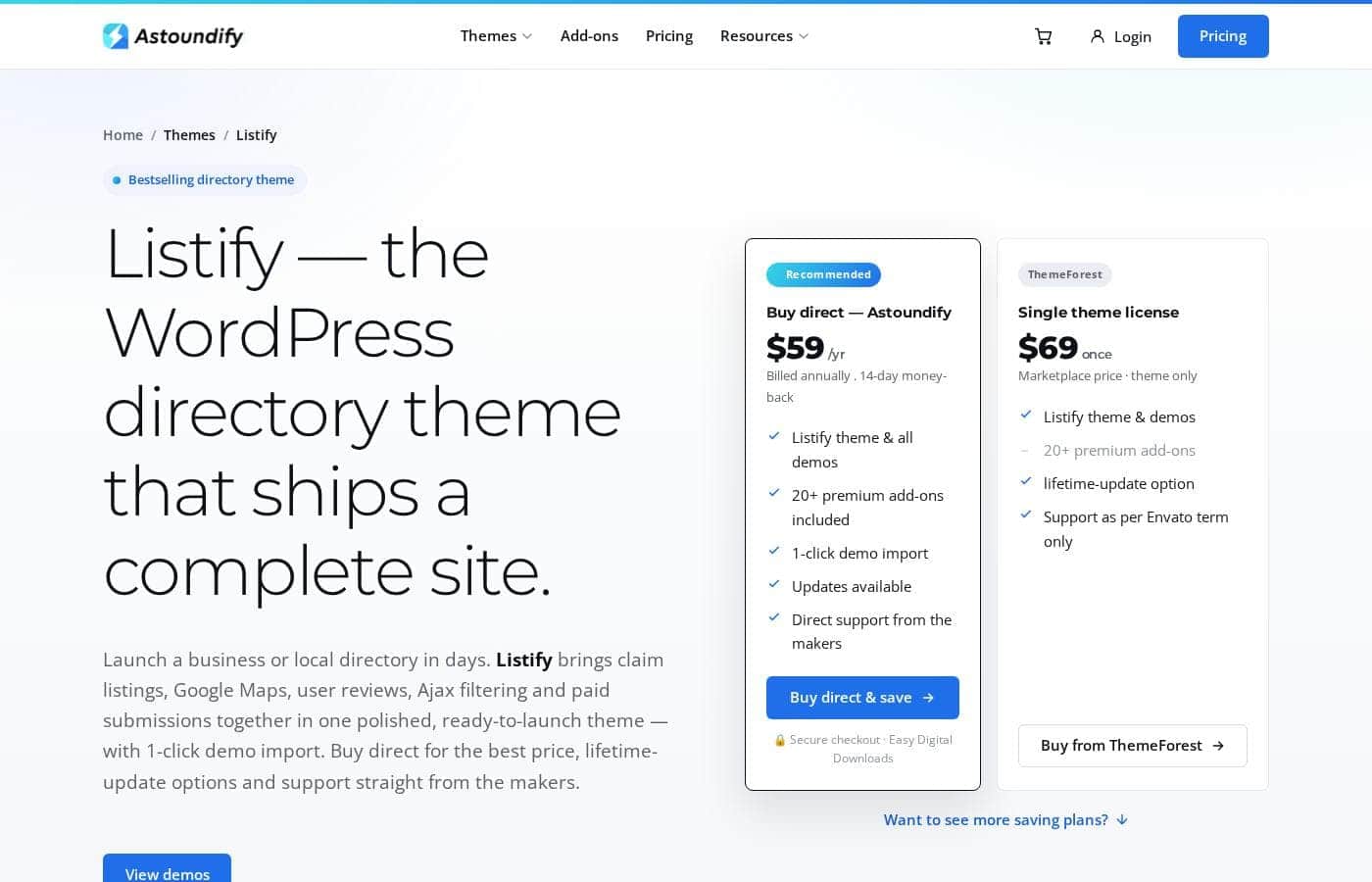
Listify starts at $59/year when you buy direct from Astoundify. You can also pick one-time licenses from $69 — including lifetime-update options — or All-Access plans at $79/year or $149 lifetime.

Listify costs between $59 and $149 with five ways to buy: Buy Direct at $59/year, ThemeForest at $69 one-time, Listify Lifetime at $69, Pro at $79/year, and Personal at $149 lifetime.

Every option includes the full theme, its demos, and 20+ premium add-ons. What changes is how you pay — and how long updates and support last. Here's each one.

Buy Direct (Astoundify)

Price: $59/year, billed annually Best For: Getting Listify itself at the lowest ongoing price Refund Policy: 14-day money-back guarantee Other Features: Listify theme and all demos, 20+ premium add-ons included, 1-click demo import, updates, direct support from the makers

This is the easiest path if you only want Listify. You buy straight from the team that built it, so support questions go to the source. At $59 a year, it's also the cheapest way to keep the theme active.

ThemeForest Single Theme License

Price: $69 one-time Best For: Buyers who prefer the Envato marketplace Other Features: Listify theme and demos, 20+ premium add-ons, lifetime-update option, support per Envato's terms only

Pay once and you're set. A lifetime-update option is available here too. Just know that support follows Envato's rules, so it works a bit differently than buying direct.

Listify – Lifetime

Price: $69 one-time Websites Supported: 1 website Other Features: Single Listify theme, all 20+ premium add-ons, lifetime updates, 1 year of support, installation support

This All-Access tier locks in your price for good — no yearly renewals, ever. Updates keep coming for life, while support runs for one year. It fits anyone building one Listify site who'd rather skip subscriptions.

Pro

Price: $79/year, billed annually Websites Supported: 1 website Best For: A single project Other Features: All Astoundify themes and demos, all 20+ premium add-ons, updates and support until renewal, installation support

Pro isn't just Listify — it unlocks every theme and premium add-on Astoundify makes. You pay year to year, and updates plus support continue until renewal. Pick it if you want the full catalog but prefer smaller annual payments.

Personal

Price: $149 one-time Websites Supported: 1 website Other Features: All Astoundify themes and demos, all 20+ premium add-ons, lifetime updates, 1 year of support, installation support

Personal sits at the top: the whole catalog, paid once, with lifetime updates and no renewals. It suits agencies and builders who'll reuse these themes for years. If you only need Listify on one site, the cheaper $69 lifetime plan already does that job.

Listify has no free plan or free trial — every option is a paid purchase. The upside is a 14-day money-back guarantee on every plan, so you can buy, test it, and walk away if it's not a fit. Checkout runs through Easy Digital Downloads, and Astoundify offers custom plans for bulk site licenses, resellers, or custom development. One tip before you buy: these tiers cover 1 website each, so confirm how many licenses you need if you're running several sites.
Cost calculator

Estimate what Listify costs for your team.

Billing

Buy Direct (Astoundify) has no published price for this billing cycle.

Buy Direct (Astoundify) has a flat price: the number of seats does not change the total. Estimate based on published list prices, before taxes, add-ons and discounts.

How to pay less for Listify

  • 14-day money-back guarantee if it does not fit.
Visit Listify

Email me when Listify changes price

One email when we detect a price change on the vendor's pricing page. No newsletter, no deals. Unsubscribe in one click.

User Reviews

No reviews yet.

Write a Review

Write a Review for Listify
0/100 characters
0/2000 characters

Why use Listify?

Most directory themes hand you an empty shell and leave the wiring to you. Listify takes a different path: the parts you'd normally stitch together are already in the box.

  • A real head start: Every demo (Classic, Luminex, Vintage, and Rental) imports in one click — fully populated, so your site looks finished from day one.
  • Core tools come standard: Google Maps, star reviews, Ajax filtering, and claim listings are built in, so you're not buying extras just to launch.
  • Built-in ways to earn: Sell paid submissions, packages, and featured upgrades through WooCommerce — no separate billing setup required.
  • Search that fits your niche: A form builder lets you create custom search fields for your specific directory, not a one-size-fits-all template.
  • SEO groundwork: Schema support and clean, fast markup are included, and it pairs with Yoast or Rank Math if you want to go deeper.
  • A lower-risk purchase: A 14-day money-back guarantee, a lifetime-updates option, and direct support from the makers reduce the guesswork.

If you want a directory that works on day one, Listify is built for exactly that.

Listify alternatives

Other tools in the WordPress Directory Theme category

View all WordPress Directory Theme tools
Voxel

Voxel

WordPress Directory Theme3.9/5

Voxel is the most versatile theme you could install on a WordPress site. It is designed to help you build advanced dynamic WordPress sites and directories, scaling beyond typical WordPress limitations. Voxel works seamlessly with Elementor, leveraging a powerful Theme Builder and dynamic tags. 💡 This allows you to visually design and manage every part of your site, from a simple brochure page to a full multi-vendor directory.

Listeo

Listeo

WordPress Directory Theme4.2/5

Listeo is the highly-rated WordPress theme designed for launching fully functional multi-vendor marketplaces and listing directories. It allows you to create sophisticated websites for specific industries like apartment rentals, classified ads, or doctors' directories. This theme is trusted by over 10,000 users for its robust functionality. It features pixel-perfect demos that are ready to customize with the Elementor page builder. Everything you need is already included in the theme price, so you don't need to buy extra plugins.

M

MyListing

WordPress Directory Theme4/5

MyListing is a premium WordPress directory theme sold on the ThemeForest marketplace. It provides the core toolkit for a listings site: custom listing types, an Explore page with live faceted filters, front-end user dashboards, reviews and ratings, listing claims, direct messaging, and monetization through WooCommerce paid listing packages. Pages are composed with Elementor extended by the theme's own directory widgets, so most design work happens in a visual editor.

ListingPro

ListingPro

WordPress Directory Theme3.9/5

ListingPro is the proven, best-selling WordPress directory software. It functions as an end-to-end directory website builder. Since 2017, this resource has empowered entrepreneurs around the globe. Tens of thousands have already used it to validate their ideas and launch listing projects in over 200 countries. It is a robust solution trusted by over 27,000 directory startups already. This theme consistently earns high consumer ratings and positive reviews.

Listify FAQ

How much does Listify cost?

Listify's cheapest paid plan, Buy Direct (Astoundify), costs $4.92 per month. Paid plans range from $4.92 to $6.58 per month.

Does Listify offer a free trial or a money-back guarantee?

It has a 14-day money-back guarantee.

Which platforms and tools does Listify work with?

It's a WordPress theme built on the WP Job Manager engine. WooCommerce handles payments, Google Maps powers location search, and it pairs with Yoast or Rank Math for SEO. Official add-ons extend things further.

How many websites can one license cover?

Base plans cover one website each. All-Access plans stretch up to 10 sites, and you can upgrade anytime as your directory grows.

Who handles support, and how long does it last?

Direct buyers get support straight from Astoundify, including installation help on All-Access tiers. Support runs one year, even on lifetime plans. ThemeForest buyers follow Envato's support terms instead.

How does checkout work, and are custom plans available?

Checkout runs securely through Easy Digital Downloads. Astoundify also tailors plans for bulk site licenses, reseller deals, and custom development — contact their team for a quote.

Ready to try Listify? Check out the official site or pricing.

Are you Listify? Claim this listing · Get the badge