Help Scout

Help Scout review

Customer support that keeps conversations, context, and AI in one place

Help Scout costs from $25/mo · 5 plans · Free plan available

By Ciroapp Editorial Team · Updated Sep 17, 2026

Commission may apply at no extra cost

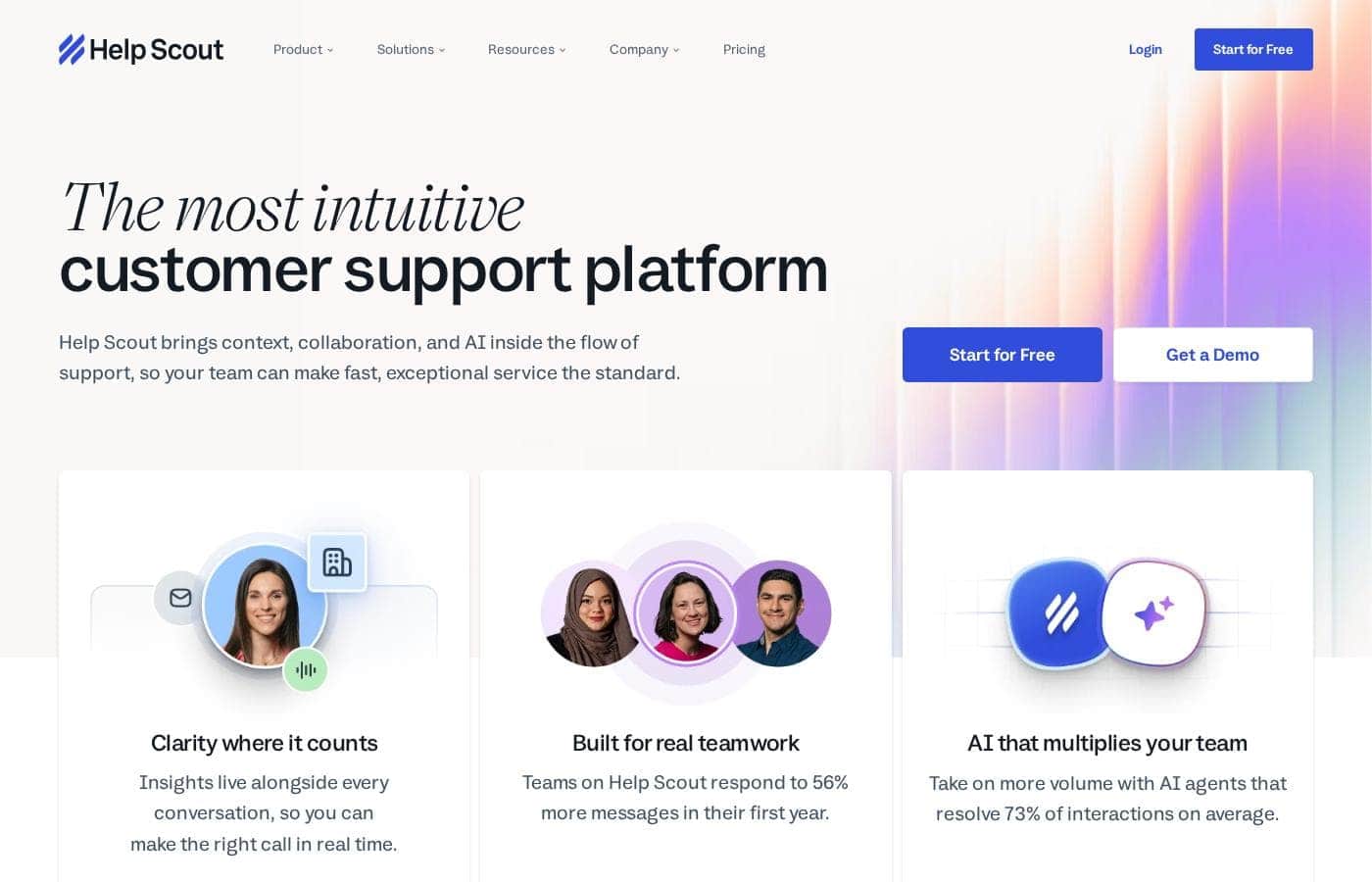
Help Scout homepage screenshot

At a glance

Quick overview for Help Scout: rating, pricing summary, key features, and highlights.

Ciroapp score

4.1/ 5

Help Scout puts email, social, and Shopify conversations in one shared inbox, with AI that drafts replies and resolves routine questions for $25–$75 per user per month. Compliance features sit behind the top Pro plan and headline stats are vendor-reported, but overall it's a strong pick for small and midsize teams if per-user and AI costs fit your budget.

Pros

  • Pros:Shared inbox consolidates email, social, and Shopify conversations into one place, and the company reports teams respond to 56% more messages in their first year
  • Pros:AI tools go beyond drafting — AI Answers resolves an average of 73% of interactions on its own, and the inbox assistant drafts, recaps, edits, and translates replies in one click
  • Pros:Customer context sits alongside every conversation, with company-level details so agents can support whole accounts rather than a single contact

Cons

  • Cons:Per-user pricing scales with headcount, so larger teams pay significantly more; Pro requires a minimum of 10 users at $75 per user per month
  • Cons:AI Answers bills per resolution ($0.75), so costs become usage-based and harder to predict unless you set a monthly cap
  • Cons:Key security features like SSO/SAML and HIPAA compliance are locked behind the top-tier Pro plan, leaving lower tiers with limited compliance options
Best for
  • Small and midsize support teams that want one shared inbox instead of scattered tools
  • Teams handling email plus social and Shopify messages in one place
  • Companies ready to let AI draft, recap, and translate conversations
Free trial
Yes — 15 days
This section is a summary. Detailed sections about features, use cases, pricing, and reviews follow below.

What is Help Scout?

Support requests pile up, context lives in five tabs, and replies slip through the cracks. Help Scout puts every conversation, customer detail, and AI assist in one shared inbox—so your team can answer faster, automate busywork, and stop losing track of customers.

Help Scout is a customer service platform built around a shared inbox. It brings conversations from email, social, and channels like Shopify into one place, with customer context and AI tools alongside each thread. According to its site, 12,000+ companies—from Buffer and Vimeo to Gusto—use it.

It's aimed at support teams that want a simple, intuitive tool that can grow with them rather than a sprawling enterprise suite.

Should you choose Help Scout?

Quick buyer guidance before you compare plans or click through.

Choose it if

  • Teams that want customer context visible right beside each conversation
  • Buyers who prioritize ease of use—the site cites an NPS 7x higher than competitors'
  • Organizations that want a vendor they can grow with: 80% of customers stay 4+ years
  • Shops already using tools Help Scout connects with through its 100+ integrations
  • Leaders who want automation to cut repetitive work and keep the inbox organized

Skip it if

  • Teams looking for a free plan—none is mentioned on the page
  • Organizations that rely on tools outside Help Scout's 100+ integrations and can't confirm a connection first
  • Buyers who want independently verified stats; figures like 73% AI resolution come from Help Scout's own marketing
  • Anyone who needs trial or refund terms visible before purchase—those details aren't on this page

Next steps before buying

  1. 1Confirm the integrations and channels you need (like Shopify or social) are supported
  2. 2Look for a free trial or refund policy and note the terms before committing
  3. 3Compare Help Scout against one or two alternatives on price and ease of use
  4. 4Treat vendor-reported stats (like 73% AI resolution) as claims to validate during any trial

Ease of use

The site leans hard on usability: it calls the platform intuitive, cites independent research showing an NPS 7x higher than competitors', and reports teams answering 56% more messages in year one. Help Scout also says its own team answers 99% of emails within 24 hours, which helps if you get stuck during or after setup.

Help Scout Key Features

📥 One home for every conversation

Email, social, and Shopify messages land in one shared inbox, so nothing slips through the cracks. Give each department or product its own dedicated inbox. It's one home for every conversation—and the company says teams respond to 56% more messages in their first year.

🤖 AI that multiplies your team

AI agents resolve 73% of interactions on average, so your team takes on more volume without burning out. For conversations you keep, AI drafts a first reply, recaps long threads, edits, and translates in a click. Reach for it when repetitive questions pile up.

✨ Clarity where it counts

Insights live alongside each thread, so you can make the right call in real time. Company management takes it further: you get details for the full account, not just the one contact who wrote in. It's handy whenever several people from the same company need help.

✨ The little things support teams love

Small tools for timing and repetition, built right into the inbox. There's nothing new to learn—just everyday helpers your team will actually use.

  • Snooze a conversation, and it resurfaces automatically at a later date
  • Send later schedules a reply so the customer gets it at the perfect time
  • Saved replies add proven answers to common questions

✨ Busywork, handled automatically

Workflows automate the tedious but critical tasks that keep your team and inbox organized, so the busywork gets done without anyone remembering it. And with 100+ integrations, Help Scout fits in with the tools you already use. Connect them once and keep working your way.

Use Cases

📥 One home for every channel

Your team juggles email, WhatsApp, Instagram, and Shopify messages across five tabs. Connect each channel to Help Scout and answer everything from one shared inbox, with customer context right beside each thread. Expected outcome: fewer missed messages and faster replies.

🤖 Let AI take the first pass

When volume spikes, agents open a thread and let AI draft, recap, or translate a reply in one click. They review, tweak, and send. Tip: new accounts get 3 months of free AI Answers, which resolves routine questions on its own.

👥 See the whole account, not just one contact

A customer writes in from a new address. Instead of digging through tabs, the agent checks company-level details beside the conversation and replies with full context. Expected outcome: informed answers on the first try.

🗂️ Keep a growing team organized

Departments get their own dedicated Inbox, and workflows assign or tag conversations automatically. Saved replies handle repeat questions; snooze and send later keep timing right. Tip: the Free plan covers 5 users, so you can test the basics before upgrading.

Help Scout pricing

From$25/mo

  • 5 plans
  • Free plan available

Prices not verified yet — see the vendor page.

Help Scout's pricing page

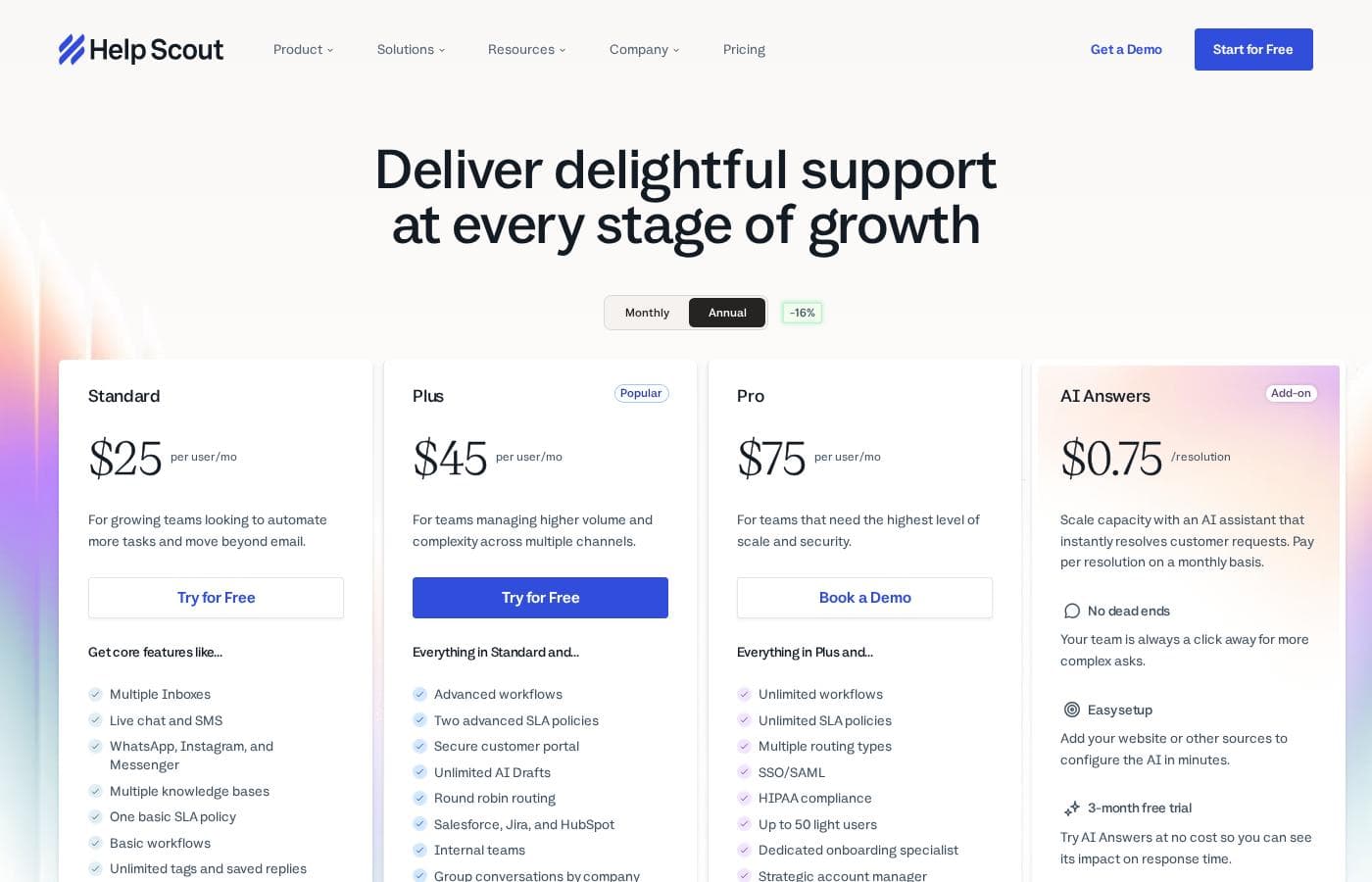
Help Scout pricing page screenshotView pricing page screenshot
PlanBilled monthlyBilled annuallyIncludes
Free
Free
—
Capped at 5 users, 1 Inbox, 1 Docs site, and 100 contacts per month
  • 5 users
  • 1 Inbox
  • 1 Docs site
  • 100 contacts per month
  • 10 saved replies, 10 tags, and 10 articles
  • +1
Standard
per user
$25/mo
—
Up to 25 users; 20 Inboxes max (2 included); 150 basic workflows; 2-year report history; 200 API calls/minute
  • Multiple Inboxes
  • Live chat and SMS
  • WhatsApp, Instagram, and Messenger
  • Multiple knowledge bases
  • One basic SLA policy
  • +3
Plus
per user
$45/mo
—
Up to 50 users and 25 light users; 50 Inboxes max (5 included); 500 advanced workflows; 400 API calls/minute
  • Everything in Standard
  • Advanced workflows
  • Two advanced SLA policies
  • Secure customer portal
  • Unlimited AI Drafts
  • +3
Pro
per user
$75/mo
—
Unlimited users (minimum 10) and 50 light users; unlimited Inboxes (10 included); unlimited advanced workflows; 800 API calls/minute
  • Everything in Plus
  • Unlimited workflows and SLA policies
  • Multiple routing types
  • SSO/SAML
  • HIPAA compliance
  • +4
AI Answers (Add-on)
$0.75 per resolution
—
Billed per resolved conversation; optional monthly cap disables AI automatically when reached
  • Instantly resolves customer requests
  • No dead ends — team a click away
  • Easy setup with your website or other sources
  • 3-month free trial
  • Pre-paid discounts available

Pricing types: Free plan, Free trial, Monthly subscription, Yearly subscription, Per seat pricing, Usage-based pricing

Pricing notes

Help Scout offers a Free plan plus three per-user plans: Standard at $25/user/month, Plus at $45/user/month, and Pro at $75/user/month. An AI Answers add-on costs $0.75 per resolution, and Standard and Plus come with a 15-day free trial.

Help Scout costs between $25 and $75 per user per month with three paid plans: Standard at $25, Plus at $45, and Pro at $75. A Free plan and an AI Answers add-on ($0.75 per resolution) round out the lineup.

Every paid tier is priced per user, so your total grows with headcount. Here's what each plan offers.

Free

Price: $0 Best For: teams that just need the basics Other Features:

  • 5 users, 1 Inbox, and 1 Docs site
  • 100 contacts per month
  • 10 saved replies, 10 tags, and 10 articles
  • 30-day report history

This plan covers the basics without adding a payment method. It's a smart way to test the platform before you commit. You'll outgrow it as volume climbs, but that's exactly what it's for.

Standard

Price: $25 per user/month Best For: growing teams that want to automate more tasks and move beyond email Other Features:

  • Multiple Inboxes, live chat, and SMS
  • WhatsApp, Instagram, and Messenger channels
  • Multiple knowledge bases and one basic SLA policy
  • 150 basic workflows and an AI Inbox assistant
  • Up to 25 users and 2-year report history

Standard is the natural first upgrade. You get real multi-channel support, automation, and room for a mid-sized team. If you're moving past plain email support, start here.

Plus

Price: $45 per user/month Best For: teams managing higher volume and complexity across multiple channels Other Features:

  • Advanced workflows and two advanced SLA policies
  • Secure customer portal and unlimited AI Drafts
  • Round robin routing and internal teams
  • Salesforce, Jira, and HubSpot integrations
  • Up to 50 users and 25 light users

Plus is the "Popular" pick, and it's easy to see why. It adds the routing, security, and integrations that busier teams rely on daily. If you're juggling several channels and departments, this tier earns its price.

Pro

Price: $75 per user/month Best For: teams that need the highest level of scale and security Other Features:

  • Unlimited workflows and SLA policies
  • SSO/SAML and HIPAA compliance
  • Multiple routing types and up to 50 light users
  • Dedicated onboarding specialist and strategic account manager
  • Unlimited users (minimum 10)

Pro is built for big operations. If you handle regulated data or want hands-on onboarding and account management, it's worth the step up. Smaller teams won't use most of what it includes, so stick with Plus unless compliance or scale demands more.

AI Answers (Add-on)

Price: $0.75 per resolution Other Features:

  • Instantly resolves customer questions without human help
  • Easy setup with your website or other sources
  • Optional monthly spending cap for predictable billing
  • Pre-paid discounts available

This add-on scales capacity without new hires. You only pay when the AI fully resolves a conversation, and caps keep costs predictable. Every new account also gets 3 months of free, unlimited resolutions to measure the impact.

Help Scout offers a genuinely useful Free plan (5 users, 1 Inbox, 1 Docs site) and a 15-day free trial of Standard or Plus with no credit card required. Pro trials run through the sales team instead. No money-back guarantee is advertised, so use the trial to decide with confidence. One tip: add-ons like extra Inboxes ($10/month) and Docs sites ($20/month) cost less when billed annually, so confirm billing frequency at checkout if you're budgeting long term.
Cost calculator

Estimate what Help Scout costs for your team.

Billing
Per month
$125
Per year
$1,500

Standard is priced per user: price × 5 seats. Estimate based on published list prices, before taxes, add-ons and discounts.

How to pay less for Help Scout

  • Start on the free plan and upgrade only when you hit its limits.
  • Use the 15-day free trial before you pay.
  • Some plans are priced per user: only pay for seats people actually use.
  • Cheaper tools in this category start at $19/mo.
Start free trial

Email me when Help Scout changes price

One email when we detect a price change on the vendor's pricing page. No newsletter, no deals. Unsubscribe in one click.

User Reviews

No reviews yet.

Write a Review

Write a Review for Help Scout
0/100 characters
0/2000 characters

Why use Help Scout?

If your support tool hides context and buries replies, every ticket takes longer than it should. Help Scout's pitch is simple: put everything in one place and let AI handle the heavy lifting. Based on what the company publishes, the payoff can be real.

  • AI that pulls real weight. Help Scout says its AI agents resolve 73% of interactions on average, and AI can draft, recap, edit, and translate replies in a click. That's less typing for your team and faster answers for customers.
  • Context where you decide. Insights sit alongside every conversation, and company-level details let you support whole accounts—not just the one contact who wrote in.
  • Proven throughput gains. The company reports teams respond to 56% more messages in their first year. More volume handled, without obvious strain.
  • Usability backed by numbers. Independent research cited on the site shows an NPS 7x higher than competitors'. In practice, that often means less training time and faster adoption.
  • A vendor that sticks around. 80% of customers are still using it after 4 years, and 12,000+ companies run support on it. That's a good sign you won't outgrow it quickly.
  • Help when you're stuck. Help Scout answers 99% of its own support emails within 24 hours, and 100+ integrations let you keep the tools you already use.

Help Scout alternatives

Other tools in the Knowledge Base category

View all Knowledge Base tools
Zendesk

Zendesk

Knowledge Base4.1/5From $19/mo

Zendesk is the complete solution for both customer and employee service. It brings together conversations from every channel, which gives your agents the full context they need. This award-winning platform also features an employee service solution. The goal is making it simple for teams to get the help they require and stay efficient at scale. It’s a powerful, flexible platform trusted by over 100,000 companies globally.

Docsie

Docsie

Knowledge Base3.5/5

Docsie is an award-winning platform designed specifically for managing enterprise knowledge bases. It acts as your central hub for standard operating procedures (SOPs), help documents, and essential knowledge sharing. The platform transforms outdated, complicated files into dynamic, searchable, and multilingual solutions. Docsie is built for teams worldwide who need to deliver consistent, high-quality technical content efficiently. Everything is secured with robust enterprise-grade features.

Freshdesk is a help desk and ticketing system that converts incoming customer messages from multiple channels into organized tickets. Agents can assign, prioritize, collaborate on, and resolve those tickets using workflows, canned responses, SLA policies, and automation rules. The platform also includes a self-service knowledge base, customer portals, reporting dashboards, and a marketplace of 150+ third-party integrations covering CRM, e-commerce, messaging, and productivity tools.

Help Scout FAQ

How much does Help Scout cost?

Help Scout's cheapest paid plan, Standard, costs $25 per month. Paid plans range from $25 to $75 per month.

Does Help Scout have a free plan?

Yes. Help Scout has a free plan (Free); paid plans start at $25 per month.

Does Help Scout offer a free trial or a money-back guarantee?

Help Scout offers a 15-day free trial.

What payment methods does Help Scout accept?

Help Scout takes major credit cards, including Visa, American Express, Mastercard, and Discover. Wire or ACH transfer is available for some annual payments. Free accounts don't need to add a payment method.

When does the AI Answers add-on actually charge me?

You're charged $0.75 only when AI Answers fully resolves a conversation. If the customer escalates, asks more questions, or clicks "I still need help," there's no charge. You pay once per conversation, even across multiple AI replies.

Does Help Scout support security features like SSO or HIPAA compliance?

The Pro plan includes SSO/SAML sign-in and HIPAA compliance. IP restrictions and SSO are also offered as add-ons on other plans. If you handle regulated data, confirm which options apply to your plan before purchasing.

Ready to try Help Scout? Check out the official site or pricing.

Are you Help Scout? Claim this listing · Get the badge