Glide

Glide review

Build connected business apps from your spreadsheets, without code.

Glide costs from $25/mo · 5 plans · Free plan available · prices checked Oct 13, 2026

By Ciroapp Editorial Team · Updated Sep 16, 2026

Commission may apply at no extra cost

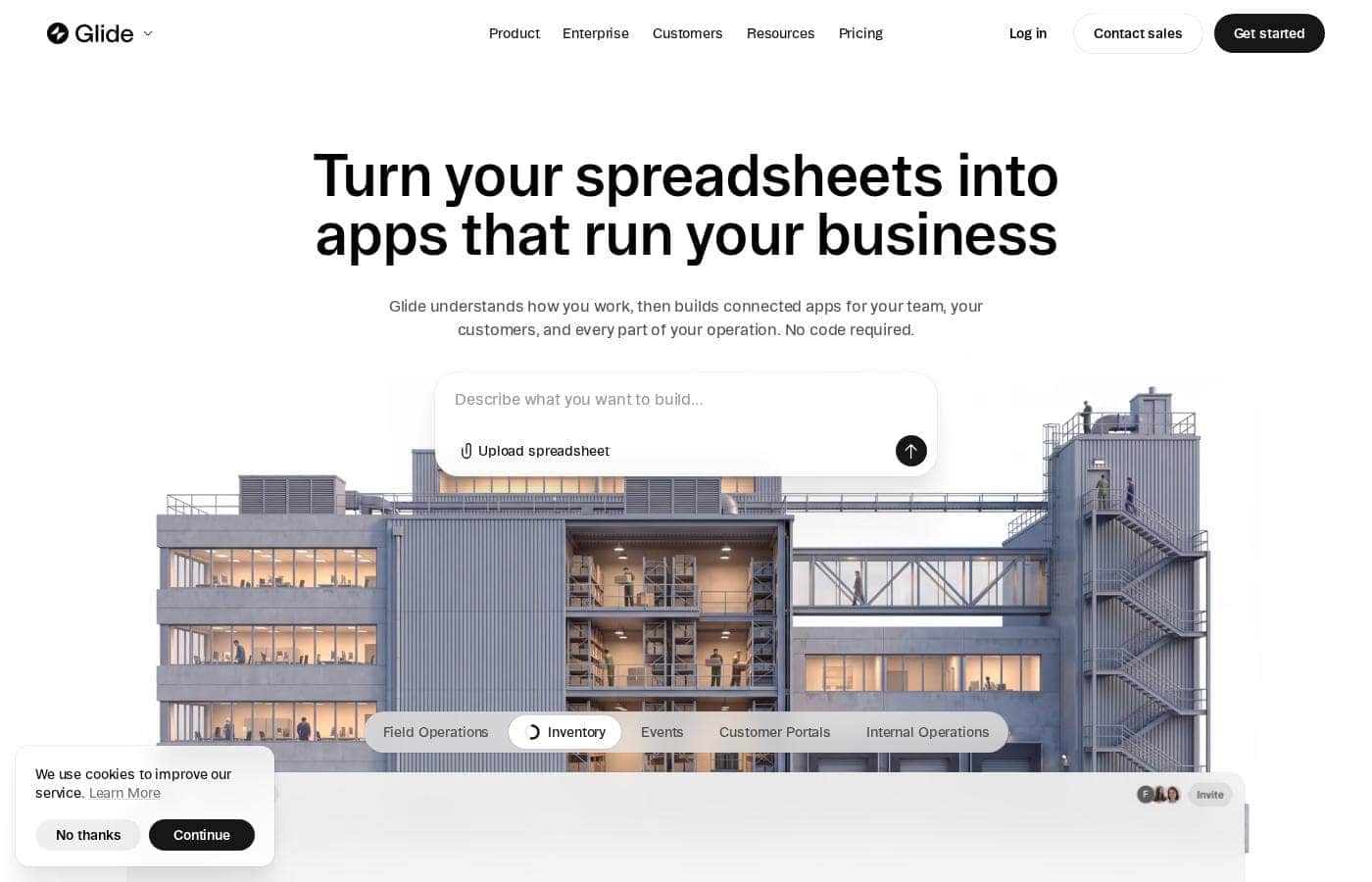
Glide homepage screenshot

At a glance

Quick overview for Glide: rating, pricing summary, key features, and highlights.
Pricing verified Oct 13, 2026

Ciroapp score

4.0/ 5

Glide turns spreadsheets into working business apps without code, connecting Sheets, Excel, Airtable, Salesforce, and SQL sources into one live system with role-based views and SOC 2 compliance. Costs run on credits, and the free plan can't publish anything. Overall, it's a strong pick for ops teams, provided you confirm trial terms and estimate credit use first.

Pros

  • Pros:Turns a spreadsheet into a working app without code — Glide's AI reads the file's structure, relationships, and logic, then generates the screens and workflows for you.
  • Pros:Multiple app types (mobile apps for field staff, executive dashboards, customer portals) can all run on one live data source, so a single record change syncs everywhere and eliminates copying between spreadsheets.
  • Pros:Connects to tools many businesses already use — Google Sheets, Excel, Airtable, QuickBooks, Salesforce, PostgreSQL, Snowflake, Slack, Notion, and Asana are all listed integrations.

Cons

  • Cons:The free plan locks publishing entirely — 0 published apps and 0 enabled workflows — so nothing you build can be shared without upgrading to at least Basic at $25/month.
  • Cons:Credit-based pricing makes costs scale with how much you build — Basic includes 100 credits with only 1 top-up per month and Plus 250 credits with 2 top-ups, so heavy usage can push you to Pro at $125/month.
  • Cons:No trial or refund policy is advertised on the pricing page, so those terms should be confirmed with Glide before committing to a paid plan.
Best for
  • Operations teams drowning in shared spreadsheets who need a real app
  • Field teams handling inventory, logistics, work orders, or site visits from mobile
  • Businesses that want customer or partner portals without hiring developers
This section is a summary. Detailed sections about features, use cases, pricing, and reviews follow below.

What is Glide?

Your business data lives in spreadsheets, but the people who need it can't do much with them. Glide reads your spreadsheet and builds connected apps for your team, customers, and operations — no code required. Everything stays in sync, so one update shows up everywhere.

Glide is a no-code, AI-powered platform that turns spreadsheets into working business apps. You upload a spreadsheet or connect tools like Google Sheets, Excel, Airtable, Salesforce, or Postgres, and Glide builds screens and workflows from your data. It's aimed at business people who know their processes, not developers, and it's used by companies ranging from startups to enterprises like Hilton, Costco, and Volkswagen.

Should you choose Glide?

Quick buyer guidance before you compare plans or click through.

Choose it if

  • Teams whose workflows already live in spreadsheets and don't want to rebuild that data elsewhere
  • Organizations that need several connected apps — internal, customer-facing, and partner-facing — sharing one live source of truth
  • Buyers who need role-based access so each audience only sees what it should
  • Teams curious about AI features like Ask Glide, which answers questions from the data behind your apps
  • Companies that need vendor-published compliance signals like SOC 2, GDPR, and CCPA before adopting a tool

Skip it if

  • Shoppers who need upfront costs: the homepage shows no plan prices, so you'll have to check the pricing page and confirm costs, limits, and any trial or refund terms before committing
  • Teams that want fully custom, hand-coded applications — Glide is a no-code platform, so highly bespoke logic may hit platform boundaries
  • Businesses whose data lives in tools not among Glide's listed integrations; verify support for your stack first
  • Anyone with messy, unstructured spreadsheets — Glide builds from the structure and relationships it reads, so poorly organized data may need cleanup before it produces a useful app

Next steps before buying

  1. 1Pick one spreadsheet-based workflow you'd want as an app first, and tidy the file so its structure is clear.
  2. 2Check the pricing page for plan costs, user limits, and any trial or refund terms before you sign up.
  3. 3Confirm your data sources are supported — Google Sheets, Excel, Airtable, QuickBooks, Salesforce, PostgreSQL, Snowflake, Slack, Notion, and Asana are listed on the site.
  4. 4Browse Glide's app store and templates to see whether a pre-built app already matches your use case.
  5. 5Use Glide's compare page and independent reviews to weigh alternatives, and review the Trust Center if compliance matters to your purchase.

Ease of use

Source-based signals point to a low-friction start. The pitch is simple — upload a spreadsheet, let AI understand it, then launch on desktop or mobile — and no code is required at any step. A template marketplace and pre-built apps shorten the path further. Glide supports beginners with docs, a help center, and a community forum, and customer quotes on the site emphasize speed, including one claim of a working app in 15 minutes. Keep in mind these are vendor-published accounts, not independent testing.

Glide Key Features

✨ From spreadsheet to working app

Upload a spreadsheet and Glide reads its structure, data, relationships, and logic. The AI then helps create the screens and workflows your business needs — no code required. You can also connect tools like Google Sheets, Excel, Airtable, Salesforce, or Postgres instead of starting over.

Launch on desktop or mobile and keep improving as things change.

✨ One data source, many connected apps

A mobile app for field staff, a dashboard for executives, and a portal for customers can all run on the same live data. Change a record once, and every connected app reflects it automatically. Data, calculations, and workflows stay connected across apps, so you're never copying information between spreadsheets or rebuilding the same process twice.

🔒 Everyone gets the right view

Apps are private by default, and you control who can see and change what. Employees, managers, customers, and partners each get the information and actions meant for them — without exposing everything else. Glide protects your data with encryption and displays SOC 2, GDPR, CCPA, and AES 256 credentials, so security checks are easier to clear.

✨ Ask your business anything

Ask Glide understands the information behind your apps, so you can get answers and take action from one place. Examples include reviewing inventory outliers or brainstorming a new project. You can also build AI features directly into the apps you create.

✨ Start with something ready

You don't have to build from scratch. Glide's app store and templates give you ready-made apps to install, then customize to fit how your business works.

  • Browse the marketplace for a pre-built app
  • Install it and make it yours
  • Keep adjusting it as your business changes

Use Cases

🔧 Run field work from a mobile app

Your field team works from phones, not laptops. Turn a spreadsheet into a mobile app for site visits, work orders, and inventory checks. Changes sync to every connected app automatically.

Expected outcome: techs update records on the spot, and managers see it.

👥 Launch a customer portal

Share order status, schedules, or account details with customers and partners. Each person signs in and sees only what's meant for them — nothing else. Expected outcome: fewer status emails, and customers self-serve their answers.

📊 Give managers a live dashboard

Stop emailing spreadsheets before every meeting. Build a dashboard on your live data, then ask Glide questions — like "review inventory outliers" — right from the app. > Tip: Keep one data source behind all your apps, so a single update shows up everywhere.

🗂️ Turn shared spreadsheets into real apps

Inventory, procurement, logistics, project tracking — if it lives in a spreadsheet, Glide can make it an app. Connect Sheets, Excel, Airtable, Salesforce, or Postgres and keep the tools you have. Expected outcome: one source of truth instead of copied files.

Glide pricing

From$25/mo

  • 5 plans
  • Free plan available

Prices checked on Oct 13, 2026 from Glide's pricing page

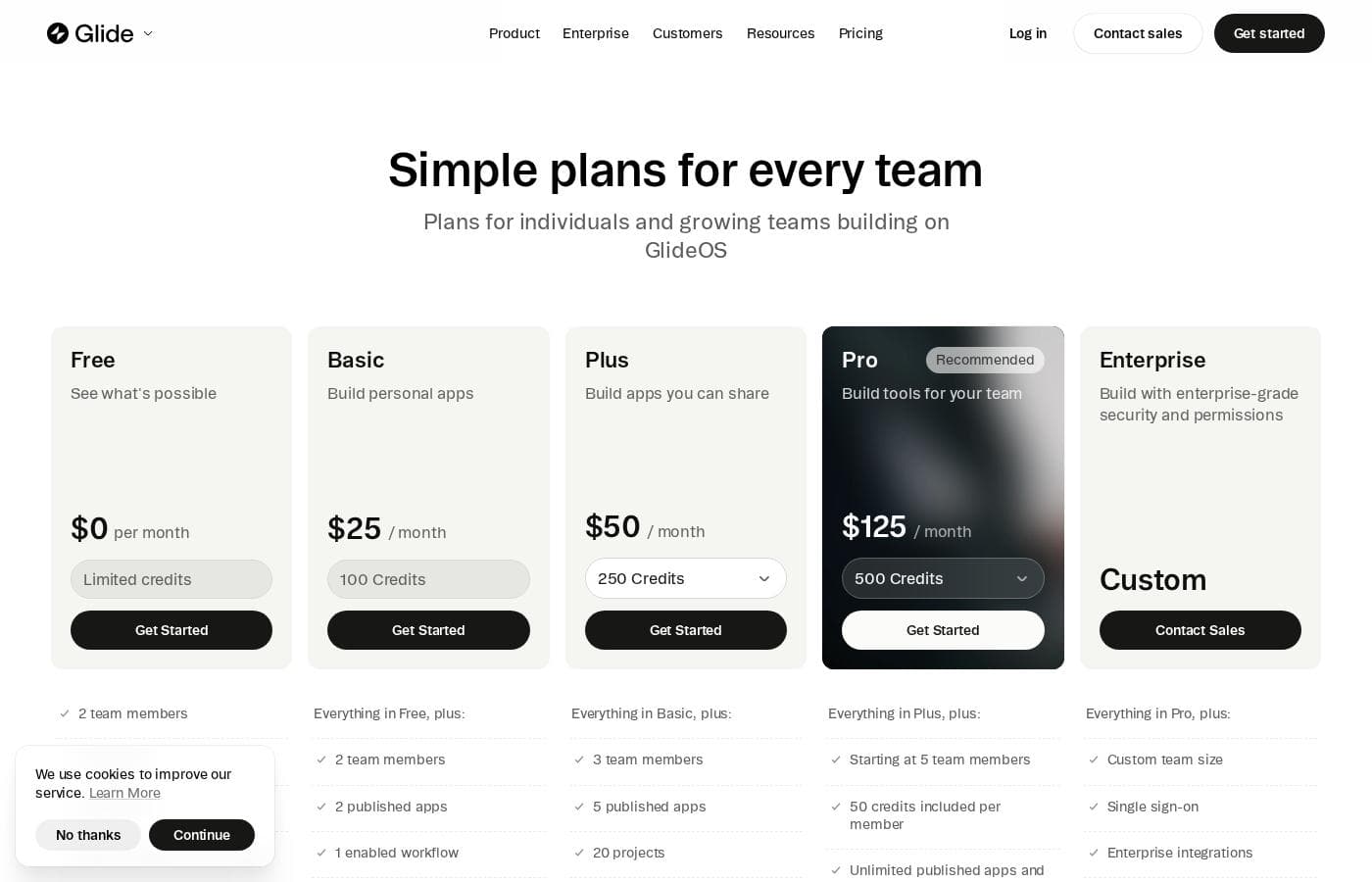
Glide pricing page screenshotView pricing page screenshot
PlanBilled monthlyBilled annuallyIncludes
Free
Free
—
0 published apps, 0 enabled workflows, 10 projects, limited credits
  • Limited credits
  • 2 team members
  • 10 projects
  • Integrations
  • Build AI features in your apps
Basic
$25/mo
—
2 team members, 2 published apps, 1 enabled workflow, 10 projects
  • Everything in Free
  • 100 credits
  • 2 team members
  • 2 published apps
  • 1 enabled workflow
  • +3
Plus
$50/mo
—
3 team members, 5 published apps, 20 projects, 5 enabled workflows
  • Everything in Basic
  • 250 credits
  • 3 team members
  • 5 published apps
  • 20 projects
  • +3
Pro
$125/mo
—
Starting at 5 team members, 100 projects, unlimited published apps and workflows
  • Everything in Plus
  • 500 credits (50 per member, starting at 5 members)
  • Starting at 5 team members
  • Unlimited published apps and workflows
  • Premium integrations
  • +6
Enterprise
See vendor page
See vendor page
Custom team size and custom pricing set by sales
  • Everything in Pro
  • Custom team size
  • Single sign-on (SSO)
  • Enterprise integrations
  • Choose your org's LLM provider
  • +7

Price history

Tracking prices since Sep 30, 2026. No price change detected yet.

Pricing types: Free plan, Monthly subscription, Usage-based pricing

Pricing notes

Glide (GlideOS) has five plans: Free at $0, Basic at $25/month, Plus at $50/month, Pro at $125/month, and Enterprise at custom pricing. Every plan runs on credits, so higher tiers include more credits, more team members, and more published apps.

Glide costs between $0 and $125 per month with five plans: Free at $0, Basic at $25, Plus at $50, Pro at $125, and Enterprise at custom pricing.

Glide's pricing runs on credits, so what you pay mostly depends on how much you build. All listed prices are per month. These plans cover GlideOS, which is separate from the older Glide Classic platform.

Free

Price: $0 per month Best For: Seeing what's possible before you commit Other Features:

  • Limited credits
  • 2 team members
  • 10 projects
  • Integrations
  • Build AI features in your apps

The Free plan is a real sandbox, not a demo. You get 10 projects and can bring in two teammates. Published apps and workflows are locked on this tier, so you'll need a paid plan to share anything.

Basic

Price: $25 per month Best For: Building personal apps Other Features:

  • 100 credits
  • 2 published apps
  • 1 enabled workflow
  • Choose agent mode (light, medium, heavy)
  • 1 credit top-up per month

Basic is the first step into publishing. You can share personal and team apps, and you can pick how hard the AI works with agent modes. It suits solo builders with modest needs.

Plus

Price: $50 per month Best For: Building apps you can share more widely Other Features:

  • 250 credits
  • 3 team members
  • 5 published apps
  • 20 projects
  • 5 enabled workflows
  • 2 credit top-ups per month

Plus adds public app publishing, which is the big jump from Basic. With 20 projects and five workflows, it fits small teams running a few real processes.

Pro

Price: $125 per month Best For: Building tools for your team (Glide marks this plan "Recommended") Other Features:

  • 500 credits (50 included per member, starting at 5 members)
  • Unlimited published apps and workflows
  • Premium integrations
  • Build with your own agent (MCP)
  • Org-level roles and permissions
  • Human support and 24-hour data backups

Pro is where Glide targets companies. Unlimited publishing means you won't hit app ceilings, and org-level permissions keep access tidy. Skip it if you only publish a couple of apps — Plus covers that cheaper.

Enterprise

Price: Custom Best For: Organizations that need enterprise-grade security and permissions Other Features:

  • Custom team size
  • Single sign-on (SSO)
  • Choose your org's LLM provider
  • 30-day data backups
  • Dedicated success manager and priority support
  • Audit logs, publishing approval, and project-level roles

Enterprise is built for larger organizations with strict security requirements. You'll contact sales for a quote, and the price scales with your team and setup.

There's a genuinely free plan, so you can start building without paying anything. 🎉 Paid plans unlock publishing, more credits, and team features, and credit top-ups are there when you run low. Before picking a tier, it's worth estimating how many credits your apps will use each month.
Cost calculator

Estimate what Glide costs for your team.

Billing

Basic allows up to 2 users: pick a larger plan for 5 users.

Estimate based on published list prices, before taxes, add-ons and discounts.

How to pay less for Glide

  • Start on the free plan and upgrade only when you hit its limits.
  • Cheaper tools in this category start at $15/mo.
Visit Glide

Email me when Glide changes price

One email when we detect a price change on the vendor's pricing page. No newsletter, no deals. Unsubscribe in one click.

User Reviews

No reviews yet.

Write a Review

Write a Review for Glide
0/100 characters
0/2000 characters

Why use Glide?

Most app projects stall because translating a process into software is slow and expensive. Glide attacks that problem head-on: it reads the structure and logic already sitting in your spreadsheets, then builds the app for you. Based on Glide's own site, here's what stands out:

  • One data source, many apps. A mobile app for field staff, a dashboard for executives, and a portal for customers can all run on the same live data. Change a record once and every connected app reflects it.

  • No code required. Upload a spreadsheet and Glide's AI reads the data, relationships, and logic behind it, then creates screens and workflows. One customer quoted by Glide says he went from concept to a working app in 15 minutes — a vendor-published claim, but a strong signal on speed.

  • The right view for each person. Employees, managers, customers, and partners each see the information and actions meant for them, without exposing everything else.

  • It works with your current tools. Listed integrations include Google Sheets, Excel, Airtable, QuickBooks, Salesforce, PostgreSQL, Snowflake, Slack, Notion, and Asana — so you don't have to replace your stack.

  • Security credentials are on display. Apps are private by default with encryption, and the site shows SOC 2, GDPR, CCPA, and AES 256 compliance badges.

  • You can start from something ready. A marketplace of pre-built apps and templates lets you install, then customize as your business changes.

Glide alternatives

Other tools in the All-in-one No Code Platform category

View all All-in-one No Code Platform tools
Emergent

Emergent

All-in-one No Code Platform4/5From $20/mo

Emergent is an AI platform that enables anyone to build full-stack, production-ready web and mobile applications using plain language. Since launching in 2025, Emergent has grown to over 5M users across 190+ countries and surpassed $100M ARR, backed by Khosla Ventures, SoftBank, Lightspeed, YC, and Google’s AI Futures Fund. Partners promote Emergent to founders, builders, and businesses looking to launch software faster without traditional development barriers.

Softr

Softr

All-in-one No Code Platform4.1/5

Softr is a no-code platform that lets teams build, customize, and publish their own software—without developers. Start by connecting to your data, then tailor layouts and logic, and publish to launch your tools. It’s ideal for teams who want fast, tailored software that fits their workflows and scales with growth.

Knack

Knack

All-in-one No Code Platform4.1/5From $19/mo

Knack is a powerful no-code web application builder. It lets your team create complex, data-rich solutions quickly. These solutions can be SaaS applications, custom client portals, or internal tools for business processes. Knack handles the technical infrastructure behind the scenes 💡. You can revolutionize your operations and build powerful, flexible workflows. If you need a custom client tracker or a better way to manage inventory, Knack delivers from concept to working application in record time. It avoids the typical six-month IT queue.

Caspio

Caspio

All-in-one No Code Platform4/5

Caspio is defined as the pioneering low-code platform that focuses on scaling with your organization. This system is an all-in-one solution for generating smart, data-driven applications without unnecessary technical compromise. 💡 The platform supports two frameworks: the proven Bridge and the visual Flex framework, both included at no extra cost. Caspio aims to be AI-Enhanced, No Code, and completely Enterprise Ready. It’s an ideal choice for organizations needing fast, customizable, high-end applications, evidenced by its trust among 15,000 organizations worldwide.

Appsmith

Appsmith

All-in-one No Code Platform4.3/5From $15/mo

Appsmith is a developer-first low-code platform. ✅ It allows you to quickly build custom apps with drag-and-drop widgets or code in JavaScript. You can connect to any LLM, database, SaaS tool, or API—even self-hosting for secure access.

UENI.com

UENI.com

Website Builder4/5

UENI gives small businesses and independent professionals a chance to reach a broader audience and increase sales by building their new website for them without the need to settle for expensive agencies or complicated DIY web design builders.

MindStudio

MindStudio

Enterprise AI Platform3.9/5

MindStudio is a visual platform for building and deploying AI agents — no coding required, though developers can add JavaScript or Python when needed. Agents can ship as web apps, scheduled automations, browser extensions, email-triggered helpers, or API endpoints. It serves individuals, teams, and enterprises, with customers cited at TikTok, Microsoft, Intel, and Adobe. The company reports 400K+ agents deployed and 1,000+ pre-built integrations.

Cheapest All-in-one No Code Platform software for 1 to 25 users

Glide FAQ

How much does Glide cost?

Glide's cheapest paid plan, Basic, costs $25 per month. Paid plans range from $25 to $125 per month. Prices checked on Oct 13, 2026 from the vendor's pricing page.

Does Glide have a free plan?

Yes. Glide has a free plan (Free); paid plans start at $25 per month.

Has Glide's price changed recently?

No. We have not detected a price change since we started tracking on Sep 30, 2026.

Which tools and data sources does Glide connect to?

Glide lists Google Sheets, Excel, Airtable, QuickBooks, Salesforce, PostgreSQL, Snowflake, Slack, Notion, and Asana. Standard integrations come on every plan; premium ones unlock on Pro, and enterprise integrations on Enterprise. Confirm your exact stack before buying.

How does Glide protect my data?

Apps are private by default, and data is protected with encryption. Glide displays SOC 2, GDPR, CCPA, and AES 256 compliance badges, with more in its Trust Center. Pro adds 24-hour data backups; Enterprise extends them to 30 days.

Does Glide offer a free trial or money-back guarantee?

You can start with a genuinely free plan: limited credits, 2 team members, and 10 projects, with publishing locked. The pricing page doesn't advertise a trial or refund policy, so confirm those terms before you commit to a paid plan.

Ready to try Glide? Check out the official site or pricing.

Are you Glide? Claim this listing · Get the badge