
GetGenie

GetGenie review

AI-assisted SEO content creation inside WordPress

GetGenie costs from $9/mo · 4 plans · prices checked Oct 12, 2026

By Ciroapp Editorial Team · Updated Sep 16, 2026

Commission may apply at no extra cost

GetGenie homepage screenshot

At a glance

Quick overview for GetGenie: rating, pricing summary, key features, and highlights.
Pricing verified Oct 12, 2026

Ciroapp score

3.5/ 5

GetGenie pulls keyword research, AI templates, and optimization checks into the WordPress editor, so drafts start from real search data. It's WordPress-only, output still needs human editing, and independent reviews are thin. Overall, it's a practical pick for WordPress publishers, and the free plan makes testing easy.

Pros

  • Pros:Research and drafting happen inside the WordPress editor, eliminating the copy-paste loop between a separate SEO tool, a chatbot, and the CMS
  • Pros:Drafts start from keyword data for the specific page being written, not from a generic prompt with no search context
  • Pros:Template coverage spans both blog posts and product descriptions, covering editorial and e-commerce needs in one plugin

Cons

  • Cons:GetGenie is built for WordPress, so teams publishing on Shopify, Webflow, or custom CMS platforms cannot use the same integrated workflow
  • Cons:Generated drafts still require human editing for factual accuracy and brand voice — the templates produce structure and phrasing, not finished writing
  • Cons:Independent review coverage on major platforms such as G2, Capterra, and Trustpilot is currently sparse, making it harder to gauge long-term user satisfaction before buying
Best for
  • Solo bloggers and niche-site publishers on WordPress who want keyword research and drafting in one dashboard instead of separate tools
  • WordPress and WooCommerce store owners who need consistent, keyword-oriented product descriptions across a growing catalog
  • Small content teams and agencies producing SEO briefs and first drafts on a regular publishing cadence
This section is a summary. Detailed sections about features, use cases, pricing, and reviews follow below.

What is GetGenie?

GetGenie positions itself as a single workspace for anyone publishing content on WordPress: keyword research, AI-assisted drafting, and optimization guidance all run inside the same dashboard where the post will eventually go live. That design choice matters, because most writers currently stitch together a separate research tool, a chatbot, and the WordPress editor. This review looks at where that integrated approach pays off, where it falls short, and who should consider it.

GetGenie is a WordPress plugin and platform for SEO content optimization. It pairs data-driven research — keyword and topic data pulled into the editor — with a library of AI templates for generating posts, product descriptions, and other page copy. Because it runs as a plugin, the entire workflow from research to publishable draft happens inside WordPress rather than across separate browser tabs.

Plans include a free tier plus monthly, yearly, and usage-based billing options.
Should you choose GetGenie?

Quick buyer guidance before you compare plans or click through.

Choose it if

  • Solo bloggers and niche-site publishers on WordPress who want keyword research and drafting in one dashboard instead of separate tools
  • WordPress and WooCommerce store owners who need consistent, keyword-oriented product descriptions across a growing catalog
  • Small content teams and agencies producing SEO briefs and first drafts on a regular publishing cadence

Skip it if

  • Teams publishing primarily on non-WordPress platforms such as Shopify, Webflow, or custom CMS builds
  • Writers who only need general-purpose AI assistance without SEO data, who may be fine with a standalone chatbot
  • Organizations that require extensive third-party review history before adopting a tool — independent review coverage for GetGenie is currently thin

Next steps before buying

  1. 1Install the GetGenie plugin from the WordPress plugin directory or upload it in wp-admin, then activate it and connect your GetGenie account
  2. 2Start on the free plan and run the plugin's keyword analysis on a topic you already plan to write about to see how the research data is presented
  3. 3Generate an outline and first draft with a template for one real post or product page, edit the output, and publish to test the end-to-end workflow
  4. 4If the free quota runs out or you need higher limits, compare the monthly and yearly subscription tiers on the GetGenie pricing page and choose based on your publishing volume

GetGenie Key Features

✨ AI Writing Templates

GetGenie ships a library of AI templates aimed at the two content types it targets most directly: blog posts and product descriptions. Instead of prompting a chatbot from scratch, you pick a template, feed it your topic and keyword, and receive a structured draft you can refine in the WordPress editor. This keeps formatting and intent consistent across a content team.

✨ Data-Driven Keyword and Topic Research

The plugin pulls research data into the editor so that outlines and drafts start from what people actually search for rather than from a blank prompt. Writers can analyze a target keyword, shape an outline around it, and generate copy that reflects that structure — shortening the distance between research and first draft.

✨ Native WordPress Integration

Because GetGenie runs inside WordPress, the usual tool-hopping disappears: research, drafting, optimization, and publishing all happen in the same dashboard. Drafts also inherit your existing WordPress workflow, including revisions and scheduling, without an export and import step.

✨ Content Optimization Guidance

As an optimization tool, GetGenie evaluates drafted content against the target keyword and surfaces adjustments before you publish. That makes the plugin more than a generator — it functions as a pre-publish check that helps posts and product pages compete on the search terms they were written for.

Use Cases

💡 Publishing SEO-Driven Blog Content

Content marketers running WordPress blogs can take a target keyword, build an outline from GetGenie's research data, and generate a first draft with the blog templates. The workflow suits teams on a regular publishing cadence, where the bottleneck is usually moving from brief to draft.

💡 Writing Product Descriptions at Scale

Store owners on WordPress can use the product description templates to write or refresh copy across a catalog. Because descriptions are generated with keyword data attached, new listings can launch with search-oriented copy instead of placeholder text, and existing pages can be revised during a site audit.

💡 Building Briefs for Writers and Clients

Agencies and editors can use the research output as the backbone of a content brief: keyword, outline, and optimization targets are assembled in the same tool the writer will draft in. That keeps freelancers and in-house writers aligned on intent before drafting starts, reducing revision cycles.

GetGenie pricing

From$9/mo

  • From the vendor's pricing page, checked Oct 12, 2026
  • 4 plans

Prices checked on Oct 12, 2026 from GetGenie's pricing page

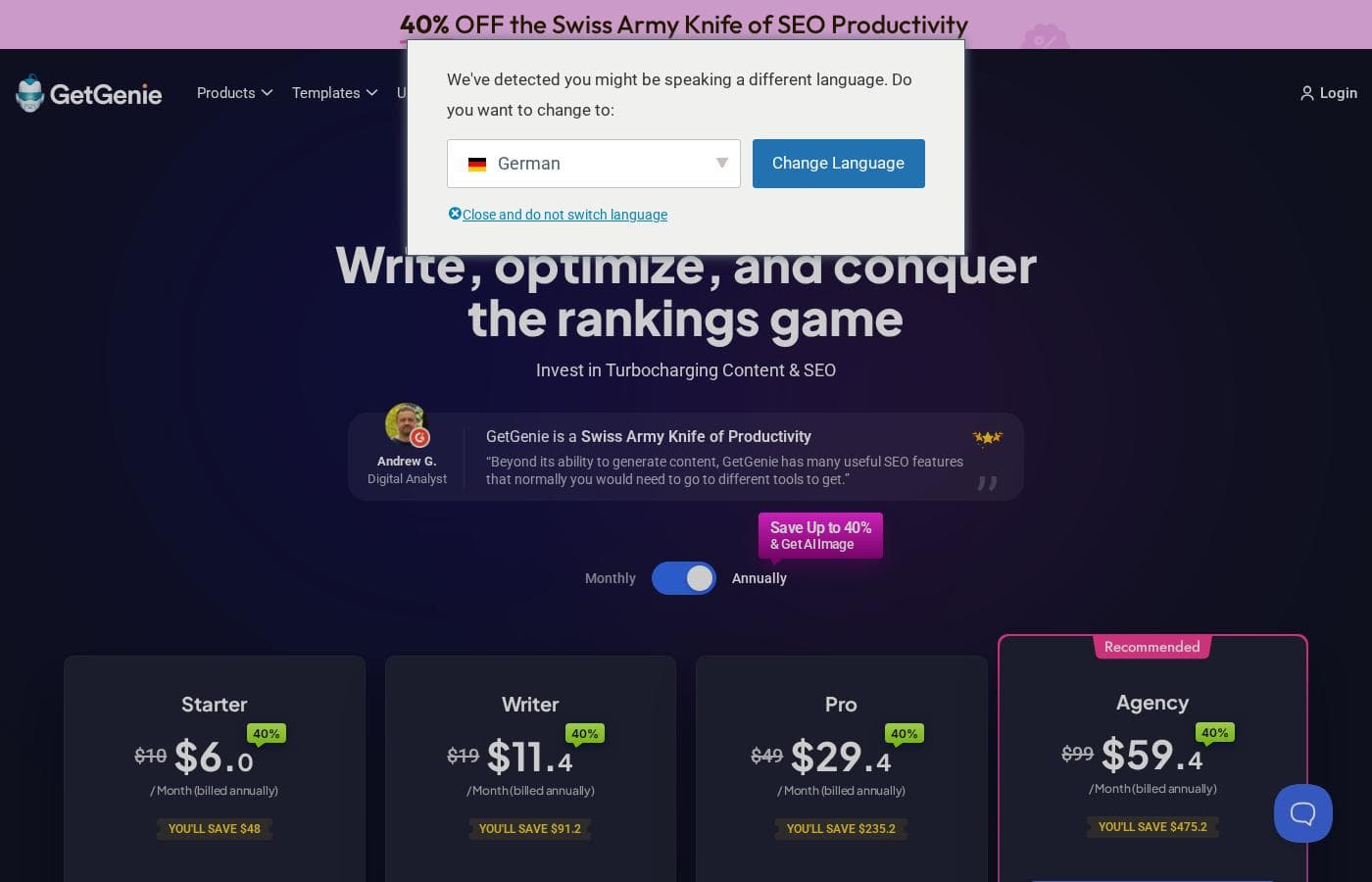
GetGenie pricing page screenshotView pricing page screenshot
PlanBilled monthlyBilled annuallyIncludes
Starter
$9/mo
—
Writer
$19/mo
—
Pro
$49/mo
—
Agency
$99/mo
—

Price history

Tracking prices since Oct 1, 2026. No price change detected yet.

Pricing types: Free plan, Monthly subscription, Yearly subscription, Usage-based pricing

Pricing notes

GetGenie pricing: Plans from $0/month Billing options: Free plan, Monthly subscription, Yearly subscription, Usage-based pricing

Cost calculator

Estimate what GetGenie costs for your team.

Billing
Per month
$9
Per year
$108

Starter states no user limit: shown as one price for the whole account. Check the price for 5 users with the vendor. Estimate based on published list prices, before taxes, add-ons and discounts.

Email me when GetGenie changes price

One email when we detect a price change on the vendor's pricing page. No newsletter, no deals. Unsubscribe in one click.

User Reviews

No reviews yet.

Write a Review

Write a Review for GetGenie
0/100 characters
0/2000 characters

Why use GetGenie?

The main reason to choose GetGenie over a generic AI writing tool is context: drafts are grounded in keyword data for the exact page you're working on, and product descriptions can be written against the same dashboard that manages your store's content. For WordPress-focused teams, it also removes the copy-paste loop between a research tool, a chatbot, and the CMS, which is where much of the friction in content production lives.

The free plan lowers the risk of evaluating it, since you can test the workflow on real posts before committing to a subscription.

GetGenie alternatives

Other tools in the Content Optimization category

View all Content Optimization tools
NeuronWriter

NeuronWriter

Content Optimization4.1/5

NeuronWriter is an advanced content editor and a powerful SEO-enhancing platform. It provides sophisticated tools, like semantic models (NLP) and Google SERP analysis. This platform helps you plan, write, and optimize content with user intent in mind. Thousands of industry leaders already trust this solution. It’s perfect whether you are an individual working on rankings or managing a large team of copywriters.

SurferSEO

SurferSEO

Content Optimization4.1/5

Surfer is an SEO powerhouse tool suite. Every day, over 150,000 content creators, SEOs, agencies, and teams rely on Surfer to rank higher. This platform gives you one streamlined workflow, specifically designed to meet the demands of modern search. It helps you optimize for what Google and AI chats are truly looking for. For complex teamwork, Surfer offers Sites as your central hub. This hub manages content planning, audits, and crucial performance monitoring all in one place.

soona

soona

Creative Management3.9/5

soona is an all-in-one creative platform for ecommerce brands. It handles photo, video, and UGC production in one place. You plan a shoot, select models, and join the live session remotely. Photographers shoot while you approve selects in real time. The company has operated since 2019 and targets online sellers who need channel-ready content for stores like Amazon and Shopify, plus ad platforms such as Meta.

SocialBee

SocialBee

Social Media Management4.3/5

SocialBee is an all-in-one social media management platform from WebPros. It covers AI content creation, scheduling, engagement, analytics, and team collaboration across ten networks, including Facebook, Instagram, LinkedIn, TikTok, and Pinterest. Based on the site's customer examples, it serves solopreneurs, small businesses, and agencies — plus nonprofits, schools, and churches. Plans run from $29 to $449 per month, with a 14-day free trial that needs no credit card.

GetGenie FAQ

How much does GetGenie cost?

GetGenie's cheapest paid plan, Starter, costs $9 per month. Paid plans range from $9 to $99 per month. Prices checked on Oct 12, 2026 from the vendor's pricing page.

Has GetGenie's price changed recently?

No. We have not detected a price change since we started tracking on Oct 1, 2026.

Does GetGenie work outside of WordPress?

No. GetGenie is built as a WordPress plugin, and its core workflow — keyword research, AI templates, and optimization checks — runs inside the WordPress dashboard. If your content is published on another CMS, you will not get the same integrated experience and should evaluate a standalone tool instead.

Is there a free version of GetGenie?

Yes. Plans start at $0/month, so you can install the plugin and test the research and template workflow on real posts before paying. When you outgrow the free quota, paid plans are available as monthly or yearly subscriptions, with usage-based billing tied to how much content you generate.

What types of content can GetGenie generate?

GetGenie's templates are aimed at blog posts and product descriptions, the two formats the platform is designed around. You supply a topic and target keyword, and the plugin combines its research data with an AI template to produce a structured draft that you then edit and publish in WordPress.

How is GetGenie different from using a chatbot plus a separate SEO tool?

The difference is workflow, not raw output quality. GetGenie ties generation to keyword data for the page you are editing and keeps everything in WordPress, while a chatbot-plus-tool setup means manually transferring research and pasting drafts back into the CMS. If you publish rarely, the manual route may be fine; at higher volume the integrated workflow saves steps.

Ready to try GetGenie? Check out the official site or pricing.

Are you GetGenie? Claim this listing · Get the badge