Fliki

Fliki

Transform text, ideas, and blogs into stunning videos with leading AI voices.

#1 dans AI text to video generator
2 min read Ā· Updated 11/19/2025
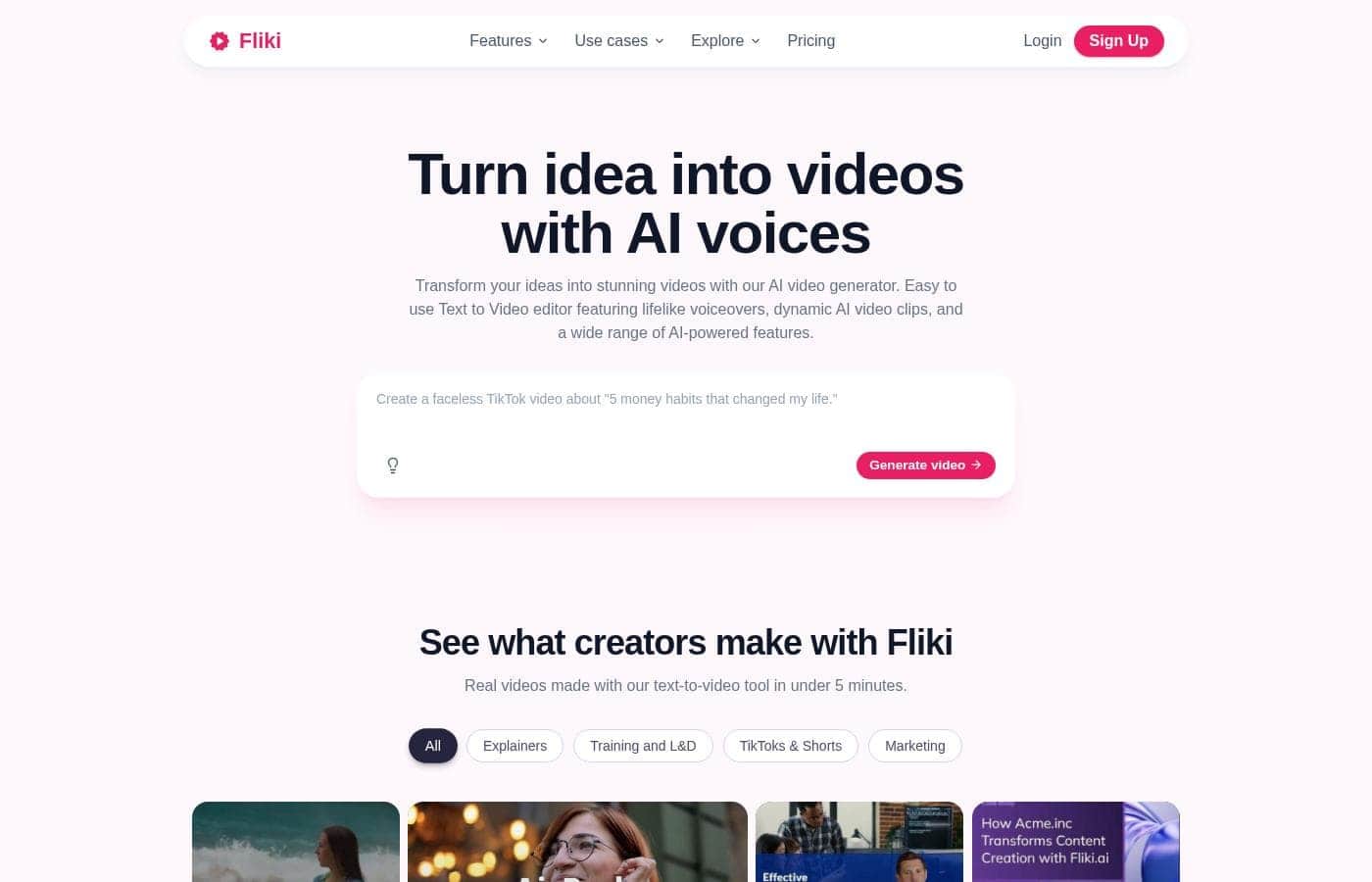
Fliki homepage screenshot

At a glance

Quick overview for Fliki: rating, pricing summary, key features, and highlights.

Ciroapp review

4.5
Leading AI platform for scaling video content.

We find Fliki to be an incredibly efficient, all-in-one content studio that excels at converting text into professional-quality videos quickly. The platform is praised universally for its user-friendly interface and the exceptional realism of its vast voice library. Overall, Fliki is a leading choice for creators and marketers seeking to scale video production with minimal effort and expense.

Pros

  • Pro:Extremely fast text-to-video conversion and development speed.
  • Pro:Intuitive, beginner-friendly platform interface.
  • Pro:High-quality, ultra-realistic AI voices (2500+ options).
  • Pro:Robust stock library of video clips, images, and music.

Cons

  • Con:Pricing is considered high for non-professional or casual users.
  • Con:Customer service effectiveness and responsiveness needs improvement.
  • Con:Limited customization options for animations and transitions.
  • Con:Occasional mispronunciation of specialized or technical vocabulary.
Free trial
Yes
Range: $0–$88/monthFree plan, Monthly subscription, Yearly subscription, Usage-based pricing
This section is a summary. Detailed sections about features, use cases, pricing, and reviews follow below.

Fliki review, pricing, features, pros & cons

Are you tired of wasting hours creating engaging video content? Getting professional voiceovers and dynamic clips used to be a huge headache. ✨ Fliki solves this common frustration by turning text and ideas into stunning videos using powerful AI voices.

It's an easy way to boost your productivity, helping you create content up to 5x faster than traditional methods.

What is Fliki?

Fliki acts as your all-in-one AI content studio. It seamlessly combines advanced text-to-video and text-to-speech capabilities into one simple platform. You can quickly transform basic text, ideas, blogs, or product URLs into engaging video content.

šŸ’” Since it’s fully web-based, you only need an internet connection and a browser like Google Chrome to start creating right away. Prior experience as a designer or video editor is definitely not required.

Fliki Key Features

šŸ’” Transform Any Content into a Stunning Video

Fliki works as your all-in-one content studio by converting diverse sources into video. You can start creating simply by submitting text, ideas, or existing documents. This process greatly boosts your productivity, helping you create engaging content quickly.

Since prior design or editing experience is not required, anyone can use these tools immediately. The platform simplifies complex production steps into four easy stages, saving significant time and reducing effort across the board. You just need an internet connection and a browser like Google Chrome to begin creating right away.

Fliki offers specialized conversion tools to streamline your workflow:

  • Blog to Video: Convert full blog articles into engaging video content.
  • PPT to Video: Transform your Powerpoint presentations into stunning videos in seconds.
  • Product to Video: Turn Amazon or Airbnb product listings directly into compelling video promotions.

✨ Access Thousands of Ultra-Realistic AI Voices

No more waiting for professional voiceover artists and translators. Fliki’s text-to-speech feature uses advanced AI algorithms to generate natural-sounding narration. These AI voices expertly mimic human speech patterns and tonalities, resulting in highly realistic voice overs.

You can select from over 2500 ultra-realistic voices to match any style or script. The AI speech generator supports more than 80 languages across over 100 dialects. This global reach means you can translate your video content with just one click to easily engage international audiences.

✨ Clone Your Voice and Identity for Authenticity

If you are comfortable on camera but short on time, Fliki helps you maintain authenticity at scale. The platform allows you to easily clone your own voice, ensuring your AI-generated videos feel truly unique to your brand. Professional voice cloning saves substantial time on traditional recording.

Beyond just sound, Fliki also offers personality cloning features. This allows you to replicate your identity seamlessly across multiple videos. This capability adds authenticity and personalizes content with ease, ensuring a consistent and proprietary feel across all your content.

✨ Add Personality with Over 70 Engaging AI Avatars

Add a face and personality to your videos without the hassle of hiring actors or filming yourself. You can start creating with a library of over 70 engaging AI avatars. These avatars handle the heavy lifting when you cannot be on camera.

Use AI avatars to personalize training videos, HR announcements, or marketing content. When paired with the voice cloning features, these visuals ensure you can deploy high-impact videos without needing complex casting or production setups.

āœ… Expedite Production with Magic Editing Tools

Boost your production speed by up to 5x using Fliki’s specialized editing features. The platform includes 'Magic Edit' which quickly transforms raw footage into polished content. This feature automatically adds necessary b-rolls and auto-subtitles to your clips.

For quick communication, use the 'Magic Record' tool. This helps you record and instantly share video updates with captions for both team and client communication. These magic tools help you swiftly turn simple recordings into finalized, high-quality content in minutes.

✨ Built for Enterprise Security and Compliance

Fliki is designed to support high-quality video production securely, even for the largest organizations. The platform is trusted by over 50,000 companies, including 73% of Fortune 500 businesses. This trust is built on a foundation of reliability and security.

We ensure security and privacy for enterprise use by remaining fully compliant with key data protection standards. Fliki adheres to both GDPR and CCPA regulations. This allows large organizations to safely create and deploy branded videos using AI.

Use Cases

✨ Scaling Content Creation Quickly

If you are a content creator needing maximum output speed, Fliki streamlines your workflow drastically. Instead of spending hours editing, you can use the ā€˜Idea to Video’ feature to turn a simple text concept into a stunning clip right away. This approach applies dynamic AI video clips and selects from over 2500 ultra-realistic voices.

Fliki helps users improve their content productivity up to 5x faster than traditional methods. Generating visually captivating videos with professional voiceovers is now seamless. You can focus on generating ideas, not wrestling with complex software.

šŸ“š Converting Existing Documents into Video

Many organizations have valuable content trapped in long-form text or static presentations. Fliki offers simple tools to mobilize these assets for better engagement.

Use case steps:

šŸ—£ļø Authentic Brand Communication

You need to ensure internal or external videos maintain your brand's unique personality but you are short on time. Fliki helps you preserve that authenticity through cloning features. You can easily clone your own voice or personality, making sure AI-generated videos truly feel authentic to your specific brand identity.

If you prefer not to be on camera, you can select from over 70 engaging AI avatars to add a face and personality. These solutions ensure consistency across all your training, marketing, and communication materials.

šŸ¢ HR and L&D Training Videos

Creating training modules and internal communication updates requires consistency, speed, and security. Fliki is trusted by 73% of Fortune 500 companies and maintains GDPR and CCPA compliance, allowing enterprises to produce high-quality video safely.

Use Fliki to generate branded tutorial videos for new employee onboarding or policy updates. You instantly translate the video into 80+ languages, guaranteeing all international teams grasp the information quickly.

šŸŽ¬ Polishing Raw and Client-Facing Clips

You often record short updates or raw footage but need professional polish without manual editing time. Use Fliki’s Magic Editing tools to bridge that gap immediately. 'Magic Edit' quickly adds necessary b-rolls and auto-subtitles to your raw footage. This feature transforms simple clips into highly polished, accessible content within minutes.

If you are sharing quick memos, use ā€˜Magic Record’ to send video updates complete with automatically generated captions for clear team and client communication.

🌐 Global Market Reach and Translation

Reaching global audiences requires translating your content effectively and affordably. Fliki removes the need for expensive voiceover artists and manual translators. You can translate your video content with just one click.

Choose from hundreds of ultra-realistic voices across 80+ languages to localize your message. This ensures your marketing campaigns and educational content resonate deeply, regardless of the user's native tongue.

Pricing Overview for Fliki

Pricing range
$0–$88/month
Pricing types
Free plan, Monthly subscription, Yearly subscription, Usage-based pricing

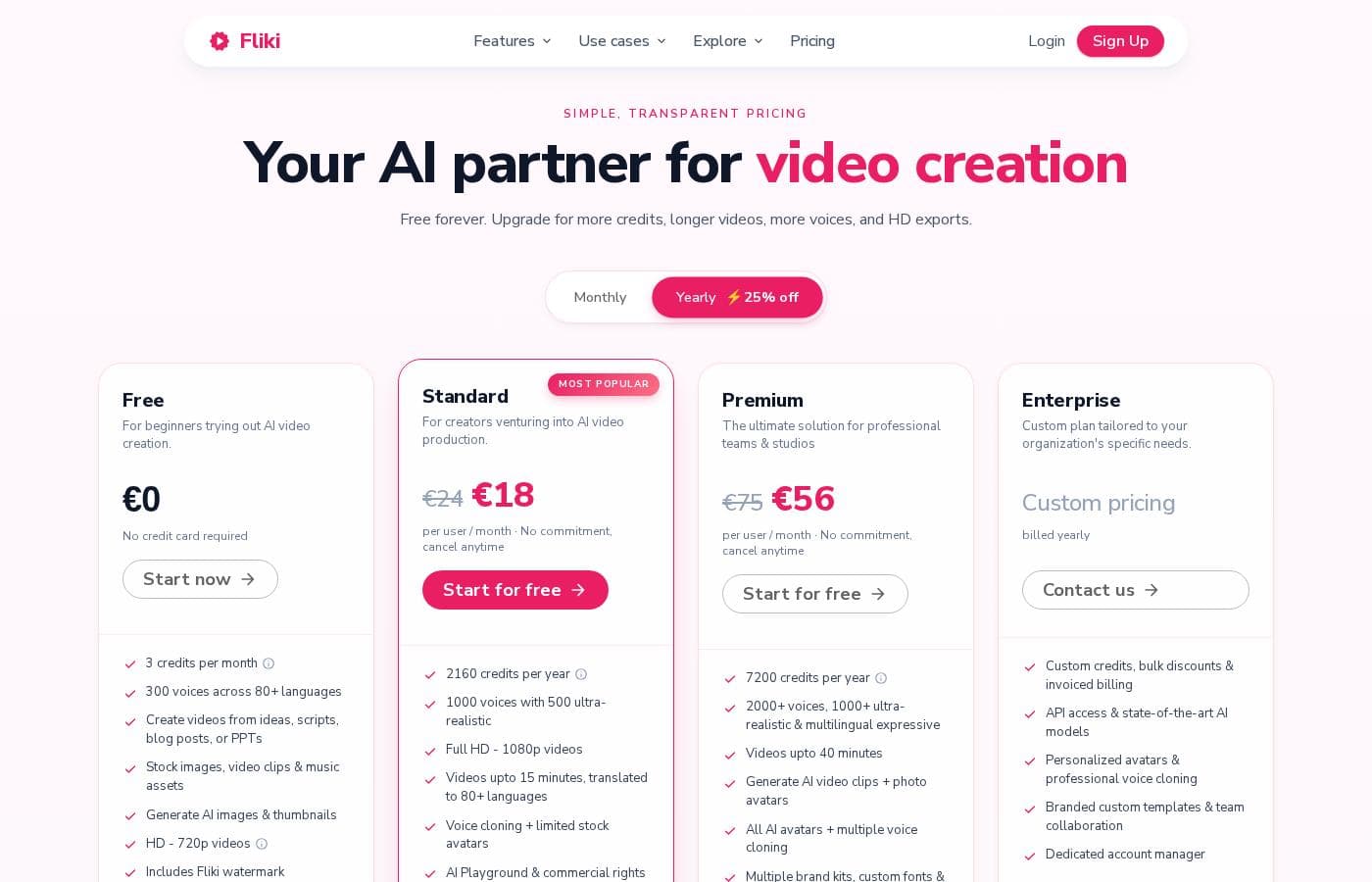
Fliki offers four flexible subscription plans, including a persistent Free tier and three paid options: Standard, Premium, and Enterprise. When billed annually, paid plans receive a significant discount, starting at the equivalent of $17 per month.

Pricing

Fliki costs between $0 and $53 per month (billed annually) with four plans: Free at $0, Standard at $17 per month, Premium at $53 per month, and Enterprise at custom pricing.

Here is a closer look at the four different subscription tiers for your AI video production needs.

Free

Price: $0 Websites Supported: Not explicitly stated Best For: Beginners trying out AI video creation Refund Policy: Not explicitly stated Other Features:

  • 5 minutes of credits per month
  • 300 limited voices across 80+ languages
  • Create videos from ideas, scripts, blog articles, or raw clips
  • HD - 720p low-res videos
  • Contains Fliki Watermark

The Free plan is the perfect starting point if you are just beginning with AI video creation. You can generate quick, low-resolution videos to test the platform. This option is great for exploring Fliki’s core functionality because you don't need a credit card to sign up.

Standard

Price: $28 billed monthly, or $17 per month billed annually Websites Supported: Not explicitly stated Best For: Creators venturing into AI video production Refund Policy: Not explicitly stated Other Features:

  • 2160 minutes of credits per year
  • Full HD - 1080p videos up to 15 minutes long
  • 1000 voices, including 150 ultra-realistic options
  • Commercial rights included; no watermark
  • Voice cloning and limited AI avatars

The Standard plan is highly recommended for creators ready to professionalize their video content output. You receive a substantial amount of annual credit minutes and unlocked features like voice cloning and commercial rights. Choosing yearly billing saves you 40% every month compared to the monthly cost of $28.

Premium

Price: $88 billed monthly, or $53 per month billed annually Websites Supported: Not explicitly stated Best For: Emerging and experienced video creators, perfect for teams of any size. Refund Policy: Not explicitly stated Other Features:

  • 7200 minutes of credits per year
  • Videos of length up to 40 minutes, exported in 1080p
  • 2000+ voices, including 1000+ ultra-realistic and 350+ studio-quality options
  • Multiple brand kits, voice cloning, and custom voices
  • All AI avatars and priority support are included

If you are operating your content creation at scale or managing a team, the Premium plan provides robust capabilities. This tier massively increases your capacity, allows for longer videos, and unlocks personalized team features. It’s the ideal choice for high-volume content production and requires fewer limitations.

Enterprise

Price: Custom pricing, billed yearly Websites Supported: Not explicitly stated Best For: Custom plan tailored to your organization's specific needs. Refund Policy: Not explicitly stated Other Features:

  • Custom credits, bulk discounts, and higher quotas
  • Invoiced billing and API access
  • Professional voice cloning and personalized avatars
  • Dedicated account manager and team collaboration

The Enterprise plan is specifically designed for large organizations that need maximum control, security, and dedicated support. This comprehensive package includes high-level features like API access, dedicated account management, and custom templates. Contact their sales team directly to discuss your personalized organizational requirements.

Fliki offers a generous free tier so you can test text-to-video features without any financial commitment. Paid plans are available either monthly or yearly, with the annual commitment offering hefty discounts. If your needs change, you can cancel any subscription at any time by simply managing your billing details in your account settings.

User Reviews

Fliki maintains an impressive 4.5-star user rating across thousands of reviews on Trustpilot and Capterra, reflecting widespread customer satisfaction. Users consistently highlight the platform’s intuitive design and speed, noting that even beginners can efficiently create professional, stunning videos in minutes.

The quality of the high-fidelity AI voices and the extensive library of stock footage and music is frequently praised as being top-tier. Many creators rely on Fliki to repurpose blogs, create educational content, and scale their YouTube and social media output faster.

Recurring positive themes include the platform's accuracy and seamless workflow. However, feedback is not entirely unanimous.

A notable concern is that the paid plans are considered too expensive for casual users, and some premium users mention significant frustration with customer service response times, desiring improved resolution beyond bot-only resources. Additionally, some advanced users wish for more sophisticated customization options for transitions and animations.

Overall, users highly recommend Fliki for its efficiency and quality. šŸš€

What users say elsewhere

Jessica S.
Ā· Trustpilot
5.0 / 5

I've tried many AI video makers, but Fliki is the only one I truly enjoyed using. It's incredibly easy, fast, and beginner-friendly. You don't need editing skills—just type your script and get professional results.

Ken L.
Ā· Trustpilot
5.0 / 5

I tried many AI tools before, but I have never felt so at home like I do with Fliki. The video quality and speed of development is excellent! They look really professional and stunning.

No reviews yet.

Write a Review

Write a Review for Fliki
0/100 characters
0/2000 characters

Why use Fliki?

Fliki stands out because it focuses on unmatched quality and speed in a single tool. It removes the need for multiple platforms and complex technical skills.

  • Superior Voice Quality: Choose from over 2500 ultra-realistic voices available in 80+ languages. You can translate your video content with just one click to easily reach global audiences.
  • Voice and Identity Cloning: If you're comfortable on camera but short on time, easily clone your own voice or personality. This ensures your AI-generated videos feel truly authentic to your brand.
  • High-Impact Visuals: Add personality to your videos using 70+ engaging AI avatars. You don't ever need to worry about being on camera or hiring actors.
  • Maximum Production Speed: Users typically see up to 5x productivity improvement. Features like ā€˜Idea to Video’ and the ability to transform PowerPoint presentations make video creation instant.
  • Trusted by Professionals: Fliki is relied upon by over 50,000 companies, including 73% of Fortune 500 businesses. The platform is GDPR and CCPA compliant, ensuring security and privacy for enterprise use.
  • Magic Editing Tools: Use 'Magic Edit' to quickly add necessary b-rolls and auto-subtitles to raw footage. This feature helps you transform simple clips into polished content in minutes. āœ…

Ready to transform your workflow with Fliki?

Frequently Asked Questions

How are minutes or credits calculated and deducted from my plan quota?

Credits are deducted based on the total duration of the audio generated or the final exported video. If you change the text or make adjustments like modifying the voice, Fliki reprocesses the audio and charges new credits for that content.

What third-party tools or applications integrate directly with Fliki?

Fliki supports key workflow automation through direct integrations with Make and Zapier. These integration features unlock starting with the paid Standard plan.

Is Fliki a usage-based service, or is it priced per user seat?

Fliki is primarily usage-based, scaling on the amount of credit minutes you purchase annually. If you need features like team collaboration and dedicated management, you'll need the Enterprise plan.

Does Fliki comply with major data security and privacy standards?

Yes, Fliki is officially GDPR and CCPA compliant. They offer enhanced security and privacy controls suited for large businesses and enterprises.

What are the limitations of the free tier compared to a paid subscription?

The Free plan limits you to 5 minutes of content per month and lower 720p video resolution. You also get limited voices, and your exported videos will contain a Fliki watermark.

What payment methods are accepted when purchasing a subscription?

Fliki accepts all major debit and credit cards for payment. They also process payments through digital wallets like GPay, Apple Pay, and local payment wallets in supported countries.

Does Fliki provide a money-back guarantee or a formal refund window?

Not explicitly stated on the official site. Since there is a generous free tier, we recommend checking their official terms of service for detailed refund information before committing to a paid plan.

What specific customer support options do I get with a paid plan?

Standard plans receive email support. If you upgrade to Premium, you get access to email and priority live chat support. Enterprise users also benefit from a dedicated account manager.

Can I clone my voice for use in generated videos, and how many clones are allowed?

Yes, you can clone your voice, starting with the Standard plan, which allows one voice clone. The Premium plan expands this capability to allow for multiple voice cloning and custom voices.

How do I cancel my subscription if I no longer need the service?

You can cancel any subscription at any time easily within your account settings. Go to the Account tab and select 'Manage billing' to process the cancellation.

What are the maximum video length limits for the paid plans?

The Standard plan lets you create videos up to 15 minutes long. The Premium plan increases this significantly, allowing for videos up to 40 minutes in length.

How many languages and dialects are supported by Fliki’s AI voices?

Fliki supports content creation in over 80 languages and more than 100 dialects. The Premium plan gives you access to a library exceeding 2000 total voices.

At what point should an organization consider the custom Enterprise plan?

Enterprise is tailored for large organizations that need specialized features. This plan includes invoiced billing, API access, bulk discounts, and dedicated team collaboration tools.

What kind of video file formats can I export from Fliki?

Fliki allows you to export your finalized videos easily. You can export your generated content in standard formats like MP4.

Ready to try Fliki? Check out the official site or pricing.