EssentialPIM

EssentialPIM review

A connected Windows workspace for email, schedules, tasks, notes, and passwords.

EssentialPIM costs from $2.99/mo · 4 plans · Free plan available

By Ciroapp Editorial Team · Updated Sep 16, 2026

Commission may apply at no extra cost

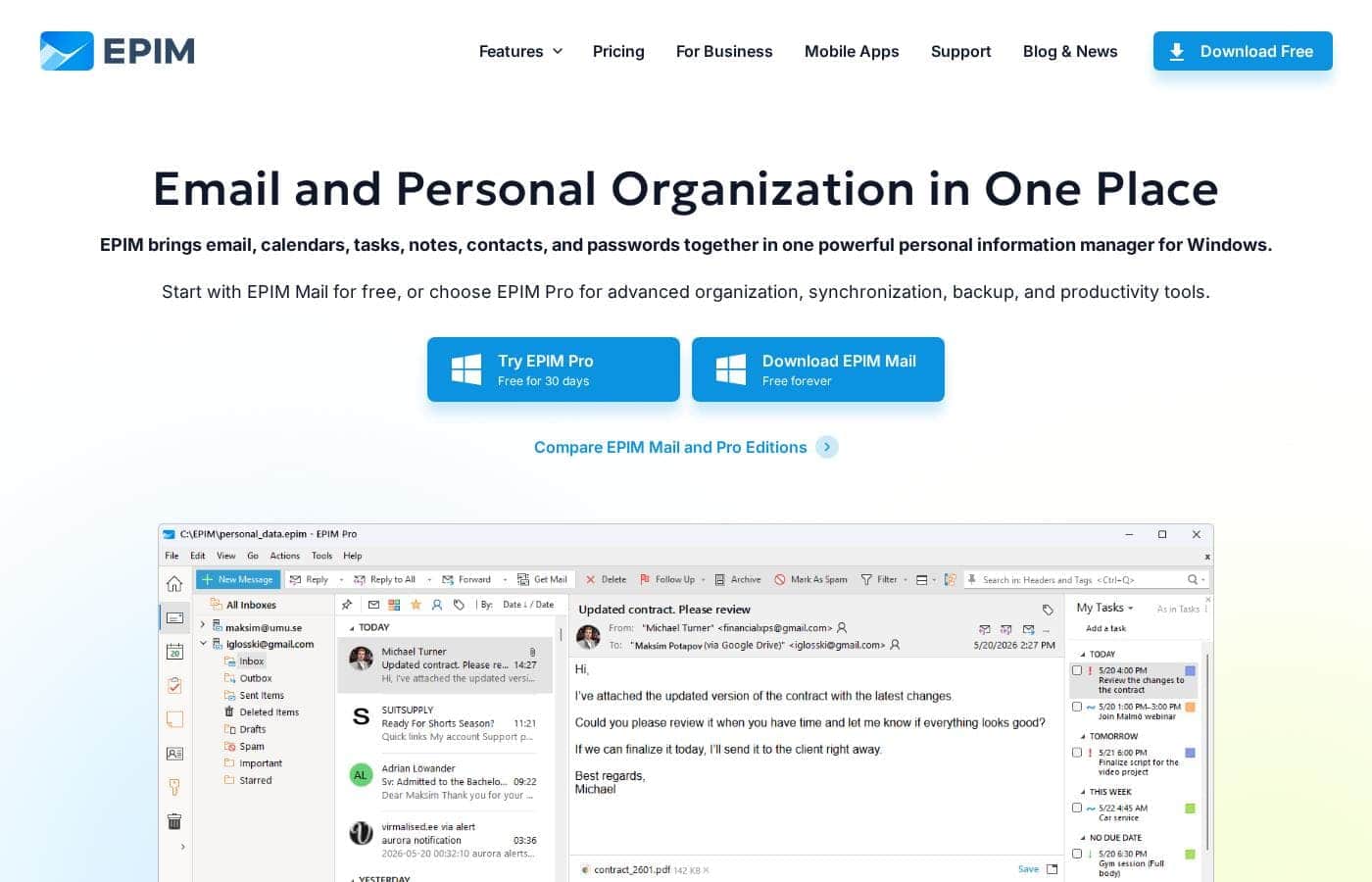
EssentialPIM homepage screenshot

At a glance

Quick overview for EssentialPIM: rating, pricing summary, key features, and highlights.
Vendor page checked Oct 12, 2026

Ciroapp score

4.0/ 5

EssentialPIM bundles email, calendars, tasks, notes, contacts, and passwords into one Windows app, with a genuinely free edition, strong local encryption, and wide sync support. It's held back by Windows-only desktop software, checkout-only pricing for Pro, and no third-party review data. Overall, it's a solid pick for privacy-minded Windows users who want one connected workspace.

Pros

  • Pros:The free EPIM Mail edition bundles email, calendar, tasks, notes, contacts, and passwords in one Windows app with no ads, subscriptions, or time limits — an unusually complete free tier for a PIM.
  • Pros:Pro synchronizes calendars, tasks, notes, and contacts across Google, Microsoft 365, iCloud, Nextcloud, plus Android and iOS devices, covering most multi-account households in one sync setup.
  • Pros:Data stays local with AES-256 encryption and full offline access, so the app works without depending on the vendor's cloud.

Cons

  • Cons:The desktop app runs on Windows only — there is no Mac or Linux client, with companion apps limited to Android and iOS.
  • Cons:Cloud synchronization and automatic backup are locked behind the paid Pro edition; the free version has neither, so multi-device users can't stay on the free tier.
  • Cons:The perpetual license includes only one year of updates, after which you must pay again to keep receiving new versions.
Best for
  • People replacing Outlook with a lighter, lower-cost all-in-one organizer
  • Users tired of keeping email, tasks, notes, and passwords in separate apps
  • Privacy-conscious buyers who want local storage and AES-256 encryption
Free trial
Yes — 30 days
Money-back guarantee
Yes — 30 days
This section is a summary. Detailed sections about features, use cases, pricing, and reviews follow below.

What is EssentialPIM?

Juggling a separate email app, calendar, task list, notes, and password manager? EssentialPIM puts all of them in one Windows program. You get a free edition to start, AES-256 encryption with local data storage, and synchronization with Google, Microsoft 365, iCloud, and more.

It's positioned as a simpler, lower-cost alternative to Outlook.

EssentialPIM (EPIM) is a personal information manager for Windows that combines email, calendars, tasks, notes, contacts, and passwords in a single application. It comes in two editions: EPIM Mail, free with no ads or subscriptions, and EPIM Pro, which adds advanced organization, synchronization, and automatic backup. Companion apps exist for Android and iOS.

It suits individuals who want one connected workspace for daily planning.

Should you choose EssentialPIM?

Quick buyer guidance before you compare plans or click through.

Choose it if

  • Windows users who want desktop email and a PIM in one application
  • Planners who cross-link related items, like emails tied to tasks and contacts
  • Task managers who use subtasks, priorities, Kanban boards, and filters
  • Note takers who want Markdown, images, tables, and attachments
  • Multi-device users syncing data with Android and iOS phones

Skip it if

  • Mac or Linux desktop users — the desktop app is built for Windows, with mobile apps only for Android and iOS
  • Buyers who want fully free synchronization — advanced sync and automatic backup sit behind EPIM Pro
  • People who avoid subscriptions — the annual plan renews each year, though a perpetual license exists with updates limited to one year
  • Teams seeking shared workspaces — the site positions EPIM as a personal information manager, not a collaboration suite

Next steps before buying

  1. 1Download the free EPIM Mail edition and add your email accounts to test the core workflow.
  2. 2Use the site's EPIM Mail vs Pro comparison page to see exactly what the paid upgrade unlocks.
  3. 3Confirm your services — Google, Microsoft 365, iCloud, or Nextcloud — sync the data types you need.
  4. 4Compare the annual subscription against the perpetual license; note the one-time license includes only one year of updates.
  5. 5Review EPIM Cloud details if managed sync and cloud backup across devices matter to you.

Ease of use

Based on the site's descriptions, EPIM uses a clean, customizable interface with flexible calendar views, advanced filters, and a Today overview that shows your day in one place. The free EPIM Mail edition lowers the risk of trying it, and modules share one workspace, so you can adopt them gradually. Exact setup time isn't stated publicly.

EssentialPIM Key Features

✨ Everything in one window

EPIM puts your email, calendar, tasks, notes, contacts, and passwords in a single Windows app. You stop jumping between programs, and everything shares one searchable space. Start free with EPIM Mail — each module is there when you need it, with no ads, no subscriptions, and no time limits.

✨ Connect related items with tags and cross-links

Related information shouldn't live in silos. EPIM lets you link emails to events, tasks to contacts, and notes to anything else using tags and cross-links. When you open an item, its connections come with it.

It's a simple way to keep projects, threads, and people easy to find.

🔄 Sync with the services you already use

EPIM Pro keeps your data current across accounts and devices, so your information follows you.

  • Google — email, calendars, tasks, notes, and contacts
  • Microsoft 365 & Outlook — sync via OneDrive and Outlook.com
  • iCloud, Nextcloud, Android, and iOS — calendars, tasks, notes, and contacts

Set it up once, and EPIM handles the rest.

🔒 Your data stays yours

EPIM stores your information locally on your PC, protected with AES-256 encryption. You can work offline whenever you like. Want extra peace of mind?

EPIM Cloud adds automatic backups and browser access — it's optional, so your core data doesn't depend on it.

✨ See your whole day with Today

The Today view pulls emails, appointments, tasks, birthdays, and anniversaries into one personalized overview. Open EPIM in the morning and see what matters without digging through modules. Flexible calendar views, Kanban task boards, and Markdown notes round out the toolkit for planning your way.

Use Cases

📬 Swapping Out Outlook for One App

You manage email, calendars, tasks, notes, contacts, and passwords in separate apps. EPIM Mail combines them in one free Windows program with no ads. When you're ready for sync and backup, your data carries straight over to Pro.

Expected outcome: One connected workspace, starting at no cost.

🔒 Keeping Private Data Private

You don't want your personal information sitting in someone else's cloud. EPIM stores everything locally with AES-256 encryption, and you can work offline. Passwords live in an encrypted database, organized for fast access when you need them.

Expected outcome: Private data that stays under your control.

🔄 Syncing Every Account and Device

Your life spans Google, Microsoft 365, iCloud, or Nextcloud — plus an Android or iOS phone. Pro keeps calendars, tasks, notes, and contacts synchronized across them. Add EPIM Cloud for automatic backups and browser access.

Tip: Pro offers a free 30-day trial, so you can test sync before paying.

🗂️ Planning Projects Without the Scatter

You plan projects with subtasks, priorities, and Kanban boards, then link each task to related emails, notes, and contacts. Tags and cross-links keep everything findable, and the Today view shows your day in one personalized overview. Expected outcome: Related items stay together and easy to find.

EssentialPIM pricing

From$2.99/mo

  • 4 plans
  • Free plan available
  • Save up to 44% with annual billing

Vendor page checked on Oct 12, 2026; confirm current prices on EssentialPIM's pricing page

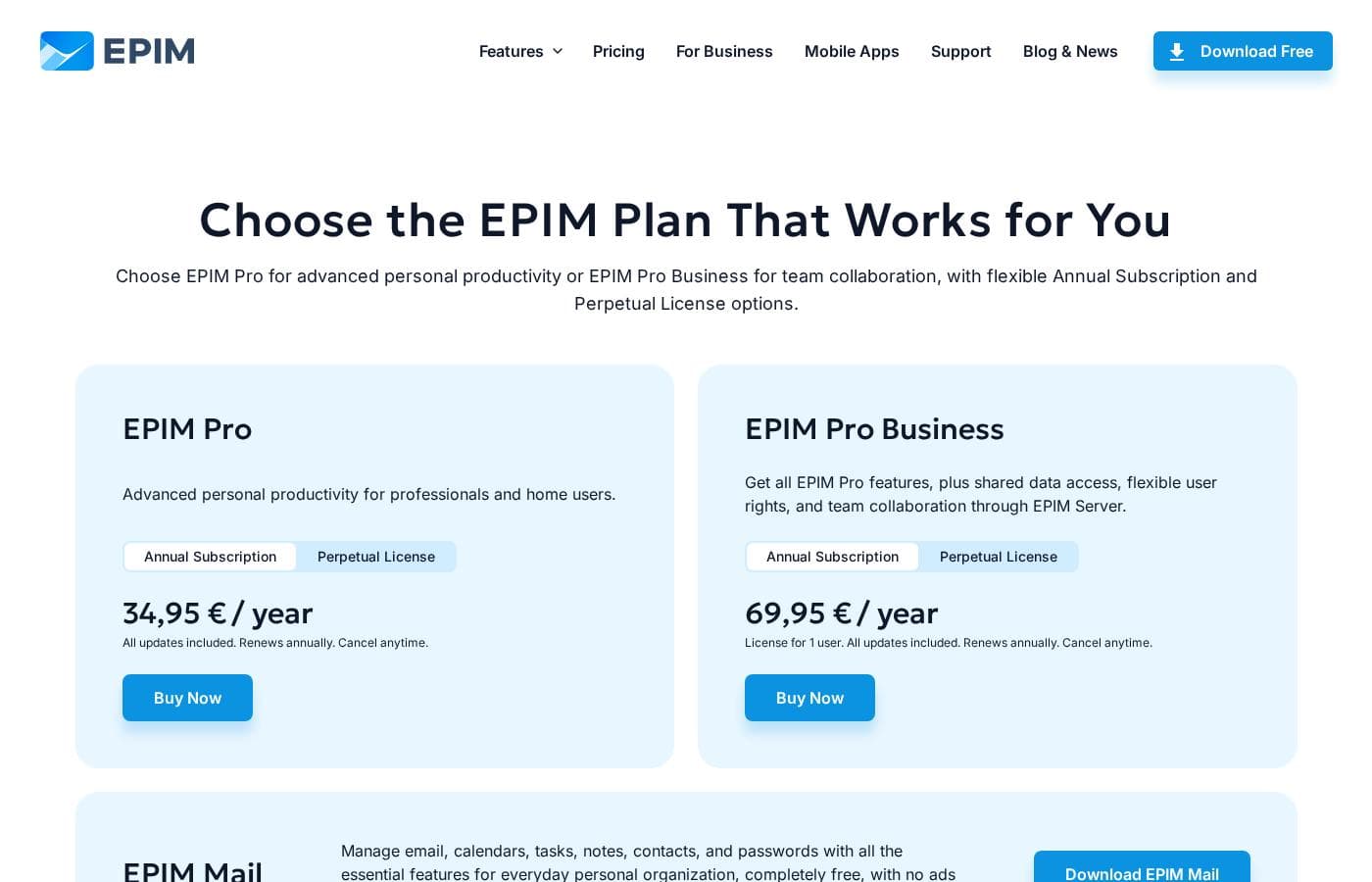
EssentialPIM pricing page screenshotView pricing page screenshot
PlanBilled monthlyBilled annuallyIncludes
EPIM Mail
Free
—
Works on Windows; essential features only (no cloud sync or automatic backup)
  • Email, calendar, tasks, notes, contacts, and passwords in one Windows app
  • No ads and no time limits
  • Community and email support
  • Data is preserved when upgrading to EPIM Pro
EPIM Pro
See vendor page
See vendor page
Annual subscription renews yearly and can be canceled anytime; perpetual license includes only 1 year of updates
  • Advanced organization tools and cross-linking
  • Sync with Google, Microsoft 365, iCloud, Nextcloud, Android, and iOS
  • Comprehensive automatic backup
  • Priority support while subscription or update period is active
  • Annual subscription (all updates, cancel anytime) or one-time perpetual license with 1 year of updates
EPIM Pro Business
See vendor page
See vendor page
License for 1 user; each user connecting to a shared database needs an individual license
  • Everything in EPIM Pro
  • Access to shared EPIM databases
  • User access rights for team members
  • EPIM Server free to download and install (no separate server license)
  • Priority support while subscription or update period is active
EPIM Cloud
$2.99/mo
$1.66/mo
$19.95 per year
Save up to 44% with annual billing
Optional service sold separately from EPIM Pro
  • Synchronizes calendars, tasks, notes, contacts, and passwords across supported devices
  • Automatic backups
  • Browser access to essential data

Price history

Tracking prices since Oct 9, 2026. No price change detected yet.

Pricing types: Free plan, Free trial, Monthly subscription, Yearly subscription, One-time payment, Per seat pricing

Pricing notes

EssentialPIM uses a freemium model: EPIM Mail is free forever, while EPIM Pro and EPIM Pro Business are sold as annual subscriptions or one-time perpetual licenses. An optional EPIM Cloud add-on costs $2.99/month or $19.95/year, and Pro can be trialed free for 30 days.

EssentialPIM runs on a freemium model: EPIM Mail is free forever, EPIM Pro and EPIM Pro Business are sold as annual subscriptions or one-time perpetual licenses, and the optional EPIM Cloud add-on costs $2.99/month or $19.95/year.

Here's how each option breaks down.

EPIM Mail

Price: Free Best For: Everyday personal organization Other Features:

  • Email, calendar, tasks, notes, contacts, and passwords in one Windows app
  • No ads and no time limits
  • Community and email support

Mail is the no-risk starting point. It covers the core modules most people need, and it stays free for as long as you want. If you outgrow it later, your data carries straight over to Pro — no migrating required.

EPIM Pro

Best For: Advanced personal productivity Refund Policy: 30-day money-back guarantee Other Features:

  • Buy it as an annual subscription (all updates included, renews yearly, cancel anytime) or a one-time perpetual license
  • The perpetual license includes 1 year of updates and never expires
  • Sync with Google, Microsoft 365, iCloud, Nextcloud, Android, and iOS
  • Advanced organization tools, automatic backup, and priority support

Pro suits professionals and home users who want the full toolkit. If subscriptions annoy you, the perpetual option lets you pay once and keep your version forever. You can also extend updates for another 12 months whenever you like.

EPIM Pro Business

Best For: Team collaboration Refund Policy: 30-day money-back guarantee Other Features:

  • Everything in EPIM Pro
  • Access to shared EPIM databases with user access rights
  • EPIM Server is free to download and install
  • Priority support while your subscription or update period is active

Business is for teams sharing one database. It's licensed per user, so count your seats first — everyone connecting to a shared database needs their own license. Working solo? Stick with Pro and skip this tier.

EPIM Cloud (optional add-on)

Price: $2.99/month or $19.95/year (about $1.66/month — save 44%) Other Features:

  • Syncs calendars, tasks, notes, contacts, and passwords across supported devices
  • Automatic backups of your information
  • Browser access to essential data

Cloud is sold separately, so it's easy to skip if you work on one device. 🔄 Add it when you want everything synced and backed up automatically.

Bottom line: Start free with EPIM Mail, or try every Pro feature for 30 days before paying. Initial Pro and Pro Business purchases are covered by a 30-day money-back guarantee, and educational, competitive, and volume discounts exist for eligible customers. Since the paid editions' exact prices appear at checkout, confirm current rates and license limits there before you buy.
Cost calculator

Estimate what EssentialPIM costs for your team.

Billing
Per month
$2.99
Per year
$35.88

EPIM Cloud states no user limit: shown as one price for the whole account. Check the price for 5 users with the vendor. Estimate based on published list prices, before taxes, add-ons and discounts.

How to pay less for EssentialPIM

  • Pay annually: saves up to 44% compared with monthly billing.
  • Start on the free plan and upgrade only when you hit its limits.
  • Use the 30-day free trial before you pay.
  • 30-day money-back guarantee if it does not fit.
Start free trial

Email me when EssentialPIM changes price

One email when we detect a price change on the vendor's pricing page. No newsletter, no deals. Unsubscribe in one click.

User Reviews

No reviews yet.

Write a Review

Write a Review for EssentialPIM
0/100 characters
0/2000 characters

Why use EssentialPIM?

If you've outgrown scattered apps but don't want Outlook's cost or complexity, EPIM offers a practical middle path — one program where everything connects.

  • Everything lives together: Link emails, events, tasks, notes, and contacts with tags and cross-links, so related items stay easy to find.
  • All modules included free: EPIM Mail covers email, calendars, tasks, notes, contacts, and passwords with no ads or subscriptions.
  • Privacy-first design: Your data stays local, protected by AES-256 encryption, and you can work offline.
  • Broad synchronization: Pro connects with Google, Microsoft 365, iCloud, Nextcloud, Android, and iOS devices.
  • Flexible licensing: Pick an annual subscription with all updates included, or a one-time perpetual license (which includes one year of updates).
  • Practical extras: Kanban task boards, Markdown notes, custom contact fields, and a personalized Today overview of your day.

Start free with EPIM Mail, then upgrade to Pro only when you need sync, backup, and advanced tools.

EssentialPIM alternatives

Other tools in the Personal Information Management category

View all Personal Information Management tools

EssentialPIM FAQ

How much does EssentialPIM cost?

EssentialPIM's cheapest paid plan, EPIM Cloud, costs $2.99 per month.

Does EssentialPIM have a free plan?

Yes. EssentialPIM has a free plan (EPIM Mail); paid plans start at $2.99 per month.

Does EssentialPIM offer a free trial or a money-back guarantee?

EssentialPIM offers a 30-day free trial. It has a 30-day money-back guarantee.

How much do you save with annual billing on EssentialPIM?

Paying annually saves up to 44% compared with monthly billing, based on EssentialPIM's list prices.

Has EssentialPIM's price changed recently?

No. We have not detected a price change since we started tracking on Oct 9, 2026.

Does every team member need their own EPIM Pro Business license?

Yes. Each user who connects to a shared EPIM database needs an individual Pro Business license. EPIM Server itself is free to download, so there's no separate server fee — just count your seats before buying.

Will my perpetual license stop working after the first year?

No. The license never expires, so you keep your final version forever. Only new updates stop after the included year, and you can optionally extend access for another 12 months.

What happens to my data if I upgrade from EPIM Mail to Pro?

Nothing is lost. Your existing EPIM data carries over intact when you upgrade, so you can start using Pro features without migrating or converting anything.

Ready to try EssentialPIM? Check out the official site or pricing.

Are you EssentialPIM? Claim this listing · Get the badge