DesignEvo

DesignEvo review

Free online logo maker with 10,000+ templates — a custom logo in about five minutes.

By Ciroapp Editorial Team · Updated Sep 16, 2026

Commission may apply at no extra cost

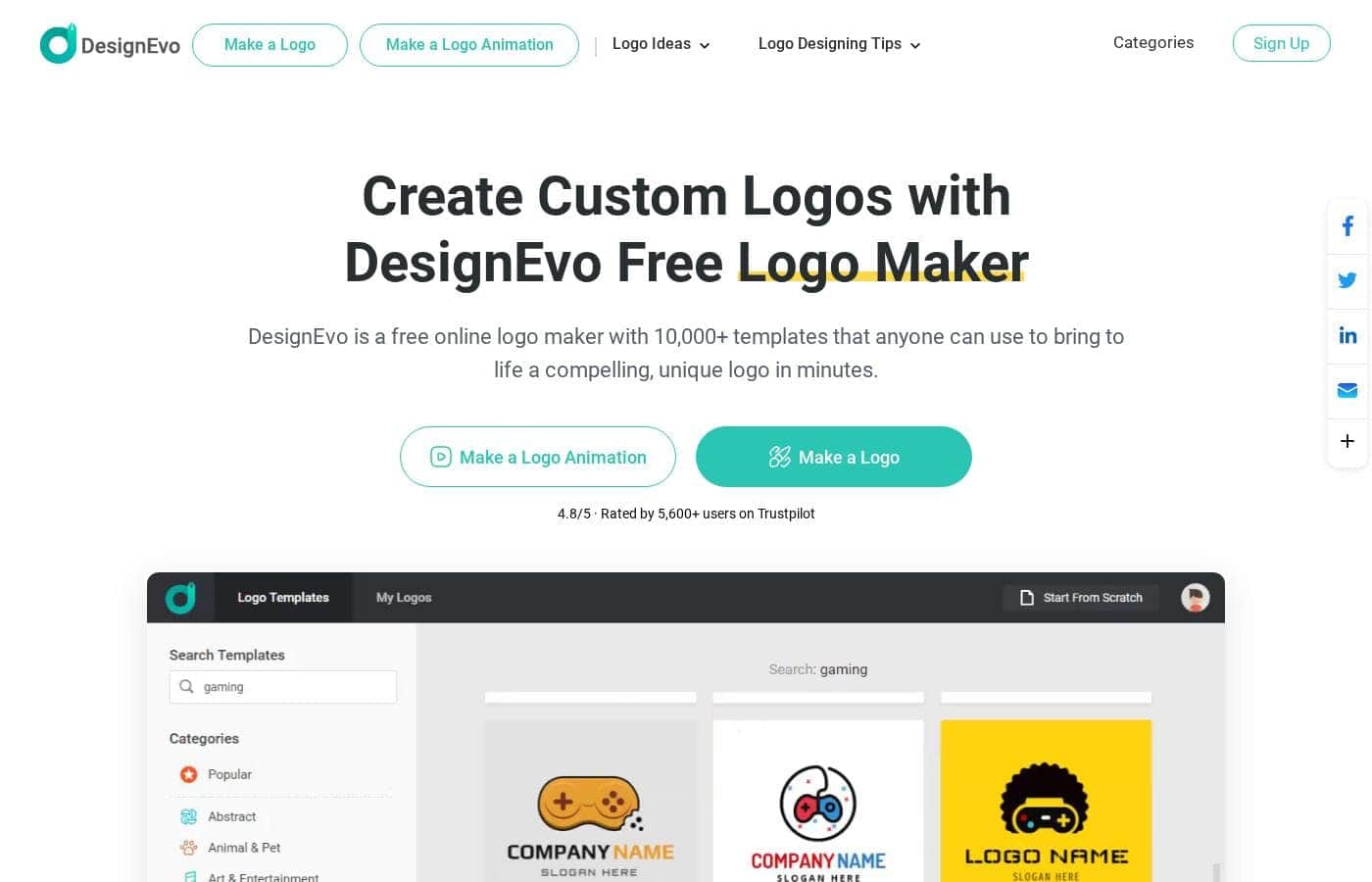
DesignEvo homepage screenshot

At a glance

Quick overview for DesignEvo: rating, pricing summary, key features, and highlights.
Pricing verified Oct 13, 2026

Ciroapp score

4.2/ 5

DesignEvo makes logo design easy with 10,000+ templates, millions of icons, and a browser editor — no downloads or subscriptions required. The trade-offs are per-logo licensing, no published refund policy, and copyright plus vector files locked behind the $49.99 Plus tier; overall, it's a solid, budget-friendly pick for a quick, professional logo.

Pros

  • Pros:Browser-based editor with no download required, and you can start designing before creating an account — sign-up is only needed to save projects
  • Pros:10,000+ professional templates across dozens of categories (gaming, bakery, real estate, and more), searchable by keyword, so you rarely start from a blank canvas
  • Pros:Millions of free vector icons, 100+ fonts, and solid or gradient color schemes are built into the editor, removing the need for external asset hunting

Cons

  • Cons:The Free plan caps downloads at 300 px low-resolution JPG/PNG, requires DesignEvo credit on your logo, and limits edits and re-downloads
  • Cons:Copyright ownership and vector files (PDF/SVG) are locked behind the $49.99 Plus package — the $24.99 Basic tier only outputs JPG and PNG
  • Cons:Licenses are per logo, so a second logo variant or a rebrand means a separate purchase each time
Best for
  • Small business owners who need a professional logo without hiring a designer
  • Solo founders and startups building a first brand identity on a budget
  • Creators designing logos for YouTube, podcasts, and social media profiles
This section is a summary. Detailed sections about features, use cases, pricing, and reviews follow below.

What is DesignEvo?

Getting a logo usually means paying a designer or wrestling with complicated software. DesignEvo skips both. It's a free browser-based logo maker with 10,000+ templates, millions of icons, and simple editing tools.

The company says you can have a finished logo in about five minutes — no download required.

DesignEvo is an online logo maker built by PearlMountain Limited. You start in your web browser, pick a template from 10,000+ options, and customize text, icons, fonts, and colors until it fits your brand. It's aimed at small businesses, organizations, and creators who need a solid logo without design experience.

You can start designing free, and paid packages unlock higher-quality files and ownership rights. Desktop and mobile versions are also available.

Should you choose DesignEvo?

Quick buyer guidance before you compare plans or click through.

Choose it if

  • You prefer working in a browser with nothing to install
  • You want a big library — 10,000+ templates across dozens of categories
  • You like searching by keyword or browsing niche categories like gaming, bakery, or real estate
  • You need core design assets included: icons, 100+ fonts, and gradient colors
  • You want to keep editing after purchase, with unlimited re-downloads

Skip it if

  • You want full commercial rights at the lowest cost — copyright ownership requires the Plus package, not the free tier or Basic
  • You need vector files without paying up. Basic only includes high-resolution JPG and PNG; PDF and SVG come with Plus
  • You want upfront prices.
  • Your workflow depends on third-party integrations. The site doesn't advertise any, so confirm your tools are compatible
  • You expect to save work without an account — sign-up is required to store and re-edit projects

Next steps before buying

  1. 1Open the free logo editor in your browser and customize a template before creating an account
  2. 2Read the pricing page carefully. Compare the Basic package (JPG, PNG) against Plus (PDF, SVG, fonts, copyright) and pick what your brand needs
  3. 3Sign up so your projects save to your account and you can re-edit or re-download later
  4. 4If exact costs or file rights matter to you, compare DesignEvo with a couple of alternative logo makers first

Ease of use

Signals point to a low-friction tool. It runs in the browser with no download, the company claims a finished logo in about five minutes, and you only sign up when you want to save work. Testimonials on the site call it the easiest logo creator the writers have used, and live chat support is available if you get stuck.

DesignEvo Key Features

✨ Start with 10,000+ templates, not a blank page

Never start from a blank canvas. DesignEvo opens with 10,000+ professional-grade templates across dozens of categories. Search by keyword or browse options like gaming, bakery, and real estate.

Pick the design closest to your vision, then swap the text and colors to make it yours. It's the fastest route to a logo that already looks polished.

🎨 Design assets built right in

Everything lives in the editor, so there's nothing extra to gather. The built-in assets include:

✨ Edit as much as you want, even after purchase

You can change text, icons, fonts, and colors until the design fits your brand. Sign up to save your project, and it stays in your account for unlimited edits and re-downloads — even after purchase. That's useful when your needs change and you need the same logo in a new size or version.

✨ Download files that are ready for your brand

Your finished logo comes in formats you can actually use. High-resolution JPG and PNG files handle everyday use, while PDF and SVG vector files scale cleanly for signage and print. Font files and full copyright ownership are available too, so you can use your logo anywhere — commercial or not.

Use Cases

🚀 Launch a small business logo fast

You're opening a bakery or a shop and need a logo today, not next month. Search bakery or ecommerce templates, swap in your name, and adjust the colors. Basic gives you print-ready JPG and PNG files.

Expected outcome: a finished logo in about five minutes.

🎥 Brand your channel or podcast

DesignEvo has templates built for YouTube, podcasts, and social profiles. Pick one, tweak the fonts and icons, and download a profile-ready logo in minutes. It runs in your browser, so there's nothing to install.

🤝 Give your nonprofit or school a face

Community groups and schools often can't budget for a designer. Browse free templates, edit the text and colors, and preview your logo before paying anything. The Free plan covers low-resolution downloads if you credit DesignEvo.

🧪 Test logo ideas before you commit

Not sure which direction fits your brand? Design a few versions with different icons and fonts, then compare them. Upgrade to Plus only when you're ready — it adds vector PDF and SVG files plus full copyright.

Tip: Sign up early so your drafts save to your account.

DesignEvo pricing

  • 3 plans
  • Free plan available

Prices checked on Oct 13, 2026 from DesignEvo's pricing page

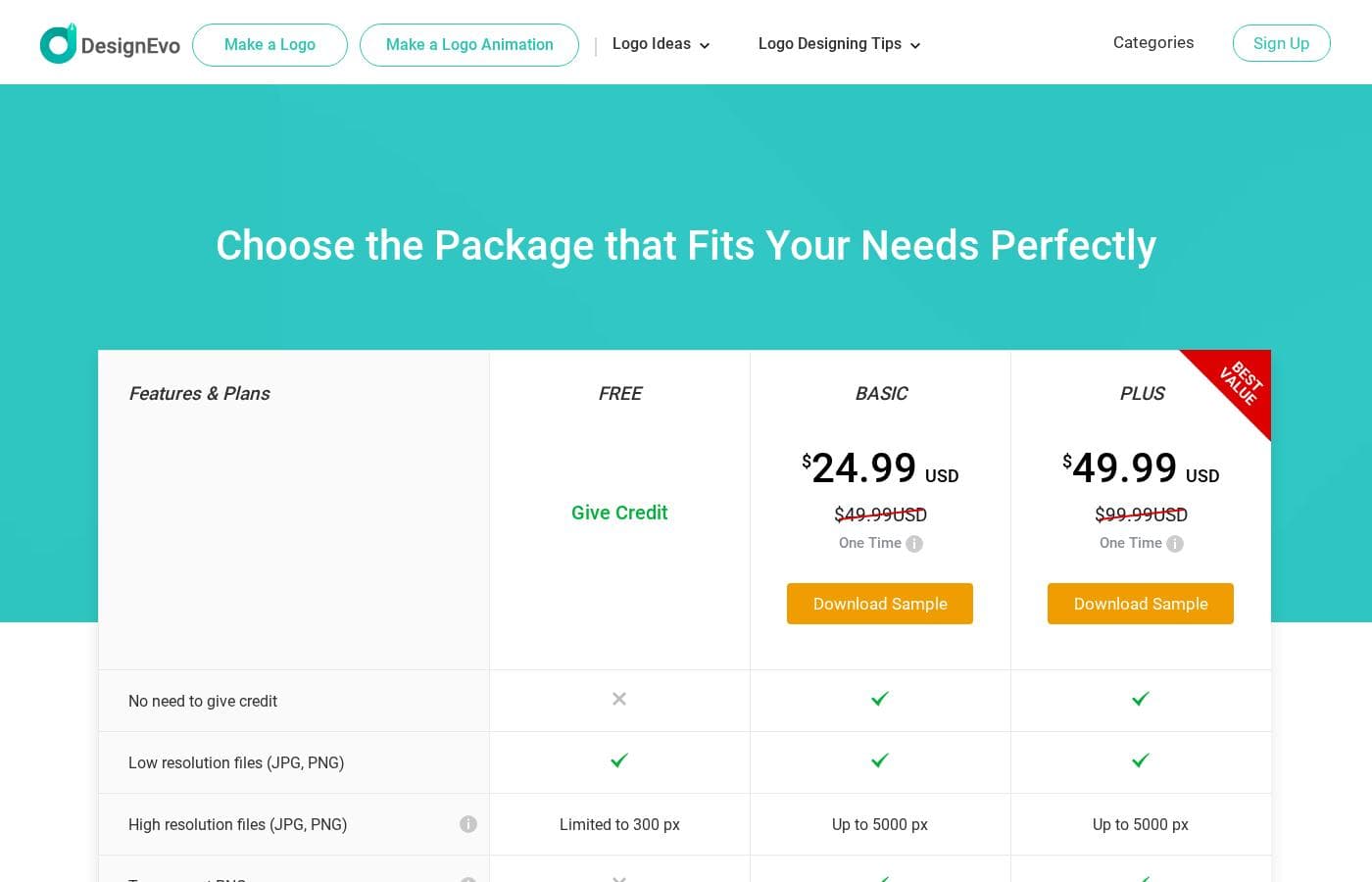
DesignEvo pricing page screenshotView pricing page screenshot
PlanBilled monthlyBilled annuallyIncludes
Free
Free
—
Requires credit attribution; low-resolution files only (up to 300 px); limited edits and re-downloads; no transparent PNG, print-ready files, vector files, or copyright ownership
  • Low-resolution JPG and PNG files
  • Logo size limited to 300 px
  • Credit to DesignEvo required
  • Limited edits and re-downloads
Basic
$24.99
—
One logo per purchase; no vector (PDF, SVG) files, font downloads, or copyright ownership
  • One-time payment for one logo with lifetime access
  • No credit required
  • High-resolution JPG and PNG up to 5000 x 5000 px
  • Transparent PNG and print-ready files
  • Unlimited edits and re-downloads with lifetime support
Plus
$49.99
—
One logo per purchase
  • One-time payment for one logo with lifetime access
  • Marked as Best Value
  • Vector files (PDF and SVG)
  • Downloadable font files
  • Full copyright ownership

Price history

Tracking prices since Oct 9, 2026. No price change detected yet.

Pricing types: Free plan, One-time payment

Pricing notes

DesignEvo keeps pricing simple with one-time payments instead of subscriptions. A free plan covers basic downloads if you credit DesignEvo, while the Basic package costs $24.99 and Plus costs $49.99 per logo — both one-time purchases with lifetime access.

DesignEvo costs between $24.99 and $49.99 as a one-time payment per logo, with three packages: Free at $0, Basic at $24.99, and Plus at $49.99.

There's no subscription or renewal to worry about. Each paid package is a single purchase covering one logo, and you keep lifetime access to it.

Free

Price: $0 Other Features:

  • Low-resolution JPG and PNG files
  • Logo size capped at 300 px
  • Credit to DesignEvo required
  • Limited edits and re-downloads

The Free package is a no-risk way to experiment. Design your logo, see how it looks in the editor, and upgrade only when you want cleaner files.

Basic

Price: $24.99 one-time (discounted from $49.99) Other Features:

  • No credit required
  • High-resolution JPG and PNG up to 5000 x 5000 px
  • Transparent PNG and print-ready files
  • Unlimited edits and re-downloads
  • Lifetime support

Basic fits small businesses and side projects that need crisp, professional files without vector editing. It skips SVG and PDF formats, font files, and copyright ownership, so it works best when you just want a good-looking logo for everyday use.

Plus

Price: $49.99 one-time (discounted from $99.99) Other Features:

  • Labeled "Best Value" on the pricing page
  • Vector files (PDF and SVG)
  • Downloadable font files
  • Full copyright ownership
  • Everything in Basic, including lifetime support

Plus is the pick for real commercial use. Copyright ownership means you can use your logo anywhere, commercially or not, and vector files let designers scale it for signage or print without quality loss.

One thing to remember: these are per-logo licenses, so a second logo means a second purchase. Since payments are one-time, double-check the file formats you need before you check out. The Free plan is always available if you'd rather try DesignEvo first — no download required.
How to pay less for DesignEvo

  • Start on the free plan and upgrade only when you hit its limits.
Visit DesignEvo

Email me when DesignEvo changes price

One email when we detect a price change on the vendor's pricing page. No newsletter, no deals. Unsubscribe in one click.

User Reviews

No reviews yet.

Write a Review

Write a Review for DesignEvo
0/100 characters
0/2000 characters

Why use DesignEvo?

Most people don't need a design agency. They need a logo that looks professional without eating their budget or their weekend. Based on what DesignEvo publishes, it covers that gap well.

  • Huge starting library. 10,000+ templates across dozens of categories, searchable by keyword, so you're never staring at a blank canvas.
  • Fast workflow. The site says a logo takes about five minutes with a few clicks — changing text and colors is simple.
  • Built-in design assets. Millions of free vector icons, 100+ fonts, and solid or gradient color schemes come included.
  • Keep iterating. Purchased projects stay saved in your account, so you can make unlimited edits and re-download anytime.
  • Brand-ready files. The Plus package includes vector PDF and SVG files, the fonts used in your design, and copyright ownership for commercial use.
  • User-approved. DesignEvo holds a 4.8/5 rating from 5,600+ reviewers on Trustpilot.

DesignEvo alternatives

Other tools in the Logo maker category

View all Logo maker tools
Looka

Looka

Logo maker4.2/5
My Brand New Logo

My Brand New Logo

Logo maker4/5

My Brand New Logo is an online tool that puts you in control of your visual branding. The design process works in just three simple steps. First, you tell the tool your company name, slogan, industry, and favorite color. Next, the system generates endless, unique logo variations just for you. Finally, you can customize your favorite design until it looks exactly right. It's totally free to create your designs; you only pay when you are happy and ready to use your logo.

Mojomox

Mojomox

Logo maker3.9/5

Mojomox is a powerful logo maker app dedicated to creating everything custom for a cool brand. It allows quick design of professional logos using unlimited designs and modern fonts. You won't find these unique options anywhere else. It’s perfect for individuals and businesses who want a personalized, professional identity without needing complex design skills. The tool helps you quickly graduate from design ideas to looking like a pro.

BrandCrowd

BrandCrowd

Logo maker3.8/5

BrandCrowd is an accessible platform for creating professional visual assets. It allows users to browse and customize thousands of professionally curated designs. If you need a stunning business card or a powerful LinkedIn banner, this tool is for you. Whether you’re an accountant or a seasoned business owner, it’s designed for easy graphic production. You will achieve consistency across all your social media, web, and print materials quickly.

Tailor Brands

Tailor Brands

Logo maker3.7/5

Tailor Brands offers comprehensive tools for successfully building your entire company. This platform is built on the promise of end-to-end business building services ✨, managing all the details for you. It serves as a centralized hub for entrepreneurs looking for structure and guidance. Crucially, the platform is relevant for business owners at any stage. It supports early-stage startups as well as established operations looking to optimize.

Smashinglogo

Smashinglogo

Logo maker3.7/5

Smashinglogo is a powerful logo maker built for small and medium businesses all over the world. It provides a highly effective, cost-effective solution for entrepreneurs. The platform has served over 20 million users across 1000+ industries in 190+ countries. It’s consistently recognized with awards for Best Ease of Use in graphic design software. Smashinglogo helps you create personalized content by giving you a lot of options for independent work. This powerful tool is designed to be the perfect choice for your professional rebranding needs.

DesignEvo FAQ

Does DesignEvo have a free plan?

Yes. DesignEvo has a free plan (Free).

Has DesignEvo's price changed recently?

No. We have not detected a price change since we started tracking on Oct 9, 2026.

Does DesignEvo work in languages other than English?

Yes. The site runs in eight languages: English, Spanish, Portuguese, German, French, Japanese, Traditional Chinese, and Simplified Chinese. You can switch anytime using the footer menu.

How do I get help if I'm stuck?

Paid plans include lifetime support. You can reach the team through Live Chat or the Contact Us form on the site, and you're welcome to ask questions before buying.

Is there anything to cancel later?

No. Each package is a one-time purchase per logo, so there's no subscription or auto-renewal to cancel. You keep lifetime access to your purchased logo in your account.

Can I use DesignEvo on more than one device?

Yes. You can design in any browser with nothing to install, and the site lists separate desktop and mobile versions too. Saved projects stay linked to your account.

Ready to try DesignEvo? Check out the official site or pricing.

Are you DesignEvo? Claim this listing · Get the badge