Chatbot

Chatbot review

An AI agent trained on your website that answers customers and helps close sales, around the clock and across channels.

Chatbot costs from $19/mo · 3 plans

By Ciroapp Editorial Team · Updated Sep 8, 2026

Commission may apply at no extra cost

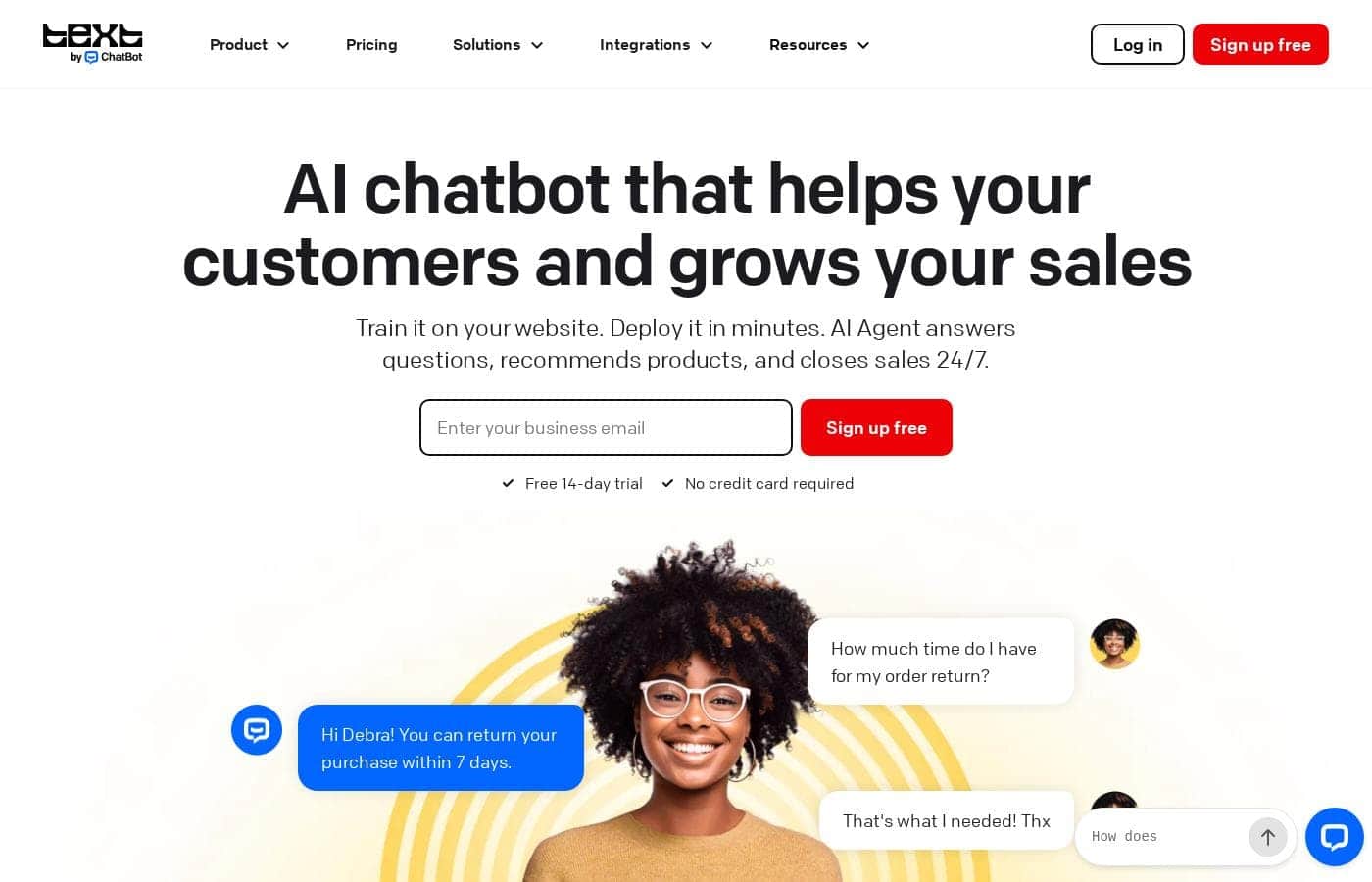
Chatbot homepage screenshot

At a glance

Quick overview for Chatbot: rating, pricing summary, key features, and highlights.
Vendor page checked Oct 13, 2026

Ciroapp score

4.1/ 5

ChatBot.com trains an AI agent on your own website, so answers match your catalog and policies. It also pushes sales with product picks and discount codes across chat, Messenger, and SMS, though resolution limits and per-seat costs can climb quickly. Overall, it's a solid, recommendable pick for online stores that want support and selling in one tool.

Pros

  • Pros:Trains automatically on your own website, help center, and product docs by pasting a URL, so answers reflect your actual catalog and policies rather than generic AI responses
  • Pros:Goes beyond FAQ handling by detecting buying signals mid-chat — checkout hesitation, bulk inquiries, product comparisons — and responding with product recommendations or discount codes to recover at-risk sales
  • Pros:Runs one AI agent across website chat, Messenger, WhatsApp, SMS, Slack, and email, with every conversation landing in a single shared inbox so agents see full customer history regardless of channel

Cons

  • Cons:Per-seat pricing starts at $19 per user/month, and costs climb quickly as team size grows — a five-agent team on Growth pays $395/month billed yearly
  • Cons:AI resolution limits are the real cost driver — Essential includes just 10 per month, and overage packs auto-refill at $49.50 per 50 resolutions, which can add up fast at higher chat volumes
  • Cons:The deepest functionality lives inside the Text (LiveChat) platform ecosystem, so teams wanting a fully standalone tool may feel constrained
Best for
  • Online stores that want a chatbot to answer questions and recover hesitant shoppers
  • Support teams that want routine questions handled before they reach a human
  • Shopify, WordPress, and BigCommerce merchants who want a quick, code-free setup
Free trial
Yes — 14 days
This section is a summary. Detailed sections about features, use cases, pricing, and reviews follow below.

What is Chatbot?

Customers expect answers at 2 a.m., but your team can't be everywhere. ChatBot.com trains an AI agent on your website, so it answers questions, recommends products, and spots real buyers around the clock. Setup takes minutes, and the 14-day trial needs no credit card.

That means fewer missed chats and fewer lost sales.

ChatBot.com is AI chatbot software that learns from your website, help center, and product docs. It answers customer questions, recommends products, and hands tricky chats to your team. You can run it on your website, Messenger, SMS, and other channels, with every conversation landing in one inbox inside the Text platform.

It's aimed at online stores and support teams that want fast answers without hiring more staff. No coding is needed to launch.

Should you choose Chatbot?

Quick buyer guidance before you compare plans or click through.

Choose it if

  • You want an AI agent trained on your own site and docs, not generic answers
  • You need 24/7 coverage without adding staff
  • You prefer a no-code launch with a copy-paste widget or Shopify and WordPress integrations
  • You want sales help — product recommendations and discount codes — built into support chats
  • You value human handover, so your team still handles the big deals

Skip it if

  • Pricing starts at $19 per user per month, so costs can climb as your team grows
  • The deepest experience lives inside the Text platform, so teams wanting a fully standalone tool may feel pulled toward that ecosystem
  • Outside Shopify and WordPress, setup relies on pasting a code snippet, which may need light technical help

Next steps before buying

  1. 1Review the pricing page for full plan details and AI resolution limits before you sign up
  2. 2Confirm your channels and integrations — website, Messenger, SMS, Shopify, Slack — are supported
  3. 3Gather your knowledge sources, like your site URL, help center, and product docs, so training is quick
  4. 4Use the 14-day free trial to test real customer questions before paying anything
  5. 5Compare per-user pricing against other chatbot tools to see how it fits your team size

Ease of use

The site emphasizes fast, no-code setup: paste your URL to train the bot, then add a code snippet or use the Shopify and WordPress integrations. Customer reviews featured on the homepage describe it as easy to navigate and quick to deploy. Training happens automatically from your content, so most teams should be able to launch without a developer.

Chatbot Key Features

✨ Trained on your business, not generic answers

Your AI agent only knows your business. Paste your website URL, and it builds a knowledge base from your site, help center, and product docs. Every reply stays accurate to what you actually sell.

Add new sources anytime, and the agent's behavior updates to match.

🛍️ Sells while it supports

Most bots stop at FAQs. This one watches for buying signals mid-chat — hesitation at checkout, bulk inquiries, product comparisons — then recommends products or offers discount codes at the right moment. It even helps shoppers check out, so fewer sales slip away.

✨ One AI, every channel

Customers reach you on website chat, Messenger, SMS, WhatsApp, Slack, and email. One AI agent covers them all, and every conversation lands in a single shared inbox inside Text. Your team sees the same customer history no matter where the message came from.

✨ Smooth handover to humans

The agent handles routine questions on its own. When a chat needs a person — a big deal or a tricky issue — your team steps in with full context already in front of them. Customers don't repeat themselves, and your people focus on conversations that close deals.

🚀 Live the same day

No developer needed. Training happens automatically from your content, so most teams can launch fast. Here's the whole setup:

  • Paste your website URL to build the knowledge base
  • Add a code snippet, or use the Shopify or WordPress integration
  • Connect your channels and start chatting

Use Cases

🌙 Around-the-clock answers

It's 2 a.m. and a customer asks about your return window. Your AI agent replies instantly, using what it learned from your website and help center.

Routine questions get resolved before they reach your team. Expected outcome: fewer missed chats and no night-shift staffing.

🛒 Recovering hesitant shoppers

A shopper stalls at checkout, comparing products. The bot spots the buying signal, recommends a fit, and offers a discount code at the right moment. Your team doesn't lift a finger.

Expected outcome: carts that would've been lost get a second chance.

📱 One agent, every channel

Customers message you on your website, Messenger, WhatsApp, and SMS. One AI agent answers on all of them, and every chat lands in a single shared inbox. Your team sees full history and context.

Tip: Start with website chat, then switch on more channels as you grow.

🤝 Smooth human handover

The bot handles routine chats on its own, but it knows its limits. When a high-value buyer needs a human, your team steps in with the full conversation in front of them. Expected outcome: your people spend time on deals, not password resets.

Chatbot pricing

From$19/mo

  • 3 plans

Vendor page checked on Oct 13, 2026; confirm current prices on Chatbot's pricing page

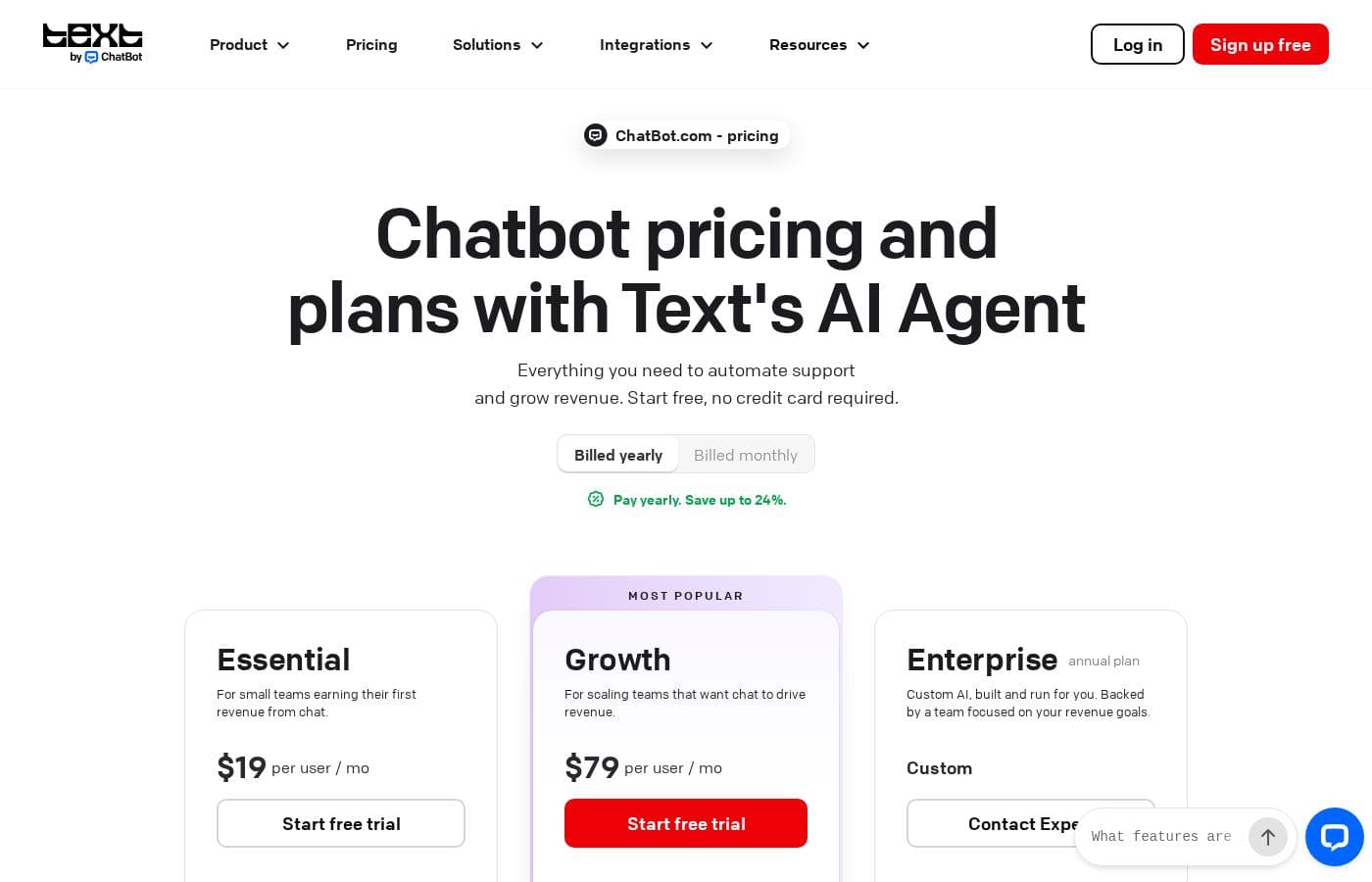
Chatbot pricing page screenshotView pricing page screenshot
PlanBilled monthlyBilled annuallyIncludes
Essential
per user
—
$19/mo
$228 per year
For small teams; billed monthly price is $25 per user. Includes 1 AI Agent, 10 AI resolutions/month, 5 reply suggestions, 5 AI text edits, 50 live visitors tracked, 3 proactive campaigns, 14-day free trial, no credit card required.
Growth
per user
—
$79/mo
$948 per year
Most popular; billed monthly price is $99 per user. Includes everything in Essential plus 10 AI Agents, 200 AI resolutions/month, 50 reply suggestions, 100 AI text edits, 400 live visitors tracked, 30 proactive campaigns, 10 workflow rules, 14-day free trial.
Enterprise
See vendor page
See vendor page
Custom AI built and run for you; everything in Growth plus custom AI Agents, tailored workflows, dedicated team, personalized onboarding, SOC 2 Type 2, SLAs, white-label widget, SSO and audit logs. Contact sales.

Price history

Tracking prices since Sep 8, 2026. No price change detected yet.

Pricing types: Free trial, Monthly subscription, Yearly subscription, Per seat pricing, Usage-based pricing

Pricing notes

ChatBot.com plans start at $19 per user/month billed yearly (Essential) or $79 per user/month billed yearly (Growth), with Enterprise at custom pricing. Billed monthly, the plans cost $25 and $99 per user respectively, and extra AI resolution packages of 50 are available for $49.50.

Chatbot costs between $19 and $79 per user/month with three plans: Essential at $19, Growth at $79, and Enterprise at custom pricing (all billed yearly).

Here's how each plan breaks down, so you can match one to your team's size and goals.

Essential

Price: $19 per user/month billed yearly ($25 billed monthly) Best For: Small teams earning their first revenue from chat Other Features:

  • 1 AI Agent with 10 AI resolutions per month
  • AI Copilot, 5 reply suggestions, and 5 AI text edits per user
  • Inbox with ticketing, workflow automation, and human takeover
  • Website chat, Messenger, WhatsApp, SMS (Twilio), and Shopify selling
  • 60 days of chat history and 10,000 API calls per month

Essential is the entry point, but it's a complete support setup. You get the AI agent, live chat, and a shared inbox working together from day one. Pick it if you're a small team that wants automation without a big spend. Keep in mind that 10 monthly resolutions can run out quickly as chat volume grows.

Growth

Price: $79 per user/month billed yearly ($99 billed monthly) Best For: Scaling teams that want chat to drive revenue Other Features:

  • 10 AI Agents with 200 AI resolutions per month
  • Unlimited chat history and chat topics insights
  • Chat supervision, shared canned responses, and team reports
  • 30 proactive campaigns with 10,000 impressions
  • 400 live visitors tracked and 20,000 API calls per month

Growth is the "Most Popular" plan, and it's easy to see why. You get ten times the AI resolutions, unlimited history, and manager tools like supervision and performance reports. Choose it if your team is growing and you want the AI to help close sales, not just answer questions. Skip it if you're a one or two person shop — Essential covers the basics for less.

Enterprise

Price: Custom, annual plan Best For: Larger companies that need custom AI and strict compliance Other Features:

  • Everything in Growth, plus custom AI Agents and tailored workflows
  • Dedicated Product Expert, personalized onboarding, and product training
  • Direct engineering support and on-demand reporting
  • SOC 2 Type 2, SLAs, SSO, audit logs, and white-label widget
  • Flexible scaling, usage limits, and alternative payment terms

Enterprise is built and run for you. The ChatBot team handles setup and optimization, with a focus on your revenue goals. It's the right fit if you need security reviews, legal support, or guaranteed service levels. Smaller teams rarely need it — Growth already covers most of what scaling businesses want.

Bottom line: There's no permanent free plan, but every plan starts with a 14-day free trial — no credit card required. Monthly plans carry no long-term contracts, so you can upgrade, downgrade, or cancel anytime; changes take effect on your next billing cycle. Before buying, check your expected chat volume against the AI resolution limits, since extra resolutions auto-refill in 50-packs at $49.50.
Cost calculator

Estimate what Chatbot costs for your team.

Billing

Essential has no published price for this billing cycle.

Essential is priced per user: price × 5 seats. Estimate based on published list prices, before taxes, add-ons and discounts.

How to pay less for Chatbot

  • Use the 14-day free trial before you pay.
  • Some plans are priced per user: only pay for seats people actually use.
Start free trial

Email me when Chatbot changes price

One email when we detect a price change on the vendor's pricing page. No newsletter, no deals. Unsubscribe in one click.

User Reviews

No reviews yet.

Write a Review

Write a Review for Chatbot
0/100 characters
0/2000 characters

Why use Chatbot?

Most chatbots handle FAQs. ChatBot.com is built to sell, too. According to the vendor, its AI Agent notices buying signals mid-chat, recommends products, and helps shoppers check out — while still resolving everyday support questions. Here's what stands out from the company's own materials:

  • Setup in minutes, not weeks. Paste your website URL and it builds a knowledge base automatically. Shopify and WordPress users get direct integrations, so there's no developer work.
  • It sells, not just answers. The bot spots hesitation at checkout, bulk inquiries, and product comparisons, then offers relevant products or discount codes at the right moment.
  • One AI, many channels. Handle website chat, Messenger, SMS, and more, with every conversation in a single shared inbox your team can see.
  • It knows when to step aside. Routine questions stay automated, while high-value conversations are handed to humans with full context.
  • Results the vendor puts numbers on. The site cites Wembley Stadium earning over $1.5M in eight months, Hairlust saving 20% of communication time, and average orders of $430 through the AI Agent. Treat these as vendor-reported figures.
  • Try before you pay. Every plan includes a 14-day free trial with no credit card required.

Chatbot alternatives

Other tools in the Chatbot category

View all Chatbot tools
CX Genie

CX Genie

Chatbot3.5/5

CX Genie is an all-in-one AI Customer Engagement Platform. It combines AI Agents, automated Workflows, and intuitive tools for easy human collaboration. It's designed to streamline support operations completely. You can quickly create a customized AI Agent and deploy it across any platform you need. This platform is ideal for growing e-commerce businesses, agencies, and customer support teams needing a smart, unified system. It conveniently includes a HelpDesk, Live Chat, and Ticket Management all in one place.

Gorgias

Gorgias

Chatbot4.1/5

Gorgias is an ecommerce-focused AI Agent and support suite designed for brands and Shopify stores. 🛍️ It brings sales and support conversations together, letting teams automate, personalize, and resolve inquiries from all channels in one place.

Manychat

Manychat

Chatbot4/5

Manychat delivers powerful automation tools specifically designed for platforms like Instagram, WhatsApp, TikTok, and Messenger. It's a key solution for creators, marketers, and brands looking to manage their massive influx of messages and comments. This platform helps you streamline your entire operation, ensuring you answer customer questions and convert leads immediately 24/7/365. The customizable platform is intuitive, meaning you don't need a computer science degree to start automating your selling and replying.

Voiceglow

Voiceglow

Chatbot3.7/5

Voiceglow is a chatbot builder for websites. You create a bot, train it on your own content such as web pages and documentation, and embed it on your site through a chat widget. The bot then answers visitor questions automatically, and because it is usage-based, you pay according to the volume of conversations and seats your team actually needs.

Landbot

Landbot

Chatbot3.5/5

Landbot is a platform designed to help you quickly generate AI Chatbots. It provides powerful AI Agents that manage repetitive tasks efficiently. The core philosophy is that successful businesses are built on relationships, which depend on great conversations. This tool is ideal for anyone needing to automate interactions, whether that means answering FAQs or ensuring better lead qualification. Landbot lets you automate these processes completely code-free.

Vista Social

Vista Social

Social Media Management4/5

Join Vista Social's affiliate program and earn 25% recurring commissions for 12 months on a product that converts. We're a fast-growing social media management platform with $3k+ LTV (& rising), already competing with industry leaders. Benefits: 90-day cookie window, high conversion rates, extremely flexible terms, and we're open to custom arrangements with quality partners. Our 14-day free trial and competitive pricing and easy onboarding your audience will truly love: 4.8/5 G2; 4.9/5 Capterra.

Chatbot FAQ

How much does Chatbot cost?

Chatbot's cheapest paid plan, Essential, costs $19 per month. Paid plans range from $19 to $79 per month.

Does Chatbot offer a free trial or a money-back guarantee?

Chatbot offers a 14-day free trial.

Has Chatbot's price changed recently?

No. We have not detected a price change since we started tracking on Sep 8, 2026.

Does ChatBot meet security and compliance standards?

Every plan encrypts data with TLS and supports two-factor login. Enterprise goes further with SSO, audit logs, security assistance, and SOC 2 Type 2, GDPR, CCPA, and PCI DSS compliance. Check the terms if you have strict requirements.

Can the chatbot answer customers in other languages?

Yes. The AI detects a customer's language and replies in it — 48 languages are supported on every plan. You can translate the chat widget too, and Growth adds agent groups dedicated to specific languages.

What happens if I hit my monthly AI resolution limit?

A 50-resolution pack auto-refills for $49.50, so the bot keeps working. One resolution counts when the AI directly solves a question — several questions in the same chat still count as one.

How responsive is support if I get stuck?

All plans include 24/7/365 support through chat on the website or inside the app, plus a self-service help center. Enterprise customers also get SLAs, a dedicated Product Expert, and direct engineering support.

Ready to try Chatbot? Check out the official site or pricing.

Are you Chatbot? Claim this listing · Get the badge