Avada

Avada review

Buy once, build for life—a WordPress website builder with no subscription fees.

By Ciroapp Editorial Team · Updated Sep 16, 2026

Commission may apply at no extra cost

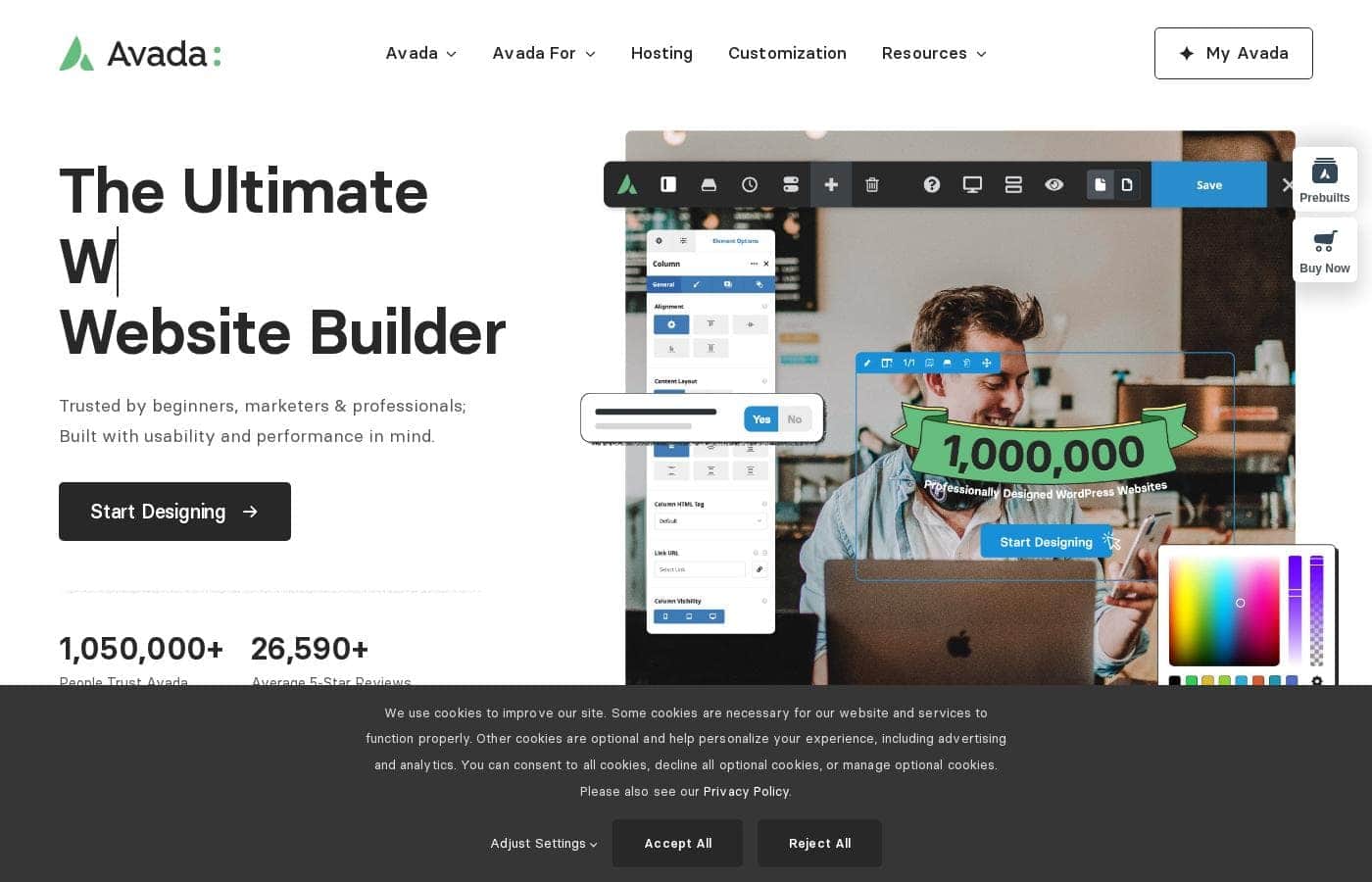
Avada homepage screenshot

At a glance

Quick overview for Avada: rating, pricing summary, key features, and highlights.
Last release 13 days ago

Ciroapp score

4.3/ 5

Avada pairs a drag-and-drop builder with 113 prebuilt websites, so you can launch a polished WordPress or WooCommerce site without coding. The one-time license with free lifetime updates keeps costs predictable, though support runs just 6 months and the exact price only shows at checkout. Overall, it's a dependable pick for anyone tired of subscription fees.

Pros

  • Pros:One-time purchase with free lifetime updates—no recurring subscription fees, keeping long-term costs predictable.
  • Pros:113 prebuilt websites and 600+ Avada Studio content blocks can be imported in a few clicks and are 100% customizable, so you start from a finished design instead of a blank page.
  • Pros:Drag-and-drop visual builder lets you design pages live without writing any code, with instant previews as you adjust layouts and styling.

Cons

  • Cons:No free trial or free plan—you must buy through ThemeForest, and the exact price only appears at checkout, so review refund terms before purchasing.
  • Cons:Hands-on support lasts just 6 months from purchase date and costs extra to renew; there is no published response-time guarantee if you're working to deadlines.
  • Cons:One license covers only a single main site plus one staging/dev/local site per top-level domain—running multiple live sites requires buying a license for each.
Best for
  • Beginners launching their first WordPress site
  • Marketers focused on generating leads and conversions
  • Small businesses that want a professional site without monthly fees
This section is a summary. Detailed sections about features, use cases, pricing, and reviews follow below.

What is Avada?

Building a professional website usually means paying monthly fees forever or hiring a developer. Avada skips both problems. It's a one-time purchase for WordPress with lifetime updates, a drag-and-drop builder, and 113 prebuilt sites you can import in a few clicks—no coding needed.

Avada is a website builder for WordPress and WooCommerce, sold as a one-time purchase. It's been the top-selling WordPress theme on ThemeForest for over 13 years, with more than a million users. You design pages with a drag-and-drop visual editor, so no coding is required.

It suits beginners launching a first site, marketers chasing leads, small businesses, and professionals building client projects.

Should you choose Avada?

Quick buyer guidance before you compare plans or click through.

Choose it if

  • You want a one-time purchase instead of a recurring subscription
  • You're on WordPress and want drag-and-drop design with no coding
  • You need a fast start from 113 prebuilt, fully customizable websites
  • You run a WooCommerce store and want unique product pages and sales journeys
  • You value long-term stability—13+ years as a top ThemeForest seller with free lifetime updates

Skip it if

  • You're not using WordPress—Avada requires it, so it won't work as a standalone or hosted builder
  • You want long-term hand-holding—support is included for 6 months from purchase, then costs extra to renew
  • You need many development environments—the license allows one staging/dev/local site per top-level domain
  • Your project depends on niche plugins—the site lists major integrations like WooCommerce, Yoast SEO, HubSpot, and WPML, but confirm your specific tools before buying
  • You expect fully hosted simplicity—you'll manage your own WordPress hosting and setup

Next steps before buying

  1. 1Confirm you have (or can set up) WordPress hosting—Avada runs on WordPress, not as a hosted service
  2. 2Check the current one-time price on ThemeForest and what the lifetime license covers
  3. 3Browse the prebuilt websites and Avada Studio library to see if a design fits your project
  4. 4Verify the plugins you rely on—such as WooCommerce, Yoast SEO, The Events Calendar, or HubSpot—are supported
  5. 5Review the 6-month support terms and renewal pricing if you think you'll need help down the road

Ease of use

Avada is clearly built with beginners in mind. The drag-and-drop visual builder removes the need for code, and prebuilt websites import in a few clicks. The learning resources are deep—550+ help files, hundreds of tutorial videos, and 6 months of hands-on support included. Keep in mind you still need to set up WordPress itself, so absolute newcomers should budget some time for that step.

Avada Key Features

✨ Drag-and-Drop Visual Builder

You don't need code to build a polished site. Avada's drag-and-drop visual editor lets you place every element exactly where you want it. Design pages live, adjust layouts and styling as you go, and see changes instantly.

It fits beginners launching a first site and pros fine-tuning client work alike.

🚀 Prebuilt Websites & Studio Blocks

Starting from a blank page is optional. Import any of the 113 prebuilt websites in a few clicks, then make it yours. Every item is 100% customizable—swap imagery, text, styling, and layouts inside the builder.

Reach for these when speed matters:

✨ WooCommerce Builder

Running a store? Avada integrates with WooCommerce, so you can design custom product layouts and tailored customer sales journeys without separate tools. Build an online store that matches your brand instead of settling for default templates.

It's aimed at store owners who want shop pages as considered as the rest of the site.

✨ Dynamic Content & Conditional Layouts

Beyond static pages, Avada supports dynamic content and conditional layouts. You can build unique page and post layouts that pull in content automatically, applying layouts where they're needed. Marketers and professionals get the flexibility to craft fully personalized websites—styling options are unlimited, so the design stays yours.

✨ Performance, Responsiveness & Reliability

Your site should look good and run well everywhere. Avada is 100% fluid and responsive across mobile, tablet, and desktop, with performance controls that let you make smart speed decisions. Because it's built 100% in-house, you're not stacking third-party plugins to stay stable—and free lifetime updates keep it current for life.

Use Cases

🚀 Launch Your First Website

New to WordPress? Import one of 113 prebuilt websites with a few clicks, then swap in your own text and images. The drag-and-drop builder means no coding.

Expected outcome: a professional site you're proud of, without hiring a developer.

🛒 Sell Online With WooCommerce

Run a store? Design custom product layouts and tailored sales journeys inside WordPress—no separate tools needed. Avada's WooCommerce builder keeps everything in one place.

Tip: Start from a shop prebuilt website, then adjust product pages to fit your brand.

📈 Turn Visitors Into Leads

Marketers can build landing pages with dynamic content and conditional layouts—all without a developer. Every element is customizable, so pages match each campaign. Expected outcome: focused pages built to drive leads and conversions.

💼 Deliver Client Projects With Confidence

Agencies and freelancers get 13+ years of proven stability, free lifetime updates, and 100% in-house development. Each license covers a main site plus one staging/dev/local site per domain. > Tip: Use the staging site to test client changes safely.

Avada pricing

Prices not verified yet — see the vendor page.

Avada's pricing page

Avada pricing page screenshotView pricing page screenshot
PlanBilled monthlyBilled annuallyIncludes
Avada License (One-Time Purchase)
See vendor page
See vendor page
One main site per license, plus a single staging/dev/local site per top-level domain; support period runs 6 months from purchase date
  • Lifetime license with free regular updates
  • 6 months of world-class hands-on support (renewable/extendable)
  • 6 bundled premium plugins
  • 110+ prebuilt websites, 100% customizable
  • 600+ Avada Studio content blocks and 120+ design elements
  • +1

Pricing range: One-time purchase (single lifetime license)

Pricing types: One-time payment, Lifetime deal

Pricing notes

Avada is sold as a one-time purchase — there are no recurring license or subscription fees. You pay once for a lifetime license that includes free updates for life.

Avada costs a single one-time payment for a lifetime license — there are no recurring license fees or subscriptions to worry about.

The exact price appears at checkout on ThemeForest. What's more useful here is what that one payment actually includes.

Avada License (One-Time Purchase)

Websites Supported: One main site per license, plus a single staging/dev/local site per top-level domain Best For: Beginners, marketers, and professionals building WordPress and WooCommerce websites Other Features:

  • Free lifetime updates for the life of your license
  • 6 months of world-class hands-on support, starting from your purchase date
  • 6 bundled premium plugins
  • 110+ prebuilt websites and 600+ Avada Studio content blocks
  • 120+ design and layout elements

This one license covers nearly every use case. Beginners can import a prebuilt website with a few clicks and customize everything — imagery, text, layouts, and styling. Marketers and professionals get dynamic content, conditional layouts, and a full WooCommerce builder for stores and client projects. Because there's only one tier, there's no plan comparison or upgrade path to stress over. 🎉 If you expect to run several live sites, confirm your license limits before buying.

Every purchase also includes the Avada Help Center with 550+ help files, hundreds of video tutorials, and regular maintenance patches through the built-in Avada Patcher. The theme is 100% built in-house, so it doesn't depend on third-party tools to stay stable. You also get performance controls, fully responsive design, and integrations with popular plugins like Yoast SEO, The Events Calendar, bbPress, HubSpot, and WPML.

There's no free plan or free trial mentioned for Avada. Instead, you get a license that's valid for life with free updates for life. Hands-on support runs for 6 months from purchase, and renewal costs only apply if you choose to extend it later.
Email me when Avada changes price

One email when we detect a price change on the vendor's pricing page. No newsletter, no deals. Unsubscribe in one click.

What's new

  1. release
    Version 7.16.2 Security Update

    We have released Avada 7.16.2, delivering new features, enhancements, improvements, fixes for six security issues, and ongoing security hardening across multiple areas of Avada: SECURITY: FIXED Possible XSS and injection vulnerability in Avada Forms submissions/notification email

  2. release
    Avada One Beta

    A few months back, we shared where Avada is heading, first with the announcement of a new chapter for Avada, and then with a follow-up post answering the questions that came out of it. Since then, the team has had a very busy summer. We shipped several Avada releases during that

  3. release
    How to Create a Terms and Conditions Page for Your Website

    Conducting business online may take you into new legal areas you hadn't considered. For example, you may have wondered whether you need a 'terms and conditions page' on your website. Additionally, it might not be clear whether including these is even beneficial. Outlining your te

  4. release
    Introduction: The Avada Custom Branding Plugin

    Freelancers, agencies, and web professionals know that a strong, consistent brand leaves a lasting impression on clients. WordPress and Avada already look professional, but swapping the default branding for your own makes the experience feel more personal. Avada Custom Branding i

  5. release
    Version 7.16.1 Security Update

    We have released Avada 7.16.1, delivering new features, enhancements, improvements, and fixing a security issue: SECURITY: FIXED A remote code execution vulnerability in the Fusion Patcher. This is disclosed in our Changelog and our Important Update Info help file. Like WordPress

  6. release
    How to Use the Avada Tabs Element in Web Design

    What exactly is tabbed content and why should you use it? Tabs added to a page or post make it easy to turn long-form content into a stylish and prominent feature, acting as a way to organize and highlight important CTA’s and marketing material (for example) for the attention of

  7. release
    How To Display Any Taxonomy In WordPress: The Avada Categories Element

    The Avada Categories Element is a single Element for displaying taxonomy terms anywhere on your site. It covers post categories and tags, WooCommerce product categories, event categories, and any custom taxonomy you have registered in WordPress, with control over which terms appe

  8. release
    Avada 7.16 Has Been Released

    Avada 7.16 was released on August 4th, 2026, and is focused on intuitive design freedom where it counts. Three popular Avada Elements have been rebuilt from the ground up, two brand-new Elements join the builder, and a series of performance, workflow, and security improvements ha

User Reviews

No reviews yet.

Write a Review

Write a Review for Avada
0/100 characters
0/2000 characters

Why use Avada?

Most website builders charge you every month. Avada flips that model: pay once and keep the updates for life. That alone makes it worth a look, and its track record backs it up.

  • No recurring fees. It's a one-time purchase with free lifetime updates, so your costs stay predictable year after year.
  • Start fast with prebuilt designs. Import any of 113 prebuilt websites or 600+ Studio content blocks, then customize every layout, image, and text block to fit your brand.
  • Proven at scale. It has held the #1 spot on ThemeForest for 13+ years and carries 26,590+ five-star reviews from more than a million users.
  • Built for stores too. WooCommerce integration lets you design custom product layouts and tailored sales journeys without separate tools.
  • A real safety net. You get 6 months of hands-on support, 550+ help files, and hundreds of video tutorials.
  • Independent by design. Avada is 100% built in-house, so you're not stacking third-party plugins just to keep things stable.

Avada alternatives

Other tools in the WordPress themes category

View all WordPress themes tools
F

Flatsome

WordPress themes4.1/5

Flatsome is a premium multi-purpose WordPress theme developed by UX Themes, aimed primarily at eCommerce sites built on WooCommerce. It ships with its own visual editor, the UX Builder, which lets you compose pages by dragging elements onto a live canvas rather than writing code. The package also includes prebuilt demo layouts, a child theme for safe customization, and translation-ready files (.po) for WPML, so it can serve multilingual stores as well as standard brochure-style sites.

Astra

Astra

WordPress themes4.1/5

Astra is recognized as the world's most popular WordPress theme. It functions as a complete digital toolkit for anyone who builds on WordPress. This includes everything from the core theme and pre-built templates to advanced AI integrations. Astra focuses on delivering exceptional speed and reliability 💡. It’s perfect for solo freelance creators, busy web pros, and growing agencies alike.

Divi

Divi

WordPress themes4.1/5

Divi is the world’s most popular premium WordPress theme and their flagship visual page builder. It is more than just a theme; it’s a robust website building framework. This tool replaces the standard WordPress post editor with a highly advanced visual editor. 💡 Whether you are a seasoned design professional or a complete newcomer, Divi gives you the power to create beautiful designs with surprising ease. Freelancers, agencies, and website owners can all jump right into the visual interface.

The7

The7

WordPress themes4/5

The7 is a highly regarded WordPress theme known for its incredible flexibility and deep capabilities. Developers, design agencies (some owning 75+ licenses), and everyday users turn to it when they need a robust solution without compatibility issues. Users often call it the "Swiss army knife" of themes because you can build almost any site you require. The theme is easy to install, edit, and use, offering a reliable, modular approach for building block by block.

W

Woodmart

WordPress themes4/5

Woodmart is a multipurpose WooCommerce theme for WordPress. It ships with a theme options panel, a library of prebuilt website demos and section templates, and native support for popular page builders. Commerce-focused features such as AJAX product filtering, quick view, off-canvas sidebars, and multiple product page layouts are built into the theme itself rather than requiring separate plugins. Buyers receive it as a standard ThemeForest license that includes six months of item support, extendable for an additional fee at checkout.

Shoptimizer

Shoptimizer

WordPress themes4/5

Shoptimizer is a specialized theme solution built specifically for WooCommerce. It is designed to enhance your online store's performance across several crucial metrics. You can easily see its capabilities in action by viewing the available demo. 💡 For store owners looking for an immediate upgrade, Shoptimizer is currently offered at an exceptional flash sale price of just $49, a significant reduction from the usual cost of $99.

Avada FAQ

Which plugins does Avada integrate with?

Avada integrates with WooCommerce, Yoast SEO, The Events Calendar, bbPress, HubSpot, and WPML. If your project depends on a niche plugin, confirm it's supported before you buy.

How many websites does one Avada license cover?

One license covers a single main site, plus one staging, dev, or local site per top-level domain. Planning multiple live sites? You'll need a license for each.

Does Avada offer a free trial or refunds?

There's no free trial or free plan. Avada is sold through ThemeForest, so check their refund terms before checkout if you want that safety net.

How long is support included, and is there a response-time guarantee?

You get 6 months of hands-on support from your purchase date, extendable later. There's no published response-time promise, so confirm expectations with the team if deadlines matter.

Ready to try Avada? Check out the official site or pricing.

Are you Avada? Claim this listing · Get the badge