Tradução completa em breve — mostrando detalhes do produto em inglês com navegação localizada.
Atto

Atto review

One app for hourly-team time tracking, GPS, scheduling, and payroll.

O Atto custa a partir de 5,65 US$ (≈ 5,16 €)/mês · 5 planos

Por Equipa editorial da Ciroapp · Atualizado 17/09/2026

Comissão pode ser aplicada sem custo extra

Captura de ecrã da página inicial do Atto

Em resumo

Resumo rápido de Atto: avaliação, preços, funcionalidades principais e destaques.

Pontuação Ciroapp

3.9/ 5

Atto bundles time tracking, GPS clock-ins, scheduling, and payroll into one app for hourly field teams, with transparent per-user pricing and a two-minute setup. The trade-offs are annual-only billing, no listed free trial or refund policy, and US-only payroll. Overall, it's a solid pick for construction and field service crews that can commit upfront.

Prós

  • Time tracking, GPS clock-ins, scheduling, and payroll live in one app, so teams avoid paying for and switching between separate tools
  • Real-time GPS tracking verifies where clock-ins happen, giving field service and construction managers location-backed hours instead of disputed ones
  • Automated timesheet reports and pay calculations reduce manual entry — Atto cites a 75% reduction in payroll errors and 4+ hours saved per week on admin

Contras

  • All plans are billed annually with no monthly option, and the pricing page shows no free trial or refund policy — a real commitment risk before you've tested the product
  • Atto Payroll is restricted to US-based businesses and costs an extra $5.95 per payroll user plus a $39.95 monthly base fee on top of any plan
  • The site lists no third-party integrations; if you depend on specific accounting, HR, or project management tools, only the Expert plan's API access offers a path, and it's not guaranteed
Ideal para
  • Construction and renovation crews that clock in at job sites
  • Field service businesses needing location-verified hours
  • Small teams replacing paper timesheets or spreadsheets
Esta secção é um resumo. Mais abaixo encontra detalhes sobre funcionalidades, casos de uso, preços e avaliações.

O que é Atto?

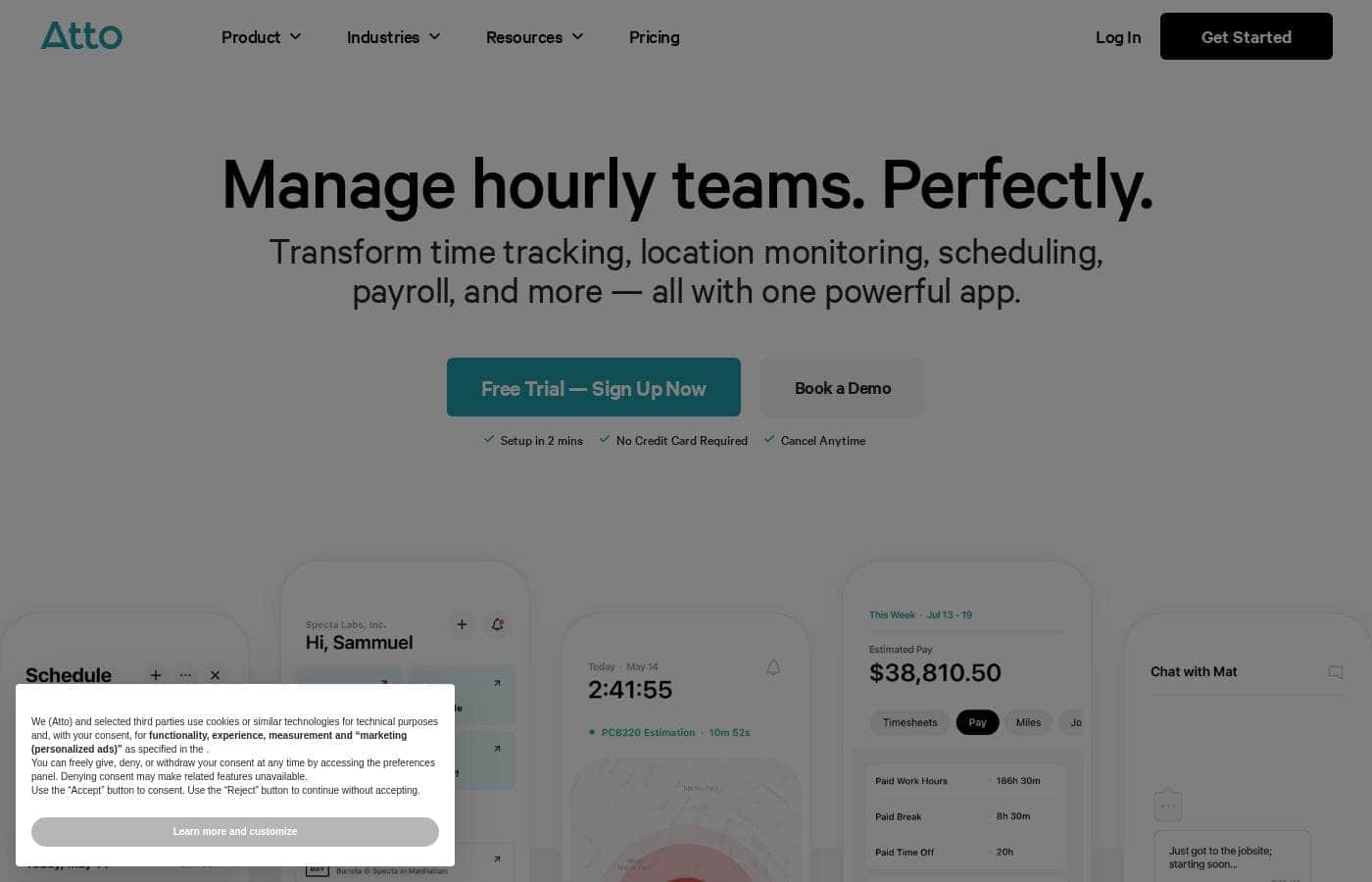
Tracking hourly staff across job sites often means chasing paper timesheets, fixing clock-in disputes, and redoing payroll. Atto pulls time tracking, GPS check-ins, scheduling, and payroll into one app. Setup takes about two minutes, and you can start without a credit card.

Atto is a timesheet and time tracking app for businesses that manage hourly staff. It's aimed at field service and construction teams, where workers clock in from job sites. The product runs on iPhone and Android apps and includes a shared time clock kiosk.

It combines tracking, scheduling, and payroll in one place, so managers don't juggle separate tools.

Deve escolher Atto?

Guia rápido antes de comparar planos ou visitar o site.

Escolha se

  • Teams that value a fast start — the site advertises two-minute setup with no credit card
  • Field workers who need to clock in through iPhone or Android apps
  • Employers focused on payroll accuracy; Atto cites a 75% cut in payroll errors
  • Admins who want timesheet reports generated automatically
  • Buyers who trust peer signal — 5/5 across 2,849+ published reviews

Evite se

  • Solo freelancers or fully remote desk teams — Atto targets hourly and field staff
  • Companies that depend on specific third-party integrations; the site doesn't list them, and payroll appears to be built in
  • Teams without smartphones or a spare tablet, since clock-ins rely on the mobile apps or a kiosk

Próximos passos antes de comprar

  1. 1Check current pricing first.
  2. 2Compare Atto against one or two other time tracking tools on price and fit before you commit.
  3. 3Confirm your devices. Make sure your crew's phones or a shared tablet can run the Atto apps or kiosk mode.
  4. 4Test the payroll flow with one full pay cycle using the no-credit-card setup.
  5. 5Read the cancel-anytime terms and any trial limits before you sign up.

Facilidade de uso

The site leans hard on simplicity: setup in two minutes, no credit card required, cancel anytime. Clock-ins happen through iOS and Android apps or a shared kiosk, and timesheet reports generate automatically. One customer says her team 'actually likes' the app. Note this assessment is based on published claims and reviews, not hands-on testing.

Atto Funcionalidades principais

⏱️ Time tracking with GPS clock-ins

Clock-ins shouldn't start with a chase. With Atto, your crew punches in from the iPhone or Android app, a shared tablet in kiosk mode, or their own phone. Real-time GPS location tracking verifies where the clock-in happens, so hours from job sites are backed by location — not memory.

It's built for crews that don't sit at a desk.

✨ Scheduling and time off in one place

Stop rebuilding the schedule every week. Atto's shift scheduling shows who works when, and advanced shift controls let you set tighter rules as your team grows. Time off requests and time off management live in the same app, so approving leave doesn't mean leaving your schedule.

Rotating crews and multi-site teams get the most here.

✨ Payroll that starts from real hours

When timesheets close, payroll shouldn't restart. Atto builds timesheet reports automatically and runs automated pay calculations, so hours flow straight into payroll processing. The payroll add-on serves US-based businesses and covers:

  • One-click payroll processing
  • Unlimited payroll runs
  • Simplified tax compliance

Fewer manual fixes means fewer errors — Atto cites a 75% drop in payroll errors.

✨ One **app** for the daily runaround

The tools you'd normally juggle sit together here. Team chat keeps everyone in one thread, the activity feed shows what's happening across the crew, and mileage tracking, job codes, and job costing tie hours to the work. It all runs from one app with a two-minute setup.

Atto says teams save 4+ hours a week on admin.

Casos de uso

🏗️ Clock in at the job site

Construction crews start shifts from their phones or a shared kiosk, no paperwork involved. Job codes and notes capture where hours went. Expected outcome: fewer clock-in disputes and timesheets that fill themselves.

📍 Verify field hours with GPS

Field service managers see who's clocked in and where, in real time. That means no more calling around to confirm arrivals. Expected outcome: location-verified hours you can trust on every job.

💵 Run payroll without the spreadsheets

Admins turn approved timesheets into pay runs with one click, including unlimited runs and simplified tax compliance for US teams. Atto cites a 75% drop in payroll errors. Expected outcome: cleaner, faster paydays.

📅 Schedule shifts and time off in one place

Managers build schedules, handle time off requests, and control overtime from the same app the crew uses to clock in. Expected outcome: less scheduling chaos and fewer missed shifts. > Tip: Advanced adds job costing and mileage tracking if you bill by project or drive for work.

Preços do Atto

A partir de5,65 US$/mês≈ 5,16 €

  • 5 planos

Preços ainda não verificados — consulte o site do fornecedor.

página de preços do Atto

Captura da página de preços do AttoVer captura da página de preços
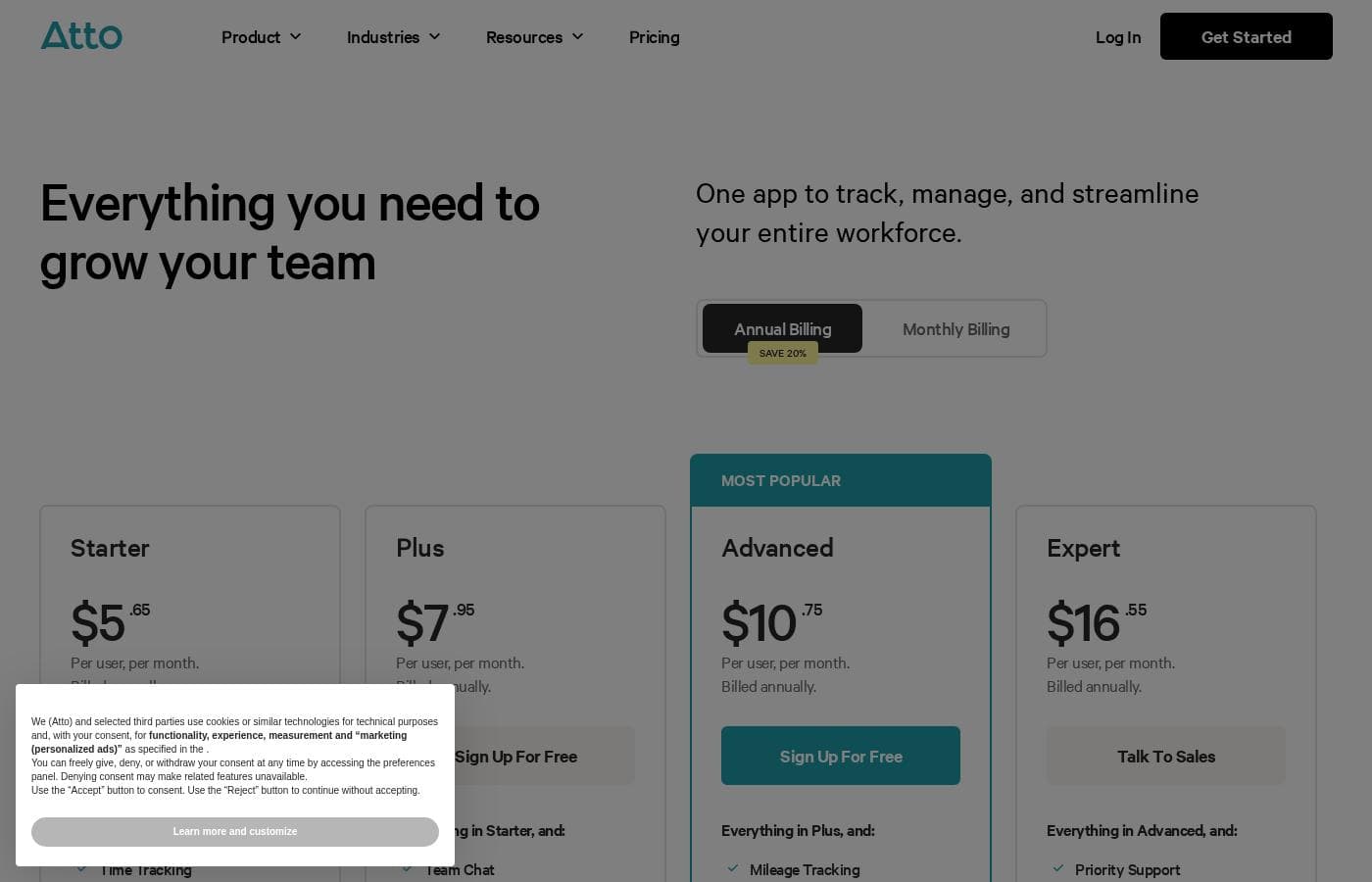
PlanoMensalAnualInclui
Starter
por utilizador
5,65 US$/mês
≈ 5,16 €
5,65 US$/mês
≈ 5,16 €
67,80 US$ por ano
  • Time Tracking
  • Shift Scheduling
  • Automated Timesheets
  • Job Codes, Breaks & Notes
Plus
por utilizador
7,95 US$/mês
≈ 7,26 €
7,95 US$/mês
≈ 7,26 €
95,40 US$ por ano
  • Everything in Starter
  • Team Chat
  • Real-Time GPS Tracking
  • Basic Time Off Management
  • Automated Pay Calculations
Advanced
por utilizador
10,75 US$/mês
≈ 9,81 €
10,75 US$/mês
≈ 9,81 €
129 US$ por ano
  • Everything in Plus
  • Mileage Tracking
  • Advanced Shift Controls
  • Time Off Requests
  • Job Costing
Expert
por utilizador
16,55 US$/mês
≈ 15,10 €
16,55 US$/mês
≈ 15,10 €
198,60 US$ por ano
  • Everything in Advanced
  • Priority Support
  • Concierge Onboarding
  • Custom Implementation
  • API Access
Atto Payroll (add-on)
por utilizador
5,95 US$/mês
≈ 5,43 €
—
Available to US-based businesses only
  • One-Click Payroll Processing
  • Unlimited Payroll Runs
  • Simplified Tax Compliance

Convertido à taxa de referência do BCE de 27/11/2026; o fornecedor pode cobrar um preço local diferente.

Tipos de preço: Yearly subscription, Per seat pricing

Notas sobre preços

Atto's time tracking plans cost between $5.65 and $16.55 per user, per month, all billed annually. A separate Atto Payroll add-on costs $5.95 per payroll user per month plus a $39.95 monthly base fee, and it's only available to US-based businesses.

Atto costs between $5.65 and $16.55 per user, per month, billed annually, with four plans: Starter at $5.65, Plus at $7.95, Advanced at $10.75, and Expert at $16.55, plus an optional payroll add-on.

Here's a closer look at what each plan includes.

Starter

Price: $5.65 per user, per month, billed annually Other Features:

  • Time Tracking
  • Shift Scheduling
  • Automated Timesheets
  • Job Codes, Breaks & Notes

Starter is the simple entry point. It covers the basics most hourly teams need: clocking in and out, building schedules, and automatic timesheets. If you run a small team and just want reliable tracking without extras, this is your plan.

Plus

Price: $7.95 per user, per month, billed annually Other Features:

  • Everything in Starter
  • Team Chat
  • Real-Time GPS Tracking
  • Basic Time Off Management
  • Automated Pay Calculations

Plus is Atto's most popular plan. It adds GPS tracking and team chat, which makes it a strong fit for field service crews and mobile teams. Managers who want to see where people are working in real time will get the most from this tier.

Advanced

Price: $10.75 per user, per month, billed annually Other Features:

  • Everything in Plus
  • Mileage Tracking
  • Advanced Shift Controls
  • Time Off Requests
  • Job Costing

Advanced suits growing businesses with more complex operations. Mileage tracking and job costing help teams that bill clients by project or drive for work. If you need proper time off requests and tighter shift rules, this tier handles it.

Expert

Price: $16.55 per user, per month, billed annually Other Features:

  • Everything in Advanced
  • Priority Support
  • Concierge Onboarding
  • Custom Implementation
  • API Access

Expert is built for larger companies that want hands-on help. You get priority support, guided onboarding, and API access for custom integrations. Skip this tier if you don't need setup assistance or custom workflows, since lower plans cover most teams well.

Atto Payroll (add-on)

Price: $5.95 per payroll user, per month, plus a $39.95 base fee per month Other Features:

  • One-Click Payroll Processing
  • Unlimited Payroll Runs
  • Simplified Tax Compliance
  • Available to US-based businesses only

Atto Payroll is an add-on that sits on top of any plan. It's priced separately from the time tracking tiers and is only open to US-based businesses. If you run payroll in the US and want it inside the same app, it's worth a look.

All four plans are billed annually, and every price is quoted per user. The pricing page doesn't show a free plan or a refund policy, though Atto's homepage notes you can get set up without a credit card and cancel anytime. It's smart to confirm your user count and current rates with Atto before committing.

Calculadora de custo

Estime quanto custa o Atto para a sua equipa.

Faturação
Por mês
28,25 US$≈ 25,78 €
Por ano
339 US$≈ 309,39 €

Starter é cobrado por utilizador: preço × 5 lugares. Estimativa com base nos preços de tabela publicados, sem impostos, extras nem descontos.

Convertido à taxa de referência do BCE de 27/11/2026; o fornecedor pode cobrar um preço local diferente.

Como pagar menos pelo Atto

  • Alguns planos são por utilizador: pague apenas os lugares realmente usados.
Visitar Atto

Avise-me quando o Atto mudar de preço

Um e-mail quando detetarmos uma alteração na página de preços do fornecedor. Sem newsletter, sem promoções. Cancelamento com um clique.

Avaliações de utilizadores

Ainda não há avaliações.

Escrever avaliação

Escrever uma avaliação para Atto
0/100 caracteres
0/2000 caracteres

Por que usar Atto?

If your crew's hours live in spreadsheets and text messages, Atto tries to fix that in one place. The site reports strong numbers, and the setup is deliberately simple. Here's what stands out:

  • One app, less admin. Time tracking, GPS clock-ins, scheduling, and payroll sit together, so you're not paying for or switching between several tools.
  • Cleaner payroll runs. Atto cites a 75% reduction in payroll errors and more than 4 million timesheet reports generated automatically.
  • Built for the field. iPhone and Android apps plus a kiosk mode let crews clock in from job sites or a shared tablet.
  • Fast to try. Setup takes about two minutes, you don't need a credit card, and you can cancel anytime.
  • Proven at scale. The site reports 15,000+ companies use Atto, with $3 billion in wages logged accurately.
  • Time back each week. Atto's published stats claim teams save 4+ hours per week on admin tasks.

Alternativas a Atto

Outras ferramentas na categoria Gestão da força de trabalho

Ver todas as ferramentas de Gestão da força de trabalho
Wing Assistant

Wing Assistant

Workforce management4.1/5

Assistentes virtuais geridos com pessoal dedicado, supervisão incluída e planos a partir de $699/mês.

Planday

Planday

Workforce management3.9/5

Equipas com turnos usam o Planday para planear horários, registar horas e pagar aos colaboradores.

Parim Workforce Software

Parim Workforce Software

Workforce management3.9/5

Software de escalas e registo de horas para equipas por turnos de todas as dimensões.

Atto FAQ

Quanto custa o Atto?

O plano pago mais barato do Atto, Starter, custa 5,65 US$ (≈ 5,16 €) por mês. Os planos pagos vão de 5,65 US$ a 16,55 US$ por mês.

How does Atto charge — per seat or by usage?

Atto charges per seat. Every plan is priced per user, per month, and billed annually. The Payroll add-on is separate: $5.95 per payroll user plus a $39.95 monthly base fee, and it's US-only.

Does Atto integrate with other software?

Atto doesn't list third-party integrations; payroll is built in and US-only. If you need custom connections, the Expert plan includes API access and custom integrations. Check your must-have tools with Atto before buying.

Is there a free trial or refund policy?

There's no free trial or money-back guarantee shown on the pricing page. You can set up without a credit card and cancel anytime, though. Confirm any trial limits and refund terms before you commit to annual billing.

What support and onboarding do Atto plans include?

Priority support, concierge onboarding, and custom implementation are Expert-plan extras. No response-time SLA is published, and lower plans don't list special support. If fast help matters to you, ask Atto about response times during signup.

Pronto para experimentar Atto? Confira o site oficial ou os preços.

Você é Atto? Reivindicar este perfil · Obter o selo