Hiver vs Techinline
Hiver and Techinline solve completely different problems. Hiver turns email into a support desk, while Techinline provides remote computer access. The right choice depends entirely on what your team does day-to-day.
Best for: Customer service teams managing email, chat, and phone support, IT and HR departments handling internal employee requests
Best for: IT professionals providing remote support to clients, Managed Service Providers (MSPs) managing desktop fleets
Simple Shared Inbox, Complex Subscription.
We found Hiver's promise of transforming Gmail into a seamless helpdesk highly appealing and effective for team collaboration. However, we must flag significant and recurring user reports concerning aggressive cancellation policies and perceived low value for the price. Overall, Hiver provides strong helpdesk features in a familiar interface, but the associated business practices detract heavily from the user experience.
Zalety
- Integrates seamlessly into Gmail, offering a familiar user interface.
- Fast deployment and high ease of use (get started quickly in under 5 minutes).
- Robust Free plan available that supports an unlimited number of users.
- Collaboration tools (Shared Drafts, internal Notes) eliminate messy email forwarding.
Wady
- Repeated and strong user complaints about high pricing or being overpriced.
- Severe complaints regarding extreme difficulty or impossibility when canceling subscriptions.
- Analytics modules have previously been deemed very limited and lacking clarity.
- Past reports indicate buggy software and inconsistent synchronization issues.
Solid remote support with scalable pricing.
We found Techinline SetMe to be a capable and secure remote access solution, especially for IT professionals and small teams needing reliable unattended and on-demand support. Its tiered pricing offers flexibility, but the lack of a clear refund policy is a notable gap for potential buyers.
Zalety
- Simple, instant client connections via a set.me link.
- Scalable plans from individual use to enterprise-level team management.
- Stable connections with auto-reconnect and multi-monitor support.
- Centralized dashboard for managing all devices and permissions.
Wady
- Limited public user reviews made independent sentiment analysis impossible.
- No explicit refund policy is detailed on the website.
- Advanced team features require upgrading to higher-tier, per-seat plans.
- The 'Core' plan for individual use lacks on-demand support features.
OHiver
Hiver is an innovative, AI-first customer service platform. It transforms your existing email inbox into a complete, powerful ticketing system. This means you already know how to use it, allowing teams to get started quickly, often in under five minutes. Hiver is built for any team—from customer service and finance to HR and IT—that needs to manage communication across channels like email, live chat, WhatsApp, and phone in one simple place. 💡
OTechinline
SetMe is a remote support and management tool 🛠️ designed for IT professionals, support teams, and managed service providers. It lets you instantly connect to any computer, whether you’re providing live help or managing unattended servers and desktops from a central dashboard.
Porównanie funkcji
Przegląd funkcji
Podkreślamy główne różnice i wybieramy zwycięzcę dla każdej funkcji.
Core Purpose
Hiver manages communication. Techinline manages remote connections. They're built for different jobs.
**What Hiver does:** Hiver transforms your Gmail inbox into a multi-channel ticketing system. Teams handle email, live chat, WhatsApp, and phone calls from one place. Over 10,000 teams use it for support. **What Techinline does:** Techinline SetMe is a remote support tool. It lets IT professionals connect instantly to any computer. They manage unattended servers or provide live help via a simple web link. **Key difference:** Hiver is for managing conversations. Techinline is for accessing and controlling computers remotely. You need to pick based on your primary workflow.
Ease of Use
Hiver feels like your inbox. Techinline uses a simple link. Both aim for low friction.
**What Hiver does:** Hiver's main strength is familiarity. It works right inside Gmail. Teams get started in under 5 minutes. The interface is designed to look like email. **What Techinline does:** Techinline's SetMe uses a simple set.me link. Clients just visit a URL to start a support session. The dashboard is centralized for managing devices. **Key difference:** Hiver is easy because you already know email. Techinline is easy because it removes complex setup for end-users. Both reduce learning curves, but for different tasks.
Collaboration
Hiver's collaboration is internal and conversational. Techinline's is about permissions and team access.
**What Hiver does:** Hiver shines with internal tools. Use Shared Drafts to write replies together. Add @mentions and internal Notes to loop in teammates without messy email forwards. **What Techinline does:** Techinline offers team management for remote access. You can assign technicians to groups and set granular access controls. It's about who can control which machine. **Key difference:** Hiver helps teams talk to each other about customer issues. Techinline helps teams share control over remote devices. Choose Hiver for support collaboration; choose Techinline for IT team coordination.
Automation
Hiver automates ticket workflows. Techinline automates reconnection and session logging.
**What Hiver does:** Hiver automates repetitive support work. It routes conversations to the right person and categorizes tickets. You can set up round-robin assignments and approval workflows. **What Techinline does:** Techinline automates connection stability. Sessions auto-reconnect if the network drops. You can also record sessions automatically for documentation. **Key difference:** Hiver's automation reduces manual work for support agents. Techinline's automation ensures seamless remote access. The value depends on whether you need to automate tasks or connections.
Scalability
Hiver scales by adding users. Techinline scales by adding devices or seats.
**What Hiver does:** Hiver's Free plan supports unlimited users. Paid plans add more shared inboxes and automation rules. It scales with team size and feature needs. **What Techinline does:** Techinline scales from individual use to enterprise. The Business plan offers unlimited unattended devices. Team plans add user management and policy controls. **Key difference:** Hiver scales horizontally with users and communication channels. Techinline scales vertically with device access and team permissions. Both can grow, but the growth metrics differ.
Reporting & Analytics
Hiver offers detailed performance metrics. Techinline provides session reports.
**What Hiver does:** Hiver tracks resolution times, support volume, and team performance. Growth and Pro plans add custom reports and advanced analytics to measure SLA success. **What Techinline does:** Techinline provides remote session reports. You can monitor connection activity. The Business plan adds advanced team reports and access logs. **Key difference:** Hiver's analytics are deeper for customer service metrics. Techinline's reporting focuses on remote access activity. Choose based on whether you need support KPIs or IT access logs.
Pricing Model
Hiver uses per-user pricing with a free plan. Techinline uses per-admin or per-seat pricing with no free tier.
**What Hiver does:** Hiver starts at $0 for unlimited users. Paid plans range from $19 to $49 per user/month (annual). There's a 7-day free trial. **What Techinline does:** Techinline starts at $8.25/month for individual unattended access. Team plans are per-seat ($41-$58/seat/month). There's a 15-day free trial. **Key difference:** Hiver is more accessible for small teams with its free plan. Techinline is more targeted for IT professionals who need remote access. Hiver's per-user model can get expensive for large teams.
Security & Compliance
Hiver offers major certifications. Techinline focuses on encryption.
**What Hiver does:** Hiver is compliant with GDPR, SOC 2 Type II, ISO 27001, and CCPA. HIPAA compliance is available in the Elite plan for health data. **What Techinline does:** Techinline uses end-to-end encryption for all remote sessions. It protects data in transit during remote control. **Key difference:** Hiver has a broader set of formal certifications. Techinline focuses on session-level encryption. Hiver is better for regulated industries; Techinline is sufficient for general remote security.
Customer Support
Hiver provides 24/7 support on all plans. Techinline's support details are less clear.
**What Hiver does:** Hiver offers 24/7 email and live chat support on every plan, including Free. The Elite plan adds a dedicated success manager. **What Techinline does:** Techinline mentions customer support but doesn't detail response times or SLAs. You may need to contact them for specifics. **Key difference:** Hiver's support is explicitly available 24/7 across all tiers. Techinline's support offerings are not detailed in the provided data. This gives Hiver an edge for teams needing reliable assistance.
Integration Ecosystem
Hiver integrates with 100+ apps. Techinline's integrations are not detailed.
**What Hiver does:** Hiver connects with over 100 applications. Lite plans include Slack, Asana, Jira. Growth adds Zapier. Pro includes premium integrations and API access. **What Techinline does:** The data does not specify integration capabilities for Techinline. You should check product documentation for details. **Key difference:** Hiver has a robust, documented integration ecosystem. Techinline's integration capabilities are unclear from the provided data. For teams needing to connect with existing tools, Hiver offers more transparency.
Mobile Experience
Neither tool's mobile experience is detailed in the data.
**What Hiver does:** The provided data does not include information about Hiver's mobile app or experience. **What Techinline does:** The provided data does not include information about Techinline's mobile app or experience. **Key difference:** Without specific data, we cannot compare their mobile offerings. You may need to check their websites for mobile app details. **Real-world impact:** For teams needing to manage support or remote access on the go, this is a gap in the comparison. You should verify mobile capabilities separately.
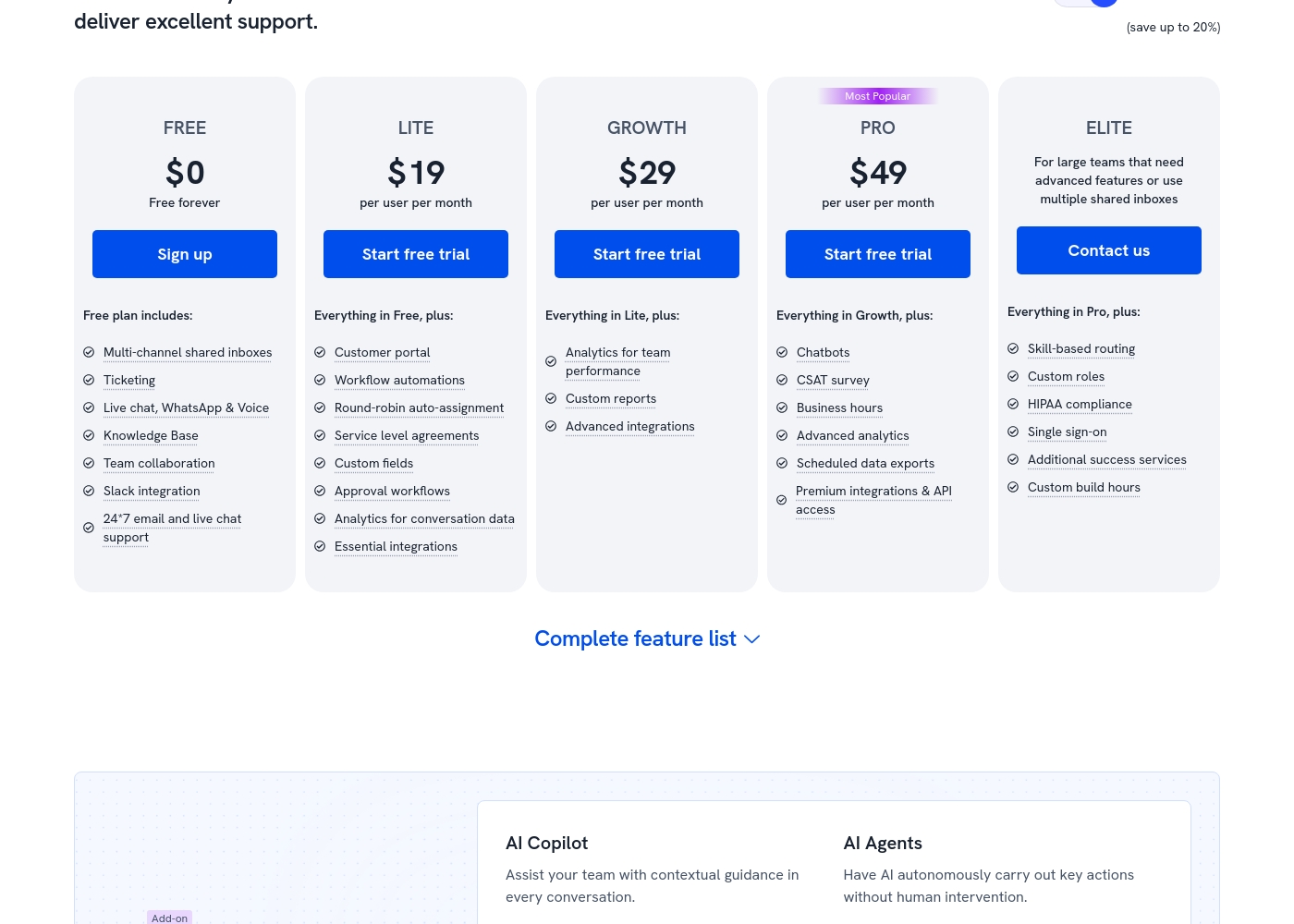
Hiver costs between $0 and $49 per user per month (billed annually) with five plans: FREE at $0, LITE at $19, GROWTH at $29, PRO at $49, and ELITE (Contact us).
Let's explore which plan makes the most sense for your team's unique needs.
FREE
Price: $0 (Free forever) Best For: Teams wanting basic triage capabilities for multi-channel communication. Other Features: Multi-channel shared inboxes, Ticketing, Live chat/WhatsApp/Voice, Knowledge Base, Team collaboration, Slack integration, 24/7 email and live chat support.
- Multi-channel shared inboxes
- Ticketing
- Live chat, WhatsApp & Voice
- Knowledge Base
- Team collaboration
- Customer portal
- Workflow automations
- Round-robin auto-assignment
- Service level agreements (SLA)
- Custom fields
- Analytics for team performance
- Custom reports
- Advanced integrations (e.g., Zapier)
- Chatbots
- CSAT survey
- Business hours
- Advanced analytics
- Scheduled data exports
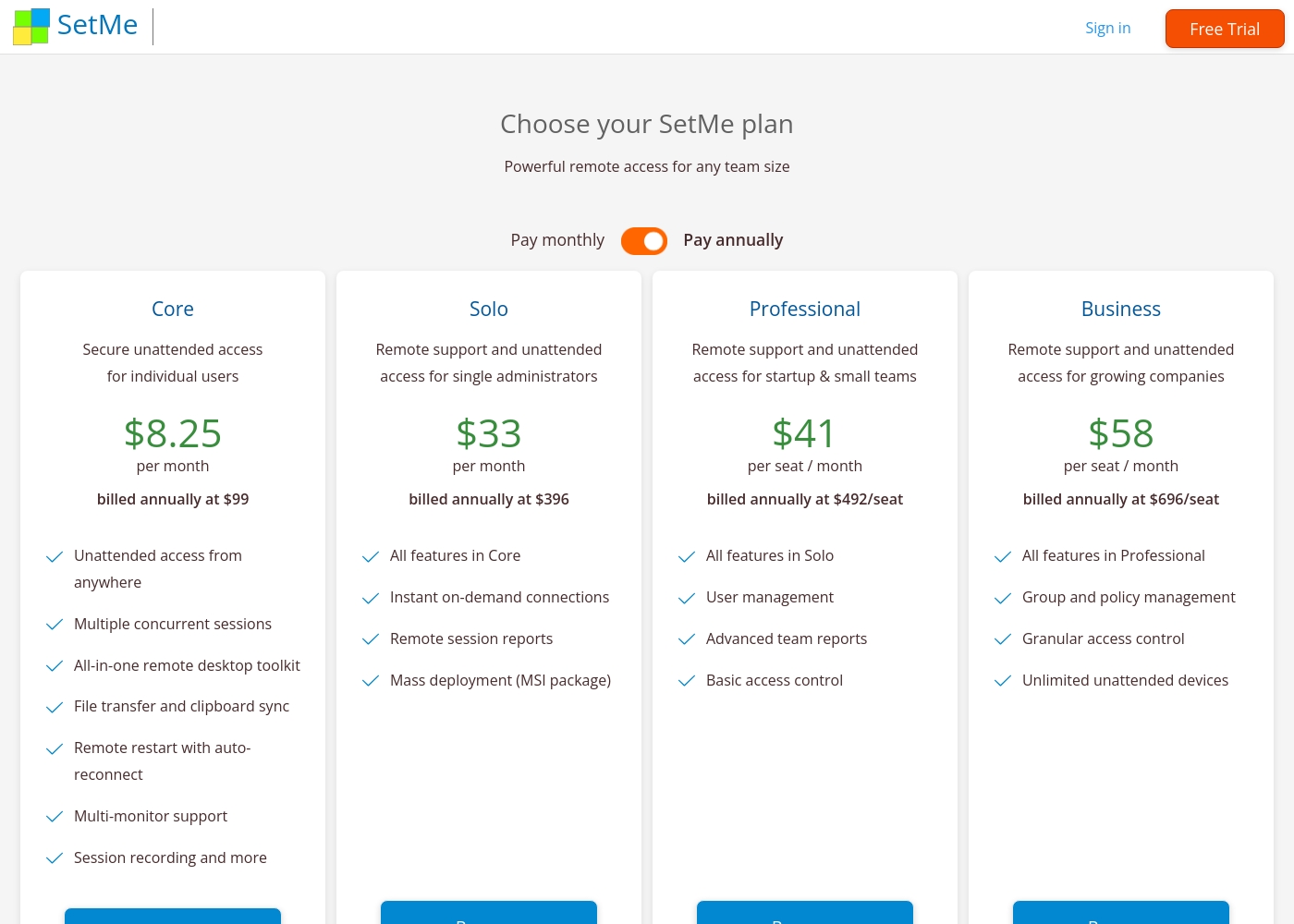
Techinline pricing: Techinline offers four SetMe plans starting at $8.25 per month (billed annually) for individual unattended access. Pricing scales based on features like on-demand support, seat count, and team management tools, with both monthly and yearly billing available for most tiers.
Core
Price: $8.25 per month (billed annually at $99) Best For: Individual users needing secure unattended access Other Features: Multiple concurrent sessions, File transfer and clipboard sync, Remote restart with auto-reconnect, Multi-monitor support, Session recording
This plan is perfect for individuals who only need to manage their own remote machines. It's a reliable choice if you don't need to provide instant on-demand support to new clients.
Pricing Head-to-Head
Opinie użytkowników
External feedback shows a highly polarized user experience, resulting in a low overall satisfaction score. While some users appreciate Hiver's core function as the "most simple helpdesk within email", providing a frictionless support experience directly inside Gmail, the critical complaints focus heavily on pricing and service practices.
Several recent reviews allege the service is overpriced and strongly advise against use due to extreme difficulties in cancelling existing subscriptions or accounts. These recurring administrative issues suggest a significant lack of focus on customer retention and respect for user autonomy.
Hiver offers the most simple helpdesk solution we've found that works right within the email interface. This made the onboarding process incredibly fast for our team. We appreciate how simple the system is to use daily.
External reviews for Techinline SetMe were not accessible during this review. The provided Trustpilot URL returned a 403 error, preventing access to user feedback. Consequently, the review relies solely on the product's website information and our independent analysis of its features and pricing structure.
Nasz werdykt
Hiver and Techinline aren't direct competitors. They solve completely different problems, so the best tool depends entirely on your job. Hiver's superpower is turning your email into a powerful support desk. It centralizes communication across email, chat, and phone. Teams report up to 90% productivity gains using it. It's built for anyone who manages conversations, not computers. Techinline's superpower is instant, stable remote access. It lets IT pros connect to any computer with a simple set.me link. Sessions stay connected even on bad internet. It's perfect for fixing issues or managing servers without being there. The deciding factor is your workflow. If you need to manage customer or internal support tickets, choose Hiver. If you need to remotely control and manage computers, choose Techinline. They're built for different jobs. Final verdict: Pick Hiver if you're a support team managing conversations across channels. Pick Techinline if you're an IT professional needing remote access. Don't try to use one for the other's job—they're not interchangeable.
Często zadawane pytania
Which is better for small teams: Hiver or Techinline?
It depends on your needs. Hiver is better for small support teams because it has a free plan with unlimited users. Techinline is better for small IT teams needing remote access. Choose Hiver for customer communication; choose Techinline for computer control.
Does Hiver have remote access like Techinline?
No. Hiver is a communication platform for managing support tickets. It does not provide remote computer access. Techinline SetMe is specifically designed for remote desktop connections and unattended access.
Is Techinline worth the extra cost over Hiver?
The cost comparison isn't direct because they serve different purposes. Techinline starts at $8.25/month for individual access. Hiver has a free plan but charges per user for paid tiers. The value depends on whether you need remote access or support ticketing.
Can I migrate from Hiver to Techinline easily?
Migration isn't straightforward because they're different tools. Hiver manages email-based tickets. Techinline manages remote connections. You can't transfer ticket data to a remote access tool. Each tool needs to be set up separately for its specific purpose.
Which tool has better customer support: Hiver or Techinline?
Hiver offers 24/7 email and live chat support on all plans, including the free tier. Techinline's support details aren't provided in the data. For guaranteed around-the-clock assistance, Hiver is the clearer choice.
What are the main security differences between Hiver and Techinline?
Hiver has major certifications like GDPR, SOC 2, and HIPAA compliance. Techinline focuses on end-to-end encryption for remote sessions. Hiver is better for regulated industries; Techinline is sufficient for general remote security.
Gotowy do wyboru?
Oba narzędzia mają swoje mocne strony. Wybierz w oparciu o swoje konkretne potrzeby.