전체 번역 준비 중 — 제품 세부 정보는 영어로 표시되며 탐색은 한국어로 제공됩니다.
Webflow

Webflow 리뷰

Build, manage, and scale your web presence without traditional dev bottlenecks.

작성자: Ciroapp Editorial Team · 업데이트됨 2026년 5월 15일

추가 비용 없이 수수료가 적용될 수 있습니다

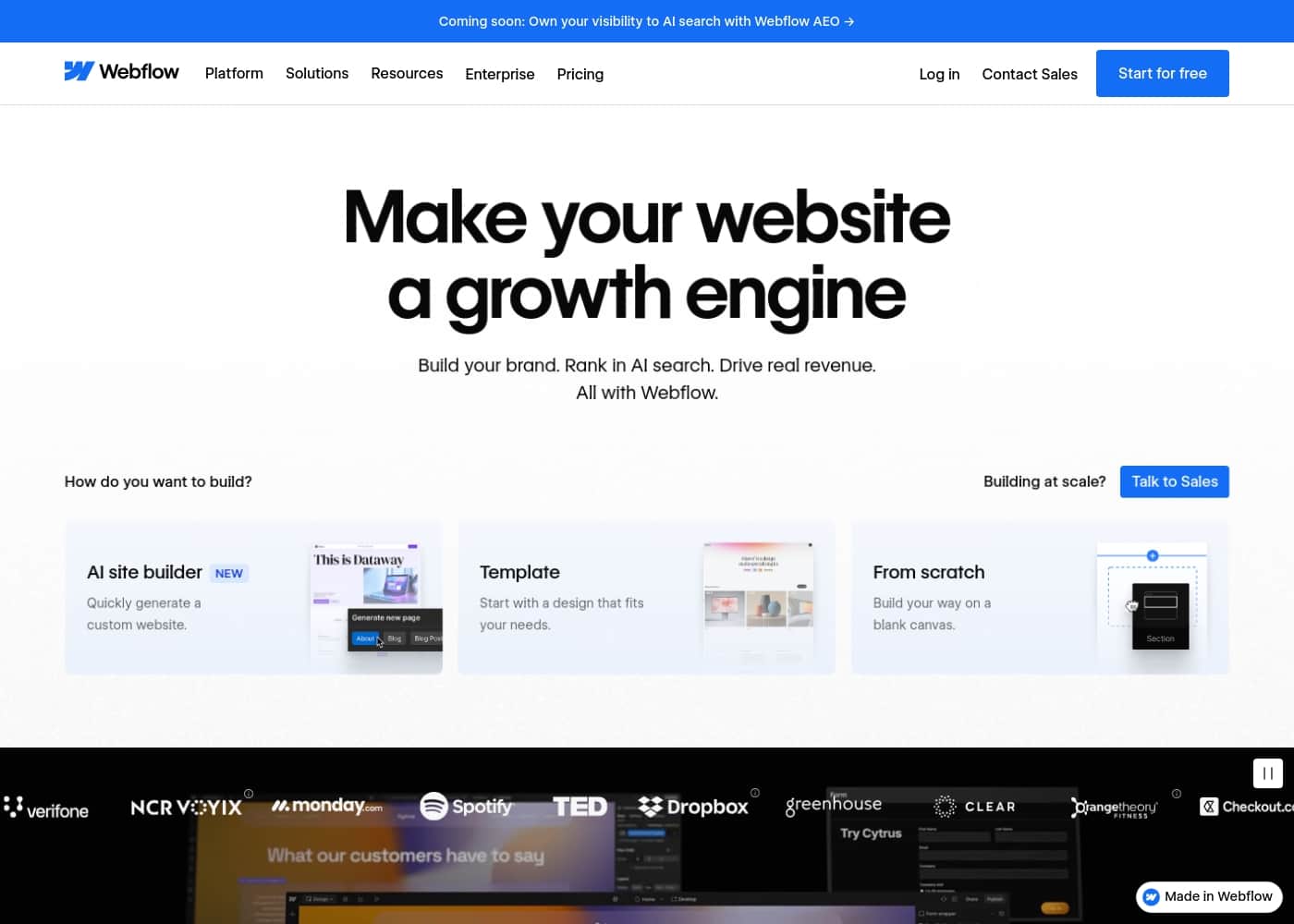
Webflow 홈페이지 스크린샷

한눈에 보기

Webflow의 평점, 가격 요약, 주요 기능, 핵심 포인트를 빠르게 확인하세요.

Ciroapp 점수

4.2/ 5

Powerful for pros, steep for beginners.

We find Webflow to be a robust platform that truly empowers marketing and design teams to build, manage, and scale websites with exceptional creative control and speed. It excels at eliminating traditional development bottlenecks and delivering measurable business impact. Overall, it's a top-tier choice for organizations ready to invest in a professional, integrated visual development system.

장점

  • Unmatched visual design freedom and pixel-perfect control.
  • All-in-one platform combining CMS, hosting, and design tools.
  • Drives faster project timelines and significant cost savings.

단점

  • Steep learning curve, especially for non-technical users.
  • Customer support responsiveness can be inconsistent.
  • Pricing can be expensive, with costs scaling quickly.
가장 적합
  • Marketing teams wanting direct control over site speed and content.
  • Designers aiming to build custom sites without developer handoffs.
  • Agencies seeking faster client project delivery and management.
이 섹션은 요약입니다. 기능, 사용 사례, 가격, 리뷰에 대한 자세한 내용은 아래에 이어집니다.

Webflow은(는) 무엇인가요?

Launching and updating your website often means waiting for developers or wrestling with rigid systems. Webflow offers a visual platform designed to eliminate these delays. It empowers marketers and designers to build, publish, and optimize sites with greater speed and creative control. ✨

As one company shared, they went from a 'rigid, brittle CMS' to launching 32 global sites in just 10 days. That shift from slow to fast is the core promise here.

Webflow is an all-in-one visual website development platform. It's designed for marketing teams, designers, and agencies who want to build professional, custom websites. The platform combines a powerful visual editor, a content management system (CMS), and hosting.

🛠️ Its goal is to let you handle everything from design to publishing to analytics without needing deep coding knowledge for every task.

Webflow을(를) 선택해야 할까요?

요금제를 비교하거나 사이트로 이동하기 전에 확인할 빠른 구매 가이드입니다.

선택하면 좋은 경우

  • Teams frustrated by slow, ticket-based web development cycles.
  • Organizations needing to scale web content across multiple regions or brands.
  • Companies aiming to prove website ROI through integrated analytics and conversion optimization.
  • Creators who want to implement rich animations and interactions visually.

피하는 것이 좋은 경우

  • Small projects with very tight budgets, as enterprise features and scale often come with significant cost.
  • Teams completely reliant on legacy systems with no path for integration or migration.
  • Users who prefer a purely code-first, command-line driven development environment.
  • Those needing fully transparent, public pricing without contacting sales for custom quotes.

구매 전 다음 단계

  1. 1Review the available pricing plans and contact sales for enterprise details to understand the cost commitment.
  2. 2Verify that your essential tools (CRM, analytics, marketing automation) can integrate via their APIs or connectors.
  3. 3Explore Webflow University to gauge the learning curve for your team's specific roles.
  4. 4Compare the platform's feature set against other visual builders or your current CMS to ensure a fit.
  5. 5Take advantage of any available trial or free tier to test the core workflow before purchasing.

사용 편의성

Webflow is built to make complex web development more accessible. It replaces traditional coding with a visual interface, aiming to empower non-technical teammates to publish content. The platform emphasizes streamlined handoffs and collaboration to reduce friction.

Webflow 주요 기능

🚀 Build Without Waiting for Developers

Webflow lets your team create and launch websites on your own schedule. You don't have to file a ticket and wait for a developer to build a new page or update content. One company went from a rigid system to launching 32 global sites in just 10 days.

This speed comes from a visual editor that feels like design software but outputs production-ready code.

✨ Design with Pixel-Perfect Control

You get complete creative freedom to build exactly what you imagine. The platform offers pixel-perfect control over layouts, interactions, and animations. You can create rich, expressive experiences visually without compromising your design vision.

It removes technical complexity so you can focus on the craft of building a beautiful site.

✨ Manage Content Your Way

Webflow includes a powerful, visual CMS that lets you own your content structure. Non-technical teammates can publish and update content fast, without needing engineering help. You can manage content in a composable way, giving you flexibility.

This empowers your entire team to keep the site fresh and drive traffic.

✨ Grow Traffic and Conversions

Every tool you need to prove your site's ROI is built in. You can understand what's working with native analytics. AI-powered tools help you run experiments and personalize content for different audiences to optimize for conversion.

The platform also helps you reach a global audience with localization and get found in both traditional search and AI-driven experiences.

✨ Collaborate Seamlessly Across Teams

Webflow replaces a disjointed set of tools with one shared workspace. Your marketing, design, and development teams can work together in one place. Features like comments, approvals, version control, and rollback simplify the feedback process.

You can set access levels to protect work while keeping the team moving forward.

✨ Scale with Enterprise-Grade Reliability

You can grow without worrying about infrastructure. Webflow provides secure, reliable hosting with 99.99% uptime, a global CDN, and edge routing. You get 24/7 managed security, audit logs, and automated site backups.

This means zero-maintenance hosting so your team can focus on building, not managing servers.

사용 사례

🚀 Launching a Global Brand Reboot Quickly

Verifone's old CMS was too slow for modern marketing. They needed to tell a new story across 32 global sites. Using Webflow's visual editor, their team built and launched all those sites in just 10 days.

This let them move from a rigid system to setting the pace for their digital presence.

📈 Boosting Conversions and Traffic

The marketing team at Lattice wanted more people to see their brand and take action. With Webflow, they improved their SEO and site experience. The result was a 20% increase in site-wide conversions and a massive 1,170% jump in year-over-year traffic.

It directly tied their web work to business growth.

🎨 Eliminating Developer Bottlenecks for Designers

At Petal, the design team often waited for engineers to bring ideas to the web. Webflow removed that hurdle completely. They completed eight major site redesigns without needing a single developer.

Now, their designers have the freedom to build and ship what they imagine.

💰 Reducing Costs and Reinvesting in Growth

Orangetheory Fitness was spending heavily on web maintenance. By moving to Webflow, they cut costs by $6 million each year. They reinvested that saved money into website optimization and localization, making their site experience even better for members worldwide.

⚡ Accelerating Client Project Delivery

Agencies like Verndale need to deliver client sites faster without losing quality. Webflow's collaborative platform eliminated slow, ticket-based processes. They achieved 44% faster project timelines, creating a more fluid workflow that gets high-performing sites to clients sooner.

🛡️ Scaling Securely with Enterprise Infrastructure

Growing companies need reliable hosting they don't have to manage. Webflow provides enterprise-grade hosting with 99.99% uptime, a global CDN, and managed security. This means you can scale your site traffic and complexity with confidence, while the platform handles all the maintenance and security updates.

✨ Building Interactive Brand Experiences

Dropbox wanted their website to stand out with emotion and usability. Using Webflow, they created three times more interactive elements than before. The platform's visual tools for interactions and animations let them build a site on the leading edge of modern web design, all without compromise.

🤝 Streamlining Agency Workflows and Handoffs

Agencies juggle client projects, billing, and feedback. Webflow simplifies this with built-in tools. You can capture page-level comments, have clients cover their own hosting costs directly, and collaborate in real-time.

This makes the handoff process cleaner and keeps everyone aligned.

Webflow 가격

가격이 아직 확인되지 않았습니다 — 공식 사이트를 참고하세요.

Webflow 가격 페이지

Webflow 가격 페이지 스크린샷가격 페이지 스크린샷 보기

가격 유형: Free plan, Monthly subscription, Yearly subscription, Per seat pricing, Usage-based pricing

가격 참고 사항

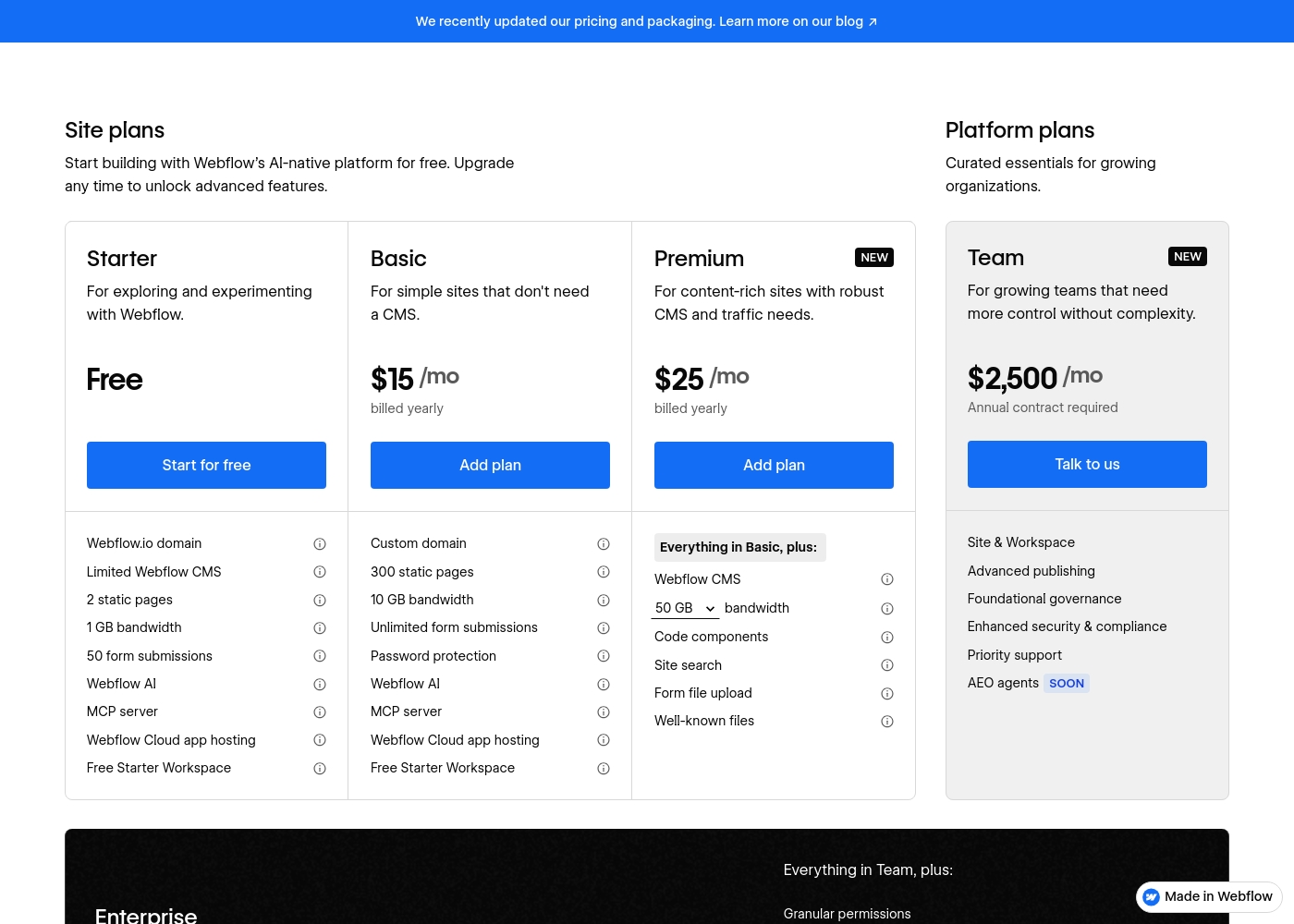
Webflow has a free Starter site plan. Paid site plans billed yearly: Basic $15/mo, Premium $25/mo; ecommerce plans: Standard $29/mo, Plus $74/mo, Advanced $212/mo.

Team platform plan from $2,500/mo (annual contract); Enterprise is custom. Prices are in USD per site, plus taxes.

Webflow pricing: Webflow offers free and paid subscription plans for individuals and organizations. Site plans start at $14/month billed annually, with separate options for ecommerce and team collaboration workspaces. Billing can be done monthly or yearly with significant savings on annual plans.

Prices are per site and exclude applicable taxes at checkout. Standard site hosting includes global CDN, automated backups, and integrated SEO controls. Features scale based on visitor traffic, CMS requirements, and advanced design needs like site search and custom code components.

New users can begin on the free Starter plan to explore the AI-native platform without an upfront commitment. Support varies from community help to priority dedicated assistance for Enterprise clients. Cancellation allows you to finish your current billing term, while overages are managed with grace periods like surge protection.

Webflow is a comprehensive platform for brands that need flexibility and scalability without engineering bottlenecks. Review each plan to find the right bandwidth and editor seats for your project. Enterprise solutions offer dedicated support and custom security configuration for large organizations.

Localization and analytics are available as separate add-ons to enhance your site's capabilities as you grow. Start your journey with Webflow today and build exactly what you imagine with professional precision and speed. The platform handles hosting and infrastructure so you can focus on craft and conversion.

Professional certifications are also available to showcase your expertise in the visual design industry. Choose the subscription that fits your business goals and start scaling your digital brand experience today. Check the full feature list to ensure you select the appropriate tier for your specific technical needs and traffic expectations.

Custom billing and invoicing are available for enterprise organizations to meet procurement requirements effectively. Contact sal

Webflow 가격이 바뀌면 이메일로 알림 받기

공급업체의 가격 페이지에서 변경을 감지하면 이메일 한 통을 보내드립니다. 뉴스레터나 할인 정보는 없습니다. 클릭 한 번으로 해지할 수 있습니다.

사용자 리뷰

We see a clear split in external sentiment about Webflow. On Trustpilot and Capterra, users frequently praise its powerful visual design and the freedom it gives to build complex sites without deep coding.

🛠️ Many love the professional results and the platform's ability to scale. However, recurring themes highlight a steep learning curve for beginners and frustration with customer support, especially for billing or technical issues.

Pricing is a common point of contention; some find the value excellent for businesses, while others deem it expensive for smaller projects. There are also notes about unexpected costs for bandwidth overages and add-ons, making predictable budgeting difficult.

공개 리뷰 요약 출처: Trustpilot, Capterra

아직 리뷰가 없습니다.

리뷰 작성

Webflow에 대한 리뷰 작성
0/100자
0/2000자

Webflow을(를) 사용해야 하는 이유는?

Why choose Webflow? It’s about gaining speed, control, and measurable results for your website. 🚀

  • Move faster, launch sooner: Teams report creating sites and pages on their own timeline without waiting for developer resources. One case noted 44% faster project timelines.
  • Boost your bottom line: Significant cost savings are possible. One company saved $6M annually, reinvesting it into site optimization and localization.
  • Drive real business impact: Users highlight key wins like a 20% increase in site-wide conversion and a 1,170% jump in year-over-year traffic. It directly ties web efforts to growth.
  • Unleash creative freedom: Build exactly what you imagine with pixel-perfect control over layout, interactions, and animations. The platform removes the 'technical complexity' so you can focus on craft.
  • Simplify team collaboration: Manage everything in one place with tools for feedback, approvals, and version control. This replaces a disjointed 'Frankenstack' of different tools.
  • Scale with confidence: The platform offers enterprise-grade hosting with 99.99% uptime, global CDN, and managed security. You get reliability without the maintenance overhead.

Webflow 대안

웹사이트 빌더 카테고리의 다른 도구

모든 웹사이트 빌더 도구 보기
Zenfolio

Zenfolio

Website Builder4.1/5

사진을 정리하고, 전시하고, 판매하는 완벽한 플랫폼입니다.

Duda

Duda

Website Builder4.1/5

전문가를 위해 구축된 AI 지원 웹사이트 플랫폼

Carrd

Carrd

Website Builder4.1/5

간단하고, 무료이며, 모든 기기에서 완벽하게 반응하는 원페이지 웹사이트를 만드는 가장 빠른 방법입니다.

Framer

Framer

Website Builder4.1/5

디자이너가 코드 제약 없이 고성능 웹사이트를 빠르게 게시하는 시각적 플랫폼입니다.

10Web

10Web

Website Builder4/5

AI 웹사이트 빌더 및 화이트 라벨 리셀링

Phonesites

Phonesites

Website Builder4/5

방문자를 리드와 고객으로 전환하는 가장 쉬운 방법.

사용자 1~25명용 가장 저렴한 웹사이트 빌더 소프트웨어

Webflow 자주 묻는 질문

What specific integrations does Webflow offer for my marketing stack?

Webflow connects to your tools through custom code, the REST API, and Webflow Apps. For deeper connections, you can use Zapier or Make. For specific integrations like Salesforce, Marketo, or HubSpot, check their app marketplace to confirm compatibility.

How does Webflow handle my site's security and data privacy?

Webflow provides 24/7 managed security, DDoS protection, and free SSL certificates for all sites. Enterprise plans offer custom security headers, audit logs, and SCIM provisioning. For specific compliance needs like SOC 2, confirm details with the sales team.

What are the exact bandwidth and CMS item limits on each plan?

The free Starter plan includes 1 GB bandwidth and 50 CMS items. The Basic plan ($15/mo) offers 10 GB bandwidth and no CMS. The Premium plan ($25/mo) scales up to 2.5 TB bandwidth and 20,000 CMS items. Team and Enterprise plans have custom limits.

How does billing work, and can I get a refund if I cancel?

Billing is per site, monthly or annually, with savings on annual plans. You can cancel any time, but you'll keep access until the end of your current billing term.

What does the free trial or Starter plan include?

The Starter plan is free and lets you build and explore Webflow. It includes a Webflow.io subdomain, 2 static pages, 1 GB bandwidth, 50 CMS items, and limited AI features. You can publish a site for free on this subdomain.

Is pricing per user or per site? Can I have multiple editors?

Site plans are priced per site. Workspace plans control team access and collaboration. Team and Enterprise plans include 'Full seats' for designers and 'Limited seats' for content editors, with more available for an extra fee.

How do I migrate my existing site to Webflow?

Webflow allows you to build sites from scratch or import content via their CMS APIs. For a full site migration, you typically rebuild the design in Webflow. They offer guided onboarding for Team and Enterprise customers to help with the process.

How responsive is Webflow customer support, and what are the SLAs?

Standard support is via email with a 48-hour response goal. Team and Enterprise plans get 24/7 priority support with faster SLAs, including 1-hour response times for major incidents on Enterprise. Phone support is available for Enterprise with a Premium SLA.

In which languages and regions is Webflow available?

The Webflow platform interface is available in English. You can build sites in any language. For multilingual sites, Webflow Localization is a paid add-on that starts at $9 per month, translating content via machine learning or partner apps.

What happens to my site if I downgrade my plan?

If you downgrade, you'll lose access to features specific to your higher plan (like advanced CMS items or bandwidth). Your site will remain live, but you must ensure you're within the limits of your new plan to avoid service interruption.

Who is Webflow best suited for, and who should look elsewhere?

Webflow is best for marketing teams, designers, and agencies needing control and speed without deep coding. It's less ideal for very small projects on tight budgets, teams relying entirely on legacy systems, or developers who prefer a purely code-first workflow.

Does Webflow have usage limits for its AI features?

Yes. Free Workspace plans get 200 AI credits per month. Paid Workspace plans (Core, Growth, Agency) get 300-400 credits per month. Enterprise plans have a custom shared credit pool. You can purchase additional credits as an add-on.

What are the surge protection and overage policies?

For bandwidth, if you exceed your limit for two consecutive months, your plan automatically upgrades. For Webflow Cloud apps and databases, overages incur a per-unit fee (e.g., $2 per million requests). Webflow provides at least 30 days' notice before charging for certain database overages.

Webflow을(를) 사용해볼 준비가 되셨나요? 공식 사이트 또는 가격을 확인하세요.

Webflow 담당자이신가요? 이 목록 소유권 주장 · 배지 받기