HelpDesk vs Techinline
HelpDesk and Techinline solve different problems. HelpDesk organizes customer tickets; Techinline connects you to remote computers instantly. One is for support desks, the other for IT support.
Best for: Support teams managing customer inquiries from multiple channels, Growing businesses needing structured ticketing and automation
Best for: IT professionals and managed service providers (MSPs), Teams providing remote support to clients or internal users
직관적인 티켓팅, 뛰어난 지원, 명확한 가치.
장점
- 깔끔하고 직관적인 인터페이스로 시스템 채택 및 사용이 용이합니다.
- 고객 지원이 빠르고 친절하며 응답성이 뛰어납니다.
- 설치가 빨라 고객 지원 속도에서 즉각적인 개선을 가져옵니다.
- 무제한 무료 뷰어 좌석이 포함된 합리적인 가격 구조입니다.
단점
- 매크로 사용자 지정과 같은 고급 기능은 현재 제한적입니다.
- 이전 통합 제품(예: LiveChat)에서 전환하는 데 비용이 많이 들거나 번거로울 수 있습니다.
Solid remote support with scalable pricing.
We found Techinline SetMe to be a capable and secure remote access solution, especially for IT professionals and small teams needing reliable unattended and on-demand support. Its tiered pricing offers flexibility, but the lack of a clear refund policy is a notable gap for potential buyers.
장점
- Simple, instant client connections via a set.me link.
- Scalable plans from individual use to enterprise-level team management.
- Stable connections with auto-reconnect and multi-monitor support.
- Centralized dashboard for managing all devices and permissions.
단점
- Limited public user reviews made independent sentiment analysis impossible.
- No explicit refund policy is detailed on the website.
- Advanced team features require upgrading to higher-tier, per-seat plans.
- The 'Core' plan for individual use lacks on-demand support features.
소개HelpDesk
HelpDesk는 광범위한 고객 지원 활동을 관리하도록 설계된 종합 소프트웨어입니다. 본질적으로 지원팀의 중앙 허브, 즉 단일 접점(SPC) 역할을 합니다.
이 도구는 모든 커뮤니케이션을 표준화된 티켓 🎟️으로 변환하여 메시지를 정리하고 시기적절한 지원을 제공합니다. 사용자가 이메일, 전화 또는 웹 양식을 통해 연락하든 상관없이 시스템은 모든 요청을 캡처하고, 우선순위를 지정하며, 추적하도록 보장합니다. 이 도구는 이제 막 시작하는 성장하는 팀뿐만 아니라 복잡한 운영 요구 사항을 가진 대기업에도 적합합니다.
소개Techinline
SetMe is a remote support and management tool 🛠️ designed for IT professionals, support teams, and managed service providers. It lets you instantly connect to any computer, whether you’re providing live help or managing unattended servers and desktops from a central dashboard.
하이라이트
기능 비교
기능 개요
주요 차이점을 강조하고 각 기능에 대한 승자를 선택합니다.
Core Purpose
HelpDesk organizes customer support tickets. Techinline provides remote computer access.
HelpDesk turns all customer messages into standardized tickets. It's a central hub for support teams managing requests from email, phone, and web forms. Techinline lets you connect to any computer remotely. You can provide live support or manage unattended servers and desktops from a central dashboard. The key difference is fundamental: HelpDesk manages conversations, Techinline manages machines. If your job is answering customer questions, HelpDesk is the tool. If your job is fixing computers remotely, Techinline is the tool.
User Interface
HelpDesk is praised for its clean, intuitive design. Techinline focuses on a functional remote dashboard.
Users consistently praise HelpDesk's interface. They call it clean, intuitive, and easy to set up, which speeds up adoption. Techinline's interface is a centralized dashboard for managing devices and sessions. It's designed for functionality, prioritizing control over aesthetics. The trade-off is clarity vs. utility. HelpDesk's UI is built for ticket flow; Techinline's is built for device management. For a support agent, HelpDesk's clean UI reduces training time. For an IT admin, Techinline's dashboard provides the controls they need.
Automation
HelpDesk offers powerful ticket automation. Techinline focuses on remote connection stability.
HelpDesk automates the entire ticketing process. Its rules handle creation, assignment, and prioritization, cutting manual work significantly. Techinline's automation is different. It focuses on connection stability, like auto-reconnect after network drops and maintaining sessions on low-speed internet. The difference is in the automation target. HelpDesk automates workflows; Techinline automates connections. For a high-volume support team, HelpDesk's rules save hours. For a field technician, Techinline's stability ensures they can finish the job.
Security
Both prioritize security. HelpDesk emphasizes data compliance; Techinline focuses on session encryption.
HelpDesk complies with GDPR and has Privacy Shield certification. It uses 256-bit SSL encryption for all data transmission. Techinline uses end-to-end encryption for all remote sessions. This protects the remote connection itself, ensuring data isn't intercepted. The security focus differs: HelpDesk protects the data in your system; Techinline protects the data in transit. For businesses handling sensitive customer data, HelpDesk's compliance is key. For remote access, Techinline's encryption is essential.
Pricing & Value
HelpDesk is per-user with free viewers. Techinline scales by user/admin and plan tier.
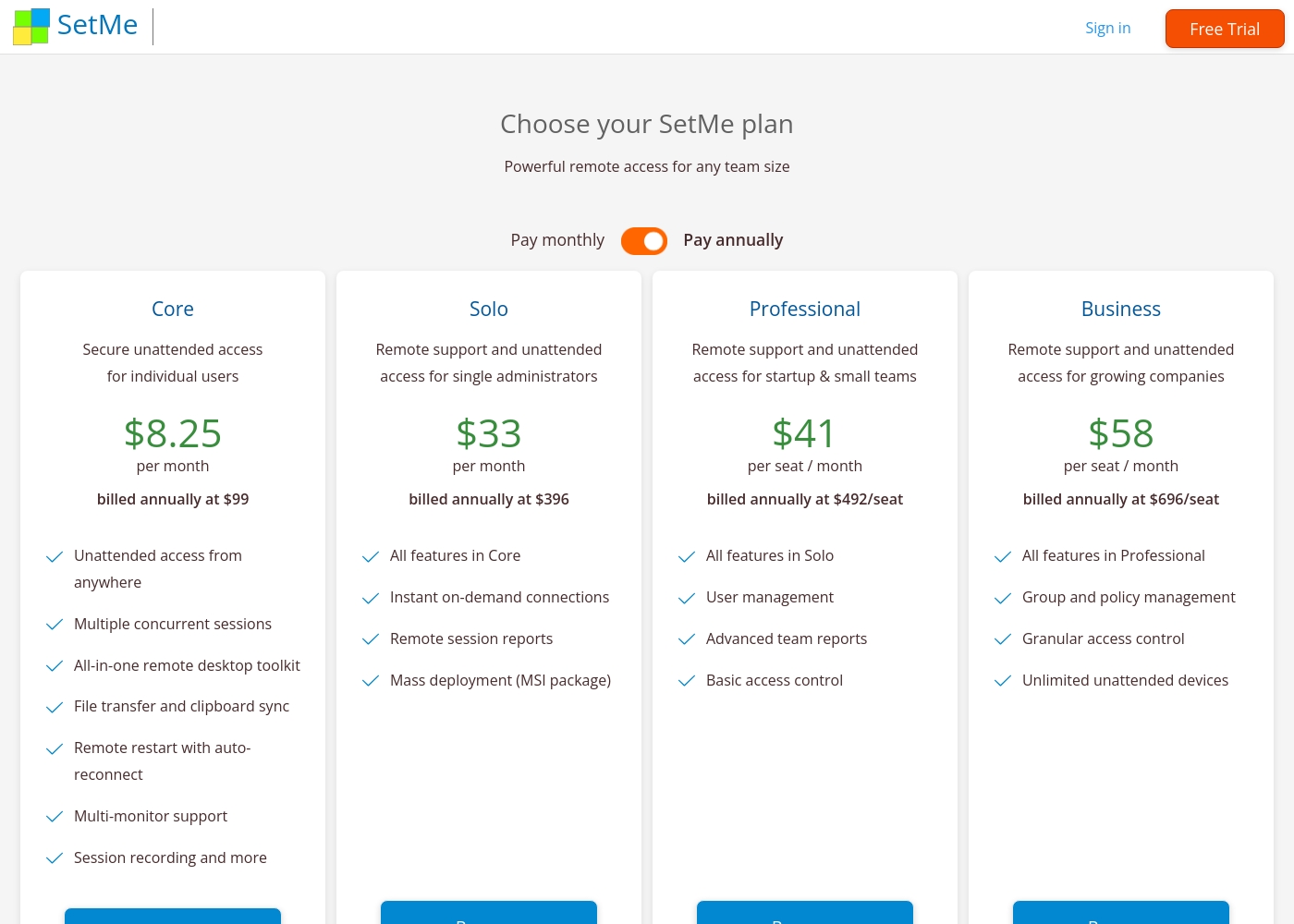
HelpDesk charges $29-50 per user/month. Admins and Agents pay; viewers are free. Annual billing saves 15%. Techinline starts at $8.25/month for solo access. Team plans are $41-58 per seat/month. Pricing scales with features and seats. HelpDesk offers clear value with unlimited free viewers. Techinline offers flexible tiers from solo to enterprise. For a team of 10 agents, HelpDesk's per-agent model is straightforward. For a solo IT consultant, Techinline's Core plan is cheaper.
Customer Support
HelpDesk offers 24/7 support with high user praise. Techinline's support details are limited.
HelpDesk provides 24/7/365 support. Users rave about quick, friendly responses that go the extra mile. Techinline's support is mentioned but not detailed in reviews. The site suggests contacting support for questions about response times. The difference is in transparency. HelpDesk's support is a highlighted strength; Techinline's is not. If you need immediate help, HelpDesk's proven support is a big plus. For Techinline, you'll need to test their support during the trial.
Integration Ecosystem
HelpDesk integrates with popular apps. Techinline has limited integrations.
HelpDesk connects to HubSpot, Salesforce, Jira, Zapier, and more. It has a marketplace for adding integrations. Techinline's integrations are not well-documented. Users may need to check for specific PSA or ticketing system compatibility. The difference is ecosystem size. HelpDesk has a broad integration network; Techinline is more standalone. For a team using Salesforce and Jira, HelpDesk's integrations are a major advantage. For pure remote support, Techinline may be sufficient.
Learning Curve
HelpDesk is easy to adopt with a clean interface. Techinline requires understanding remote access concepts.
HelpDesk is frequently described as easy to set up and use. Its clean UI helps new agents get started quickly. Techinline requires knowledge of remote access, unattended devices, and permissions. The dashboard is functional but technical. The trade-off is simplicity vs. specialization. HelpDesk is for general support; Techinline is for IT specialists. A new hire could be productive in HelpDesk in hours. Techinline might require a day of training for remote support basics.
HelpDesk의 비용은 연간 청구 시 사용자당 월 $29에서 $50 사이이며, 세 가지 플랜이 있습니다: Team은 월 $29, Business는 월 $50, Enterprise(맞춤형 가격)가 있습니다.
가격 책정은 운영 요구 사항에 가장 적합한 선택을 할 수 있도록 명확하고 체계적으로 구성되어 있습니다.
Team
가격: 사용자당 월 $29(연간 청구 시) 또는 사용자당 월 $34(월별 청구 시) 지원되는 웹사이트: 명시되지 않음 적합한 대상: 기본 수준의 요구 사항이 있는 성장하는 팀 환불 정책: 지원팀에서 개별 검토 기타 기능:
- 무제한 무료 뷰어 역할
- 팀 5개 및 사용자 지정 가능한 티켓 보기
- 이메일 템플릿 5개 및 활성 자동화 규칙 5개
- 사용자 지정 도메인 1개
- 활성화된 사용자 지정 필드 5개
- 관리자 또는 상담원 역할을 가진 유료 사용자
- 무제한 무료 뷰어
- 팀 5개
- 전달 주소 5개
- 회신 주소 5개
- 관리자 또는 상담원 역할을 가진 유료 사용자
- 무제한 무료 뷰어
- 팀 100개
- 전달 주소 100개
- 회신 주소 100개
- 제한 없는 Business 플랜의 모든 기능
- 전담 계정 관리자
- 제품 교육
- 소프트웨어 엔지니어 지원
- 보안 지원
Techinline pricing: Techinline offers four SetMe plans starting at $8.25 per month (billed annually) for individual unattended access. Pricing scales based on features like on-demand support, seat count, and team management tools, with both monthly and yearly billing available for most tiers.
Core
Price: $8.25 per month (billed annually at $99) Best For: Individual users needing secure unattended access Other Features: Multiple concurrent sessions, File transfer and clipboard sync, Remote restart with auto-reconnect, Multi-monitor support, Session recording
This plan is perfect for individuals who only need to manage their own remote machines. It's a reliable choice if you don't need to provide instant on-demand support to new clients.
Pricing Head-to-Head
사용자 리뷰
HelpDesk는 사용 편의성과 인터페이스에 대해 전반적으로 훌륭한 피드백을 받습니다. 사용자들은 플랫폼의 깔끔하고 직관적인 디자인을 자주 언급하며, 설정 및 탐색이 쉽다고 말합니다. 경쟁사에서 마이그레이션한 사람들을 포함하여 많은 리뷰어들은 티켓팅 구조가 매우 효율적이어서 팀 생산성이 향상되고 응답 시간이 단축되었다고 언급했습니다. 플랫폼의 자동화 기능, 티켓 분류, 무제한 무료 뷰어 좌석 포함은 자주 긍정적으로 평가됩니다. 지원팀은 빠르고 친절하며 매우 전문적이며 문제를 신속하게 해결하기 위해 기꺼이 노력하는 것으로 높은 평가를 받고 있습니다. 💪
하지만 모든 피드백이 긍정적인 것은 아닙니다. 회사의 이전 통합 LiveChat 시스템에서 전환하는 일부 사용자는 분리 및 구독 비용 증가에 대해 불만을 표시하며 새 시스템이 소규모 비즈니스에는 '훨씬 비싸다'고 말했습니다. 또한 일부 사용자는 이 시스템이 필수 티켓팅 기능을 매우 잘 처리하지만 고급 기능은 깊이가 부족하다고 언급하며 특히 매크로 기능의 제한을 지적했습니다.
Zendesk에서 HelpDesk로 전환하면서 비용을 절약했습니다. 이 채팅 위젯은 매우 저렴하고 UI/UX가 훨씬 좋아졌습니다. 이 도구는 사용하기 매우 쉽고 훨씬 더 많은 데이터 액세스를 제공합니다.
External reviews for Techinline SetMe were not accessible during this review. The provided Trustpilot URL returned a 403 error, preventing access to user feedback. Consequently, the review relies solely on the product's website information and our independent analysis of its features and pricing structure.
우리의 판정
HelpDesk and Techinline are different tools for different jobs. HelpDesk is a ticketing system. Techinline is a remote access tool. They don't compete directly. HelpDesk's superpower is organizing customer support. It turns emails and calls into tickets. Its clean interface and 24/7 support get high praise. Techinline's superpower is remote connectivity. It connects you to any computer instantly. Its stable connections on bad Wi-Fi are a lifesaver. The deciding factor is your core need. If you're answering customer questions, choose HelpDesk. If you're fixing computers remotely, choose Techinline. For most support teams, HelpDesk is the clear winner. For IT pros needing remote access, Techinline is the right choice. Pick the tool that matches your daily work.
자주 묻는 질문
Which is better for small teams: HelpDesk or Techinline?
It depends on your need. HelpDesk is better for small support teams managing customer tickets. Techinline is better for small IT teams providing remote support. HelpDesk starts at $29/user/month; Techinline at $8.25/month for solo access.
Does HelpDesk have remote access features like Techinline?
No. HelpDesk is a ticketing system, not a remote access tool. It manages customer support conversations. Techinline is designed for remote computer control and support sessions.
Is Techinline worth the extra cost over HelpDesk?
The cost comparison isn't apples-to-apples. HelpDesk charges per user for ticketing. Techinline charges for remote access. If you need remote support, Techinline is worth it. If you need ticketing, HelpDesk is better value.
Can I migrate from HelpDesk to Techinline easily?
No, these are different tools. You can't migrate tickets to remote access software. You might use both, but they serve separate purposes.
Which has better customer support: HelpDesk or Techinline?
HelpDesk offers 24/7 support with high user praise. Techinline's support is not well-documented. Based on reviews, HelpDesk has better support.
Do both tools offer free trials?
Yes. HelpDesk has a 14-day free trial. Techinline offers a 15-day free trial. Both are risk-free to test.
선택할 준비가 되셨나요?
두 도구 모두 강점이 있습니다. 특정 요구 사항에 따라 선택하세요.