Backlog by Nulab Inc vs Wrike
Backlog by Nulab Inc and Wrike are both project management powerhouses, but they serve different masters. Backlog by Nulab Inc shines for dev teams with built-in code tools. Wrike is built for large, cross-functional enterprises needing deep automation.
Best for: Software development teams needing Git/SVN integration, Small to mid-sized teams wanting flat-fee pricing
Best for: Large enterprises with complex, cross-functional workflows, Marketing and creative teams needing proofing and approvals
Solid all-in-one for dev teams.
Overall, we find Backlog to be a capable and cost-effective platform that effectively merges project management, issue tracking, and code collaboration into a single tool. It's a strong choice for small to mid-sized teams looking to simplify their workflow without per-user costs.
장점
- All-in-one platform combining project management, issue tracking, and Git/SVN repositories.
- Transparent, flat-fee pricing with no per-user charges, making it affordable for growing teams.
- Built-in AI assistant to help with summaries, file retrieval, and task drafting.
- Integrates with popular tools like Slack, Microsoft Teams, and Google Drive.
단점
- External review sources were inaccessible, limiting our ability to gauge user sentiment on support or reliability.
- The platform's breadth might be overwhelming for very simple project tracking needs.
- Advanced features are only available on higher-priced plans.
- Specific details on performance with very large teams or complex codebases are unclear from provided materials.
엔터프라이즈급 파워와 복잡한 약속
Wrike는 3000명 규모의 기업 환경 전반에 걸쳐 효율적으로 확장되고 고도로 복잡한 워크플로우 전반에서 커뮤니케이션을 통합하는 데 탁월한 것으로 평가되는 매우 다재다능한 프로젝트 솔루션입니다. 전반적으로 이 소프트웨어는 고급 가시성과 사용자 지정을 위한 강력한 기능 세트를 제공하지만, 엄격한 연간 구독 및 자동 갱신 및 가격 인상 관리에 대한 문서화된 어려움에 대해 사용자들에게 경고합니다.
장점
- 복잡한 기업 워크플로우를 효율적으로 변환하고 간소화합니다.
- 다양한 방법론(예: 홀로크라시, OKR)에 맞게 높은 사용자 정의가 가능합니다.
- 뛰어난 협업 투명성과 360도 프로젝트 가시성을 제공합니다.
- 구현 및 버그 관련하여 신속하고 도움이 되는 고객 지원을 제공합니다.
단점
- 가격 책정 관행이 공격적이라는 보고가 있으며, 이로 인해 갱신 시 상당한 인상이 발생하는 경우가 많습니다.
- 구독 취소가 어렵고, 사용자들이 자동 갱신을 막는 데 어려움을 겪었다고 보고합니다.
- 일부 팀은 채택 및 설정 과정이 까다롭다고 보고합니다.
- 사용자들은 자신들이 필요하지 않았던 기능 번들에 대해 과도하게 판매되었다고 보고합니다.
소개Backlog by Nulab Inc
Backlog is an all-in-one work management platform built for teams that build, plan, or create. 🚀 It combines project management, issue tracking, and team collaboration into a single, powerful tool. This makes it ideal for development teams managing code and bugs, design teams planning sprints, marketing teams running campaigns, and small businesses seeking a straightforward solution without user limits.
소개Wrike
Wrike는 신뢰할 수 있는 엔드투엔드 엔터프라이즈 작업 관리 솔루션입니다. 이 솔루션은 수동 프로세스를 상호 연결된 자동화된 워크플로우로 전환할 준비가 된 조직을 위해 설계되었습니다. 20명부터 20,000명에 이르는 팀은 Wrike가 모든 산업이나 규모에 매우 적응력이 뛰어나기 때문에 성공적으로 활용합니다. 여러 팀을 한곳에 모아 획기적인 시각적 협업을 가능하게 합니다. Wrike는 전략을 쉽게 정렬하고 프로젝트 및 프로그램을 효과적으로 실행할 수 있는 곳입니다. 💡
하이라이트
기능 비교
기능 개요
주요 차이점을 강조하고 각 기능에 대한 승자를 선택합니다.
Pricing Model
Backlog by Nulab Inc charges a flat fee. Wrike charges per user, per month.
Backlog by Nulab Inc uses flat-fee pricing. Your team pays the same price whether you have 5 or 50 users. Plans range from $0 to $210 per month. Wrike uses per-user pricing. You pay $10 to $25 per user each month. This is billed annually for paid plans. A team of 10 on Business costs $250/month. The key difference is scaling cost. Adding a new developer to Backlog by Nulab Inc costs $0 extra. Adding one to Wrike costs $10-$25 more monthly. For a growing team of 20, this saves thousands annually with Backlog by Nulab Inc.
Version Control
Backlog by Nulab Inc has native Git and SVN. Wrike does not.
Backlog by Nulab Inc includes built-in Git and SVN repositories. Developers can commit code directly linked to issues. This keeps code and tasks in sync. Wrike offers no built-in version control. Development teams must use external tools like GitHub. Then connect them via integrations. This is a major difference for software teams. Backlog by Nulab Inc creates a true single platform. Wrike requires extra tools and context switching for code management.
Automation & Workflows
Wrike offers deep, scalable automation. Backlog by Nulab Inc has simpler rules.
Backlog by Nulab Inc provides basic workflow automation. You can set up rules for task assignments and status changes. It covers core needs. Wrike provides powerful automation. The Team plan gives 50 actions per user monthly. The Business plan offers 200 actions. Enterprise plans go up to 1500. Wrike's automation is more granular and scalable. It's built for complex, cross-department processes. Backlog by Nulab Inc is sufficient for straightforward team workflows.
Resource Management
Wrike has advanced resource planning tools. Backlog by Nulab Inc is more basic.
Backlog by Nulab Inc offers basic task assignment and progress tracking. It helps you see who is doing what. Wrike provides dedicated Resource Management. You can plan capacity, forecast workloads, and prevent team burnout. It's a core feature of the Business plan. Wrike gives managers a strategic view of team bandwidth. This is critical for large, multi-project organizations. Backlog by Nulab Inc focuses more on task execution than resource forecasting.
Reporting & Analytics
Wrike provides real-time, visual reports. Backlog by Nulab Inc has standard reporting.
Backlog by Nulab Inc includes standard reports. You can track project progress, burndown charts, and issue trends. The data is solid. Wrike offers real-time reports in visual dashboards. Its Business plan unlocks advanced reporting. Enterprise adds business intelligence tools. Wrike's reporting is more dynamic and customizable. It's designed for data-driven decision-making at scale. Backlog by Nulab Inc's reports are effective for team-level tracking.
Integrations
Wrike integrates with over 400 apps. Backlog by Nulab Inc connects with key tools.
Backlog by Nulab Inc integrates with Slack, Teams, Google Drive, and more. It offers a robust API for custom builds. Wrike boasts over 400 integrations. It connects with Slack, Microsoft, Adobe, Salesforce, and Jira. Wrike Integrate syncs data rapidly. Wrike's integration ecosystem is vastly larger. It's built to be the central hub for enterprise software stacks. Backlog by Nulab Inc covers the essentials most teams need.
Ease of Use
Backlog by Nulab Inc is often simpler. Wrike can be complex to set up.
Backlog by Nulab Inc is designed for clarity. Its interface for issues and code is straightforward. Users report a learning curve but find it clean. Wrike is highly customizable but can be complex. New teams often need professional onboarding. The platform has many features to configure. Backlog by Nulab Inc offers a quicker start for core tasks. Wrike requires more investment upfront but offers deeper customization.
Enterprise Security
Both offer SAML and strong security. Wrike provides more granular controls.
Backlog by Nulab Inc offers SAML authentication on its Enterprise plan. It provides centralized management and a dedicated CSM. Wrike provides SAML, 2FA, custom access roles, and user audit reports. Its Enterprise plan includes password policies and custom user types. Wrike's security controls are more detailed. This suits large, regulated organizations. Backlog by Nulab Inc's security is robust for most enterprise needs.
Mobile Experience
Both have solid mobile apps for core tasks. No clear winner.
Backlog by Nulab Inc offers a mobile app for quick checks. You can view tasks, update statuses, and collaborate on the go. Wrike also provides full-featured iOS and Android apps. You can manage tasks, view Gantt charts, and approve work from your phone. Both apps allow essential work away from the desk. They serve as useful companions to the desktop platform. Neither app replaces the full power of the web version for complex work.
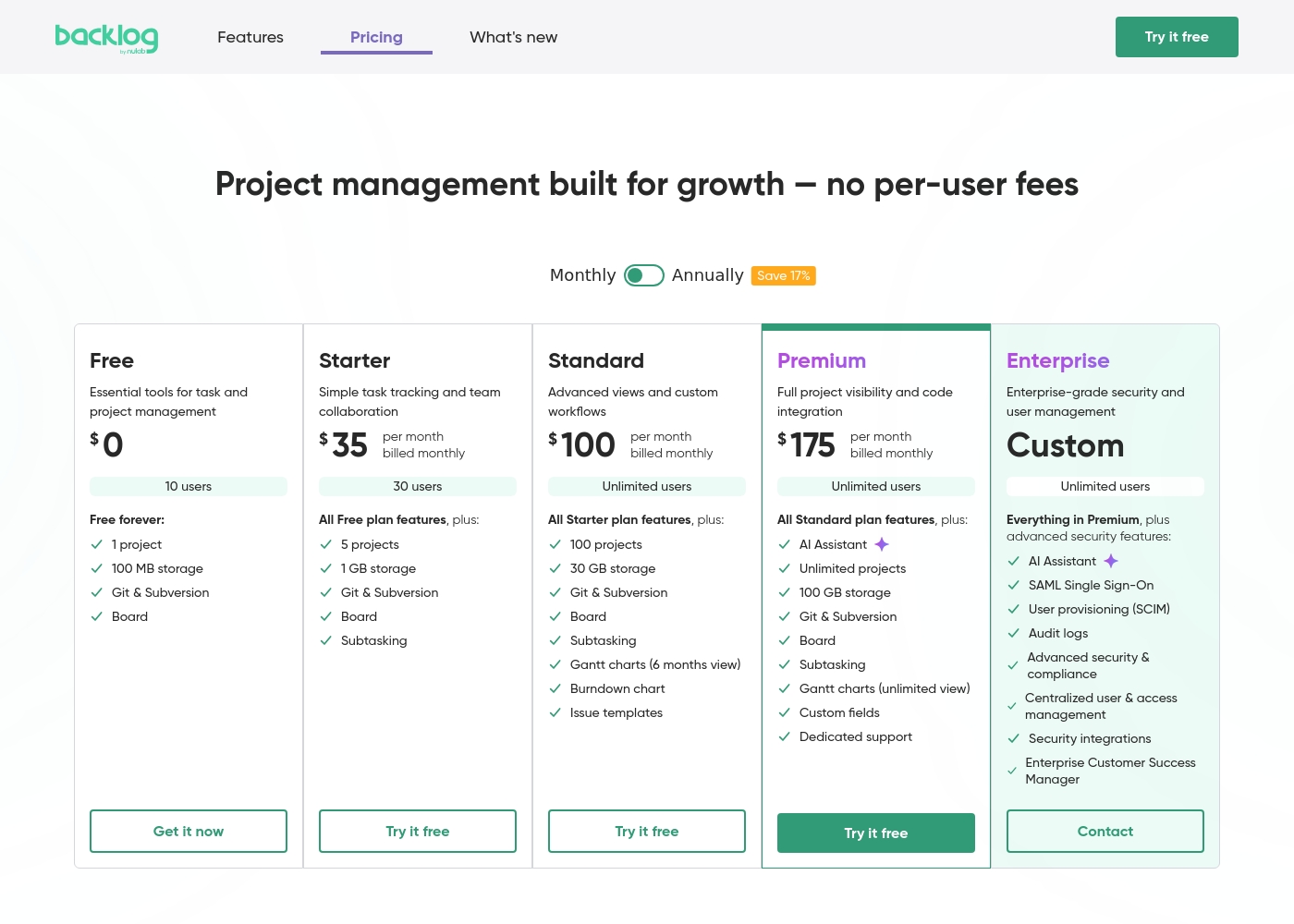
Backlog by Nulab Inc pricing: Backlog by Nulab Inc offers a range of flat-fee plans starting from a free tier up to $175 per month, with no per-user fees. You can save 17% by choosing annual billing for any paid plan level reached by your team's needs. Plans range: $0–$210/month Billing options: Free plan, Free trial, Monthly subscription, Yearly subscription, Per seat pricing, Usage-based pricing
Wrike는 5가지 구독 수준으로, 초보자를 위한 영구 무료 티어부터 대기업을 위한 포괄적인 플랜까지 있으며, 사용자당 $0에서 $25 사이의 비용이 듭니다. 유료 플랜은 사용자당 월 $10부터 시작하며 연간 약정이 필요합니다.
- 웹, 데스크톱 및 모바일 앱
- 프로젝트 및 작업 관리
- 보드 보기(칸반)
- 테이블 보기(스프레드시트 형식)
- 폴더 구조 및 중첩 프로젝트
- 무제한 프로젝트, 작업 및 하위 작업
- 간트 차트, 캘린더 및 차트 보기
- 생성형 AI, 사용자당 2GB 저장 공간
- 프로젝트 청사진 및 무제한 요청 양식
- 승인 및 게스트 승인
- 리소스 및 용량 계획
- 파일 및 비디오 검토(30개 이상의 파일 형식)
- 실시간 보고서
- SAML 기반 SSO 및 2단계 인증(2FA)
- 암호 정책 및 사용자 지정 액세스 역할
- 사용자 지정 가능한 사용자 유형 및 관리자 권한
- 사용자 감사 보고서
Pricing Notes
- Backlog by Nulab Inc's flat-fee model is a major cost advantage for growing teams. You add users for free.
- Wrike's pricing is per-user and requires annual billing for paid plans. Watch out for renewal price increases.
- Backlog by Nulab Inc offers a 30-day free trial. Wrike offers a 14-day free trial.
- Wrike's paid plans (Team and above) are only available as annual subscriptions.
- Backlog by Nulab Inc allows monthly or annual billing, with a 17% discount for paying yearly.
Pricing Head-to-Head
사용자 리뷰
We found that external review platforms like Trustpilot were not accessible due to verification errors, preventing us from gathering specific user sentiment from those sources. Capterra was not provided.
Therefore, our review is based solely on the official product information and pricing details from Nulab. ✅ We can confirm Backlog offers a unified platform for project management, issue tracking, and collaboration with built-in Git/SVN support and no per-user fees.
Backlog is great for keeping all our code and tasks in one place. The Git integration is seamless, and my team stopped switching between five different apps. It just works for our sprint planning.
사용자들은 Wrike의 강력한 기능이 작업 관리 변환과 조직 효율성 향상에 탁월하다고 일관되게 칭찬합니다. 많은 리뷰어들, 특히 팀 리더들과 대기업 사용자들은 이것이 OKR과 같은 특정 방법론에 대한 높은 수준의 사용자 지정에 강하게 적합한 최고의 프로젝트 관리 시스템 중 하나라고 언급합니다.
대규모 글로벌 팀 전반에서 커뮤니케이션 중앙 집중화, 360도 가시성 확보 및 협업 관리에 대한 기능이 최고라는 점이 자주 강조됩니다. 또한, 고객 지원은 구현 및 빠른 버그 수정과 관련하여 모범적이라고 자주 설명됩니다.
3년 동안 Wrike를 사용하면서 워크플로우 관리 방식이 완전히 바뀌었습니다. 가장 큰 변화는 운영이 얼마나 간소화되고 빨라졌는지입니다. 대규모 팀에게 진정으로 효율적입니다.
우리의 판정
This isn't a one-size-fits-all showdown. Backlog by Nulab Inc and Wrike are built for different teams with different priorities. Your choice hinges on your team's size, budget, and workflow complexity. Backlog by Nulab Inc's superpower is its seamless blend of project management and code collaboration. The flat-fee pricing is a game-changer for growing teams. It removes the fear of per-user costs. Wrike's superpower is its enterprise-grade depth. It excels at complex resource planning, advanced automation, and visual collaboration across massive organizations. It's built to scale to 20,000 users. The deciding factor is often cost versus capability. If you need advanced features and have the budget, Wrike delivers. If you want simplicity and predictable costs, Backlog by Nulab Inc wins. Choose Backlog by Nulab Inc if you're a dev team under 50 people. It's your cost-effective, code-centric command center. Choose Wrike if you're an enterprise with 200+ users. It will untangle your most complex workflows.
자주 묻는 질문
Which is better for small teams: Backlog by Nulab Inc or Wrike?
Backlog by Nulab Inc is generally better for small teams. Its flat-fee pricing means costs don't increase with each new hire. Wrike's per-user model can get expensive quickly for a growing small team.
Does Backlog by Nulab Inc have built-in Git like Wrike?
Yes, Backlog by Nulab Inc includes built-in Git and SVN repositories. Wrike does not offer built-in version control. Development teams must use external tools and integrations with Wrike.
Is Wrike worth the extra cost over Backlog by Nulab Inc?
It depends on your needs. Wrike is worth it if you require advanced resource planning, deep automation, or proofing for 200+ users. For smaller teams, Backlog by Nulab Inc provides great value at a lower total cost.
Can I migrate from Backlog by Nulab Inc to Wrike easily?
Migration is possible but not one-click. Backlog by Nulab Inc has import tools for Jira and Redmine. Moving to Wrike would require manual data transfer or using Wrike's professional services for a guided setup.
How do their automation features compare?
Wrike offers significantly more powerful automation. Its Business plan gives 200 automation actions per user per month. Backlog by Nulab Inc has basic workflow rules for task updates and assignments.
Which tool has better reporting?
Wrike has better reporting. It offers real-time reports in visual dashboards and advanced business intelligence on higher plans. Backlog by Nulab Inc provides standard, effective project reports.
선택할 준비가 되셨나요?
두 도구 모두 강점이 있습니다. 특정 요구 사항에 따라 선택하세요.