完全な翻訳は近日公開 — 製品詳細は英語、ナビゲーションは日本語で表示しています。
Browse AI

Browse AI レビュー

Point, click, and automate web data collection.

Browse AIは月額$1.58 (≈ ¥252)から · 4プラン · 無料プランあり · 2026年11月27日に価格を確認

著者 Ciroapp Editorial Team · 更新日 2026年9月17日

追加費用なしでコミッションが発生する場合があります

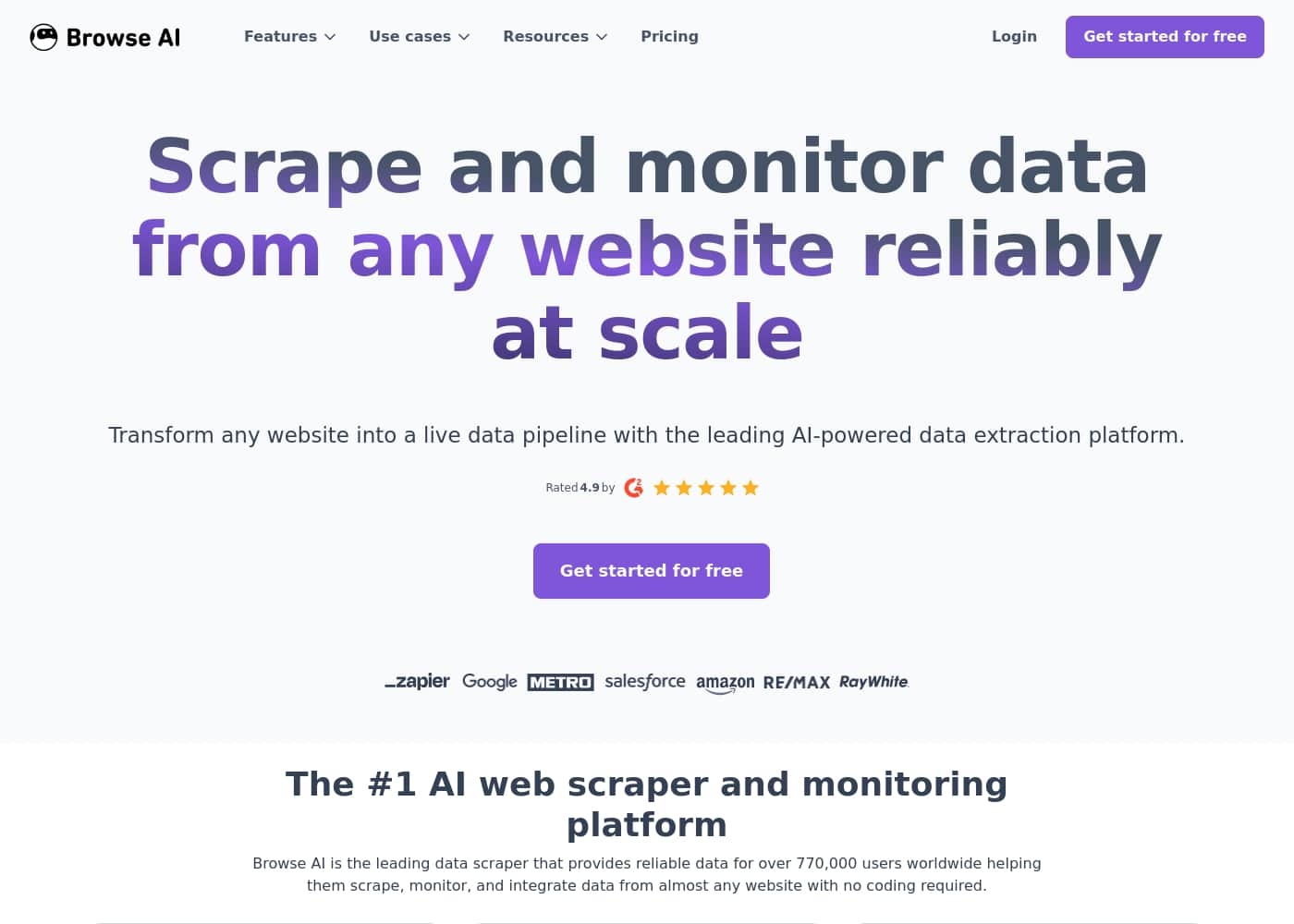
Browse AIのホームページスクリーンショット

概要

Browse AIの評価、価格概要、主な機能、注目ポイントをすばやく確認できます。
料金確認日 2026年11月27日

Ciroappスコア

4.3/ 5

No-code web scraping for everyone.

We find Browse AI to be a powerful, accessible tool that democratizes web data collection. It excels at turning manual monitoring into automated workflows for non-technical users. Overall, it's a strong solution for small teams and individuals needing reliable, scalable data extraction without coding.

長所

  • No-code, point-and-click setup — users report building their first working scraper in under 10 minutes without any technical background, making web data extraction accessible to non-developers.
  • Automated change monitoring — once a robot is built it can watch pages on a schedule (down to 5-minute intervals on the Professional plan) and alert you when content like competitor pricing or inventory levels changes.
  • Built-in scraping resilience — dynamic content capture, bot evasion, proxy management, automatic retries, and rate limiting are handled by the platform rather than requiring custom engineering.

短所

  • Credit-based pricing can add up at volume — multiple users note the credit system is confusing at first, and costs grow quickly when running many active monitors; extra credits start at $0.024 each on the Personal plan.
  • Domain limits are restrictive on lower tiers — the Free plan tracks only 2 websites and the Personal plan only 5, so teams monitoring many sites must pay for add-ons ($4/mo per extra website) or upgrade tiers.
  • Struggles with complex targets — highly interactive web apps, extensive login layers, and sophisticated anti-bot measures can present setup challenges that the built-in evasion features don't fully cover.
最適
  • Sales teams tracking competitor pricing or inventory
  • Market researchers gathering data from multiple sources
  • Small business owners automating lead generation
無料トライアル
Yes
このセクションは概要です。機能、ユースケース、価格、レビューの詳細は下に続きます。

Browse AIとは?

Ever needed specific data from a website, only to find it's locked behind a firewall or changes daily? 😩 Manually copying information is a time-sink and breaks easily. Browse AI offers a no-code way to extract, scrape, and monitor that data for you.

It transforms the headache of web scraping into a simple, automated process. You can capture information, track changes, and feed it directly into your tools, saving countless hours.

Browse AI is an AI-powered web scraper and monitoring tool designed for people who aren't developers. 🤖 Its core mission is to help you pull data from almost any webpage without writing a single line of code.

It’s built for professionals, sales teams, researchers, and businesses who need reliable, scalable web data to power their workflows. Think of it as your personal assistant for gathering and watching online information.

Browse AIを選ぶべきですか?

プラン比較や公式サイトへ進む前に確認したい購入判断のポイントです。

選ぶべき人

  • You need data but don't have a developer on staff.
  • Your team spends too much time manually copying web info.
  • You need to monitor websites for changes automatically.
  • You want to feed web data directly into apps like Google Sheets or CRMs.
  • You've tried other scraping tools but found them too complex.

避けるべき人

  • Those needing to scrape highly complex, interactive web apps with extensive login layers.
  • Users looking for a completely free, unlimited solution (pricing plans are required).
  • Teams that need to bypass extremely sophisticated anti-bot measures not covered by built-in features.
  • If your primary need is for raw, unstructured data without any subsequent workflow integration.

購入前の次のステップ

  1. 1Visit the Browse AI website and thoroughly review the different pricing tiers and their limits.
  2. 2Check if the tool supports integration with the specific apps or databases you currently use.
  3. 3Identify 2-3 alternative web scraping tools and compare their features, ease of use, and pricing against Browse AI.
  4. 4Look for any available trial period or free plan to test the interface and core functionality before committing.
  5. 5Read the latest user reviews to gauge current performance and support responsiveness.

使いやすさ

The platform emphasizes a **simple, point-and-click** interface. Multiple customer testimonials highlight that even non-technical users can set up scrapers quickly and find the UX incredibly easy. Fast customer support is also frequently noted.

Browse AI 主な機能

✨ Effortless Data Extraction Without Code

Browse AI lets you point and click to capture data from almost any website. You don't need to write a single line of code. The platform's intuitive interface makes setting up a scraper a quick and straightforward process.

It's designed for professionals who need data but aren't developers. You can build a working tool in minutes, not hours. The system handles the complex parts, like navigating page structures, so you can focus on the information you need.

✨ Automated Monitoring for Constant Changes

Set your robots to watch specific pages and Browse AI will alert you when information updates. This means you're always working with the latest data, whether it's competitor pricing, inventory levels, or news. Once you build a scraper, you can set it and forget it.

The monitoring frequency is flexible, with options for fast updates on certain plans. It transforms websites into reliable, self-updating data pipelines for your workflows.

✨ Reliable Performance at Any Scale

The platform is built on infrastructure designed for limitless scale. You can go from scraping a single page to monitoring thousands without worrying about the system crashing. Browse AI is considered the most reliable scraper on the market for this reason.

It includes features to handle the challenges of large-scale data collection automatically:

✨ Smart Tools to Bypass Barriers

Getting data can be tricky when websites use dynamic content or try to block scrapers. Browse AI includes built-in tools to handle these obstacles smoothly. This allows you to capture information that might otherwise be difficult to access.

Key capabilities include dynamic content capture for modern websites, bot evasion, proxy management, automatic retries, and rate limiting. These work together to help ensure your data scraping runs successfully.

✨ Seamless Integration with Your Tools

Browse AI makes it easy to connect your information directly to the apps you already use. You can integrate with over 7,000 tools via API or webhook to build automated workflows.

For example, you can automatically send new leads to your CRM, update a Google Sheet with fresh data, or trigger other actions in your automation platform. It turns websites into a reliable data source for your databases and apps.

✨ A Focus on Enterprise-Grade Security

Browse AI takes data security and compliance seriously. The platform is SOC 2 Type II certified and GDPR compliant. This provides a strong foundation for businesses that need to adhere to strict data governance standards.

Additional security measures include encrypted data transfer, role-based access control, defined data retention policies, and dedicated infrastructure. These features help protect your data and your customers' information.

使用例

💰 Competitor Price Monitoring

Your marketing team needs to track competitor pricing but can't spend all day checking websites. Set up a Browse AI robot to monitor specific product pages on competitor sites. It will automatically scrape prices and inventory levels on a schedule, like every hour or daily.

Tip: Use the Professional plan for 5-minute monitoring on critical items.

🎯 Lead Generation from Public Directories

You're a sales manager looking for new leads. You can build a robot to scrape business listings from public directories or industry websites. The robot extracts names, contact info, and descriptions, then sends that data directly to your CRM.

This turns hours of manual searching into a reliable, automated lead pipeline.

🔍 Research & Data Collection

As a market researcher, you need data from many different sources for a report. Manually copying information from multiple sites is slow and error-prone.

With Browse AI, you can create a separate robot for each source. They all run in the background, collecting the specific data points you need. You can then download the results or send them to a spreadsheet for analysis.

📰 Monitoring News & Public Updates

A project manager needs to stay on top of announcements related to a client or industry. Setting up a monitor for key news sites or government portals is a perfect use case.

The tool will alert you when a page changes or new content appears. This way, you're always working with the latest information without manually refreshing pages all day.

⚙️

Problem: Your team manually copies data from a website into a Google Sheet every day, which is tedious and breaks easily.

Approach: Create a Browse AI robot for that website and connect it to Google Sheets using the built-in integration. Set the robot to run automatically each morning.

Outcome: The spreadsheet updates itself with fresh data. Your team saves hours and stops worrying about missing or incorrect entries.

📦 Tracking Inventory for Restocking

You run a small e-commerce business and need to monitor supplier websites for stock availability on key items. You can set up a robot to check specific product pages for inventory counts.

When stock levels change, you get an alert. This helps you place restock orders at the right time, avoiding both stockouts and over-ordering.

Browse AIの料金

最安$1.58/月≈ ¥252

  • 4プラン
  • 無料プランあり

2026年11月27日に次のページで価格を確認: Browse AIの料金ページ

Browse AIの料金ページのスクリーンショット料金ページのスクリーンショットを見る
プラン月払い年払い含まれる機能
Free
無料
無料
50 credits per month
  • 50 credits per month
  • 2 domains
  • 3 users
  • Unlimited robots
Personal
—
$1.58/月
≈ ¥252
年額$19
12,000 credits per year
  • 12,000 credits per year
  • 5 domains
  • 3 users
  • Basic email support
Professional
—
$5.75/月
≈ ¥917
年額$69
60,000 credits per year
  • 60,000 credits per year
  • 10 domains
  • 10 users
  • Priority email support
Premium
—
$41.67/月
≈ ¥6,648
年額$500
600,000+ credits per year
  • 600,000+ credits per year
  • Custom domains
  • Dedicated Account Manager
  • Fully managed onboarding

2026年11月27日のECB参照レートで換算しています。ベンダーの現地価格は異なる場合があります。

価格の推移

2026年10月1日から価格を追跡中。まだ価格変更はありません。

価格タイプ: Free plan, Monthly subscription, Yearly subscription, Usage-based pricing

料金に関する補足

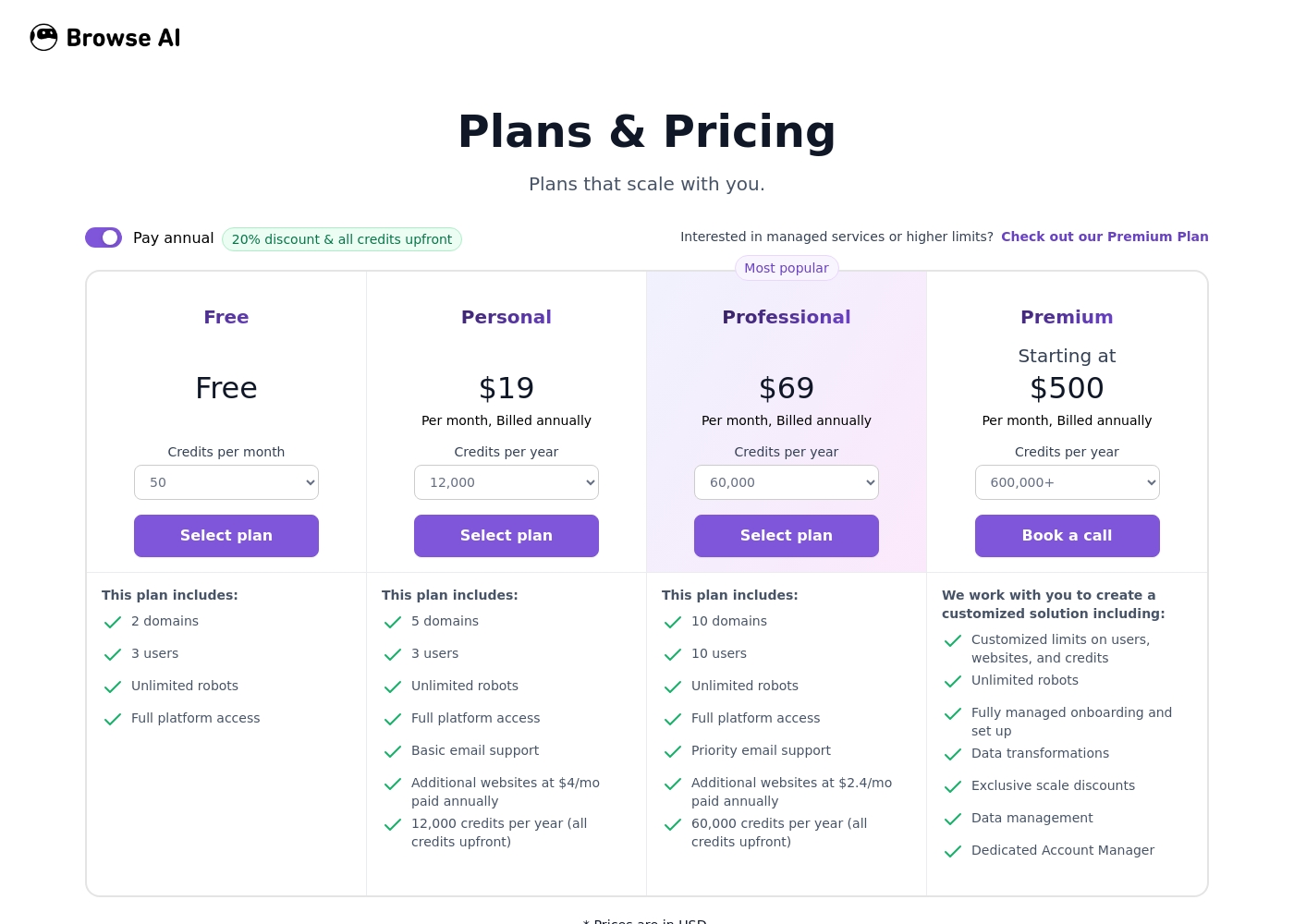
Browse AI offers a range of plans from a $0 free forever tier to professional solutions starting at $19 per month billed annually. Pricing is based on credits and the number of tracked domains you need.

Browse AI costs between $0 and $500 per month with 4 plans: Free at $0, Personal at $19, Professional at $69, and Premium at $500.

Take a look at the specific features and limits for each plan below to find your match.

Free

Price: $0 monthly Websites Supported: 2 domains Best For: Individuals starting small Other Features: 50 credits per month, 3 users, unlimited robots, full platform access

This plan is perfect if you're just learning how to scrape data. You get enough credits to test the waters without any financial commitment.

Personal

Price: $19 per month, billed annually Websites Supported: 5 domains Best For: Freelancers and small projects Other Features: 12,000 credits per year, 3 users, basic email support, add-on websites for $4/mo

This is a solid choice for individuals who need reliable monitoring on a few specific sites. It keeps costs low while giving you plenty of annual credits.

Professional

Price: $69 per month, billed annually Websites Supported: 10 domains Best For: Growing businesses and teams Other Features: 60,000 credits per year, 10 users, priority email support, 5-minute monitor frequency

Choose this if you need faster updates and more team members on board. It's the most popular tier for a reason, offering high-speed monitoring and priority help when you need it.

Premium

Price: $500 per month, billed annually Websites Supported: Custom Best For: Large enterprises with high volume Other Features: 600,000+ credits per year, custom users, dedicated account manager, data transformations

This tier is built for power users who require a managed solution. It includes specialized setup and configuration to ensure your data pipeline never skips a beat. ✅

If you aren't sure yet, you can start with the Free Forever plan to test the robots. Please note that annual plans offer a 20% discount and give you all your credits upfront for the year. Check the specific cancellation terms in your dashboard before upgrading.

コスト計算ツール

チームでBrowse AIを使う場合の費用を試算します。

支払い方法

Personalにはこの支払いサイクルの公開価格がありません。

Personalは定額料金のため、ユーザー数で合計は変わりません。 公開されている定価に基づく概算です(税・アドオン・割引は含みません)。

Browse AIを安く使う方法

  • まず無料プランで始め、制限に達してからアップグレードしましょう。
  • 無料トライアルがあります。支払う前に試しましょう。
無料トライアルを始める

Browse AIの価格が変わったらメールで通知

ベンダーの料金ページで価格の変更を検出したときに1通のメールを送ります。ニュースレターやセール情報はありません。ワンクリックで解除できます。

ユーザーレビュー

Our review of external sources reveals a generally positive sentiment for Browse AI, with users consistently praising its ease of use and powerful automation. 🌟 Many highlight the intuitive, no-code interface that allows even non-technical users to build scrapers quickly, saving significant time.

Recurring themes include reliable performance for monitoring and data extraction, alongside responsive customer support. However, some users note a learning curve for advanced features and mention that credit-based pricing can become costly for high-volume tasks.

A few feedback points touch on occasional setup challenges for complex sites. Overall, it's well-regarded for making web data collection accessible and efficient for small to mid-sized teams.

公開レビューの要約: Trustpilot, Capterra

まだレビューがありません。

レビューを書く

Browse AIのレビューを書く
0/100文字
0/2000文字

Browse AIを使う理由は?

Stop wasting hours on manual data entry or fragile scripts that break. Here’s how Browse AI can become your data workhorse:

  • ⏱️ Save Massive Time: Tasks that took hours or days can be completed in minutes. Build working tools incredibly quickly, even as a beginner.
  • 📈 Scale Reliably: It's built for limitless scale, so you can go from a single page to monitoring thousands without worrying about the system crashing. Turn websites into reliable data pipelines for your databases or automation platforms.
  • 🛡️ Set It and Forget It: Once a scraper is built, you can monitor pages for changes. It alerts you when something updates, so you’re always working with the latest info.
  • 🌍 Bypass Barriers: Features like dynamic content capture, bot evasion, and proxy management help you get data that might otherwise be difficult to access.

Browse AI の代替ツール

データ抽出カテゴリの他のツール

データ抽出の全ツールを見る
Bitskout

Bitskout

Data extraction3.7/5

バックオフィス業務のデータ抽出を自動化するAIを導入しましょう。

Browse AI よくある質問

Browse AIの料金はいくらですか?

Browse AIの最も安い有料プラン「Personal」は月額$1.58 (≈ ¥252)です。 有料プランは月額$1.58から$41.67までです。 2026年11月27日にベンダーの料金ページで価格を確認しました。

Browse AIに無料プランはありますか?

はい。Browse AIには無料プラン(Free)があり、有料プランは月額$1.58 (≈ ¥252)からです。

Browse AIに無料トライアルや返金保証はありますか?

Browse AIには無料トライアルがあります。

Browse AIの価格は最近変わりましたか?

いいえ。2026年10月1日に追跡を始めて以来、価格の変更は検出されていません。

What apps does Browse AI integrate with?

Browse AI connects directly to popular tools like Google Sheets, Airtable, Zapier, Make.com, Pabbly Connect, and Amazon S3. It also offers a REST API and webhooks for custom integrations with thousands of other apps.

How does Browse AI handle data security and compliance?

Browse AI is SOC 2 Type II certified and GDPR compliant. Security features include encrypted data transfer, role-based access control, and data retention policies. Enterprise customers on the Premium plan get dedicated infrastructure.

Are there any limits on how many robots or tasks I can run?

All plans include unlimited robots. However, your usage is limited by credits (which cover tasks and monitoring checks) and the number of websites you can track, which ranges from 2 on the Free plan to custom on Premium.

How does customer support work? What's the response time?

Support levels vary by plan. The Free and Personal plans include basic email support. The Professional plan offers priority email support. The Premium plan includes a dedicated account manager. Specific SLAs for response time are not stated on the website.

What languages and regions does Browse AI support?

Browse AI can scrape content from websites in various languages. However, the platform interface and primary support are in English. Specific regional data center locations are not detailed on the public site.

How do I cancel my subscription?

You can manage and cancel your subscription directly from your account dashboard. The website advises checking specific cancellation terms in your dashboard before upgrading.
Who is Browse AI best for?

It's ideal for sales teams, market researchers, small business owners, and no-code builders who need to extract or monitor web data reliably. It's great for those without coding skills who want to automate data collection.

What happens if I run out of credits mid-year on an annual plan?

On annual plans, you receive all credits upfront. If you exhaust them, you can purchase additional credit packs. The cost per extra credit varies by plan, starting at $0.024 for the Personal plan.

Is there help with getting started or migrating from another tool?

The Premium plan includes fully managed onboarding, customized setup, and a dedicated account manager. For other plans, you can use the platform's documentation or contact support for guidance.

Browse AIを試してみる準備はできましたか?公式サイトまたは価格をご覧ください。

Browse AIの担当者ですか? この掲載を申請する · バッジを入手