Norton Family vs Xnspy
Norton FamilyとXnspyはどちらもデバイス監視のための強力なツールですが、ターゲットとするニーズが異なります。Norton Familyは、信頼できるブランドによる透明性の高いペアレンタルコントロールで、境界線を設定することに重点を置いています。一方、Xnspyは、通信とアプリの目立たない詳細な調査を優先する専門的な監視ソフトウェアです。選択は、監視と制限が必要か、それともステルス性とデータ抽出が必要かによって決まります。
Best for: 透明性の高い監視とオープンな境界線を優先する家族, Norton 360セキュリティバンドルを利用している、または購入を計画しているユーザー
Best for: 完全に目立たない、または検出されない監視機能が必要なユーザー, キーストロークのキャプチャと周囲の音声を必要とする調査監視
長所
短所
Effective Monitoring, Comprehensive Customer Support.
We find Xnspy delivers robust remote monitoring capabilities, offering comprehensive tracking of communications and social media for both Android and iPhone devices. While the setup can be tricky, the powerful 24/7 live customer support team earns significant praise for assisting users through installation hurdles. Overall, Xnspy provides strong feature value for its price, but users should be aware of potential data synchronization delays and the limiting partial refund policy.
長所
- Runs discreetly in the background, minimizing detection.
- Comprehensive social media and communication monitoring features.
- Professional and quick 24/7 live customer support available.
- Effective for parental control and providing peace of mind.
短所
- Reports of data synchronization delays, particularly on iPhone.
- Setup process is noted as tricky or difficult for average users.
- Strict 10-day partial refund policy is widely criticized.
- Compatibility limitations restrict features (e.g., GPS) on older Android phones.
についてNorton Family
についてXnspy
XNSPY is designed as an accessible monitoring solution. It helps you stay informed and provides necessary visibility. The platform works specifically with key mobile systems. You can easily explore compatibility for both Android and iPhone devices before committing. Get instant access to the Live Demo to see the system in action. ✅
ハイライト
機能比較
機能の概要
主な違いを強調し、各機能の勝者を選びます。
監視の理念
Norton Familyは透明性のある境界線と話し合いを促進します。Xnspyは検出されずに目立って深く監視できるようにします。
Norton Familyは、家族環境での目に見えるペアレンタルコントロールのために設計されています。 インスタントロックやスクールタイムなどの機能は、制限に関するオープンなコミュニケーションを促進します。 Xnspyは、特に古いAndroidバージョンで100%未検出で動作することに重点を置いています。 このステルスアプローチは、ユーザーに知られずに調査を行うのに適しています。 透明性を求めるならNorton Familyを。ステルス性が必要ならXnspyを選びましょう。
高度なデータキャプチャ
Xnspyはキーストロークをキャプチャし周囲の音声を録音します。Norton Familyは代わりに検索とビデオ履歴に焦点を当てています。
Norton Familyは、ウェブコンテンツとビデオのスニペットの明確な監視を提供します。 子供たちが何を検索し、何を見たかについて詳細なレポートを提出します。 XnspyはAndroidデバイス向けに強力なキーロガー機能を提供します。 これはログインや下書きを含むすべてのキーストロークをキャプチャします。 さらに、Xnspyプレミアムはデバイスの周囲をリモートで録音できます。 Norton Familyには、こうした侵襲的な調査収集機能はありません。
スクリーンタイム管理
Norton Familyはスケジューリングと制限を専門としています。Xnspyは受動的なデータ監視のみを提供します。
Norton Familyは、毎日の制限とスケジュールを設定するための堅牢な時間監視機能を提供します。 リモート学習中の集中力を妨げる要因を制限するために、スクールタイム機能も備えています。 Xnspyは、デバイス使用に関するスケジュール管理や制限を提供するものではありません。 これは純粋な情報収集ツールであり、制御ツールではありません。 健全なデジタル習慣と境界線を確立するためには、Norton Familyが必要です。
ソーシャルメディアのカバレッジ
Xnspyは10以上のソーシャルアプリに対応した明示的な監視を提供します。Norton Familyは一般的なアプリ監視を提供します。
Norton Familyは、インストールされているアプリを表示し、一般的なウェブトラフィックを監視するためにアプリ監視を使用します。 YouTubeやHuluコンテンツのスニペットのビデオ監視を提供します。 Xnspyプレミアムエディションは、Snapchat、Instagram、Tinderなどの10以上のプラットフォーム上のチャットを追跡します。 これは、これらすべてのソーシャルプラットフォームでの活動に関する深い洞察を提供します。 深いソーシャルメディアの監視が目標であれば、この点においてXnspyははるかに優れています。
リモートデバイス制御
Xnspyは堅牢なリモートセキュリティ制御を提供します。Norton Familyはリモートアクションを「インスタントロック」に限定しています。
Norton Familyは、必要に応じてデバイスの使用をすぐに一時停止するためのインスタントロックを提供します。 このリモートロックは、Windows、Android、iOSデバイスで機能します。 Xnspyプレミアム(Androidのみ)は、リモートワイプおよびリモートロック機能を提供します。 これにより、紛失した場合に携帯電話の内容を消去して機密データを保護できます。 どちらも即座の制御を提供しますが、Xnspyは重要なデータセキュリティオプションを提供します。
価格設定とバンドル
Norton Familyは非常に手頃な価格になるか、無料で提供されることがあります。Xnspyは専用のサブスクリプション支払いが必要です。
Norton Familyは安価に始まり、Norton 360バンドルの一部として含まれることがよくあります。 これにより、多くのユーザーが追加費用なしでNorton Familyにアクセスできます。 Xnspyは年間請求の場合、月額4.99ドルから7.49ドルの範囲で実行されます。 基本とプレミアムの階層がありますが、無料プランやバンドルオプションはありません。 特にアンチウイルス保護も必要な場合、Norton Familyが価値で勝ちます。
カスタマーサポートとセットアップ
Xnspyは24時間年中無休のライブサポートを提供し、セットアップを手伝うことが多いです。Norton Familyは標準のヘルプチャネルを使用します。
Norton Familyは、標準のNortonサポートとメンバーサービスチャネルを使用します。 セットアップはほとんどの家族ユーザーにとって簡単でまっすぐであると評価されています。 一方、Xnspyのインストールは平均的なユーザーにとっては難しい、または高く評価されています。 Xnspyは、難しいインストールを支援するために24時間年中無休のライブチャットサポートを誇りに思っています。 技術に詳しくない場合、Xnspyの専用サポートは命綱になる可能性があります。
Xnspy costs between $4.99 and $7.49 per month (when billed annually) with 2 plans: XNSPY Basic Edition at $59.99 annually, and XNSPY Premium Edition at $89.99 annually.
These plans offer flexible billing options, including monthly, quarterly, and yearly subscriptions, allowing you to choose the commitment that works best for you.
XNSPY Basic Edition
Price: $59.99 billed annually (equivalent to $4.99/month) Best For: Users who need fundamental call, message, and location monitoring on a budget. Refund Policy: Partial refund within the first 10 days Other Features:
- View full call history and record calls (Android 4-9)
- Read all incoming and outgoing text messages
- Monitor WhatsApp chats and photos
- View internet browsing history and bookmarks
- Monitor keystrokes via Keylogger (Android)
- Call History & Recording (Android 4-9)
- Read All SMS & iMessages
- WhatsApp Chat & Photo Monitoring
- Real-Time Location Lookup
- Keylogger (Android)
- All Basic features included
- Monitor 10+ Social Media Apps (Facebook, Snapchat, Viber, etc.)
- Remotely Record Surroundings (Android)
- Remote Wipe Phone Data & Lock Phone (Android)
- Monitor Gmail App (Android)
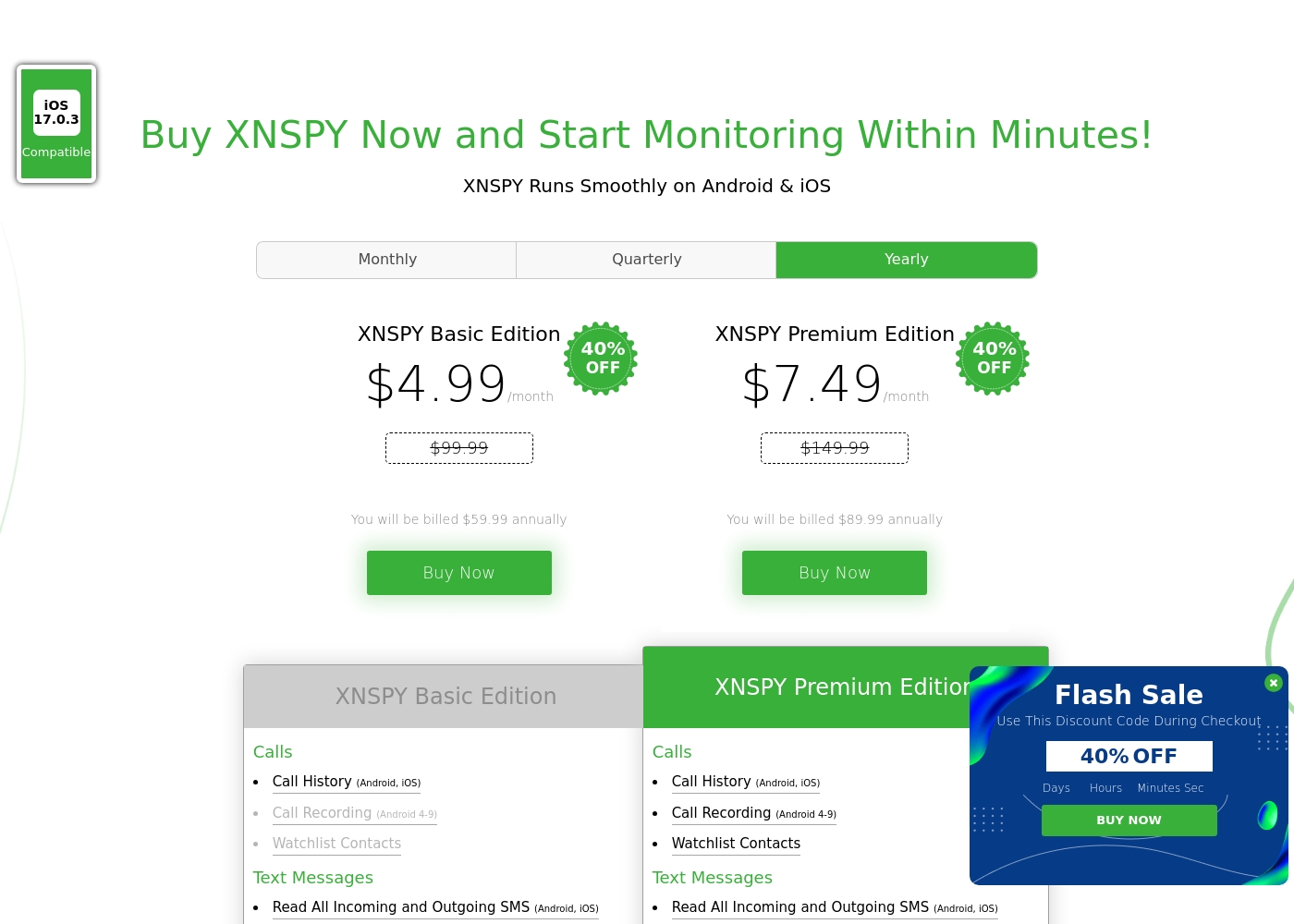
Pricing Head-to-Head
ユーザーレビュー
The general sentiment for Xnspy is mixed, reflected in its cumulative Trustpilot score of 3.3/5. Users commonly praise its core capabilities, noting that the app runs discreetly and is effective for monitoring calls, texts, location, and social media activity.
Many parents appreciate the peace of mind it offers, finding the system more straightforward than complex rival monitoring software. A major strength cited frequently across reviews is the responsiveness and professionalism of the 24/7 customer support team.
I’m not very tech-savvy, so I reached out to live support for help with the setup. They opened a support ticket and completed everything for me quickly. The team was professional and really helpful.
選択する準備はできましたか?
両方のツールにはそれぞれの強みがあります。特定のニーズに基づいて選択してください。