GitLab vs Splunk
GitLab and Splunk serve different worlds. GitLab unifies the software lifecycle from code to deploy. Splunk turns machine data into security and observability insights.
Comprehensive DevSecOps, but complex.
GitLab is a powerful, all-in-one platform that unifies the entire software lifecycle. We find it delivers on its promise of acceleration and unified security, though its depth can create a steep learning curve for smaller teams. Overall, it's an excellent choice for organizations seeking a single, scalable solution for planning, building, and deploying software securely.
長所
- Single platform for the entire DevSecOps lifecycle
- Built-in security scanning accelerates vulnerability detection
- AI-powered workflows (Duo Agent) enhance productivity
- Offers a functional Free tier for individuals and small projects
短所
- Learning curve can be steep due to platform breadth
- Enterprise features like advanced security require costly Ultimate tier
- Compute and storage limits on lower tiers may require paid add-ons
- Annual billing commitment for paid plans
Powerful but complex data platform.
We find Splunk offers a robust, unified platform for security and observability with extensive integrations and scalability. However, its pricing structure is opaque and usage-based, which can make cost planning challenging. Overall, it's a strong choice for enterprises needing deep data analysis, but smaller teams may find it complex and expensive.
長所
- Unified platform for security and observability.
- Over 2,000 integrations with various data sources.
- AI and automation for threat response.
- Handles massive data volumes at scale.
短所
- Opaque pricing requires consultation with sales.
- Can be complex to set up and learn.
- Usage-based models may lead to unpredictable costs.
- External review access was blocked, limiting user sentiment data.
についてGitLab
GitLab is an end-to-end DevSecOps platform for teams of all sizes, from startups to large enterprises. It’s the single place to plan, build, test, secure, and deploy your software. You get all your projects, releases, and code in one data plane, so both your team and AI agents work from the same information. 💡
についてSplunk
Splunk is a unified platform for security and observability. It's designed for teams that need to search, analyze, and act on data from any source. Whether you're a security analyst hunting threats or an engineer troubleshooting app performance, it brings everything together in one place. ✨
ハイライト
機能比較
機能の概要
主な違いを強調し、各機能の勝者を選びます。
Platform Purpose
GitLab builds software. Splunk analyzes machine data from software and systems.
GitLab is the factory floor for software development. It provides a single interface to write, test, secure, and release code. Your entire team works from one project board and set of pipelines. Splunk is the security operations center and analytics engine. It ingests logs, metrics, and traces from thousands of sources. Analysts and engineers then search this data to find threats or performance issues. The key difference is their entry point. GitLab starts with your source code repository. Splunk starts with data flowing from your already-running applications and infrastructure.
Security Approach
GitLab shifts security left into development. Splunk focuses on detecting threats across the entire environment.
GitLab has security scanners (SAST, DAST, SCA) built into the development workflow. Vulnerabilities are flagged directly in merge requests so developers fix them before code is deployed. It's about prevention. Splunk ingests security event data from firewalls, endpoints, and cloud services. It uses AI to correlate events and generate high-fidelity alerts for security analysts. It's about detection and response. GitLab helps you write secure code. Splunk helps you defend your running systems from attacks. Both are critical, but they operate at different stages.
AI & Automation
GitLab automates dev tasks. Splunk automates security investigation and response.
GitLab's Duo Agent Platform lets you define AI agents that automate tasks like turning issues into merge requests or reviewing code. The goal is to free up developer time for creative work. Splunk's AI focuses on threat detection. It automates the investigation of security alerts, helping analysts triage incidents faster and respond before damage spreads. GitLab's AI acts on your development process. Splunk's AI acts on security data from your live systems. They solve different automation problems.
Data Handling
GitLab manages code and artifacts. Splunk ingests and indexes massive, diverse machine data.
GitLab's data plane is optimized for Git repositories, CI/CD artifacts, and project metadata. It's structured around your development lifecycle and is included in your plan. Splunk is built to ingest and index petabytes of unstructured data from any source. Its core value is making that vast ocean of logs, metrics, and events searchable and actionable. If your primary challenge is managing code and releases, GitLab is the answer. If your challenge is making sense of data from thousands of servers and applications, Splunk is the answer.
Integration Ecosystem
GitLab integrates with DevOps tools. Splunk connects to virtually everything that generates data.
GitLab connects with tools like Jira, Jenkins, and cloud providers. It focuses on integrations that support the software development and delivery pipeline. Splunk boasts over 2,000 apps and add-ons in Splunkbase. It integrates with everything from AWS and Azure to specific network appliances and business applications. GitLab's ecosystem is deep for DevOps. Splunk's ecosystem is vast for data collection and analysis across IT and security.
Learning Curve
GitLab is complex but unified. Splunk is powerful but requires data expertise.
GitLab offers a single platform, but mastering all its features—from CI/CD to security to project management—takes time. New users often start with a subset and expand. Splunk's complexity lies in data onboarding and query language (SPL). Getting the right data in and writing effective searches is a skill that requires dedicated training. GitLab's learning curve is about breadth of a single tool. Splunk's learning curve is about depth of data analysis. Both require investment to unlock full potential.
Cost Predictability
GitLab has clear per-user pricing. Splunk's usage-based model can be opaque.
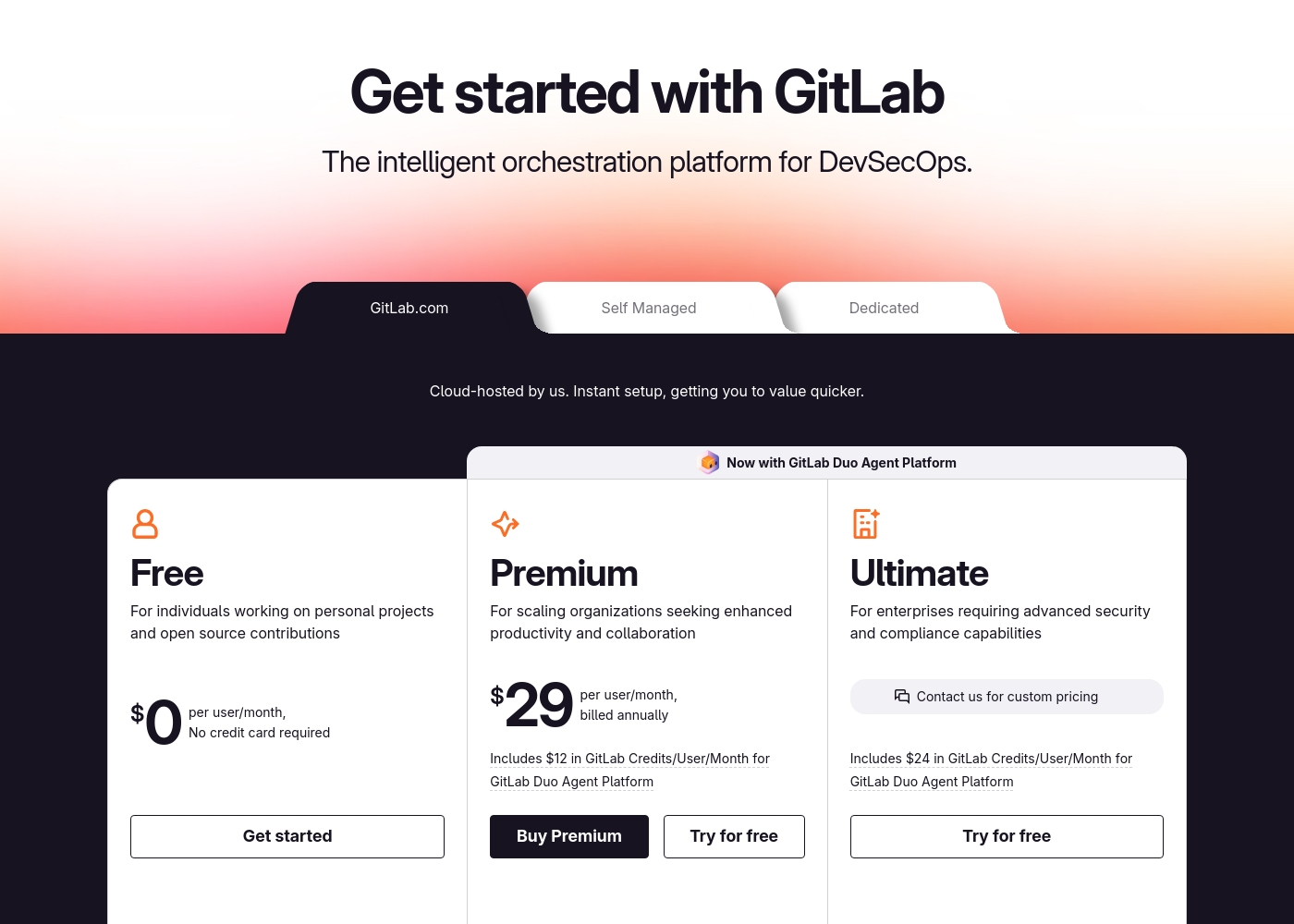
GitLab's plans (Premium at $29/user/month, Ultimate at $99/user/month) are straightforward per-seat, annual costs. You know your bill based on team size. Splunk's pricing is based on data volume (Ingest) or monitored activity. Costs can scale unpredictably with usage spikes and require a custom quote from sales. For budgeting, GitLab offers more predictability. Splunk's value must be weighed against potentially variable costs tied to your data growth.
GitLab pricing: GitLab offers a range of DevSecOps plans from a free tier for individuals to an Ultimate enterprise solution for $99/month. Subscriptions include various compute minutes, storage allocations, and security features to fit different team sizes and needs.
Please note: the provided screenshot shows $29/user/month for Premium, while the text mentions $99 for Ultimate elsewhere; we have prioritized the current primary source values below for clarity. Actually, the provided text includes $0, $29 annually, and custom pricing options depending on the deployment method (SaaS or Self-Managed).
Overall it is a per-seat annual subscription model with usage-based add-ons for credits and compute time. For current SaaS pricing: Free $0, Premium $29/mo annually, Ultimate $99/mo annually (implied for custom).
Splunk costs are Not explicitly stated per year with 2 plans: Ingest Pricing at Not explicitly stated, Activity-based Pricing at Not explicitly stated.
Take a look at the different ways you can manage your data costs below.
Ingest Pricing
Price: Not explicitly stated Websites Supported: Not explicitly stated Best For: Teams needing predictable costs for high-volume data ingestion Refund Policy: Not explicitly stated Other Features: Simple predictable approach, Economical search scaling, Broad data ingestion
- Search and analyze machine data
- Expanded use cases on ingested data
- Standard data ingestion
- Metric time series (MTS)
- Traces analyzed per minute
- Sessions monitoring
- Uptime requests

Pricing Notes
- GitLab's pricing is transparent: Free ($0), Premium ($29/user/mo), Ultimate ($99/user/mo). All paid plans are billed annually.
- Splunk's pricing is not public. It's based on either data volume (Ingest) or activity metrics, requiring a sales consultation.
- GitLab's Ultimate tier ($99/user/mo) is required for advanced security and compliance features.
- Splunk's usage-based model means costs can increase with your data volume or monitoring needs.
- GitLab offers a free plan. Splunk offers a free trial to explore its UI.
Pricing Head-to-Head
ユーザーレビュー
External user reviews for GitLab are currently inaccessible for a full synthesis, as both Trustpilot and Capterra returned security verification errors. 📄 Therefore, we cannot provide a balanced, specific summary of recurring user themes on accuracy, ease of use, support, or pricing at this time. We recommend checking these sources directly for up-to-date sentiment.
GitLab streamlined our entire development pipeline. Having CI/CD, security, and planning in one place saves our team significant time each week.
Based on the provided external sources, we couldn't retrieve detailed user reviews for Splunk due to access restrictions. Trustpilot and Capterra both returned verification or security pages, preventing us from gathering specific sentiment on accuracy, ease of use, support, or pricing.
This means our review is based solely on the official product information and pricing details provided. We recommend checking these review sites directly for the latest user feedback before making a decision.
私たちの判定
It's not about which tool is better overall. It's about what problem you're solving. GitLab's superpower is unification. It gives your software team a single place to plan, code, test, secure, and deploy. You eliminate toolchain chaos. Splunk's superpower is insight. It turns endless streams of machine data from any source into actionable security and operational intelligence. You eliminate blind spots. Choose GitLab if your main goal is to build and ship software faster and more securely. Choose Splunk if your main goal is to monitor, troubleshoot, and defend your live systems. For most software teams, GitLab is the core platform. For most security and ops teams, Splunk is the essential analytical layer. They solve different problems, so the right choice depends entirely on your mission.
よくある質問
Which is better for small teams: GitLab or Splunk?
GitLab is generally better for small software teams. Its free and low-cost tiers ($29/user/month) offer a complete DevSecOps platform. Splunk's usage-based pricing and complexity are often overkill for small teams.
Does GitLab have monitoring like Splunk?
GitLab provides pipeline and job monitoring. It does not offer full-stack observability or log aggregation like Splunk. Splunk is specialized for ingesting and analyzing monitoring data from diverse sources.
Is Splunk worth the extra cost over GitLab?
If your primary need is security operations or infrastructure observability, Splunk is worth it. Its value is in analyzing massive data volumes. GitLab's cost is for building software, which is a different use case.
Can I use GitLab and Splunk together?
Yes, they are complementary. You can use GitLab for the entire software development lifecycle. Then use Splunk to ingest logs and metrics from the applications GitLab builds and deploys for monitoring and security.
Which has better AI features?
They have different AI focuses. GitLab's Duo Agent automates development tasks like code review. Splunk's AI focuses on automating threat detection and security investigation. Neither is definitively 'better'—it depends on your domain.
How long is the free trial for each?
GitLab offers a permanent free plan with usage limits. Splunk offers a time-limited free trial to explore its features, but the exact duration is not specified in the provided data.
選択する準備はできましたか?
両方のツールにはそれぞれの強みがあります。特定のニーズに基づいて選択してください。