Riverside.fm

Riverside.fm

The all-in-one studio for high-quality audio and video creation.

#3 dans Podcast
1 min di lettura · Aggiornato 10/5/2025
Screenshot della homepage di Riverside.fm

At a glance

Quick overview for Riverside.fm: rating, pricing summary, key features, and highlights.

Ciroapp review

4.7
Quality content made simple with AI.

We find Riverside.fm excels by simplifying the otherwise complex remote recording process, ensuring high-quality, individual tracks regardless of connection speed. Its powerful suite of AI tools drastically speeds up editing and content repurposing, offering exceptional value for both novices and seasoned producers. Overall, we confidently recommend Riverside for any creator prioritizing studio-quality results and efficiency.

Pro

  • Pro:Local recording ensures high-quality audio and video regardless of poor internet connection.
  • Pro:Powerful AI features (transcription, text-based editing, Magic Clips) dramatically reduce post-production time.
  • Pro:User-friendly interface makes it intuitive for beginners to use and simple for guests to join sessions.
  • Pro:Exceptional value proposition, replacing multiple separate tools needed for content creation.

Contro

  • Con:Some users report that customer support occasionally relies on generic responses.
  • Con:The interface and setup can feel complicated when attempting strictly in-person recordings.
Prova gratuita
Yes
Gamma: $0–$99/monthFree plan, Monthly subscription, Yearly subscription
This section is a summary. Detailed sections about features, use cases, pricing, and reviews follow below.

Recensione di Riverside.fm, prezzi, funzionalità, pro e contro

Creating high-quality content often involves frustrating recording setups and long post-production hours.

Riverside.fm solves this problem by providing an all-in-one studio where you record in high quality and easily edit in a flash. Thanks to integrated AI, you can create your best content yet. ✨

Cos’è Riverside.fm?

Riverside.fm is your comprehensive digital content studio. It is designed to help you create, edit, and go live with professional media quickly.

The platform supports advanced production controls and seamless collaboration, which is ideal for individual creators and business teams alike. It’s trusted by top names like Tim Cook and Mark Zuckerberg for essential high-stakes recording. This system helps you move from recording right to publishing with maximum impact. ✅

Riverside.fm Funzionalità chiave

✍️ Precision Editing with Text

Riverside transforms the way you edit video and audio content. You can efficiently refine recordings by manipulating the text transcript, just like reviewing a document. This makes the editing process intuitive and incredibly fast.

The platform automatically creates a transcript of your session immediately after you finish recording. When you search for text or make an edit in the transcript, the corresponding audio and video update instantly. This seamless integration drastically reduces frustrating timelines in post-production.

You can easily delete sections you don't need, copy useful content, or rearrange parts simply by editing the text. Furthermore, the system helps refine the flow of spoken words. Utilize the automated Clean Up function to remove unneeded silences and unnecessary filler words.

This ensures your final product has a flawless, professional rhythm every time. It truly integrates the editing process efficiently, so you focus on creating instead of endlessly reviewing footage.

✨ Superior Quality and Multi-Track Control

Start your production process by capturing the highest quality, multi-track recordings available. Riverside offers studio-quality video, supporting up to 4K resolution, alongside crystal-clear 48kHz audio. This capability ensures every piece of content looks and sounds impeccable.

The platform provides advanced multi-track editing controls. You gain granular control over individual audio tracks, video layouts, and overall composition. For instance, you can easily remove accidental crosstalk between participants.

You can even adjust the volume of individual audio tracks independently after the recording is synced. By having this detailed control, you ensure the final mix is perfectly balanced regardless of the initial recording conditions. Magic Audio also instantly tunes up your tracks to achieve that professional studio sound.

💡 Automated Publishing and Increased Reach

Riverside handles the tedious work of preparing your content for distribution. Integrated AI streamlines the final steps, helping to boost your SEO and overall discoverability. The software generates essential publishing materials quickly so you can focus on your audience.

The AI Show Notes feature generates everything needed to hit the publish button. This includes concise summaries and useful organizational elements. You no longer need to spend time manually drafting summaries and metadata.

Key components generated by AI Show Notes include:

  • Titles and Descriptions: Automatically created for immediate publishing.
  • Keywords and Chapters: Helps listeners and viewers find your content easily.
  • Soundbites: Ready-made quotes for quick promotional use.

✨ Instant Repurposing with Magic Clips

Maximize your content’s reach across all social media platforms efficiently. The Magic Clips function turns your full, long-form recordings into perfect, ready-to-share social video clips instantly. You get promotional jump-off points right away.

You can share these promotional soundbites as they are or make small adjustments before posting. This effortless content repurposing is crucial for promoting your episodes and engaging new audiences across various platforms.

Additionally, generating visual appeal is simple with automated Captions. With just one click, your recording is transcribed onto the video. A few extra steps allow you to fully design and animate those captions for maximum visual engagement.

✨ Advanced AI Vocal Production

Riverside offers groundbreaking AI tools to enhance vocal performance and output complexity. The AI Voice feature allows for unique text-to-speech generation. This capability uses your own voice for personalized applications. You can use it for intros, outros, ad reads, or quick textual fixes without needing to re-record.

For sophisticated production or international projects, the VideoDub feature is invaluable. It seamlessly syncs your lips visually with the AI-generated voice track. This creates a perfectly natural video-audio harmony.

These unique tools streamline sophisticated production tasks that typically require extensive professional audio and video expertise. This reduces time spent fixing issues and increases creative possibilities.

Casi d’uso

🎙️ Producing a Remote Podcast Interview

Recording remote interviews usually requires complex setup and long recovery times. Now you can capture audio and video tracks separately in high quality. Once done, Magic Audio will tune up all tracks for a professional sound. You won't waste time on complex mixing controls.

Use the text-based editor to finalize the episode quickly. You can search, delete filler words, and copy content by simply editing the transcript like a document. This drastically cuts down on hours spent in post-production.

Expected outcome: Studio-quality sound and a clean edit ready for publication right away.

🎬 Generating Social Content from Long Videos

When you finish recording a long video or podcast, you need quick ways to promote it. Riverside accelerates content repurposing dramatically. Its automatic transcription turns your audio into text immediately.

Next, use Magic Clips to turn the main recording into ideal, short social clips that are ready to share. With one click, your content gets perfectly animated captions. This maximizes discoverability and helps you reach new audiences across all social platforms.

💼 Hosting Professional Webinars and Events

Teams that rely on large-scale events need secure, high-quality hosting. You can host webinars for up to 100 or even 10,000 registrants, depending on your plan. The platform includes lead capture tools and registration forms to streamline follow-up.

After the session, publishing is effortless thanks to AI Show Notes. This feature automatically generates titles, detailed descriptions, chapters, and relevant keywords. All that remains is hitting the publish button on your highly professional content.

✍️ Correcting Small Errors Without Reshooting

Sometimes you misspeak or forget a crucial detail after the camera stops rolling. You don't need to re-record the entire segment. Use AI Voice technology to generate new audio in your own distinct voice.

If the recording is video, VideoDub syncs the new audio with your original video seamlessly. This ensures you maintain a smooth, professional feel without any jarring cuts or extensive correction work.

📈 Boosting SEO and Accessibility

Content needs to be easily found to maximize impact. The platform helps boost SEO effectiveness and overall discoverability. The automatic transcription kicks in immediately after recording.

This provides the content needed for captions and indexable text for search engines. By cleaning up silences and unnecessary filler words, you ensure high-quality content that engages viewers longer.

📡 Multistreaming Live HD Broadcasts

If you are a serious live streamer, you want studio-quality broadcasts and maximum reach. Riverside allows you to stream live in full 1080p HD quality. You can also multistream your content to unlimited destinations.

This means you can reach your audience on YouTube, Facebook, and elsewhere simultaneously. Audience engagement tools, like Omnichat and live call-ins, help create an interactive and professional live studio experience.

Tip: Use custom branding while live streaming to maintain a consistent professional look across platforms.

Panoramica prezzi di Riverside.fm

Pricing range
$0–$99/month
Tipi di prezzo
Free plan, Monthly subscription, Yearly subscription

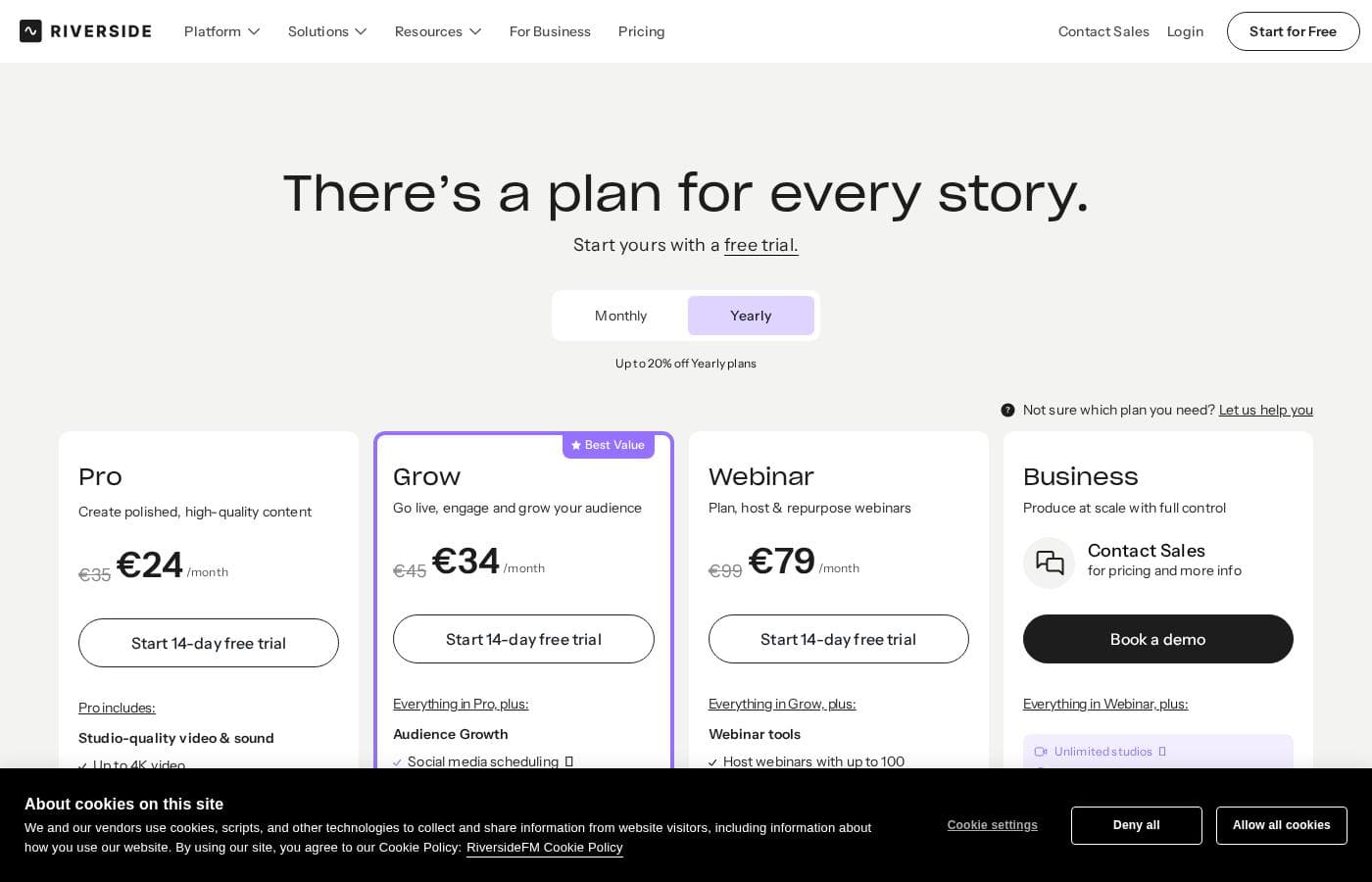
Riverside.fm offers a solid Free plan and flexible paid subscriptions starting at $24 per month when paid annually. Pricing tiers are based primarily on multi-track recording hours and advanced features like live streaming and webinar hosting.

Piani e prezzi

Free

Monthly$0
Yearly$0
2 hours of multi-track recording per month
  • Try 2 hours of multi-track recordings
  • Includes full suite of editing tools
  • Up to 720p video quality
  • Riverside watermark on all things
  • Unlimited single track recording and editing

Pro

Monthly$29
Yearly$24
15 hours of multi-track recordings per month
  • Studio-quality video & sound
  • Up to 4K video quality
  • No watermark
  • AI tools (Magic Audio, unlimited transcriptions, remove silences & filler words)
  • Content repurposing (Magic clips & show notes)

Live

Monthly$39
Yearly$34
15 hours of multi-track recordings per month
  • Everything in Pro, plus live features
  • Studio-quality streaming (1080p HD)
  • Multistreaming to unlimited destinations
  • Audience engagement tools (Omnichat, live call-ins)
  • Custom branding and remote control

Webinar

Monthly$99
Yearly$79
Not explicitly stated (focuses on registrants/sessions)
  • Everything in Live, plus webinar features
  • Webinar hosting (up to 100 registrants)
  • Unlimited scheduled sessions
  • Registration & follow up (lead capture tool)
  • Webinar analytics and Hubspot integration

Business

MonthlyContact Sales
YearlyContact Sales
Unlimited multi-track recording
  • Unlimited multi-track recording
  • Webinar hosting (up to 10,000 registrants)
  • Collaboration (production workspaces, custom roles)
  • 24/7 Priority support and dedicated CSM
  • Enterprise-grade security (SSO, SOC2 type II)

Riverside.fm costs between $0 and $99 per month with five main plans: Free at $0/month, Pro at $24/month (annual), Live at $34/month (annual), Webinar at $79/month (annual), and Business (Contact Sales).

The platform offers great flexibility. Here is a detailed breakdown of what you get for your investment.

Free

Price: $0 per month Websites Supported: Not explicitly stated Best For: New creators starting their journey Refund Policy: Not applicable Other Features:

  • Try 2 hours of multi-track recordings
  • Up to 720p video quality
  • Riverside watermark on all output
  • Unlimited single track recording and editing

This 'Jump in and create something' plan is perfect if you're experimenting with high-quality recording. You get access to essential editing tools without any financial commitment.

Pro

Price: $24 per month (billed annually at $288) or $29 per month (monthly rate) Websites Supported: Not explicitly stated Best For: Studio-quality video and sound recording Refund Policy: Monthly plans can be canceled at any time Other Features:

  • 15 hours of multi-track recordings
  • Up to 4K video quality; 48kHz audio quality
  • No watermark, giving you a professional look
  • AI tools like Magic Audio and unlimited text-based editing

The Pro plan is clearly labeled as "Most Popular"; it's ideal for serious producers who need excellent quality and access to fast AI content repurposing.

Live

Price: $34 per month (billed annually at $408) or $39 per month (monthly rate) Websites Supported: Not explicitly stated Best For: Multistreaming and interactive live studio experiences Refund Policy: Monthly plans can be canceled at any time Other Features:

  • Everything in Pro included
  • Live stream in full HD (1080p)
  • Multistreaming to unlimited destinations (YouTube, Facebook, etc.)
  • Audience engagement tools like Omnichat and live call-ins

If you want to broadcast live with professional quality and engage directly with your audience, choosing the Live plan gives you all the tools you need to multistream effectively.

Webinar

Price: $79 per month (annual rate) or $99 per month (monthly rate) Websites Supported: Not explicitly stated Best For: Hosting and repurposing large-scale professional webinars Refund Policy: Monthly plans can be canceled at any time Other Features:

  • Everything in Live included
  • Host webinars with up to 100 registrants
  • Unlimited scheduled sessions with no time limit
  • Lead capture tools and custom registration forms

This tier is built for marketers and educators who frequently run large events. The Webinar plan streamlines hosting, follow-up, and integration with your CRM systems.

Business

Price: Contact Sales for pricing and more info for pricing & more info Websites Supported: Not explicitly stated Best For: Producing content at scale with full control and enterprise-grade security Refund Policy: Not explicitly stated Other Features:

  • Unlimited multi-track recording
  • Host webinars with up to 10,000 registrants
  • 24/7 Priority support and dedicated Customer Success Manager
  • Enterprise-grade security (SSO, SOC2 type II & ISO27001 certified)

The Business plan is tailored for larger organizations. Contact the sales team if you need unlimited recording hours, advanced security, or extensive team collaboration features.

Riverside makes it easy to get started because there's a permanent Free plan available. Paid plans can be purchased monthly or yearly; yearly plans offer a significant discount, while monthly plans let you cancel at any time.

Recensioni utenti

Reviewers overwhelmingly find Riverside.fm to be a powerful and user-friendly platform, evidenced by its Excellent 4.3/5 Trustpilot rating. Users frequently highlight the system’s ability to capture high-quality, professional video and audio, even when recording remotely or dealing with slow internet speeds, thanks to the critical local file backup feature.

The platform’s accessibility is a major selling point: guests find it simple to join, and beginners find it easy to navigate and learn. A huge benefit cited is the array of cutting-edge AI features—such as text-based editing, accurate transcription, and Magic Clips—which significantly reduce post-production time.

Dedicated customers appreciate the rapid, user-oriented support and the constant stream of updates driven by community feedback. While the overall sentiment is highly positive, a few users noted that customer support responses could occasionally be less detailed than desired, and the existing setup might feel complex for strictly in-person recordings.

Overall, users feel the platform offers exceptional value, replacing many individual tools needed for content creation. 🎬

Cosa si dice altrove

Alex R.
· Trustpilot
5.0 / 5

Absolutely love Riverside! The video recording quality for both the host and customers remains high even when my own internet lags behind. The platform ensured that guests logged in easily, and the output was reliably professional every time.

Daryl S.
· Trustpilot
5.0 / 5

I previously avoided making videos because post-production seemed too complex and difficult to master. Riverside's interface, especially the text-based editor, makes everything a breeze. It’s simple, intuitive, and truly saves me incredible amounts of time every week.

Ancora nessuna recensione.

Scrivi una recensione

Write a Review for Riverside.fm
0/100 characters
0/2000 characters

Perché usare Riverside.fm?

You should choose Riverside.fm because its integrated AI dramatically reduces the time you spend on tedious post-production tasks. It truly works with you so you can focus on creating instead of endlessly editing.

Here are some key benefits that set the platform apart:

  • Streamlined Editing: Edit video and audio files just like a document. Use the text-based editor to search, copy, or delete content right in the transcript.
  • Professional Audio Results: Achieve studio-quality sound instantly. Magic Audio tunes up your tracks so your content always sounds impeccable, without complex mixing.
  • Maximize Reach Easily: Boost SEO and overall discoverability with automatic transcription, which also helps generate perfect animated captions with just one click.
  • Fast Content Repurposing: Turn your main recordings into ideal, ready-to-share social clips using Magic Clips. Use these soundbites to quickly promote your episodes across platforms.
  • Effortless Publishing: AI Show Notes automatically generate titles, comprehensive descriptions, chapters, and relevant keywords. All that remains is hitting the publish button. 💡

Pronto a trasformare il tuo flusso di lavoro con Riverside.fm?

Domande frequenti

How does Riverside calculate the monthly limit for multi-track recording hours?

Your limit is based on the total session duration, regardless of how many guests participated. For example, a one-hour recording with multiple guests counts as only one hour toward your monthly usage limit.

What happens if I accidentally go over my included monthly recording hours?

Riverside ensures your recording will not be stopped if you exceed your limit. If you consistently record more than your quota, they will reach out to discuss upgrading your plan to better fit your production needs.

What are the limitations of the permanent Free plan?

The Free plan provides two hours of multi-track recording monthly, full editing tools, and 720p video quality. All outputs will include a Riverside watermark.

Are plans based on a per-user or per-usage pricing model?

Pricing is primarily usage-based, determined by the volume of multi-track recording hours you need. The Business plan introduces advanced features for teams, such as production workspaces and custom roles.

Can I pay month-to-month, and is cancellation easy?

Yes, you can choose monthly billing for maximum flexibility, and you can cancel your subscription at any time. You can easily manage plan changes and cancellations right in your account dashboard.

If I choose an annual plan, is there a money-back guarantee?

Not explicitly stated on the official site. Annual plans offer a discounted rate, while monthly plans allow you to cancel future payments anytime if your needs change.

What security standards and certifications does Riverside offer for large organizations?

The Business plan includes enterprise-grade security, featuring Single Sign-On (SSO) and certification under SOC2 type II and ISO27001 standards.

What level of customer support is included with paid plans?

Pro and Live plans include access to Live Chat support. Business plan users benefit from 24/7 Priority Support, dedicated Customer Success Managers, and customized onboarding.

Does the AI transcription feature support multiple languages?

Yes, the platform’s automatic AI Transcription tool is robust and supports transcription in over 100 languages.

Does Riverside integrate with my existing marketing tools?

The Webinar plan and the Business plan specifically mention integration with Hubspot. This allows you to sync leads and track performance data within your CRM system.

What is the highest video quality I can achieve across different plans?

The Free plan is limited to 720p quality. However, Pro and higher tiers allow recording of separate high-definition local files up to 4K resolution.

Who should choose the Live plan instead of the Pro plan?

The Live plan suits creators who need to broadcast in full HD (1080p). It adds features like multistreaming to unlimited destinations, audience engagement tools, and live call-ins.

Pronto a provare Riverside.fm? Visita il sito ufficiale o consulta i prezzi.