Plesk

Plesk

Simplify server management with a powerful, all-in-one control panel.

1 min di lettura · Aggiornato 15 mag 2026
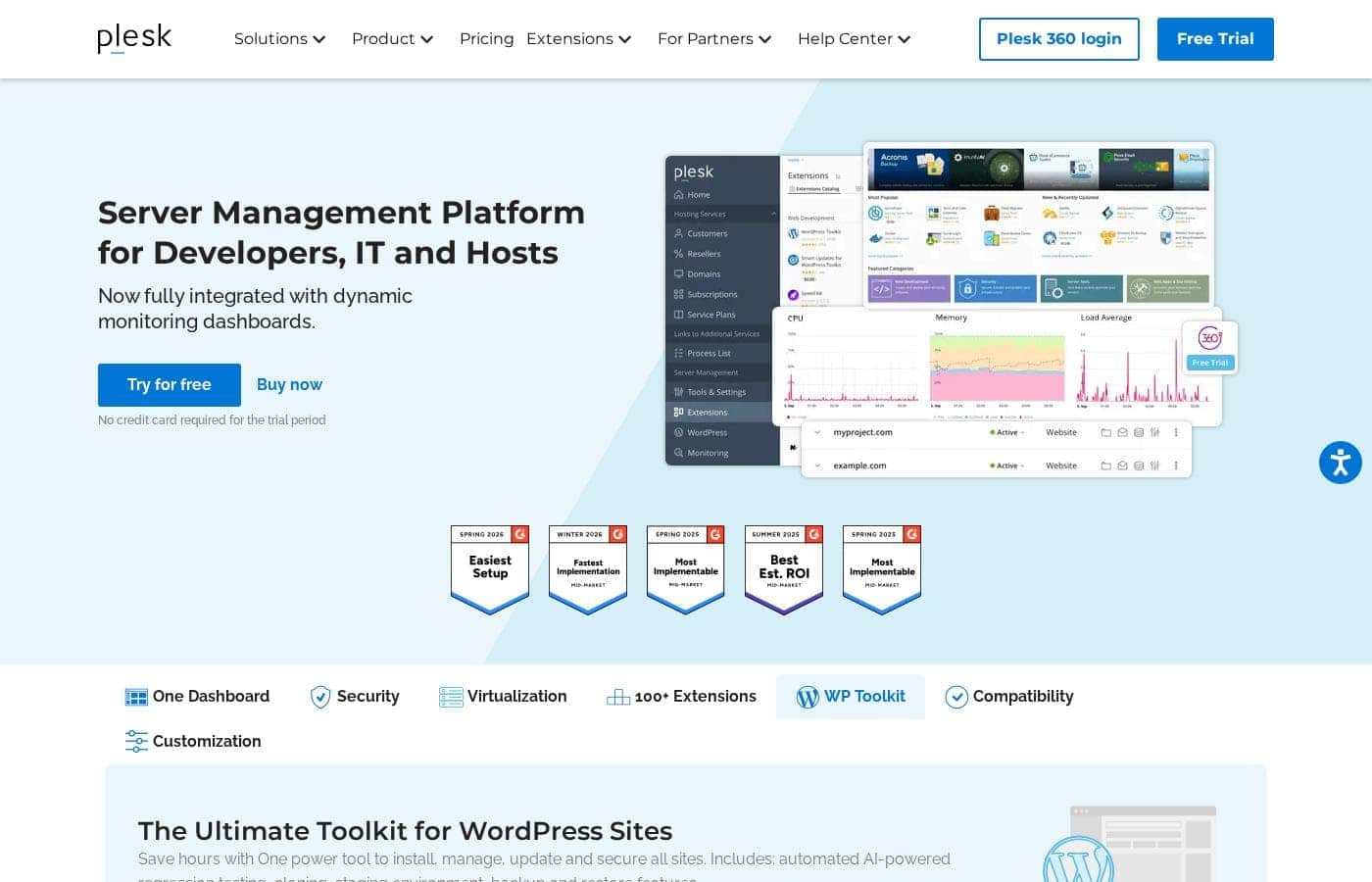
Screenshot della homepage di Plesk

At a glance

Quick overview for Plesk: rating, pricing summary, key features, and highlights.
Best for
Web agencies managing client sitesIT admins overseeing multiple serversDevelopers needing a unified dev environmentHosting providers building VPS solutionsContent managers handling WordPress properties
Facilità d'uso
Plesk aims to simplify server management by providing a single, centralized dashboard. The platform emphasizes one-click tools like the WP Toolkit for complex tasks. Full root access gives experts control, which may present a learning curve for newer users.

Ciroapp review

3.7
Powerful panel, check the support.

Plesk is a feature-rich control panel that excels at centralizing server and website management, especially for WordPress. We found it robust and cloud-compatible, but the overall experience can be inconsistent due to reported customer support challenges. Overall, it's a strong contender for technical users who value its toolkit, but we'd advise trying the free trial to test support responsiveness firsthand.

Pro

  • Pro:Unified dashboard for managing multiple sites and servers
  • Pro:Powerful, automated WordPress Toolkit for updates and staging
  • Pro:Broad security features built-in at the OS and app level

Contro

  • Contro:Customer support responsiveness is frequently criticized in reviews
  • Contro:Pricing can be opaque, and some users report billing surprises
  • Contro:May present a learning curve for users unfamiliar with server admin
Prova gratuita
Yes — 14 giorni
Gamma: $15.57–$57.74/monthFree trial, Monthly subscription, Yearly subscription, Usage-based pricing
This section is a summary. Detailed sections about features, use cases, pricing, and reviews follow below.

Recensione di Plesk, prezzi, funzionalità, pro e contro

Managing multiple websites, servers, and security tools can feel overwhelming. You're juggling updates, performance, and security across different platforms. 💡 Plesk brings it all together into one centralized dashboard, designed for web professionals who need control without the chaos.

Cos’è Plesk?

Plesk is a comprehensive server management platform built for developers, IT admins, and hosting providers. It acts as a centralized control panel for building and managing multiple sites. You get tools for security, performance monitoring, and onboarding new clients from a single place.

Compare Plesk with similar tools and browse the full category before choosing.

View all WordPress Plugins tools

Should you choose Plesk?

Quick buyer guidance before you compare plans or click through.

Choose it if

  • Teams needing to manage many websites from one panel
  • Users requiring strong, built-in security features
  • WordPress-heavy operations looking for specialized toolkit
  • Professionals working across diverse cloud and virtualization platforms
  • Those who need deep, root-level server access and customization

Skip it if

  • Users on a very tight budget, as pricing details are not transparently listed and may involve annual commitments.
  • Those seeking a managed service without any technical setup, as Plesk requires installation and configuration on your server.
  • Individuals running a single, simple website who may not need this level of comprehensive management tools.
  • Teams heavily invested in a specific, non-standard stack not supported by the listed extensions or integrations.

Next steps before buying

  1. 1Review the available hosting control panel plans and pricing on the Plesk website.
  2. 2Confirm compatibility with your current server, OS, and preferred cloud or virtualization platform.
  3. 3Explore the Extension Catalog to ensure critical tools for your workflow (e.g., SSL, CDN, security) are available.
  4. 4Try the free trial to test the dashboard and key features with no credit card required.
  5. 5Compare Plesk's features and pricing with alternative control panels like cPanel or DirectAdmin.

Facilità d'uso

Plesk aims to simplify server management by providing a single, centralized dashboard. The platform emphasizes one-click tools like the WP Toolkit for complex tasks. Full root access gives experts control, which may present a learning curve for newer users.

Plesk Funzionalità chiave

🎯 All-in-One Centralized Dashboard

Managing multiple websites and servers can feel like juggling too many tabs. Plesk brings everything together into one powerful, centralized control panel. You can build and manage multiple sites, run updates, and monitor performance from a single, unified interface.

This saves you time and eliminates the chaos of switching between different tools.

✨ Built-in, Multi-Level Security

Security is at the core of Plesk, protecting you across multiple layers. It provides robust security for your operating system, network, and applications. This core protection is further enhanced through integrations with leading industry security partners.

You get a comprehensive shield without needing to piece together separate solutions.

✨ The Ultimate WordPress Toolkit

For WordPress-heavy operations, Plesk offers a specialized toolkit that saves hours of work. It allows you to install, manage, update, and secure all your WordPress sites from one place. The toolkit includes powerful features like automated AI-powered regression testing, site cloning, and staging environments.

This makes managing a WordPress portfolio far more efficient and secure.

✨ Runs Anywhere You Need

Plesk is built for maximum flexibility and compatibility. It works across all major virtualization and container platforms. You can deploy it on huge cloud providers like AWS, Google Cloud, Azure, and DigitalOcean.

This means you're never locked into a specific infrastructure and can choose the best environment for your projects.

✨ Full Root Access and Control

For those who need deep technical control, Plesk provides full root access via SSH on every server. This means you have the freedom to install any third-party, open-source, or custom application you need. It's designed for professionals who require complete command over their server environment without restrictions.

✨ Expandable with 100+ Extensions

You can power up your Plesk platform by integrating a vast catalog of over 100 extensions. Add tools like DigiCert SSL, Cloudflare, NGINX, Git, and many more to fit your workflow. This extensibility lets you customize your panel with the specific software your projects require.

Casi d’uso

🏢 Web Agency Manages 30 Client WordPress Sites

Sarah runs a small digital agency. Her team builds and maintains WordPress sites for clients. They used to juggle logins, updates, and backups for each site separately.

Now, they use Plesk's WP Toolkit from one dashboard. They install, clone, and stage sites in seconds. Automated testing catches errors before clients see them.

Expected outcome: The agency cuts maintenance time in half and delivers updates with fewer bugs.

🛡️ IT Admin Secures and Updates Servers on AWS and Azure

Mark manages servers across AWS and Azure for his company. He needed a single place to handle security patches and performance checks.

With Plesk, he gets built-in security at the OS and network level. He runs updates across all servers from one screen. He also installs custom apps via full root access.

Tip: Use the centralized dashboard to set up unified monitoring and alerts across all your cloud servers.

⚙️ Developer Builds and Deploys a Staging Environment

A developer is building a new feature for a client's site. She needs to test it without affecting the live version.

Using Plesk's WP Toolkit, she clones the production site into a staging environment with one click. She makes changes, runs automated tests, and pushes to live only when everything passes.

This workflow is simple, fast, and safe.

🚀 Hosting Provider Launches VPS Services

An infrastructure provider wants to offer VPS hosting. They need a control panel that integrates with their virtualization layer.

Plesk combines with SolusVM to create a seamless experience. They can onboard new clients, manage subscriptions, and offer a self-service panel. The platform scales as their business grows.

🔄 Problem → Approach → Outcome: Managing a WordPress Portfolio

Problem: A content manager oversees 15 WordPress blogs. Manually updating each one takes hours and risks breaking things.

Approach: They deploy Plesk and use the WP Toolkit's bulk update and security features. Cloning and staging are used for major changes.

Outcome: All sites are updated securely from one place. Regression testing prevents errors, and backups are automated.

Panoramica prezzi di Plesk

Pricing range
$15.57–$57.74/month
Tipi di prezzo
Free trial, Monthly subscription, Yearly subscription, Usage-based pricing

Plesk offers three main VPS and Dedicated server plans starting at $15.57/month for annual billing. Pricing scales based on the number of domains managed and administrative features included.

Piani e prezzi

Web Admin Edition VPS

Monthly$16.99
Yearly$15.57
10 domains
  • 10 domains
  • Sitejet Builder
  • WP Toolkit SE

Web Pro Edition VPS

Monthly$29.99
Yearly$27.49
30 domains
  • 30 domains
  • Sitejet Builder
  • WP Toolkit
  • Subscription Management
  • Account Management
  • PostgreSQL & MSSQL modules

Web Host Edition VPS

Monthly$62.99
Yearly$57.74
Unlimited domains
  • Unlimited domains
  • Sitejet Builder
  • WP Toolkit
  • Subscription Management
  • Account Management
  • PostgreSQL & MSSQL modules
  • Reseller Management

Partners Business Plans

Monthly$250
Minimal commitment of $250/mo
  • Offer all Plesk Editions
  • Sitejet Builder
  • Partner Discounts up to 45%
  • Priority 24/7 support
  • Dedicated Account Manager
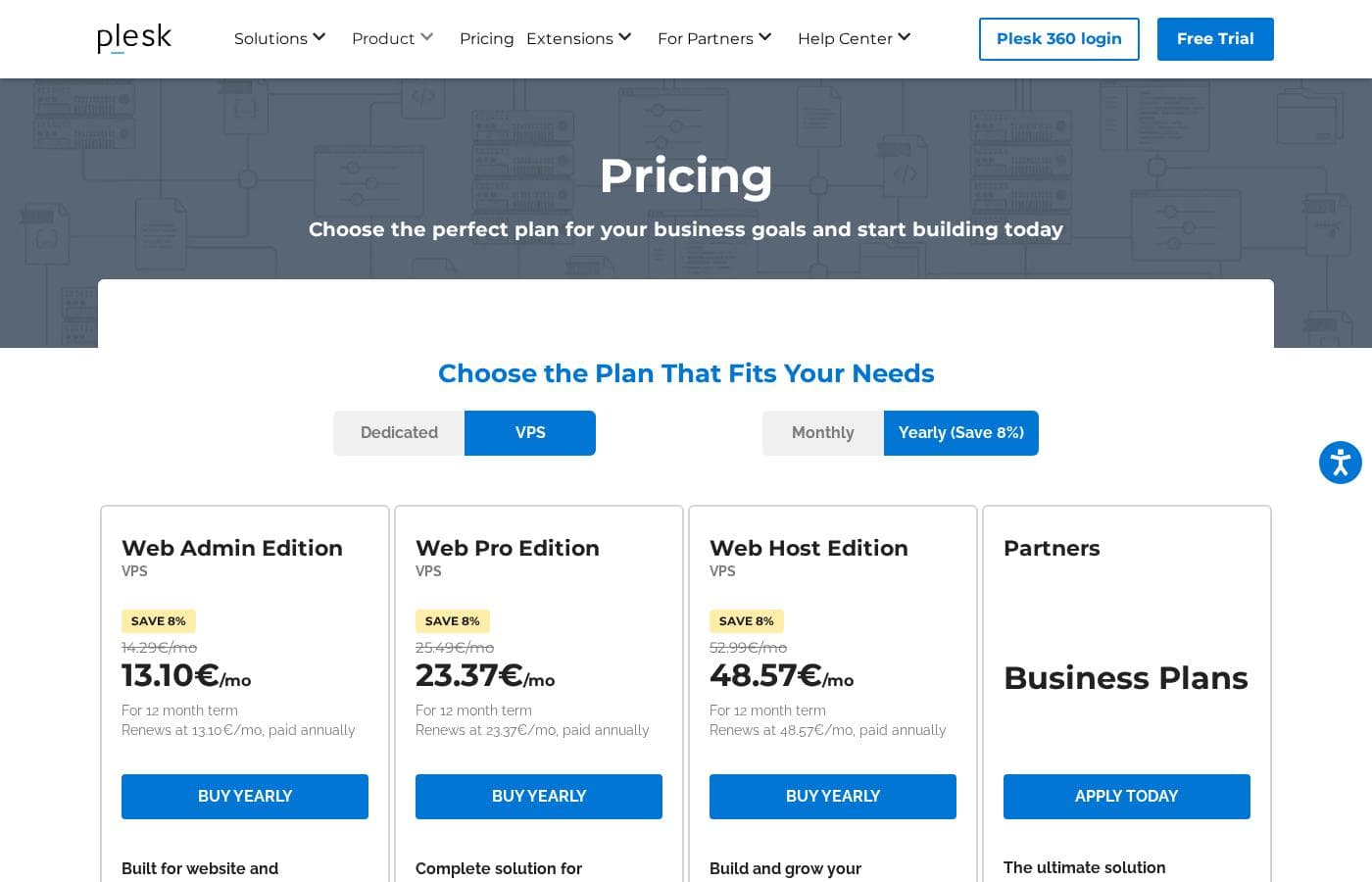
Screenshot dei prezzi
Pricing

Plesk costs between $15.57 and $57.74 per month with 4 plans: Web Admin Edition at $15.57/mo, Web Pro Edition at $27.49/mo, Web Host Edition at $57.74/mo, and Partners at $250/mo minimum.

You can see how the specific licenses break down below to find the right fit for your server.

Web Admin Edition

Price: $15.57 per month billed annually Websites Supported: 10 domains Best For: Basic website and server administration Refund Policy: Not explicitly stated Other Features: Sitejet Builder, WP Toolkit SE

This plan is ideal if you manage a few personal or small business sites. It provides the essential tools to keep your server running without overwhelming you with complex management features. 🛠️

Web Pro Edition

Price: $27.49 per month billed annually Websites Supported: 30 domains Best For: Web developers and designers Refund Policy: Not explicitly stated Other Features: Full WP Toolkit, Subscription Management, Account Management, PostgreSQL & MSSQL modules

Choose this tier if you're a professional managing multiple client projects. It unlocks mass-management tools for WordPress and database modules that save you time on every dev project.

Web Host Edition

Price: $57.74 per month billed annually Websites Supported: Unlimited domains Best For: Hosting providers and resellers Refund Policy: Not explicitly stated Other Features: Reseller Management, Sitejet Builder, Full WP Toolkit, All database modules

This is the choice for those building a true hosting business. You get unlimited domain support and the ability to manage your own resellers from one dashboard. 🚀

Partners Business Plans

Price: €250 / $250 monthly minimum Websites Supported: Unlimited Best For: Large scale businesses and agencies Refund Policy: Not explicitly stated Other Features: Priority 24/7 support, Dedicated Account Manager, Partner Discounts up to 45%

Scaling agencies should pick this option to maximize their margins. It offers the deepest discounts and a dedicated manager to help your infrastructure grow efficiently.

Plesk offers a completely free and fully functional 2-week trial with no credit card required. You can upgrade or downgrade between different editions at any time without a long-term agreement.

Recensioni utenti

We found that user sentiment for Plesk is quite mixed. On Trustpilot, many users praise its user-friendly interface and reliable server management tools, especially the WordPress toolkit.

🛠️ However, a significant number of reviews complain about unresponsive customer support and billing issues, particularly after contract renewals. Some find the software intuitive for basic tasks, while others report it can be unreliable and cause server downtime.

The consensus seems to be that Plesk is a powerful tool for those who can navigate it, but support and pricing transparency are major pain points for a vocal subset of users.

Cosa si dice altrove

Mark T.
Trustpilot

Plesk makes managing my WordPress sites a breeze. The dashboard is intuitive, and the one-click updates save me hours every week. It's the most reliable panel I've used.

Priya S.
Trustpilot

The software itself is okay, but the support is non-existent. When I had a critical server issue, I couldn't get anyone to help. The billing department is also impossible to reach.

Chris B.
Trustpilot

Great for agencies. We manage over 30 client sites from one Plesk dashboard. The security tools and server monitoring give us peace of mind. Wish their support was a bit faster though.

Samira K.
Trustpilot

It has all the features I need, like the WP Toolkit and SSL management. However, it can be a bit complex for beginners. The annual pricing model is a commitment to consider.

Ancora nessuna recensione.

Scrivi una recensione

Write a Review for Plesk
0/100 characters
0/2000 characters

Perché usare Plesk?

Why choose Plesk for your hosting and server management? It’s designed to save you time and reduce complexity. ✨

  • One Dashboard to Rule Them All: Manage multiple sites, run updates, and monitor performance from a single, unified interface. Stop switching between tools.
  • Built-in, Broad Security: Get robust security at the OS, network, and application levels. This is core to Plesk and enhanced by leading industry partners.
  • Ultimate WordPress Toolkit: The WP Toolkit lets you install, manage, update, and secure all WordPress sites. It includes automated testing, cloning, and staging environments.
  • Runs Anywhere: It’s compatible with all major virtualization and container platforms, including big cloud providers like AWS, Google Cloud, and Azure.
  • Full Control & Flexibility: You get full root access via SSH on every server. Install any third-party or custom application you need.
  • Expand with 100+ Extensions: Power up your platform by integrating tools like DigiCert SSL, Cloudflare, NGINX, Git, and many more.

Pronto a trasformare il tuo flusso di lavoro con Plesk?

Altri strumenti nella categoria WordPress Plugins

Popular comparisons

Volza
Plesk vs Volza
WordPress Plugins
Netlify
Netlify vs Plesk
Web Hosting
GiveWP
GiveWP vs Plesk
WordPress Plugins
IONOS
IONOS vs Plesk
Web Hosting

Similar tools

Volza
Volza
WordPress Plugins3.8/5

Volza is a global trade-intelligence platform providing verified international trade information and actionable market insights. With over 30 years of expertise in trade analytics, we support thousands of businesses and leading consultancies around the world.

Netlify
Netlify
Web Hosting4.3/5

Over 12 million users rely on Netlify to build and host custom websites, apps, prototypes, and internal tools. Create with AI or code, publish and share in seconds. Trusted by millions of businesses and brands like Meta, Figma, Autodesk, and Mattel.

GiveWP
GiveWP
WordPress Plugins4.7/5

GiveWP is consistently called the best donation plugin built specifically for WordPress. This tool is the ultimate platform for organizations and changemakers who need to elevate their fundraising and amplify their mission. It’s trusted by over 100,000 fundraisers across the globe. You can onboard easily using ready-to-go campaign structures that include optimized forms, landing pages, and built-in reporting tools. GiveWP lets you organize and manage all your efforts under a single, unified structure. That helps organizations of all sizes focus on creating a movement and making a lasting impact. 💡

IONOS
IONOS
Web Hosting4.5/5

IONOS offers a comprehensive range of digital services for every stage of your online journey. It serves as your single source for domains, web hosting, and reliable server infrastructure. Starting online is simple with user-friendly tools like the Online Store Builder and the MyWebsite Now service. For growing businesses, IONOS provides secure, scalable options. This includes high-performance WordPress Hosting and advanced cloud services like Managed Kubernetes and dedicated database management. IONOS currently supports over 6.2 million customers using robust, secure, and sustainable data centers. ✅

Domande frequenti

Does Plesk offer a free trial, and do I need a credit card?

Yes, Plesk provides a completely free 14-day trial with no credit card required. You can test the full functionality of the software before committing.

How is Plesk priced, and what's the difference between VPS and Dedicated licenses?

Plesk is priced per server license, with separate options for VPS (virtual servers) and Dedicated servers. The pricing scales based on the plan (Admin, Pro, Host) and whether you pay monthly or yearly for an 8% discount. The main difference is that a VPS license only works on virtual servers, while a dedicated license works on both.

Can I switch between Plesk plans if my needs change?

Yes, there is no long-term agreement. You can upgrade or downgrade between the different editions (Admin, Pro, Host) at any time.

What is the refund policy for Plesk licenses?

The official website does not explicitly state a money-back guarantee or refund policy. It's best to confirm the terms before purchase, especially since licenses auto-renew.

How does license renewal work?

All licenses purchased online have automatic renewal enabled by default. A renewal order is created and paid automatically at the end of your billing period (monthly or yearly).

What integrations and extensions does Plesk support?

Plesk is expandable with over 100 extensions, including tools like DigiCert SSL, Cloudflare, NGINX, Git, and ImunifyAV. This allows you to integrate popular security, performance, and development tools.

Does Plesk handle server hosting or just software?

Plesk is a software control panel only; it does not provide hosting services. You need your own server from a hosting partner or a cloud hyperscaler like AWS, Google Cloud, or Microsoft Azure.

What kind of support is included with Plesk?

Standard plans include 24/7 built-in support. Partners with a business plan get priority 24/7 support and a dedicated account manager. Some user reviews, however, report challenges with support responsiveness.

Are there discounts for non-profits or educational institutions?

Yes, Plesk offers discounted licenses for non-profit and academic institutions. You need to contact their sales team directly to learn if you're eligible.

Who is Plesk best suited for?

Plesk is ideal for web agencies, IT admins, developers, hosting providers, and content managers who need to manage multiple websites or servers from a single dashboard. It's especially strong for WordPress-heavy operations.

What languages and regions does Plesk support?

The official site does not specify supported languages for the control panel itself. For availability, it's noted that services cannot be provided to account holders located in Russia at this time. You should verify regional compatibility before purchase.

Is there a limit to how many domains I can manage?

Yes, the plans have domain limits: the Web Admin edition supports 10 domains, Web Pro supports 30, and the Web Host edition supports unlimited domains.

How do I cancel my Plesk subscription?

While not explicitly detailed, since renewals are automatic, you would likely need to disable auto-renewal in your account settings or contact support to cancel before the next billing cycle.

Pronto a provare Plesk? Visita il sito ufficiale o consulta i prezzi.