Traduzione completa in arrivo — dettagli del prodotto in inglese con navigazione localizzata.
Dropbox DocSend

Dropbox DocSend review

Secure file sharing with document analytics for sales and fundraising teams

Dropbox DocSend costa da 15 USD (≈ 13,41 €)/mese · 5 piani

Di Ciroapp Editorial Team · Aggiornato 9 ott 2026

Può essere applicata una commissione senza costi aggiuntivi

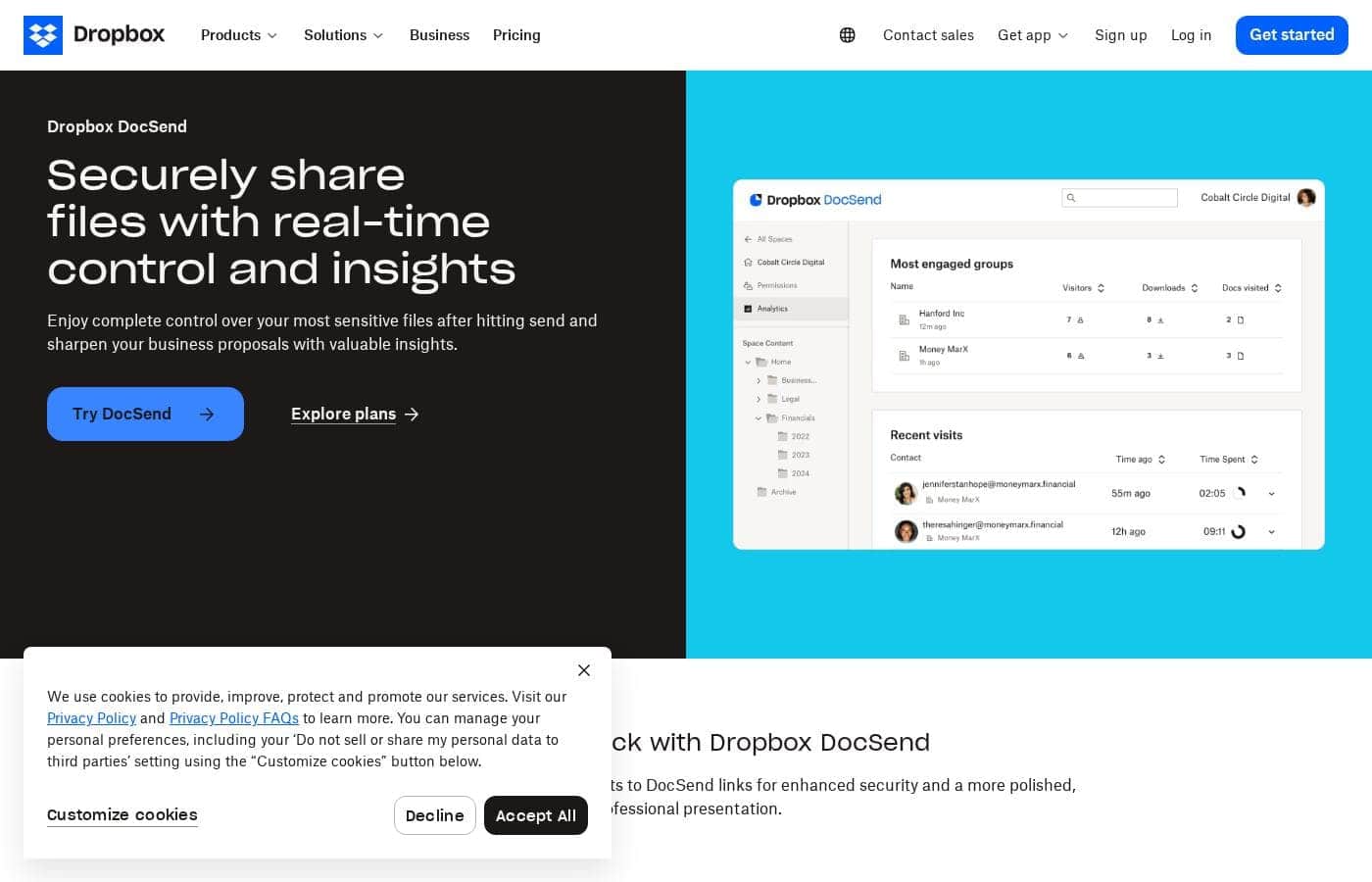
Screenshot della homepage di Dropbox DocSend

In breve

Panoramica rapida di Dropbox DocSend: valutazione, prezzi, funzionalità chiave e punti salienti.
Pagina del fornitore controllata il 12 ott 2026

Punteggio Ciroapp

4.1/ 5

Track every document after you hit send.

DocSend turns ordinary attachments into secure links you can track, showing who opened a file, how long they stayed, and where they stopped reading. Pricing is clear across four tiers, though yearly billing locks you in and there's no permanent free plan. Overall, a strong pick for sales and fundraising teams.

Pro

  • Pro:Secure links keep you in control after sending, with view requirements and download permissions you set yourself
  • Pro:Real-time email alerts tell you when someone is reviewing a proposal, so you can time your follow-up
  • Pro:Page-level analytics show time spent per page and where readers drop off

Contro

  • Contro:There's no permanent free plan, only a time-limited trial, and the trial length isn't published
  • Contro:Advanced and Advanced Data Rooms bundle three seats, so a solo user pays for seats they never use
  • Contro:Yearly billing charges the full year up front and every paid plan renews automatically
Ideale per
  • Sales teams sending proposals that need to stand out from ordinary email attachments
  • Fundraising teams and founders sharing financials with investors through a data room
  • Executives and board liaisons circulating board materials before a meeting
Prova gratuita
Yes
Questa sezione è un riepilogo. Più in basso trovi dettagli su funzionalità, casi d’uso, prezzi e recensioni.

Cos’è Dropbox DocSend?

Dropbox DocSend is a file-sharing tool built for people who send high-stakes documents. Instead of attaching a file to an email, you share a link you can still control. Teams use it for business proposals, board materials, financials, and fundraising data rooms.

Advanced options include virtual data rooms, file indexing, and one-click NDAs. The pitch is simple: a more secure, polished way to present documents, plus analytics that show how recipients engage with them.

Verdict

Best for Sales, fundraising, and executive teams that share sensitive documents outside their organization and want to understand how recipients engage with them..

Dropbox DocSend makes sense when visibility into a document matters as much as the document itself. Confirm the current pricing, billing terms, and setup requirements first, then pilot it on one high-stakes proposal or data room.

Strengths

  • Keeps control of files after sending, including view requirements and download permissions
  • Sends real-time notifications when someone is reviewing a proposal
  • Page-level analytics show time per page and where readers drop off

Watch-outs

  • The page doesn't publish plan pricing, billing cycle details, or refund terms, so you'll need to confirm them directly
  • Editing and co-authoring aren't the focus here; the tool is built around sharing and tracking
  • Because it's a separate platform, it adds a step alongside whatever file storage you already use

Dropbox DocSend Funzionalità chiave

🔒 Secure sharing that lasts past the send button

DocSend swaps email attachments for secure links you still control after sending. You set the terms of access, like requiring an email and a passcode before anyone can view the file. You also decide whether a file can be downloaded.

Replacing raw attachments with links gives every document a cleaner, more polished look.

✨ Analytics that show you who is actually reading

Line graphs show how long readers spend on each page and where they drop off, so you can see which sections hold attention. Email alerts notify you in real time when someone is reviewing a proposal. That helps you time your follow-up instead of guessing.

Standard and higher plans add video and rich-media analytics.

✨ Data rooms for sensitive deals

Virtual data rooms give you version control over financials and research you send outward. A few pieces carry the weight:

  • Visitor group permissions decide who sees what
  • Diligence tracking and an audit log record activity
  • Enhanced rooms offer double the capacity per room

✨ One-click NDAs with an audit trail

Peers and investors can sign an NDA with a single click before you hand over research. Signed documents stay available afterward, which makes an easy audit trail. Unlimited eSignature comes with Standard and up, while the entry plan includes a limited allowance of envelopes.

✨ Controls built for due diligence conversations

Tighter plans add dynamic watermarking and email verification for viewers, so you know exactly who opened a file. Folder- and file-level security permissions let you narrow access further. These are the controls that tend to come up when investors or lawyers review a deal.

Casi d’uso

📈 Sending sales proposals

Sales teams send proposals as DocSend links. Email alerts fire while a prospect reads, so you time your follow-up. Graphs show which sections held attention and where readers dropped off.

Expected outcome: you know who's engaged before you call.

Tip: open your follow-up with the section they lingered on.

💰 Running a fundraising process

Founders and deal teams run a raise in an Advanced Data Room. Version control keeps financials current as they manage distribution and access. Visitor group permissions decide who sees what, and the audit log records activity for investors and lawyers.

Expected outcome: investors review the right version of every document.

🏛️ Circulating board materials

Board liaisons share board decks as secure links before a meeting. You set email and passcode requirements, then check the analytics to see who opened the materials and what drew their attention. That shapes the agenda you walk in with.

Expected outcome: a meeting tailored to what board members actually read.

✍️ Sharing research under NDA

Finance and legal teams send one-click NDAs alongside research or financials. Peers and investors sign in a single step, and signed documents stay available afterward. That leaves a clean audit trail without chasing paper.

Tip: keep signed NDAs on file so diligence requests are quick to answer.

Prezzi di Dropbox DocSend

Da15 USD/mese≈ 13,41 €

  • 5 piani
  • Risparmia fino al 40% con la fatturazione annuale

Pagina del fornitore controllata il 12 ott 2026; verifica i prezzi attuali su pagina prezzi di Dropbox DocSend

Screenshot della pagina prezzi di Dropbox DocSendVedi lo screenshot della pagina prezzi
PianoMensileAnnualeInclude
Personal
per utente
15 USD/mese
≈ 13,41 €
10 USD/mese
≈ 8,94 €
120 USD all’anno
Risparmia fino al 33% con la fatturazione annuale
One user; 10 GB storage
  • Secure document links with real-time view tracking
  • Basic document analytics
  • Limited eSignature envelopes
  • 10 GB storage per user
Standard
Il più scelto
per utente
65 USD/mese
≈ 58,10 €
45 USD/mese
≈ 40,22 €
540 USD all’anno
Risparmia fino al 31% con la fatturazione annuale
Priced per user; 50 GB storage per user
  • Everything in Personal
  • Multi-file sharing and folders
  • Video and rich-media analytics
  • Unlimited eSignature
  • Custom branding and password protection
  • +1
Advanced
250 USD/mese
≈ 223,45 €
150 USD/mese
≈ 134,07 €
1800 USD all’anno
Risparmia fino al 40% con la fatturazione annuale
Includes 3 users; extra seats cost more
  • Everything in Standard
  • Dynamic watermarking
  • Email verification for viewers
  • Lightweight data rooms (Spaces)
  • Folder- and file-level security
  • +1
Advanced Data Rooms
300 USD/mese
≈ 268,14 €
180 USD/mese
≈ 160,89 €
2160 USD all’anno
Risparmia fino al 40% con la fatturazione annuale
Includes 3 users; extra seats cost more
  • Everything in Advanced
  • Enhanced data rooms with double capacity per room
  • Visitor group permissions
  • Diligence tracking and data room audit log
  • Data room analytics
  • +1
Enterprise
Vedi sito del fornitore
  • Custom pricing and contract terms
  • Set up through the sales team

Convertito al tasso di riferimento BCE del 13 ott 2026; il fornitore potrebbe applicare un prezzo locale diverso.

Storico prezzi

Monitoriamo i prezzi dal 9 ott 2026. Nessuna variazione rilevata finora.

Tipi di prezzo: Free trial, Monthly subscription, Yearly subscription, Per seat pricing

Note sui prezzi

Dropbox DocSend starts at $10 per user per month when you pay yearly, and the four self-serve plans run up to $180 per month for Advanced Data Rooms. Paying monthly costs more per month, but it skips the one-year commitment, and you can try the product on a time-limited trial before you buy.

Dropbox DocSend costs between $10 and $180 per month, with four self-serve plans: Personal at $10 per user/month, Standard at $45 per user/month, Advanced at $150/month, and Advanced Data Rooms at $180/month. Those are the annual-billing rates.

Here's how the tiers stack up, and who each one fits.

Personal

Price: $10 per user/month billed annually, or $15 month to month Best For: freelancers and solo consultants who share a handful of decks Other Features:

  • Secure links with real-time view tracking
  • Basic document analytics
  • A limited allowance of eSignature envelopes
  • 10 GB of storage, and one seat only

Personal is the cheapest way into DocSend. It works well if you send the occasional proposal and just want to know when someone opens it. You get one seat, so it's you and nobody else.

Standard

Price: $45 per user/month billed annually, or $65 month to month Best For: small teams sharing multiple files with clients and investors Other Features:

  • Everything in Personal
  • Multi-file sharing and folders
  • Video and rich-media analytics
  • Unlimited eSignature
  • Custom branding and password protection
  • 50 GB of storage per user

Standard is the tier most growing teams land on. The jump from Personal buys you multi-file sharing, branding, and unlimited eSignature, which matters once you're sending more than one document at a time.

Advanced

Price: $150 per month billed annually, or $250 month to month Best For: teams that need tighter control over who can open a file Other Features:

  • Everything in Standard
  • Dynamic watermarking
  • Email verification for viewers
  • Lightweight data rooms (Spaces)
  • Folder- and file-level security permissions
  • Three users included

Advanced adds the security layer that shows up in due diligence conversations. Note that the monthly figure covers three users, so a one-person team would be paying for seats it never uses. Stay lower if you don't need watermarking or data rooms.

Advanced Data Rooms

Price: $180 per month billed annually, or $300 month to month Best For: fundraising and deal teams running a formal diligence process Other Features:

  • Everything in Advanced
  • Enhanced data rooms with double the capacity per room
  • Visitor group permissions
  • Diligence tracking and a data room audit log
  • Data room analytics
  • Three users included

Advanced Data Rooms is built for a raise or a transaction. You get bigger rooms, per-group permissions, and an audit trail that investors and lawyers tend to ask for. If you're sending decks rather than running a data room, this is more than you need.

Enterprise

Best For: larger organizations with custom security and contract requirements Other Features: custom pricing and terms set with the sales team

Enterprise is a conversation rather than a checkout page. Reach out to sales if you need custom terms or a volume arrangement.

Every paid plan renews automatically, and yearly plans bill the full year up front in exchange for the lower monthly rate. Monthly billing costs more but you can stop whenever you like.

There's no permanent free plan. New accounts do get a time-limited trial, so you can test secure links and analytics before paying. Since there's no published money-back window, it's worth confirming the trial length and seat minimums before you commit to a yearly plan.
Calcolatore dei costi

Stima quanto costa Dropbox DocSend per il tuo team.

Fatturazione
Al mese
75 USD≈ 67,04 €
All’anno
900 USD≈ 804,43 €

Personal ha un prezzo per utente: prezzo × 5 postazioni. Stima basata sui prezzi di listino pubblicati, esclusi tasse, componenti aggiuntivi e sconti.

Convertito al tasso di riferimento BCE del 13 ott 2026; il fornitore potrebbe applicare un prezzo locale diverso.

Come pagare meno Dropbox DocSend

  • Paga annualmente: risparmi fino al 40% rispetto al mensile.
  • È disponibile una prova gratuita: provalo prima di pagare.
  • Alcuni piani sono per utente: paga solo le postazioni effettivamente usate.
  • Strumenti più economici in questa categoria partono da 4,17 USD/mese.
Inizia la prova gratuita

Avvisami quando Dropbox DocSend cambia prezzo

Un’email quando rileviamo una variazione sulla pagina prezzi del fornitore. Niente newsletter, niente offerte. Disiscrizione con un clic.

Recensioni utenti

Ancora nessuna recensione.

Scrivi una recensione

Scrivi una recensione per Dropbox DocSend
0/100 caratteri
0/2000 caratteri

Perché usare Dropbox DocSend?

If your proposals disappear into an inbox and you never learn whether they were read, the problem isn't your pitch. It's the delivery method.

  • Stay in control after sending. You set the terms of access, such as requiring an email and passcode before someone can view a file, and you decide whether the file can be downloaded.
  • Get notified in real time. Email alerts tell you when someone is reviewing a proposal, which helps you time your follow-up instead of guessing.
  • See how readers behave. Line graphs show time spent per page and where people drop off, so you know which sections hold attention.
  • Look more professional. Replacing raw email attachments with links gives every document a more polished presentation.
  • Run fundraising with version control. Data rooms let you manage distribution and access to financials and research, which matters when information is sensitive.
  • Simplify NDAs. One-click NDAs let peers and investors sign quickly, and signed documents stay available afterward for an easy audit trail.

Taken together, that's a shift from hoping a document was read to knowing which prospects are engaged and tailoring your next conversation to their interests.

Alternative a Dropbox DocSend

Altri strumenti nella categoria Gestione file

Vedi tutti gli strumenti Gestione file
iMazing

iMazing

File management4.2/5Da 4,17 USD/mese (≈ 3,73 €)

Gestisci il tuo iPhone. Alle tue condizioni.

CopyTrans

CopyTrans

File management3.9/5

La suite di applicazioni efficiente per gestire i trasferimenti di dati tra iPhone, iPad e PC.

Dropbox DocSend FAQ

Quanto costa Dropbox DocSend?

Il piano a pagamento più economico di Dropbox DocSend, Personal, costa 15 USD (≈ 13,41 €) al mese. I piani a pagamento vanno da 15 USD a 300 USD al mese.

Dropbox DocSend offre una prova gratuita o una garanzia di rimborso?

Dropbox DocSend offre una prova gratuita.

Quanto si risparmia con la fatturazione annuale di Dropbox DocSend?

Pagando annualmente si risparmia fino al 40% rispetto alla fatturazione mensile, in base ai prezzi di listino di Dropbox DocSend.

Il prezzo di Dropbox DocSend è cambiato di recente?

No. Non abbiamo rilevato variazioni di prezzo dall’inizio del monitoraggio, il 9 ott 2026.

How do seats and storage limits work across the plans?

Personal covers one user and gives 10 GB. Standard is priced per user, with 50 GB each. Advanced and Advanced Data Rooms bundle three seats, and extra users cost more. A solo buyer may pay for seats they never use.

What security controls come with the paid plans?

Standard adds password protection and custom branding. Advanced brings dynamic watermarking, email verification, and file-level permissions. Advanced Data Rooms adds visitor group permissions, diligence tracking, and an audit log for due diligence.

Is there a free plan, and who gets the most value?

There's no permanent free plan, just a time-limited trial, and the trial length isn't published. It suits sales, fundraising, and executive teams that share sensitive files and want to see how readers engage.

Pronto a provare Dropbox DocSend? Visita il sito ufficiale o consulta i prezzi.

Sei Dropbox DocSend? Rivendica questa scheda · Ottieni il badge