Pngtree vs Shade
Pngtree and Shade serve very different creative needs. Pngtree is a massive library of downloadable PNG graphics. Shade is a centralized media hub for team storage and workflow. Your choice depends on whether you need assets or asset management.
Best for: Designer che necessitano frequentemente di asset PNG trasparenti, Esperti di marketing che creano grafica di campagne stagionali ricorrenti
Best for: Creative and marketing teams, Video production departments
Accesso rapido PNG con i dettagli della licenza da leggere attentamente
Pngtree è utile per un rapido accesso a PNGs e ai modelli di progettazione, ma gli utenti commerciali devono verificare l'ambito della licenza, tenere registri e valutare i reclami dei clienti di terze parti prima di impegnarsi.
Pro
- Ampia libreria di PNGs, modelli, sfondi e risorse di presentazione trasparenti.
- I piani a pagamento pubblicizzano licenze per uso commerciale, download più rapidi e nessun requisito di attribuzione.
- Utili strumenti di modifica integrati e AI per la rimozione dello sfondo e la variazione rapida dell'immagine.
- È disponibile un piano gratuito per testare la qualità della ricerca prima di pagare.
Contro
- I termini della licenza individuale sono monoposto e potrebbero non coprire l'utilizzo da parte del team o del cliente principale.
- Le revisioni di terze parti mostrano reclami ricorrenti su fatturazione, supporto e avvisi relativi al copyright.
- I prezzi promozionali a vita possono essere interessanti ma dovrebbero essere confrontati con i termini attuali.
- Le risorse azionarie generiche potrebbero richiedere modifiche per evitare l'aspetto del marchio basato su modelli.
Ricerca intelligente, ma i prezzi sono poco chiari.
Riteniamo che Shade offra un hub centralizzato avvincente per i team multimediali, con una ricerca AI eccezionale e uno streaming file intelligente. Nel complesso, è un solido strumento di flusso di lavoro, ma la mancanza di prezzi pubblici per i piani di team è un notevole inconveniente per gli acquirenti futuri.
Pro
- Piattaforma all-in-one per archiviazione, revisione e approvazione
- Streaming intelligente dei file per un accesso rapido a file di grandi dimensioni
- Potente ricerca AI e metadati automatici
- Archiviazione sicura per progetti a lungo termine
Contro
- I prezzi per i piani Team ed Enterprise non sono divulgati pubblicamente
- È necessaria una demo di vendita per preventivi dettagliati e scalabilità
- Dati di revisione esterni limitati per una validazione approfondita
Informazioni suPngtree
Pngtree è un mercato di grafica stock incentrato su immagini, sfondi, modelli, illustrazioni, effetti di testo, risorse PowerPoint PNG e nuovi strumenti AI. La sua pagina dei prezzi individuale pubblicizza un'ampia libreria di risorse curata, download giornalieri gratuiti, piani premium per uso commerciale, velocità di download più elevata, rimozione dello sfondo, modifica online e un'opzione di piano a vita. La piattaforma è meglio intesa come una libreria di risorse di progettazione piuttosto che come una suite creativa completa.
Informazioni suShade
💡 Shade è una piattaforma all-in-one per l'archiviazione e la gestione dei media. È pensata per i team creativi e multimediali che gestiscono quotidianamente file di grandi dimensioni. Combina streaming intelligente dei file, strumenti di revisione e ricerca intelligente in un unico luogo.
Punti salienti
Confronto delle funzionalità
Panoramica funzionalità
Evidenziamo le principali differenze e scegliamo un vincitore per ogni funzionalità.
Core Purpose
Pngtree provides stock assets. Shade manages your own assets. They solve different problems.
Pngtree is a marketplace. You browse and download ready-to-use PNG images, templates, and backgrounds for your projects. It's like a giant library of creative ingredients. Shade is a storage and workflow hub. It's a central home for your team to upload, organize, search, and collaborate on your own media files like videos and graphics. The key difference is acquisition vs. management. Pngtree helps you get new assets. Shade helps you work with the assets you already have. A marketing team might use Pngtree to grab a Halloween graphic. That same team would use Shade to store and manage all their campaign videos.
Asset Library
Pngtree offers millions of downloadable assets. Shade has no library, only your own files.
Pngtree's main feature is its massive library. It specializes in transparent PNGs and has millions of items, including templates and illustrations. New assets are added daily. Shade does not provide any stock assets. Its library consists entirely of media files you and your team upload. It's a blank slate for your own content. This is the most fundamental difference. If you need graphics, Pngtree is the clear choice. If you need to organize existing files, Shade is the relevant tool. You'd choose Pngtree to find a specific birthday cake illustration. You'd choose Shade to archive last year's video project.
Search & Discovery
Shade's AI search finds files by description. Pngtree's search is for browsing its own library.
Pngtree has a search bar to find items within its own asset library. You search by keywords to discover new images and templates. Shade offers AI-powered search across your uploaded media. It uses automated metadata to help you find specific files even if you don't remember their name, based on content description. Shade's search is for management. Pngtree's search is for shopping. Shade helps you find what you have. Pngtree helps you find what you need to get. For example, you'd use Shade to find 'the sunset clip from the summer shoot.' You'd use Pngtree to search for 'transparent sunset graphic.'
Collaboration Tools
Shade has built-in review and approval workflows. Pngtree is a solo download experience.
Pngtree is designed for individual creators. The core action is browsing and downloading files for your own use. There are no team collaboration features. Shade includes tools for team review and approval. You can share media via secure links and gather time-stamped feedback directly on files, streamlining the approval process. This makes Pngtree a personal tool and Shade a team tool. Collaboration is a central part of Shade's value proposition. A freelance designer would use Pngtree. A video production team would need Shade to get client sign-offs on edits.
File Handling
Shade streams large files for instant access. Pngtree downloads standard-sized assets.
Pngtree downloads assets directly to your computer. Download speeds are high for premium users, but the action is a complete file transfer. Shade features intelligent file streaming. This allows team members to access and preview very large files like 4K video instantly in the browser without waiting for a full download. Streaming is a major advantage for media-heavy teams. It solves the bottleneck of working with huge files. Pngtree's assets are typically smaller and don't require this. Editing a video project in Shade can start immediately. Downloading a 5MB PNG from Pngtree is quick but a different workflow.
Commercial Licensing
Pngtree provides commercial licenses. Shade doesn't license assets—it stores your own.
Pngtree's paid plans include valid commercial licenses for their assets. You can also download official copyright certificates for legal protection on client work. Shade does not provide licenses. It is a storage platform. You are responsible for ensuring you have the rights to any files you upload and store in it. This is a critical difference for legal use. Pngtree handles the licensing for its own assets. Shade assumes you already have the rights to your files. Using a Pngtree image in a product design is covered by your subscription. Uploading your company's logo to Shade requires you to own that logo.
Learning Curve
Both are simple, but Pngtree is a familiar download site. Shade requires team onboarding.
Pngtree functions like any stock photo site. If you've used Shutterstock or Adobe Stock, you'll understand it instantly. It's a browse-and-download model. Shade is an all-in-one platform for storage and workflow. While reviews praise its intuitive interface, it requires setting up a central library and teaching team members the review and search processes. Pngtree has a lower initial learning curve for an individual. Shade has a higher setup curve but more long-term value for a team. An individual can be productive on Pngtree in minutes. A team might need a day to properly onboard to Shade.
Value Proposition
Pngtree's value is access to a huge asset library. Shade's value is team efficiency and organization.
Pngtree's value is clear: pay a fee to access millions of assets you can use commercially. The risk is whether the business practices (reports of aggressive upselling) undermine that value. Shade's value is efficiency and reduced chaos. It aims to save creative teams time searching for files and streamline feedback loops. Its value is harder to quantify but solves real workflow pain. The comparison is apples-to-oranges. One sells ingredients, the other sells a kitchen organization system. You'd calculate Pngtree's ROI on asset cost vs. hiring a designer. You'd calculate Shade's ROI on time saved searching and faster project turnarounds.
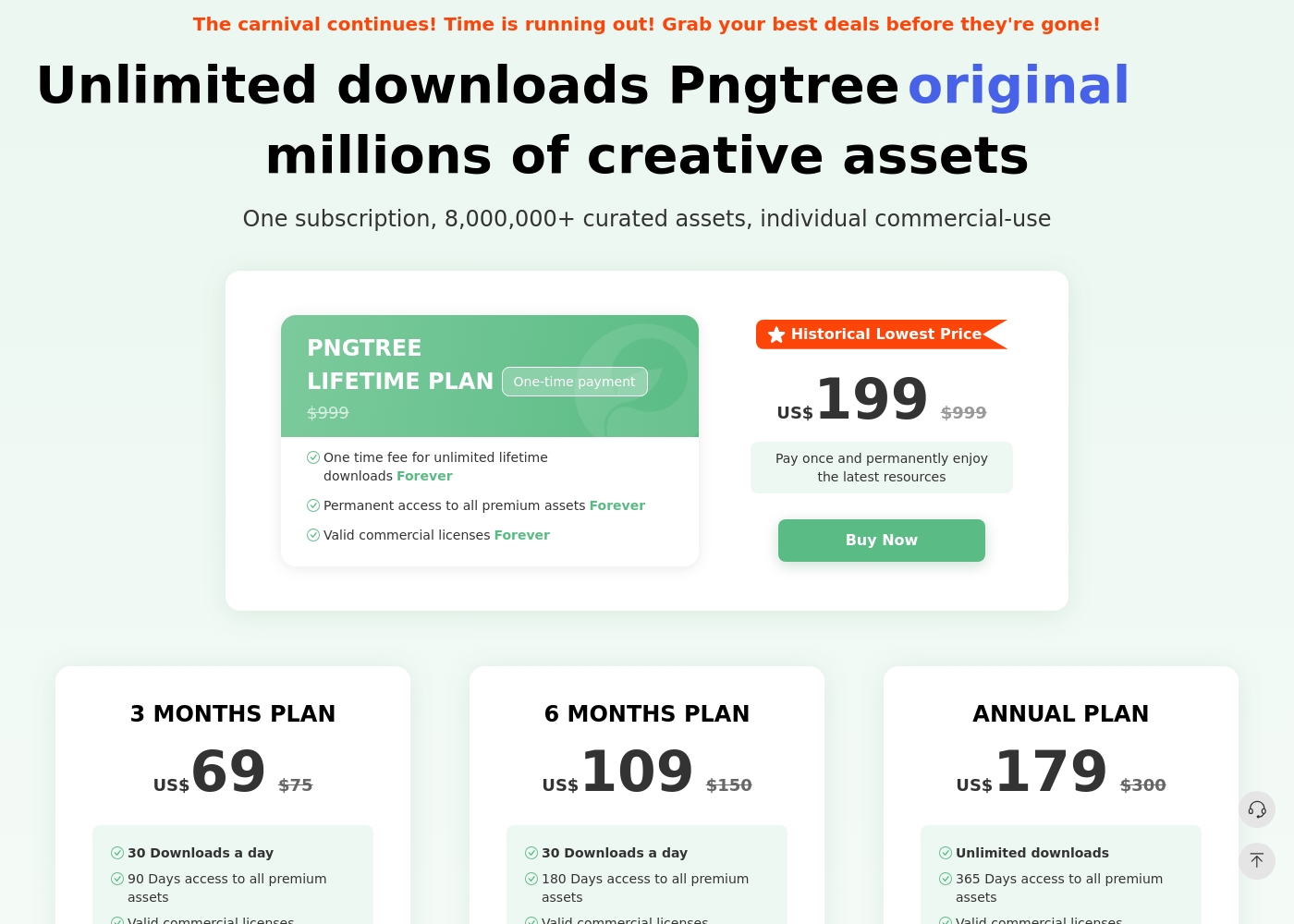
Pngtree ha un piano gratuito con download giornalieri limitati e diversi piani individuali a pagamento. La pagina dei prezzi attualmente elenca un piano di 3 mesi, un piano di 6 mesi, un piano annuale e un piano a vita. Il piano annuale e il piano a vita enfatizzano i download illimitati, mentre i piani a pagamento più brevi elencano i limiti di download giornalieri. I piani a pagamento pubblicizzano licenze commerciali valide, download più rapidi, nessun requisito di attribuzione e risorse premium. I termini della licenza contano ancora: la licenza individuale è per postazione singola e l'autorizzazione di gruppo o aziendale più ampia può richiedere un piano aziendale.
- 1 milione di asset gratuiti
- 2 download al giorno
- Nessuna attribuzione richiesta (per risorse gratuite)
- Velocità di download fino a 0,5 MB/s
- Accesso per 90 giorni a tutte le risorse premium
- Licenze commerciali valide
- Download ad alta velocità (10 MB/s)
- Nessuna attribuzione richiesta per i contenuti premium
- Accesso per 180 giorni a tutte le risorse premium
- Licenze commerciali valide
- Download ad alta velocità (10 MB/s)
- Nessuna attribuzione richiesta per i contenuti premium
- Download illimitati
- Accesso per 365 giorni a tutte le risorse premium
- Licenze commerciali valide
- Download ad alta velocità (10 MB/s)
- Nessuna attribuzione richiesta per i contenuti premium
Shade ha un costo non divulgato con almeno 1 piano: Inizia Gratis a $0.
Trovare il piano giusto dipende dalle specifiche esigenze di archiviazione multimediale e di flusso di lavoro del tuo team.
Inizia Gratis
Prezzo: $0 Siti Web Supportati: Non specificati esplicitamente Ideale per: Singoli utenti o piccoli team che esplorano la ricerca AI Politica di rimborso: Non specificata esplicitamente Altre Funzionalità: Streaming intelligente dei file, revisione e approvazione, metadati automatici, ricerca AI, archiviazione multimediale
- Streaming intelligente dei file
- Revisione e approvazione
- Metadati automatici
- Ricerca AI
- Archivio
Pricing Notes
- Pngtree offers clear, tiered pricing from $69 for 3 months to a $199 lifetime plan. All paid plans include commercial licenses.
- Shade has a free starting plan. Paid team/enterprise pricing is not public and requires contacting sales.
- Pngtree's free plan is very limited (2 downloads/day). Shade's free plan has no stated limits for initial testing.
- Pngtree has a 15-day money-back guarantee. Shade's refund policy is not stated.
Pricing Head-to-Head
Recensioni degli utenti
Pngtree ha una forte utilità come libreria grafica veloce, ma gli acquirenti dovrebbero bilanciare tale utilità con la complessità della licenza e il feedback negativo dei clienti di terze parti. L'approccio più sicuro consiste nel testare prima il catalogo, documentare ogni download per uso commerciale ed evitare di dare per scontato che un piano individuale copra automaticamente tutti gli scenari del team o del cliente.
Nel 2020 ho pagato $ 199 per il piano a vita Premium permanente. Ora chiedono l'aggiornamento a un nuovo piano Enterprise, accusandomi di violazione del copyright. La vita dovrebbe significare una vita senza limiti, ma cercano continuamente di estorcere più soldi.
Le recensioni esterne per Shade mostrano un sentimento generalmente positivo, sebbene il campione sembri piccolo. Gli utenti su Capterra evidenziano la facilità d'uso della piattaforma e la sua solida funzionalità di ricerca tramite AI, che aiuta i team a trovare rapidamente i file.
Alcuni recensori notano che il processo di onboarding è stato fluido e che il supporto clienti è stato reattivo. Vengono menzionati anche i vantaggi di un hub multimediale centralizzato per la collaborazione.
La ricerca AI cambia le regole del gioco. Possiamo localizzare qualsiasi filmato in pochi secondi senza scavare in infinite cartelle. Ha fatto risparmiare moltissimo tempo al nostro team sui progetti.
Il nostro verdetto
For most individuals, Pngtree offers quick access to the PNG assets they need. For teams managing their own media, Shade provides a more valuable and ethical workflow solution. Pngtree's superpower is its sheer volume of transparent PNG images and templates. It's the go-to when you need a specific graphic fast for a design project. Shade's superpower is intelligent media management. Its AI search and streaming turn a chaotic file server into a streamlined creative hub. The deciding factor is your core need. Do you need to *find and buy* assets, or do you need to *organize and collaborate* on assets you already have? Choose Pngtree for individual, on-demand stock assets. Choose Shade if your team wastes hours searching for files or juggling feedback. The right tool depends entirely on your workflow.
Domande frequenti
Which is better for small teams: Pngtree or Shade?
Shade is built for team collaboration and centralized storage. Pngtree's plans are individual and lack team features like shared libraries or review tools.
Does Pngtree have AI search like Shade?
No. Pngtree's search is for browsing its own library. Shade's AI search helps you find files within your own uploaded media based on content description.
Is Shade worth the extra cost over Pngtree?
It's a different cost structure. Pngtree sells assets directly. Shade's cost is for a workflow platform. The value depends on whether you need asset storage or asset acquisition.
Can I use Pngtree images commercially?
Yes, but only with a paid premium plan. The free plan does not include commercial licenses. Paid plans also offer downloadable copyright certificates.
Does Shade have a free trial?
Yes. You can start with a free plan to explore core features like AI search and file streaming before committing to a paid team plan.
Which tool has better customer support?
User reviews are mixed for both. Pngtree has a 1.4-star rating with complaints about aggressive practices. Shade has a 3.8-star rating but notes can be slow.
Pronto a scegliere?
Entrambi gli strumenti hanno i loro punti di forza. Scegli in base alle tue esigenze specifiche.