Google Calendar vs Shiftie
Google Calendar and Shiftie solve scheduling, but for very different people. Google Calendar excels at personal and general team scheduling. Shiftie is built specifically for employee shift management in sectors like hospitality.
Best for: Solo entrepreneurs and freelancers managing personal and client schedules, Remote teams of 10-50 needing shared calendars and meeting coordination
Best for: Hospitality businesses (cafes, hotels, restaurants) managing hourly staff, Retail stores and leisure centers with rotating shifts
Pianificazione essenziale e integrata per tutti.
Abbiamo trovato Google Calendar uno strumento di pianificazione estremamente accessibile, che offre funzionalità potenti come la creazione automatica di eventi e una profonda integrazione delle attività, anche al livello gratuito individuale. L'accesso a pagamento, ottenuto tramite un abbonamento a Google Workspace, sblocca potenti strumenti di collaborazione e utili analisi (Time Insights) per le organizzazioni. Nel complesso, è il punto di riferimento per la pianificazione essenziale personale e di squadra.
Pro
- Gratuito per uso personale e gestione delle attività di base.
- Integrazione perfetta con Gmail, Tasks e il più ampio ecosistema Google.
- Aggiunge automaticamente eventi (voli, prenotazioni) dalle conferme via email.
- Include Appointment Schedules professionali per la gestione delle prenotazioni.
Contro
- Le funzionalità Premium richiedono prezzi oscurati tramite un abbonamento a Google Workspace.
- Il livello gratuito limita gli utenti a una sola pagina di prenotazione per Appointment Schedule.
- I costi specifici in dollari per i livelli premium non sono dettagliati esplicitamente.
Simple, effective staff scheduling.
We found Shiftie to be a straightforward and focused platform for employee scheduling and time tracking. It clearly solves core administrative headaches for teams in sectors like hospitality. Overall, it's a solid, no-fuss tool that delivers on its promise to simplify workforce management.
Pro
- Clear, per-user pricing with no hidden fees.
- Generous 28-day free trial without needing card details.
- Intuitive drag-and-drop scheduling with conflict detection.
- Automatic timesheet generation simplifies payroll.
Contro
- Limited external user reviews make social proof difficult to assess.
- May lack advanced features for very large, complex organizations.
- Integrations and deeper reporting capabilities are not detailed.
- Support is UK-based, which could affect time zones for other regions.
Informazioni suGoogle Calendar
Google Calendar è un calendario online condivisibile progettato per mantenere i tuoi piani sempre a portata di mano. Riunisce gli impegni personali, professionali e organizzativi in un'unica vista centralizzata. Questo strumento funziona perfettamente all'interno del tuo Google Workspace per organizzare attività e appuntamenti, assicurando che la tua giornata scorra senza intoppi. 💡
Informazioni suShiftie
Shiftie is a modern, all-in-one platform for scheduling employees and managing time & attendance. It’s built for managers and teams in sectors like hospitality, leisure, and retail who want to ditch outdated systems. Think of it as your digital rota, timesheet generator, and team hub combined. 👥
Confronto delle funzionalità
Panoramica funzionalità
Evidenziamo le principali differenze e scegliamo un vincitore per ogni funzionalità.
User Interface
Both offer clean interfaces, but Shiftie is built for shift management. Google Calendar is more versatile for general scheduling.
Google Calendar's interface is instantly familiar if you use Gmail or other Google apps. It's a clean grid where you can see days, weeks, or months. Adding events is simple, and the drag-and-drop feature works smoothly. Shiftie's interface is designed for managers building rotas. It has a dedicated shift scheduling view with drag-and-drop. You can use templates or let employees volunteer for open shifts. The focus is on visualizing team schedules. The key difference is intent. Google Calendar is a blank canvas for any kind of event. Shiftie is a specialized tool for constructing employee schedules with conflict detection. For a solo user, Google Calendar is likely more intuitive. For a restaurant manager building weekly shifts, Shiftie's interface saves time.
Collaboration
Google Calendar shines for general team coordination. Shiftie excels at managing and communicating with a shift-based workforce.
Google Calendar lets you layer multiple calendars into one view. You can see your team's availability and share group calendars. It's ideal for scheduling meetings across a distributed team. Shiftie includes built-in team messaging and a centralized directory. You can send updates to the entire team or specific groups. This keeps shift-related communication in one place, reducing email clutter. Google Calendar's collaboration is about shared schedules and appointments. Shiftie's collaboration is about managing a workforce's schedule, communication, and documents. A remote marketing team would use Google Calendar for meetings. A hotel with 20 front-desk staff would use Shiftie to coordinate shifts and announcements.
Automation
Google Calendar automates adding events from emails. Shiftie automates timesheet generation and labor cost tracking.
Google Calendar's automation is primarily about pulling in details. When you get a flight or reservation confirmation email, it adds the event to your calendar automatically. This saves manual entry. Shiftie automates the payroll workflow. Employees clock in/out on their phones. Shiftie then generates digital timesheets for managers to approve. It also shows real-time labor costs as you build the schedule. Google Calendar automates personal event intake. Shiftie automates the end-to-end employee time management process. They automate different things. If you travel often, Google Calendar's automation is a huge time-saver. If you manage a café's payroll, Shiftie's automation eliminates hours of manual timesheet work.
Reporting & Analytics
Shiftie provides live labor cost and hours data. Google Calendar offers time insights for premium Workspace users.
Google Calendar's premium Time Insights feature shows how you spend your time. You can see meeting patterns and who you meet with most often. This helps optimize your personal or team schedule. Shiftie's analytics are built for workforce management. You see live data on labor costs and hours worked as you schedule. You can filter by role or department to spot overstaffing or understaffing. Google Calendar analyzes your time investment. Shiftie analyzes your staffing costs and coverage. The focus is completely different. For a sales manager, Google Calendar's Time Insights might be valuable. For a retail manager, Shiftie's real-time cost data is essential for budget control.
Mobile Experience
Both have strong mobile apps. Shiftie's app is centered on clocking in/out and viewing shifts.
Google Calendar's mobile app is robust and syncs perfectly across devices. You get all features on the go: view schedules, add events, get notifications, and use Appointment Schedules. Shiftie's mobile app allows employees to clock in/out using their phones. It can use GPS to verify they're on-site. They can also see their upcoming shifts and request changes easily. Google Calendar's app is for managing your schedule anywhere. Shiftie's app is for employees to interact with their work schedule and log time. A freelancer checking their day on a tablet would prefer Google Calendar's app. A barista clocking in for their shift would use Shiftie's app.
Customer Support
Google Calendar has extensive help resources. Shiftie offers direct, 7-day-a-week support for its users.
Google Calendar relies on its Help Center for support. For Workspace users, there's access to a team of Google experts. The support is more self-service and for general Google products. Shiftie provides unlimited support 7 days a week, from 08:00 to 20:00 UK time. The support team helps with setup, feature questions, and troubleshooting. It's included in the subscription. Google Calendar's support is broad but less hands-on for the calendar app itself. Shiftie's support is direct and included, focusing on its specific tool. If you hit a complex issue with Google Calendar, you might navigate multiple help articles. With Shiftie, you can call or contact the support team directly during business hours.
Integration Ecosystem
Google Calendar integrates deeply with Google Workspace. Shiftie has limited, unspecified external integrations.
Google Calendar is part of the Google ecosystem. It works seamlessly with Gmail, Google Meet, Google Tasks, and Google Workspace apps. It's a hub that connects many of your daily tools. Shiftie's integration details are sparse. The website mentions an integration with DigiTickets in a testimonial. You'd need to contact their support for a full list. Google Calendar benefits from Google's vast developer platform. Shiftie is more focused on its core scheduling features without deep third-party connections. If your business runs on Google Workspace, Google Calendar is a natural fit. If you just need robust scheduling without many other apps, Shiftie works well on its own.
Pricing Model
Google Calendar has a free tier. Shiftie is a per-employee monthly subscription with no free tier.
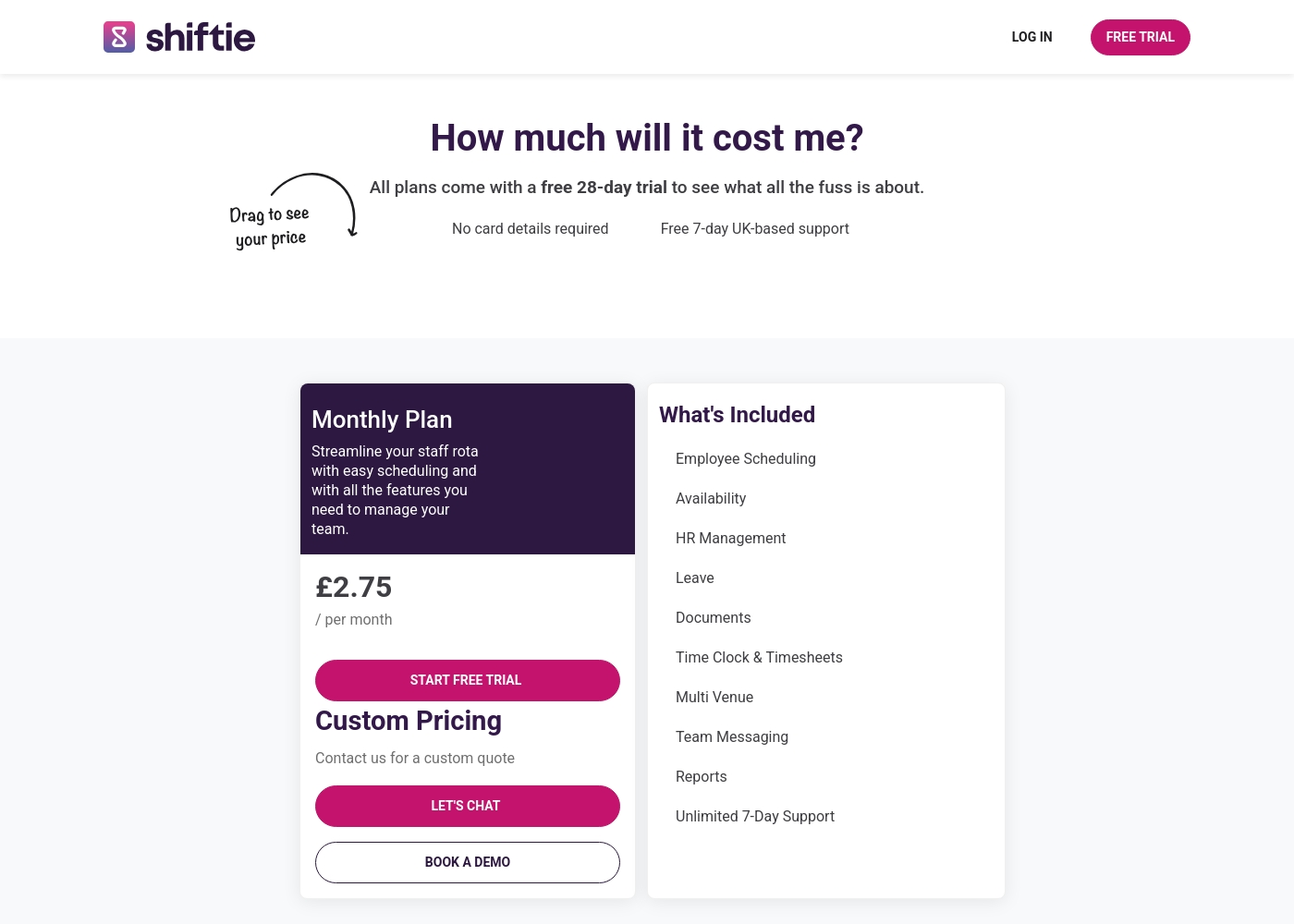
Google Calendar is free for basic personal use. Premium features require a Google Workspace subscription, which is per-user. Specific dollar amounts aren't listed in the data. Shiftie costs £2.75 per employee per month. It's one plan with all features. There's a 28-day free trial, but no permanent free tier. Custom pricing is available for large organizations. Google Calendar offers a low barrier to entry with its free plan. Shiftie's pricing is transparent and predictable based on team size. For a solo user, Google Calendar is unbeatable in value. For a business with 50 employees, Shiftie's per-user cost is straightforward to budget.
Learning Curve
Google Calendar is familiar to most. Shiftie is simple but has a specific workflow for managers.
Google Calendar is likely already familiar if you use any Google product. The interface for adding events and sharing calendars is straightforward. Most people can start using it immediately. Shiftie is designed to be intuitive. It has drag-and-drop scheduling and clear menus. However, it has a specific workflow for building rotas, managing leave, and approving timesheets. This might take a short time to learn for a new manager. The learning curve for Google Calendar is almost zero for basic use. For Shiftie, it's low but focused on its employee management features. A student organizing their study schedule would pick up Google Calendar instantly. A new restaurant manager would learn Shiftie's scheduling process quickly with the free trial.
Customization
Google Calendar offers event and calendar customization. Shiftie customizes schedules and team roles.
Google Calendar lets you customize event colors, notifications, and calendar views. You can create multiple calendars and customize sharing settings. It's flexible for personal organization. Shiftie lets you customize schedules with templates and define employee roles. You can set up different schedules for departments and create open shifts for volunteering. It's tailored for workforce management. Google Calendar customizes how you view and manage events. Shiftie customizes how you structure and manage your team's work schedule. An individual can color-code their life with Google Calendar. A business owner can set up complex shift rules and roles with Shiftie.
Security
Google Calendar uses Google's robust infrastructure. Shiftie mentions security but doesn't specify details.
Google Calendar data is stored in Google's world-class data centers. It has built-in security against spam and phishing. You control your privacy settings within your Google Account. It's a proven, large-scale security system. Shiftie's website mentions secure, cloud-based storage but doesn't detail specific certifications or protocols. You'd need to ask their support about their security measures. It's less transparent. Google Calendar benefits from Google's massive security investment. Shiftie's security claims are less detailed in the provided information. For businesses handling sensitive employee data, Google's security track record is a major advantage. Shiftie's security is less documented in this comparison.
Scalability
Both can scale, but Shiftie is built for team size growth. Google Calendar scales across the Google ecosystem.
Google Calendar scales by adding more users and calendars. It works for individuals up to large enterprises using Google Workspace. Its power comes from the broader Google infrastructure. Shiftie scales by adding more active employees. The per-user pricing model means costs grow with your team. It's designed to manage schedules for small to medium businesses in sectors like hospitality. Google Calendar scales with organizational complexity. Shiftie scales with the number of staff you need to schedule. A global company with thousands of employees would use Google Calendar for general scheduling. A growing chain of 20 cafes would use Shiftie for all their shift management needs.
Google Calendar è gratuito per l'uso personale di base e richiede un abbonamento a pagamento a Google Workspace per le funzionalità premium. Non è specificato un periodo di prova gratuito per le funzionalità premium di Workspace.
Non vediamo importi specifici in dollari qui. Diamo un'occhiata alle funzionalità fornite nei diversi livelli di accesso.
Accesso Individuale/Base
Prezzo: Non specificato esplicitamente (Incluso con un Account Google personale) Siti Web Supportati: Non specificato esplicitamente Ideale per: Pianificazione personale, gestione delle attività quotidiane e tracciamento eventi di base. Politica di Rimborso: Non specificata esplicitamente Altre Funzionalità:
- Riunisce tutti i calendari in un unico posto
- Affronta le cose da fare aggiungendo attività da Calendar, Gmail o dall'app Tasks
- Aggiunta automatica degli eventi dalle conferme via email (voli, prenotazioni)
- Una pagina di prenotazione gratuita per Appointment Schedule
- Riunisce tutti i calendari in un unico posto
- Aggiungi attività direttamente nel calendario
- Aggiunta automatica degli eventi dalle email (voli, prenotazioni)
- Una pagina di prenotazione gratuita per Appointment Schedules
- Time Insights per mostrare come viene speso il tempo
- Crea Appointment Schedules illimitati e riscuoti pagamenti (Stripe)
- Sovrapposizione di più calendari in un'unica vista
- Imposta e condividi la sede di lavoro e gli orari di lavoro
- Opzioni di RSVP specifiche per la località
Shiftie pricing: Shiftie keeps things simple with a monthly plan starting at £2.75 per employee. You'll get full access to all scheduling and HR features with no upfront card details required for your trial period.
To help your team hit the ground running, we offer a generous 28-day free trial along with seven-day UK-based support to answer any questions you might have. It's built to be flexible, so you're only billed for the active users on your account each month.
Plus, you can cancel at any time directly through your billing settings if your needs change. This approach ensures your costs scale naturally as your team grows or shrinks, keeping your budget predictable and your admin time low.
Pricing Head-to-Head
Recensioni degli utenti
Abbiamo esaminato il sentimento degli utenti esterni raccolto dalle principali piattaforme di recensioni di software, in particolare Capterra, per comprendere le percezioni dei clienti sulle prestazioni di Google Calendar. Sebbene sia presente il collegamento alla valutazione di Capterra, non siamo stati in grado di accedere a snippet specifici generati dagli utenti riguardanti temi ricorrenti come l'affidabilità del sistema, l'utilità di funzionalità come Time Insights, la facilità di implementazione (onboarding) o la reattività del supporto clienti.
Allo stesso modo, non è attualmente disponibile per la sintesi un consenso dettagliato degli utenti sui parametri di valore, sulla qualità dell'integrazione o sulla chiarezza dei requisiti di abbonamento a Google Workspace rispetto alle funzionalità del livello gratuito. Non abbiamo trovato recensioni pubblicate dagli utenti su Trustpilot.
We couldn't access any external user reviews for Shiftie on Trustpilot or Capterra during our research. The Capterra page returned a security error, and Trustpilot had no available data. Without this external feedback, our assessment is based solely on the product's features and the company's own presentation. We encourage you to try the free trial to experience the software firsthand and gather your own user feedback.
We switched from spreadsheets and the difference is night and day. Shiftie has saved our management team at least a few hours every week on scheduling alone.
Il nostro verdetto
Here's the bottom line: Google Calendar wins for most people. It's the Swiss Army knife of scheduling—free, powerful, and integrated with everything. Shiftie is the specialist. It's built for one job: managing employee shifts and payroll. Google Calendar's superpower is its versatility. It unifies personal and work schedules, pulls events from emails, and offers free appointment booking. It's perfect if you're an individual or a team that needs general coordination. Shiftie's superpower is its focus on workforce management. It handles shift creation, time tracking, and timesheet approval automatically. It's designed to save managers in hospitality and retail hours of admin work every week. The deciding factor is your role. If you're scheduling meetings, appointments, or your own life, Google Calendar is the clear choice. If you're scheduling a team of hourly workers, Shiftie will save you serious time and money. Choose Google Calendar if you're an individual, a remote team, or need a free, all-purpose calendar. Choose Shiftie if you manage a shift-based business like a restaurant, hotel, or retail store. They solve very different problems, so pick the one that matches your daily grind.
Domande frequenti
Is Shiftie better than Google Calendar for scheduling employee shifts?
Yes, absolutely. Shiftie is designed specifically for employee shift management. Google Calendar is a general-purpose calendar and doesn't have built-in shift scheduling or time tracking features.
Which is cheaper: Google Calendar or Shiftie?
Google Calendar is free for basic personal use. Shiftie costs £2.75 per employee per month. For a team of 10 employees, Shiftie would cost about £27.50/month, while Google Calendar remains free.
Can I use Google Calendar to manage my team's payroll timesheets?
No, Google Calendar doesn't generate timesheets or track employee hours for payroll. For that, you need a dedicated tool like Shiftie, which automatically creates digital timesheets from clock-in/out data.
Does Shiftie integrate with other tools like Google Calendar?
The data doesn't specify deep integrations. Shiftie mentions an integration with DigiTickets. For seamless scheduling across apps, Google Calendar's integration with the Google Workspace ecosystem is much broader.
Which tool is better for a small restaurant with 15 staff?
Shiftie is the better fit. It's built for hospitality and allows you to create rotas, track labor costs, and manage timesheets for your team. Google Calendar would only handle general meeting scheduling.
Is there a free trial for Shiftie?
Yes, Shiftie offers a 28-day free trial with no credit card required. You can test all its features before committing to a monthly subscription.
Pronto a scegliere?
Entrambi gli strumenti hanno i loro punti di forza. Scegli in base alle tue esigenze specifiche.