Traducción completa pronto — detalles del producto en inglés, navegación localizada.
Foxit esign

Reseña de Foxit esign

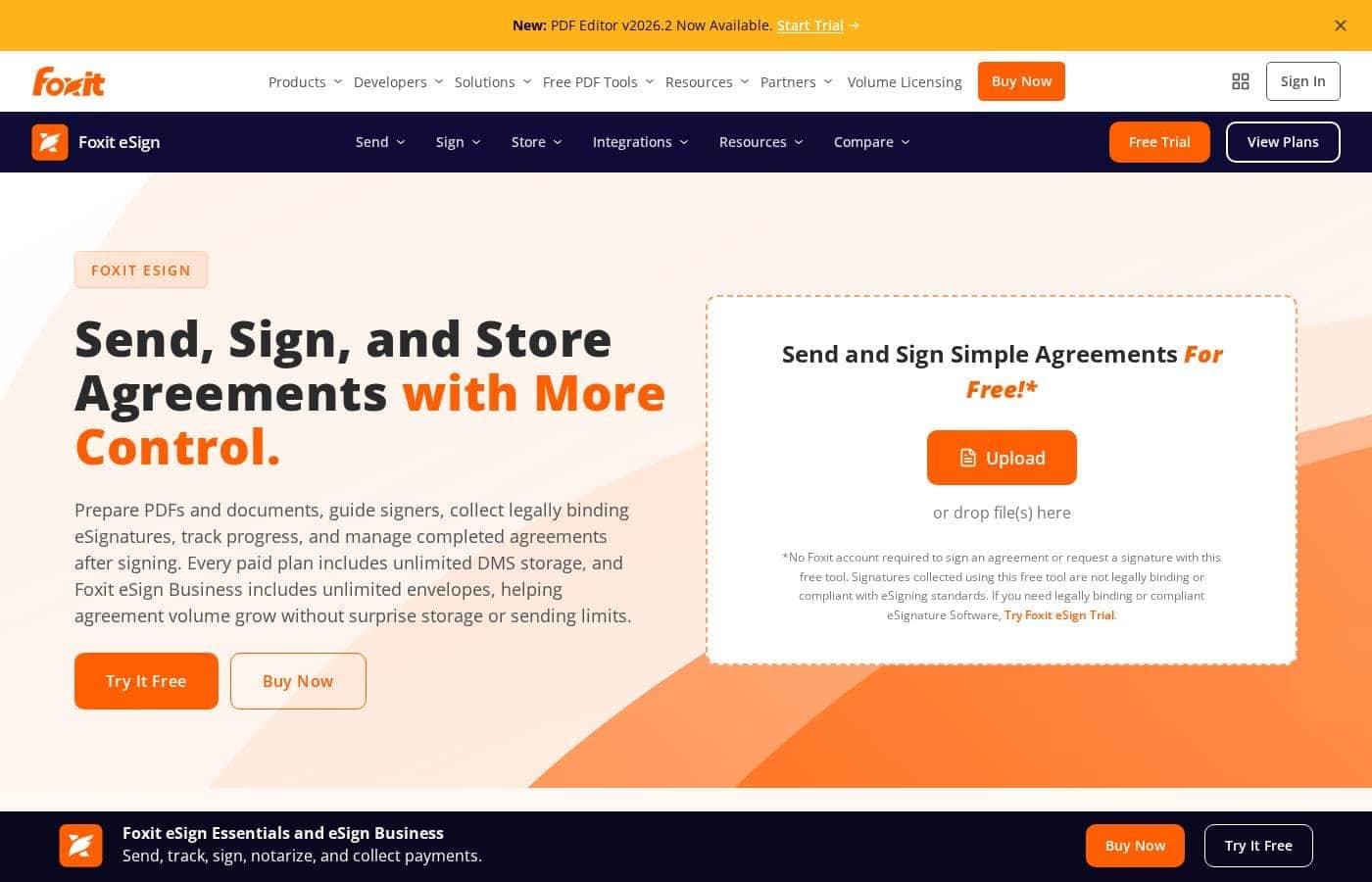
Legally binding eSignatures with storage, payments, and document prep in one place

Foxit esign cuesta desde 10 US$ (≈ 8,94 €)/mes · 2 planes

Por Ciroapp Editorial Team · Actualizado 17 sept 2026

Puede aplicarse una comisión sin coste adicional

Captura de pantalla de la página de inicio de Foxit esign

De un vistazo

Resumen rápido de Foxit esign: valoración, precios, funciones clave y puntos destacados.
Página del proveedor consultada el 13 oct 2026

Puntuación Ciroapp

4.0/ 5

Foxit eSign bundles legally binding signatures, unlimited document storage, and in-document payment collection, with audit trails and phone support even on its $120 entry plan. The catch is annual-only billing with no trial, and team features locked behind a five-license Business plan. Overall, it's a smart pick for budget-minded buyers who can commit to a full year.

Ventajas

  • Ventajas:Unlimited Foxit DMS storage for completed agreements is included on every paid plan, so signed documents stay searchable without paying for a separate repository
  • Ventajas:Recipients sign from a browser or mobile device without creating an account or downloading software, which reduces friction for clients and external signers
  • Ventajas:Payment collection is built into every paid plan via Foxit Pay, letting customers pay by credit card or ACH during signing instead of through a separate billing step

Desventajas

  • Desventajas:There is no monthly billing option — both plans are annual only, and the pricing page shows no free trial or money-back guarantee, so you commit to a full year up front
  • Desventajas:The Essentials license is tied to one dedicated user and cannot be reassigned or managed via the Admin Console, which is restrictive if staff change or multiple people need access
  • Desventajas:Key integrations cost extra — Foxit Connectors (40+ HR and CRM platforms) and the Salesforce add-on carry additional charges beyond the base plan price
Ideal para
  • Individuals handling occasional signature requests within Essentials' 250 envelopes per year
  • Growing teams that need unlimited envelopes, templates, and bulk sending on Business
  • Sales teams generating and tracking agreements directly from Salesforce
Esta sección es un resumen. Más abajo encontrarás detalles sobre funciones, casos de uso, precios y reseñas.

¿Qué es Foxit esign?

Chasing signatures across email threads wastes time, and storing signed agreements gets messy fast. Foxit eSign tackles both by combining legally binding eSignatures, unlimited document storage on paid plans, and PDF prep tools in one workflow — so agreements move with fewer handoffs and clearer ownership.

Foxit eSign is an electronic signature platform for preparing documents, sending them to signers, collecting legally binding eSignatures, and storing completed agreements. It's built for individuals, small teams, and growing organizations — Essentials covers lower-volume signing, while Business targets teams with unlimited envelopes, templates, and admin controls. It also connects to Foxit's PDF Editor, DMS, Salesforce, and API options.

¿Deberías elegir Foxit esign?

Guía rápida de compra antes de comparar planes o visitar el sitio.

Elígelo si

  • Buyers who want unlimited DMS storage included on every paid plan
  • Teams that need unlimited reusable templates without per-template fees
  • Signers who shouldn't have to create accounts or install software
  • Organizations that want audit trails and signature certificates by default
  • Teams already using Foxit PDF Editor or Foxit DMS who want connected workflows

Evítalo si

  • Very light users — Essentials caps you at 250 envelopes and 10 reusable templates per year
  • Buyers who need QES, SAML SSO, or advanced authentication — those controls are Business-only
  • Teams expecting every tool in one subscription — PDF Editor, Salesforce, and Connectors are separate add-ons
  • Anyone using the free tool for official agreements — those signatures aren't legally binding or compliant
  • Shoppers wanting full plan prices on the main page — detailed packaging lives on a separate pricing page

Siguientes pasos antes de comprar

  1. 1Check the Foxit eSign pricing page for current plan costs and confirm which tier matches your envelope volume
  2. 2Verify the integrations you need — Salesforce, HR systems, or storage platforms — and whether they're included or paid add-ons
  3. 3Match your compliance requirements (ESIGN, eIDAS, QES, HIPAA, 21 CFR Part 11) to the right plan before buying
  4. 4Use Foxit's comparison pages to weigh it against DocuSign, Adobe Acrobat Sign, and PandaDoc for your workflow
  5. 5Review any trial or refund terms on the pricing page, since they aren't detailed on the main product page

Facilidad de uso

Signing is deliberately simple for recipients — they review and sign from a browser or phone with no account and no downloads, and Foxit describes the experience as built for quick adoption. Admin-side setup takes more effort: user management, SSO, and MFA sit on the Business plan, and deeper PDF preparation or system integrations require connecting separate Foxit tools and add-ons.

Foxit esign Funciones clave

✍️ Send, Sign, and Track in One Flow

You shouldn't need three tools to get one signature. Upload a PDF, drop in signature, date, text, payment, or attachment fields, then add recipients. Choose sequential or parallel signing order and send secure links.

Signers review and sign from a browser or phone — no account or download needed. Status updates and reminders keep everything moving.

✨ Signed Records That Stay Organized

Signed agreements shouldn't scatter across folders and inboxes. Every paid plan includes unlimited Foxit DMS storage, so completed files land in one searchable, controlled place. You can find past agreements fast and keep storage predictable even as volume grows — no extra repository to buy or maintain.

✨ Proof and Compliance Built In

Audit trails and signature certificates record signer metadata, IP addresses, full event logs, and RFC 3161 timestamps. That supports the U.S. ESIGN Act, UETA, and eIDAS.

Need stricter controls? Business adds MFA, Knowledge-Based Authentication, SAML SSO, QES through ZealiD, plus HIPAA and 21 CFR Part 11 options.

✨ Workflows That Connect to Your Tools

Signing doesn't have to live in a silo. Foxit connects eSign to the tools around it, so agreements move with fewer manual handoffs:

  • Prepare signature-ready PDFs with Foxit PDF Editor's editing and organization tools.
  • Generate, send, and track agreements straight from Salesforce data.
  • Automate routing and completed-file storage across business, HR, and storage apps with Connectors.

✨ Templates and Volume Tools for Repeat Signing

If you send similar agreements often, reusable templates and payment fields cut the busywork. Save a document once, then resend it with new signers. Business teams get unlimited templates, bulk sending, bulk signing, signable web forms, custom branding, and support for 16 languages.

Casos de uso

📝 Freelancers and solo consultants

You send contracts, quotes, or NDAs a few times a month. Essentials covers you with 250 envelopes a year, 10 reusable templates, and payment fields. Clients sign from a browser — no account needed.

Expected outcome: Signed, enforceable agreements with payment collected in one step.

Tip: Add a payment field to invoices so clients pay right when they sign.

🤝 Sales teams working inside Salesforce

Reps generate agreements from Salesforce data, send them for signature, and track progress without leaving the CRM. Signing activity stays close to customer records.

Expected outcome: Faster turnaround with agreement activity tied to each deal.

🚀 Growing teams with high signing volume

Your team sends agreements all day. Business lifts the caps with unlimited envelopes, unlimited templates, and bulk sending. Admins manage users, and recipients sign from any phone or browser.

Expected outcome: Room to grow without hitting sending or storage limits.

Tip: Use signable web forms so customers can start the agreement themselves.

🛡️ Regulated and compliance-focused organizations

Healthcare and regulated teams need defensible records. Audit trails, signer metadata, IP logging, and RFC 3161 timestamps support ESIGN, UETA, and eIDAS. HIPAA and 21 CFR Part 11 options are on Business.

Expected outcome: Clear records from send to signature to storage.

Precios de Foxit esign

Desde10 US$/mes≈ 8,94 €

  • 2 planes

Página del proveedor revisada el 13 oct 2026; confirma los precios actuales en la página de precios de Foxit esign

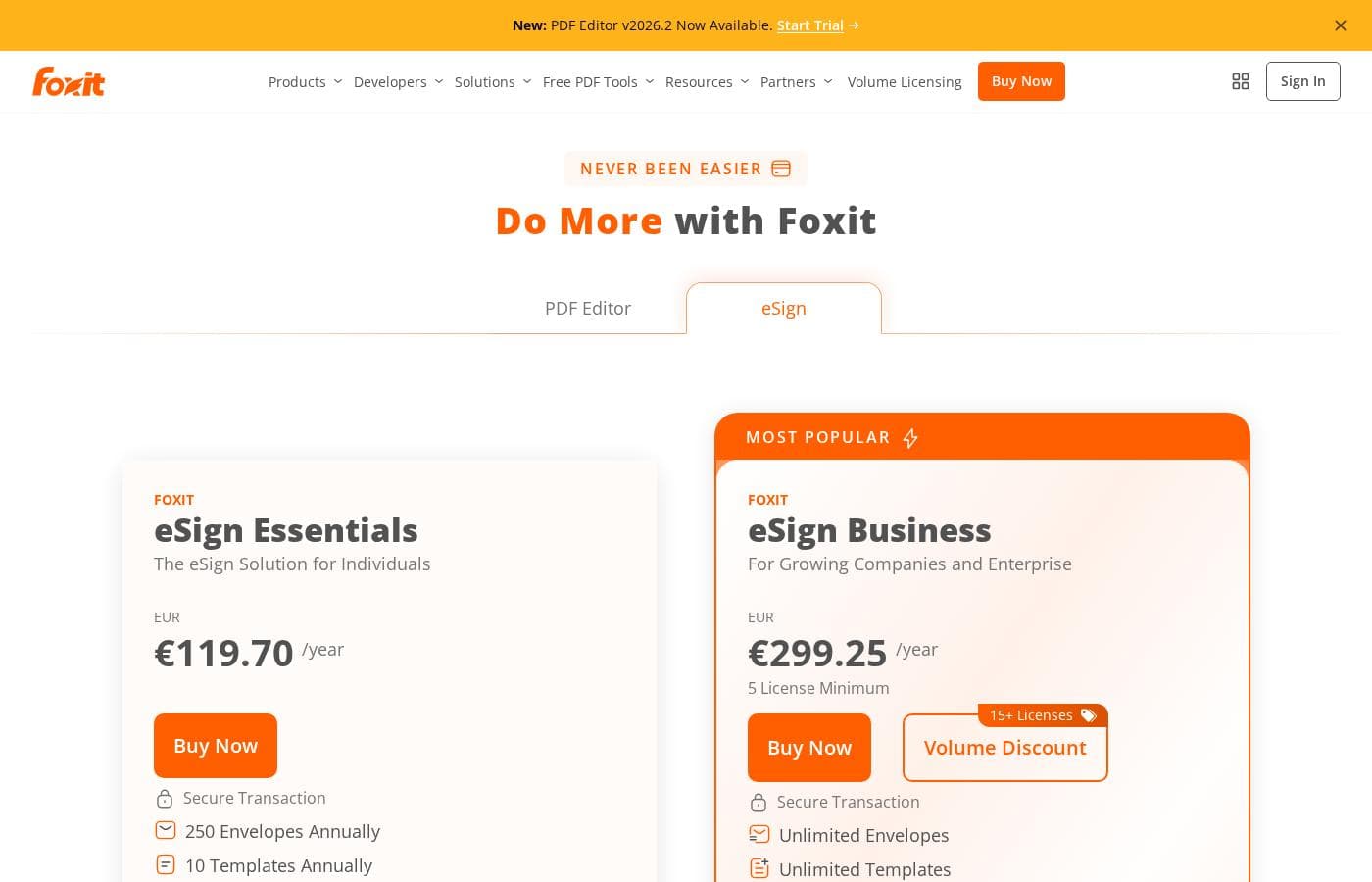
Captura de la página de precios de Foxit esignVer captura de la página de precios
PlanPago mensualPago anualIncluye
eSign Essentials
—
10 US$/mes
≈ 8,94 €
120 US$ al año
250 envelopes and 10 templates per year; license is assigned to 1 dedicated user and cannot be reassigned or managed via Admin Console
  • 250 envelopes annually
  • 10 reusable templates annually
  • Collect payments within agreements
  • Legally binding eSignatures
  • Audit trails and certificates
  • +2
eSign Business
—
25 US$/mes
≈ 22,36 €
300 US$ al año
5 license minimum; additional charges apply for Foxit Connectors and optional add-ons like On-Demand Notary
  • Unlimited envelopes
  • Unlimited templates
  • Custom branding
  • Bulk sending and bulk signing
  • Signable web forms and advanced form fields
  • +2

Convertido al tipo de referencia del BCE del 12 oct 2026; el proveedor puede cobrar un precio local distinto.

Historial de precios

Seguimos los precios desde el 1 oct 2026. Aún no hay cambios.

Tipos de precios: Yearly subscription

Notas sobre precios

Foxit eSign offers two annual plans: eSign Essentials at $120/year for individuals and eSign Business at $300/year for teams (with a 5-license minimum). Pricing scales with volume — Essentials covers 250 envelopes per year, while Business removes the caps with unlimited envelopes and templates.

Foxit eSign costs between $120 and $300 per year with two plans: eSign Essentials at $120/year and eSign Business at $300/year (5-license minimum).

Here's a closer look at what each plan includes.

eSign Essentials

Price: $120.00/year Best For: Individuals who need simple, legally binding eSignatures Other Features:

  • 250 envelopes per year
  • 10 reusable templates per year
  • Collect payments inside agreements
  • Audit trails, mobile app signing, and 16 languages

This plan fits solo users — freelancers, consultants, or anyone sending a moderate volume of documents. You get enforceable eSignatures, payment collection, and real-time document tracking without paying for team features you won't touch. One caveat: the license is tied to a single dedicated user and can't be reassigned, so it's a poor fit if multiple people need access.

eSign Business

Price: $300.00/year (5 license minimum) Best For: Growing companies and enterprise teams Other Features:

  • Unlimited envelopes and unlimited templates
  • Custom branded documents
  • Bulk sending and bulk signing
  • Signable web forms and advanced form fields
  • User management, eSigner delegation, and all integrations

Business is built for teams handling high signing volume or shared workflows. You get everything in Essentials, plus admin tools, advanced authentication options, and unlimited envelopes so growth never hits a wall. Solo users with light volume should stick with Essentials — the five-license minimum only pays off when several people are sending agreements. ✍️

A few things to know before you buy. Foxit Connectors, which link eSign to 40+ HR, CRM, and storage platforms, cost extra on both plans, so factor those fees into your budget if integrations matter to you. The pricing page doesn't mention a free trial or money-back guarantee, so you're committing to a full year up front. There is a free online tool that lets you sign PDFs without an account, but those signatures aren't legally binding — for enforceable agreements, you'll need one of these paid plans. ✅
Calculadora de coste

Calcula cuánto cuesta Foxit esign para tu equipo.

Facturación

eSign Essentials no tiene precio publicado para este ciclo de facturación.

eSign Essentials tiene precio fijo: el número de puestos no cambia el total. Estimación con precios de lista publicados, sin impuestos, complementos ni descuentos.

Cómo pagar menos por Foxit esign

  • Herramientas más baratas de esta categoría empiezan en 5 US$/mes.
Visitar Foxit esign

Avísame cuando Foxit esign cambie de precio

Un correo cuando detectemos un cambio en la página de precios del proveedor. Sin boletín ni ofertas. Baja con un clic.

Reseñas de usuarios

Aún no hay reseñas.

Escribir una reseña

Escribir una reseña para Foxit esign
0/100 caracteres
0/2000 caracteres

¿Por qué usar Foxit esign?

Most signature tools stop at the signature. Foxit eSign pushes further into the work that happens before and after signing — and that's where buyers can save real time and money.

  • Signed agreements stay organized. Every paid plan includes unlimited Foxit DMS storage, so completed agreements remain searchable and controlled without moving files to another repository.
  • Volume won't surprise you. Foxit eSign Business includes unlimited envelopes and unlimited reusable templates, giving growing teams predictable room to scale.
  • Signers face no friction. Recipients sign from a browser or mobile device without creating an account or downloading software.
  • Compliance runs deep. Audit trails, signer metadata, IP logging, and RFC 3161 timestamps support the U.S. ESIGN Act, UETA, and eIDAS — with QES, HIPAA, and 21 CFR Part 11 options on Business.
  • It plays well with your stack. Foxit PDF Editor, Connectors, Salesforce workflows, and APIs tie signing into the systems your teams already use.
  • Payments fit the flow. Payment fields can be added to documents, keeping billing steps inside the agreement process.

Alternativas a Foxit esign

Otras herramientas en la categoría Firma electrónica

Ver todas las herramientas de Firma electrónica
QuickSigner

QuickSigner

eSignature4.1/5Desde 5 US$/mes (≈ 4,47 €)

Firmas electrónicas legalmente vinculantes para pymes: con certificación ISO 27001, sellado AATL y sin sobrecoste empresarial en el precio.

Alohi

Alohi

eSignature3.9/5

Alohi ofrece a equipos y empresas un ecosistema suizo y seguro para sus flujos de trabajo con documentos.

AirSlate

AirSlate

eSignature3.8/5

Transforma tu experiencia con documentos mediante la automatización.

PandaDoc

PandaDoc

eSignature3.7/5

La solución esencial para crear, gestionar y cerrar cada acuerdo.

Blueink

Blueink

eSignature3.6/5

Valor en firmas electrónicas con soporte y precio inmejorables.

Preguntas frecuentes sobre Foxit esign

¿Cuánto cuesta Foxit esign?

El plan de pago más barato de Foxit esign, eSign Essentials, cuesta 10 US$ (≈ 8,94 €) al mes. Los planes de pago van de 10 US$ a 25 US$ al mes.

¿Foxit esign tiene un plan gratuito?

No. Foxit esign no muestra un plan gratuito; el plan de pago más barato empieza en 10 US$ (≈ 8,94 €) al mes.

¿Ha cambiado el precio de Foxit esign recientemente?

No. No hemos detectado cambios de precio desde que empezamos a seguirlo el 1 oct 2026.

How does Foxit eSign handle security and compliance?

It's SOC 2 Type 2 certified and supports ESIGN, UETA, eIDAS, GDPR, CCPA, FERPA, and FINRA. It's HIPAA ready, and a Business Associate Agreement is available where applicable. Audit trails log signer metadata, IP addresses, and timestamps.

What kind of customer support can you expect?

Every plan includes live phone support during business hours, plus 24/7 ticketing with fast resolution SLAs. Business buyers can add enterprise support for round-the-clock live access and direct contact with integration engineers.

Can you collect payments while someone signs?

Yes. Foxit Pay embeds fixed or variable payment fields into agreements, so customers can pay by credit card or ACH during signing. Payment collection is included in every paid plan.

¿Listo para probar Foxit esign? Consulta el sitio oficial o los precios.

¿Eres Foxit esign? Reclama esta ficha · Obtén la insignia