AOMEI

AOMEI

AOMEI Mantiene la Información Global Más Segura Siempre

#1 dans Backup
2 min de lectura · Actualizado 10/5/2025
Captura de pantalla de la página de inicio de AOMEI

At a glance

Quick overview for AOMEI: rating, pricing summary, key features, and highlights.

software.ciroappReview

4.6
Reliable Backup and Cloning, Made Easy.

We find AOMEI delivers exceptional value through its user-friendly backup, cloning, and recovery tools, appealing to individual and enterprise users alike. Their long-standing expertise and diverse licensing options, backed by a 90-day guarantee, underscore a commitment to reliable data security. Overall, AOMEI is an excellent choice offering professional features even in its free version.

Ventajas

  • Pro:Extremely easy and intuitive user interface for cloning and backup.
  • Pro:Effective disk cloning capability for migrating data (e.g., HDD to SSD).
  • Pro:Free version provides robust, high-value, and reliable features.
  • Pro:Responsive and helpful technical support team praised by users.

Desventajas

  • Con:Confusion exists regarding system versus disk backup terminology for new users.
  • Con:Specific niche products (Cyber Backup for VSphere Linux) are reported as outdated and buggy.
  • Con:Trustpilot noted potential issues with review invitation methods.
Prueba gratuita
Yes
Garantía de reembolso
Yes — 90 días
Rango: $39.95–$699.00/yearFree plan, Yearly subscription, One-time payment
This section is a summary. Detailed sections about features, use cases, pricing, and reviews follow below.

Reseña de AOMEI, precios, funciones, pros y contras

Dealing with unexpected data loss is stressful. Losing critical files or experiencing system failure costs valuable time and money. AOMEI understands this frustration completely.

They offer simple, secure solutions designed to safeguard global data for both individuals and large enterprises. Backup is truly the best way to prevent data loss now and in the future. ✨

¿Qué es AOMEI?

The AOMEI software platform provides a comprehensive suite of secure data utility tools. It focuses on several key areas, including system backup, partition management, and data cloning. AOMEI serves a massive global audience, supporting over 186 million users across 180 countries. Their tools protect numerous operating systems, including Windows PCs, servers, Mac systems, and the data stored on iPhones.

The core goal is to provide accessible, easy-to-use software for anyone needing reliable data protection. They have spent more than 16 years building expertise and trust in this vital technological field. 💡

Funciones clave

System, disk, partition, and file backup capabilities.
Instant recovery for quick disaster mitigation.
Centralized console for cross-platform enterprise data management.
Operating System migration (OS) directly to SSD.
Support for VMware, Hyper-V, and Microsoft SQL Server environments.
Granular Recovery feature for retrieving specific files from VM backups.
iPhone data backup included (to computer or external storage).
Transfer photos, videos, and contacts between computer and iPhone.
Secure management of WhatsApp and iCloud application data.
Free Partition Manager and PC Optimizer utility.
Free SSD and HDD disk cloning software.
Free Windows Data Recovery Software (FastRecovery).
Tools for setting up user accounts and groups for access control.
Includes specialized technical utilities like the PXE Boot Tool.
Supports file synchronization across different storage locations.

Casos de uso

💡Performing comprehensive system and file backups for Windows PCs and Servers.
💡Achieving instant recovery of operating systems to minimize expensive downtime.
💡Centralizing enterprise backup management for VMware, Hyper-V, and SQL servers.
💡Cloning entire hard drives and migrating the operating system to a new SSD.
💡Synchronizing files from one storage location to another for real-time safety.
💡Transferring photos, videos, and contacts from an iPhone to a computer.
💡Managing unlimited client PCs and servers under technician licensing agreements.
💡Optimizing and resizing hard disk partitions without losing valuable data.

Resumen de precios de AOMEI

Rango de precios
$39.95–$699.00/year
Tipos de precios
Free plan, Yearly subscription, One-time payment
Garantía de reembolso
Sí — 90 días

AOMEI provides diverse annual and perpetual licensing options for its backup and recovery software, starting at $39.95 per year for a single PC license. Pricing scales significantly based on the number of devices supported and included commercial rights, with professional technician licenses reaching up to $699.00 annually.

Planes y precios

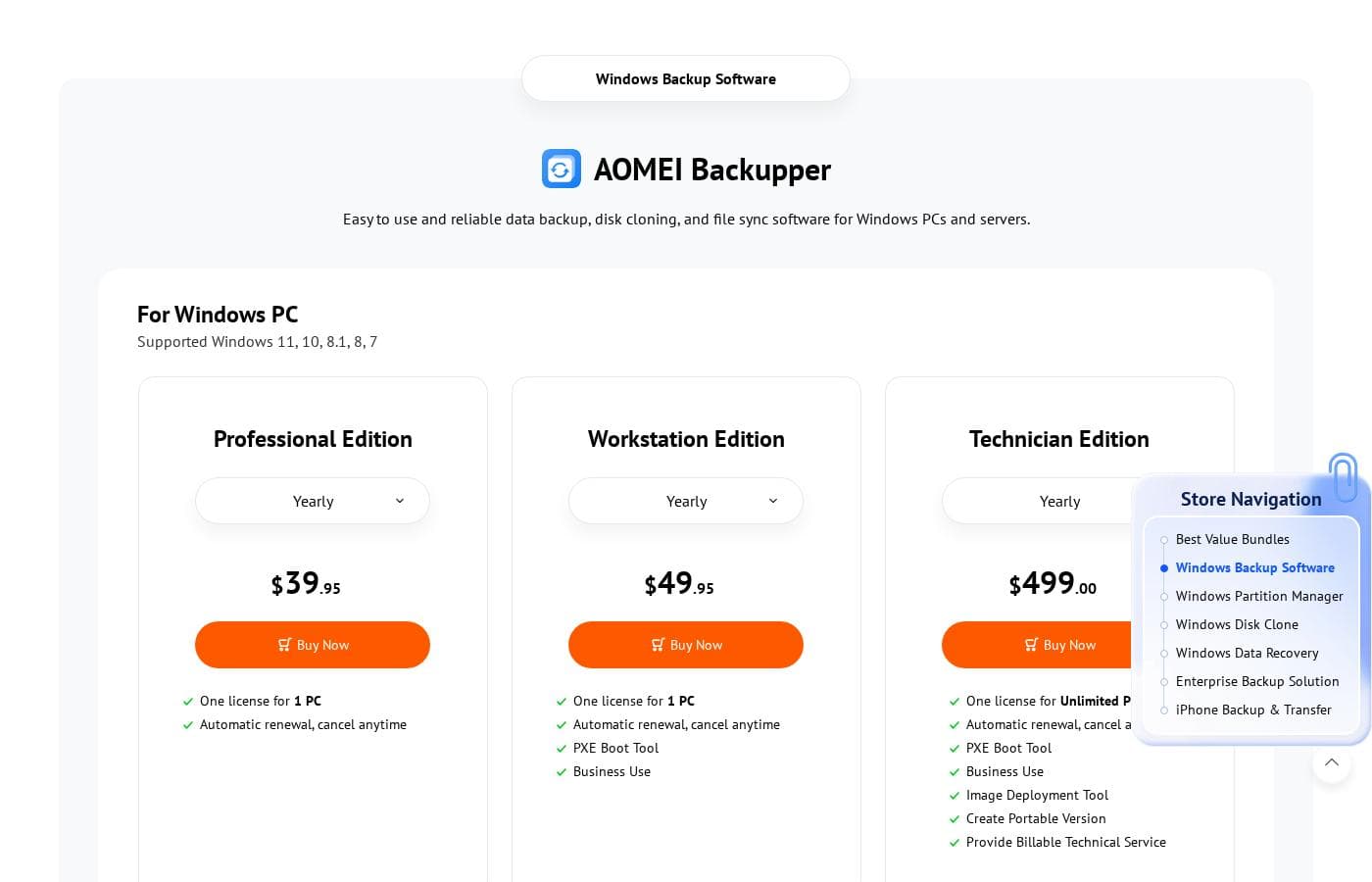
Professional (AOMEI Backupper)

Yearly$39.95
For personal use only
  • 1 PC/License
  • Supports Windows 11, 10, 8.1/8, 7, Vista, XP
  • PXE Boot Tool
  • Perpetual Free Technical Support

Workstation Edition (AOMEI Backupper)

Yearly$49.95
Limited to 1 PC
  • 1 PC/License
  • Business Use
  • PXE Boot Tool
  • Image Deployment Tool
  • Create Portable Version

Technician Edition (AOMEI Backupper)

Yearly$499.00
PC systems only
  • Unlimited PCs/License
  • Business Use
  • Image Deployment Tool
  • Create Portable Version
  • Provide Billable Technical Service

Server Edition (AOMEI Backupper)

Yearly$149.00
Limited to 1 Server
  • 1 Server/License
  • Supports Windows Server 2025, 2022, 2019, 2016, 2012, 2008, 2003
  • Business Use
  • Image Deployment Tool
  • Create Portable Version

Technician Plus Edition (AOMEI Backupper)

Yearly$699.00
Unlimited devices
  • Unlimited PCs & Servers/License
  • Business Use
  • Supports all Windows PC and Server operating systems
  • Image Deployment Tool
  • Provide Billable Technical Service

AOMEI Backupper costs between $39.95 and $699.00 per year with five main yearly plans: Professional at $39.95, Workstation Edition at $49.95, Server Edition at $149.00, Technician Edition at $499.00, and Technician Plus Edition at $699.00.

This broad range serves everyone, from individual users to large enterprises. Let’s explore the license features for AOMEI Backupper products, which are designed for Windows systems.

Professional (AOMEI Backupper)

Price: $39.95/year Websites Supported: 1 PC/License Best For: Not explicitly stated Refund Policy: 90-Day Unconditional Money Back Guarantee Other Features:

  • Supports Windows 11, 10, 8.1/8, 7, Vista, XP
  • PXE Boot Tool
  • Perpetual Free Technical Support

This plan is ideal for individual users who need reliable backup and cloning tools for a single Windows PC. It provides all necessary personal features, including the useful PXE Boot tool.

Workstation Edition (AOMEI Backupper)

Price: $49.95/year Websites Supported: 1 PC/License Best For: Business Use Refund Policy: 90-Day Unconditional Money Back Guarantee Other Features:

  • Allows Business Use
  • Includes PXE Boot Tool
  • Supports Windows 11 through XP
  • Image Deployment Tool
  • Create Portable Version

If you plan to use AOMEI Backupper in a commercial setting on a single computer, the Workstation Edition is the right choice. It includes business use rights and advanced tools, such as the option to create a portable version.

Technician Edition (AOMEI Backupper)

Price: $499.00/year Websites Supported: Unlimited PCs/License Best For: Providing Billable Technical Service Refund Policy: 90-Day Unconditional Money Back Guarantee Other Features:

  • Unlimited PCs licensed
  • Includes Business Use and PXE Boot Tool
  • Image Deployment Tool
  • Provide Billable Technical Service

The Technician Edition caters to professionals needing to manage many client PCs. You acquire an unlimited PC license and the critical ability to use the software while providing billable technical services 🛠️.

Server Edition (AOMEI Backupper)

Price: $149.00/year Websites Supported: 1 Server/License Best For: Small to mid-sized businesses Refund Policy: 90-Day Unconditional Money Back Guarantee Other Features:

  • Supports Windows Server 2025 down to 2003
  • Compatible with all Windows PC OS
  • Includes PXE Boot Tool and Business Use
  • Perpetual Free Technical Support

Choose the Server Edition if your priority is backing up a dedicated Windows Server environment. This license provides the specialized support and compatibility required for mission-critical server operations.

Technician Plus Edition (AOMEI Backupper)

Price: $699.00/year Websites Supported: Unlimited PCs & Servers/License Best For: IT consultants or managed service providers (MSPs) Refund Policy: 90-Day Unconditional Money Back Guarantee Other Features:

  • Unlimited licenses for both PCs and Servers
  • Supports all Windows PC and Server operating systems
  • Includes rights to Provide Billable Technical Service

This top-tier plan is for IT consultants or businesses who handle complex, mixed client environments. It offers maximum licensing flexibility across all possible Windows and Server systems.

AOMEI supports its core products with free versions, such as AOMEI Backupper Free and AOMEI FoneBackup Free. Every purchase is protected by their 90-Day Unconditional Money Back Guarantee, so you can buy with confidence. Yearly subscriptions can also be canceled anytime before the next annual billing date.

Reseñas de usuarios

AOMEI receives overwhelmingly positive feedback, primarily highlighting its exceptional ease of use and reliable performance, especially for disk cloning and system backups. Users often praise how intuitive the software is, noting that tasks like migrating data to a new SSD or creating Windows 11 system images were simple and worked flawlessly on the first attempt.

Many users appreciate the powerful capabilities offered by the free versions, calling it "quick, free, robust," and an excellent value. Customer support is another frequently praised area, with specific agents mentioned for being helpful and resolving installation or registration issues quickly.

However, the feedback isn't entirely flawless; one specialized criticism noted that the Linux version of Cyber Backup for VSphere is outdated and contains "massive bugs." Overall, AOMEI is seen as a dependable, easy-to-use tool for data management and recovery. 👍

Qué dicen en otras fuentes

Miguel J.
· Trustpilot
5.0 / 5

Necesitaba migrar mis datos a un nuevo SSD de 500GB. Esta herramienta hizo el proceso muy práctico y conveniente. La interfaz fácil de usar aseguró que la clonación funcionara perfectamente.

David K.
· Trustpilot
5.0 / 5

He estado confiando en AOMEI durante unos cinco años y siempre ha sido bueno. Dado que es gratuito, realmente no puedo quejarme del rendimiento o las características. Proporcionan un gran valor, y espero que sigan así.

Aún no hay reseñas.

Escribir una reseña

Escribir una reseña para AOMEI
0/100 caracteres
0/2000 caracteres

¿Por qué usar AOMEI?

Protecting your essential digital assets should not require excessive technical knowledge. AOMEI provides reliable stability that eliminates unnecessary stress from data management. When you choose AOMEI, you are opting for proven experience and total peace of mind.

Why should you rely on AOMEI for your data protection needs?

  • Trusted Expertise: They bring more than 16 years of specialized expertise to data management, backup, and recovery.
  • Proven Stability: Over 186 million users worldwide across 180 countries already rely on their secure solutions every day.
  • Easy Setup and Management: Enterprise tools allow for less than five minutes of initial setup and feature centralized consoles to reduce IT complexity.
  • Minimize Downtime: Their solutions offer instant recovery capabilities, which is crucial for minimizing downtime and eliminating costly revenue loss.
  • Comprehensive Coverage: AOMEI helps protect diverse environments, including Windows PCs, VMware, Hyper-V, and Microsoft SQL Server. ✅

AOMEI offers essential value to anyone serious about data security, whether you are an individual PC user or managing a large enterprise network. They deliver simplified solutions that protect critical data against nearly any threat. You deserve reliable and easy data management. Ready to start keeping your global data safer today? ➡️

Listo para transformar su flujo de trabajo con AOMEI?

AOMEI Alternativas

Otras herramientas en la categoría Backup

Preguntas frecuentes

Does AOMEI Cyber Backup use per-seat licensing or volume pricing?

AOMEI Cyber Backup offers both options for businesses. You can choose customized volume pricing, requiring a minimum purchase of five units (VMs, databases, or client PCs). Alternatively, you can select an Unlimited Plan covering an unrestricted number of specific workload types for a fixed annual fee.

What is included if I purchase a Lifetime license instead of a Yearly subscription?

A lifetime license is a one-time fee and usually includes lifetime free upgrades to all future versions. The yearly subscription automatically renews and typically includes one year of free upgrades and technical support.

If I buy AOMEI Backupper for personal use, can I use it for my small business tasks?

No, the basic Professional plan is strictly for personal use only. If you need to use AOMEI Backupper in a commercial or business environment, you must purchase the Workstation Edition or a higher commercial tier.

What is your refund policy if the software doesn't meet my expectations?

AOMEI stands behind its products with a 90-Day Unconditional Money Back Guarantee. If you are unsatisfied with your purchased product within the first 90 days, you are entitled to a full refund.

Can I stop using the software and cancel my yearly subscription later?

Yes, you can cancel your yearly subscription at any time. You must cancel before the next auto-renewal date to ensure you are not charged for the following year.

What platforms can AOMEI Cyber Backup protect besides standard Windows PCs?

The centralized Cyber Backup solution is designed for mixed enterprise environments. It provides coverage for popular virtualization platforms like VMware and Hyper-V, and it also backs up Microsoft SQL Server databases.

How quickly will I receive my license key after purchasing AOMEI software?

AOMEI provides real-time delivery for digital purchases. Once your payment is successfully processed, the download link, license code, and electronic invoice are sent immediately to your email address.

Does AOMEI software work on Mac operating systems or only Windows?

While AOMEI specializes in Windows PCs and Servers, their platform does support Mac systems. They also offer dedicated products like AOMEI FoneBackup for protecting data stored on iPhones.

What kind of technical support is included with a paid AOMEI plan?

All paid purchases include Perpetual Free Technical Support. This means technical assistance is available to you for the lifetime of your product license. No specific response time or SLA is published.

Who is the Technician Plus Edition designed for?

This top-tier plan is specifically for IT consultants, MSPs, and businesses managing complex client systems. It uniquely provides unlimited licenses for both PCs and servers, along with the right to provide billable technical services.

Are there extra fees like taxes added to the price advertised on the website?

Yes, the advertised price may be subject to additional local taxes. These taxes are charged by the eCommerce service provider according to your specific local tax laws.

I noticed an option for 1TB Cloud Storage. Is AOMEI a cloud storage provider?

Yes, AOMEI offers a 1TB Cloud Storage option that can be bundled with many of their yearly and lifetime licenses. This provides integrated cloud space for storing your backups directly with AOMEI.

Does AOMEI offer centralized management for business backups?

Yes, AOMEI Cyber Backup offers a central console to manage business backups. The site states this solution allows for less than five minutes of initial setup to reduce IT complexity and minimize downtime.

Can I restore just a single file from a large Hyper-V backup job?

Yes, current versions of AOMEI Cyber Backup feature enhanced Granular Recovery. This allows you to restore specific files or folders from virtual machine backups, rather than restoring the entire image.

¿Listo para probar AOMEI? Consulta el sitio oficial o los precios.