Parentaler vs SpyBubble
Parentaler and SpyBubble both aim to provide digital device tracking, but their reliability is vastly different. Parentaler provides stable parental control visibility across Android and iOS with strong user reviews. SpyBubble is cheaper sometimes but suffers from critical malfunctions and exceptionally poor customer support feedback.
Seguimiento Potente, Transparencia en la Compra Comprometida.
Evaluamos Parentaler como una herramienta de monitoreo altamente funcional con sólidas características de seguridad, incluida la visualización integral de comunicaciones y alertas GPS precisas. Sin embargo, encontramos problemas graves y recurrentes con la entrega del producto y la transparencia de la facturación, ya que varios usuarios informan de que se les dirige al servicio mSpy tras la compra. En general, aconsejamos a los posibles usuarios que sean muy conscientes de estos problemas recurrentes de pago y entrega de productos.
Ventajas
- Proporciona seguimiento GPS fiable y alertas de geovallado (Geofencing).
- La función de Alerta de Palabras Clave ayuda a los padres a intervenir rápidamente en situaciones graves.
- Permite la visualización integral de fotos, vídeos y registros de comunicación.
- Efectivo para establecer límites y gestionar el uso excesivo del tiempo de pantalla.
Desventajas
- Queja generalizada de un cambio fraudulento (los usuarios compran Parentaler pero reciben mSpy).
- Informes de cargos anuales no autorizados a pesar de seleccionar planes mensuales.
- Se informa que el servicio de atención al cliente se resiste a emitir reembolsos por motivos no técnicos.
- Es posible que las funciones de redes sociales anunciadas no se entreguen mediante el producto sustituto.
Promises Fall Short of Performance
We note SpyBubble offers a clear pricing structure and includes a three-day trial, supporting Windows, Mac, and Android devices. However, user reports consistently reveal major issues regarding data reliability, security failures, and frustrating customer service. Overall, we cannot recommend this software until the significant performance issues, lack of reliable undetectable operation, and questionable refund practices are fully resolved.
Ventajas
- Straightforward $24.95 entry price for single-device monitoring.
- Professional plan covers up to five different devices.
- Includes a valuable 3-day free trial period.
- Effective tracking of media, messages, and call logs (when the app functions correctly).
Desventajas
- Application frequently malfunctions, failing to update or provide complete logs.
- Target device can display obvious detection warnings, violating the 'undetectable' claim.
- Essential features like audio/video streaming are often reported as non-functional.
- The setup process is sometimes described as stressful or difficult.
Acerca deParentaler
Parentaler es una excelente aplicación de control parental. Te ofrece una descripción detallada del teléfono y las actividades en línea de tu hijo, ayudándote a supervisarlo de forma remota y con total confidencialidad.
La aplicación funciona sin problemas en cualquier dispositivo iPhone, iPad o Android. Luego puedes acceder a todas las funciones a través de un panel sencillo utilizando cualquier dispositivo o navegador.
Fundamentalmente, la aplicación funciona en silencio en segundo plano. No envía notificaciones ni alertas al teléfono de tu hijo, lo que significa que no sabrán cuándo estás revisando datos.
Acerca deSpyBubble
SpyBubble is a monitoring application designed for effective tracking. It offers an easy solution for those who need to keep tabs on digital device activity. Several customers found that after initial setup, the app handles everything else. User reports show that it delivers expected results and sometimes exceeds expectations. Installation requires physical access to the device; note that it can't be installed remotely. 💡
Aspectos destacados
Comparación de características
Resumen de Funcionalidades
Destacamos las principales diferencias y elegimos un ganador para cada característica.
OS Compatibility
Parentaler offers true cross-platform coverage for parents. SpyBubble only supports Windows, Mac, and Android target devices.
Parentaler is specifically designed to work across both Android and iOS devices. You can monitor your children regardless of their phone's brand. Access the helpful dashboard from any device or browser effectively. SpyBubble explicitly lists support only for Windows, Mac, and Android target devices. iPhone users are completely left out of SpyBubble’s tracking capabilities. This is a crucial differentiator for families mixing Apple and Android devices. Parentaler provides seamless coverage where SpyBubble immediately fails. If your child uses an iPhone, SpyBubble is immediately disqualified from your monitoring options. Parentaler offers necessary flexibility.
Monitoring Reliability
Parentaler reports strong satisfaction and reliable performance. SpyBubble users frequently report critical malfunctions and data loss.
Parentaler users praise its effectiveness and receive detailed, consistent logs of activity. The tool brings peace of mind through comprehensive, steady visibility. SpyBubble is often plagued by reliability issues and users report critical functions failing to update. Critical information often fails to deliver correctly, wasting your money. Parentaler collects data efficiently and quietly without causing suspicion on the device. SpyBubble sometimes shows obvious detection warnings, instantly defeating the monitoring goal. Choose Parentaler if you require accurate, complete data delivery. SpyBubble’s inconsistent performance makes its tracking attempts questionable.
Safety Features & Blocking
Parentaler offers robust content filtering and app blocking. SpyBubble lacks any advanced ability to restrict online access or usage.
Parentaler includes advanced proactive tools like a website porn blocker and the ability to block specific apps. You can also block specific Wi-Fi networks using Parentaler's features. SpyBubble focuses solely on data extraction after the fact for investigation. It offers no functions for active control or content restriction at all. Parents using Parentaler can set preventative boundaries and limit risky content exposure. SpyBubble only lets you view the trouble that already happened. Parentaler helps proactively guide focus by restricting harmful or distracting apps on the target device. Prevention is better than just reviewing activity logs.
Pricing Model & Trial
Parentaler offers varied pricing tiers but lacks a clear trial. SpyBubble has a low fixed price and a guaranteed 3-day free trial.
Parentaler plan costs are highly variable, ranging from $1 up to $97 per month. The official site does not explicitly advertise a free trial opportunity for Parentaler. SpyBubble has clear monthly pricing starting low at $24.95 for one device. All SpyBubble plans include a valuable, mandatory 3-day free trial for testing. If you need to rigorously test the software before subscribing, SpyBubble is the only option here. However, Parentaler's highest plan ($97) is double the cost of SpyBubble’s. SpyBubble's low entry point and trial period are appealing despite reliability concerns. Parentaler must be purchased sight unseen.
Customer Support
Parentaler offers reliable 24/7 multilingual support. SpyBubble support is frequently described as slow, unprofessional, and evasive regarding refunds.
Parentaler boasts highly rated 24/7 multilingual support via chat or email, which users find responsive. 97% of Parentaler users report positive experiences with the support team. SpyBubble support is notoriously poor and cited for being unprofessional and difficult about refunds. There is no official Service Level Agreement for SpyBubble support. When vital technical issues arise, Parentaler users can rely on immediate, competent assistance. SpyBubble users often struggle to resolve critical functionality failures on their own. Poor support effectively means that when SpyBubble malfunctions, you risk losing valuable monitoring time. Parentaler provides help when you need it most.
Location Tracking
Parentaler provides detailed GPS tracking and geofencing. SpyBubble’s location features are not explicitly advertised or guaranteed.
Parentaler offers comprehensive location services including live GPS view and full location history. Crucially, Parentaler includes geofencing alerts for safe or restricted zones. SpyBubble does not explicitly list GPS tracking or advanced location features among its core capabilities. It focuses more on text and media extraction. Parents prioritize knowing exact locations for safety planning and real-time awareness. Parentaler gives you immediate, detailed location information you can trust. SpyBubble lacks this core safety assurance feature completely. This is vital for parents worried about where their teens travel after school. Parentaler provides the necessary proof and alerting.
Parentaler utiliza un modelo de suscripción, pero los costes específicos y los nombres de los planes no se detallan explícitamente en la información disponible.
Para empezar a utilizar las herramientas completas de monitoreo, primero debes seleccionar una opción de suscripción.
Plan de Suscripción Estándar
Precio: No especificado explícitamente Sitios web compatibles: No especificado explícitamente Ideal para: Cualquier padre o tutor que necesite capacidades completas de monitoreo del teléfono Política de reembolso: No especificado explícitamente Otras características:
- Monitorea conversaciones de redes sociales y mensajeros
- Alertas detalladas de ubicación GPS y geovallado (Geofencing)
- Bloqueador de pornografía web y de aplicaciones
- Acceso a SMS, llamadas, correos electrónicos y contactos
- Alertas de palabras clave y funcionalidad de captura de pantalla
- Soporte al cliente 24 horas al día, 7 días a la semana
- Descripción general completa del monitoreo del teléfono
- Alerta de ubicación GPS y geovallado (Geofencing)
- Bloqueador de pornografía web y de aplicaciones
- Monitoreo de SMS, llamadas y correo electrónico
- Alertas de palabras clave y captura de pantalla
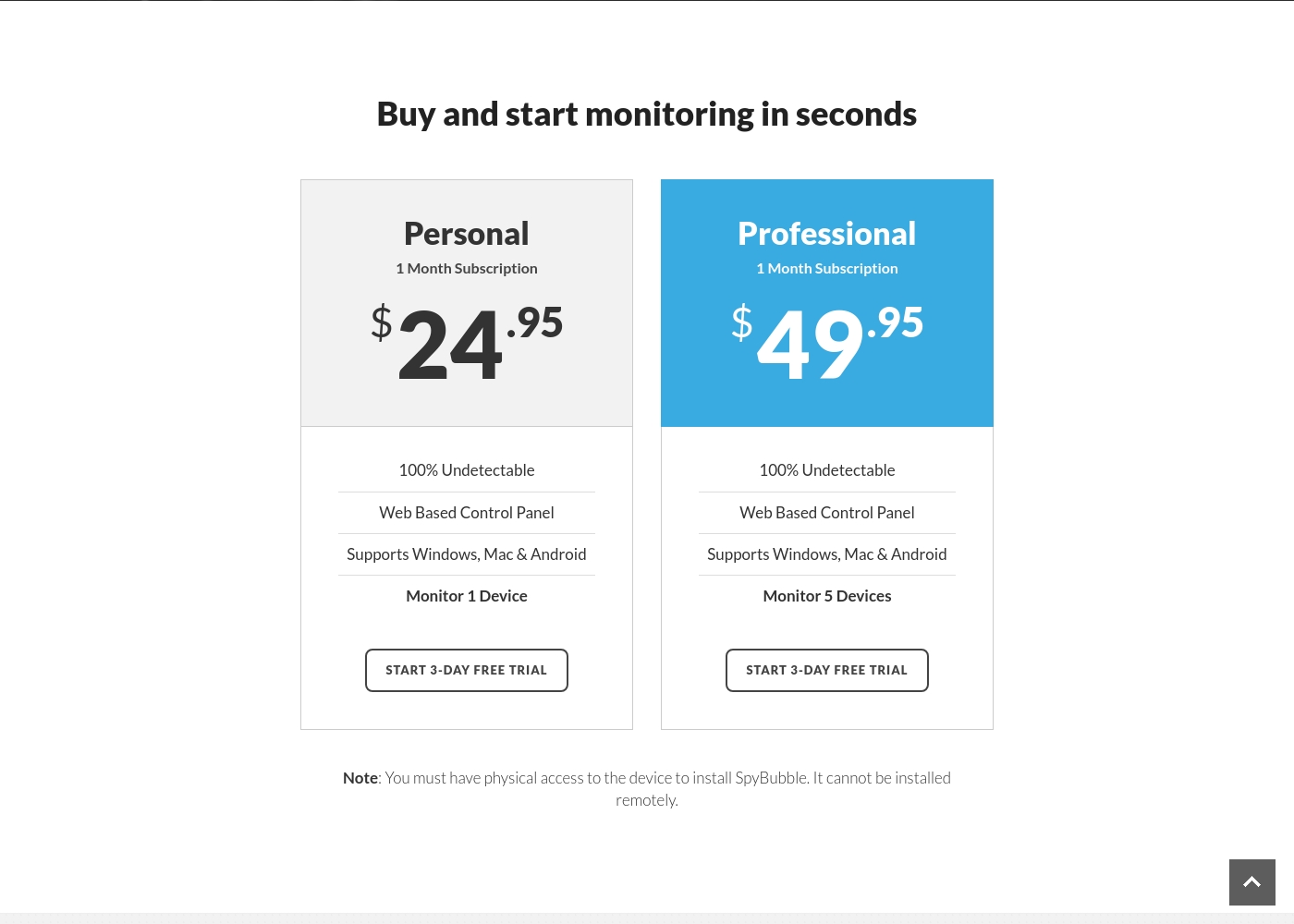
SpyBubble costs between $24.95 and $49.95 per month with 2 plans: Personal at $24.95, and Professional at $49.95.
You can choose between two straightforward monthly plans, depending on how many devices you need to monitor. Both options currently provide access to a 3-day free trial period.
Personal
Price: $24.95 per month Websites Supported: Not explicitly stated Best For: Individual device monitoring Refund Policy: Not explicitly stated Other Features:
- 100% Undetectable monitoring
- Web Based Control Panel access
- Supports Windows, Mac, and Android
- Monitor 1 Device
- 100% Undetectable
- Web Based Control Panel
- Supports Windows, Mac & Android
- Monitor 1 Device
- 100% Undetectable
- Web Based Control Panel
- Supports Windows, Mac & Android
- Monitor 5 Devices
Pricing Notes
- SpyBubble offers a simple, clear pricing structure based only on the number of devices (1 or 5).
- SpyBubble provides a valuable 3-day free trial, allowing users to rigorously test functionality.
- Parentaler plan costs range widely, suggesting different feature access up to $97/month.
- Parentaler does not explicitly advertise a free trial opportunity for testing.
- SpyBubble does not offer discounted annual subscriptions; only monthly billing is available.
- Users report that securing a refund from SpyBubble is highly difficult or impossible.
Pricing Head-to-Head
Reseñas de usuarios
Parentaler tiene una calificación media mixta de 3.6 en Trustpilot. Muchos padres elogian la capacidad de la aplicación para proporcionar funciones de monitoreo esenciales, enfatizando específicamente el seguimiento de ubicación fiable y las alertas de geovallado oportunas que han ayudado en emergencias del mundo real, como localizar a un niño tras una avería de vehículo.
Los usuarios también citan con frecuencia el valor de la supervisión de las comunicaciones, señalando que intervinieron con éxito en casos de ciberacoso, conversaciones peligrosas y búsquedas en línea preocupantes utilizando la función de Alerta de Palabras Clave. El software es apreciado por ayudar a gestionar el tiempo de pantalla excesivo, lo que lleva a cambios positivos en el comportamiento de los niños y a una mejor comprensión familiar.
Mi hija se quedó sin coche en medio del campo y no sabía su ubicación. Usé Parentaler para localizarla de inmediato. Me permitió tranquilizarla diciéndole que estaba a solo minutos de distancia. Esta aplicación es absolutamente esencial para la tranquilidad de los padres.
The 3.0-star rating on Trustpilot reflects a stark divergence between user experiences. On one hand, a few users praised SpyBubble as the best tracking app they’ve used, highlighting its quick setup and effective acquisition of media, messages, and call logs.
They specifically noted the convenience of media tracking and reports updating fast. However, the majority of detailed negative feedback aggressively challenges the service’s core promises and reliability.
The app suddenly showed a red mirroring icon on the target phone, instantly making the monitoring obvious. My entire goal was foiled because the target became suspicious and changed devices. Customer service could not resolve this major security flaw or offer a useful solution.
Nuestro Veredicto
Deciding between Parentaler and SpyBubble is simpler than it seems: choose Parentaler for reliability. SpyBubble promises basic monitoring but its frequent failures and terrible support make it a risky purchase. If your goal is safety and peace of mind, Parentaler is the clear winner. Parentaler’s superpower is comprehensive, reliable monitoring across all major mobile platforms. It supports both Android and iOS, making it perfect for families handling mixed devices. Parentaler includes critical tools like geofencing and app blockers that proactively protect children's activity. Its strong review score confirms that Parentaler reliably delivers on these complex features. SpyBubble does boast lower entry pricing and a handy 3-day free trial for quick testing. The Professional plan allows tracking up to five devices, but only Windows, Mac, and Android are currently supported. Users constantly mention that SpyBubble malfunctions, slow data updates, and visible detection alerts on the target phone. You simply cannot trust SpyBubble to work when monitoring is critical. The deciding factor is reliability, features, and OS compatibility. If your monitoring includes an iPhone, Parentaler is your only viable option. For ongoing, stress-free monitoring, Parentaler’s dedicated 24/7 support is an invaluable safety net. If you prioritize consistent data and proactive controls, choose Parentaler to protect your family wisely. Only consider SpyBubble if you must test monitoring software quickly on a non-iOS device before spending money.
Preguntas Frecuentes
Which software supports tracking iPhones: Parentaler or SpyBubble?
Parentaler fully supports tracking activities on both Android and iOS devices. SpyBubble explicitly only supports devices running Windows, Mac, or Android. If your target device is an iPhone, you must select Parentaler for tracking.
Does Parentaler offer content blocking features like SpyBubble?
Parentaler excels in content control, offering app blocking, website filtering, and porn blockers. SpyBubble focuses on log extraction only. SpyBubble has no ability to restrict content access or block apps effectively.
Is SpyBubble's 100% undetectable operation guarantee reliable?
No, user reviews frequently contradict SpyBubble’s claim of being 100% undetectable. Users report the target device often shows obvious warnings or glitches. Parentaler focuses on quiet, background monitoring but maintains stronger reliability.
Which tool has better customer support for technical issues?
Parentaler provides superior customer care with 24/7 multilingual support rated highly by users. SpyBubble's support is notoriously described as slow, unprofessional, and unresponsive to critical bugs. Choose Parentaler for reliable help.
How does the installation process differ between Parentaler and SpyBubble?
Both tools require mandatory physical access to the target device for setup. SpyBubble emphasizes this requirement constantly. Parentaler offers quick setup and covers both Android and iOS installations effectively.
Can I monitor multiple devices with Parentaler and SpyBubble?
SpyBubble offers a Professional plan to monitor up to five devices concurrently. Parentaler is built for multi-device family monitoring. Note that SpyBubble's multi-device plan only works for Windows, Mac, and Android.
¿Listo para elegir?
Ambas herramientas tienen sus fortalezas. Elige según tus necesidades específicas.