Databox vs Splunk
Databox and Splunk are both data powerhouses, but they serve very different masters. Databox is built for marketing and business teams needing fast, AI-powered answers. Splunk is for IT and security teams managing massive machine data.
Smart AI analytics for growing teams.
We found Databox is a capable BI platform that connects to many data sources and uses AI to explain performance. Overall, it's a strong choice for teams needing fast, actionable insights from their data, especially with its unlimited user model.
Ventajas
- AI-powered Genie provides instant, plain-English answers to data questions.
- Connects to 130+ data sources, creating a single source of truth.
- Unlimited users and dashboards on all paid plans, removing seat-based costs.
- Offers a free plan and a 14-day trial for paid tiers.
Desventajas
- Pricing starts at $159/month for paid plans, which may be high for small budgets.
- Advanced features like white-labeling are available as paid add-ons.
- Limited external review data was accessible for a full sentiment check.
- The platform's depth might require an onboarding period for full adoption.
Powerful but complex data platform.
We find Splunk offers a robust, unified platform for security and observability with extensive integrations and scalability. However, its pricing structure is opaque and usage-based, which can make cost planning challenging. Overall, it's a strong choice for enterprises needing deep data analysis, but smaller teams may find it complex and expensive.
Ventajas
- Unified platform for security and observability.
- Over 2,000 integrations with various data sources.
- AI and automation for threat response.
- Handles massive data volumes at scale.
Desventajas
- Opaque pricing requires consultation with sales.
- Can be complex to set up and learn.
- Usage-based models may lead to unpredictable costs.
- External review access was blocked, limiting user sentiment data.
Acerca deDatabox
Databox is a business intelligence and analytics platform built for teams that need clear, trusted answers fast. It connects directly to over 130 tools you already use, like CRMs and marketing platforms, and turns that data into shared metrics, dashboards, and AI-powered insights. Whether you're a marketing lead, a business analyst, or an agency owner, it's designed to help you understand performance without the technical headaches.
Acerca deSplunk
Splunk is a unified platform for security and observability. It's designed for teams that need to search, analyze, and act on data from any source. Whether you're a security analyst hunting threats or an engineer troubleshooting app performance, it brings everything together in one place. ✨
Aspectos destacados
Comparación de características
Resumen de Funcionalidades
Destacamos las principales diferencias y elegimos un ganador para cada característica.
Primary Use Case
Databox analyzes business metrics. Splunk analyzes machine and security data.
Databox connects to your CRM, marketing, and sales tools. It turns that data into dashboards showing campaign ROI, pipeline health, and revenue trends. Splunk ingests logs, metrics, and traces from your servers, apps, and network. It's used for security incident investigation and infrastructure performance monitoring. The core difference is data type: Databox works with business data; Splunk works with operational machine data.
User Interface
Databox is visual and drag-and-drop. Splunk is powerful but technical.
Databox offers pre-built templates and a drag-and-drop dashboard builder. Non-technical users can create visual reports in minutes. Splunk's interface is search-driven. You often write queries (SPL) to find data. It's powerful for analysts but has a steep learning curve. If you want to point and click, Databox wins. If you want to write complex searches, Splunk wins.
AI & Automation
Both use AI, but for different goals. Databox explains business trends. Splunk detects threats.
Databox's Genie AI answers plain-English questions about your business data. It explains 'why' your conversion rate dropped last week. Splunk uses AI to correlate logs and generate high-fidelity security alerts. It automates responses to potential threats. Databox AI helps you understand business performance. Splunk AI helps you defend your infrastructure.
Integrations
Splunk has more integrations, but Databox covers core business apps.
Databox connects to 130+ marketing, sales, and analytics tools. It covers the main business stack like HubSpot, Google Ads, and Salesforce. Splunk boasts 2,000+ integrations for logs, metrics, and traces from any source. This includes enterprise infrastructure and custom apps. Splunk's integration scale is larger, but Databox's are tailored for business teams.
Pricing Transparency
Databox has clear published prices. Splunk requires a sales call.
Databox lists its pricing: Free, and paid plans starting at $159/month. You know the cost before you sign up. Splunk's pricing is custom and usage-based. You must contact sales to get a quote based on your data volume. For budget predictability, Databox is straightforward. Splunk may have hidden complexity.
Learning Curve
Databox is easier to start. Splunk requires more technical setup.
Databox is designed for self-service. A marketing manager can sign up, connect Google Analytics, and have a dashboard in an hour. Splunk often requires dedicated engineers to install, configure data inputs, and write queries. The initial setup can take days or weeks. If you need insights fast with no IT help, Databox is the choice.
Scalability
Both scale, but Splunk handles massive data volumes for enterprises.
Databox scales for growing business teams. Its unlimited user model prevents cost spikes as you add people. Splunk is built to ingest and search petabytes of data per day. It's used by the largest enterprises for global IT monitoring. Splunk's raw data processing scale is in a different league for technical use cases.
Customer Support
Databox offers included support. Splunk's support details are custom.
All Databox paid plans include support via chat and a help center. Premium plans get priority support. Splunk's support options and SLAs are not public. You'd need to discuss them with sales. Databox's support model is more transparent and included in the price.
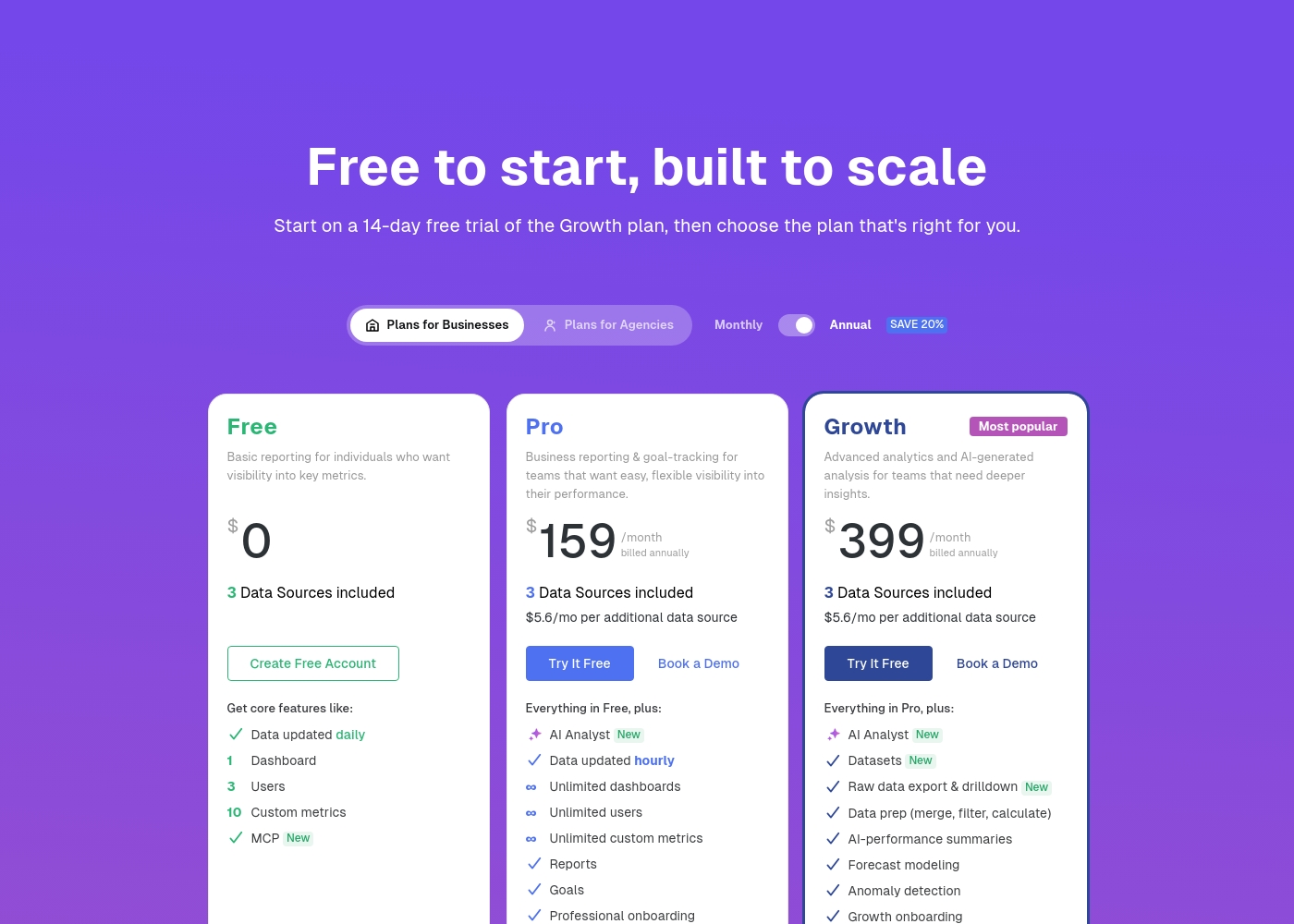
Databox pricing: Databox offers a forever-free plan and three paid tiers starting at $159/month when billed annually. Pricing is based on data features and bundled data sources, with a 20% discount on yearly subscriptions.
All paid plans include unlimited users and dashboards, but extra data sources are billed based on a per-source monthly fee. A 14-day free trial is available for all new users to explore the full-featured platform before committing to a paid plan.
Professional, Growth, and Premium tiers ensure high scalability for teams of any size by removing seat-based pricing and offering advanced analytics, AI-powered reports, and business intelligence features regardless of team complexity or user count. For even more power, you can also add on specialized services like OKRs and white-labeling to truly customize your dashboard experience for your organization or clients' needs and brand standards through their flexible dashboard portal.
Splunk costs are Not explicitly stated per year with 2 plans: Ingest Pricing at Not explicitly stated, Activity-based Pricing at Not explicitly stated.
Take a look at the different ways you can manage your data costs below.
Ingest Pricing
Price: Not explicitly stated Websites Supported: Not explicitly stated Best For: Teams needing predictable costs for high-volume data ingestion Refund Policy: Not explicitly stated Other Features: Simple predictable approach, Economical search scaling, Broad data ingestion
- Search and analyze machine data
- Expanded use cases on ingested data
- Standard data ingestion
- Metric time series (MTS)
- Traces analyzed per minute
- Sessions monitoring
- Uptime requests

Pricing Notes
- Databox publishes clear pricing: Free plan, then Growth ($159/mo annual), Pro ($259/mo annual), and Premium plans.
- Splunk's pricing is opaque and customized. You must contact sales for a quote based on data volume or activity.
- Databox offers a 20% discount for annual billing. Splunk's discount structure is not public.
- Both offer a free trial to test the platform before committing.
Pricing Head-to-Head
Reseñas de usuarios
We found external review snippets were blocked by security checks on both Trustpilot and Capterra, preventing us from gathering specific user feedback from these sources. Therefore, our assessment is based solely on the provided website content and pricing information, which highlights key features like AI-powered analytics, extensive integrations, and unlimited users on paid plans.
Based on the provided external sources, we couldn't retrieve detailed user reviews for Splunk due to access restrictions. Trustpilot and Capterra both returned verification or security pages, preventing us from gathering specific sentiment on accuracy, ease of use, support, or pricing.
This means our review is based solely on the official product information and pricing details provided. We recommend checking these review sites directly for the latest user feedback before making a decision.
Nuestro Veredicto
Choosing between Databox and Splunk isn't about which is better overall—it's about which is better for your specific job. Databox is your go-to for business intelligence, while Splunk is your command center for IT security and operations. Databox's superpower is making business data instantly understandable for anyone. Its AI analyst, Genie, answers questions in plain English. You can connect to tools like HubSpot and Google Ads and see a clear dashboard in minutes, no SQL required. Splunk's superpower is searching and correlating petabytes of machine data to find threats and performance issues. It's the industry standard for security analysts and IT ops teams who need to hunt through logs and traces from across their entire infrastructure. The deciding factor is your team and their data. If you're a marketer or executive tracking KPIs, Databox is the clear winner. If you're an engineer or security analyst troubleshooting a system outage, Splunk is the only serious tool. Pick Databox if you want fast, visual answers about business performance. Pick Splunk if you need to deeply analyze technical data for security or IT operations. They solve different problems, so the right choice depends entirely on what you're trying to fix.
Preguntas Frecuentes
Which is better for a small marketing team, Databox or Splunk?
Databox is better for small marketing teams. It's designed for non-technical users, connects to business apps, and has clear, affordable pricing. Splunk is complex and expensive for basic marketing analytics.
Does Databox have security monitoring like Splunk?
No. Databox focuses on business intelligence from app data. Splunk is a dedicated security platform for threat detection and infrastructure monitoring. They serve completely different purposes.
Is Splunk worth the extra cost over Databox?
It's not about cost—it's about need. Splunk is worth it for IT/security teams analyzing logs at scale. For business teams tracking marketing and sales KPIs, Databox provides more value at a lower price.
Can I connect Databox to my cloud databases like Splunk can?
Yes, Databox's Growth and Premium plans support direct SQL database connections. However, Splunk is built to ingest and search massive volumes of raw database logs, which is a different use case.
Which tool is easier to set up for a non-technical person?
Databox is much easier. You can sign up, connect a tool like Google Analytics, and have a dashboard in under an hour. Splunk often requires dedicated engineering time to install and configure.
Do both tools offer free trials?
Yes. Databox offers a 14-day free trial of its paid plans. Splunk also offers a free trial so you can explore the platform's interface and features.
¿Listo para elegir?
Ambas herramientas tienen sus fortalezas. Elige según tus necesidades específicas.