Sender vs Splunk
Sender and Splunk serve completely different masters. Sender makes email marketing easy for small teams. Splunk tackles massive data for enterprise security. It's not really a fair fight—they're built for different worlds.
Simple, free, and effective for basics.
We found Sender to be a solid, no-frills tool for core email marketing tasks. Its free plan is a major draw for startups and small businesses. Overall, it delivers good value with a straightforward interface, though it may lack some advanced features for power users.
Vorteile
- Extremely generous free plan (2,500 contacts, 15k emails/month).
- Clean, user-friendly interface that's easy to learn.
- Transparent, affordable pricing with no hidden fees.
- Includes essential automation features from the start.
Nachteile
- Advanced features and segmentation are limited on lower tiers.
- Some users report occasional email deliverability issues.
- Integrations can be inconsistent with certain platforms.
- Free plan lacks SMS marketing capabilities.
Powerful but complex data platform.
We find Splunk offers a robust, unified platform for security and observability with extensive integrations and scalability. However, its pricing structure is opaque and usage-based, which can make cost planning challenging. Overall, it's a strong choice for enterprises needing deep data analysis, but smaller teams may find it complex and expensive.
Vorteile
- Unified platform for security and observability.
- Over 2,000 integrations with various data sources.
- AI and automation for threat response.
- Handles massive data volumes at scale.
Nachteile
- Opaque pricing requires consultation with sales.
- Can be complex to set up and learn.
- Usage-based models may lead to unpredictable costs.
- External review access was blocked, limiting user sentiment data.
ÜberSender
Sender is an email marketing platform designed for businesses of all sizes. It helps you build, automate, and send email campaigns that people actually want to read. Think of it as your straightforward tool for staying in touch with your audience and driving sales. 🚀
ÜberSplunk
Splunk is a unified platform for security and observability. It's designed for teams that need to search, analyze, and act on data from any source. Whether you're a security analyst hunting threats or an engineer troubleshooting app performance, it brings everything together in one place. ✨
Highlights
Funktionsvergleich
Funktionsübersicht
Wir heben die Hauptunterschiede hervor und wählen einen Gewinner für jede Funktion.
Core Purpose
Sender is for email marketing. Splunk is for analyzing machine data.
Sender is an email marketing platform. You build campaigns, automate sequences, and nurture leads. It's designed for communication. Splunk is a data analytics platform. It ingests logs, metrics, and traces from IT systems. It's designed for security and operations. The difference is fundamental. Sender talks to people. Splunk talks to machines and helps humans understand them.
Ease of Use
Sender is simple and quick. Splunk is powerful but complex.
Sender promises setup in about 5 minutes. The interface is clean. Beginners can create their first campaign without training. Splunk is built for data analysts and engineers. Its power comes with a steep learning curve. You might need professional services for implementation. For a small business owner, Sender is effortless. For a security analyst hunting threats, Splunk's complexity is necessary power.
Free Offering
Sender has a permanent free plan. Splunk has a free trial.
Sender's Free Forever plan is generous. You get 2,500 subscribers, 15,000 emails/month, and automation. No credit card needed. Splunk offers a free trial. You can explore the UI and features. But it's time-limited. You can't use it for free long-term. For budget-conscious startups, Sender's free plan is a major advantage. It's not a trial; it's a real, usable product.
Pricing Model
Sender's pricing is transparent. Splunk's is usage-based and opaque.
Sender shows clear tiers: Free ($0), Standard ($7/mo), Professional ($14/mo). You pay based on subscriber count. No hidden fees. Splunk uses Ingest or Activity-based pricing. Costs depend on data volume or metrics. You must contact sales for a quote. It's unpredictable. Sender is predictable. Splunk's costs can spike with usage. This makes budgeting for Splunk a challenge.
Integration Ecosystem
Splunk has thousands of integrations. Sender focuses on marketing tools.
Sender integrates with platforms you use for marketing: WordPress, WooCommerce, PrestaShop, Zapier. It's focused and relevant for its audience. Splunk boasts over 2,000 integrations. It connects to any source of machine data: databases, cloud services, applications. It's vast and technical. Splunk's ecosystem is broader, but more complex. Sender's integrations are simpler and more immediately useful for email marketers.
Reporting & Analytics
Splunk provides deep, real-time analysis. Sender offers basic email stats.
Sender gives you email metrics: opens, clicks, bounces. It's enough to measure campaign performance. Some users want more detail. Splunk is built for analysis. You create real-time dashboards, run complex searches, and get AI-powered insights from terabytes of data. It's unparalleled. Comparing them here is like comparing a calculator to a supercomputer. Splunk is in a different league for data analysis.
Customer Support
Sender offers 24/7 live support on all plans. Splunk's support details are for sales.
Sender includes 24/7 live support, even on the Free plan. You can get help immediately when you're stuck. Splunk's support options and SLAs are not public. You need to contact their sales team. Enterprise support is likely comprehensive but opaque. For a small business needing quick help, Sender's accessible support is a huge win. Splunk's support is likely robust but tailored to enterprise contracts.
Scalability
Both scale, but for different things. Sender scales contacts, Splunk scales data.
Sender scales by letting you upgrade plans as your subscriber list grows. It's designed for marketing audiences up to 200,000+ contacts. Splunk scales to handle massive volumes of machine data. It monitors AI infrastructure and global networks. It's built for petabyte-scale analysis. They scale in completely different dimensions. Sender scales horizontally with more users. Splunk scales vertically with more data and complexity.
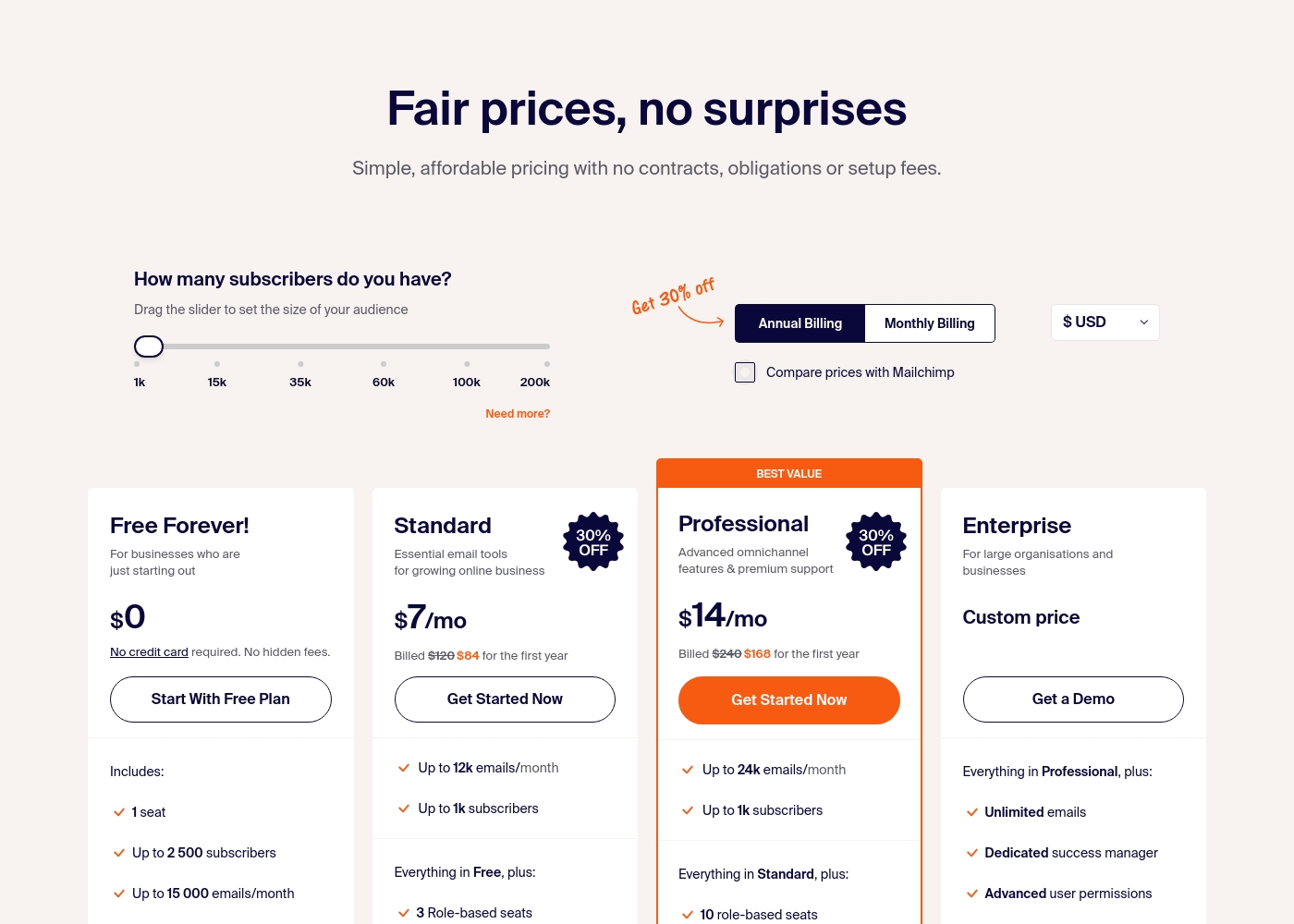
Sender costs between $0 and a custom price per month with 4 plans: Free Forever at $0, Standard at $7, Professional at $14, and Enterprise at Custom price.
Take a look at the specific features and limits included in each plan tier below.
Free Forever!
Price: $0 monthly Websites Supported: Not explicitly stated Best For: Businesses who are just starting out Refund Policy: Not explicitly stated Other Features: 1 seat, up to 2,500 subscribers, 15,000 emails/month, 24/7 live support, email automation.
- 1 seat
- Up to 2,500 subscribers
- Up to 15,000 emails/month
- 24/7 live support
- Email automation
- Up to 12k emails/month
- Up to 1k subscribers
- 3 Role-based seats
- Automated sequences
- Up to 24k emails/month
- Up to 1k subscribers
- 10 role-based seats
- Premium support
- Unlimited emails
- Dedicated success manager
- Advanced user permissions
Splunk costs are Not explicitly stated per year with 2 plans: Ingest Pricing at Not explicitly stated, Activity-based Pricing at Not explicitly stated.
Take a look at the different ways you can manage your data costs below.
Ingest Pricing
Price: Not explicitly stated Websites Supported: Not explicitly stated Best For: Teams needing predictable costs for high-volume data ingestion Refund Policy: Not explicitly stated Other Features: Simple predictable approach, Economical search scaling, Broad data ingestion
- Search and analyze machine data
- Expanded use cases on ingested data
- Standard data ingestion
- Metric time series (MTS)
- Traces analyzed per minute
- Sessions monitoring
- Uptime requests

Pricing Notes
- Sender's Free Forever plan is not a time-limited trial; it's a permanent free tier.
- Splunk's pricing is opaque and requires sales consultation. Costs are based on data volume or activity.
- Sender's paid plans start at just $7/month, making it highly accessible.
- Splunk's usage-based model can lead to unpredictable costs if data volume spikes.
- Sender includes SMS credits as an optional add-on, while Splunk focuses purely on data analytics.
Pricing Head-to-Head
Nutzerbewertungen
User sentiment on Trustpilot and Capterra highlights Sender's generous free plan and ease of setup as major positives. Many praise the intuitive interface and reliable automation.
😊 However, some note occasional deliverability hiccups and a learning curve for advanced features. Customer support is frequently mentioned as responsive, though a few users report slow responses during peak times.
The free plan is unbeatable for a new business. I set up my first automation in minutes. The platform is simple and gets the job done without fuss.
Based on the provided external sources, we couldn't retrieve detailed user reviews for Splunk due to access restrictions. Trustpilot and Capterra both returned verification or security pages, preventing us from gathering specific sentiment on accuracy, ease of use, support, or pricing.
This means our review is based solely on the official product information and pricing details provided. We recommend checking these review sites directly for the latest user feedback before making a decision.
Unser Fazit
This comparison is a bit of a mismatch. Sender and Splunk are built for entirely different jobs. Sender is a fantastic, affordable email marketing tool. Splunk is a powerful enterprise data platform. Sender's superpower is simplicity and value. Its free plan lets you email 2,500 people for $0. Setup takes five minutes, not five days. Splunk's superpower is deep data analysis. It ingests everything from logs to metrics. It uses AI to find threats and performance issues in real-time. The deciding factor is your core need. Need to send newsletters and automate sales emails? Choose Sender. Need to analyze terabytes of IT data for security? Choose Splunk. For most small businesses and beginners, Sender is the clear winner. It's affordable, easy, and gets you results fast. Splunk is a specialist tool for enterprises with complex data challenges.
Häufig gestellte Fragen
Which is better for small teams: Sender or Splunk?
Sender is far better for small teams. Its free plan is perfect for startups and small businesses. Splunk is an enterprise tool designed for large security and IT teams analyzing complex data.
Is Splunk worth the extra cost over Sender?
They aren't competitors, so 'extra cost' isn't the right comparison. Sender costs $0-$14/month for email. Splunk costs thousands for data analytics. Choose based on your need, not price.
Can I use Sender for data analytics like Splunk?
No. Sender is an email marketing platform. It tracks opens and clicks for campaigns. It cannot ingest, search, or analyze machine data from IT systems like Splunk can.
Does Sender have security features like Splunk?
No. Sender is for marketing communication. Splunk is a security platform for threat detection and incident response. They serve completely different security needs.
Which tool has a better free plan?
Sender wins decisively. It offers a permanent Free Forever plan with 15,000 emails per month. Splunk only offers a time-limited free trial to explore its interface.
Can I migrate from Sender to Splunk?
Migration doesn't make sense. They are not interchangeable. You would use Sender for email and potentially add Splunk to analyze your infrastructure data. They can complement each other.
Bereit zu wählen?
Beide Tools haben Stärken. Wähle passend zu deinem Bedarf.