HelpDesk vs Techinline
HelpDesk and Techinline solve different problems. HelpDesk organizes customer tickets; Techinline connects you to remote computers instantly. One is for support desks, the other for IT support.
Best for: Support teams managing customer inquiries from multiple channels, Growing businesses needing structured ticketing and automation
Best for: IT professionals and managed service providers (MSPs), Teams providing remote support to clients or internal users
Intuitive Ticketsysteme, exzellenter Support, klarer Mehrwert.
HelpDesk überzeugt durch ein hochgradig nutzbares, schlankes Ticketsystem, das sich perfekt für wachsende Teams eignet, die Organisation benötigen. Wir fanden die Benutzeroberfläche sauber und schätzten den durchweg gelobten, reaktionsschnellen Kundenservice, der rund um die Uhr verfügbar ist. Insgesamt ist dies eine zuverlässige und erschwingliche Lösung für Unternehmen, die starke Kern-Supportfunktionen priorisieren.
Vorteile
- Saubere, intuitive Benutzeroberfläche macht die Einführung und Nutzung des Systems einfach.
- Der Kundensupport ist schnell, freundlich und sehr reaktionsschnell.
- Die Einrichtung erfolgt zügig, was zu sofortigen Verbesserungen der Kundensupport-Geschwindigkeit führt.
- Günstige Preisstruktur beinhaltet wertvolle unbegrenzte kostenlose Viewer-Plätze.
Nachteile
- Erweiterte Funktionen, wie die Makro-Anpassung, sind aktuell begrenzt.
- Der Übergang von zuvor integrierten Produkten (wie LiveChat) kann kostspielig/frustrierend sein.
Solid remote support with scalable pricing.
We found Techinline SetMe to be a capable and secure remote access solution, especially for IT professionals and small teams needing reliable unattended and on-demand support. Its tiered pricing offers flexibility, but the lack of a clear refund policy is a notable gap for potential buyers.
Vorteile
- Simple, instant client connections via a set.me link.
- Scalable plans from individual use to enterprise-level team management.
- Stable connections with auto-reconnect and multi-monitor support.
- Centralized dashboard for managing all devices and permissions.
Nachteile
- Limited public user reviews made independent sentiment analysis impossible.
- No explicit refund policy is detailed on the website.
- Advanced team features require upgrading to higher-tier, per-seat plans.
- The 'Core' plan for individual use lacks on-demand support features.
ÜberHelpDesk
HelpDesk ist eine umfassende Software zur Verwaltung einer breiten Palette von Kundensupport-Aktivitäten. Im Grunde dient es als zentrale Anlaufstelle oder Single Point of Contact (SPC) für Ihr Support-Team.
Dieses Tool organisiert Nachrichten und bietet zeitnahe Hilfe, indem es sämtliche Kommunikation in standardisierte Tickets 🎟️ umwandelt. Unabhängig davon, ob Nutzer per E-Mail, Telefon oder über ein Webformular Kontakt aufnehmen, sorgt das System dafür, dass jede Anfrage erfasst, priorisiert und nachverfolgt wird. Es eignet sich sowohl für wachsende Teams, die gerade erst starten, als auch für große Konzerne mit komplexen betrieblichen Anforderungen.
ÜberTechinline
SetMe is a remote support and management tool 🛠️ designed for IT professionals, support teams, and managed service providers. It lets you instantly connect to any computer, whether you’re providing live help or managing unattended servers and desktops from a central dashboard.
Highlights
Funktionsvergleich
Funktionsübersicht
Wir heben die Hauptunterschiede hervor und wählen einen Gewinner für jede Funktion.
Core Purpose
HelpDesk organizes customer support tickets. Techinline provides remote computer access.
HelpDesk turns all customer messages into standardized tickets. It's a central hub for support teams managing requests from email, phone, and web forms. Techinline lets you connect to any computer remotely. You can provide live support or manage unattended servers and desktops from a central dashboard. The key difference is fundamental: HelpDesk manages conversations, Techinline manages machines. If your job is answering customer questions, HelpDesk is the tool. If your job is fixing computers remotely, Techinline is the tool.
User Interface
HelpDesk is praised for its clean, intuitive design. Techinline focuses on a functional remote dashboard.
Users consistently praise HelpDesk's interface. They call it clean, intuitive, and easy to set up, which speeds up adoption. Techinline's interface is a centralized dashboard for managing devices and sessions. It's designed for functionality, prioritizing control over aesthetics. The trade-off is clarity vs. utility. HelpDesk's UI is built for ticket flow; Techinline's is built for device management. For a support agent, HelpDesk's clean UI reduces training time. For an IT admin, Techinline's dashboard provides the controls they need.
Automation
HelpDesk offers powerful ticket automation. Techinline focuses on remote connection stability.
HelpDesk automates the entire ticketing process. Its rules handle creation, assignment, and prioritization, cutting manual work significantly. Techinline's automation is different. It focuses on connection stability, like auto-reconnect after network drops and maintaining sessions on low-speed internet. The difference is in the automation target. HelpDesk automates workflows; Techinline automates connections. For a high-volume support team, HelpDesk's rules save hours. For a field technician, Techinline's stability ensures they can finish the job.
Security
Both prioritize security. HelpDesk emphasizes data compliance; Techinline focuses on session encryption.
HelpDesk complies with GDPR and has Privacy Shield certification. It uses 256-bit SSL encryption for all data transmission. Techinline uses end-to-end encryption for all remote sessions. This protects the remote connection itself, ensuring data isn't intercepted. The security focus differs: HelpDesk protects the data in your system; Techinline protects the data in transit. For businesses handling sensitive customer data, HelpDesk's compliance is key. For remote access, Techinline's encryption is essential.
Pricing & Value
HelpDesk is per-user with free viewers. Techinline scales by user/admin and plan tier.
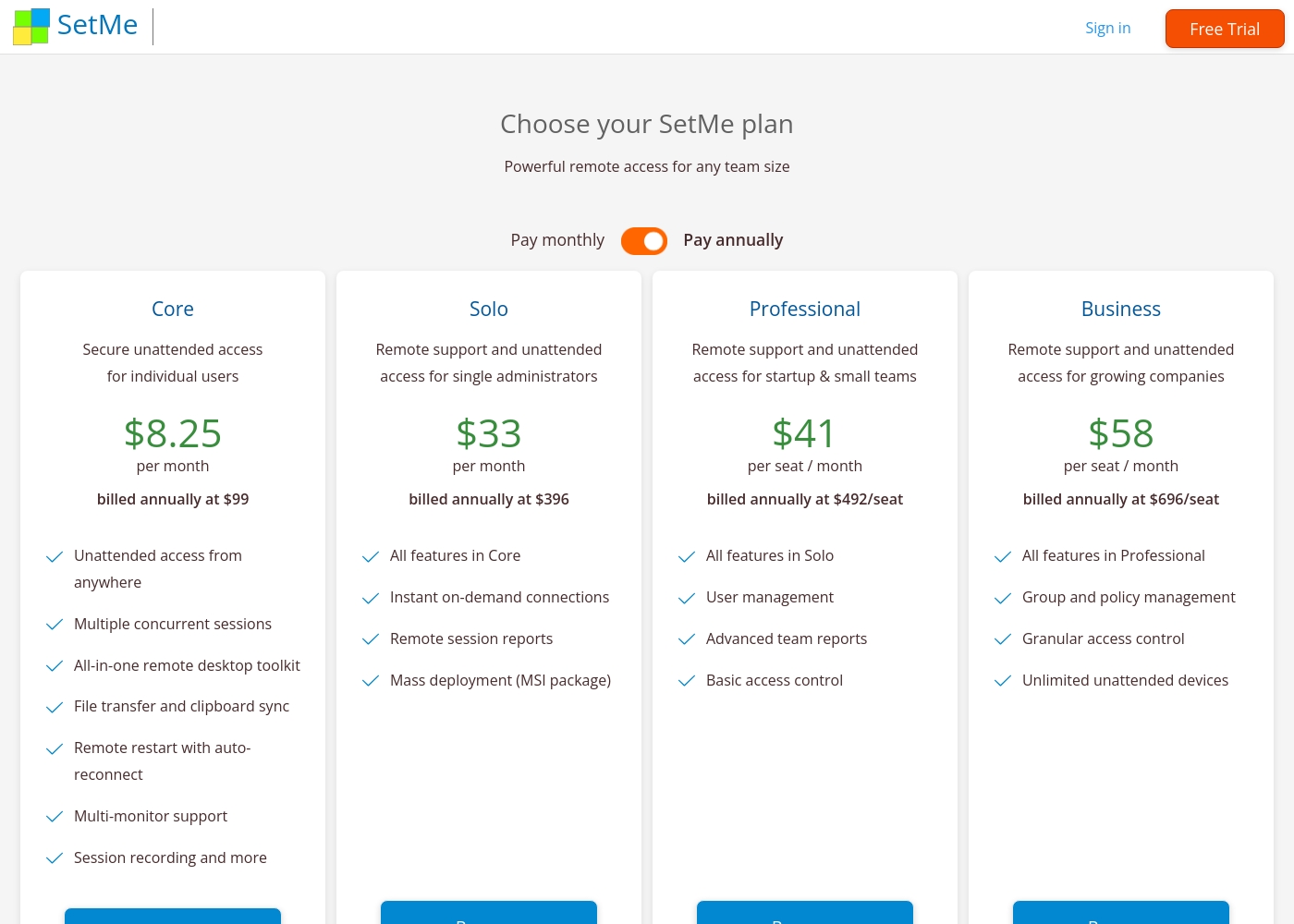
HelpDesk charges $29-50 per user/month. Admins and Agents pay; viewers are free. Annual billing saves 15%. Techinline starts at $8.25/month for solo access. Team plans are $41-58 per seat/month. Pricing scales with features and seats. HelpDesk offers clear value with unlimited free viewers. Techinline offers flexible tiers from solo to enterprise. For a team of 10 agents, HelpDesk's per-agent model is straightforward. For a solo IT consultant, Techinline's Core plan is cheaper.
Customer Support
HelpDesk offers 24/7 support with high user praise. Techinline's support details are limited.
HelpDesk provides 24/7/365 support. Users rave about quick, friendly responses that go the extra mile. Techinline's support is mentioned but not detailed in reviews. The site suggests contacting support for questions about response times. The difference is in transparency. HelpDesk's support is a highlighted strength; Techinline's is not. If you need immediate help, HelpDesk's proven support is a big plus. For Techinline, you'll need to test their support during the trial.
Integration Ecosystem
HelpDesk integrates with popular apps. Techinline has limited integrations.
HelpDesk connects to HubSpot, Salesforce, Jira, Zapier, and more. It has a marketplace for adding integrations. Techinline's integrations are not well-documented. Users may need to check for specific PSA or ticketing system compatibility. The difference is ecosystem size. HelpDesk has a broad integration network; Techinline is more standalone. For a team using Salesforce and Jira, HelpDesk's integrations are a major advantage. For pure remote support, Techinline may be sufficient.
Learning Curve
HelpDesk is easy to adopt with a clean interface. Techinline requires understanding remote access concepts.
HelpDesk is frequently described as easy to set up and use. Its clean UI helps new agents get started quickly. Techinline requires knowledge of remote access, unattended devices, and permissions. The dashboard is functional but technical. The trade-off is simplicity vs. specialization. HelpDesk is for general support; Techinline is for IT specialists. A new hire could be productive in HelpDesk in hours. Techinline might require a day of training for remote support basics.
HelpDesk kostet zwischen 29 $ und 50 $ pro Nutzer pro Monat (jährlich abgerechnet) mit drei Plänen: Team für 29 $/Monat, Business für 50 $/Monat und Enterprise (benutzerdefinierte Preise).
Die Preisgestaltung ist klar strukturiert, damit Sie die beste Lösung für Ihren Betriebsbedarf auswählen können.
Team
Preis: 29 $/Monat pro Nutzer (jährlich abgerechnet) oder 34 $/Monat pro Nutzer (monatlich abgerechnet) Websites unterstützt: Nicht explizit angegeben Am besten geeignet für: Wachsende Teams mit grundlegendem Bedarf Rückerstattungsrichtlinie: Wird individuell vom Support geprüft Weitere Funktionen:
- Unbegrenzte kostenlose Viewer-Rollen
- 5 Teams und anpassbare Ticket-Ansichten
- 5 E-Mail-Vorlagen und 5 aktive Automatisierungsregeln
- Eine benutzerdefinierte Domain
- 5 aktivierte benutzerdefinierte Felder
- Bezahlte Nutzer mit Admin- oder Agenten-Rollen
- Unbegrenzte kostenlose Viewer
- 5 Teams
- 5 Weiterleitungsadressen
- 5 Antwortadressen
- Bezahlte Nutzer mit Admin- oder Agenten-Rollen
- Unbegrenzte kostenlose Viewer
- 100 Teams
- 100 Weiterleitungsadressen
- 100 Antwortadressen
- Alles aus dem Business-Plan ohne Limits
- Dedizierter Account Manager
- Produktschulung
- Support durch Software-Ingenieure
- Sicherheitsunterstützung
Techinline pricing: Techinline offers four SetMe plans starting at $8.25 per month (billed annually) for individual unattended access. Pricing scales based on features like on-demand support, seat count, and team management tools, with both monthly and yearly billing available for most tiers.
Core
Price: $8.25 per month (billed annually at $99) Best For: Individual users needing secure unattended access Other Features: Multiple concurrent sessions, File transfer and clipboard sync, Remote restart with auto-reconnect, Multi-monitor support, Session recording
This plan is perfect for individuals who only need to manage their own remote machines. It's a reliable choice if you don't need to provide instant on-demand support to new clients.
Pricing Head-to-Head
Nutzerbewertungen
HelpDesk erhält im Allgemeinen ausgezeichnetes Feedback zu Benutzerfreundlichkeit und Oberfläche. Nutzer heben häufig das saubere, intuitive Design der Plattform hervor und betonen, dass sie einfach einzurichten und zu navigieren ist. Viele Gutachter, auch solche, die von Wettbewerbern gewechselt sind, fanden die Ticketstruktur sehr effizient, was zu einer gesteigerten Teamproduktivität und kürzeren Reaktionszeiten führte. Die Automatisierungsfunktionen der Plattform, die Ticketkategorisierung und die Einbeziehung unbegrenzter kostenloser Viewer-Plätze werden oft positiv hervorgehoben. Der Support wird für seine Schnelligkeit, Freundlichkeit und hohe Professionalität gelobt, wobei oft gesagt wird, dass er sich besonders bemüht, Probleme schnell zu lösen. 💪
Allerdings ist das Feedback nicht durchweg positiv. Einige Nutzer, die vom älteren, integrierten LiveChat-System des Unternehmens umgestiegen sind, äußerten Frustration über die erzwungene Trennung und die gestiegenen Abonnementkosten, was das neue System für Kleinstunternehmen als „deutlich teurer“ bezeichneten. Einige Nutzer erwähnten auch, dass das System zwar wesentliche Ticketing-Funktionen sehr gut beherrscht, ihm aber Tiefe bei erweiterten Funktionen fehlt, wobei insbesondere Einschränkungen bei der Makro-Funktionalität genannt wurden. Insgesamt wird die Plattform weithin als erschwinglich angesehen und bietet ein gutes Preis-Leistungs-Verhältnis für Unternehmen, die zuverlässige Kernsupportfunktionen benötigen.
Der Wechsel von Zendesk zu HelpDesk hat uns Geld gespart. Dieses Chat-Widget ist sehr erschwinglich und die UI/UX ist jetzt viel besser. Das Tool ist sehr einfach zu bedienen und liefert uns viel mehr Datenzugriff.
External reviews for Techinline SetMe were not accessible during this review. The provided Trustpilot URL returned a 403 error, preventing access to user feedback. Consequently, the review relies solely on the product's website information and our independent analysis of its features and pricing structure.
Unser Fazit
HelpDesk and Techinline are different tools for different jobs. HelpDesk is a ticketing system. Techinline is a remote access tool. They don't compete directly. HelpDesk's superpower is organizing customer support. It turns emails and calls into tickets. Its clean interface and 24/7 support get high praise. Techinline's superpower is remote connectivity. It connects you to any computer instantly. Its stable connections on bad Wi-Fi are a lifesaver. The deciding factor is your core need. If you're answering customer questions, choose HelpDesk. If you're fixing computers remotely, choose Techinline. For most support teams, HelpDesk is the clear winner. For IT pros needing remote access, Techinline is the right choice. Pick the tool that matches your daily work.
Häufig gestellte Fragen
Which is better for small teams: HelpDesk or Techinline?
It depends on your need. HelpDesk is better for small support teams managing customer tickets. Techinline is better for small IT teams providing remote support. HelpDesk starts at $29/user/month; Techinline at $8.25/month for solo access.
Does HelpDesk have remote access features like Techinline?
No. HelpDesk is a ticketing system, not a remote access tool. It manages customer support conversations. Techinline is designed for remote computer control and support sessions.
Is Techinline worth the extra cost over HelpDesk?
The cost comparison isn't apples-to-apples. HelpDesk charges per user for ticketing. Techinline charges for remote access. If you need remote support, Techinline is worth it. If you need ticketing, HelpDesk is better value.
Can I migrate from HelpDesk to Techinline easily?
No, these are different tools. You can't migrate tickets to remote access software. You might use both, but they serve separate purposes.
Which has better customer support: HelpDesk or Techinline?
HelpDesk offers 24/7 support with high user praise. Techinline's support is not well-documented. Based on reviews, HelpDesk has better support.
Do both tools offer free trials?
Yes. HelpDesk has a 14-day free trial. Techinline offers a 15-day free trial. Both are risk-free to test.
Bereit zu wählen?
Beide Tools haben Stärken. Wähle passend zu deinem Bedarf.