Xero vs Zoho Books
Xero and Zoho Books both offer robust cloud accounting tools for small businesses. Xero prioritizes quick setup and bank automation with specialist support. Zoho Books offers stronger built-in features like inventory management for better value.
Best for: Businesses prioritizing deep bank automation and reconciliation speed, Users who need guided, specialized setup assistance for the first 90 days
Best for: Businesses already using the Zoho CRM or broader Zoho ecosystem products, Service firms needing integrated project budgeting and time tracking
Smart features, frustrating support structure.
We found Xero delivers a powerful, intuitive cloud accounting experience, enhanced by automation tools like Hubdoc and their new AI assistant, JAX. Overall, this is a highly recommended platform, provided users are prepared for its chat-centric customer support model.
Pros
- Intuitive interface that is easy to master for daily bookkeeping tasks.
- Excellent core features, including seamless bank reconciliation and Hubdoc capture.
- Highly effective and prompt dedicated onboarding support is available for new users.
- Support staff is professional and helpful once communication is successfully established.
Cons
- Customer support is difficult to access, mainly relying on a chat-only system.
- Users report long wait times and often need to contact support multiple times for issue resolution.
- Reporting structure sometimes proves challenging or differs greatly from standard accounting practice.
- Some users feel newer features primarily benefit large businesses, impacting value for small businesses.
Scalable Accounting with Clear Value.
We find that Zoho Books provides a comprehensive and budget-friendly alternative to complex accounting systems. The scalability, permanent free tier, and full financial management capabilities are major strengths. Overall, this is a top recommendation for growing businesses needing feature-rich accounting without high legacy costs.
Pros
- Permanent Free plan available for micro-businesses.
- Highly scalable pricing structure with competitive annual rates.
- Cloud-based, comprehensive solution covering invoicing, inventory, and expenses.
- User-friendly interface simplifies daily financial tasks.
Cons
- Severe MFA reset issues reported across the Zoho suite can lock users out of accounts.
- Mixed reports regarding customer service responsiveness.
- All plans impose explicit annual limits on invoices and expenses.
- External accounting-specific feedback on accuracy and reliability is limited.
AboutXero
Xero is trusted cloud accounting software used by over 4.6 million subscribers worldwide. It's built for everyday businesses, offering an all-in-one, paperless way to manage your financial records. This system centralizes your finances in a safe and secure environment. Xero helps you manage your cash flow, control your finances, and connect seamlessly with other apps. Accountants and bookkeepers also use Xero to keep their practices steps ahead. 💡
AboutZoho Books
Zoho Books is comprehensive, cloud-based accounting software built specifically for growing businesses. It helps you manage your entire financial workflow seamlessly, integrating key functions into one place. You can handle everything from tracking expenses to controlling inventory and processing invoices. Because it’s available through mobile apps for iOS and Android, you can easily manage your books on the go. ✅
Highlights
Feature Comparison
Features Overview
We highlight the main differences and pick a winner for each feature.
Onboarding & Setup
Xero offers dedicated setup specialists for your crucial first 90 days. Zoho Books excels at hassle-free migration services.
Xero provides specialized onboarding support for a full 90 days. This resource helps beginners quickly adopt cloud accounting processes. Xero users frequently praise the responsive, patient support team for their help. Zoho Books offers a free migration service to transition your historical data quickly. Its onboarding relies more on streamlined self-service initial setup. Some users note that Zoho Books takes longer to get fully up and running without specialized guidance. If you require guided setup from experts, Xero provides a clear advantage. Those who are transferring from another system may prefer Zoho Books' free migration service. This means Xero gets you to operational status faster if you value hand-holding. Zoho Books saves you money on moving your old books.
Built-in Feature Depth
Zoho Books includes robust inventory and project management built-in. Xero requires add-ons or separate plans for comparable features.
Zoho Books is a comprehensive solution, merging core accounting with inventory controls and projects. Stock levels update automatically upon sale or purchase within Zoho Books. The project module helps track budgets and bill clients easily. Xero’s strength is powerful core ledger management and bank reconciliation accuracy. Deeper features like detailed inventory depend on third-party integrations or its separate Projects plan. Xero handles fewer aspects of the business flow internally. Zoho Books offers true end-to-end accounting out of the box, delivering superior feature value. Xero is preferred if you prioritize clean core ledger management over full business management. Businesses that sell physical goods or manage many client projects will find Zoho Books more complete.
Pricing Clarity
Zoho Books provides superior value and clearer per-user scaling costs. Xero uses a simpler model but users report price instability.
Xero bills simply per organization, which can simplify cost for very small teams. However, users occasionally report frequent pricing increases over time. This makes long-term budgeting for Xero slightly unpredictable. Zoho Books clearly defines extra users at $3 per user/month, making scaling predictable. Zoho Books explicitly aims for stable pricing without frequent, disruptive hikes. Both Xero and Zoho Books offer robust free plans. If your team expects substantial growth, Zoho Books' transparent costs offer better financial clarity. Xero’s per-organization model is easier initially but less predictable later on. Zoho Books offers more defined pricing types, including annual billing for savings.
Global Capabilities
Zoho Books guarantees multi-currency support with mandatory real-time rates. Xero supports multiple currencies without confirming real-time rates.
Zoho Books excels at international transactions with built-in multi-currency handling. It uses real-time exchange rates to ensure accurate cross-border bookkeeping. This minimizes manual effort for global firms. Xero also supports multiple currencies, essential for global commerce needs. Xero's primary focus is often domestic bank automation in certain markets. The guarantee of real-time rate tracking is not specified by Xero. Zoho Books is the superior choice for users managing complex global sales and multiple foreign bank accounts. Real-time rates drastically reduce accounting discrepancies day-to-day. Xero is better suited for businesses with simpler, less frequent international transactions.
Ecosystem Integrations
Zoho Books seamlessly integrates within the Zoho family of products. Xero connects to a much broader selection of third-party tools.
Zoho integration is its superpower, providing a seamless, consistent flow between Zoho Books and Zoho CRM. If you use the Zoho suite, data consistency is perfect. Zoho Books makes data transfer effortless across all its internal products. Xero is known for its massive, diverse ecosystem of thousands of 3rd-party integrations. This flexibility allows Xero users to combine best-of-breed software solutions they already love. Hubdoc is included for receipt capture, linking well with other apps. Choose Xero if you need flexibility outside the Zoho ecosystem and use diverse niche software. Choose Zoho Books if existing Zoho products are central to your operations. The integration strategy is the main non-feature choice between Xero and Zoho Books.
Automation Focus
Xero excels at bank reconciliation and receipt capture automation. Zoho Books emphasizes internal workflow and inventory automation.
Xero's primary automation strength is high-level, fast bank reconciliation. Xero also includes Hubdoc for automated receipt and bill capture. Automated invoice reminders speed up cash flow dramatically for Xero users. Zoho Books automation includes custom workflows, scheduled emails, and inventory alerts internally. It manages automated inventory updates after purchases or sales. Project costs are also automated through its integrated project module. Automation in Xero directly speeds up crucial month-end financial tasks. Zoho Books automation focuses more on streamlining operational tasks like stocking and project billing. Both tools automate, but Xero is superior for core banking tasks, while Zoho Books automates business operations.
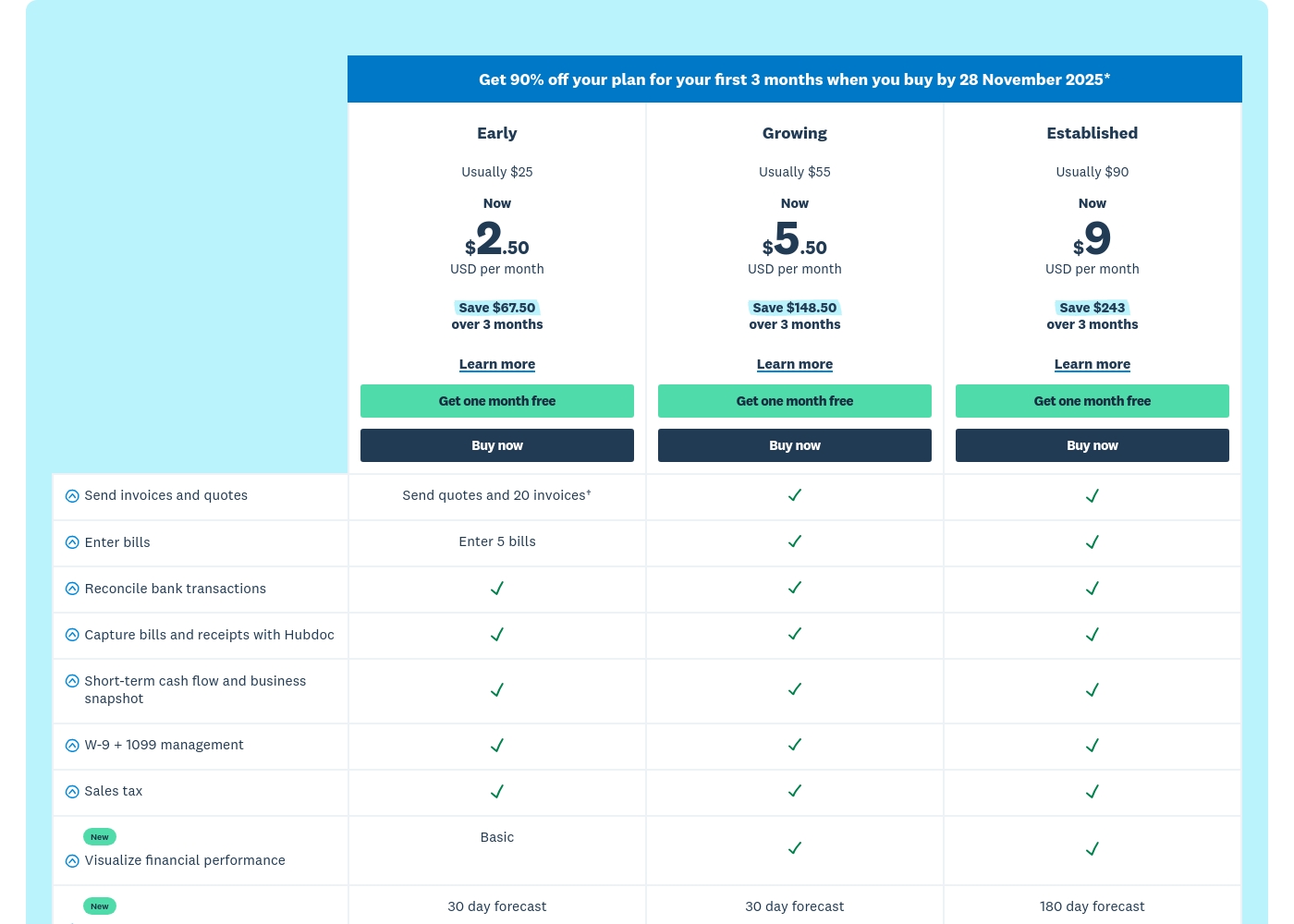
Xero costs between $25 and $90 per month with 3 plans: Early at $25/month, Growing at $55/month, and Established at $90/month.
Prices are quoted monthly, and you can see what's included in each tier below. Remember, when you purchase any plan, your first month is free!
Early
Price: $25 USD per month (Usually; promotional rate is $2.50 per month for 3 months) Best For: Small or new businesses with limited transaction volumes Refund Policy: Subscriptions auto-renew monthly until canceled Other Features:
- Send quotes and 20 invoices
- Enter 5 bills
- Reconcile bank transactions
- Capture bills and receipts with Hubdoc
- W-9 + 1099 management and Sales tax
- Reconcile bank transactions
- Capture bills and receipts with Hubdoc
- Short-term cash flow and business snapshot
- W-9 + 1099 management
- Sales tax
- Send invoices and quotes (unlimited implied)
- Enter bills (unlimited implied)
- Reconcile bank transactions
- Capture bills and receipts with Hubdoc
- Short-term cash flow and business snapshot
- Send invoices and quotes (unlimited implied)
- Enter bills (unlimited implied)
- Reconcile bank transactions
- Capture bills and receipts with Hubdoc
- Short-term cash flow and business snapshot
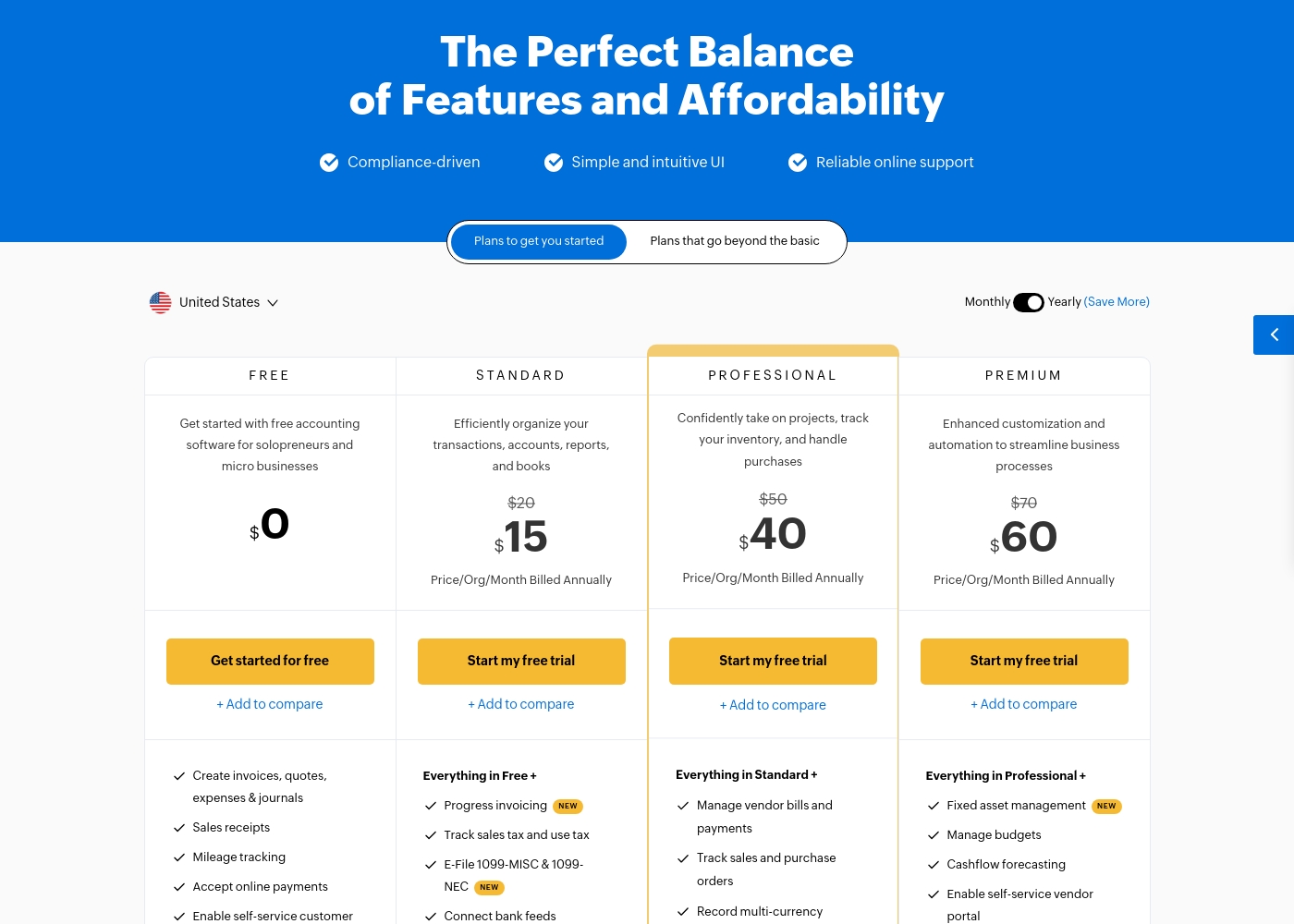
Zoho Books costs between $0 and $240 per month (billed annually) with six plans: FREE at $0, STANDARD at $15, PROFESSIONAL at $40, PREMIUM at $60, ELITE at $120, and ULTIMATE at $240.
Zoho Books offers plans built to grow with your company, from sole proprietors to large teams. Let's look closely at what is included in each option.
FREE
Price: $0.00 Best For: Solopreneurs and micro businesses (up to $50K annual revenue) Other Features:
- Create invoices, quotes, expenses, and journals
- Process sales receipts and track mileage
- Enable self-service customer portal
- Email Support (1 User + 1 Accountant)
- Create invoices, quotes, expenses & journals
- Sales receipts
- Mileage tracking
- Accept online payments
- Enable self-service customer portal
- Progress invoicing
- Track sales tax and use tax
- E-File 1099-MISC & 1099-NEC
- Connect bank feeds
- Generate divisional reports with reporting tags
- Manage vendor bills and payments
- Track sales and purchase orders
- Record multi-currency transactions
- Bill timesheets
- Project profitability
- Fixed asset management
- Manage budgets
- Cashflow forecasting
- Enable self-service vendor portal
- Set up custom domain
Pricing Notes
- Zoho Books offers clear per-user add-on costs at $3/user/month, aiding scalability planning.
- Xero gives a generous first month free, while Zoho Books provides a 14-day trial.
- Zoho Books explicitly commits to stable pricing; Xero users have reported experiencing frequent price increases.
- Both Xero and Zoho Books feature robust free plans suitable for very small businesses or solopreneurs.
Pricing Head-to-Head
User Reviews
Xero generally receives positive external feedback, focusing heavily on its ease of use and intuitive cloud interface. Many users, including accountants, praise the platform for streamlining bookkeeping and its excellent bank reconciliation feature.
Onboarding support is frequently highlighted as outstanding, with dedicated specialists making transitions smooth for new customers. The extensive ecosystem of connected apps is also noted as a major benefit for business operations.
Habib was excellent and guided me through all the things I needed to migrate over to Xero from our previous software. He gave me confidence that I was doing things correctly and answered all my questions.
While Zoho maintains an overall positive rating of 4.1/5 across thousands of reviews, most specific feedback provided recently centers on the Zoho Social tool, not the Books accounting software. Regardless, the consensus affirms Zoho’s commitment to excellent ease of use and high functional value.
Users consistently praise the platform for its intuitive interface, which streamlines workflows and simplifies multi-account management. Many appreciate that Zoho provides advanced functionality for a fraction of the cost of competitors, representing significant value for startups and small teams.
This platform offers huge functionality without the huge price tag. I used managers that cost ten times more, but Zoho offers the same key features and is incredibly user-friendly. It’s excellent value.
Our Verdict
Choosing between Xero and Zoho Books depends entirely on your integration strategy and feature needs. Both tools deliver excellent, intuitive cloud accounting accessible anywhere. For pure feature value, Zoho Books usually edges out Xero. Xero prioritizes a fast, professionally supported start for core financials. The 90-day specialist onboarding ensures smooth initial migration and setup. Xero’s bank reconciliation automation and Hubdoc capture are superb time savers. Use Xero if precision and dedicated, initial professional support are your top concerns. Zoho Books offers true end-to-end accounting from invoicing to inventory tracking seamlessly. It is perfect if you need integrated project management without costly third-party add-ons. Zoho Books provides predictable costs and clear $3/user/month scaling. The deciding factor is your existing app landscape. If you already use or plan to use Zoho CRM, choose Zoho Books for exceptional data flow and consistency. If you use a broad, non-Zoho variety of applications, Xero is often a better fit. For ultimate value and integrated functionality, Zoho Books is the smartest choice for growing teams. Choose Xero if guided setup and automation of bank feeds are your business priority instead.
Frequently Asked Questions
Which tool is better for integrating with a CRM?
Zoho Books offers unparalleled, seamless integration across the entire Zoho suite, including Zoho CRM. Xero integrates widely with thousands of external, non-Zoho CRMs via its vast app marketplace.
Does either Xero or Zoho Books charge extra for additional users?
Zoho Books uses clear per-user add-ons, costing $3 per extra user per month. Xero does not explicitly advertise per-user pricing, billing per organization instead.
Which software provides guided setup support?
Xero offers dedicated onboarding specialists to assist during your first 90 days. Zoho Books offers a free migration service but relies more on self-service setup resources.
If I have a global business, is Xero or Zoho Books better for multi-currency?
Zoho Books has a clear advantage with built-in multi-currency operations plus real-time exchange rates. This ensures greater accuracy for global transactions than Xero.
Are inventory and project management included in Xero or Zoho Books?
Inventory and project management are standard, integrated features in higher-tier Zoho Books plans. Xero usually requires costly add-ons or separate packages for this full functionality.
Which online accounting tool is more budget-friendly long-term?
Zoho Books is generally considered better value due to its stable, predictable pricing model. Xero users have occasionally reported price increases over time which impact long-term budgeting.
Ready to Choose?
Both tools have their strengths. Choose based on your specific needs.