WPX vs xCloud
Choosing between WPX and xCloud is deciding between ultimate expert management and maximum server control. WPX handles everything for you with guaranteed rapid support response times. xCloud provides advanced root access and superior cost savings for high-volume agencies. Both platforms deliver serious speed, but their core models are fundamentally different.
Best for: Solo entrepreneurs managing 5-15 important, high-traffic websites, Business owners who prioritize guaranteed rapid support and zero downtime
Best for: Web agencies managing 10+ cloud servers needing volume discounts, Developers who require full root access and specific server environment configurations
Ultrafast Hosting with Rapid Expert Support
We found WPX focuses intensely on delivering ultrafast WordPress performance tailored for entrepreneurs managing multiple sites. The core value is fully managed service paired with a guaranteed 30-second average support response time. Overall, this specialized hosting solution offers powerful resources and reliable expert involvement, justifying its premium price point.
Pros
- Exceptional customer support responding within seconds on live chat.
- Support staff are real humans who solve complex problems quickly.
- Reliable speed and zero reported downtime by many long-term users.
- Fully managed service includes free CDN and speed optimizations.
Cons
- High usage limits can be strictly enforced, even on the top-tier Elite package.
- Pricing structure requires hosting multiple sites (no single website plan).
- Reports of refusal to issue refunds after premature service termination.
- Initial setup issues reported (e.g., security certificate problems).
Powerful, Affordable WordPress Server Management
We found xCloud offers an impressive combination of specialized WordPress hosting features and highly competitive pricing for self-managed servers. Overall, the platform excels at simplifying complex server management tasks while delivering consistently high performance, as confirmed by extensive user feedback.
Pros
- Intuitive, user-friendly interface that greatly simplifies server management.
- Cost-effective BYOS model providing discounts per server volume (as low as $3 each).
- Highly responsive and knowledgeable customer support with quick resolution times.
- Significant performance gains and speed boosts reported by migrated users.
Cons
- Pricing for fully managed hosting plans is not publicly transparent.
- The service does not explicitly advertise a money-back guarantee or a free trial.
AboutWPX
WPX is ultrafast WordPress hosting built specifically for business owners and entrepreneurs. The founders created this service after experiencing the pitfalls of poor hosting services firsthand. It's a fully managed system, allowing reliable experts to handle the heavy lifting while you focus on scaling your business ✅. Thousands of people have already trusted this approach and given WPX positive 5-star reviews.
AboutxCloud
xCloud is a cloud hosting platform designed for WordPress sites. It automatically installs a fast LEMP stack, optimized with PHP-FPM, or a fully integrated OpenLightSpeed (OLS) stack, to help sites run smoothly. You get a single place to monitor performance, security, and updates for all your WordPress websites, and you can easily share access with team members to manage and optimize sites together. The service also offers root access, up-to-date standard packages, Redis caching for speed, and free migrations for site and server transfers.
Highlights
Feature Comparison
Features Overview
We highlight the main differences and pick a winner for each feature.
Service Model
WPX is fully managed; xCloud is a management panel for cloud servers.
WPX sells you performance and premium management of up to 35 sites. Their experts handle 100% of the backend work, ensuring fast speed and stability. xCloud is a powerful tool to automate and manage servers you rent from external providers. This Buy Your Own Server (BYOS) model provides immense flexibility in resource allocation. The trade-off is management simplicity (WPX) versus ultimate control and cost-efficiency (xCloud BYOS). For non-technical business owners, WPX is the definitive hands-off service choice.
Customer Support
WPX guarantees 30-second response; xCloud support is stellar but unguaranteed.
WPX offers an unrivaled guarantee of a 30-second average response time on the Professional plan. The experts solve 90% of issues instantly on live chat, minimizing business risk. xCloud users universally report 'stellar' support for resolving complex technical configurations. Staff are knowledgeable and swift when assisting with server issues. WPX wins because of its specific, measurable service level guarantee on speed of contact. Knowing help is guaranteed in seconds provides superior peace of mind during critical failures.
Performance Stacks
xCloud automates superior stacks and caching; WPX uses custom optimization.
WPX utilizes ultra-fast servers and handles Free Speed optimizations automatically. Global content uses their custom 41+ point XDN network for worldwide delivery. xCloud automates the deployment of highly efficient NGINX LEMP or OpenLightSpeed (OLS) stacks. It includes built-in, optimized Redis caching presets, even for complex WooCommerce environments. xCloud provides deeper technical controls and features like Redis presets for experienced users. Users migrating to xCloud frequently report immediate and significant site speed gains.
Server Control
xCloud offers full root access; WPX restricts access for managed security.
WPX is designed for users who prioritize hands-off maintenance and expert intervention. The service handles everything behind the scenes without user configuration need. xCloud explicitly grants users and developers full root access to their underlying server environment. You get complete freedom to customize configurations and packages globally. If you need to tinker, install custom libraries, or run specialized software, xCloud gives you necessary control. WPX is the opposite philosophy: no access, no problems.
Agency Tools
xCloud is built for agencies; WPX focuses on individual site limits.
WPX scales based on resource quotas and website capacity, supporting between 5 and 35 sites. It does not feature multi-client or dedicated collaboration tools. xCloud includes an Exclusive Team Management system for sharing server access and streamlining workflows. High-tier plans also offer optional White Label and comprehensive client management features. A growing development or marketing agency will find xCloud’s workflow tools far superior for scaling client management efficiently. WPX focuses purely on individual site hosting capacity.
Security Measures
WPX guarantees fixes and removal; xCloud provides proactive monitoring.
WPX provides premium security including proactive clean-ups by experts. The Professional plan guarantees Free Malware Removal and Free Fixes if your site goes offline. xCloud ensures underlying systems are up-to-date and offers centralized monitoring dashboards. Security issues are proactively watched but direct, guaranteed remediation is not explicitly included. WPX takes on the post-incident security burden, physically fixing problems for business owners. xCloud places the ultimate responsibility on the user via the BYOS model.
Cost Efficiency
xCloud is cheaper at high volume; WPX is all-inclusive premium pricing.
WPX is priced as a premium, fully managed service, starting at $20.83/month annually for 5 sites. This covers all hosting, support, and maintenance. xCloud’s self-managed plans drop to just $3 per server/month when managing 11 servers or more. This BYOS model offers massive savings. Agencies managing dozens of servers can realize enormous cost savings with xCloud’s volume pricing. WPX’s price reflects the labor costs of guaranteed expert management.
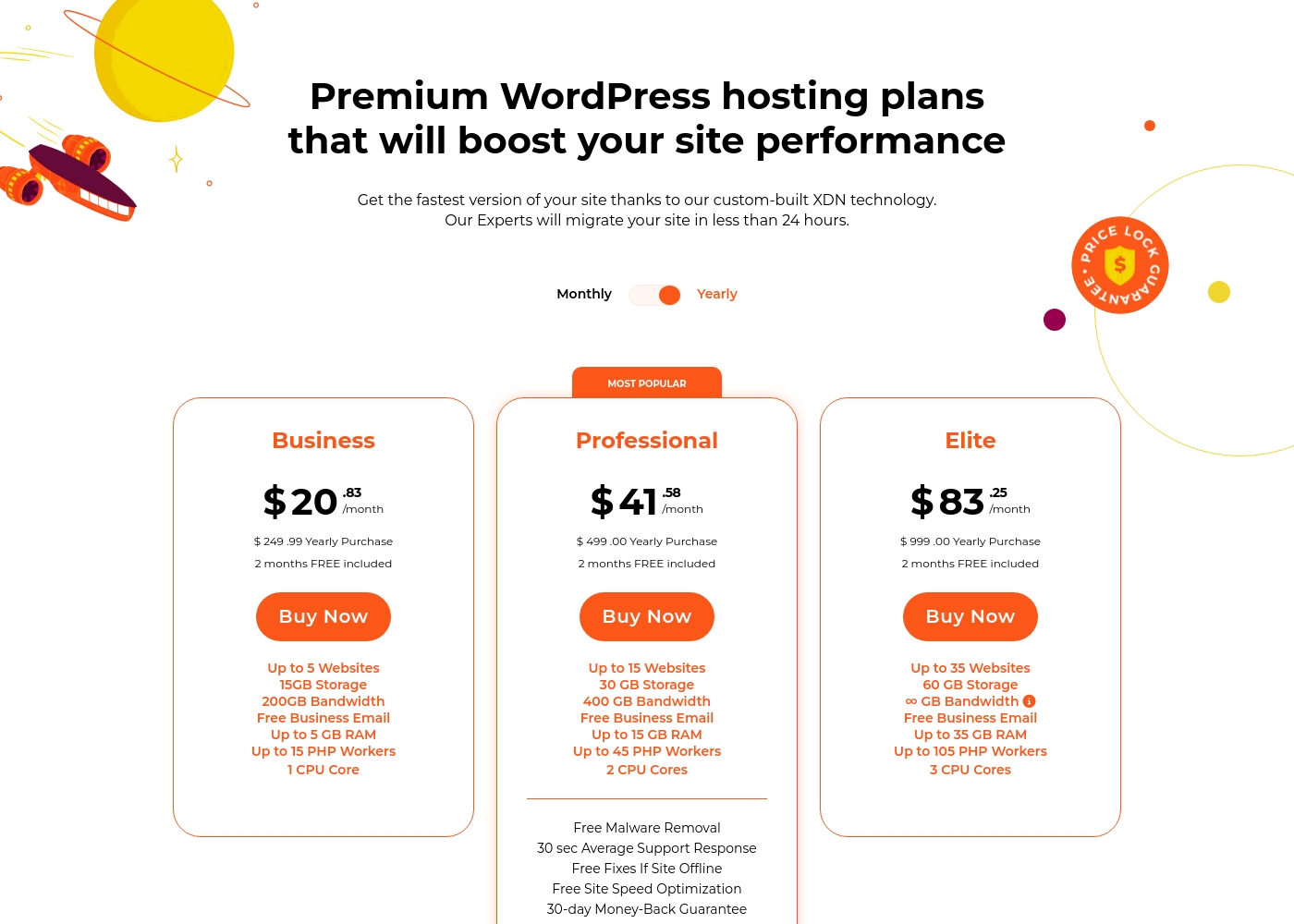
WPX costs between $20.83 and $83.25 per month with three plans: Business at $20.83, Professional at $41.58, and Elite at $83.25.
Let's look closely at what each premium WordPress hosting plan offers.
Business
Price: $20.83/month (annual purchase) Websites Supported: Up to 5 Other Features:
- 15GB Storage
- 200GB Bandwidth
- Up to 15 PHP Workers
- Free Business Email
- 1 CPU Core
- Up to 5 Websites
- 15GB Storage
- 200GB Bandwidth
- Free Business Email
- Up to 5 GB RAM
- Up to 15 Websites
- 30GB Storage
- 400GB Bandwidth
- Free Business Email
- Up to 15 GB RAM
- Up to 35 Websites
- 60 GB Storage
- Unlimited Bandwidth
- Free Business Email
- Up to 35 GB RAM
xCloud costs between $3 and $5 per server per month across 3 monthly plans for self-managed servers: BYOS 1-5 Servers at $5/server/month, BYOS 6-10 Servers at $4/server/month, and BYOS 11+ Servers at $3/server/month.
This pricing structure applies if you choose to 'Manage Your Own Server,' where you pay for access to the xCloud control panel based on server volume. All managed server plans include the ability to host unlimited websites.
BYOS 1-5 Servers
Price: $5/server/month Websites Supported: Unlimited Sites Best For: Small teams or individuals launching foundational projects. Other Features:
- Access to all features
- Deployment via xCloud automation
- Free server and site migration assistance
- 1 to 5 servers managed
- Unlimited Sites
- Access To All Features
- 6 to 10 servers managed
- Unlimited Sites
- Discounted pricing per server
- 11+ servers managed
- Unlimited Sites
- Highest volume discount
- One-time payment
- 1 Server included
- 10 Sites included
- No Credit Card Required

Pricing Notes
- WPX requires annual commitment for the stated effective low prices, saving users the cost of two months.
- xCloud's quoted range ($3–$5) applies only to the Bring Your Own Server (BYOS) management panel model.
- WPX offers a clear 30-day money-back guarantee, providing a risk-free start not advertised by xCloud.
- xCloud offers compelling Lifetime Access packages, whereas WPX plans are subscription-only.
Pricing Head-to-Head
User Reviews
WPX receives polarizing yet impactful feedback from Trustpilot reviewers, resulting in a 4.1-star public rating. Users consistently praise the level of customer support, often describing response times as instant—within seconds on live chat—with real human experts solving complex problems. Several long-term customers report zero downtime and describe the hosting speed as great, even 'ballistic fast.' The free CDN and committed back-end support are highly valued features, especially when handling user-caused errors.
However, not all experiences align. Some users reported significant performance issues, directly contradicting the positive claims. More critically, a handful of reviewers faced severe reliability issues, including being shut down for ‘high usage’ even on the Elite plan and subsequent refund refusal. Issues with initial security certificate setup and support errors (staff not reading tickets) also caused frustration 😟. For high-volume users enjoying the full commitment of the back-end teams, WPX delivers reliable, unmatched service, but those hitting resource limits face steep consequences.
This is a great company. I have been with WPX for a few years now and they provide excellent service any time of day or night. They are always reliable for my business needs.
Users consistently praise xCloud for offering an intuitive and responsive interface, marking a welcome change from complicated control panels like cPanel. The primary theme across reviews is exceptional performance, with many customers reporting significant speed boosts and improved site stability after migrating from other providers.
Support is repeatedly described as "Crazy Good" and "stellar," with staff being swift, helpful, and knowledgeable in resolving complex technical issues, often through live chat. Reviewers frequently mention that xCloud provides high value, being considerably cheaper than alternatives like Cloudways while offering better hardware and performance.
xCloud is much cheaper than similar services like CloudWays and offers better performance. Deploying a Vultr or Hetzner server is about half the price. Their support is excellent; they fixed my small problem immediately.
Our Verdict
Deciding between WPX and xCloud comes down to service philosophy: delegation or control. For most business owners who dread server management, WPX is the clearer winner. WPX gives you complete freedom from hosting headaches with exceptional speed and guaranteed expert support. You pay a premium price for that incredible peace of mind and fully managed service. WPX’s superpower is making hosting invisible yet completely reliable for busy entrepreneurs. It's ideally suited for users managing 5 to 35 critical sites needing zero downtime. The Professional plan guarantees a 30-second average support response time and includes free site fixes. If you value your time greatly, WPX handles necessary maintenance instantly. xCloud’s strength lies in ultimate technical flexibility and superior cost efficiency at scale. It allows agencies to manage unlimited sites across numerous external servers cheaply. You get full root access and advanced stack features like optimized Redis caching presets. xCloud transforms complex cloud server management into a simple, automated, and collaborative tool. The deciding factor is your technical comfort and scale. Choose WPX if you need high-touch management and experts to guarantee fixes immediately. Pick xCloud if you are a confident technical user or agency seeking deep control and massive savings at high volume. If you run a small to mid-sized e-commerce business, WPX guarantees reliable speed and fixes your malware. If you are a large agency managing 11+ servers, xCloud’s $3/server pricing makes it the dominant choice for efficient scaling.
Frequently Asked Questions
Which is better for agencies managing multiple client sites: WPX or xCloud?
xCloud offers superior agency tools, including Exclusive Team Management and White Label options. While WPX handles up to 35 sites, xCloud’s BYOS model is far cheaper for managing lots of client servers. xCloud is clearly the stronger agency scaling choice.
Does WPX offer the same level of server control as xCloud?
No, they have opposing philosophies. WPX is strictly a fully managed host, restricting user access for system optimization and security. xCloud provides advanced users and developers full root access to their underlying cloud server.
Is xCloud cheaper than WPX for basic hosting needs?
WPX is all-inclusive, starting at $20.83/month for 5 sites and expert support. xCloud management fees start at $5/server (plus external server rental costs). For high volume (11+ servers), xCloud drops to $3/server, making it vastly cheaper than WPX.
Does WPX include built-in performance features, like the advanced caching found in xCloud?
WPX provides complementary speed optimizations and a custom XDN network for performance speed. xCloud specifically integrates Redis caching with optimized presets for complex WordPress installs like WooCommerce. xCloud offers deeper optimization controls here.
Which software provides a risk-free trial or guarantee for new users?
WPX offers a clear 30-day money-back guarantee explicitly on their popular Professional hosting plan. xCloud does not advertise any free trial or standard money-back guarantee option on their self-managed plans.
Does WPX or xCloud provide automated free malware removal and fixes?
WPX includes guaranteed Free Malware Removal and proactive clean-ups on its Professional plan. xCloud provides proactive security monitoring but does not explicitly offer free removal or guaranteed fixes post-incident.
Ready to Choose?
Both tools have their strengths. Choose based on your specific needs.