Umobix vs Xnspy
Umobix and Xnspy both provide deep mobile monitoring for parental oversight. Umobix focuses on speed, broad features, and detailed remote control options. Xnspy appeals heavily to budget users but requires a trickier installation process.
Best for: Parents prioritizing immediate boundary control (app/Wi-Fi blocking), Users requiring maximum social media app visibility (41+ platforms)
Best for: Budget-conscious users needing reliable core features ($4.99/mo annual), Users who need geo-fencing for instant location-based safety alerts
Powerful monitoring, excellent user support.
We find that uMobix offers powerful and highly detailed monitoring capabilities, which users praise for providing considerable oversight, particularly regarding location tracking and social media activity. Overall, while the core functionality and supporting team are excellent, prospective users must proceed with caution regarding the reported persistent issues with billing transparency and unexpected charges.
Pros
- Comprehensive tracking system supports 41 popular apps, calls, and messages.
- Highly responsive and helpful customer support team assists with difficult installations.
- Accurate and reliable GPS location tracking and keylogging functions.
- Provides highly detailed tracking data often missing in competitor applications.
Cons
- Frequent, serious complaints regarding unauthorized charges and unexpected billing practices.
- Users often report difficulty canceling trials or subscriptions and securing refunds.
- Real-time data and updates can sync slowly, especially during the initial setup phase.
- Some reports indicate the application can negatively impact the target device’s battery life or internet efficiency.
Effective Monitoring, Comprehensive Customer Support.
We find Xnspy delivers robust remote monitoring capabilities, offering comprehensive tracking of communications and social media for both Android and iPhone devices. While the setup can be tricky, the powerful 24/7 live customer support team earns significant praise for assisting users through installation hurdles. Overall, Xnspy provides strong feature value for its price, but users should be aware of potential data synchronization delays and the limiting partial refund policy.
Pros
- Runs discreetly in the background, minimizing detection.
- Comprehensive social media and communication monitoring features.
- Professional and quick 24/7 live customer support available.
- Effective for parental control and providing peace of mind.
Cons
- Reports of data synchronization delays, particularly on iPhone.
- Setup process is noted as tricky or difficult for average users.
- Strict 10-day partial refund policy is widely criticized.
- Compatibility limitations restrict features (e.g., GPS) on older Android phones.
AboutUmobix
uMobix is a powerful cell phone tracker designed for modern parents. It lets you manage and monitor everything happening on your child's smartphone or tablet. This comprehensive tool supports a wide range of devices, including all iPhones, iPads, and Android OS 4+. You can easily check if your specific model is compatible on the website. uMobix provides real-time access to crucial digital activities and communications. 💡
AboutXnspy
XNSPY is designed as an accessible monitoring solution. It helps you stay informed and provides necessary visibility. The platform works specifically with key mobile systems. You can easily explore compatibility for both Android and iPhone devices before committing. Get instant access to the Live Demo to see the system in action. ✅
Highlights
Feature Comparison
Features Overview
We highlight the main differences and pick a winner for each feature.
Remote Blocking Controls
Umobix provides instant boundary controls like blocking apps or Wi-Fi. Xnspy offers remote data protection features like wiping and locking.
Umobix provides extensive practical controls for immediate boundary setting. You can restrict specific apps or block the target device's Wi-Fi access remotely. These instant digital timeouts are crucial for quick parental intervention. Xnspy's remote features prioritize security and data protection. Premium Android users can remotely lock the phone or wipe all device data if it is lost. Umobix excels at enforcement tools; Xnspy is better for emergency data security actions. Umobix’s instant reaction capabilities give parents immediate peace of mind and faster action.
Social App Coverage Breadth
Umobix monitors 41 popular social platforms, offering superior breadth. Xnspy covers 10+ core apps extensively on the Premium tier.
Umobix actively provides visibility across 41 popular apps and social platforms. This offers comprehensive oversight for today's wide digital landscape. Xnspy covers key platforms like Facebook, Snapchat, and Instagram via its Premium plan. Coverage is excellent but limited to about 10+ major platforms. If tracking obscure or newly adopted apps is vital, Umobix provides significantly more depth. Umobix is the clear winner for maximum overall social media insight and robust visibility.
Location Tracking Alerts
Xnspy provides crucial geo-fencing alerts for proactive safety. Umobix features accurate real-time location and visit history only.
Umobix keeps a detailed log of visited places and updates the location in real-time. It is highly accurate for simply tracking current whereabouts. Xnspy Premium provides critical geo-fencing functionality for instant, proactive alerts. You are notified the moment the device leaves a designated safe zone on the map. This alert system makes Xnspy far more responsive for monitoring safety constraints. If immediate notifications about location changes are your number one priority, Xnspy performs better here.
Setup Experience
Umobix users report quick, straightforward installation and remote handling. Xnspy is noted as technically tricky for the average user.
Umobix promises a quick setup process, often supported by simple remote instructions. Users find the process easy and generally straightforward to complete quickly. Xnspy’s setup process is frequently noted by users as being difficult or tricky upon initial installation. They often rely heavily on the 24/7 support team for assistance. Both Umobix and Xnspy users frequently report frustrating data synchronization delays post-setup. Umobix is the winner based on initial onboarding experience and reduced friction when getting started.
Keylogger Capability
Xnspy offers a clearly defined Keylogger feature focused on Android devices. Umobix includes keylogging but is less detailed on compatibility.
Xnspy clearly features a dedicated Keylogger that captures every keystroke made on Android phones. This provides deep insight into drafted texts or searched terms. Umobix also includes a keylogger feature in its toolkit. However, Umobix lacks explicit compatibility details or feature constraints in the documentation provided. This means you may need to confirm language support on Umobix manually. Xnspy offers a powerful, clearly articulated keylogger feature that captures digital intent effectively on target Androids.
Pricing and Value
Xnspy is significantly cheaper annually and transparently priced. Umobix pricing is highly promotional and lacks clear plan tiers.
Xnspy Basic starts at only $4.99 per month when billed annually, making it distinctly budget-friendly. Xnspy offers two clear tiers, Basic and Premium, with flexible monthly or annual billing. Umobix pricing appears competitive but lacks clear plan definitions or standard money-back guarantees in its provided data. The provided pricing data for Umobix starts vaguely at $1. Xnspy is the better overall value choice if you need core tracking features at the lowest annual cost with clear tiers.
Customer Support Quality
Both Umobix and Xnspy receive strong praise for their professional, responsive support teams. Support is a highlight of both tools.
Umobix customer service is consistently praised as prompt, professional, and effective at resolving issues. Users frequently mention specific agents by name who provided good help. Xnspy provides accessible 24/7 live chat support and earns high marks for helping users with complex installations. Both tools clearly invest heavily in support quality to address user issues. You can expect high-quality help regardless of whether you choose Umobix or Xnspy.
While the exact prices aren't currently displayed, Umobix is designed to be a comprehensive mobile monitoring solution featuring cross-platform compatibility. uMobix works seamlessly on all Android devices running OS 4+ and all iPhones and iPads. This broad compatibility ensures that most modern parental devices are supported immediately.
Comprehensive Monitoring Package (Details Not Stated)
Best For: Parents or guardians seeking absolute, real-time activity monitoring across a child's mobile device. Other Features:
- Access to all incoming and outgoing calls, messages, and deleted content.
- Keylogger functionality capturing keystrokes and passwords.
- Real-time and historic GPS location tracking features.
- Total monitoring capability for 41 popular apps and social media platforms.
- Remote control settings (e.g., blocking apps, Wi-Fi, or the device).
This package appears to provide truly extensive surveillance and control tools for monitoring modern Android and iOS devices. If you are prioritizing robust oversight across text communication, social media, and physical location tracking, this feature set is ideal for your needs. The advanced remote controls allow parents to actively manage the device environment, which often provides significant peace of mind. Key features like deleted message recovery and explicit handling of dating apps offer crucial capabilities for proactive parents.
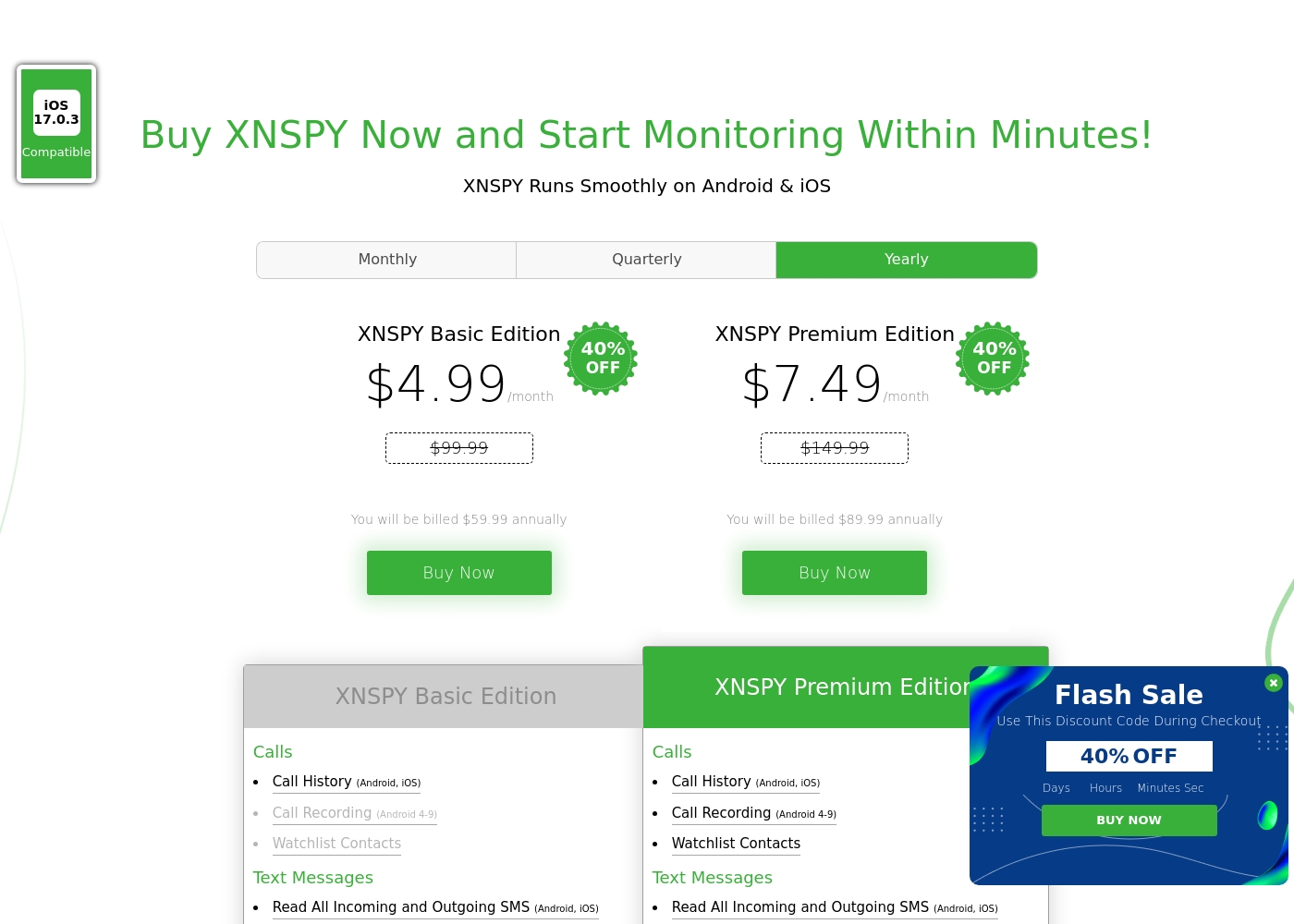
Xnspy costs between $4.99 and $7.49 per month (when billed annually) with 2 plans: XNSPY Basic Edition at $59.99 annually, and XNSPY Premium Edition at $89.99 annually.
These plans offer flexible billing options, including monthly, quarterly, and yearly subscriptions, allowing you to choose the commitment that works best for you.
XNSPY Basic Edition
Price: $59.99 billed annually (equivalent to $4.99/month) Best For: Users who need fundamental call, message, and location monitoring on a budget. Refund Policy: Partial refund within the first 10 days Other Features:
- View full call history and record calls (Android 4-9)
- Read all incoming and outgoing text messages
- Monitor WhatsApp chats and photos
- View internet browsing history and bookmarks
- Monitor keystrokes via Keylogger (Android)
- Call History & Recording (Android 4-9)
- Read All SMS & iMessages
- WhatsApp Chat & Photo Monitoring
- Real-Time Location Lookup
- Keylogger (Android)
- All Basic features included
- Monitor 10+ Social Media Apps (Facebook, Snapchat, Viber, etc.)
- Remotely Record Surroundings (Android)
- Remote Wipe Phone Data & Lock Phone (Android)
- Monitor Gmail App (Android)
Pricing Notes
- Xnspy offers clearly defined Basic ($4.99/mo) and Premium ($7.49/mo) tiers when billed annually.
- Umobix has opaque pricing; the starting price is listed as low as $1 but lacks clear plan details.
- Xnspy protects purchases with a strict 10-day partial refund policy instead of a free trial.
- Umobix provides no explicit information regarding a money-back guarantee or refund policy.
Pricing Head-to-Head
User Reviews
uMobix has a Trustpilot rating of 3.5/5, reflecting a balanced mix of strong praise and serious complaints from over 500 users. Reviewers frequently emphasize the app’s comprehensive monitoring capabilities, noting its reliability for accurate location tracking, accessing messages, and social media oversight. Many users say it provides essential peace of mind. Customer support receives consistently high marks, described as prompt, patient, and knowledgeable, with agents like Nicky Brown and Julia frequently mentioned for their helpfulness during installation and troubleshooting. 👍
However, the platform faces recurring issues related to billing and transparency, which impact overall user satisfaction. We noted significant complaints alleging unauthorized charges following low-cost trials, difficulty canceling subscriptions, and refusal to process refunds. While the core features are robust, some users report slow syncing or delayed real-time updates, particularly right after installation. Successful implementation depends heavily on careful setup and reliance on the praised technical support staff, but prospective customers must be wary of the potential financial friction.
This helped me gain clarity in my relationship. Info came in slow at first but after like a day it started syncing fine. The support team was super helpful when I had issues.
The general sentiment for Xnspy is mixed, reflected in its cumulative Trustpilot score of 3.3/5. Users commonly praise its core capabilities, noting that the app runs discreetly and is effective for monitoring calls, texts, location, and social media activity.
Many parents appreciate the peace of mind it offers, finding the system more straightforward than complex rival monitoring software. A major strength cited frequently across reviews is the responsiveness and professionalism of the 24/7 customer support team.
I’m not very tech-savvy, so I reached out to live support for help with the setup. They opened a support ticket and completed everything for me quickly. The team was professional and really helpful.
Our Verdict
Choosing between Umobix and Xnspy often comes down to control versus proactive alerting. Umobix earns slightly higher user ratings and offers a much easier setup process. If you want maximum surveillance breadth and seamless onboarding, Umobix is the smarter, less frustrating choice. Umobix's superpower is its immediate action and depth of monitoring. Umobix monitors an enormous 41 popular social apps from one single dashboard. You also gain unparalleled remote device control with Umobix, letting you block specific apps or cut Wi-Fi instantly. This real-time boundary enforcement makes Umobix perfect for setting digital ground rules. Xnspy’s greatest strength is its lower pricing and proactive safety features. Xnspy Basic starts at a very attractive $4.99 monthly when billed annually, significantly lowering the barrier to entry. Crucially, Xnspy Premium provides invaluable geo-fencing alerts, notifying you the second a device enters a restricted area. Xnspy also adds remote device wipe/lock for emergency Android security. The deciding factor is your monitoring emphasis. If you want broad visibility across dozens of apps and instant disciplinary tools, pick Umobix. If robust location alerts and low cost are necessities, then Xnspy is your clear winner, despite the trickier installation. Overall, Umobix is recommended for ease of use and superior feature breadth. Choose Xnspy if budget is tight and geo-fencing-based, proactive location alerts are critical for your monitoring needs.
Frequently Asked Questions
Which is better for comprehensive social media tracking: Umobix or Xnspy?
Umobix offers superior social media coverage, monitoring 41 different popular platforms. Xnspy Premium monitors 10+ social apps, which is extensive but significantly less coverage than Umobix. If maximum visibility is key, choose Umobix.
Is Umobix easier to install and set up than Xnspy?
Yes. User reviews indicate Umobix has a quick and easy setup process, often requiring one click. Xnspy is frequently reported as tricky and difficult for non-tech-savvy users during installation. Umobix offers a smoother start.
Does Xnspy offer geo-fencing location alerts like Umobix?
Xnspy Premium offers highly valuable geo-fencing alerts, which constantly monitor location boundaries. Umobix only provides real-time location lookup and history of visited places. For instant alerts when a boundary is crossed, Xnspy is better.
Which tool is cheaper annually, Umobix or Xnspy?
Xnspy is clearly cheaper and more transparently priced. Xnspy Basic costs an equivalent of $4.99 per month when billed annually. Umobix's pricing starts low but lacks clear plan details and reliable annual rates in its provided data.
Does Umobix provide remote data wiping capabilities like Xnspy?
No. Xnspy Premium offers remote features like locking or wiping the phone data for Android users. Umobix focuses on remote access to block websites or applications. If emergency security features are needed, Xnspy is the tool.
How do Umobix and Xnspy compare regarding customer support?
Both Umobix and Xnspy receive strong, positive user reviews for their professional support teams. Both tools offer highly responsive assistance regardless of technical complexity. Customer support is a strong component for both Umobix and Xnspy.
Ready to Choose?
Both tools have their strengths. Choose based on your specific needs.