ShippingEasy vs ShipStation
ShippingEasy and ShipStation spark debate among growing shops. ShippingEasy shines with low-volume plans; ShipStation excels at multi-store power. Here’s how to pick the right one.
Best for: Solo entrepreneurs or tiny teams shipping up to 25 orders/month, Low-volume retailers needing free access and USPS/UPS discounts
Best for: Multi-store sellers across many channels needing 180+ partners, High-volume shippers handling 15,000+ orders/day
Great Rates, Questionable Reliability.
We find ShippingEasy provides impressive carrier discounts and a generous free plan, making it financially attractive for small businesses. However, external feedback reveals critical deficiencies in support responsiveness and system reliability, which overshadow the platform's core benefits.
Pros
- Access to the industry's lowest USPS and heavily discounted UPS rates.
- The Starter plan is completely free for up to 25 shipments monthly.
- Powerful automation features consolidate orders from multiple stores quickly.
- Generous 30-day free trial allows risk-free testing of the paid tiers.
Cons
- Customer support is frequently reported as unresponsive across multiple channels.
- Some users experience technical flaws that lock them out of the account system.
- Reports cite difficulty obtaining credits or refunds for canceled labels.
- Users report unexpected charges from carrier adjustments (e.g., UPS).
Powerful Shipping Automation, Weak Customer Support.
We find ShipStation offers powerful automation and deep carrier discounts, streamlining logistics for handling high volumes efficiently. Overall, while the technical capacity and feature set are strong, prospective users must be aware that the platform is regularly criticized for slow, unhelpful customer support and opaque billing practices.
Pros
- Seamless integration with unlimited selling channels (Starter plan and up).
- Access industry-leading carrier discounts (up to 90% off FedEx rates).
- Automates repetitive tasks, allowing users to batch print up to 500 labels.
- Robust automation rules like rate shopping simplify workflow significantly.
Cons
- Customer support is consistently reported as slow, outsourced, and ineffective.
- Users report critical failures with the two-factor authentication (MFA) login process.
- Concerns regarding unexpected fees, pricing opacity, and sharp subscription increases.
- Filing claims or securing refunds for lost packages or billing adjustments is often difficult.
AboutShippingEasy
ShippingEasy provides a robust and easy-to-use platform specifically designed for merchants who sell products online. Whether you sell on your own website, through a marketplace, or in multiple places, this solution works for you. It automatically imports all your orders, putting everything in one centralized location so you can streamline your workflow.
Because the platform is built for ease—it's in the name!—you can ship faster and cheaper. This allows merchants like you to reclaim time and invest back into growing your business. Plus, ShippingEasy provides expert, unlimited support right from the start. ✅
AboutShipStation
ShipStation is a centralized logistics solution designed for businesses looking to streamline and scale their operations. It connects to over 400 existing integrations, linking your stores and providing access to more than 180 carrier partners. This single sign-on platform helps simplify your entire order fulfillment process. ShipStation actively manages everything from importing orders to tracking shipments. It is built to grow with you, supporting operations scaling to as many as 15,000 orders a day. ✅
Highlights
Feature Comparison
Features Overview
We highlight the main differences and pick a winner for each feature.
Ease of Use
Both aim for simplicity, but ShipStation leans on a streamlined UI and one-login workflow.
ShippingEasy presents an intuitive hub that centralizes orders from multiple sources. ShipStation emphasizes a clean, familiar interface with a single login for all stores. The trade-off is that ShipStation often feels quicker to adopt for multi-store setups. In real life, teams switch between tools smoothly when onboarding is strong.
Automation & Workflows
Automation starts right when orders arrive; both offer batch printing, but ShipStation packs more power.
ShippingEasy offers robust automation to streamline label creation and workflows. ShipStation starts automation the moment orders import and supports batch printing up to 500 labels. The trade-off is ShipStation’s longer onboarding in some cases, which can slow initial gains. Real-world impact: faster fulfillment at scale with ShipStation when you ship many orders daily.
Integrations
ShipStation wins on breadth, ShippingEasy wins on seamless channel centralization within its own ecosystem.
ShippingEasy centralizes orders from all your selling channels in one place. ShipStation connects to 180+ partners and 400+ integrations for imports, printing, and tracking. The key trade-off: ShipStation covers more partners; ShippingEasy excels at consolidating within its platform. Real-world: ShipStation handles diverse channels with ease, ShippingEasy tightens workflow across fewer sources.
Branding & Communication
Both offer branding, but ShipStation dives deeper into customer-facing touchpoints.
ShippingEasy lets you brand labels and use custom tracking experiences on paid plans. ShipStation offers branded emails, packing slips, tracking pages, and a branded returns portal. The trade-off: branding depth vs pricing and plan requirements. Real-world: ShipStation’s branding tools shine for merchants emphasizing customer perception.
Batch Printing & Multi-Package
ShipStation shines with bulk printing; ShippingEasy offers automation but fewer explicit batch claims.
ShipStation supports batch printing up to 500 labels and handles multi-package shipments. ShippingEasy emphasizes automation; explicit batch-print counts aren’t stated. Trade-off: ShipStation wins on batch capability; ShippingEasy wins on overall automation flow. Real-world: teams shipping hundreds of items weekly benefit more from ShipStation’s batch power.
Pricing & Value
ShippingEasy starts free and adds Growth at $19.99; ShipStation has many tiers including free.
ShippingEasy Starter is free up to 25 shipments; Growth starts at $19.99 for 26–200 shipments. ShipStation offers Free, Starter, Standard, and Premium with a 30-day free trial. The trade-off: ShippingEasy may be cheaper for low volumes; ShipStation shines with multi-store value at scale. Real-world: pick ShippingEasy if you’re budget-conscious; pick ShipStation if you scale multi-store operations.
Customer Support
Support quality is strong for ShippingEasy Growth; ShipStation support varies by region.
ShippingEasy advertises award-winning support on Growth. ShipStation’s support is noted as inconsistent in reviews. Trade-off: ShippingEasy offers more reliable help where needed; ShipStation can disappoint during peak times. Real-world: if you rely on quick help, ShippingEasy usually delivers better experience.
Onboarding & Migration
Both provide onboarding, but ShipStation’s onboarding quality varies by region.
ShippingEasy provides unlimited expert setup guidance. ShipStation offers onboarding solutions, but details aren’t explicit. Trade-off: ShippingEasy tends to have clearer onboarding expectations; ShipStation may vary by locale. Real-world: recent users benefit from structured setup with ShippingEasy.
Security & Reliability
Security varies; ShipStation has MFA concerns reported, ShippingEasy retains steady onboarding.
ShipStation has MFA/login security issues reported by some users. ShippingEasy emphasizes ongoing expert support to resolve setup problems. Trade-off: Security concerns exist for ShipStation; ShippingEasy tends to emphasize reliability given onboarding support. Real-world: for teams prioritizing login stability, ShippingEasy is favorable.
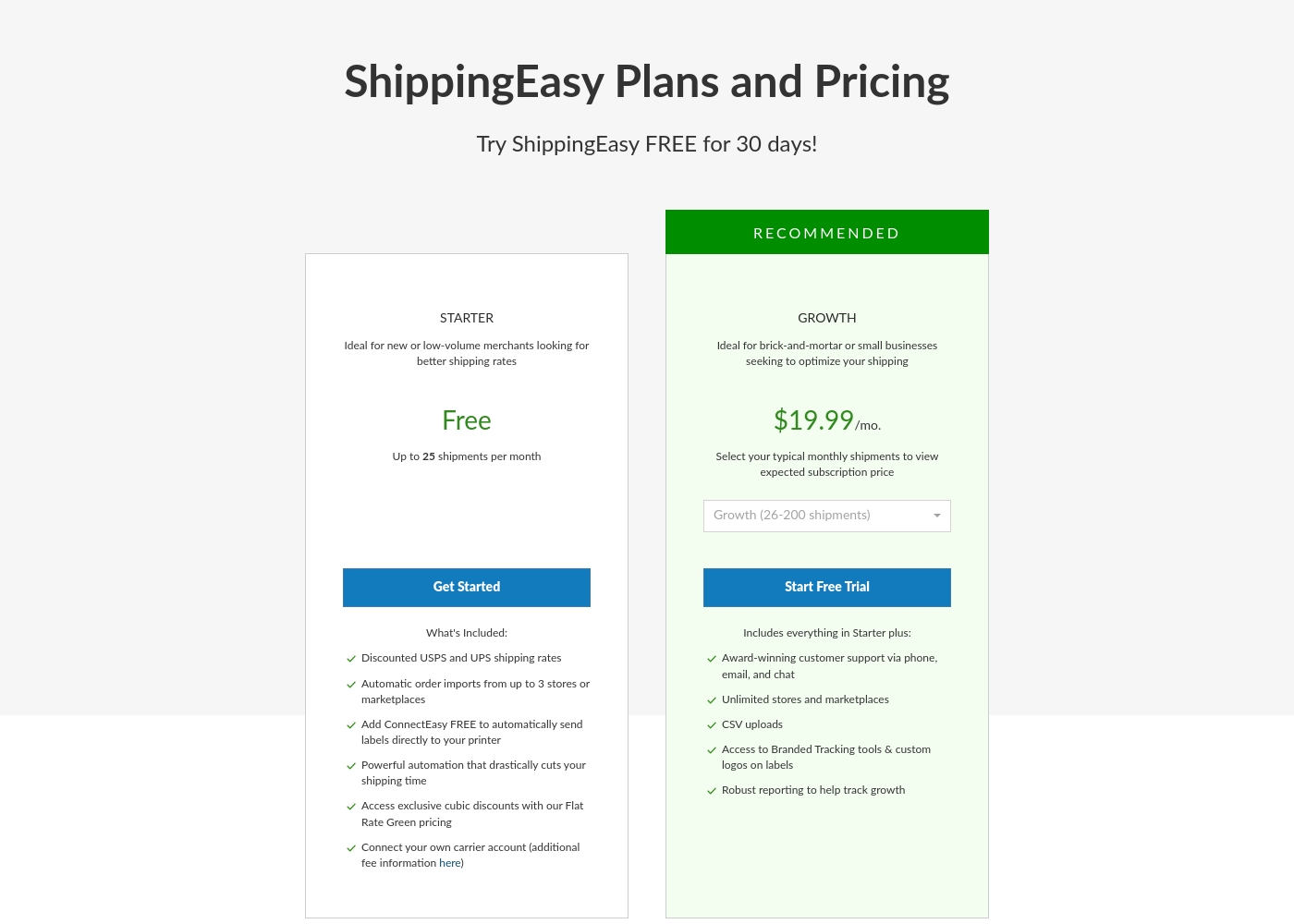
ShippingEasy costs between Free and $19.99 per month, with two plans visible: Starter at Free and Growth starting at $19.99.
Here is a closer look at the key features and limits for these initial plans. If you have higher shipment volumes, your price adjustment will depend on the expected subscription rate for your shipping bracket.
Starter
Price: Free Websites Supported: Up to 3 stores or marketplaces Best For: New or low-volume merchants looking for better shipping rates Other Features: * Discounted USPS and UPS shipping rates
- Automatic order imports from up to 3 stores
- Free ConnectEasy for automatic label printing
- Powerful shipping automation
- Access to exclusive cubic discounts (Flat Rate Green)
- Option to connect your own carrier account (additional fee applies)
- Discounted USPS and UPS shipping rates
- Automatic order imports from up to 3 stores or marketplaces
- Free ConnectEasy for automatic label printing
- Powerful shipping automation
- Access to exclusive cubic discounts (Flat Rate Green)
- All Starter features included
- Award-winning customer support (phone, email, chat)
- Unlimited stores and marketplaces integration
- CSV uploads
- Access to Branded Tracking tools & custom logos on labels
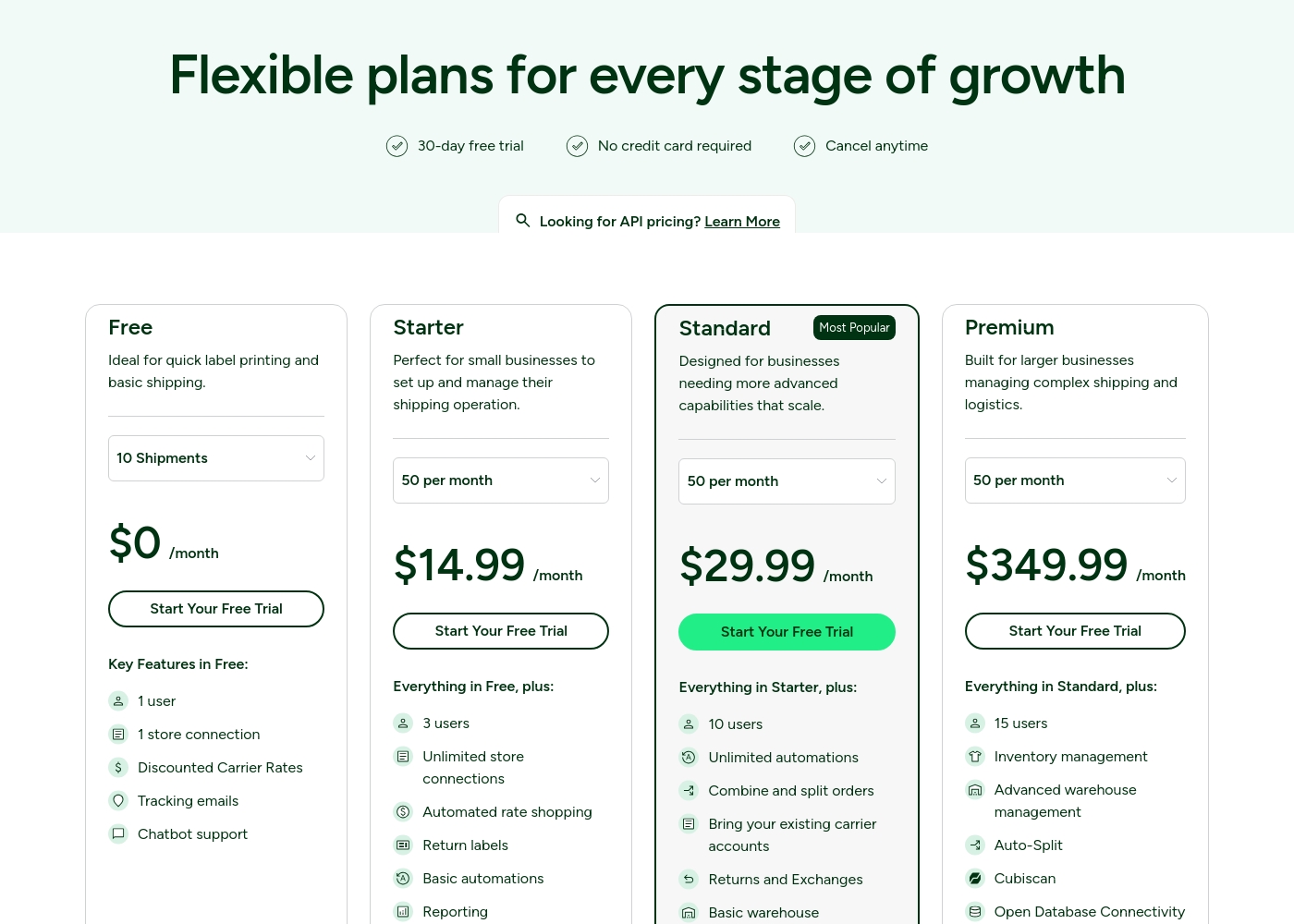
ShipStation costs between $0 and $349.99 per month with four plans: Free at $0/month, Starter at $14.99/month, Standard at $29.99/month, and Premium at $349.99/month.
Here's a look at the features included with each plan tier.
Free
Price: $0 per month Websites Supported: 1 Best For: Quick label printing and basic shipping. Refund Policy: Not applicable Other Features:
- 1 user
- Discounted Carrier Rates
- Tracking emails automatically sent
- Chatbot support included
- 1 user
- 1 store connection
- Discounted Carrier Rates
- Tracking emails
- Chatbot support
- 3 users
- Unlimited store connections
- Automated rate shopping
- Return labels
- Basic automations
- 10 users
- Unlimited automations
- Combine and split orders
- Bring your existing carrier accounts
- Returns and Exchanges
- 15 users
- Inventory management
- Advanced warehouse management
- Auto-Split
- Cubiscan
Pricing Notes
- ShippingEasy Starter is free up to 25 shipments; Growth begins at $19.99/month for 26–200 shipments.
- ShippingEasy may charge extra to connect a carrier account on the Starter plan.
- Growth plan includes unlimited stores; CSV uploads and branded tracking are included.
- ShippingEasy's refund policy isn’t clearly stated; contact for billing adjustments.
- ShipStation offers a Free plan and a 30-day free trial; plans range to high-end tiers.
- ShipStation pricing can be high for some users; onboarding quality varies by region.
- Carrier connection fees may apply on older ShipStation plans; postage and insurance cost extra.
- API pricing options exist on ShipStation; learn more on the pricing page.
Pricing Head-to-Head
User Reviews
ShippingEasy is highly praised for offering competitive shipping rates, including the lowest USPS rates and serious UPS discounts. However, external user sentiment is generally quite negative, focusing primarily on operational reliability and support.
Users frequently report terrible customer service; many complaints detail unresponsive phone support and ignored emails, sometimes numbering over ten, especially when attempting to resolve billing issues or secure refunds. Recurring technical flaws also create huge headaches.
I am now waiting one month for ShippingEasy to pay back $100. They simply won't answer my emails, even after I sent more than 10. Once you pay, it feels like they stop caring about your business.
ShipStation receives mixed yet clearly polarized feedback. Many users praise the platform for its efficiency, noting the seamless integration with various selling channels and the significant time saved when printing labels and managing high shipment volumes.
Customers frequently highlight the convenience of features, such as creating return labels and accessing competitive, discounted shipping rates. Positive experiences often mention excellent onboarding sessions led by helpful, specific representatives.
This was one of the best business decisions this year! Implementing ShipStation and shipping directly from our home office has been a total game-changer. It is an easy, seamless solution that saves us so much time.
Our Verdict
Bottom line: for most growing shops, it’s a close tie between ShippingEasy and ShipStation. ShippingEasy shines when you’re low-volume and want free access plus branding and onboarding support. ShipStation wins for multi-store setups, breadth of integrations, and batch printing power. The deciding factor is your volume and channel mix. If you ship 25 orders a month or fewer and value branding plus easy onboarding, ShippingEasy is a great fit. If you run multiple stores, rely on automation, and need batch printing at scale, ShipStation is the safer bet. Either way, start with a free plan or trial to test automations in your workflow.
Frequently Asked Questions
Which is better for small teams: ShippingEasy or ShipStation?
ShippingEasy offers a free Starter plan with up to 3 stores and 25 shipments. ShipStation provides a Free plan and a 30-day trial. For very small teams, ShippingEasy’s free tier is compelling; ShipStation still works well for multi-store needs.
Does ShippingEasy have features like ShipStation such as multi-store support?
ShippingEasy Growth supports unlimited stores and marketplaces. ShipStation also supports multi-store shipping with a single login. If you need broad multi-store support, ShipStation is strong; ShippingEasy scales with Growth.
Is ShipStation worth the extra cost over ShippingEasy?
ShippingEasy Growth starts at $19.99/month for 26–200 shipments. ShipStation pricing ranges from free to high tiers. If you need breadth and scale, ShipStation offers deeper multi-channel advantages.
Can I migrate from ShippingEasy to ShipStation easily?
Migration details aren’t explicitly stated. ShipStation offers onboarding options, but check current guides. If you rely on automated setups, confirm migration steps before moving.
Does ShippingEasy support CSV uploads and carrier connections?
ShippingEasy Growth includes CSV uploads. Connecting a carrier account on Starter may incur an extra fee. This helps with advanced workflows if you stay on Growth.
Does ShipStation support MFA and security features reliably?
ShipStation has MFA/login-related issues reported by some users. ShippingEasy emphasizes onboarding support to resolve setup problems. If security is critical, evaluate current MFA options for both.
Ready to Choose?
Both tools have their strengths. Choose based on your specific needs.