Mozello vs Webydo
Mozello and Webydo are website builders with completely opposite goals. Mozello is for rapid, beginner-friendly setup and multilingual sites. Webydo focuses on pixel-perfect precision for designers and agencies. Reliability is the key difference you need to know.
Best for: Solo entrepreneurs needing the lowest barrier to entry, Bloggers or individuals requiring fast, mobile-friendly sites
Best for: Design agencies requiring White Label branding and client CMS, Designers needing absolute pixel-perfect layout control
Simplistic builder, high risk of deletion.
We found Mozello to present an appealing, easy-to-use interface and attractive pricing, including lifetime free domain renewals. However, recurring external reports of sites being randomly deleted without professional explanation raise serious concerns regarding data integrity and platform reliability. Overall, we cannot recommend Mozello for professional or long-term projects due to the documented risk of unprompted data loss.
Pros
- Extremely easy to use (minimal learning curve)
- Strong free plan includes 0% e-commerce transaction fees
- Premium plans include free lifetime domain renewals
- AI tools available for content generation
Cons
- High risk of random site deletion without warning or explanation
- Reseller program allegedly failed to provide true white-label service
- Branding/links remain visible even after paying for removal
- Unsatisfactory communication regarding account termination
Professional features, questionable stability.
We observe that Webydo provides unique features such as white labeling and advanced CMS tools specifically built for professional agencies and designers. However, we cannot recommend a product where frequent platform glitches, extremely unreliable support, and aggressive billing practices are consistently reported by users. Overall, designers should exercise extreme caution before committing to this platform, especially for critical client projects.
Pros
- No-code, pixel-perfect design capabilities available.
- Includes client-facing CMS functionality for easy content updates.
- Professional features like White Labeling and custom branding for agencies.
- Centralized dashboard simplifies management of multiple client projects.
Cons
- Users report frequent platform glitches and operational unreliability.
- Customer support is consistently described as poor, slow, or non-existent.
- Reports of unexpected billing, charges, and sudden price hikes.
- Fees to export sites create a feeling of being 'captive' designers.
AboutMozello
Mozello is an incredibly easy-to-use website and online store builder. It is often described as being as easy as writing an e-mail. This platform is designed for entrepreneurs, bloggers, and small businesses that need a high-performing site without specialized help. Mozello handles all complex technical details, including domain registration and web hosting. You get all the essential features needed for a professional online presence.
Starting your project is stress-free; you can begin building immediately for free, and you never need to provide a credit card to try it. Whether you need a simple portfolio or a powerful store, you can achieve professional results in hours or days. 💡
AboutWebydo
Webydo is a powerful professional platform built specifically for designers and agencies. It empowers you to design and publish complex websites without dealing with underlying code. The platform's editor allows drag and drop functionality directly onto the design canvas. ✅
This platform automatically handles code generation. This gives you the professional features you need to create custom websites down to the last pixel. Over 246,000 designers and agencies are already using Webydo to grow their businesses.
Highlights
Feature Comparison
Features Overview
We highlight the main differences and pick a winner for each feature.
Target Audience
Mozello is for rapid, low-cost personal sites; Webydo is strictly for design professionals.
Mozello targets individuals, bloggers, and entrepreneurs seeking speed and ease. It is built for non-technical users who need quick deployment. Mozello handles built-in hosting and domain registration for worry-free launching. Webydo is engineered for professional designers and agencies focused on client scale. Its Agency plan supports 10 designer accounts and 100 client sites. Webydo users prioritize pixel-level precision for professional client work. The difference is DIY simplicity versus professional service delivery capability. Mozello is a personal tool; Webydo is a business management platform. If you build sites for paying clients often, Webydo offers crucial client tools that Mozello does not.
Ease of Use
Mozello offers easy setup for beginners; Webydo demands high design expertise for precision.
Mozello is designed for fast, no-code setup and automatically creates mobile-friendly pages. Users get clear guidance and supportive video tutorials for quick onboarding. The initial learning curve is gentle for beginners building simple sites quickly. Webydo uses a detailed Design Editor similar to complicated graphic design software. Though code-free, users report a slow learning curve that can be tricky for newcomers. It requires prior design expertise to use the precision tools effectively. Mozello favors speed and accessibility over granular control in the building process. Webydo offers control but has a much steeper ramp-up time for non-design professionals. If building your first site, Mozello will be much simpler to launch quickly without frustration.
Reliability & Stability
Mozello has some reliability reports; Webydo faces severe criticism for constant, crippling glitches.
Mozello faces user reports of random site deletions and removals due to inactivity or login issues. While these stability issues are concerning, they seem focused on inactive sites. Mozello users rely on included hosting and basic security features. Webydo reviews consistently report constant glitches and unprompted design changes on running sites. These technical failures undermine stability for agencies relying on the platform. The stability issues make using Webydo professionally extremely challenging. This is the critical trade-off: Mozello risks inactivity removal, but Webydo risks continuous platform failures. Mozello’s problems generally seem less catastrophic for active users. For any critical business, Mozello currently offers more user confidence than Webydo's long list of crippling technical flaws.
Advanced Design
Webydo allows powerful pixel precision; Mozello relies on quick, fixed responsive templates.
Mozello focuses on responsive design automatically using its simple, template-driven tools. Customization is geared towards quick content population, not intricate layout design. You cannot achieve pixel-perfect control over element placement. Webydo provides advanced design features via its Design Editor for high precision layouts. Designers manage unique layouts specifically for individual device breakpoints. This allows full control over exact appearance on every screen. Webydo lets professional designers translate exact visual mock-ups without compromising flexibility. Mozello sacrifices this control for its promised ease of use and speed. If you need highly customized layouts, Webydo is mandatory and even supports interactive 3D model integration.
eCommerce Fees
Mozello charges zero sales commission; Webydo requires a paid, per-site monthly add-on.
Mozello includes built-in online store features like shopping cart and payment processing. Crucially, Mozello explicitly states there are no sales commissions charged at all. The top plan supports unlimited products and variants. Webydo offers eCommerce via a separate per-site add-on plan for $15/month. This fee is required for store inventory and order management features. This additional fee applies on top of your main designer account subscription. Mozello integrates eCommerce transparently into its primary plans at no transactional cost. Webydo treats selling as a costly specialist feature. For straightforward selling, Mozello offers a simpler, cost-effective pathway compared to Webydo's add-on model.
Customer Support
Mozello offers responsive staff; Webydo's support is widely reported as slow and completely ineffective.
Mozello provides responsive staff, clear written guidance, and practical video tutorials for all users. Support is focused on helping beginners launch their sites successfully. Users report friendly and timely assistance. Webydo users consistently report customer support that takes over 24 hours to provide a response. Reviewers state that support rarely solves the core technical issues when they do respond. The help desk is clearly insufficient for platform instability. This difference is immense: Mozello helps users stay on track while Webydo leaves users frustrated and stranded. Users feel abandoned by Webydo during platform crises. For timely assistance and platform stability, Mozello provides a far superior support reputation despite its lower complexity.
Agency Tools
Webydo is specifically designed for agencies with white-label features; Mozello is not.
Mozello is geared toward the individual user and lacks features for managing multiple clients or workflows. There are no client billing tools or Central Dashboard features built-in. Mozello is solely a DIY creation tool. Webydo’s Team and Agency plans include essential features like White Label CMS and Branding. It provides Client Billing tools to streamline the financial workflow. The Central Dashboard organizes all client sites effectively. Webydo allows design firms to maintain a professional, unified brand throughout the client process. Mozello has absolutely no equivalent specialized professional tools. If your livelihood involves delivering polished, branded websites to clients, Webydo offers indispensable managed services tools.
Pricing Structure
Mozello uses clear tiers; Webydo uses complex account plans plus mandatory per-site fees.
Mozello uses straightforward pricing, scaling from a $0 Free plan up to $19/month for Premium Plus. Costs are predictable and mainly based on storage and product capacity limits. There are no hidden per-site fees. Webydo requires a designer account subscription, plus an additional recurring fee per published site. General sites cost $9/month; Online Stores cost $15/month extra. This structure rapidly increases costs. Users report that Webydo also charges high fees to export sites, locking users in once invested. Mozello provides a much clearer, simpler value proposition. Mozello provides predictable monthly costs without the risk of arbitrary price hikes or excessive export charges.
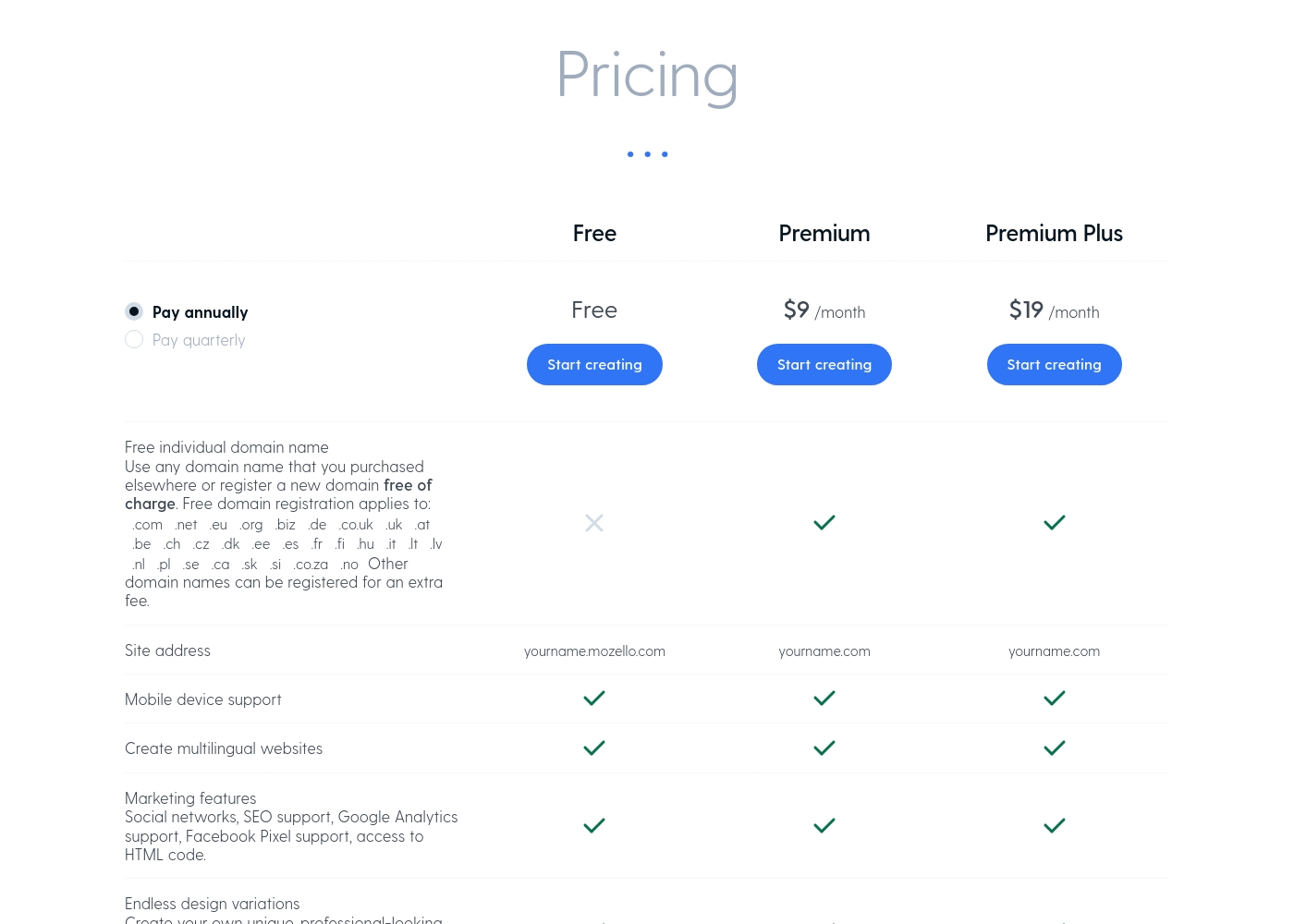
Mozello costs between $9 and $24 per month with three plans: Free (at $0), Premium (at $9/month billed annually), and Premium Plus (at $19/month billed annually). The platform makes pricing straightforward. You choose between three levels that fit your project scope. These plans scale features based on your storage and e-commerce needs. Let's explore what each plan offers you.
Free
Price: Free Best For: Individuals and beginners getting started with a basic web presence. Other Features:
- 0.5 GB of storage space.
- Mobile device support and multilingual websites.
- Basic online store for up to 5 products.
- Marketing tools including SEO support and HTML code access.
The Free plan is the best way to test out Mozello's simple website builder. You can publish a functional website immediately and start selling a small number of items. It's a fantastic choice for small personal projects or tiny shops just starting out. You'll need to use the Mozello subdomain for this plan.
- 0.5 GB storage space
- Mobile device support
- Create multilingual websites
- Online store (5 products, 1 option, 5 variants)
- 0% transaction fee
- Free individual domain name and renewals
- 50 GB storage space
- Remove Mozello branding
- Online store (15 products, 1 option, 20 variants)
- 0% transaction fee
- Free individual domain name and renewals
- Unlimited storage space
- Remove Mozello branding
- Online store for unlimited items (3 options, Unlimited variants)
- 0% transaction fee
Webydo offers subscription packages focusing on Designer Accounts, starting with a general site plan at $12 per month (billed annually).
Selecting the right Webydo plan depends on the number of sites you manage and the scope of features required for your agency or freelance business. All plans fully include hosting and the Content Management System (CMS) for your use and for your clients.
General Site Pricing
Price: $15/month or $12/month (billed annually) Websites Supported: 1 Best For: Individuals building and hosting one site effortlessly Other Features: Included hosting and CMS
- Ideal for individuals
- Build and host one site effortlessly
- Included hosting and CMS
- 1 Designer Account
- Free hosting & CMS included
- Email Support
- 1 Designer Account
- Chat & Email Support
- Client Billing
- Free hosting & CMS included
- 3 Designer Accounts
- Full Onboarding & Setup
- Client Billing
- White Label CMS & Branding
- Add Code to Site

Pricing Notes
- Mozello offers a permanent Free plan; Webydo requires users to start with a 14-day free trial requiring a credit card.
- Mozello's pricing is straightforward, tiered by limits; Webydo's payment involves a designer account fee plus separate monthly per-site charges.
- Webydo users report unexpected charges, arbitrary price hikes, and high export fees, suggesting vendor lock-in.
- Mozello explicitly states zero sales commission on any online store transactions.
- Webydo's Per-Site pricing covers hosting and CMS access, ranging from $7.50 to $15/month depending on store functionality and billing cycle.
Pricing Head-to-Head
User Reviews
User feedback on Mozello is extremely polarized. While some users praised the platform, noting that it is "really easy to make an website," the most serious complaints focus on critical reliability and business integrity issues.
Several paying and non-paying users reported that Mozello randomly deletes entire websites with no warning, explanation, or clear cause—sometimes citing ‘inactivity,’ even after significant effort was invested. Users view this data loss as genuinely risky, suggesting the fundamental infrastructure might not be stable.
It’s really easy to make an website here. The system is much better than platforms like Weebly. I highly recommend Mozello if you are looking for a simple, functional builder.
The public feedback available for Webydo is overwhelmingly negative, pointing to significant reliability and customer support issues. Users consistently describe the platform as glitchy and unstable; long-term users noted that it "makes changes on its own" and frequently "crashes a lot." The most consistent complaint concerns the extremely poor quality of customer service, described by multiple reviewers as "awful," "slow at best," and frequently non-existent.
Support response times often exceeded 24 hours without resolving the core problem. Furthermore, several reviews highlight major concerns regarding billing and platform lock-in.
Been using it for almost a decade, and it’s the worst web builder available. It glitches constantly and Webydo support is truly awful. I do not recommend this service at all; find an alternative.
Our Verdict
This comparison pits simple accessibility against advanced professional design tools. If you want a reliable, easy-to-manage site, Mozello is the clear winner for most individual users. Webydo is meant for high-end agencies, but buyer beware of critical issues. Mozello’s core superpower is speed and accessibility for sole entrepreneurs. It handles all the technical details, including hosting and domain setup, for worry-free launching. Mozello offers built-in multilingual features and transparent, inexpensive plans. Webydo tries to deliver pixel-perfect precision and advanced workflow tools for large agencies. Its Design Editor gives professionals granular control and per-breakpoint customization. Webydo is necessary if you need Central Dashboard management and white-label branding. The deciding factor is fundamental reliability and customer service quality. Mozello’s support is responsive, helping beginners through new setups easily. Webydo users report constant glitches, unprompted changes, and 24+ hour support waits. Webydo also faces severe vendor lock-in with huge export fees. Stick with Mozello if you prioritize stability, clarity, and cost-effectiveness. Mozello is the better choice for personal use or setting up a zero-commission store. Webydo's advanced design tools simply do not outweigh its debilitating technical instability issues.
Frequently Asked Questions
Which is better for small teams: Mozello or Webydo?
Mozello is much better for solo entrepreneurs and bloggers starting out quickly. Webydo's structure targets design businesses with advanced features. However, Webydo's severe reliability issues make it a terrible risk for any team. Use Mozello for simplicity and greater stability now.
Does Mozello support White Label branding like Webydo?
No, Mozello does not offer White Label branding or agency-specific tools whatsoever. Webydo explicitly offers full White Label features on its Team and Agency plans. Mozello focuses on simple individual site ownership.
Is Webydo worth the extra cost over Mozello?
Webydo offers pixel control and agency tools that Mozello lacks completely. However, Webydo users report serious concerns over unexpected charges and high export fees. Mozello offers much better overall value due to its transparent, lower pricing structure.
Which builder is better for creating multilingual websites?
Mozello is specifically known for its built-in multilingual website support feature. Multilingual options help you connect with diverse audiences easily. Webydo does not list inherent multilingual support in its core platform features.
How different are the core design workflows in Mozello and Webydo?
Mozello uses a simplified builder focused on getting responsive pages online immediately. Webydo uses a high-precision Design Editor for granular, absolute pixel control. Mozello prioritizes speed; Webydo prioritizes exact visual translation.
Is there a risk of vendor lock-in with Mozello or Webydo?
Webydo has severe vendor lock-in reported due to high fees charged for site export. Mozello does not have such export issues reported by users. Webydo effectively traps designers on its platform once sites are built.
Ready to Choose?
Both tools have their strengths. Choose based on your specific needs.