Mobicip vs Umobix
Mobicip and Umobix offer very different approaches to digital parenting control. Mobicip is the comprehensive family manager for consistent rules across many devices. Umobix provides intense, real-time mobile tracking focused on deep visibility. The core difference lies between managing access and deep surveillance data collection.
Best for: Large families managing 5 or more devices simultaneously, Parents needing consistent rules across phones, tablets, and home computers
Best for: Parents needing deep, detailed mobile surveillance and investigation, Situations where teens are actively hiding activity or deleting messages or calls
Comprehensive Features, Criticized Reliability.
We found Mobicip offers comprehensive, multi-platform features like robust screen time limits and social media monitoring at a competitive annual price. Overall, we are concerned by multiple reports indicating that controls are easily circumvented by tech-savvy children, which fundamentally undermines the security promise of the product.
Pros
- App blocking and time schedules work effectively for basic enforcement.
- Supports a wide range of platforms (iOS, Android, Windows, Chromebooks).
- Competitive annual pricing tiers based on family device count.
- Email customer support is rated highly and is helpful during initial setup.
Cons
- Controls are easily bypassed by children changing device time or disabling the VPN.
- Settings frequently get corrupted or unblocked following software updates.
- Administrative functions, like account cancellation, are not available in the web portal and require contacting support.
- Technical glitches can cause connectivity problems and significant battery drain.
Powerful monitoring, excellent user support.
We find that uMobix offers powerful and highly detailed monitoring capabilities, which users praise for providing considerable oversight, particularly regarding location tracking and social media activity. Overall, while the core functionality and supporting team are excellent, prospective users must proceed with caution regarding the reported persistent issues with billing transparency and unexpected charges.
Pros
- Comprehensive tracking system supports 41 popular apps, calls, and messages.
- Highly responsive and helpful customer support team assists with difficult installations.
- Accurate and reliable GPS location tracking and keylogging functions.
- Provides highly detailed tracking data often missing in competitor applications.
Cons
- Frequent, serious complaints regarding unauthorized charges and unexpected billing practices.
- Users often report difficulty canceling trials or subscriptions and securing refunds.
- Real-time data and updates can sync slowly, especially during the initial setup phase.
- Some reports indicate the application can negatively impact the target device’s battery life or internet efficiency.
AboutMobicip
Mobicip is a comprehensive Smart Parental Control App built specifically for the needs of busy families. It aims to simplify digital parenting by offering reliable protection across many different platforms. 💡
Unlike tools restricted to a single company, Mobicip bridges the gap by applying consistent settings across nearly any device. It protects your family on iOS, Android, macOS, Windows, Chromebook, and even Kindle. The app is simple to set up and keeps detailed track of everything your child does online.
AboutUmobix
uMobix is a powerful cell phone tracker designed for modern parents. It lets you manage and monitor everything happening on your child's smartphone or tablet. This comprehensive tool supports a wide range of devices, including all iPhones, iPads, and Android OS 4+. You can easily check if your specific model is compatible on the website. uMobix provides real-time access to crucial digital activities and communications. 💡
Highlights
Feature Comparison
Features Overview
We highlight the main differences and pick a winner for each feature.
Scope of Coverage
Mobicip covers all platforms; Umobix focuses only on mobile phones.
Mobicip applies consistent rules across phones and computers. Protection works on iOS, Android, Windows, and Mac seamlessly. This unified approach simplifies management significantly. Umobix monitoring is strictly focused on mobile devices. It works across Android OS 4+ and standard iOS devices. Umobix does not offer protection for home computers or laptops. Mobicip is superior for large families with mixed devices, simplifying enforcement. If your child uses a gaming PC, Umobix won't report their screen activity there.
Tracking Depth
Umobix is a deep spy tool; Mobicip is a usage manager.
Mobicip provides detailed activity reports and time usage summaries only. It monitors social media for harmful content keywords actively. Umobix tracking is extremely comprehensive on target phones and tablets. It includes a keylogger to capture every keystroke typed. Umobix also detects deleted calls and deleted messages successfully. For surveillance of older teens who hide activity, Umobix offers necessary investigative power.
Parenting Style
Mobicip encourages collaboration; Umobix enables stealth monitoring.
Mobicip includes a Child Dashboard for self-monitoring and engagement. It encourages kids to meet goals and rewards good habits effectively. The Guardians feature allows co-parenting collaboration easily. Umobix is inherently designed for high-level, hidden parental control. Its core function is to allow comprehensive, remote data collection. Umobix provides the highest level of direct intervention power. Mobicip aims to foster responsibility and trust in children. Umobix prioritizes full, hidden oversight when trust is broken.
Device Limits
Mobicip supports families of 20; Umobix licenses are per device.
Mobicip plans are structured specifically for multiple devices easily. The premium plan manages up to 20 devices affordably. Mobicip scales perfectly for large, multi-child families. Umobix's pricing structure implies a per-device licensing model. Monitoring costs likely increase significantly for many children. It lacks specific family device bundles or tiers. Mobicip is far more cost-effective for covering 5 or more devices quickly. A family needing 15 devices protected would find Mobicip much cheaper.
Location Services
Mobicip uses geofencing; Umobix provides better real-time history.
Mobicip's Family Locator provides live tracking instantly and reliably. Parents can set up custom geofences easily via the portal. Alerts trigger when children enter or leave key locations. Umobix specializes in highly accurate real-time GPS location updating. Umobix also keeps a detailed history of all visited places. It does not appear to offer geofencing capabilities yet. Mobicip offers proactive boundary alerts via geofences. Use Mobicip to ensure safety around school zones.
Reliability & Bypassing
Umobix is more stable; Mobicip is easily bypassed by savvy kids.
Mobicip users consistently report the controls are easily bypassed. Children disable the protective VPN or change the device time successfully. Setting corruption occurs often after software updates. Umobix users report generally reliable function after the initial setup. Performance issues are usually tied to slow data synchronization only. Umobix support is quick to resolve technical issues promptly. For a tech-savvy, determined child, Mobicip might prove completely ineffective. Umobix is harder to disable or circumvent intentionally.
Customer Support
Umobix receives more enthusiastic praise than Mobicip.
Mobicip email support is highly rated for initial setup help easily. They also offer the option to schedule a call if needed. Administrative tasks often require contacting Mobicip directly. Umobix customer service is described as prompt and professional extensively. Users often mention excellent support agents by name in positive reviews. They excel at helping with technical migration details effectively. Both have strong support responses from users. Umobix receives more specific, enthusiastic praise from its user base. If quick troubleshooting is critical, Umobix might be faster.
Pricing Model
Mobicip requires annual commitment; Umobix pricing is highly unclear.
Mobicip requires customers to commit to an annual payment upfront. Plans are device-tier specific (5, 10, or 20 devices). The monthly rate displayed is only possible with a yearly commitment. Umobix pricing starts very low but ranges up to $41 per plan. The exact model (monthly/annual/per-device) is opaque in public data. Plans cover a wide range of undisclosed features. Mobicip is transparent but requires an annual lock-in commitment. Umobix is flexible but lacks clear, tiered pricing information. Mobicip offers better long-term predictability for large multi-device families.
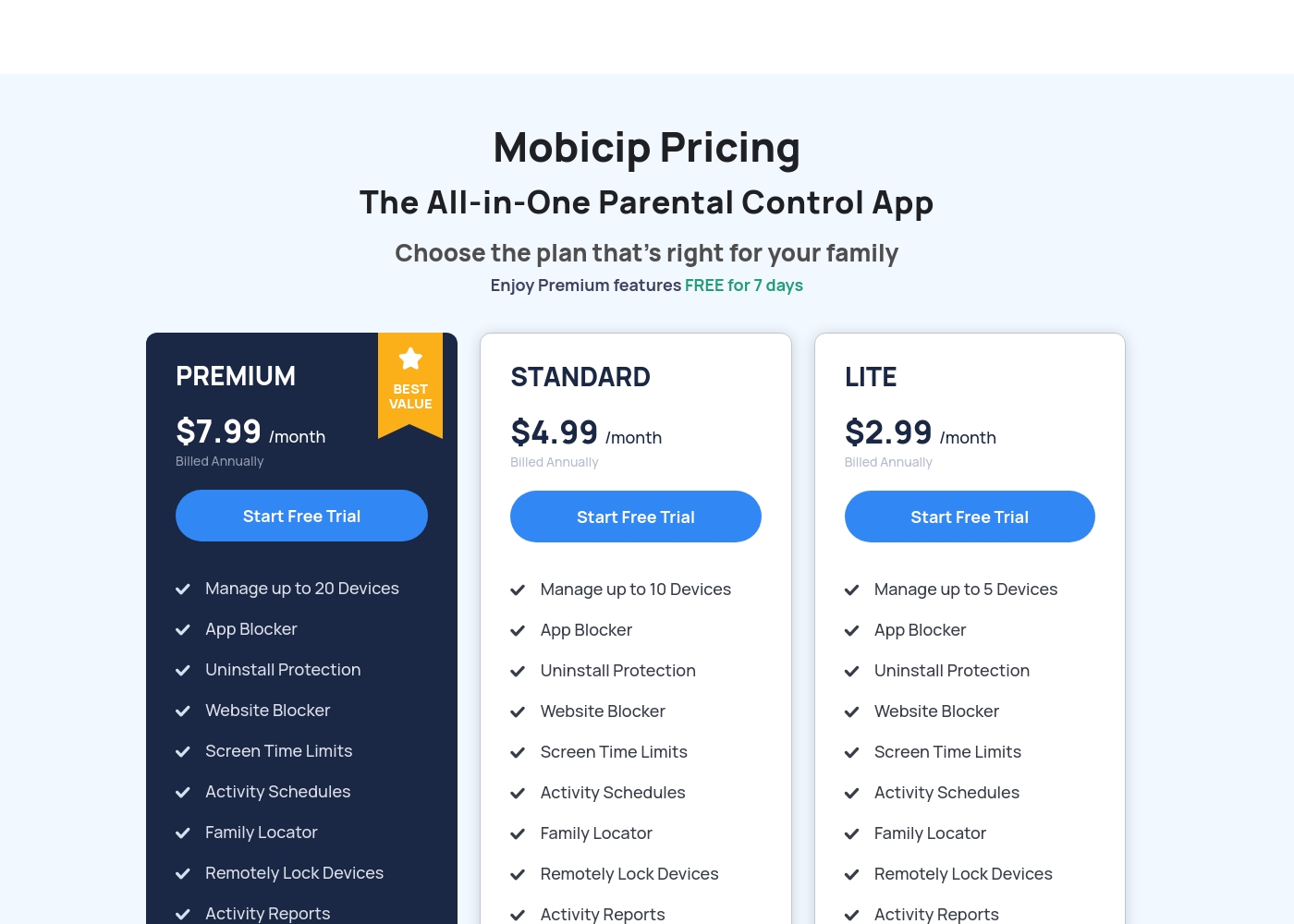
Mobicip costs between $2.99 and $7.99 per month (when billed annually) with three plans: LITE at $2.99/month, STANDARD at $4.99/month, and PREMIUM at $7.99/month.
You can easily choose the right plan for your family's needs below. All options include a 7-day free trial of Premium features.
LITE
Price: $2.99/month (Billed Annually) Best For: Families with 5 or fewer devices Other Features: Uninstall Protection, Website Blocker, Screen Time Limits, Activity Schedules, Activity Reports, Family Locator
- Manage up to 5 Devices
- App Blocker
- Uninstall Protection
- Website Blocker
- Screen Time Limits
- Manage up to 10 Devices
- App Blocker
- Uninstall Protection
- Website Blocker
- Screen Time Limits
- Manage up to 20 Devices
- App Blocker
- Uninstall Protection
- Website Blocker
- Screen Time Limits
While the exact prices aren't currently displayed, Umobix is designed to be a comprehensive mobile monitoring solution featuring cross-platform compatibility. uMobix works seamlessly on all Android devices running OS 4+ and all iPhones and iPads. This broad compatibility ensures that most modern parental devices are supported immediately.
Comprehensive Monitoring Package (Details Not Stated)
Best For: Parents or guardians seeking absolute, real-time activity monitoring across a child's mobile device. Other Features:
- Access to all incoming and outgoing calls, messages, and deleted content.
- Keylogger functionality capturing keystrokes and passwords.
- Real-time and historic GPS location tracking features.
- Total monitoring capability for 41 popular apps and social media platforms.
- Remote control settings (e.g., blocking apps, Wi-Fi, or the device).
This package appears to provide truly extensive surveillance and control tools for monitoring modern Android and iOS devices. If you are prioritizing robust oversight across text communication, social media, and physical location tracking, this feature set is ideal for your needs. The advanced remote controls allow parents to actively manage the device environment, which often provides significant peace of mind. Key features like deleted message recovery and explicit handling of dating apps offer crucial capabilities for proactive parents.
Pricing Notes
- Mobicip requires consumers to pay the full price annually, despite displaying a monthly rate.
- Mobicip offers predictable, tiered pricing based solely on the number of devices (5, 10, or 20).
- Umobix pricing lacks transparency regarding device limits, subscription length, and feature tiers.
- For families needing 5+ devices, Mobicip provides vastly superior and clearer long-term value.
Pricing Head-to-Head
User Reviews
Mobicip holds a "Great" 4.1-star rating on Trustpilot, though this score is based on a very limited number of reviews. Users generally appreciate the core functions like app blocking and setting screen time schedules, which successfully helps keep young children focused, and email customer service has been highly praised as "Excellent" during setup.
However, significant reliability concerns challenge Mobicip's effectiveness as a true parental control tool. Several parents report that the app is easily bypassed—teenagers can circumvent controls by changing phone time, disabling the VPN, or simply deleting the app to regain full access.
App blocking and screen time schedules work well, especially for keeping my children focused during class time. We successfully use it across both iPhones and Windows PCs. It is an effective tool for setting digital boundaries.
uMobix has a Trustpilot rating of 3.5/5, reflecting a balanced mix of strong praise and serious complaints from over 500 users. Reviewers frequently emphasize the app’s comprehensive monitoring capabilities, noting its reliability for accurate location tracking, accessing messages, and social media oversight. Many users say it provides essential peace of mind. Customer support receives consistently high marks, described as prompt, patient, and knowledgeable, with agents like Nicky Brown and Julia frequently mentioned for their helpfulness during installation and troubleshooting. 👍
However, the platform faces recurring issues related to billing and transparency, which impact overall user satisfaction. We noted significant complaints alleging unauthorized charges following low-cost trials, difficulty canceling subscriptions, and refusal to process refunds. While the core features are robust, some users report slow syncing or delayed real-time updates, particularly right after installation. Successful implementation depends heavily on careful setup and reliance on the praised technical support staff, but prospective customers must be wary of the potential financial friction.
This helped me gain clarity in my relationship. Info came in slow at first but after like a day it started syncing fine. The support team was super helpful when I had issues.
Our Verdict
The choice between Mobicip and Umobix is about control philosophy. Are you seeking partnership and structure, or deep, hidden surveillance? Mobicip is the collaborative family manager; Umobix is the investigative mobile spy tool. Both tools offer distinct features. Mobicip's superpower is consistent, broad, cross-platform coverage instantly. It handles iOS, Windows, Mac, and Android devices seamlessly. You can easily manage schedules and rules for up to 20 devices affordably. Mobicip also focuses on collaboration with its helpful Guardians feature for co-parents. Umobix excels at providing forensic-level mobile investigation details. It includes a keylogger to capture everything typed remotely on the phone. Umobix can even recover deleted messages and call logs effectively. Its comprehensive tracking of 41+ apps is unmatched by Mobicip. Here is the deciding factor for your purchase. If you absolutely need to cover computers and multiple devices, Mobicip is your only viable option. However, if your teen actively hides phone activity, Umobix provides critical investigative data. Choose Mobicip for predictable, structured access; choose Umobix for secret mobile detail.
Frequently Asked Questions
Which is better for scheduling screen time: Mobicip or Umobix?
Mobicip is vastly superior for enforcing digital boundaries with schedules. Mobicip allows you to set customized activity schedules for various times. Umobix offers remote blocking but lacks a sophisticated scheduler for routines.
Does Umobix offer keylogging like other spy apps?
Yes, Umobix features keylogging to capture every keystroke typed on the monitored device. This level of detail is not available whatsoever in Mobicip’s feature set. Umobix is built for forensic-level mobile surveillance.
Can Mobicip monitor Windows or Mac computers?
Yes, Mobicip provides consistent protection across a wide range of platforms. This includes iOS, Android, macOS, Windows, Chromebook, and Kindle devices. Umobix is strictly limited to monitoring mobile operating systems.
Is Mobicip cost effective for large families?
Mobicip is highly cost-effective, offering tiers for up to 10 or 20 managed devices. Umobix generally requires a separate, full subscription for each additional child or device. Mobicip saves money when monitoring 5+ devices efficiently.
Which app tracks deleted messages and calls for parents?
Umobix provides the function to detect and track deleted messages and calls effectively. Mobicip does not retain this highly detailed information in its reports. Use Umobix if you suspect hidden or deleted mobile communications.
Do I have to pay annually for Mobicip?
Yes, Mobicip requires customers to commit to an annual payment upfront. The attractive monthly prices shown are calculated based on this yearly commitment. Umobix appears to offer more flexible, non-annual payment options.
Ready to Choose?
Both tools have their strengths. Choose based on your specific needs.