Minvo vs Munch
Minvo and Munch are both AI video clipping tools generating short content from long videos. Minvo clearly shines in editing features, distribution, and price transparency. Munch uses superior AI to find contextual 'gold nuggets' and offers actionable marketing data. The deciding factor is whether you need editing power or data insights.
Advanced features marred by critical instability.
We found Minvo offers compelling features at competitive prices, including strong AI editing utilities and versatile content scheduling options. Overall, until core issues like severe bugs, slow rendering, and reported reliability problems are fully resolved, we cannot recommend it for critical or high-volume production schedules.
Pros
- Access to extensive AI tools (filler word removal, B-roll, 4K export, auto-framing).
- Cost-effective pricing starts low at $3.49/month (annual billing).
- Includes editing via text/transcript alongside traditional timeline controls.
- The interface is reported to be user-friendly and modern.
Cons
- Severe platform instability is reported, leading to bugs and lost edits.
- Exporting and rendering processes are often slow or fail entirely.
- Users report slow or unresponsive customer support.
- Controversial billing practices concerning free trials and denied refunds have been cited.
High potential, hampered by technical issues.
We recognize Munch's advanced AI capabilities for smart video repurposing and its excellent interface design. However, recurring performance issues, including poor clip accuracy and inconsistent reliability, hinder the intended workflow and time savings. Overall, we see a tool with strong potential but significant technical growing pains that require user patience and manual correction.
Pros
- Intuitive, highly functional, and easy-to-navigate interface.
- Effective tool for high-volume content repurposing and rapid ideation.
- Automatically generates keywords, captions, and trend insights.
- Customer service is highly responsive for specific billing/subscription issues.
Cons
- Clip generation is frequently inaccurate, lacking context or proper cutoffs.
- Significant reliability concerns reported, including website freezing and bugs.
- Exported video and sound quality are often reported as poor.
- Rendering times can be excessively long compared to competitors.
AboutMinvo
Minvo is an intuitive platform built for over 10,000 creators and businesses who need effective audience engagement. It handles the difficult parts of video editing using smart AI tools. Whether you’re cutting clips for TikTok or generating transcripts for LinkedIn, Minvo puts robust creation power right at your fingertips. 💡
It offers flexibility for every user. You choose how to edit: simply highlight text to cut content, just like editing a word document, or use the precision timeline editing meant for more advanced professionals.
AboutMunch
Munch is an advanced AI platform built to revolutionize content repurposing. It transforms your ready-made long-form content into engaging, stand-alone clips ✨. Instead of just randomly chopping up videos, Munch uses smart algorithms to identify the most engaging moments with context intact. For those needing a full marketing solution, Munch also offers Munch Studio. This new product plans, creates, and posts content for you, ensuring everything is always on-brand. Munch is ideal for Brands, Digital Marketers, Media Agencies, Social Media Managers, and Content Creators.
Highlights
Feature Comparison
Features Overview
We highlight the main differences and pick a winner for each feature.
Pricing Clarity
Minvo offers transparent pricing; Munch hides its cost.
Minvo clearly lists three tiers ranging from $3.49 to $19.99 monthly with annual billing. This means you know the total cost and limitations upfront. Minvo offers a significant 50% discount for paying yearly. Munch completely hides its pricing tiers on its public website. Users must sign up for a trial or contact the company to get specific cost details. The lack of transparency makes it hard to budget accurately for Munch. Minvo provides essential peace of mind with guaranteed predictable monthly expenses. Munch forces a trial commitment before revealing the actual investment required. If budgeting and transparent predictable costs matter for your business, Minvo is the only clear choice here.
Clip Selection Logic
Munch finds contextual 'gold nuggets'; Minvo focuses on rapid output.
Munch uses proprietary AI algorithms to identify highly engaging and contextual moments. Its goal is to extract coherent, stand-alone clips that make sense immediately. This approach is powerful for getting marketing-ready snippets. Minvo focuses on speed and gives you full control using text-based or timeline editing. You direct which clips are made, often relying on faster AI clipping and text cuts. Minvo ensures rapid production volume first and foremost. While Minvo offers more editing controls, Munch's unique strength is its AI understanding of context. However, Munch users report frustrating inaccuracies requiring heavy manual cleanup. Choose Munch if you prioritize highly-contextual automatic clipping, but expect to do some quality control.
Advanced Editing Tools
Minvo offers superior cleanup tools; Munch lacks specific refinements.
Minvo includes a comprehensive AI Editing suite in its higher plans (Pro and Pro+). This suite automatically removes silences and filler words like 'um's and 'ah's. Minvo enhances audio and can even insert B-roll or frame faces automatically. Munch generates the clip but does not include these advanced cleanup features. Users must handle background noise, awkward pauses, and filler words manually or use third-party tools. This adds unexpected time to the Munch workflow. Minvo aims to deliver truly 'pro-edited' moments in just a few clicks. Munch requires more post-extraction refinement to achieve a similar level of polish. For a fully refined export, Minvo saves you significant time in the editing room.
Social Distribution Integration
Minvo includes scheduling; Munch requires a separate product.
Minvo provides unlimited social scheduling directly within its platform across five major sites. You can manage unlimited brands and track analytics from one Minvo dashboard. This makes distribution seamless and efficient. Munch’s standard tool focuses only on clip extraction, not distribution scheduling. Automated posting and planning require the newer, supplementary product, Munch Studio. Minvo is a true all-in-one content powerhouse spanning creation and distribution. Munch requires integrating multiple tools or purchasing the Studio upgrade for posting. Minvo’s bundled scheduling feature offers better value and a cleaner workflow for publishing content.
Performance & Stability
Both tools suffer severe reliability issues and long rendering times.
Minvo users report severe platform instability, leading to bugs and lost edits regularly. Exporting and rendering in Minvo are often slow or fail entirely, frustrating high-volume users. This instability hinders Minvo’s promising features. Munch also faces significant reliability concerns, including website freezing and bugs. Users frequently mention excessively long rendering times, claiming it is slow compared to competitors. The core AI often needs extensive manual correction. Review scores for both Minvo (2.6/5.0) and Munch (2.8/5.0) reflect these widespread technical problems. Neither platform appears highly reliable right now. Expect some technical patience and manual review time, regardless of whether you choose Minvo or Munch.
Export Quality
Minvo guarantees 4K export; Munch users complain about quality issues.
Minvo offers 4K export capability starting with its Pro and Pro+ plans, ensuring high-definition video output. This is essential for professionals relying on pristine visual quality. Minvo prioritizes clean, high-resolution final results. Munch users frequently complain that the exported video and sound quality is poor. Some report low resolution, severely limiting professional use of the final clips. This suggests internal processing limitations within Munch. If you need guaranteed high-quality, professional video output for large screens or client use, Minvo is the safer option. Munch’s export issues are a major reported drawback. Minvo clearly excels in providing the necessary quality settings for professional content creators.
Team Use & Limits
Minvo dictates plan limits (max 3); Munch details are unknown.
Minvo clearly defines user seats, accommodating one, two, or three users based on the plan selected. This is perfect for small teams or solo creators wanting to share access. Minvo provides clear, though limited, scalability. Munch does not publicly address team user limits or collaboration features on its available pages. It is unclear how to scale Munch for multiple collaborators easily. This uncertainty makes planning difficult for growing teams. While Minvo’s three-user cap is restrictive for growing agencies, it provides a functional team environment. Munch offers no transparent team solution details. For any team requiring shared access, Minvo offers explicit (if low) guaranteed seating.
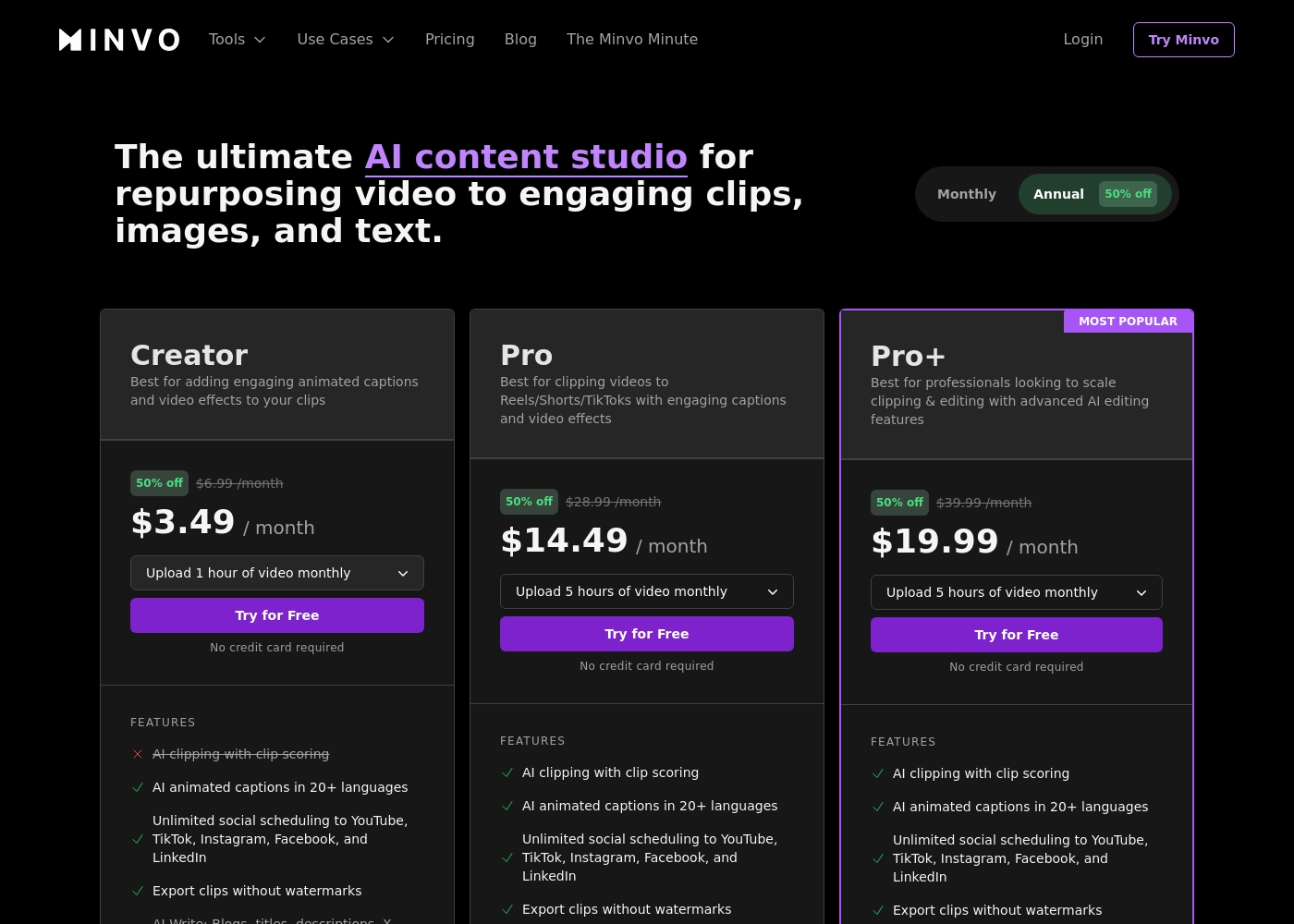
Minvo costs between $3.49 and $19.99 per month with three plans: Creator at $3.49/month, Pro at $14.49/month, and Pro+ at $19.99/month (all prices reflect the annual discount).
Let's look closely at what these video content plans offer.
Creator
Price: $3.49 / month (based on annual billing; standard monthly rate is $6.99) Websites Supported: Unlimited social scheduling to YouTube, TikTok, Instagram, Facebook, and LinkedIn Best For: Adding engaging animated captions and basic structuring to video clips Refund Policy: Not explicitly stated Other Features:
- Upload 1 hour of video monthly
- AI animated captions in 20+ languages
- Export clips without watermarks
- AI Write tools (Blogs, titles, descriptions, X posts)
- 1 user and 14 days of video storage
- Upload 1 hour of video monthly
- AI animated captions in 20+ languages
- Unlimited social scheduling
- Export clips without watermarks
- AI Write tools (Blogs, descriptions, X posts)
- Upload 5 hours of video monthly
- AI clipping with clip scoring
- Includes full AI Editing suite (Cut Silences, Filler Words, Face Framing)
- Export in 4K
- Unlimited AI image generation
- Upload 5 hours of video monthly
- Lightning 10x fast transcription
- Includes all Pro features
- Max upload length: 3 hours
- 3 users included
Munch costs between Not explicitly stated and Not explicitly stated per Not explicitly stated with 0 plans: Not explicitly stated.
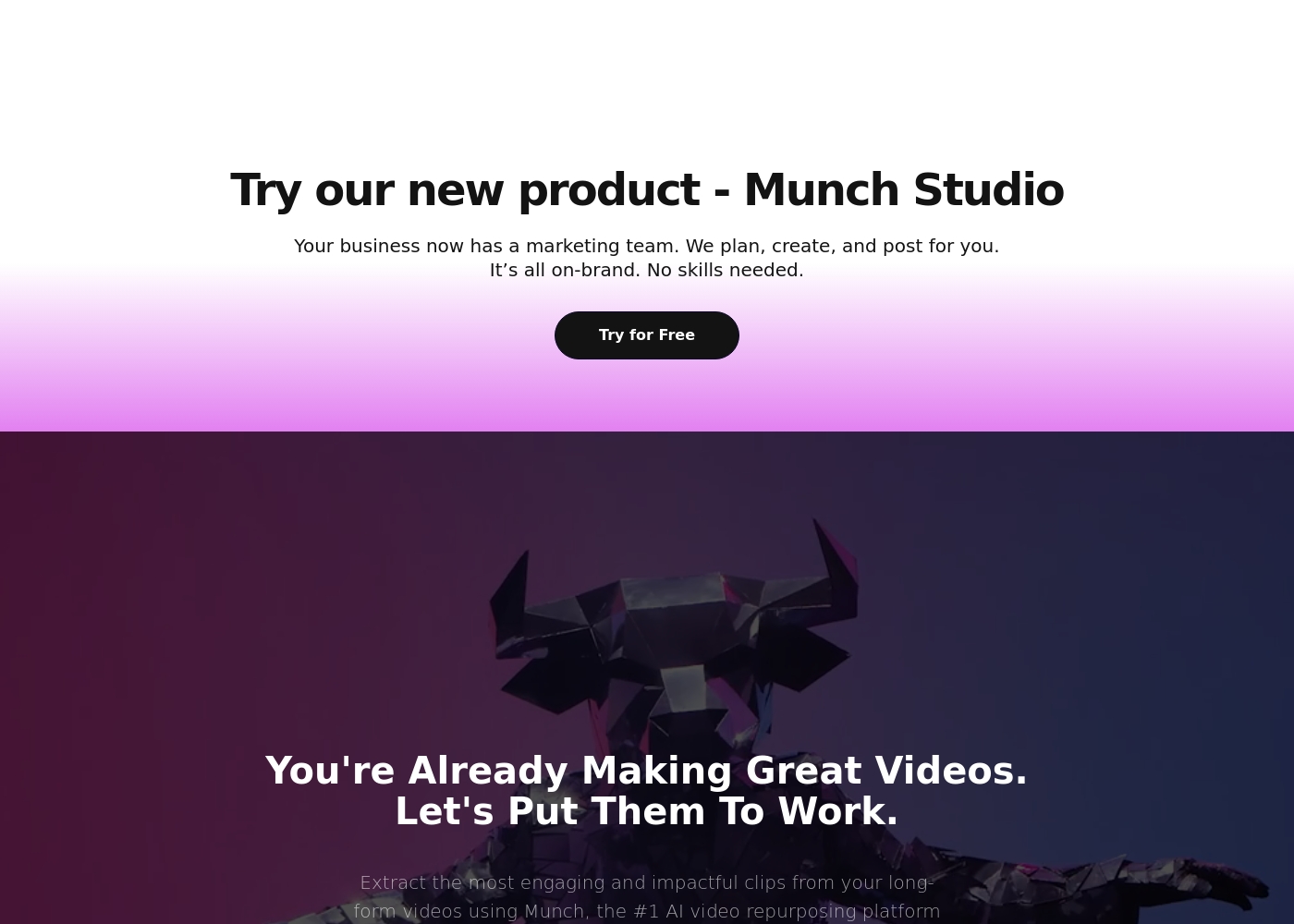
While the specific pricing tiers aren't visible right now, we can review what we know about the packages if they become available. Keep in mind that Munch uses advanced AI to distill the most engaging contextual clips from your long-form videos.
Since no specific plan details are currently displayed, we cannot list individual plan features, prices, or recommendations. If you are a content creator, digital marketer, or social media manager, Munch promises to simplify your workflow and keep you consistent across platforms by extracting effective clips automatically.
Pricing Notes
- Minvo publicly lists all three tier prices and plan limitations based on video hours and user seats.
- Minvo offers a substantial 50% discount for users who opt to pay annually instead of monthly.
- Munch does not publish any specific pricing tiers, costs, or subscription models publicly.
- To get pricing details for Munch, you must sign up for the 'Try for Free' option, which is a major transparency hurdle.
- The lack of public pricing in Munch makes budgeting and value comparison extremely challenging.
Pricing Head-to-Head
User Reviews
Minvo receives mixed but largely critical feedback on Trustpilot, resulting in a Poor 2.6/5.0 rating across nine reviews. Users appreciate Minvo’s core potential, praising its modern interface, user-friendly editing features like transcript and timeline tools, and a wide array of trending capabilities like AI smart cuts and content scheduling.
When it works, some users report that it truly streamlines their creative workflow. However, reliability is a major concern.
Minvo has been a magic tool for my content creation workflow. The user-friendly platform lets me create engaging, professional videos in just a few clicks. It saved me hours of manual editing.
Users have sharply contrasting experiences with Munch, resulting in a low overall Trustpilot rating of 2.8/5.0 💔. Positive feedback highlights the general ease of use and strong interface, noting its potential as a powerful ideation tool that generates usable content rapidly.
However, issues regarding accuracy and reliability are widespread. Many users report that the AI selects random clips, misses critical context, and features poor cutoffs, which makes the core technology frustrating.
The potential of Munch and the ease of use is why I upgraded immediately. This is a powerhouse app that quickly generates a ton of useful content. I'm excited to explore additional features and integrations.
Our Verdict
Choosing between Minvo and Munch depends entirely on your specific workflow needs and tolerance for technical bugs. It’s a choice between Minvo's editing power or Munch's contextual analysis. Minvo is the significantly better choice for most individual creators and small teams. Minvo offers an impressive suite of features, including 4K export and AI filler word removal. Crucially, Minvo is honest, listing its clear costs and plan limits upfront. Munch’s superpower is its core AI, which is designed to identify the most contextual, engaging clips available. Marketers appreciate Munch’s focus on providing actionable data insights on posting strategy. However, Munch's hidden pricing and quality complaints are major red flags. The deciding factor is feature depth versus specific AI focus. If you need powerful cleanup tools and included social scheduling, pick Minvo. If you value unique contextual extraction and data insights above all else, try Munch. Use Minvo if you plan to write 50+ articles monthly and need an integrated workflow. Choose Munch only if you accept the risks of hidden pricing for its advanced clip analysis capabilities.
Frequently Asked Questions
Which is cheaper: Minvo or Munch?
Minvo is cheaper and transparent, starting at $3.49/month with annual billing. Munch does not publish its prices publicly, making an objective cost comparison impossible. You must sign up for Munch to see its subscription costs.
Does Minvo have better editing features than Munch?
Yes, Minvo offers a vastly superior editing toolkit. Minvo provides text-based editing, a precision timeline, and advanced AI features like filler word removal. Munch focuses almost exclusively on automatic clip extraction.
Which tool is better for integrated social media scheduling?
Minvo is much better for social scheduling, including unlimited posting to five major platforms. Munch requires you to use its separate, external product, Munch Studio, for automated posting features.
Can I use either Minvo or Munch with a team?
Minvo explicitly supports team collaboration, offering up to three user seats on its top plan. Munch does not publicly list any multi-user or team collaboration options in its available data.
Why is Munch's pricing not publicly available, unlike Minvo?
Munch keeps its specific plan costs and limits non-public. This lack of transparency is highly unusual for software competitors like Minvo. You must likely sign up or contact their sales team for specific pricing.
Is Munch more reliable than Minvo for professionals?
No. Both Minvo (2.6/5.0) and Munch (2.8/5.0) have poor user reliability ratings. Users frequently report technical stability issues, bugs, and slow rendering with both Minvo and Munch.
Ready to Choose?
Both tools have their strengths. Choose based on your specific needs.