iKeyMonitor vs Mobicip
iKeyMonitor and Mobicip both promise digital safety, but their monitoring styles differ greatly. iKeyMonitor focuses on maximum surveillance, including keylogging and ambient audio recording. Mobicip emphasizes consistent rules across many different devices using AI filtering. Choose based on whether you need deep, forensic data or wide-ranging, unified enforcement.
Best for: Parents needing comprehensive, forensic data collection and review., Monitoring Android devices where keylogging is a primary requirement.
Best for: Large families needing to secure 10-20 devices cost-effectively., Households using mixed devices: phones, tablets, Chromebooks, and PCs.
Robust monitoring with variable reliability.
We find iKeyMonitor offers extensive monitoring tools, including unique features like remote camera activation and surrounding audio capture. The user experience is generally smooth, thanks to the very intuitive cloud dashboard. Overall, while the feature list is impressive, we note recurring user complaints regarding inconsistent log updates and occasional app detection, suggesting reliability can be inconsistent compared to the premium pricing.
Pros
- Extensive monitoring features, including specific keylogging across all apps.
- Intuitive and user-friendly eCloud control panel for easy navigation.
- Offers a permanently Free plan for basic tracking functions.
- Supports remote features like capturing photos and listening to surroundings.
Cons
- Potential for high cost given reported inconsistencies in log delivery.
- Key features like audio recording and GPS tracking can occasionally be unreliable.
- The application sometimes becomes detectable, alerting the target user.
- Customer support response times are reportedly long for complex issues.
Comprehensive Features, Criticized Reliability.
We found Mobicip offers comprehensive, multi-platform features like robust screen time limits and social media monitoring at a competitive annual price. Overall, we are concerned by multiple reports indicating that controls are easily circumvented by tech-savvy children, which fundamentally undermines the security promise of the product.
Pros
- App blocking and time schedules work effectively for basic enforcement.
- Supports a wide range of platforms (iOS, Android, Windows, Chromebooks).
- Competitive annual pricing tiers based on family device count.
- Email customer support is rated highly and is helpful during initial setup.
Cons
- Controls are easily bypassed by children changing device time or disabling the VPN.
- Settings frequently get corrupted or unblocked following software updates.
- Administrative functions, like account cancellation, are not available in the web portal and require contacting support.
- Technical glitches can cause connectivity problems and significant battery drain.
AboutiKeyMonitor
iKeyMonitor is known as the best parental control app available for Android, iPhone, and iPad devices. It offers an all-in-one solution for keeping your children safe online. This powerful app helps you monitor phone activities to fully understand what your child is doing. ✅ Over 400,000 parents in 100 countries rely on iKeyMonitor to discover the truth and protect their kids from potential online threats.
AboutMobicip
Mobicip is a comprehensive Smart Parental Control App built specifically for the needs of busy families. It aims to simplify digital parenting by offering reliable protection across many different platforms. 💡
Unlike tools restricted to a single company, Mobicip bridges the gap by applying consistent settings across nearly any device. It protects your family on iOS, Android, macOS, Windows, Chromebook, and even Kindle. The app is simple to set up and keeps detailed track of everything your child does online.
Highlights
Feature Comparison
Features Overview
We highlight the main differences and pick a winner for each feature.
Data Depth & Keylogging
iKeyMonitor captures every keystroke; Mobicip focuses on consistent filtering and blocking.
iKeyMonitor features a robust input logger that records keystrokes across any application. This provides the deepest, most comprehensive view of a child's digital life. iKeyMonitor also tracks deleted messages if they were deleted after app installation. Mobicip monitors conversations only on the top three social apps for harmful content detection. Mobicip does not feature a universal keylogger for all applications on the monitored device. The difference is depth of detail versus filtered alerts. iKeyMonitor gives you the raw data you need for forensic review. Mobicip simplifies the process by alerting you only when specific bad content is found. If you need exhaustive textual data, iKeyMonitor is the superior espionage tool.
Platform Consistency
Mobicip supports six operating systems; iKeyMonitor concentrates heavily on Android and iOS.
Mobicip bridges the gap by applying consistent rules across iOS, Android, Windows, Mac, Chromebook, and Kindle. This unified approach simplifies digital parenting greatly when using many devices. Mobicip ensures the same boundaries apply whether a child is on a tablet or a computer. iKeyMonitor is primarily focused on the mobile experience: Android and iOS (via jailbreak or iCloud extraction). While iKeyMonitor supports major mobile OS, it lacks the expansive reach of Mobicip for desktop platforms. Choose Mobicip if your kids frequently switch between phones and Chromebooks or Windows PCs.
Remote Monitoring Media
iKeyMonitor performs audio surveillance; Mobicip offers location tracking only.
iKeyMonitor includes highly invasive features like listening to the phone's surroundings in real-time. It can also remotely activate the camera to take photos or capture live screenshots of device activity. Mobicip provides essential location features like the Family Locator and geofencing alerts, which are standard safety tools. Mobicip does not offer any remote media capture, audio recording, or ambient listening capability. iKeyMonitor delivers full remote surveillance capability, going far beyond standard screen time enforcement.
Screen Time & Schedules
Mobicip uses self-regulation and goals; iKeyMonitor handles hard scheduled limits.
Mobicip offers robust scheduling tools plus a Child Dashboard for self-regulation and goal setting. This system aims to encourage healthier digital habit growth, not just limit usage. Mobicip allows for flexible weekly and daily screen time limits enforced consistently. iKeyMonitor allows parents to set healthy limits and block inappropriate apps by schedule easily. iKeyMonitor’s focus is strictly on parental control and imposition of limits, not on collaborative goal-setting features. Mobicip is better for parents who want to involve their kids in managing their own screen habits.
Pricing Structure
Mobicip costs less annually for multiple devices; iKeyMonitor allows monthly subscriptions.
Mobicip requires annual billing, but its rates are low, starting at $2.99/month for five devices. Mobicip’s top tier manages 20 devices for only $7.99/month, making it highly cost-effective for large families. iKeyMonitor offers monthly plans starting from $16.66/month for full features, which is significantly higher per month than Mobicip. iKeyMonitor also offers a specialized $10/device Self-hosted plan, but that requires a minimum 25-device commitment. If budgeting for multiple devices is key, Mobicip provides better per-device value via its annual commitment.
Reliability & Bypass
Both apps have reliability issues; iKeyMonitor suffers from logging issues, and Mobicip is easily bypassed.
iKeyMonitor users report recurring problems with technical consistency, like GPS logging failures and inconsistent surroundings recording. The iKeyMonitor app sometimes becomes detectable on the target device, ruining the monitoring setup. Mobicip faces serious bypass concerns, notably that the protective VPN can be easily switched off without notifying the parent. Mobicip also has issues with settings corrupting after software updates, forcing constant checking. Both tools carry a significant risk of functional failure or evasion, so neither is fully trustworthy yet.
Trial Availability
Mobicip offers a full-feature 7-day trial; iKeyMonitor provides only a limited free basic plan.
Mobicip provides a clear, 7-day free trial that unlocks every PREMIUM feature immediately for testing. This lets you thoroughly evaluate the platform’s performance ahead of any commitment. iKeyMonitor offers a permanent Free Basic plan, but it saves only the latest 20 log items. You must pay $9.99 for a brief 3-day access to all of iKeyMonitor's full features. For a true, comprehensive free test drive, Mobicip is the better option for families.
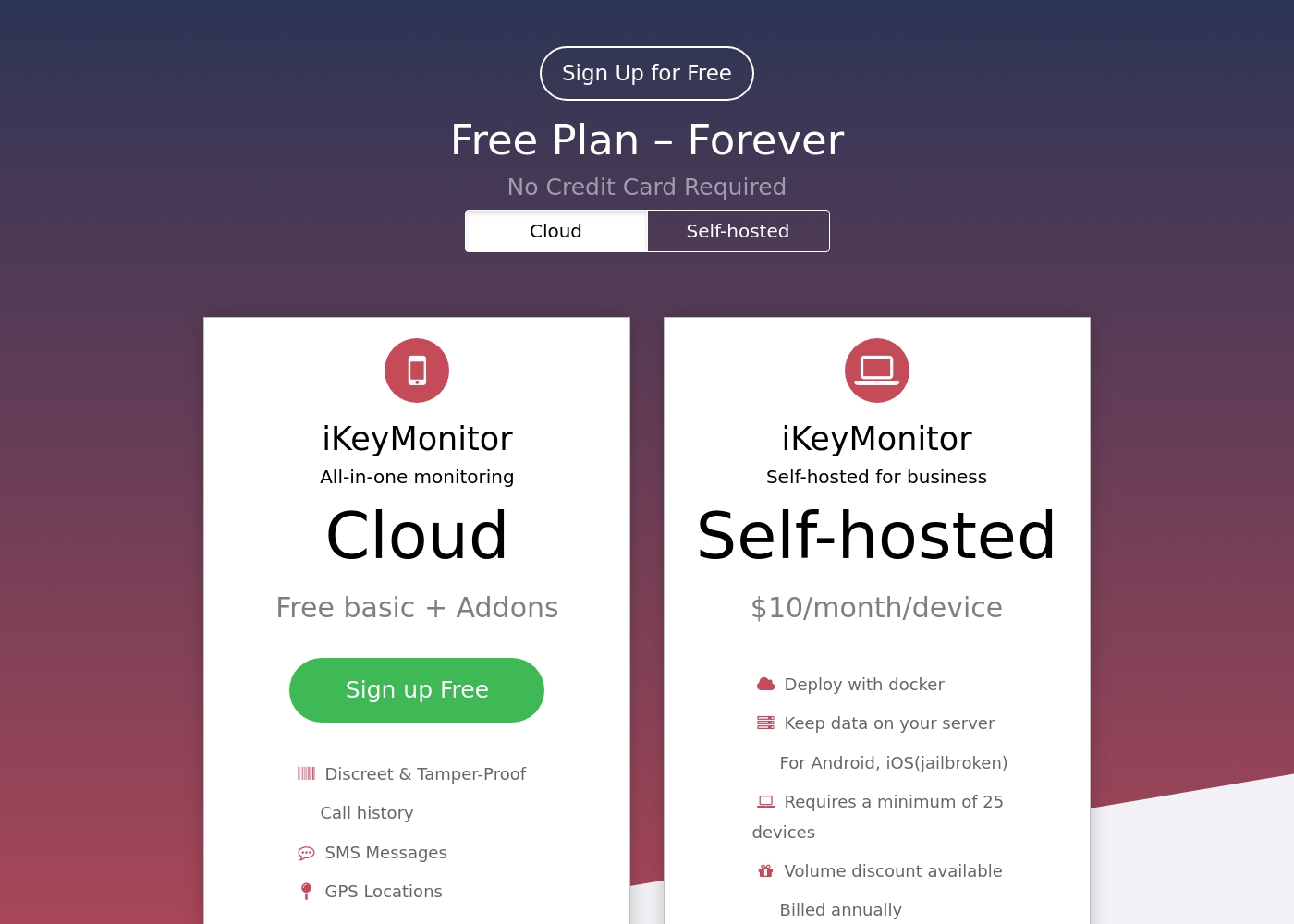
iKeyMonitor offers personalized monitoring solutions ranging from Free to around $16.66 per month for individual use, alongside a specialized Self-hosted Business Plan.
You have three ways to use the service, depending on your needs for features and data control. Review the options below to find the best fit for you.
Cloud Free Basic
Price: Free, Forever Best For: Basic family monitoring and testing the service Refund Policy: Not applicable (Free) Other Features:
- Discreet & Tamper-Proof protection
- Tracks Call history and SMS Messages
- Monitors GPS Locations and Geo-fencing
- Includes Contacts, Calendars, Notes, Reminders, and Voice Memos
- Call history
- SMS Messages
- GPS Locations
- Geo-fencing
- Contacts
- Input Logger
- Capture Screenshots
- SMS Messages
- Websites visited
- Social media monitoring (WhatsApp, Facebook, Skype, etc.)
- Deploy with docker
- Keep data on your server
- For Android, iOS(jailbroken)
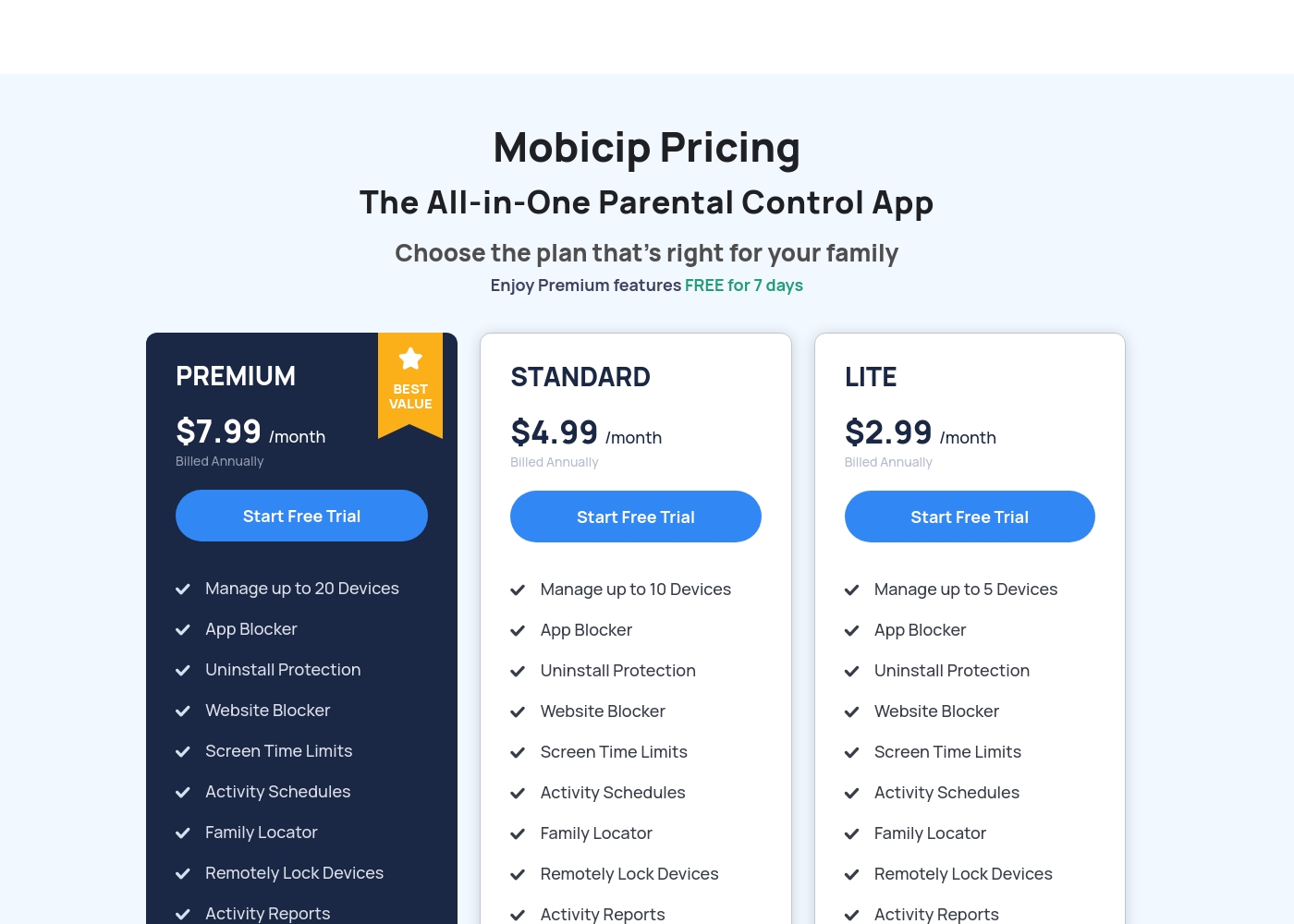
Mobicip costs between $2.99 and $7.99 per month (when billed annually) with three plans: LITE at $2.99/month, STANDARD at $4.99/month, and PREMIUM at $7.99/month.
You can easily choose the right plan for your family's needs below. All options include a 7-day free trial of Premium features.
LITE
Price: $2.99/month (Billed Annually) Best For: Families with 5 or fewer devices Other Features: Uninstall Protection, Website Blocker, Screen Time Limits, Activity Schedules, Activity Reports, Family Locator
- Manage up to 5 Devices
- App Blocker
- Uninstall Protection
- Website Blocker
- Screen Time Limits
- Manage up to 10 Devices
- App Blocker
- Uninstall Protection
- Website Blocker
- Screen Time Limits
- Manage up to 20 Devices
- App Blocker
- Uninstall Protection
- Website Blocker
- Screen Time Limits
Pricing Notes
- Mobicip requires annual billing for all plans despite advertising lower monthly rates.
- iKeyMonitor offers a permanent Free Basic tier, but it is severely limited to only the latest 20 activity logs.
- Mobicip’s pricing is tiered only by device count (5, 10, or 20), not by feature set.
- iKeyMonitor offers a specialized $10/device self-hosted business solution requiring a 25-device minimum commitment.
- iKeyMonitor charges $9.99 for a 3-day full access trial, while Mobicip provides a 7-day trial for free.
Pricing Head-to-Head
User Reviews
The external sentiment for iKeyMonitor is significantly mixed, leading to a moderate overall TrustScore of 3.8. Many parents describe the tool as a "life saver," praising its comprehensive feature set, including the powerful keylogger, accurate GPS tracking, and discreet operation.
Users frequently highlight the platform's intuitive and easy-to-use eCloud dashboard. 😌 However, technical reliability is a critical point of friction.
Ikeymonitor is by far the best monitoring app I’ve came across. I’ve tested quite a few competitors over time. The ecloud panel is super easy to navigate and you don’t sit there hitting ten different buttons trying to find the information you need.
Mobicip holds a "Great" 4.1-star rating on Trustpilot, though this score is based on a very limited number of reviews. Users generally appreciate the core functions like app blocking and setting screen time schedules, which successfully helps keep young children focused, and email customer service has been highly praised as "Excellent" during setup.
However, significant reliability concerns challenge Mobicip's effectiveness as a true parental control tool. Several parents report that the app is easily bypassed—teenagers can circumvent controls by changing phone time, disabling the VPN, or simply deleting the app to regain full access.
App blocking and screen time schedules work well, especially for keeping my children focused during class time. We successfully use it across both iPhones and Windows PCs. It is an effective tool for setting digital boundaries.
Our Verdict
The choice between iKeyMonitor and Mobicip distills into two distinct monitoring philosophies. Do you need deep, targeted surveillance, or broad, consistent enforcement? For most families managing multiple device types, Mobicip often presents a better starting point due to its expansive platform support. iKeyMonitor is the clear go-to for deep, invasive data collection and specialized surveillance tasks. Only iKeyMonitor offers cross-app keystroke logging and essential ambient audio recording capabilities. If you need absolute forensic detail on Android or specific remote media capture, iKeyMonitor delivers unique features Mobicip simply lacks. Mobicip, however, excels at broad, cost-effective consistency across nearly every gadget. If your family uses Windows, Macs, Chromebooks, and multiple phones, Mobicip applies the same boundary rules seamlessly. Mobicip is also significantly cheaper when monitoring 5+ devices annually at its low tiered rates. Be warned: reliability is a major concern for both iKeyMonitor and Mobicip based on user feedback. iKeyMonitor users report frustrating intermittent logging failures. Mobicip users report controls that are easily bypassed by tech-savvy children. Your deciding factor should be whether multi-OS coverage (Mobicip) or keystroke detection (iKeyMonitor) is the greater priority. Choose Mobicip if you manage 10+ mixed devices and prioritize scheduling and AI web filtering. Choose iKeyMonitor if your goal requires the absolute deepest level of digital surveillance and specialized remote audio features.
Frequently Asked Questions
Which software is cheaper for families with five or more devices?
Mobicip is significantly cheaper for multi-device households. Mobicip offers coverage for up to 20 devices for less than $8 per month, billed annually. iKeyMonitor’s full feature cloud plan starts at $16.66 monthly for a single user.
Can I monitor every keystroke typed, no matter the app?
Yes, iKeyMonitor offers a powerful input logger that records keystrokes across every app on the device. Mobicip focuses on monitoring conversations on specific social apps, not universal keystrokes. iKeyMonitor is the appropriate tool for deep forensic textual analysis.
Which tool provides the best coverage for Windows and Chromebooks?
Mobicip provides far superior platform coverage for desktop and varied devices. Mobicip works consistently across Chromebooks, Windows, macOS, and Kindle, alongside mobile devices. iKeyMonitor’s core focus and deep features are primarily limited to Android and iOS devices.
Does Mobicip or iKeyMonitor offer live ambient audio recording?
iKeyMonitor provides unique surveillance features, including the ability to record or listen to the sounds surrounding the monitored phone. Mobicip does not include any ambient audio recording or live media capture features. If audio surveillance is necessary, you must choose iKeyMonitor.
Which software is safer from being bypassed by tech-savvy teens?
Neither iKeyMonitor nor Mobicip can guarantee complete safety from detection or bypass. Mobicip users complain controls are easy to circumvent by disabling the VPN. iKeyMonitor struggles with being inconsistent or accidentally detected post-installation. Research user experiences carefully before relying on either tool for complete stealth.
Does iKeyMonitor offer a proper free trial like Mobicip?
No, iKeyMonitor does not offer a free, full-feature trial; its permanent Free Basic plan is too limited. Mobicip offers a superior 7-day free trial that grants complete, unrestricted access to all Premium features immediately. You can truly test Mobicip before paying.
Ready to Choose?
Both tools have their strengths. Choose based on your specific needs.