Hoverwatch vs Xnspy
Hoverwatch and Xnspy are both powerful remote spies, but they focus on different monitoring priorities. Hoverwatch handles multi-platform oversight and discreet family tracking. Xnspy delivers deeper, more aggressive surveillance features like keylogging and remote controls. The choice depends on coverage density versus the depth of required insight.
Best for: Families needing to monitor 3-5 devices (mobile/PC/Mac) affordably, Users who need desktop (Windows/Mac) activity tracking alongside mobile
Best for: Users requiring deep surveillance features like Keylogging and call recording, Parents or employers needing geo-fencing location alerts and watchlists
Pros
Cons
Effective Monitoring, Comprehensive Customer Support.
We find Xnspy delivers robust remote monitoring capabilities, offering comprehensive tracking of communications and social media for both Android and iPhone devices. While the setup can be tricky, the powerful 24/7 live customer support team earns significant praise for assisting users through installation hurdles. Overall, Xnspy provides strong feature value for its price, but users should be aware of potential data synchronization delays and the limiting partial refund policy.
Pros
- Runs discreetly in the background, minimizing detection.
- Comprehensive social media and communication monitoring features.
- Professional and quick 24/7 live customer support available.
- Effective for parental control and providing peace of mind.
Cons
- Reports of data synchronization delays, particularly on iPhone.
- Setup process is noted as tricky or difficult for average users.
- Strict 10-day partial refund policy is widely criticized.
- Compatibility limitations restrict features (e.g., GPS) on older Android phones.
AboutHoverwatch
Hoverwatch is a monitoring application for Android devices. 💡 It’s designed for parents who want to ensure their children’s safety, and for employers managing company devices. The software runs quietly in the background, tracking activity without disrupting the user. It works by recording data from the device itself.
AboutXnspy
XNSPY is designed as an accessible monitoring solution. It helps you stay informed and provides necessary visibility. The platform works specifically with key mobile systems. You can easily explore compatibility for both Android and iPhone devices before committing. Get instant access to the Live Demo to see the system in action. ✅
Highlights
Feature Comparison
Features Overview
We highlight the main differences and pick a winner for each feature.
Platform Versatility
Hoverwatch works on PCs and Macs; Xnspy mainly focuses on mobile devices.
Hoverwatch is uniquely cross-platform for monitoring. It supports Android, Windows PC, and Mac computers from one account. This makes Hoverwatch great for monitoring mixed devices in a family setting. Xnspy focuses primarily on Android and iPhone devices only. Xnspy setup on iPhone can also be tricky, often requiring the device to connect via iTunes. If you need desktop surveillance alongside mobile, Hoverwatch is your clear answer.
Advanced Android Spying
Xnspy offers deeper surveillance like recording calls and ambient audio.
Xnspy Premium lets you remotely record the device’s surroundings using the microphone. It also includes a robust Keylogger feature specifically for the Android OS. Hoverwatch provides basic logs like texts and calls but lacks these highly invasive features. Xnspy offers superior deep monitoring capabilities on compatible Android versions. This advanced depth makes Xnspy better for serious detailed evidence collection.
Multi-Device Value
Hoverwatch allows monitoring up to 5 devices; Xnspy requires one license per device.
Hoverwatch is excellent for families needing oversight of multiple phones or computers. The standard plan can cover up to five devices across all platforms. Xnspy subscriptions cover only one single target device per license. If you need to monitor three smartphones, Hoverwatch saves significantly on subscription costs. Xnspy will require you to purchase three separate licenses for the same oversight.
Remote Phone Control
Xnspy Premium provides critical functions to lock the phone or wipe data remotely.
Xnspy Premium users on Android can lock the phone immediately if it's lost or stolen. They can also initiate a crucial remote wipe of all sensitive device data. Hoverwatch does not offer any documented remote control capabilities. This remote command capability is vital for managing device security and data protection. Xnspy offers peace of mind if the physical device is compromised.
Tampering Alerts
Hoverwatch proactively alerts you to SIM card changes; Xnspy focuses on location alerts.
Hoverwatch notifies you immediately if the SIM card on the monitored device is swapped out. This is a built-in security measure against tampering or unauthorized removal. Xnspy counters with advanced geo-fencing, alerting you when the device enters defined zones. For hardware security detection, the Hoverwatch SIM alert is a crucial feature. Xnspy is useful for monitoring specific location boundaries.
Social Media Depth
Xnspy Premium handles 10+ social apps; Hoverwatch offers basic messenger coverage.
Xnspy Premium is a social media powerhouse, monitoring activity on 10+ apps. This includes platforms like Snapchat, Instagram, and Facebook conversations. Hoverwatch tracks standard messenger chats but doesn't list the same broad platform support. If the user engages across many different social platforms, Xnspy will capture more conversations. Hoverwatch works if you only need the basics like WhatsApp and standard texts.
Customer Support
Xnspy explicitly offers 24/7 live support; Hoverwatch's support detail is unclear.
Xnspy boasts professional, quick 24/7 live chat support for users experiencing difficulties. Testimonials frequently praise the Xnspy support team for helping with the complex installation process. Hoverwatch does not explicitly guarantee 24/7 live support on its official materials. Complex monitoring software often requires dedicated technical help for activation or troubleshooting. This makes Xnspy more reliable if you anticipate installation issues.
User Context Capture
Hoverwatch grabs front-camera photos when the screen is unlocked for context.
Hoverwatch uniquely captures a front-camera photo every time the screen is unlocked. This provides an unusual and helpful context for who is actively using the device. Xnspy does not list this specific camera-capture feature in its comprehensive feature set. This is a unique and highly effective way Hoverwatch offers situational awareness. It adds an extra layer of visibility to the logs.
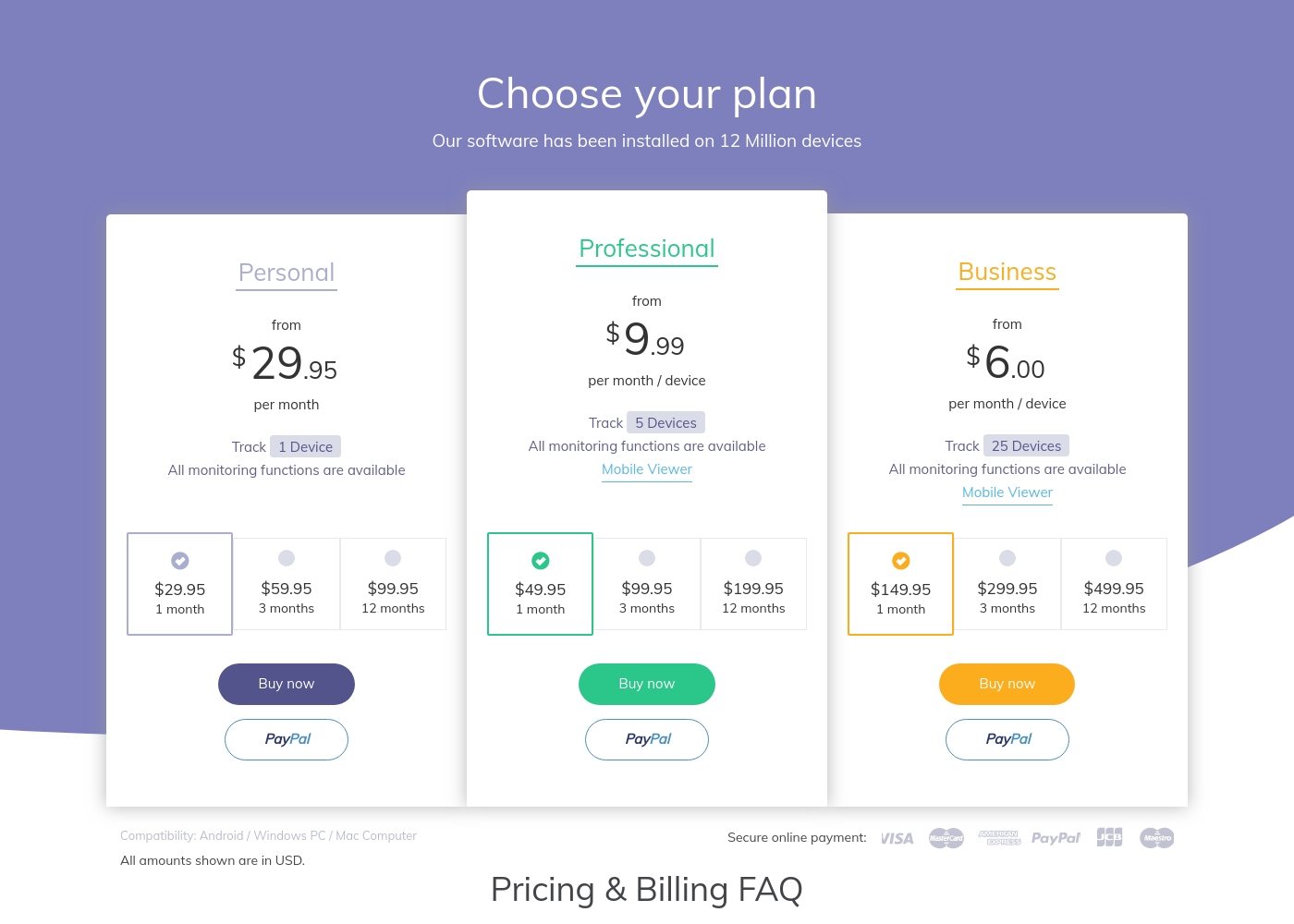
Hoverwatch pricing: Plans from $0/month Plans range: $0–$499.95/month Billing options: Monthly subscription
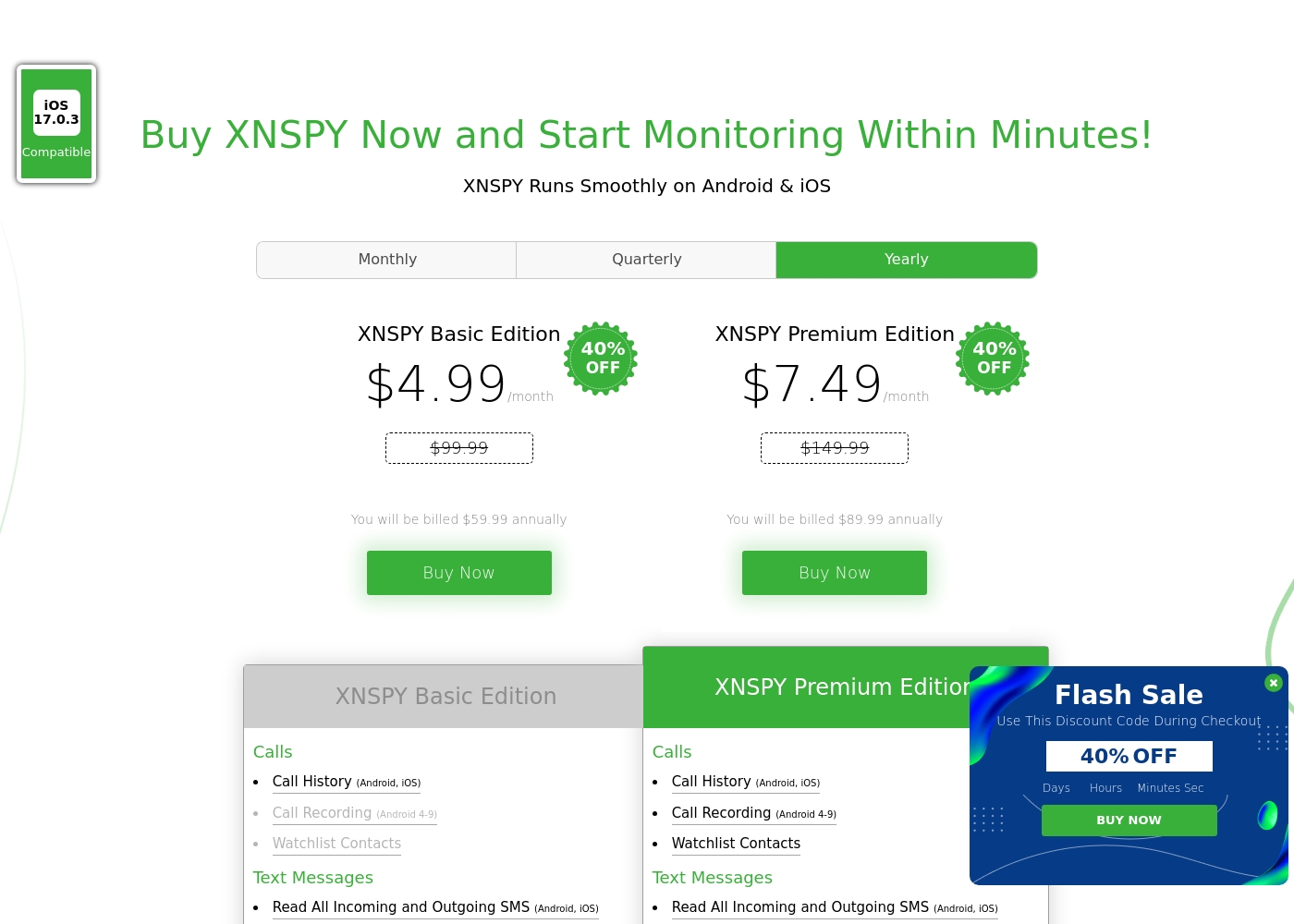
Xnspy costs between $4.99 and $7.49 per month (when billed annually) with 2 plans: XNSPY Basic Edition at $59.99 annually, and XNSPY Premium Edition at $89.99 annually.
These plans offer flexible billing options, including monthly, quarterly, and yearly subscriptions, allowing you to choose the commitment that works best for you.
XNSPY Basic Edition
Price: $59.99 billed annually (equivalent to $4.99/month) Best For: Users who need fundamental call, message, and location monitoring on a budget. Refund Policy: Partial refund within the first 10 days Other Features:
- View full call history and record calls (Android 4-9)
- Read all incoming and outgoing text messages
- Monitor WhatsApp chats and photos
- View internet browsing history and bookmarks
- Monitor keystrokes via Keylogger (Android)
- Call History & Recording (Android 4-9)
- Read All SMS & iMessages
- WhatsApp Chat & Photo Monitoring
- Real-Time Location Lookup
- Keylogger (Android)
- All Basic features included
- Monitor 10+ Social Media Apps (Facebook, Snapchat, Viber, etc.)
- Remotely Record Surroundings (Android)
- Remote Wipe Phone Data & Lock Phone (Android)
- Monitor Gmail App (Android)
Pricing Notes
- Xnspy is significantly cheaper, especially when choosing the annual plan starting at $4.99/month.
- Hoverwatch’s large pricing range suggests it caters heavily to high-volume business applications at the top end.
- Xnspy offers flexible billing (monthly, quarterly, yearly), giving users more choice than Hoverwatch’s simple monthly model.
- Neither Hoverwatch nor Xnspy offers a true free trial, but Xnspy provides a 10-day partial refund guarantee.
Pricing Head-to-Head
User Reviews
The general sentiment for Xnspy is mixed, reflected in its cumulative Trustpilot score of 3.3/5. Users commonly praise its core capabilities, noting that the app runs discreetly and is effective for monitoring calls, texts, location, and social media activity.
Many parents appreciate the peace of mind it offers, finding the system more straightforward than complex rival monitoring software. A major strength cited frequently across reviews is the responsiveness and professionalism of the 24/7 customer support team.
I’m not very tech-savvy, so I reached out to live support for help with the setup. They opened a support ticket and completed everything for me quickly. The team was professional and really helpful.
Our Verdict
Deciding between Hoverwatch and Xnspy boils down to breadth versus depth of monitoring. Do you need one very detailed spy or several basic spies? Both tools offer excellent stealth performance, ensuring monitoring remains completely discreet. Hoverwatch is the champion for multi-platform device management and affordability. It stands out by monitoring up to five devices, including Windows and Mac, from one dashboard. Hoverwatch also provides unique features like the front-camera photo snap upon screen unlock. This makes Hoverwatch ideal for discreet cross-platform family oversight. Xnspy is the preferred advanced mobile spy tool focused heavily on Android surveillance depth. It gives you intense features like keylogging, remote data wipe, and even ambient audio recording. Xnspy also provides great value starting at only $4.99 per month annually for very invasive tracking features. The deciding factor should be platform coverage versus feature depth. Choose Hoverwatch for wide, multi-device, cross-platform supervision. Choose Xnspy if you are monitoring a single device and require the absolute most invasive and detailed tracking features. Xnspy provides the most comprehensive monitoring solution, while Hoverwatch provides the maximum device coverage.
Frequently Asked Questions
Which offers the best multi-device support, Hoverwatch or Xnspy?
Hoverwatch is the better choice for multi-device support. It allows monitoring up to five devices across Android, Windows, and Mac systems. Xnspy requires one full license subscription for every single device you wish to track.
Does Xnspy offer desktop monitoring like Hoverwatch?
No, Xnspy's monitoring capabilities are focused on mobile phones and tablets. Hoverwatch uniquely supports monitoring Windows PC and Mac computers. If you need oversight on laptops or desktops, Hoverwatch is the tool you should choose.
Is Xnspy cheaper than Hoverwatch?
Yes, Xnspy is significantly cheaper for a single mobile device subscription. Xnspy starts at an equivalent of $4.99/month when billed annually. Hoverwatch's pricing model starts lower but quickly becomes expensive when tracking multiple devices separately.
Which software has better remote control features?
Xnspy Premium offers superior remote control features for Android devices. You can remotely lock the phone or completely wipe all data if the device is lost. Hoverwatch does not offer any documented remote control or device management functions.
Does Hoverwatch include a Keylogger feature for keystroke capture?
No, Hoverwatch does not list a Keylogger capability in its features. Xnspy includes a robust Keylogger, specifically for Android devices. Users needing to capture keystrokes should opt for Xnspy Premium.
Which tool is better for advanced location tracking and alerts?
Xnspy is better for advanced location tracking because it offers geo-fencing. You get instant alerts when the device enters or leaves defined safe zones. Hoverwatch offers standard GPS, Wi-Fi, and cell-tower location logging.
Ready to Choose?
Both tools have their strengths. Choose based on your specific needs.