Hoverwatch vs Umobix
People are torn between Hoverwatch's stealth and Umobix's real-time tracking. Hoverwatch shines in discreet visibility; Umobix excels at cross-platform live data. Choose based on whether discreet monitoring or real-time scope matters more.
Best for: Solo entrepreneurs, Budget-conscious families
Best for: Parents needing real-time visibility across Android and iOS, Multi-device teams needing cross-platform monitoring
Pros
Cons
Powerful monitoring, excellent user support.
We find that uMobix offers powerful and highly detailed monitoring capabilities, which users praise for providing considerable oversight, particularly regarding location tracking and social media activity. Overall, while the core functionality and supporting team are excellent, prospective users must proceed with caution regarding the reported persistent issues with billing transparency and unexpected charges.
Pros
- Comprehensive tracking system supports 41 popular apps, calls, and messages.
- Highly responsive and helpful customer support team assists with difficult installations.
- Accurate and reliable GPS location tracking and keylogging functions.
- Provides highly detailed tracking data often missing in competitor applications.
Cons
- Frequent, serious complaints regarding unauthorized charges and unexpected billing practices.
- Users often report difficulty canceling trials or subscriptions and securing refunds.
- Real-time data and updates can sync slowly, especially during the initial setup phase.
- Some reports indicate the application can negatively impact the target device’s battery life or internet efficiency.
AboutHoverwatch
Hoverwatch is a monitoring application for Android devices. 💡 It’s designed for parents who want to ensure their children’s safety, and for employers managing company devices. The software runs quietly in the background, tracking activity without disrupting the user. It works by recording data from the device itself.
AboutUmobix
uMobix is a powerful cell phone tracker designed for modern parents. It lets you manage and monitor everything happening on your child's smartphone or tablet. This comprehensive tool supports a wide range of devices, including all iPhones, iPads, and Android OS 4+. You can easily check if your specific model is compatible on the website. uMobix provides real-time access to crucial digital activities and communications. 💡
Highlights
Feature Comparison
Features Overview
We highlight the main differences and pick a winner for each feature.
Real-time Monitoring
Umobix offers real-time monitoring across devices. Hoverwatch emphasizes discreet visibility.
Hoverwatch is discreet by design and Android-focused. It focuses on invisible monitoring rather than live data. Umobix delivers real-time visibility across Android and iOS. This is visible across both platforms. Umobix also offers a keylogger and deleted-message visibility for deeper insight. Hoverwatch does not list a keylogger in its features.
Location Tracking
Umobix provides GPS updates and history. Hoverwatch tracks location via Wi‑Fi and GPS.
Hoverwatch location uses Wi‑Fi signals, cell towers, and GPS. It enables ongoing tracking without being obtrusive. Umobix provides GPS updates and history. It combines live location with visited places history for context. Both offer location awareness, but Umobix presents more structured, real-time data. Hoverwatch remains steady with offline-friendly options.
Camera Snapshots
Hoverwatch can capture front-camera photos; Umobix has no documented camera feature.
Hoverwatch can capture front-camera photos when the screen is unlocked. This gives you visual context on activity. Umobix focuses on calls, messages, and location, with media tracking but no stated camera capture. The choice hinges on whether you need camera context. Hoverwatch provides that, Umobix does not advertise it.
App Coverage
Umobix tracks 41 apps; Hoverwatch emphasizes broad activity across messaging apps.
Hoverwatch consolidates messages, calls, and app activity in one panel. It covers internet history, Gallery, and app usage on Android. Umobix tracks 41 apps and social platforms for deeper app ecosystem visibility. Hoverwatch offers a broad activity view inside its scope. Umobix provides deeper app-level tracking for a wider set.
Remote Controls
Umobix includes remote controls like blocking; Hoverwatch lacks stated controls.
Umobix remote controls include app blocking, website blocking, and Wi‑Fi control. Hoverwatch’s remote control capabilities aren’t clearly documented. If you need intervention controls, Umobix has the advantage. Hoverwatch remains focused on visibility and data access.
Deleted Messages
Umobix can monitor deleted messages; Hoverwatch data for this is not stated.
Umobix shows deleted messages and calls for deeper insight. Hoverwatch’s stance on deleted messages isn’t explicitly declared. If deleted data matters, Umobix has the edge. Hoverwatch may still cover many other data points.
Device Limits
Hoverwatch supports up to five devices; Umobix device limits aren’t clearly stated.
Hoverwatch supports multi-device oversight up to five devices. This helps families or small teams watch several assets. Umobix doesn’t specify device limits in the data provided. If you need clarity, verify with sales for your plan size. Hoverwatch offers clear multi-device boundaries.
Cross-Platform Availability
Umobix supports Android and iOS; Hoverwatch focuses on Android with desktop visibility.
Hoverwatch is Android-focused with PC/Mac visibility noted. Umobix covers Android and iOS for cross-platform use. If you need iOS monitoring, Umobix is the better fit. Hoverwatch remains strong on Android ecosystems.
Keylogger
Umobix includes a keylogger; Hoverwatch does not list one.
Umobix includes a keylogger to capture keystrokes. Hoverwatch does not list a keylogger in its features. For keystroke capture, Umobix provides the capability. Hoverwatch emphasizes invisibility and activity logs instead.
Hoverwatch pricing: Plans from $0/month Plans range: $0–$499.95/month Billing options: Monthly subscription
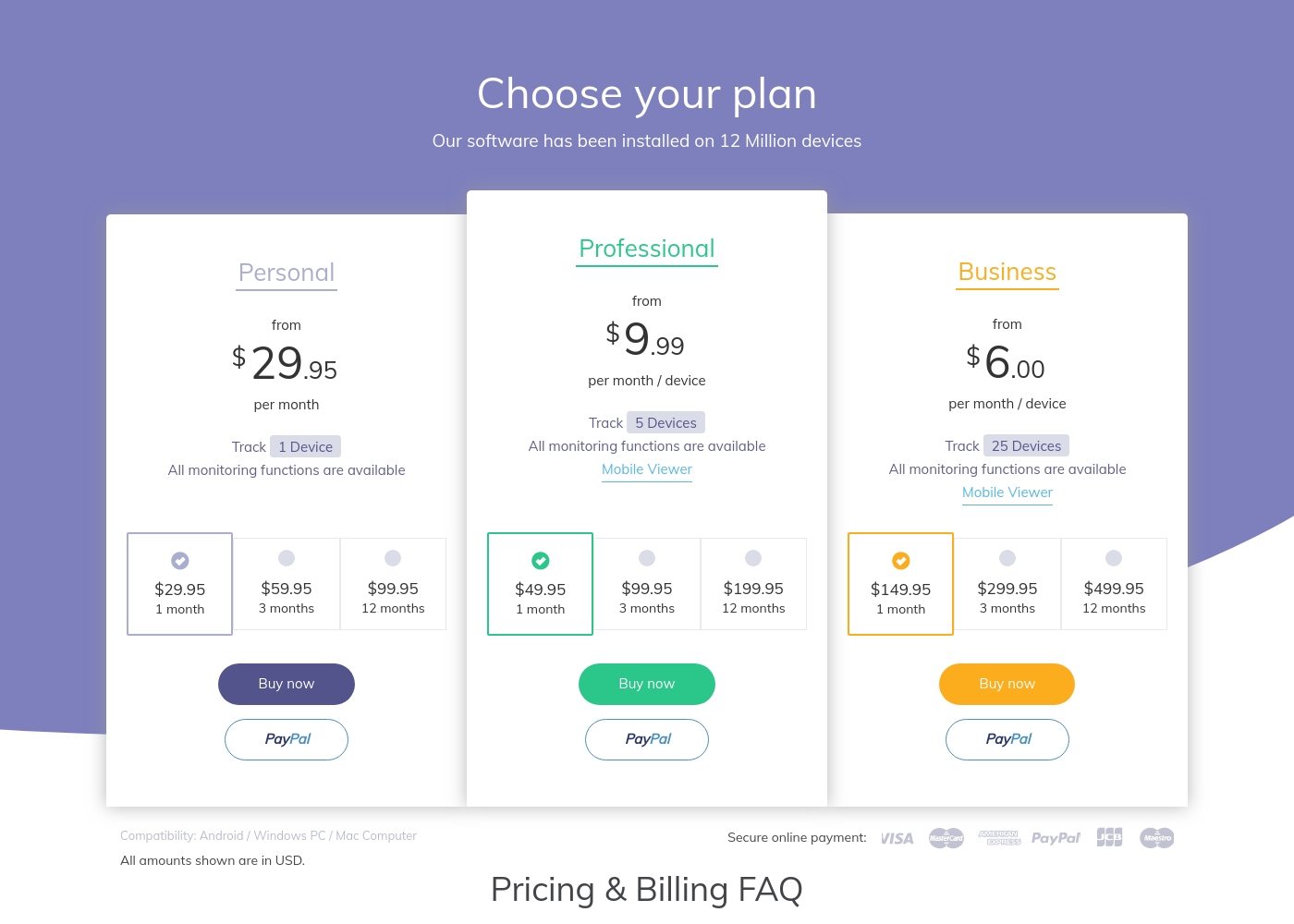
While the exact prices aren't currently displayed, Umobix is designed to be a comprehensive mobile monitoring solution featuring cross-platform compatibility. uMobix works seamlessly on all Android devices running OS 4+ and all iPhones and iPads. This broad compatibility ensures that most modern parental devices are supported immediately.
Comprehensive Monitoring Package (Details Not Stated)
Best For: Parents or guardians seeking absolute, real-time activity monitoring across a child's mobile device. Other Features:
- Access to all incoming and outgoing calls, messages, and deleted content.
- Keylogger functionality capturing keystrokes and passwords.
- Real-time and historic GPS location tracking features.
- Total monitoring capability for 41 popular apps and social media platforms.
- Remote control settings (e.g., blocking apps, Wi-Fi, or the device).
This package appears to provide truly extensive surveillance and control tools for monitoring modern Android and iOS devices. If you are prioritizing robust oversight across text communication, social media, and physical location tracking, this feature set is ideal for your needs. The advanced remote controls allow parents to actively manage the device environment, which often provides significant peace of mind. Key features like deleted message recovery and explicit handling of dating apps offer crucial capabilities for proactive parents.
Pricing Notes
- Hoverwatch pricing ranges broadly; no explicit free trial stated.
- Umobix pricing starts at 1; per-device or tiered structure not fully documented.
Pricing Head-to-Head
User Reviews
uMobix has a Trustpilot rating of 3.5/5, reflecting a balanced mix of strong praise and serious complaints from over 500 users. Reviewers frequently emphasize the app’s comprehensive monitoring capabilities, noting its reliability for accurate location tracking, accessing messages, and social media oversight. Many users say it provides essential peace of mind. Customer support receives consistently high marks, described as prompt, patient, and knowledgeable, with agents like Nicky Brown and Julia frequently mentioned for their helpfulness during installation and troubleshooting. 👍
However, the platform faces recurring issues related to billing and transparency, which impact overall user satisfaction. We noted significant complaints alleging unauthorized charges following low-cost trials, difficulty canceling subscriptions, and refusal to process refunds. While the core features are robust, some users report slow syncing or delayed real-time updates, particularly right after installation. Successful implementation depends heavily on careful setup and reliance on the praised technical support staff, but prospective customers must be wary of the potential financial friction.
This helped me gain clarity in my relationship. Info came in slow at first but after like a day it started syncing fine. The support team was super helpful when I had issues.
Our Verdict
Bottom line: Hoverwatch and Umobix are capable; neither dominates every scenario. Your choice hinges on stealth versus real-time visibility and cross-platform needs. In practice, most buyers will prioritize one of those dimensions. Hoverwatch is discreet by design, especially on Android devices. It focuses on invisible monitoring rather than live alerts. Umobix delivers real-time visibility across Android and iOS, right when you need it. This is visible across both platforms. Umobix also offers a keylogger and deleted-message visibility for deeper insight. Hoverwatch does not list a keylogger in its features. If budget and stealth drive your choice, hover toward Hoverwatch's discreet approach. If you need live data, cross‑platform coverage, and robust controls, pick Umobix. Ultimately, match your use case to the right strengths rather than chasing headlines. For many families, real-time needs push Umobix ahead in practice. Hoverwatch remains superb for those who want stealth and focused Android oversight. If you monitor across platforms with a mix of devices, Umobix is your pick.
Frequently Asked Questions
Which is better for small teams: Hoverwatch or Umobix?
Hoverwatch tends to be stealth-friendly for small teams. Umobix offers real-time, cross‑platform visibility that scales with more users. For tiny teams, Hoverwatch can be cost-effective; Umobix shines when you need live data across apps.
Does Hoverwatch have a keylogger like Umobix?
Umobix includes a keylogger. Hoverwatch does not list a keylogger in its features. If keylogging matters, Umobix is the clearer choice. Hoverwatch users should verify current capabilities before relying on it.
Is Umobix worth the extra cost over Hoverwatch?
Umobix offers real-time tracking and broader app coverage. Hoverwatch is often cheaper and emphasizes discreet monitoring. If you need live data on iOS and Android, Umobix often justifies the cost. Otherwise, Hoverwatch may be more budget-friendly for basic needs.
Can I migrate from Hoverwatch to Umobix easily?
Umobix offers migration details to help move licenses. Hoverwatch to Umobix migration specifics aren't fully detailed here. Contact support for a precise transfer process and potential downtime.
Does Hoverwatch support cross-platform data sharing with Umobix?
Hoverwatch data is mainly Android-focused, with desktop visibility mentioned. Umobix covers Android and iOS with cross-platform access. There’s no built‑in cross-share between Hoverwatch and Umobix within one dashboard.
What platforms do Hoverwatch and Umobix support?
Hoverwatch supports Android, Windows PC, and Mac. Umobix covers Android and iOS devices. Check device model compatibility in each product page.
Ready to Choose?
Both tools have their strengths. Choose based on your specific needs.