Droip vs Spectra Pro
Droip and Spectra Pro both profoundly enhance WordPress but target completely different users. Droip offers unparalleled visual design control, much like Webflow, for achieving pixel perfection. Spectra Pro supercharges the native editor, focusing heavily on performance, dynamic content, and integrated AI. Your best choice depends entirely on your required workflow and specific design demands.
Best for: Professional web design agencies demanding pixel perfection and flawless responsive design, Designers specializing in complex, interactive layouts using CSS Grid tools
Best for: Content creators prioritizing superior Core Web Vitals and lightning-fast SEO performance, Marketers needing conversion tools like targeted popups and countdown timers
Deep Control for WordPress Designers
We assess Droip as a truly advanced visual builder that empowers designers with Webflow-level precision within WordPress. We noted its focus on complex layout controls, precision typography, and dedicated timeline animations. Overall, Droip provides exceptional technical support and superior design control, positioning it as a top contender for professional web builders.
Pros
- Access to a "Webflow-in-WordPress" interface providing deep customization.
- Exceptional customer support noted for responsiveness, patience, and technical expertise.
- Allows creating complex, interactive sites free from typical WordPress limitations.
- Achieves pixel-perfect and seamless responsiveness across all device sizes.
Cons
- The dedicated community interaction appears currently limited primarily to Facebook channels.
- Initial introductory pricing renews at a significantly higher annual rate ($20 to $69).
- Features localization support is still being developed and expanded.
Pros
Cons
AboutDroip
Droip is a dynamic, visual tool designed to help you create stunning, responsive websites. It’s built for designers who demand unmatched accuracy and finesse in their work. Instead of battling restrictive interfaces, you gain specialized tools for complex layout structuring. You can experience pure creative freedom while speeding up your overall workflow. 💡
AboutSpectra Pro
Spectra Pro is a premium web design toolkit that works seamlessly inside the native WordPress editor. It's designed for website creators—from beginners to professionals—who want to build stunning, high-performance sites without complex code dependencies. It delivers a suite of powerful blocks, templates, and smart design tools to elevate your workflow. 💡
Highlights
Feature Comparison
Features Overview
We highlight the main differences and pick a winner for each feature.
Design Workflow
Droip uses a highly specialized visual interface; Spectra Pro works within the native WordPress Editor.
Droip provides a powerful, dedicated design environment often called 'Webflow-in-WordPress.' This interface gives advanced users deep customization. Spectra Pro works directly within the familiar Gutenberg block editor. This means Spectra Pro will integrate much more seamlessly into standard WordPress workflows. If you hate leaving the native backend, Spectra Pro is the better choice for you.
Creative Control
Droip excels at pixel-perfect precision; Spectra Pro focuses on template speed and functionality.
Droip offers specialized tools like Precision Typography to fine-tune spacing and character styles accurately. You gain granular control over every visual element on the page. Spectra Pro is great for rapid, functional design but lacks these deep typographic controls. Droip supports complex CSS Grid layouts for multi-directional structures easily. For truly unique, intricate designs, Droip is engineered for superiority.
AI Assistance
Spectra Pro integrates Spectra AI for content and design; Droip has no inherent AI features.
Spectra Pro includes AI tools to instantly generate compelling copy and full custom web pages. The Spectra AI can also personalize existing templates effectively. Droip focuses purely on the manual designer workflow and physical layout structuring. If generating marketing copy and rapid design ideas is essential, Spectra Pro delivers built-in functionality. Droip users must purchase an entirely separate AI service.
Conversion Tools
Spectra Pro offers focused marketing tools; Droip does not include conversion blocks.
Spectra Pro provides robust conversion features like a Popup Builder with exit-intent trigger functionality. It also includes a customizable Countdown Timer to leverage sales urgency (FOMO). Droip's feature set is strictly centered on visual design and page structure. Marketers will find the targeted tools in Spectra Pro invaluable for lead capture and direct sales efforts. Droip users must utilize third-party plugins for conversion features.
Performance & SEO
Spectra Pro guarantees high Core Web Vitals scores; Droip emphasizes internal workflow speed.
Spectra Pro is engineered to achieve 100% scores in Core Web Vitals due to its clean code and JIT compiler. The system only loads assets dynamically when needed on the page, ensuring zero bloat. Droip offers an optimized visual workflow, helping designers build intricate sites faster. However, Spectra Pro is the undeniable choice if external page speed metrics are the highest priority. Fast-loading Spectra Pro pages win search rankings.
Animation Capabilities
Droip offers timeline control for complex animations; Spectra Pro is limited to simple entrance effects.
Droip features a Dynamic Timeline Animation Control for creating smooth, multi-step interactive experiences. Designers can precisely control timing, duration, and easing functions. Spectra Pro offers Advanced Animations, primarily simple, scroll-based entrance effects for visual polish. For advanced interactive narratives and complex triggers, Droip gives much greater creative freedom. Spectra Pro’s animations are functional but lack depth.
Dynamic Content
Spectra Pro supports dynamic content integration; Droip focuses on static design elements.
Spectra Pro seamlessly integrates with tools like ACF, PODS, and Meta Box for complex dynamic content displays. The robust Loop Builder creates tailored content lists for products or articles. Droip's documentation does not mention support for querying or displaying custom fields dynamically. For building data-driven websites like directories or e-commerce shops, Spectra Pro is the superior tool. Droip excels purely in visual layout.
Risk Assessment (Trial)
Droip provides a 90-day free trial; Spectra Pro offers no equivalent without purchase.
Droip gives new users a lengthy, commitment-free 90-day trial to fully test every feature. You can thoroughly evaluate Droip before paying anything. Spectra Pro only offers a 14-day money-back guarantee, requiring an upfront purchase. The long trial period and 60-day money-back guarantee make Droip the far safer option for initial testing. Spectra Pro users must rely on the free base plugin version.
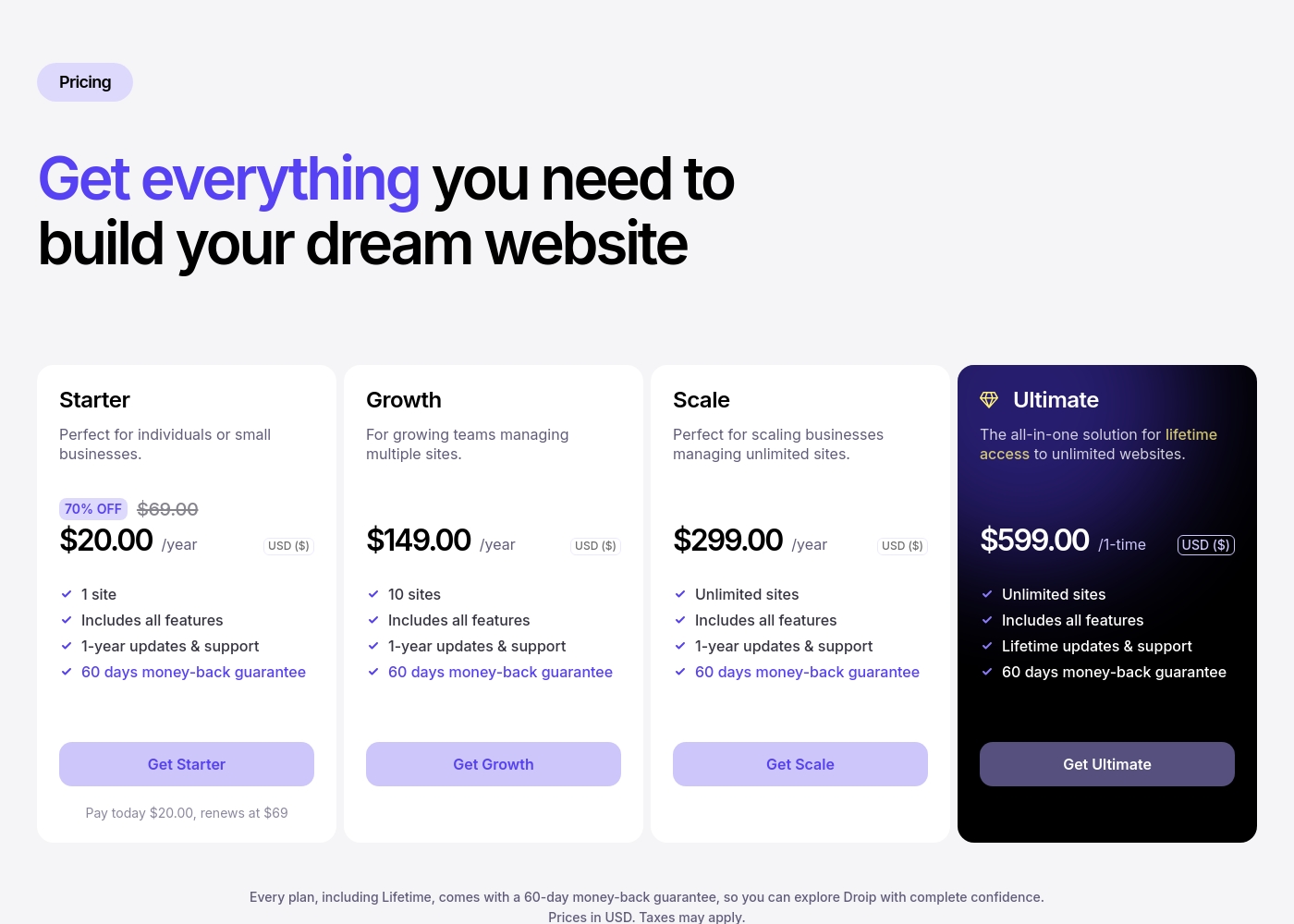
Droip costs between $20 per year (introductory offer) and $599 one-time with 4 plans: Starter at $20/year (renews at $69/year), Growth at $149/year, Scale at $299/year, and Ultimate at $599 one-time.
You can choose the plan that best fits your needs, whether you're just starting out or managing many client sites.
Starter
Price: $20.00 per year (renews at $69.00 per year) Websites Supported: 1 site Best For: Individuals or small businesses Refund Policy: 60 days money-back guarantee Other Features: Includes all features, 70% off introductory offer, 1-year updates & support. The Starter plan is perfect if you only need one website for your business or personal project. You get a massive initial discount on the first year, making it super accessible. Even at the renewal rate, it's a great entry point to experience all of Droip's powerful design tools.
- 1 site
- Includes all features
- 1-year updates & support
- 60 days money-back guarantee
- 10 sites
- Includes all features
- 1-year updates & support
- 60 days money-back guarantee
- Unlimited sites
- Includes all features
- 1-year updates & support
- 60 days money-back guarantee
- Unlimited sites
- Includes all features
- Lifetime updates & support
- 60 days money-back guarantee
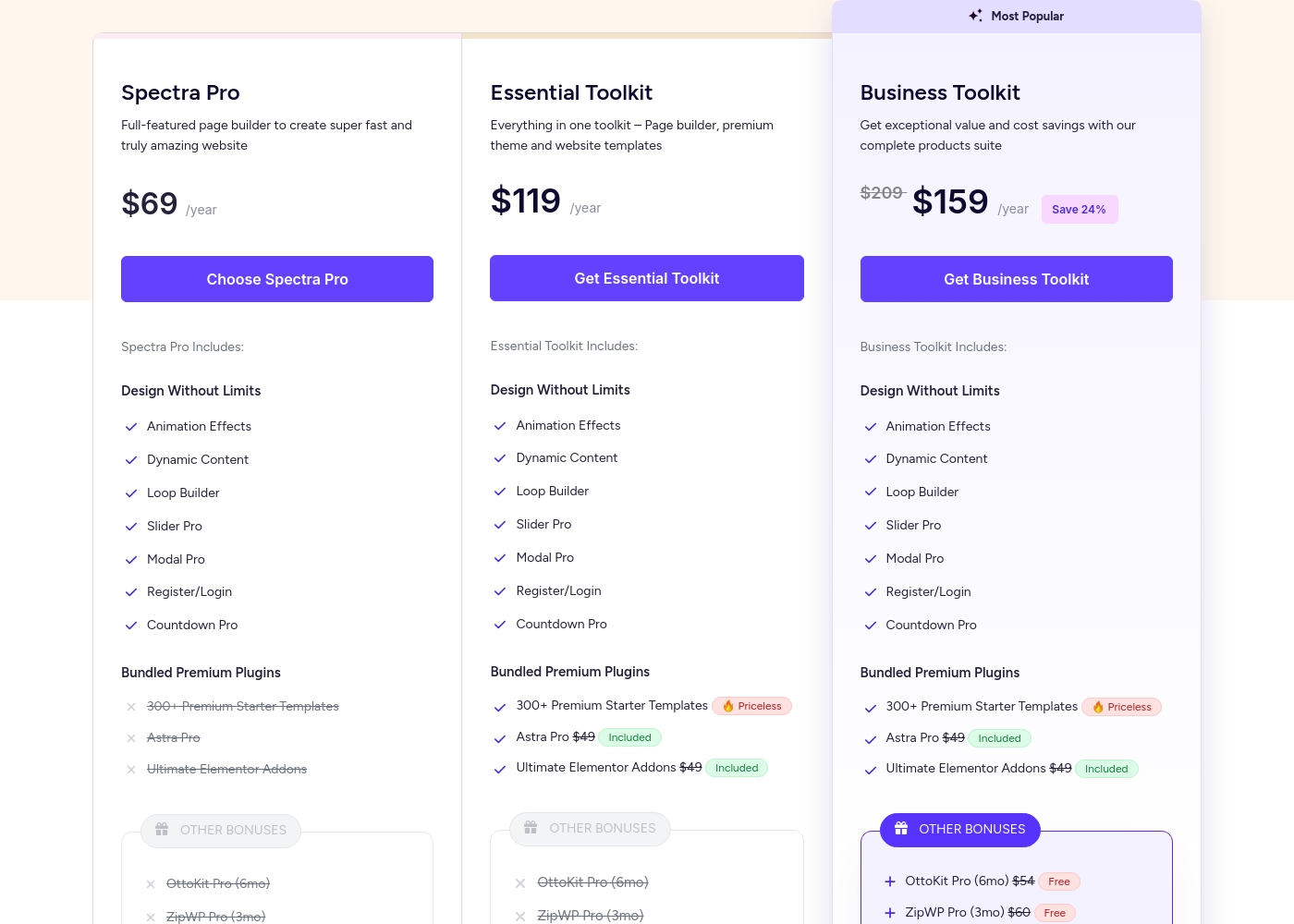
Spectra Pro pricing: Spectra Pro offers flexible subscription plans starting at $69/year for use on up to 3 websites. Users can choose between annual subscriptions or one-time lifetime payments across three distinct product tiers: Spectra Pro, Essential Toolkit, and Business Toolkit.
All plans are backed by a 14-day 100% money-back guarantee for peace of mind. Note that free version of Spectra is also available for those who want to try the basics first before upgrading to a paid plan.
Check out the current pricing below to find the best fit for your needs and budget. For those looking for the best value, the Business Toolkit includes a comprehensive suite of tools for web agencies and professionals.
Pricing Notes
- Droip’s Starter plan costs only $20 the first year but renews at $69 annually after the initial discount.
- Spectra Pro's annual prices are introductory offers and will automatically increase upon renewal time.
- Both Droip and Spectra Pro offer a one-time payment option for lifetime access, ensuring long-term value.
- The Business Toolkit from Spectra Pro includes significant bonus software like Astra Pro and SureFeedback, increasing its value proposition.
- Droip offers a generous 60-day money-back window while Spectra Pro's guarantee is only 14 days.
Pricing Head-to-Head
User Reviews
Droip maintains an excellent 4.5/5 rating on Trustpilot, driven primarily by outstanding customer support. Users frequently describe the support team as quick, active, and highly responsive, solving technical issues, often through personalized methods like providing screencasts.
They note this high level of attention persists even during the free trial period. Regarding usability, users view Droip as a "Webflow in a WordPress" experience.
The support is top notch! Rashed and his team solved my simple problems instantly. I was patiently answered even while still in the Free Trial mode. They made a great product.
Our Verdict
Choosing between Droip and Spectra Pro depends entirely on your project's foundational needs. Don't think of it as A vs. B, but as Design Precision vs. Speed and AI. Both tools deliver professional WordPress results, but via different workflows. Droip's superpower is deep creative precision and control over the visuals. It provides specialized tools for CSS Grids and dynamic timeline animations that bypass typical WordPress restrictions. Droip is built for designers who need guaranteed pixel-perfect output on all screens, backed by phenomenal user-praised support. Spectra Pro shines brightest in performance, dynamics, and conversion optimization. It guarantees fast load times and high Core Web Vitals scores because it enhances the native editor efficiently. Spectra Pro is your co-pilot for rapid creation, featuring integrated Spectra AI for copy and content generation. The deciding factor is simple: Are you a creative craving granular control, or a marketer prioritizing SEO speed and dynamic data? Droip lets you design intricate experiences with unmatched finesse and offers a 90-day trial. Spectra Pro gives you the speed and AI tools to win in search results and capture leads effectively. Choose the tool that aligns with your biggest pain point.
Frequently Asked Questions
Which is easier to learn, Droip or Spectra Pro?
Spectra Pro is generally easier because it works as an advanced add-on within the native WordPress editor. Droip offers a specialized visual builder that requires a steeper learning curve for mastery. Once mastered, Droip unlocks unmatched pixel and layout precision for expert designers.
Does Spectra Pro offer a lifetime deal like Droip?
Yes, both Spectra Pro and Droip provide a one-time payment option for lifetime access to their features. Droip’s Ultimate plan costs $599 and includes updates forever. Spectra Pro offers lifetime deals on all its bundled toolkits.
Which tool is better for website speed and SEO performance?
Spectra Pro is explicitly optimized for speed and SEO, often achieving 100% in Core Web Vitals. Droip focuses more on design precision and workflow efficiency. For measurable SEO performance gains and speed, Spectra Pro is the superior choice.
How do the free trials differ between Droip and Spectra Pro?
Droip offers a very generous 90-day free trial period to fully test the entire platform. Spectra Pro does not offer a free trial for the premium Pro version. Spectra Pro only provides a 14-day money-back guarantee after purchase.
Can I use AI to generate content in Droip?
No, Droip focuses on advanced visual design tools like CSS Grids and timeline animations. Spectra Pro includes the powerful Spectra AI feature. This helps users write compelling copy and generate design concepts directly within the platform.
Is Droip a full page builder, or is Spectra Pro an enhancement?
Droip acts as a specialized visual page builder with deep, custom control divorced from the native editor. Spectra Pro is an advanced toolkit that enhances the capabilities of the core Gutenberg block editor. They represent two different approaches to web building.
Ready to Choose?
Both tools have their strengths. Choose based on your specific needs.