Dreamstime vs Pngtree
Dreamstime and Pngtree both offer millions of creative assets, but their focus differs significantly. Dreamstime provides a huge, comprehensive library of photos, video, and audio assets with strong customer service. Pngtree concentrates on specialized transparent PNG files and design templates, offering built-in customization tools.
Best for: High-volume marketing agencies needing a diverse mix of photos, video, and audio., Businesses prioritizing guaranteed responsive customer support and simple refund resolution.
Best for: Designers who frequently need transparent PNG assets, Marketers creating recurring seasonal campaign graphics
Great Value with Excellent Support
We found Dreamstime excels in offering a massive asset library paired with highly responsive customer service, often resolving thorny issues like accidental double charges instantly. However, we caution new users about the automatic renewal practices and a growing prevalence of AI-generated images that clutter search results. Overall, the platform delivers strong value for high-volume content creators who prioritize helpful human support.
Pros
- High quality and vast selection of stock photos, videos, and audio.
- Exceptional and responsive customer service that promptly handles refunds.
- Simple and efficient image uploading process for contributors.
- User-friendly platform that is easy for most users to navigate.
Cons
- Subscription system lacks clarity regarding automatic renewals and cancellation.
- High volume of difficult-to-filter, low-quality AI-generated content.
- Search functionality sometimes struggles to return relevant results.
- Photographers report significant recent drops in sales and high payout threshold ($100).
Fast PNG access with license details you should read carefully
Pngtree is helpful for fast access to PNGs and design templates, but commercial users should verify license scope, keep records, and weigh third-party customer complaints before committing.
Pros
- Large library of transparent PNGs, templates, backgrounds, and presentation assets.
- Paid plans advertise commercial-use licenses, faster downloads, and no attribution requirements.
- Useful built-in editing and AI tools for background removal and quick image variation.
- Free plan is available for testing search quality before paying.
Cons
- Individual license terms are single-seat and may not cover team or client-principal usage.
- Third-party reviews show recurring complaints about billing, support, and copyright-related notices.
- Promotional lifetime pricing can be attractive but should be checked against current terms.
- Generic stock assets may require editing to avoid a templated brand look.
AboutDreamstime
Dreamstime is known as the world's largest stock photography community. It was established in 2000 and has since grown immensely. Talented contributors worldwide enrich the vast collection daily. This resource is perfect for everyone, from large corporations to small magazines and personal blogs. You'll find professional assets regardless of your budget. 💡
AboutPngtree
Pngtree is a stock graphics marketplace centered on PNG images, backgrounds, templates, illustrations, text effects, PowerPoint assets, and newer AI tools. Its individual pricing page advertises a large curated asset library, free daily downloads, premium commercial-use plans, faster download speed, background removal, online editing, and a lifetime plan option. The platform is best understood as a design-resource library rather than a full creative suite.
Highlights
Feature Comparison
Features Overview
We highlight the main differences and pick a winner for each feature.
Core Asset Focus
Dreamstime offers a massive, comprehensive asset library including video and audio. Pngtree focuses intensely on transparent PNGs and editable visual templates.
Dreamstime boasts over 314 million assets, including photos, vectors, illustrations, and 4K video. It functions as a complete media solution for varied projects. Pngtree excels in high-demand transparent PNG files, saving designers significant masking time. Their specialization covers backgrounds, templates, and text effects. Users choose Dreamstime for video content; Pngtree is better for quick graphic design templates. Pngtree's online editing functions complement their core graphic assets instantly.
Multimedia Support
Dreamstime is a full multimedia platform offering millions of audio and 4K video clips. Pngtree limits its offering primarily to static images and templates.
Dreamstime provides extensive libraries of royalty-free audio tracks and professional sound effects. It supplies millions of high-quality video footage clips, available up to 4K resolution. Pngtree lacks this broad multimedia support, concentrating on vector and raster graphic assets only. If your project requires moving images or background scores, Dreamstime is the clear choice. Dreamstime's All-in-one plans streamline purchasing across all media types in a single subscription. Pngtree keeps its focus squarely on graphic design visual assets.
Pricing Structure
Dreamstime uses tiered subscriptions with download rollover benefits for stability. Pngtree focuses on high-volume unlimited access, including a risky Lifetime option.
Dreamstime subscriptions cap monthly downloads, but unused ones automatically roll over to the next month for credit, which users appreciate. Dreamstime's core plans range from $25/month up to $2,028 annually for high volume. Pngtree offers one-time 'Lifetime' access for just $199 with high daily limits, which is incredibly tempting. Pngtree's Annual Plan gives truly unlimited daily downloads for only $179 yearly. However, Dreamstime's rollover is a safer value proposition due to Pngtree's poor record with honoring payments.
User Trust & Ethics
Dreamstime enjoys a high rating and praise for responsive customer support. Pngtree has an abysmal 1.4-star rating due to aggressive, unethical business practices.
Dreamstime has a positive 4.1/5 Trustpilot rating; users praise staff for quick, effective refunds and friendly service. Pngtree has a 1.4/5 rating, with many reports of threatening copyright notices for alleged infringement. Pngtree reportedly uses these threats to pressure users into buying expensive Enterprise plans unfairly. This difference in user trust is the single most critical factor; Dreamstime offers security. Professionals should view Pngtree with extreme caution because of user extortion complaints.
Design Utility
Pngtree offers essential built-in design features like an editor and templates for quick customization. Dreamstime focuses purely on delivering raw assets.
Pngtree provides access to an Online Photo Editor and a handy one-click background remover for premium users. Users can instantly customize Online Editable Templates and great editable fonts on the Pngtree site. Dreamstime requires users to download assets and use external design software like Photoshop immediately. Pngtree’s integrated tools make it easier for non-design specialists to customize assets quickly. This increased utility makes Pngtree highly efficient for graphic projects demanding speed.
Copyright Security
Dreamstime provides commercial licenses, but Pngtree offers an explicit professional copyright certificate for purchased assets.
All paid Dreamstime and Pngtree plans include valid commercial licenses for use. Pngtree allows premium users to download a professional copyright certificate for any specific asset legally used. This documentation provides additional assurance for high-stakes commercial client work. Dreamstime relies on its standard licensing terms without issuing specific per-asset certificates publicly. Users working with demanding legal restrictions might prefer the explicit documentation offered by Pngtree. However, the ethics concerns with Pngtree undermine their copyright claims.
Image Discovery
Dreamstime integrates AI for automated image classification and search refinement via PhotoEye™. Pngtree provides template-focused AI assistance.
Dreamstime uses advanced Machine Learning, resulting in optimized search accuracy and automatic image classification. Users benefit from smart cropping and keyword suggestions with advanced tools like PhotoEye™. Pngtree offers a Free AI Template Design tool meant to streamline and accelerate the initial draft stage. Dreamstime focuses its AI efforts on making its huge library searchable for specific assets. Pngtree uses its AI to facilitate fast, customizable content creation based on templates.
Dreamstime costs between $14.99 (one-time) and $219 per month with several plans available: 5 images at $25, 10 images at $39, up to 750 images at $219 per month, or $2,028 billed annually.
Dreamstime offers flexible pricing through credit packages or standard time-based subscriptions. Let's explore the best fit for your content needs.
Credit Packages (Pay per Download)
Price: Starts at $14.99 (for 3 credits) Best For: Users who need images occasionally or high-value media Other Features:
- Credits are the site currency for all downloads.
- Credits are valid for one full year from purchase.
- Use credits for RF, EL images, videos, and professional audio.
- Prices differ depending on media size, level, format, or license.
- Pay per download (using site currency)
- Used for RF, EL images, videos, audio
- Valid for 1 Year
- 5 total downloads per month
- Unused downloads roll over
- Automatic renewal
- Includes lifetime license
- 200 downloads per month
- Unused downloads roll over
- Includes lifetime license and unlimited online usage
- Gives unlimited printed and electronic copies
- 750 downloads per month
- Automatic renewal
- Downloads roll over
- Includes lifetime license and unlimited online usage

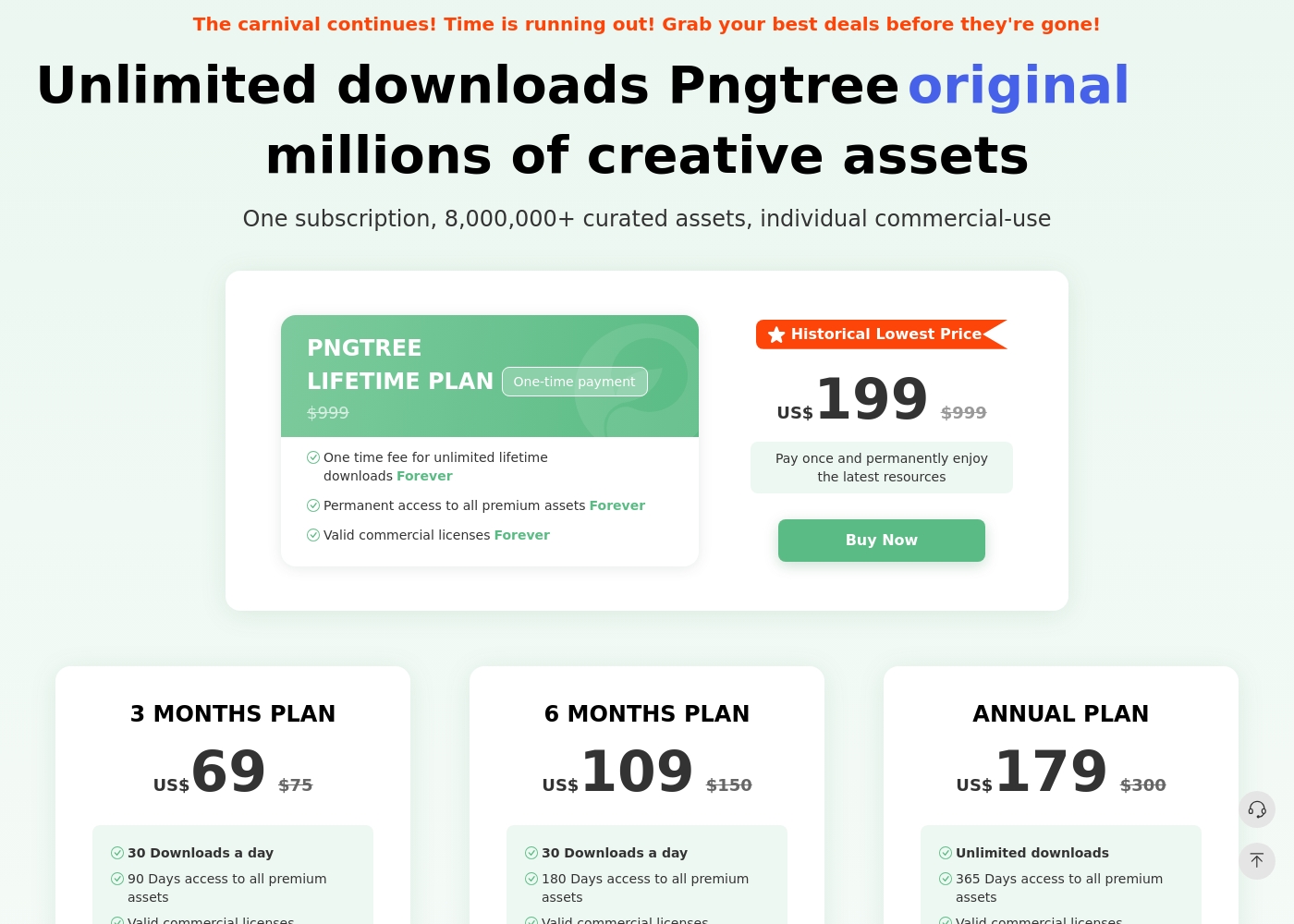
Pngtree has a free plan with limited daily downloads and several paid individual plans. The pricing page currently lists a 3-month plan, 6-month plan, annual plan, and a lifetime plan. The annual plan and lifetime plan emphasize unlimited downloads, while shorter paid plans list daily download limits. Paid plans advertise valid commercial licenses, faster downloads, no attribution requirements, and premium assets. The license terms still matter: the individual license is single-seat, and team or broader business authorization may require an enterprise plan.
- 1 Million Free assets
- 2 Downloads / day
- No Attribution required (for Free assets)
- Download speed up to 0.5MB/s
- 90 Days access to all premium assets
- Valid commercial licenses
- High-speed downloads (10MB/s)
- No attribution required for premium content
- 180 Days access to all premium assets
- Valid commercial licenses
- High-speed downloads (10MB/s)
- No attribution required for premium content
- Unlimited downloads
- 365 Days access to all premium assets
- Valid commercial licenses
- High-speed downloads (10MB/s)
- No attribution required for premium content
Pricing Notes
- Dreamstime's pricing is structured clearly around tiered monthly download usage ranging up to 750 images.
- Dreamstime incorporates automatic rollover, ensuring unused monthly downloads retain their value for subscribers.
- Pngtree's Lifetime Plan is heavily discounted to $199, but numerous user reviews claim the company fails to honor this permanent access.
- Dreamstime users caution against the automatic renewal feature, which can lead to unexpected charges after free trials.
- Pngtree provides a 15-day money-back guarantee, unlike Dreamstime, which relies on customer service goodwill for refunds.
- For high-volume needs, Pngtree's Annual Plan ($179/year) offers truly unlimited downloads, which may be drastically cheaper than Dreamstime's high-tier image plans.
Pricing Head-to-Head
User Reviews
Dreamstime generally receives positive feedback from its large user base, scoring a 3.6/5 on Trustpilot. Customers frequently praise the high quality of the images available and the platform's user-friendly nature, noting that uploading and navigating the site is straightforward and easy.
Exceptional customer support is a standout feature; reviewers often highlight the staff's professionalism, quick response times, and efficiency in handling issues like accidental double billing or subscription problems. Contributors enjoy the strong sense of community and the fast approval process for their work.
I accidentally upgraded my free trial and was charged immediately. Dreamstime customer service efficiently processed my cancellation and provided a full refund quickly since I hadn't used any downloads. I really appreciate their prompt support!
Pngtree has strong utility as a fast graphics library, but buyers should balance that utility against license complexity and negative third-party customer feedback. The safest approach is to test the catalog first, document every commercial-use download, and avoid assuming that an individual plan automatically covers all team or client scenarios.
Back in 2020 I paid $199 for the Permanent Premium Lifetime Plan. Now they demand an upgrade to a new Enterprise Plan, accusing me of copyright infringement. Lifetime should mean lifetime without limits, but they continually try to extort more money.
Our Verdict
Choosing between these two is less about features and more about business ethics. Pngtree might look attractively cheap, but Dreamstime is the far safer, more professional option for long-term use. Dreamstime offers stability and an incredible depth of multimedia across photos, video, and audio assets. Its customer support team is consistently lauded for resolving billing errors quickly and efficiently. You can rely on Dreamstime for consistent asset delivery and crucial peace of mind. Pngtree’s superpower is its specialization in transparent PNGs, templates, and built-in editors. If you only need transparent graphics, Pngtree saves you significant masking time and offers true unlimited downloading. However, Pngtree's critical one-star user reviews are a massive red flag that professionals cannot ignore for commercial work. Users report highly aggressive sales tactics and threatening copyright extortion attempts from Pngtree staff. They also claim Pngtree fails to honor the supposed ‘Permanent Lifetime Plan’ purchases. The deciding factor here is business integrity versus niche utility. Dreamstime offers stability, responsive human support, and a complete, high-quality multimedia library. Unless you absolutely need specialized transparent graphics and are comfortable risking high-pressure sales tactics, Dreamstime is the only responsible choice for any professional use.
Frequently Asked Questions
Which platform is better for video and audio assets?
Dreamstime is the clear winner for multimedia. Dreamstime offers millions of professional clips, including 4K video and royalty-free audio tracks. Pngtree’s library focuses almost entirely on static graphics, illustrations, and templates.
Does Pngtree’s Lifetime plan provide a permanent, guaranteed subscription?
The Pngtree Lifetime plan is $199 and promises permanent access. However, many users report Pngtree fails to honor this plan, demanding expensive Enterprise upgrades later on. Dreamstime does not offer a lifetime option but provides safer subscription models.
Which software has better customer reviews and more reliable technical support?
Dreamstime is significantly better, backed by a 4.1/5 Trustpilot rating. Users praise Dreamstime's quick support staff for processing refunds promptly. Pngtree’s rating is critically low (1.4/5) due to widespread ethical complaints.
Which is the better choice for finding transparent PNG images?
Pngtree specializes in this area, claiming to be the largest source for transparent PNG images online. Pngtree offers these assets alongside online tools like background removal and editable templates. Dreamstime's large library is less specialized in pre-masked assets.
Can I get a free trial on Dreamstime or Pngtree?
Dreamstime offers a traditional 7-day free trial, allowing 15 initial image downloads. Pngtree does not offer a trial but has a Free Plan allowing two downloads of non-commercial assets every day.
Which tool offers download rollover for unused monthly allowance?
Dreamstime is great for predictable usage because its subscription plans include automatic download rollover. If you pay for 200 images, your unused portions roll over. Pngtree’s subscriptions do not mention a rollover feature.
Ready to Choose?
Both tools have their strengths. Choose based on your specific needs.