Design Pickle vs Graphics Zoo
Design Pickle and Graphics Zoo both offer subscription design services for high output. Design Pickle focuses on pure volume with guaranteed rapid 24-hour turnarounds. Graphics Zoo provides broader creative scope, including video editing, at a clear monthly flat rate. Choosing depends on your need for speed versus specific creative capabilities and predictable costs.
Best for: Marketing agencies needing constant high creative volume., Organizations prioritizing quick, guaranteed 24-hour design turnarounds.
Best for: Consultancies expanding service offerings into video, UI/UX, or motion graphics., Growing businesses requiring predictable flat-rate monthly expenses.
Reliable volume output, but quality varies.
We found Design Pickle provides exceptional creative production bandwidth with guaranteed 24-hour turnarounds, making it a very powerful resource for high-volume design needs. Overall, this service is highly valuable for its efficiency and quantity, provided users remain diligent about vetting creative output and closely managing their subscription terms.
Pros
- Consistent 24-hour turnaround time for first drafts.
- Ideal resource for high-volume creative output.
- Simple, transparent workflow for project submission and tracking.
- Support for major industry tools (Figma, Adobe, Canva).
Cons
- Design quality is often inconsistent and reported as 'hit or miss.'
- Designers sometimes misinterpret complex or broad project instructions.
- Pricing is customized and not publicly transparent.
- Reports of aggressive billing practices, including refusal to refund unused auto-renewed contracts.
Bridging capacity needs and ethical risks.
We find Graphics Zoo efficiently handles scalability and service speed for clients, providing dedicated project management and diverse creative capabilities like video editing. Overall, reports of excellent client responsiveness must be weighed carefully against serious, persistent concerns regarding design quality and alleged toxic internal workplace practices.
Pros
- Predictable flat-rate monthly pricing covering comprehensive services (graphics, video editing, UI/UX).
- Significantly expands client production capacity (up to four active projects) crucial for growing businesses.
- Dedicated project managers are cited as highly responsive, often replying within five minutes.
- Proven ability to streamline operations for agencies and help meet strict deadlines effectively.
Cons
- Substantial claims of a toxic workplace and exploitation of design staff.
- Customer reports of poor design quality or inability to deliver professional outputs consistently.
- Reports that the advertised risk-free trial is denied if the user submits actual work.
- Low 3.2 average Trustpilot score indicates inconsistent service delivery.
AboutDesign Pickle
Design Pickle is a subscription-based creative service platform. It combines expert human talent with smart systems and dedicated support. This platform makes spinning up a complete creative team surprisingly fast. They use vetted creatives supported by advanced processes and AI tools. This ensures guaranteed quality with every design request they handle.
It’s built for businesses needing consistent, high-quality creative work. Design Pickle creates everything you need inside one powerful platform. It’s an effective way to simplify your entire creative process. 💡
AboutGraphics Zoo
Graphics Zoo acts as a dedicated partner focused on eliminating design roadblocks for your business. They directly resolve the friction caused by limited creative options and restricted in-house resources. The service is ideal for consultancies and businesses needing to significantly boost market position and service speed. By relying on Graphics Zoo, you can broaden your offerings and successfully handle more complex projects efficiently. 💡
Highlights
Feature Comparison
Features Overview
We highlight the main differences and pick a winner for each feature.
Pricing Structure
Graphics Zoo offers clear, predictable flat rates, unlike Design Pickle’s complex custom pricing. Transparency is the critical difference here.
Design Pickle utilizes a customized pricing model based on daily design hours required. You must engage sales to determine the final cost, which lacks public transparency. Design Pickle does offer flexible monthly, quarterly, or annual payment contracts. Graphics Zoo provides simple, tiered flat-rate monthly subscriptions from $850 up to $2,750. This predictable structure simplifies budgeting significantly for growing businesses. However, Graphics Zoo does not list any annual billing discounts or options. If cost prediction is your highest priority, Graphics Zoo provides superior clarity. Design Pickle requires greater diligence during the contract negotiation process. Design Pickle's variable pricing allows for much more granular capacity scaling (2 to 12 hours daily). For start-ups, the clear fixed monthly price from Graphics Zoo may be easier to manage initially.
Service Scope
Graphics Zoo includes advanced services like video editing in all plans. Design Pickle strictly focuses on graphics in its core offering.
Design Pickle's core offering focuses heavily on high-volume static graphic production. Video editing, motion graphics, and UI/UX often require specific add-on services or higher-tier components. They guarantee delivery of layered source files. Graphics Zoo includes comprehensive services like video editing, motion graphics, and UI/UX design in every single plan. This makes Graphics Zoo a true full-spectrum creative partner instantly. Their breadth of service is a major advantage for integrated campaigns. If your needs frequently cross into motion or video content, Graphics Zoo is the clearer value proposition. Design Pickle is better suited if you only require bulk throughput of standard marketing graphics. The all-inclusive approach of Graphics Zoo eliminates the need to hire or manage separate video specialists.
Design Quality Risk
Design Pickle posts a higher public review rating of 4.1/5.0. Graphics Zoo’s reputation is lower at 3.2/5.0, citing quality and ethical concerns.
Design Pickle users frequently report consistent quality is "hit or miss," needing significant revision time. Despite these issues, Design Pickle maintains an overall favorable public rating of 4.1/5.0. Customer complaints center more on billing practices than general service quality. Graphics Zoo receives harsh criticism regarding poor design quality and unprofessional output from several users. Their 3.2/5.0 rating reflects significant service inconsistency and lower user satisfaction overall. Graphics Zoo also faces serious allegations regarding internal workplace ethics. When considering risk, Design Pickle presents a safer bet with fewer extreme negative quality reports. The internal culture concerns at Graphics Zoo may affect future service and quality consistency. Always review samples and clarify expectations before committing to either Graphics Zoo or Design Pickle.
Speed Guarantee
Design Pickle explicitly guarantees 24-hour turnarounds for first drafts. Graphics Zoo focuses on concurrent projects, not time guarantees.
Design Pickle is engineered for speed, offering an average first draft turnaround of 24 hours. This predictable commitment helps marketers plan launches precisely. This rapid speed helps clients triple their creative output volume. Graphics Zoo scales capacity using parallel workflows (1 to 4 concurrent projects). Their speed is thus project-dependent and tied to the efficiency of the dedicated manager. No specific time frame is guaranteed for first drafts or final delivery. If speed is the absolute metric for your operation, Design Pickle is the clear winner here. Graphics Zoo's strength lies in managing many complex projects at once. For quick, repetitive visual assets, Design Pickle is the safer choice.
Capacity Management
Design Pickle allows granular purchasing of daily design hours (2-12H). Graphics Zoo limits scaling to 1 to 4 concurrent project slots.
Design Pickle allows you to purchase precise working time, scaling from 2 hours up to 12 hours daily. This method offers granular control over output volume and cost. It ensures highly steady and measurable daily production volume. Graphics Zoo capacity is capped at four simultaneous project queues, regardless of complexity. Once a slot is open, you can submit a new project immediately. This concurrency model works well for diverse project pipelines. For massive, measurable production volume, Design Pickle's hour-based system is superior. Graphics Zoo is better if you need a flexible number of different project types running in parallel.
Client Support
Graphics Zoo boasts incredibly fast reported response times of five minutes. Design Pickle guarantees 24/5 support, responding within ten minutes.
Design Pickle provides 24/5 human support and commits to responding to inquiries in ten minutes or less. This dedication ensures project blockers are removed quickly. Support is available for general requests and platform questions. Graphics Zoo users report even faster responsiveness from their dedicated project managers, often within five minutes. This personalized and rapid communication streamlines the feedback loop. Dedicated project managers ensure focused attention on your queued projects. While both are highly responsive, Graphics Zoo appears to deliver the fastest project-level communication. Design Pickle offers broader 24/5 availability across all time zones.
Since pricing is individualized, you choose the plan that best meets your creative goals. You can opt for monthly, quarterly, or annual billing, with costs summarizing based on a specified number of daily hours, starting at 2 hours.
Platform (Base)
Best For: Users who need access to the core creative management system and toolset. Other Features:
- Access to the Creative Command Center
- Simple request form for submitting projects
- Real-time progress tracking of design requests
- Managed file delivery and organization
This level provides the structural foundation for your design needs. It includes essential tools for briefing, tracking, and managing creative requests efficiently. Choose the Platform (Base) if you need reliable, consistent design management and high-quality file access.
- Access to Creative Command Center
- File delivery on all tools
- Submit and track projects easily
- Daily support (24/5)
- Licensed tooling included (Adobe Suite, Figma, Canva, etc.)
- Average 24-hour first drafts
- Collaboration tools for reviews
- Access to vetted creatives
- Access to expert consultation
- Strategic partnership for growth
- Highest level of dedicated creative support
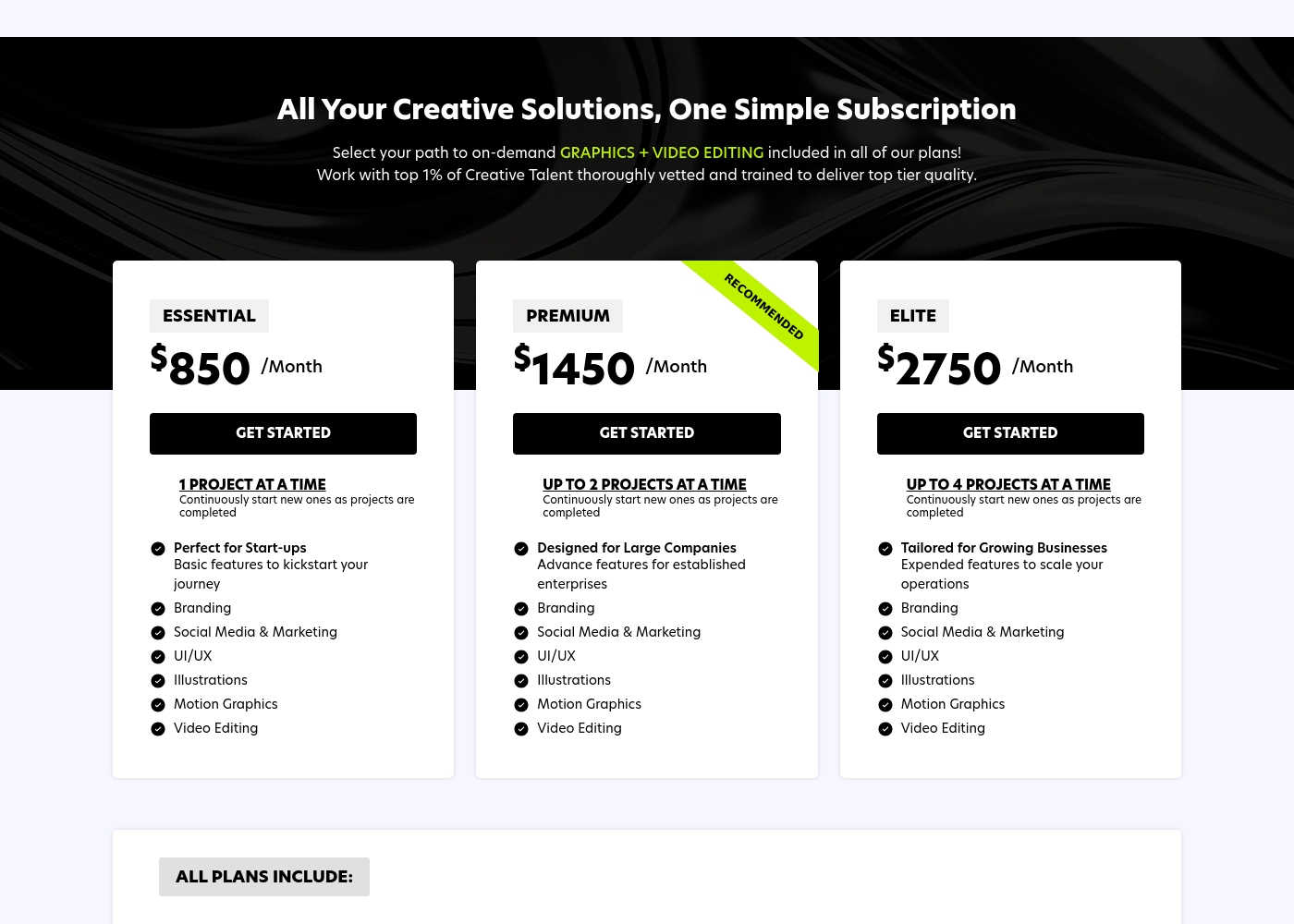
Graphics Zoo costs between $850 and $2,750 per month with three plans: Essential at $850/month, Premium at $1,450/month, and Elite at $2,750/month.
Selecting your plan is easy. You just look at your immediate creative needs and choose the right level of project support.
Essential
Price: $850 /Month Best For: Start-ups Other Features:
- 1 Project at a Time (Continuously start new ones as projects are completed)
- Branding, Social Media & Marketing
- UI/UX, Illustrations
- Motion Graphics, Video Editing
- 1 Project at a Time
- Perfect for Start-ups
- Branding
- Social Media & Marketing
- UI/UX
- Up to 2 Projects at a Time
- Designed for Large Companies
- Branding
- Social Media & Marketing
- UI/UX
- Up to 4 Projects at a Time
- Tailored for Growing Businesses
- Branding
- Social Media & Marketing
- UI/UX
Pricing Notes
- Design Pickle pricing is customized and scales based on required daily design hours (2H-12H).
- Graphics Zoo offers simple flat-rate monthly pricing based on 1, 2, or 4 concurrent projects.
- Both companies face criticism regarding their refusal to honor advertised free trials or guarantee refunds.
- Graphics Zoo plans are only listed with monthly billing, potentially lacking annual discounts.
- Always seek an official quote from Design Pickle, as final pricing is not public or transparent.
Pricing Head-to-Head
User Reviews
Trustpilot users rate Design Pickle 3.8/5.0, reflecting a split experience. Customers highly value the consistent 24-hour turnaround time and the platform's suitability for managing high-volume creative requests efficiently.
Positive feedback often highlights the ease of collaboration, professional communication, and the speed at which quality designs are delivered. Users consider it an essential solution for expanding their creative output.
Design Pickle is always consistent, delivering what we need weekly. The quick 24-hour turnaround time is a major plus. We can easily prioritize projects ourselves, which is critical for timely marketing execution.
Graphics Zoo presents a mixed public face on Trustpilot, earning an average 3.2 score from 39 reviews. Many clients praise the responsive communication and efficiency of their dedicated teams.
Users frequently highlight that the service provides necessary production capacity to handle accounts quickly, with specific mentions of project managers who are professional and helpful in generating creative ideas. Adding Slack integration seems to further enhance service speed and quality.
Daniel, my project manager, is really helpful at generating new design ideas. I always get a response within five minutes whenever I reach out. The company successfully gave my team the capacity we needed without sacrificing quality.
Our Verdict
Choosing between Design Pickle and Graphics Zoo depends on your primary creative goals. If you need reliable speed and high production volume of standard graphics, Design Pickle is the clear winner. Design Pickle's superpower is guaranteed speed, promising first drafts in under 24 hours consistently. You can accurately manage costs by scaling up to 12 daily design hours with Design Pickle. Graphics Zoo, conversely, focuses on broader capability and simple pricing. Graphics Zoo excels by including sophisticated video editing, motion graphics, and UI/UX design in all plans. You can efficiently manage up to four concurrent projects with Graphics Zoo’s Elite plan. The major deciding factor is customer trust and service reliability outside of speed. While Design Pickle handles volume well, Graphics Zoo faces concerning user reports about execution quality. If predictable flat pricing and advanced video are necessary, Graphics Zoo is an option. Use Design Pickle for maximum static output and reliability based on better reviews. Choose Graphics Zoo only if integrated video/UI/UX outweighs the higher risk of inconsistent quality.
Frequently Asked Questions
Which service is better for reliable design consistency: Design Pickle or Graphics Zoo?
Design Pickle has a far higher overall user rating of 4.1/5.0 for service reliability. Graphics Zoo holds a deeply concerning 3.2/5.0 Trustpilot score. While Design Pickle has quality complaints, Graphics Zoo’s reviews cite more serious failures in execution.
Which is more cost-transparent, Design Pickle or Graphics Zoo?
Graphics Zoo is completely transparent, offering three clear flat-rate plans up to $2,750 per month. Design Pickle uses a custom pricing matrix based on daily hours. You must contact sales for a specific quote from Design Pickle.
Does Graphics Zoo include video editing, unlike Design Pickle?
Yes, absolutely. Graphics Zoo includes video editing and motion graphics in every single subscription plan. Design Pickle requires purchasing specific add-on services for advanced creative output like video.
Which design service offers the fastest design turnaround time?
Design Pickle is the fastest, guaranteeing reliable average first drafts in 24 hours. Graphics Zoo focuses on concurrent projects (up to four at once) instead of guaranteed explicit speed. Use Design Pickle if time to draft is critical.
Can I get layered source files from both Design Pickle and Graphics Zoo?
Yes, Design Pickle explicitly states they deliver layered source files with all finalized projects. Graphics Zoo does not explicitly mention source file delivery in their publicly available material.
Who should choose Graphics Zoo over Design Pickle?
Choose Graphics Zoo if you primarily need integrated video, motion graphics, and UI/UX design services. Graphics Zoo is also better for businesses running 2-4 diverse projects simultaneously. Always weigh their predictable pricing against the service’s negative user reports.
Ready to Choose?
Both tools have their strengths. Choose based on your specific needs.