Cakemail vs Kit (formerly ConvertKit)
Cakemail and Kit (formerly ConvertKit) serve very different creators. Cakemail is built for developers needing deep product integration. Kit is designed for solo creators wanting simple automation and audience growth.
Best for: Software companies needing to embed email functionality, Developers building custom email workflows via API
Best for: Authors and writers building a reader community, Newsletter creators focused on subscriber growth
Specialized Email API for Product Integration.
We assessed Cakemail based on its defined market position: an email platform designed for deep product integration, offering embedded solutions and robust APIs. The pricing is accessible, featuring a permanent Free tier and low costs for smaller lists. Overall, this is a highly specialized tool best suited for developers or companies needing to bake email functionality directly into their existing software products.
Pros
- Permanent Free plan is available for continuous use and testing.
- Specific focus on embedded email capabilities and Email API access.
- Strong integration support via Zapier connections.
- Premium plan offers unlimited users and unlimited audiences.
Cons
- Pricing scales strictly based on total contact count.
- Monthly send limits are relatively conservative for paid tiers (e.g., 7,500 sends).
- Specialized focus on API/embedded use may limit appeal for general marketing needs.
- Lack of external user reviews makes reliability and support assessment difficult.
Creator-friendly, but check support.
We find Kit a capable and intuitive email marketing platform tailored specifically for creators, offering strong automation and a clean interface. Overall, it's a great starting point for growing an audience, though users should weigh the mixed customer support reviews and potential pricing scale against their needs.
Pros
- Intuitive, clean interface designed for creators and non-technical users.
- Powerful visual automations and sequences to nurture audiences.
- Generous free plan for up to 10,000 subscribers.
- Strong focus on deliverability and building owned audiences.
Cons
- Customer support responsiveness and quality receive frequent criticism.
- Pricing can become steep as subscriber counts increase significantly.
- Some users report unexpected account suspensions or deliverability issues.
- Advanced analytics and collaboration features are limited.
AboutCakemail
Cakemail is described fundamentally as an Email Marketing Platform. It is designed for businesses looking to enhance their existing offerings. This includes integrating options like embedded email, automation, or resale products directly into their services. It supports scaling companies by providing robust capabilities such as Email APIs and dedicated Professional Services. 💡
AboutKit (formerly ConvertKit)
Kit is an email marketing platform specifically for creators like authors, podcasters, YouTubers, and entrepreneurs. It's the hub for growing your email list, sending beautiful newsletters, and selling digital products—all while keeping the experience intuitive and straightforward. 💡
Highlights
Feature Comparison
Features Overview
We highlight the main differences and pick a winner for each feature.
Target Audience & Use Case
Cakemail is for developers building products. Kit is for creators building audiences.
Cakemail focuses on businesses needing to embed email marketing directly into their software. It's ideal for product teams using APIs to create customized email experiences. Kit is built for individual creators like authors, podcasters, and newsletter writers. It provides tools to grow an email list and sell digital products without technical skills. The key difference is Cakemail powers your product, while Kit powers your creator business. One is B2B infrastructure, the other is B2C growth.
Automation & Sequences
Kit's visual automations are powerful and unlimited. Cakemail's capabilities are less detailed.
Kit offers a full visual automation builder to create complex email sequences. Paid plans include unlimited automations and sequences for nurturing subscribers 24/7. Cakemail mentions 'marketing automation features' but provides less detail. The focus is more on API-driven custom workflows than a visual builder. Kit provides a clear, user-friendly path to automated marketing. Cakemail's automation is more developer-oriented and integrated into other systems.
Pricing & Value
Cakemail is cheaper for small lists. Kit's free plan supports more subscribers.
Cakemail's plans start at $0 for 500 contacts, then $9 and $14 per month. Pricing scales strictly by your contact count. Kit's free Newsletter plan supports up to 10,000 subscribers. Paid Creator and Pro plans start at $39 and $79 per month for 1,000 subscribers. For a list under 500, Cakemail is more affordable. For a larger list, Kit's free tier offers exceptional value. Paid plans become expensive on both as lists grow.
Ease of Use
Kit is praised for simplicity. Cakemail's interface is less documented.
Kit is consistently described as intuitive and easy to use, even for non-technical users. The learning curve is low for core email and automation tasks. Cakemail's ease of use isn't highlighted in the data. Its focus on APIs and embedded functions suggests a steeper curve for non-developers. For a solo creator wanting to start quickly, Kit is the clear choice. For a developer comfortable with code, Cakemail's complexity is expected.
Integrations
Kit has a large native app store. Cakemail relies on Zapier.
Kit offers over 100 native integrations through its App Store, including Shopify, Canva, and Circle. These sync data directly between platforms. Cakemail connects with your stack primarily via Zapier integrations. It also provides dedicated Email APIs for deep, custom connections. Kit offers more out-of-the-box connections for popular creator tools. Cakemail offers deeper, customizable integration for developers.
Customer Support
Kit offers 24/7 support but with mixed reviews. Cakemail's support is tiered.
Kit provides 24/7 email and chat support. The Pro plan includes priority support, but user reviews frequently mention slow responses and unhelpful agents. Cakemail offers 'premium support' only on its Premium plan. Details for support on Free and Growth plans are not stated. Kit makes support more accessible across plans, but quality is inconsistent. Cakemail gates support behind a higher payment tier.
Scalability
Kit scales with subscribers. Cakemail scales with contacts and API usage.
Kit's model scales with your active subscriber count. Pricing and features grow with your audience, with unlimited users on the Pro plan. Cakemail scales with total contacts and send limits. It offers unlimited users and audiences on the Premium plan and custom limits via Premium Plus. Both scale for their respective audiences. Kit is for audience growth, Cakemail for product integration and sending volume.
User Reviews & Reputation
Kit has public reviews with mixed feedback. Cakemail lacks external reviews.
Kit has public Trustpilot reviews. Users love its ease of use but criticize support and pricing as lists grow. Cakemail has no public user reviews listed on major platforms like Trustpilot or Capterra. This makes independent validation difficult. Kit's reputation is known but mixed. Cakemail's reputation is unverified, which is a risk for potential buyers.
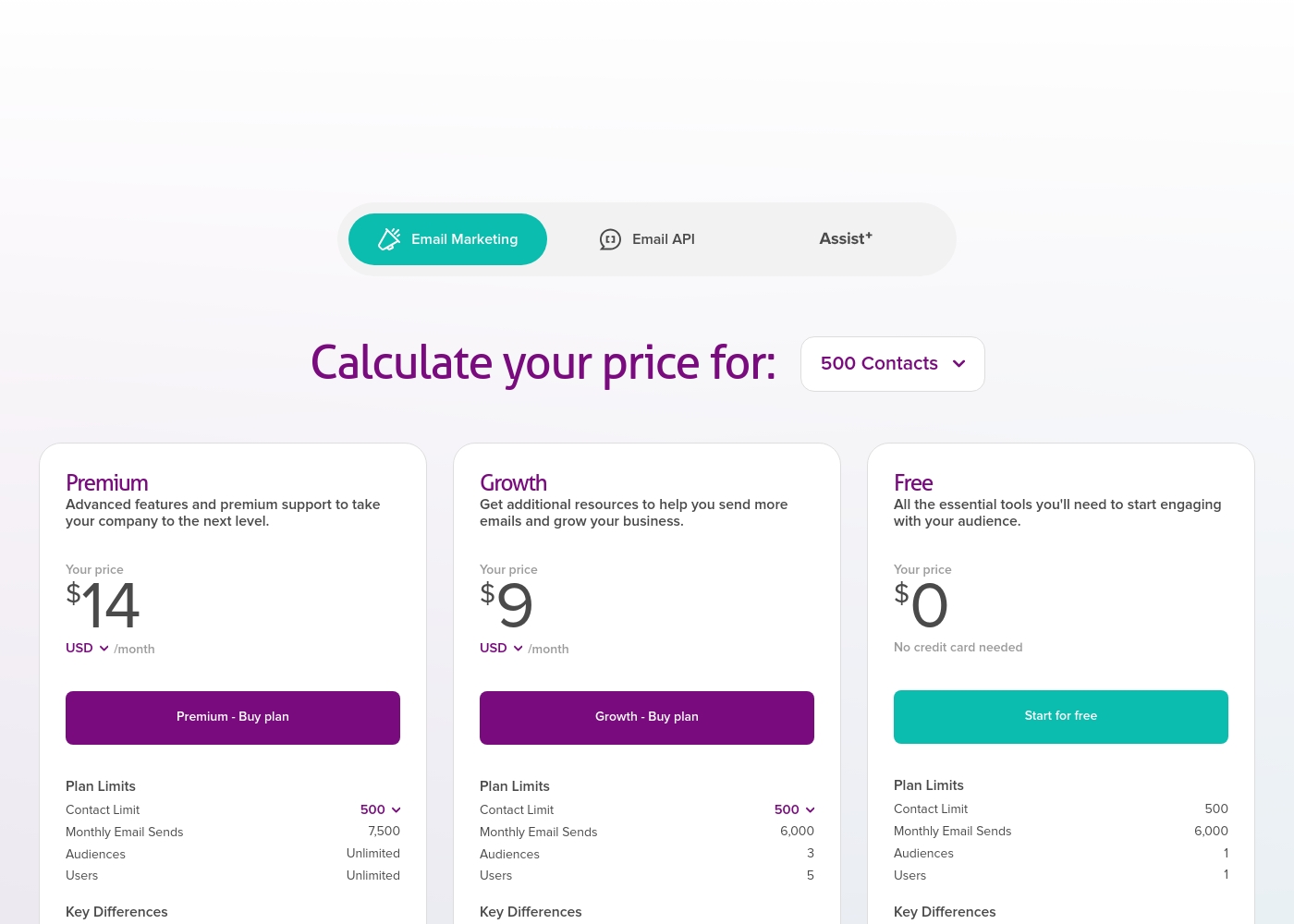
Cakemail costs between $0 and $14 per month for up to 500 contacts with three plans: Free at $0, Growth at $9, and Premium at $14.
The prices shown below are specifically for accounts managing up to 500 contacts. Prices will increase if you need higher contact limits or greater sending volumes.
Free
Price: $0 /month Best For: New businesses or teams just starting out with email marketing Other Features:
- No credit card required to sign up
- Allows 1 user and 1 audience
- 6,000 monthly email sends
- Advanced features and premium support
- Unlimited Audiences
- Unlimited Users
- Additional resources to grow your business
- 3 Audiences
- 5 Users
- Essential tools to start engaging with your audience
- 1 Audience
- 1 User
- No credit card needed
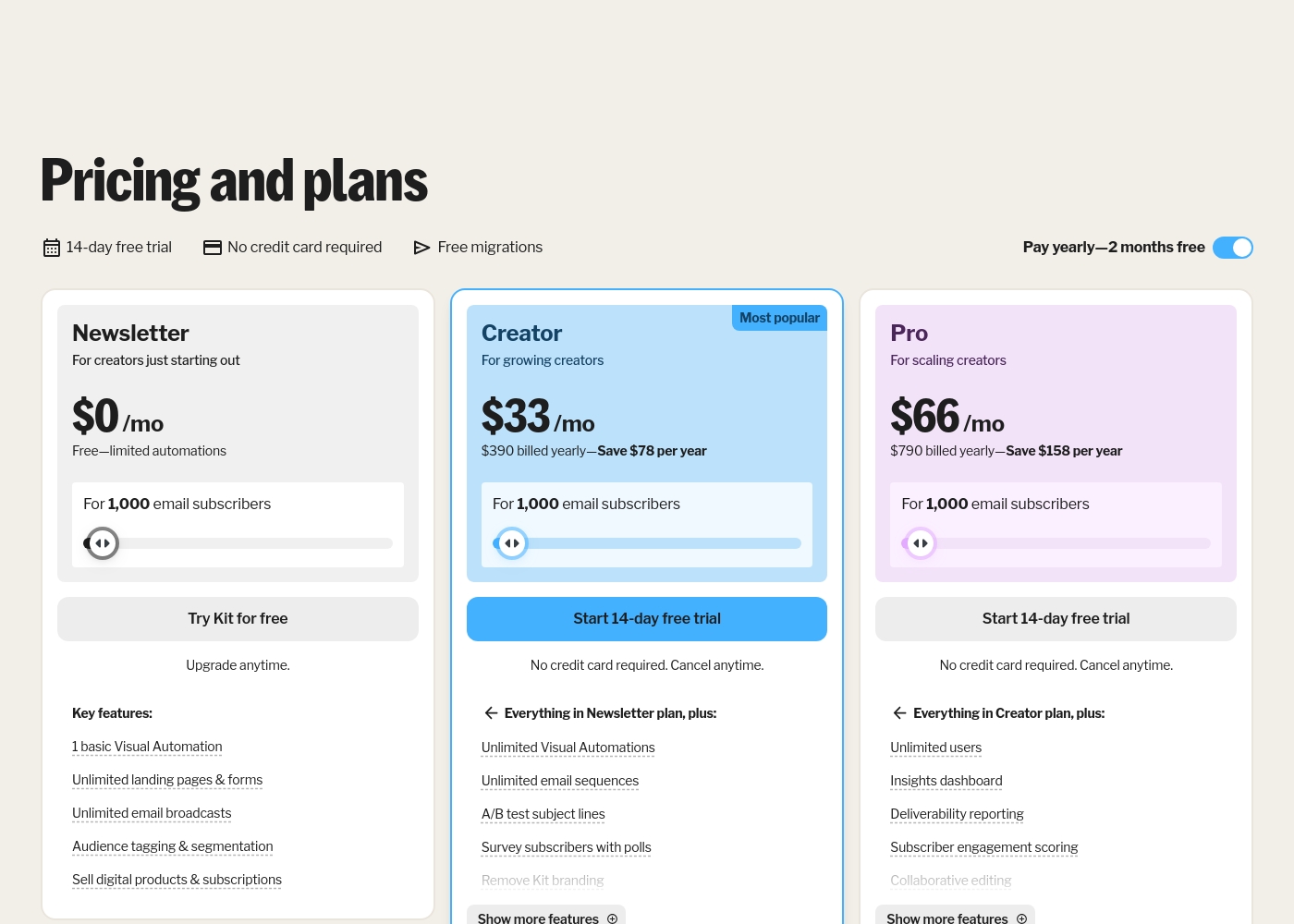
Kit (formerly ConvertKit) costs between $0 and $790 per year for 1,000 subscribers with 3 plans: Newsletter at $0, Creator at $390 billed yearly, and Pro at $790 billed yearly.
Take a look at the breakdown below to see which features fit your current creative goals.
Newsletter
Price: $0 per month Best For: New creators starting out Other Features: Unlimited landing pages, Audience tagging, Digital product sales, 1 basic Visual Automation
- 1 basic Visual Automation
- Unlimited landing pages & forms
- Unlimited email broadcasts
- Audience tagging & segmentation
- Sell digital products & subscriptions
- Everything in Newsletter plan
- Unlimited Visual Automations
- Unlimited email sequences
- A/B test subject lines
- Remove Kit branding
- Everything in Creator plan
- Unlimited users
- Insights dashboard
- Deliverability reporting
- Newsletter referral system
Pricing Notes
- Cakemail's pricing shown is for 500 contacts. Costs increase with more contacts.
- Kit's free Newsletter plan supports up to 10,000 subscribers, a much higher limit.
- Kit charges a 3.5% + $0.30 transaction fee on all digital product sales.
- Cakemail's paid plans have conservative monthly send limits (e.g., 6,000-7,500).
- Kit offers a 14-day free trial on paid plans without a credit card.
Pricing Head-to-Head
User Reviews
We currently do not have specific user feedback snippets available for Cakemail from Trustpilot or Capterra to establish recurring themes regarding user experience. Based solely on the product description, Cakemail positions itself as a platform focused on embedded email solutions for products and services, featuring robust Email APIs and Zapier integrations.
Their pricing structure is usage-based, scaling with contacts, offering a permanent Free plan alongside Growth ($9/month) and Premium ($14/month) tiers (for 500 contacts). While the tool aims to offer smarter targeting and professional services, we cannot provide concrete details on user satisfaction regarding ease of use, support responsiveness, or system reliability.
On Trustpilot, Kit (formerly ConvertKit) receives mixed feedback. Users frequently praise its ease of use, highlighting a simple, intuitive interface perfect for creators and beginners.
Many appreciate the automation features and clean design for emails and landing pages. However, a significant number of reviews cite poor customer support, with long response times and unhelpful agents.
ConvertKit is super easy to use. I love how simple it is to set up automations and sequences without any tech headaches. It's perfect for my newsletter.
Our Verdict
For most individual creators, Kit (formerly ConvertKit) is the clear winner. It's built specifically to help you grow an audience and sell products with simple, powerful tools. Cakemail's superpower is deep integration. It's designed for developers who need to embed email marketing directly into their own software product using APIs and automation. Kit's superpower is creator-focused simplicity. It provides unlimited landing pages, automations, and a free plan supporting up to 10,000 subscribers to help you build and own your audience. The deciding factor is your goal. Choose Cakemail if you're a product company building email into your service. Choose Kit if you're a creator building a direct relationship with your fans. Go with Kit if you write books, host podcasts, or sell digital courses. Go with Cakemail if you're a developer needing robust, embeddable email infrastructure for your application.
Frequently Asked Questions
Which is better for small teams: Cakemail or Kit (formerly ConvertKit)?
Kit is better for small creative teams or solo creators. Its interface is simpler and designed for non-technical users. Cakemail is better for small product or development teams needing API access.
Does Cakemail have automation like Kit (formerly ConvertKit)?
Cakemail offers marketing automation features and Zapier integrations. Kit provides more advanced, visual automation builders with unlimited sequences on paid plans. Kit's automation is more robust and user-friendly.
Is Kit (formerly ConvertKit) worth the extra cost over Cakemail?
It depends on your use case. For creators, Kit's free 10,000-subscriber plan and built-in sales tools offer great value. For developers needing API integration, Cakemail's lower cost and specialized features may be worth it.
Can I migrate from Cakemail to Kit (formerly ConvertKit) easily?
Kit offers free migrations from other email platforms, including help rebuilding forms and automations. You should confirm the specific details with their support team for a smooth transition.
Which platform has better deliverability, Cakemail or Kit (formerly ConvertKit)?
Kit explicitly highlights a 99.8% email delivery rate and tools to improve it on the Pro plan. Cakemail does not provide specific deliverability statistics in the provided data.
Can I sell digital products with Cakemail like I can with Kit (formerly ConvertKit)?
Kit has built-in features to sell digital products, memberships, and subscriptions directly. Cakemail's product description does not mention e-commerce or digital product sales capabilities.
Ready to Choose?
Both tools have their strengths. Choose based on your specific needs.