Breakdance vs Spectra Pro
This comparison pits the dedicated visual builder Breakdance against the native block toolkit Spectra Pro. Breakdance offers a complete visual editing experience focused on WooCommerce speed. Spectra Pro integrates deeply into Gutenberg, leveraging clean code for extreme speed scores. Choosing between Breakdance and Spectra Pro depends on your preferred WordPress workflow.
Best for: Agencies needing to migrate many sites from Elementor quickly, WooCommerce businesses requiring a fast, visual storefront editor
Best for: Users committed solely to the native WordPress block editor (Gutenberg), Website owners needing verified 100% Core Web Vitals scores for maximum SEO performance
Top-Tier, Blazing Fast WordPress Visual Builder.
Breakdance is an exceptional visual builder that provides superior speed, performance, and total creative control for WordPress users. We confirm its reputation for seamlessly handling complex dynamic data and building powerful WooCommerce stores efficiently. Overall, this builder stands out as a top-tier alternative to popular rivals, offering immense power wrapped in an easy-to-use interface.
Pros
- Achieves superior performance, speed, and SEO benefits.
- The intuitive design is incredibly easy for new users to learn quickly.
- Offers total creative control and limitless design freedom.
- Includes full templating power for professional WooCommerce stores.
Cons
- Customer support inconsistently addresses major, long-standing technical bugs.
- Reports of critical bug resolution taking months without developer communication.
- Some specialized support answers are reportedly unhelpful or dismissive.
Pros
Cons
AboutBreakdance
Breakdance is the best visual website builder available for WordPress. It's built to give you total creative control right out of the box. The platform emphasizes superior performance and SEO, ensuring incredibly fast load times. If you have data in the WordPress database, Breakdance handles it easily with its powerful dynamic data features. It truly transforms your WordPress editing experience. 💡
AboutSpectra Pro
Spectra Pro is a premium web design toolkit that works seamlessly inside the native WordPress editor. It's designed for website creators—from beginners to professionals—who want to build stunning, high-performance sites without complex code dependencies. It delivers a suite of powerful blocks, templates, and smart design tools to elevate your workflow. 💡
Highlights
Feature Comparison
Features Overview
We highlight the main differences and pick a winner for each feature.
Architecture & Speed
Spectra Pro targets certified 100% Core Web Vitals; Breakdance focuses on general speed.
Spectra Pro features a just-in-time compiler for dynamic asset loading, helping sites achieve max speed. Spectra Pro is engineered specifically to target 100% Core Web Vitals scores in performance tests. Breakdance is also built for speed and performance, emphasizing fast, smooth WooCommerce visual edits. Breakdance promises superior performance but doesn't guarantee the 100% Web Vitals score like Spectra Pro. If strict technical performance metrics are your priority, Spectra Pro has a clear architectural advantage. Breakdance prioritizes the speed of the editing workflow above all else.
E-commerce Focus
Breakdance is a dedicated WooCommerce builder; Spectra Pro drives conversions with specific tools.
Breakdance is designed from the ground up to facilitate fast, visual WooCommerce store builds. It provides a massive 145 elements tailor-made for design flexibility. Spectra Pro integrates extensively with WooCommerce and relevant plugins like LearnDash. Spectra Pro focuses on maximizing sales with conversion tools like the Countdown Timer and exit-intent popups. Breakdance focuses more on the actual layout and visual styling of the store pages. If you live in WooCommerce, Breakdance offers a more dedicated environment.
Editing Environment
Breakdance uses a custom visual builder; Spectra Pro enhances the native Gutenberg editor.
Breakdance offers a dedicated, modern visual editing interface, useful for users leaving tools like Elementor. The Breakdance interface is easy to learn and separate from the standard WordPress back end. Spectra Pro operates completely within the native WordPress block editor environment. It unlocks advanced functionality directly in Gutenberg blocks. Users deeply comfortable with the standard WordPress interface will prefer Spectra Pro’s seamless integration. Breakdance users get a richer set of dedicated visual controls in its custom editor.
AI Functionality
Spectra Pro includes its AI tool; Breakdance requires a separate purchase for AI features.
Spectra Pro includes 'Spectra AI' in its premium plans for generating copy and custom page designs. Spectra AI acts as a smart assistant, helping prototype ideas quickly and efficiently. Breakdance offers AI-assisted content tools to quickly craft pages within the editor. The AI tools in Breakdance are a separate purchase, not included in the core license price. Spectra Pro delivers a more bundled and feature-complete AI offering out of the box.
Custom Development
Breakdance offers a built-in IDE; Spectra Pro focuses on block expansion.
Breakdance includes Element Studio, described as the first built-in element development IDE for WordPress. This dramatically speeds up custom component creation within Breakdance. Spectra Pro focuses on stability and expanding existing native blocks but lacks a dedicated custom development environment. Breakdance prioritizes deep developer flexibility for bespoke projects and unique elements. If you require truly custom builder elements, Element Studio in Breakdance is a critical tool.
Pricing Flexibility
Spectra Pro offers lifetime access and bundles; Breakdance provides a 60-day refund window.
Spectra Pro features annual subscriptions and attractive one-time lifetime deal options. Spectra Pro's higher tiers bundle premium software like Astra Pro and SureFeedback, increasing overall value. Breakdance uses a straight annual subscription model and does not currently offer lifetime deals. Breakdance backs its commitment with a very generous 60-day money-back guarantee for user peace of mind. Spectra Pro provides robust value if you commit long-term or need the bundled products.
Breakdance costs between $0 and $799.99 per year with four plans: Free at $0.00, Pro (Inferred) at $99.99, an Unnamed tier at $199.99, and Agency at $799.99.
Here are the available annual plans for Breakdance Website Builder.
Free
Price: $0.00 / year Websites Supported: Unlimited Websites Best For: Basic features to build a WordPress website Refund Policy: 60-day money-back guarantee applies to paid plans only, but the Free plan costs nothing. Other Features:
- Access to the core Breakdance Website Builder plugin
- Functionality remains active indefinitely
- Basic website building features
- Unlimited Websites
- All features in Breakdance Website Builder
- Unlimited Websites
- Unlimited Access to Design Library
- Premium Support
- Unlimited Websites
- Saves $200/year (Implied original price $399.99/year)
- Unlimited Websites
- Agency-specific offering for teams and resellers
- Access to affiliate program

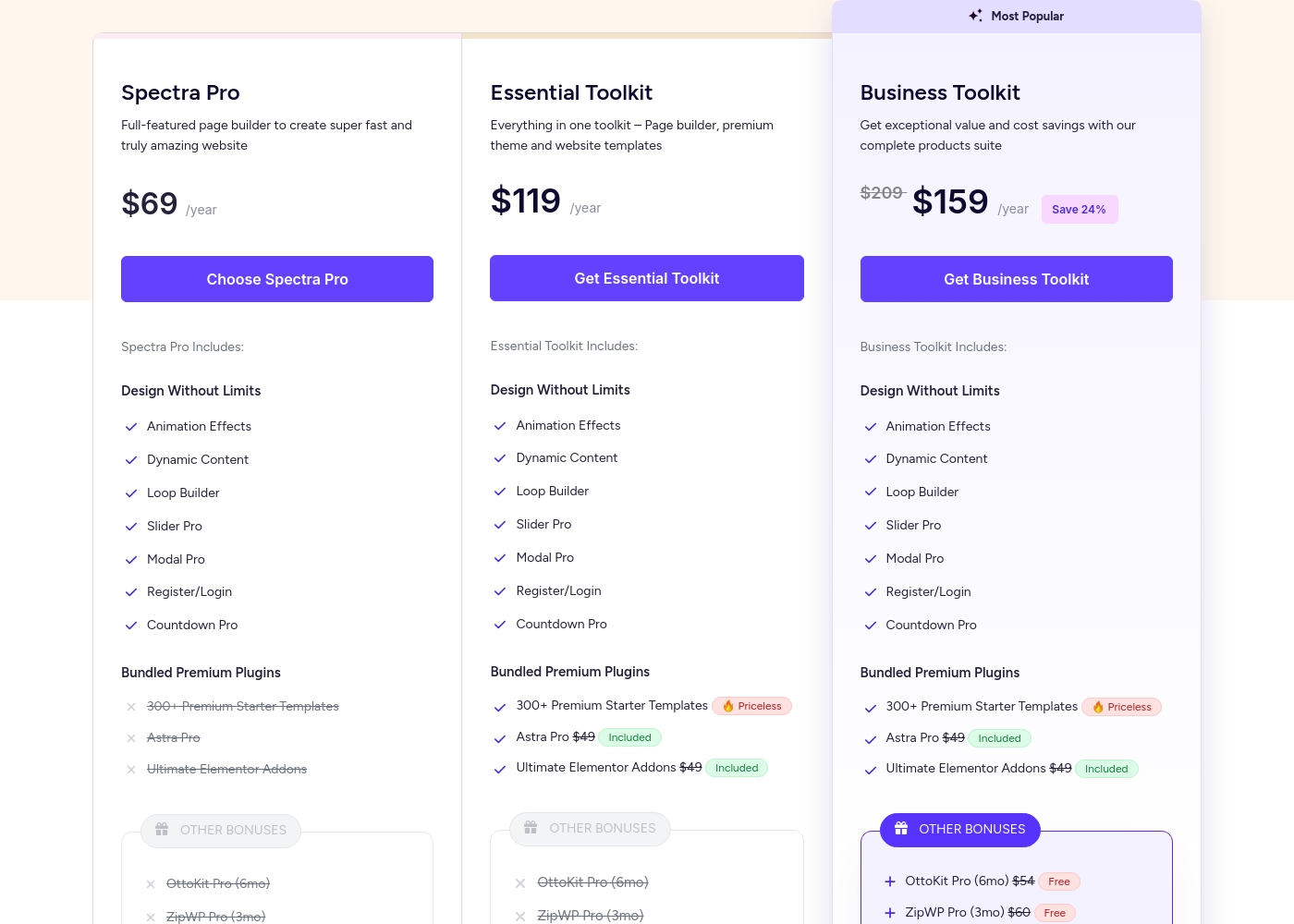
Spectra Pro pricing: Spectra Pro offers flexible subscription plans starting at $69/year for use on up to 3 websites. Users can choose between annual subscriptions or one-time lifetime payments across three distinct product tiers: Spectra Pro, Essential Toolkit, and Business Toolkit.
All plans are backed by a 14-day 100% money-back guarantee for peace of mind. Note that free version of Spectra is also available for those who want to try the basics first before upgrading to a paid plan.
Check out the current pricing below to find the best fit for your needs and budget. For those looking for the best value, the Business Toolkit includes a comprehensive suite of tools for web agencies and professionals.
Pricing Notes
- Spectra Pro offers attractive one-time lifetime payment options, which Breakdance does not.
- The renewal price for Spectra Pro annual plans is higher than the initial introductory rate.
- Breakdance offers a consumer-friendly 60-day money-back guarantee, while Spectra Pro provides 14 days.
- The AI content feature is a separate purchase for Breakdance, but it is included in Spectra Pro plans.
- Spectra Pro's higher tiers bundle valuable products like Astra Pro and SureFeedback, maximizing value.
Pricing Head-to-Head
User Reviews
Breakdance users are overwhelmingly satisfied, frequently calling it a game changer and the best page builder available. Reviewers consistently praise its superior speed, intuitive interface, and immense customization possibilities.
This allows for quick site construction, especially when building complex and powerful WooCommerce platforms. Users report that the support team is generally quick to respond, helpful, and friendly; they sometimes go above and beyond to diagnose and fix issues not related to Breakdance itself.
Breakdance has been a game changer for me. It finds a rare balance: fun and easy to use, yet packing amazing advanced features. I especially love the ACF integration. Support has been second to none—helpful and friendly.
Our Verdict
This comparison forces a choice between two high-speed WordPress philosophies. If pure performance within the native WordPress editor is key, Spectra Pro is the superior choice. If you require a dedicated visual editor tailored specifically for e-commerce, choose Breakdance. Breakdance’s major superpower is its focused support for WooCommerce store development. Breakdance offers 145 robust elements and the Element Studio IDE for creating custom components. If you need fine-grained control and a smooth visual workflow, Breakdance delivers better. Spectra Pro’s strength lies in its relentless pursuit of technical performance and value. It guarantees 100% Core Web Vitals scores and uses a unique JIT compiler for stability. Spectra Pro also offers excellent lifetime deals and bundles other useful tools like Astra Pro. What truly differentiates them is the editor: Breakdance is a full, external visual builder. Spectra Pro simply enhances the standard Gutenberg block editor. This preference should be your deciding factor when evaluating Breakdance versus Spectra Pro. For heavy WooCommerce users needing visual flexibility and custom code, Breakdance is the winner. For SEO fanatics and Gutenberg loyalists seeking a lifetime deal and max speed, Spectra Pro is the best fit.
Frequently Asked Questions
Which is better for e-commerce: Breakdance or Spectra Pro?
Breakdance has a greater focus on e-commerce, offering strong visual tools for fast WooCommerce builds. Spectra Pro offers conversion helpers like specific countdown timers and targeted popups. If you are building the store, use Breakdance. If you are marketing aggressively, use Spectra Pro.
Does Breakdance offer a lifetime license like Spectra Pro?
No, Breakdance currently uses an annual subscription model with a 60-day money-back guarantee. Spectra Pro is unique in offering compelling lifetime deal options across all its toolkit tiers. This makes Spectra Pro better for long-term, one-time investment.
Which tool focuses more on Core Web Vitals: Breakdance or Spectra Pro?
Spectra Pro makes an explicit claim to achieve 100% scores in Core Web Vitals due to its clean code. Breakdance is highly performant but does not guarantee those perfect scores. Spectra Pro is architecturally engineered for maximum speed.
Do I need the Gutenberg editor to use Breakdance or Spectra Pro?
Spectra Pro requires the Gutenberg editor as it is built to enhance the native block system. Breakdance is a standalone visual builder and does not rely on Gutenberg for its primary workflow. Breakdance gives you a custom visual interface instead.
Is the AI feature included in the core price for Breakdance or Spectra Pro?
Spectra AI is included in the premium plans for Spectra Pro to generate copy and templates. Breakdance AI-assisted content is a separate purchase, required on top of the main Breakdance license. Spectra Pro offers better value for integrated AI.
Which tool offers better support for custom component creation?
Breakdance is superior here because it includes Element Studio, a built-in development IDE. This feature allows technical users to build custom elements directly. Spectra Pro focuses on expanding its block library, not custom component development.
Ready to Choose?
Both tools have their strengths. Choose based on your specific needs.