Bark vs Hoverwatch
Bark and Hoverwatch offer monitoring, but they have fundamentally different approaches. Bark provides proactive AI safety alerts and helps guide conversations with your kids. Hoverwatch focuses entirely on discreet, invisible logging of basic device activity. Your choice is between transparency-focused safety and absolute stealth.
Best for: Families seeking proactive safety and open dialogue with children, Households requiring monitoring across 5+ devices (unlimited coverage)
Best for: Users requiring completely invisible monitoring (stealth mode), Small-scale tracking (1-5 devices) focused on Android logging
Comprehensive AI Safety For Modern Families
We find Bark offers an essential, modern solution for digital parenting, leveraging advanced AI to monitor threats without excessive surveillance. The platform provides comprehensive coverage across various devices and social media platforms, including tamper-proof device options. Overall, Bark delivers robust protection and specific, actionable guidance for handling complex online safety issues.
Pros
- AI monitors 30+ social media platforms for severe issues like self-harm and bullying.
- System focuses only on potential threats, preserving a child's general privacy.
- Comprehensive controls cover screen time management, app blocking, and GPS location tracking.
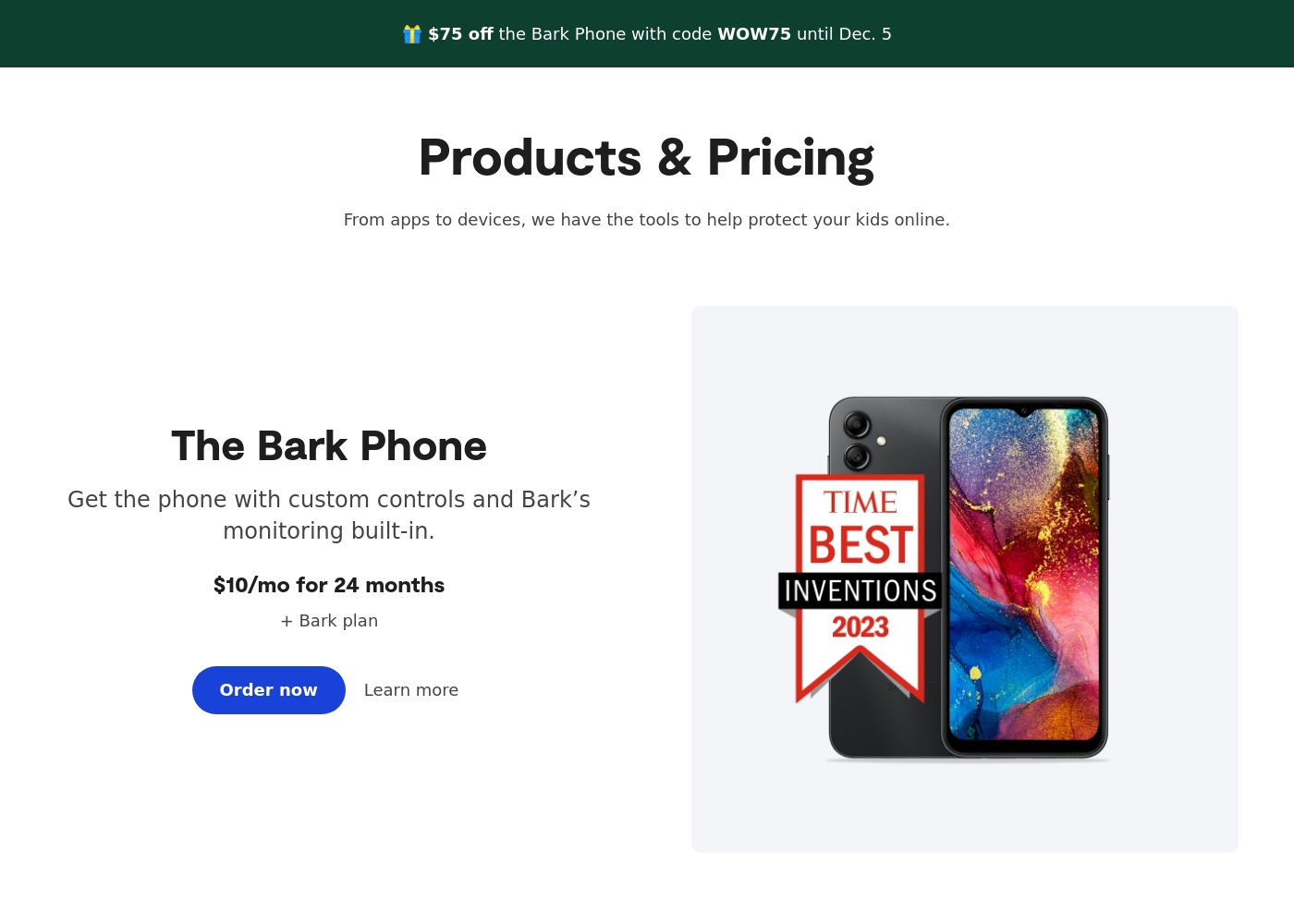
- Specialized options like the Bark Phone offer tamper-proof, built-in controls for a first device.
Cons
- Users have noted some complexity or inconsistency with the mobile app's user interface.
- The varied product line (App, Phone, Watch, Home) creates a complex overall pricing structure.
- The mandatory free trial registration requires a credit card and auto-enrolls into a paid subscription.
Pros
Cons
AboutBark
Bark offers a comprehensive suite of digital safety tools designed for modern families. The system provides monitoring and parental controls across various device types, including phones, tablets, and home internet networks. Whether you need an optimized safety phone or just the software for existing devices, Bark offers solutions tailored to your needs. Their robust systems actively scan texts, emails, web browsers, and over 30 social media apps for concerning content. They have already covered 7.4 million children, indicating a strong commitment to digital protection. ✅
AboutHoverwatch
Hoverwatch is a monitoring application for Android devices. 💡 It’s designed for parents who want to ensure their children’s safety, and for employers managing company devices. The software runs quietly in the background, tracking activity without disrupting the user. It works by recording data from the device itself.
Highlights
Feature Comparison
Features Overview
We highlight the main differences and pick a winner for each feature.
AI vs. Stealth Monitoring
Bark provides dynamic AI safety alerts; Hoverwatch prioritizes completely invisible operation.
Bark uses powerful AI to scan over 30 social media platforms for dangerous content. It delivers personalized reports and expert recommendations with every alert. This approach is designed to trigger conversations and proactive parenting. Hoverwatch is explicitly built to stay completely invisible on the device. It focuses on discreetly logging calls, texts, and location data quietly. Hoverwatch’s strength is securing raw information without alerting the user. If you want smart analysis and proactive intervention, Bark is required. If absolute secrecy and basic data collection are the only goals, Hoverwatch is the choice. Bark helps you monitor dangers like cyberbullying; Hoverwatch is for quiet, raw data collection.
Device & User Limits
Bark covers entire families affordably; Hoverwatch sets strict per-device caps.
A single Bark Premium subscription covers every child and device in your family. This includes the Bark App, Bark Phone, and Bark Home products seamlessly. It is extremely cost-effective for households with multiple kids or various devices. Hoverwatch plans are limited to specific device counts, ranging from one up to 25 devices maximum. You must purchase a higher-tiered plan to track additional devices. This makes Bark inherently more scalable for large families or growing households. Hoverwatch charges a premium to monitor more than five devices in total. Bark's unlimited coverage provides much better value for multi-child households using many different connected devices.
Screen Time & Controls
Bark excels at management controls; Hoverwatch offers zero user limitation capabilities.
Bark offers robust screen time management controls and customizable schedules for app use. Parents can actively pause the internet or set specific usage windows easily. Bark also features a comprehensive web filter to block harmful content categories and specific sites. Hoverwatch is solely a monitoring and logging tool by design. It does not provide any functionality for setting screen time limits or content filtering. Its purpose is visibility, not active management or control. If active device management is a core requirement, Bark is the clear winner. Hoverwatch users must use third-party tools for filtering needs. Bark ensures healthy digital boundaries through technology; Hoverwatch only provides data on unhealthy usage.
Platform Scope
Bark provides universal coverage; Hoverwatch emphasizes Android, PC, and Mac.
Bark supports comprehensive monitoring across Android, iOS, Chromebooks, and computers. It integrates with dedicated hardware like the Bark Phone and Watch for added security. Bark provides strong cross-platform protection for modern families. Hoverwatch focuses heavily on Android logging capabilities. It also supports monitoring for Windows PC and Mac computers. However, Hoverwatch does not advertise strong, comprehensive iOS integration or support. Bark covers every modern platform a child might use, including gaming consoles via Bark Home. Hoverwatch is better suited for PC use cases alongside Android logging. For seamless protection across mixed Apple and Android homes, Bark offers broader, unified platform depth.
Key Data Collection
Bark analyzes content deeply; Hoverwatch delivers raw logs and unique photos.
Bark analyzes the context of conversations and media attachments using AI categorization. It alerts you to risks in 29+ categories, like depression or drug use. Bark focuses on the meaning behind the activity. Hoverwatch provides raw data logs of texts, calls, internet history, and calendar entries. Crucially, Hoverwatch captures front-camera photos every time the target device screen is unlocked. This unique photo feature gives Hoverwatch an edge in contextual tracking and proving who is using the device. Bark focuses less on raw privacy invasion and more on actionable safety alerts. If you need verification of who unlocked the phone, Hoverwatch’s camera feature is invaluable, while Bark offers smarter content analysis.
Bark costs between $49 and $99 per year, offering two main app subscription plans: Bark Jr at $49/year and Bark Premium at $99/year. Bark also offers devices like the Bark Watch and Bark Phone in device installment plans.
You can protect your family with Bark's powerful monitoring and parental controls through several options tailored to your needs. Note that the prices listed below for the App plans reflect the software subscription cost only.
Bark Jr
Price: $5/month or $49/year Websites Supported: Unlimited devices & accounts Best For: Families focused on basic control and location tracking Other Features:
- Gain control over screen time
- Block unwanted websites and apps
- Filter inappropriate content
- Track your child's whereabouts with live GPS
- Gain control over screen time
- Block unwanted websites and apps
- Filter inappropriate content
- Track your child's whereabouts with live GPS, location alerts, and check-in features
- Covers every child and device in the family
- Monitor and receive alerts for social media, phones, tablets, and computers
- Manage screen time
- Block specific websites and apps
- Track location
- Alerts for potential dangers (Parent’s top choice for comprehensive coverage)
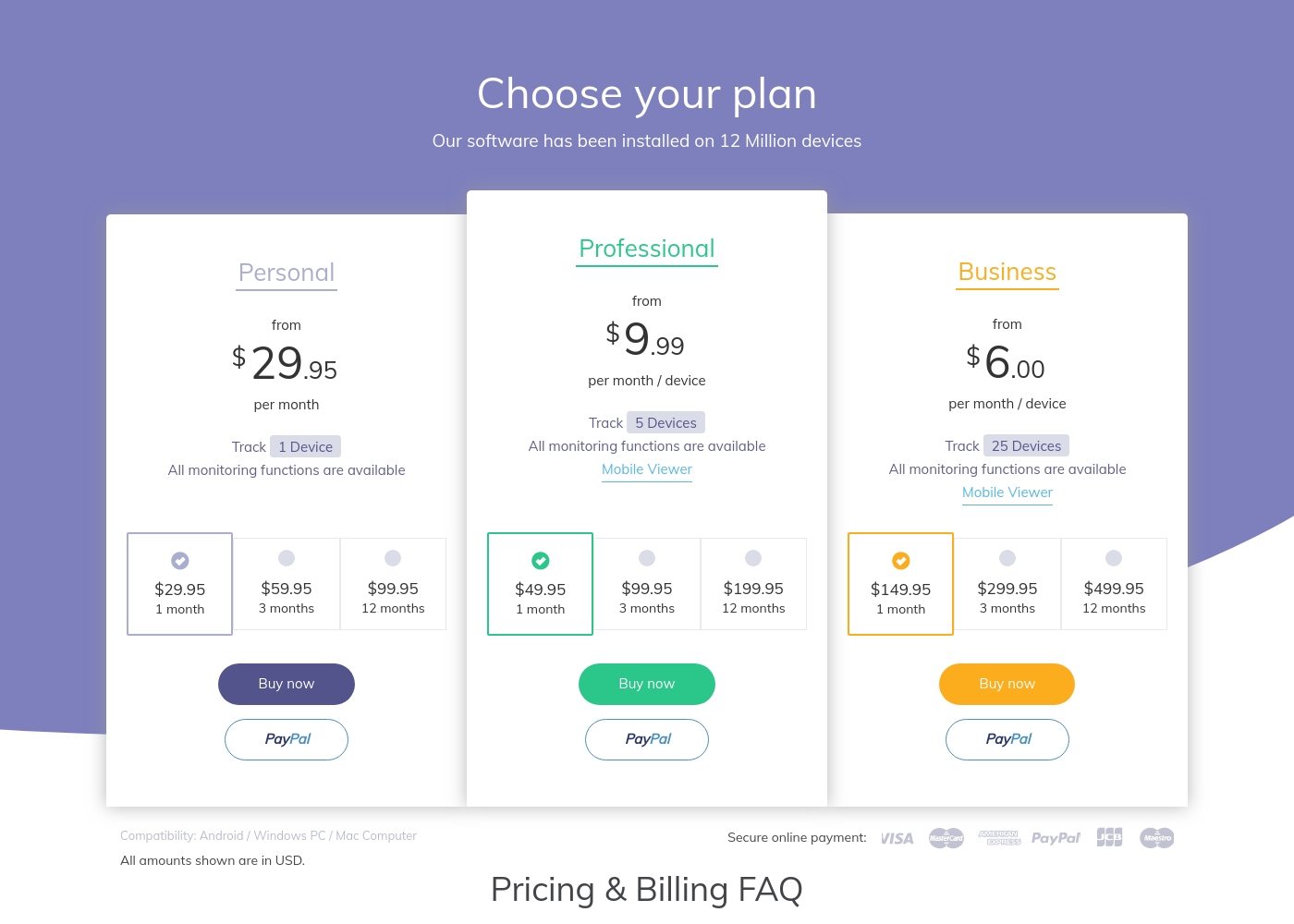
Hoverwatch pricing: Plans from $0/month Plans range: $0–$499.95/month Billing options: Monthly subscription
Pricing Notes
- Bark offers a 7-day free trial on both its Premium and Jr plans.
- Hoverwatch pricing is tiered by device count (1, 5, or 25 devices).
- Bark provides excellent value for large families as one subscription covers unlimited children/devices (non-hardware plans).
- Hoverwatch's lack of confirmed free trial requires immediate commitment to testing the tool.
- Bark provides cheaper annual rates, while Hoverwatch appears primarily billed on a 30-day monthly cycle.
Pricing Head-to-Head
User Reviews
Bark receives generally positive feedback, especially concerning its effectiveness in digital safety. Users frequently praise the AI monitoring system, noting that it provides helpful alerts only when concerning content is detected.
This strikes a crucial balance between essential protection and maintaining a child's privacy. Many families feel safer using the service, often highlighting the reliability of location tracking and comprehensive screen time scheduling features.
The Bark Phone is excellent security. It’s better than the parental controls on a standard iPhone. Bark has truly saved my teenager’s life three or four times by alerting us to severe dangers. You get to monitor everything that matters, which provides essential peace of mind.
Our Verdict
Choosing between Bark and Hoverwatch requires deciding between transparent safety and absolute invisibility. If your goal is proactive parenting, Bark is the overwhelming winner for most modern families. Hoverwatch is only suited for very specific, discreet surveillance needs. Bark’s superpower is its deep, AI-powered safety across 30+ communication platforms. Bark alerts prioritize conversations, giving parents expert guidance with every potential threat spotted. Bark manages screen time and blocks specific content across unlimited devices effortlessly. Hoverwatch excels at extreme stealth, performing entirely invisible monitoring on Android devices. It logs crucial raw data like calls, texts, and location history quietly. Hoverwatch even captures unique front-camera photos when the device screen is unlocked. The critical deciding factor is control versus logging capability. Choose Bark if you value content filtering, proactive AI analysis, and family-wide scalability. Pick Hoverwatch if absolute visual invisibility is non-negotiable for your monitoring. For comprehensive family safety and promoting healthy digital habits, Bark offers a superior, feature-rich ecosystem. Hoverwatch remains a niche tool, ideal only when discretion trumps deep content analysis and robust protective controls.
Frequently Asked Questions
Is Bark or Hoverwatch better for monitoring multiple children?
Bark is significantly better for multiple children or many family devices. Bark’s subscription covers every child and device in the household. Hoverwatch plans strictly limit the number of devices you can track.
Does Hoverwatch offer screen time controls like Bark?
No, Hoverwatch is purely a logging tool and does not offer any screen time controls. Bark provides robust schedules, filtering, and the ability to pause the internet directly. If you need control, choose Bark.
Which software is completely invisible on the target device?
Hoverwatch is built specifically to remain completely invisible on the monitored Android device. Bark devices and apps operate with more transparency to enable alerts and conversation guidance.
Does Bark offer front-facing camera photo capture functionality?
No, Bark focuses on content analysis and safety alerts, not capturing secret photos. Hoverwatch is designed to capture a front-camera photo every time the target device unlocks.
Which tool provides monitoring for iOS devices?
Bark provides comprehensive iOS monitoring support through its app and desktop pairing utility. Hoverwatch's primary focus is on Android devices, Windows PC, and Mac.
Is the pricing for Bark or Hoverwatch more complex?
Hoverwatch’s pricing complexity comes from tiered limits based on device count (1, 5, 25). Bark offers simple tiers based on features (Jr vs. Premium) covering unlimited devices.
Ready to Choose?
Both tools have their strengths. Choose based on your specific needs.