Sapling

Sapling

Verify whether text is AI-generated quickly and accurately.

#5 dans AI Detector
2 阅读时间 · 更新时间 10/5/2025
Sapling首页截图

At a glance

Quick overview for Sapling: rating, pricing summary, key features, and highlights.

Ciroapp 评论

2.9
Powerful Writing Assistant, Unreliable Detector.

We found Sapling offers powerful tools for improving grammar and making written text more concise, features that users often praise above competitors. Overall, the reported serious issues regarding the AI content detector's high false positive rate significantly undermine confidence in its primary specialized function.

优点

  • Pro:Offers significant savings with an annual discounted Pro plan ($12/month).
  • Pro:Writing suggestions frequently cited as superior to Grammarly for corrections.
  • Pro:High claimed detection accuracy (97%) for longer AI-generated texts.
  • Pro:Identifies and highlights sentence segments indicative of simplistic phrasing.

缺点

  • Con:AI detector frequently reports significant false positives on human-written content.
  • Con:Citations of rigid or inconsistent detection results.
  • Con:Reports of high memory usage specifically for the browser extension.
  • Con:Interface described by some users as clunky.
免费试用
Yes — 30 天
范围: $0–$25/monthFree plan, Free trial, Monthly subscription, Yearly subscription, Per seat pricing
This section is a summary. Detailed sections about features, use cases, pricing, and reviews follow below.

Sapling评论、价格、功能、优缺点

It's hard to tell if content is truly human-written or generated by AI models like ChatGPT. When you encounter inaccurate facts or bland prose, you need clarity. Sapling helps you resolve the "Is this AI-generated?" question, giving reviewers, educators, and SEO professionals confidence.

Sapling 是什么?

The Sapling AI Content Detector is a powerful tool designed to check the probability that text was written by models such as ChatGPT or Gemini. It uses a specialized machine learning system—a Transformer—to analyze the input. This system specifically estimates the probability that each word or token is machine-generated. 💡

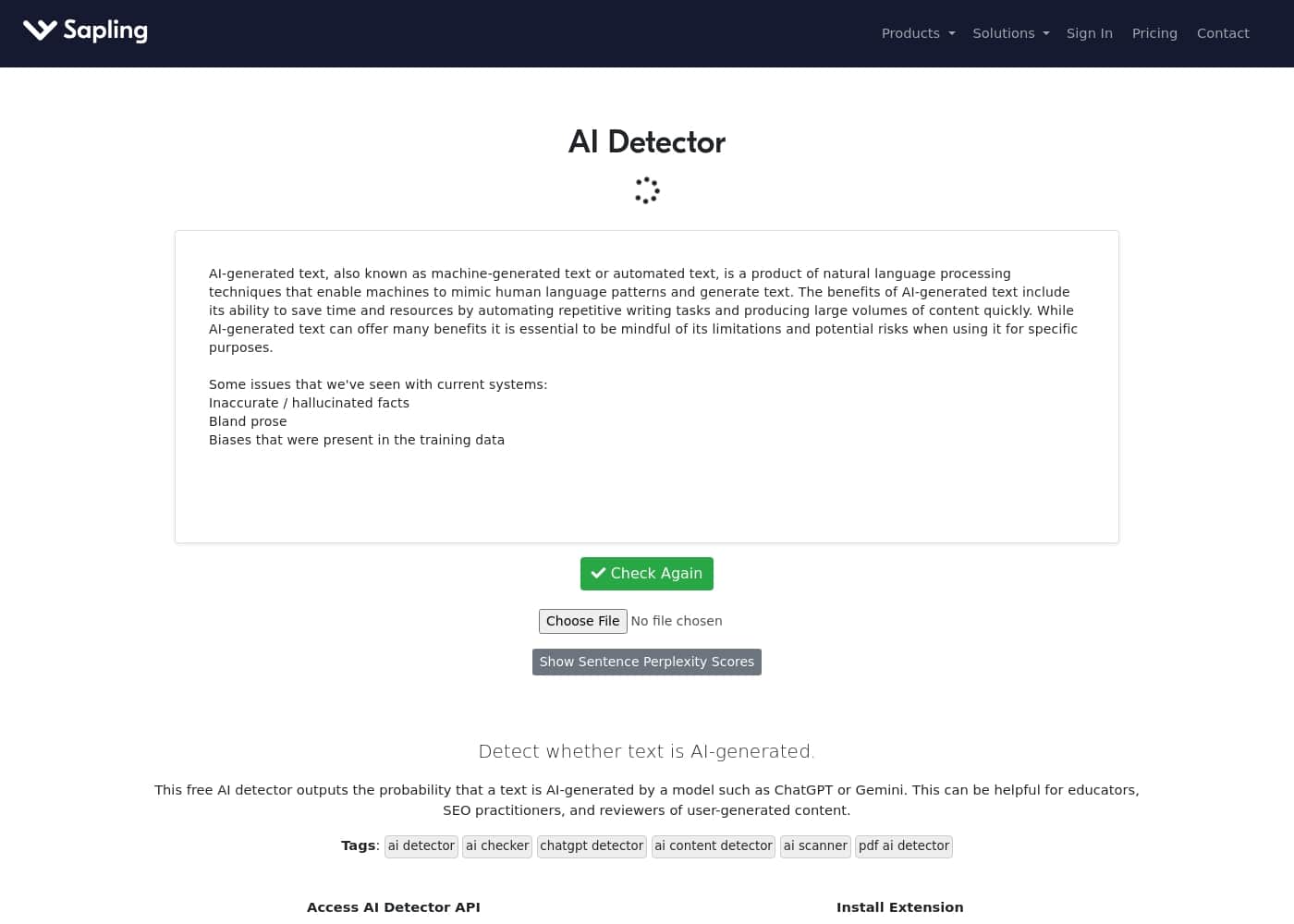
This utility is especially useful for educators concerned about learning integrity, or for practitioners reviewing large volumes of synthetic content. You're guided by visual results, seeing both the overall text score and highlighted portions. The detector also flags individual sentences with low perplexity, helping you catch simplistic or cliché phrasing.

Sapling 主要功能

✨ Advanced Detection Mechanism

Sapling helps you reliably verify if text was created by AI models. It uses a specialized mathematical system, a Transformer, to analyze the words in your input. This technology works by calculating the probability that each word or token was machine-generated, providing a quantitative score for the text.

The system uses complementary detection techniques to give you a comprehensive picture. For instance, the detector uses one technique for the overall text score and a different but related technique for per-sentence analysis. This combination ensures precision when determining machine authorship.

✅ High Performance on Leading AI Models

You need confidence that the detector works on current technology, not last year's. Sapling constantly updates its model to maintain peak performance, even against the newest systems. The detector is regularly retrained to handle new models like GPT-4o, Gemini, Claude 3, Llama 3, and Mistral v0.3.

This commitment means the tool performs consistently, giving you flexible verification. For longer texts, users can expect an excellent detection rate exceeding 97% for AI-generated text. Crucially, the false positive rate for human writing remains very low, under 3%.

✨ Pinpoint Problem Areas with Visual Analysis

The tool gives you clear visual results that go beyond a simple score. You receive an overall text score and see specific portions of the text highlighted instantly. This visualization helps you focus your review.

Sapling also flags individual sentences that have very low perplexity. This detail is important because low perplexity often signals sentences that are cliché, repetitive, or overly simplistic. Identifying these areas allows you to focus your editing away from bland prose and potentially bias-ridden content.

✨ Flexible Input Options and Scaling

Sapling is built for efficiency across different workflows. You can easily upload PDFs and DOCX files directly into the tool. The system extracts the text from these files and runs the standard text-based AI detection process, making compliance simple.

Users needing to verify large volumes of content can scale their efforts significantly. Paid subscribers can query texts up to 100,000 characters per analysis. This allows you to move far beyond the free limit and improve your content review efficiency.

✨ Seamless Web Integration

You can check for AI content anywhere you are working by installing the Sapling AI Content Detector extension. The extension allows you to select text on any webpage and run an immediate, complete analysis of the selected content.

When you use chatbots like ChatGPT, the extension embeds a 'Detect AI' button right next to the generated result. This enables one-click detection, allowing you to instantly assess the content. You can even edit the analyzed text right there and recheck your work.

使用案例

🎓 Ensuring Academic Integrity

Educators often face the challenge of distinguishing original student work from AI-generated text. Sapling helps resolve the crucial question, “Is this AI-generated?” quickly and accurately. You can analyze essays and reports to check the probability they were written by models like ChatGPT or Gemini. This gives reviewers confidence when assessing learning integrity.

For assignments submitted in common formats, Sapling accepts direct uploads. This removes extra steps for both teachers and compliance teams. You can handle formal documents easily, supporting both PDF and DOCX files.

✍️ Optimizing Content Quality for SEO

Content managers need to ensure published articles are insightful, not just quickly generated. AI-written content often suffers from bland prose and potential factual errors.

Sapling helps you manage these quality risks effectively. The tool highlights specific sentence parts that have low perplexity. This flagging helps you pinpoint and refine any simplistic or cliché phrasing, making your content more unique and engaging.

📊 Vetting Large Volumes of Text

When you handle extensive content, accuracy and capacity are critical. Paid subscribers benefit significantly from expanded limits. You can check individual texts up to 100,000 characters, moving far beyond the free limitations.

This high capacity allows SEO professionals and reviewers to analyze entire articles or chapters at once. The system maintains a detection rate exceeding 97% for longer AI-generated texts. This guarantees efficiency while maintaining reliable results.

🌐 Real-Time Content Validation (Extension Use)

Reviewers of user-generated content often need to check claims instantly on the web. The Sapling browser extension makes this process seamless. You can select text on any webpage and immediately run the detection tool.

When using chatbots, the tool embeds a quick 'Detect AI' button next to the results. This allows instant verification of the content the chatbot created for you. You can even edit any flagged sections and recheck your revisions immediately.

Tip: Use the extension when working directly within ChatGPT to verify and refine outputs instantly.

⚙️ Step Flow: Integrating Detection into Your Workflow

Developers and organizations needing automated checks can integrate Sapling’s capabilities directly via the API. This usage-based model flexibly accommodates different volumes of content analysis.

🛡️ Identifying Bias and Inaccuracy

AI models carry risks like inherent biases presented in their training data and hallucinated facts. When the stakes are high, ensuring accuracy is paramount. Sapling provides a reliable checker built by former researchers and constantly updated.

It provides a comprehensive picture using complementary techniques, not just one analytic effort. This comprehensive assessment helps reviewers identify where the text might require human editorial correction to mitigate bias or restore factual accuracy.

Sapling 价格概览

价格范围
$0–$25/month
价格类型
Free plan, Free trial, Monthly subscription, Yearly subscription, Per seat pricing

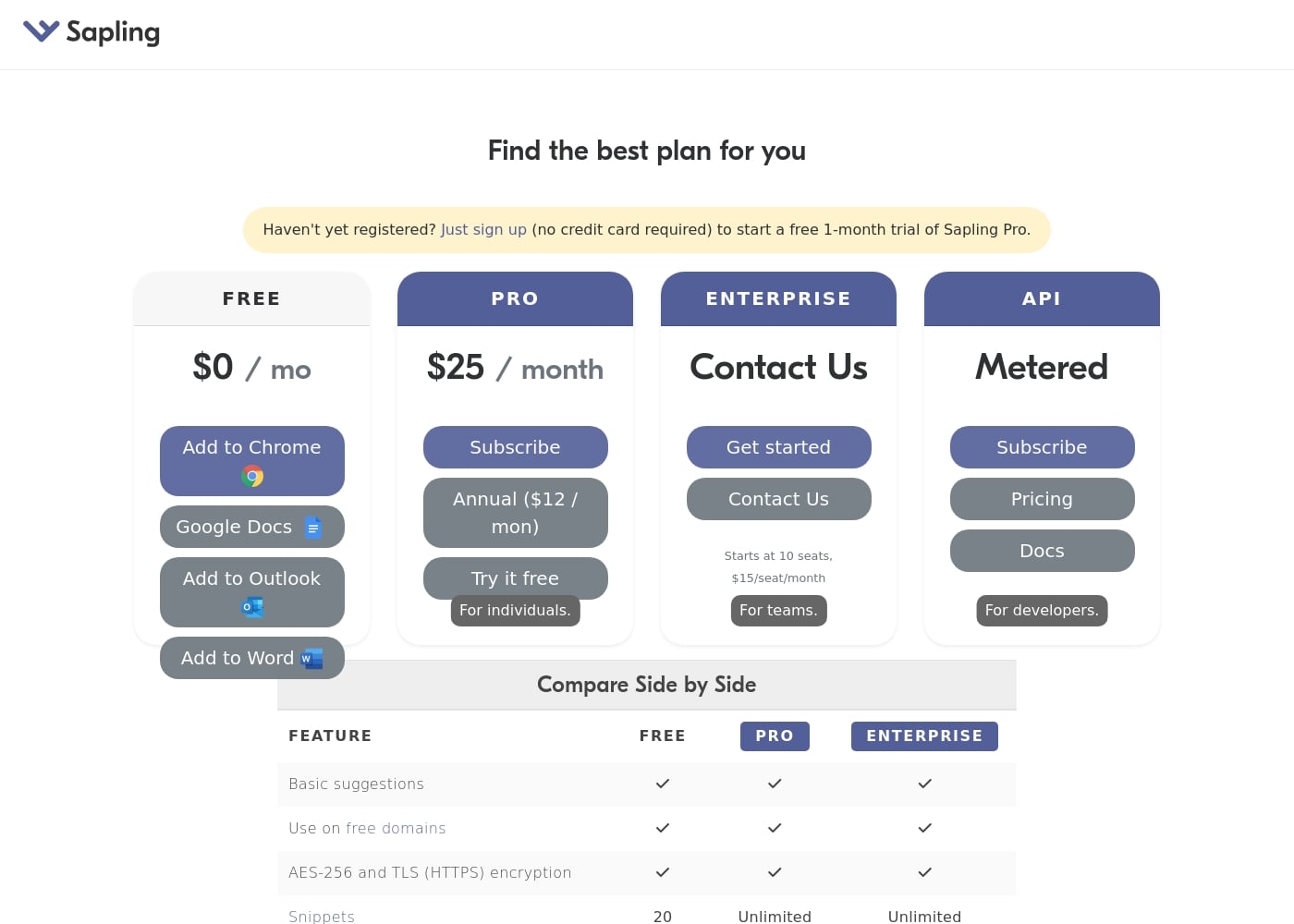
Sapling offers a robust free plan and two main paid tiers: Pro and Enterprise. The Pro plan costs $25 per month, or $12 per month when billed annually, and is designed for individuals.

Teams should consider the Enterprise plan, which starts at $15 per seat per month with a 10-seat minimum.

计划和定价

Free

月度$0
20 Snippets
  • Basic suggestions
  • Use on free domains
  • AES-256 and TLS (HTTPS) encryption

Pro

月度$25
年度$12
For individuals
  • Basic suggestions
  • Use on free domains
  • AES-256 and TLS (HTTPS) encryption
  • Unlimited Snippets

Enterprise

联系我们了解价格
Minimum 10 seats required
  • Starts at 10 seats
  • Priced at $15/seat/month
  • Unlimited Snippets
  • Basic suggestions and security features included

API

联系我们了解价格
Usage-based/Metered
  • Metered pricing structure
  • For developers
  • Access to full documentation

Sapling costs between $0 and $25 per month with four plans: Free at $0/month, Pro at $12/month (annual rate), Enterprise, and API.

You can compare the different options below to find the best fit for your precise writing needs.

Free

Price: $0 / month Websites Supported: Not explicitly stated Best For: Basic individual use Refund Policy: Not explicitly stated Other Features:

  • Basic suggestions
  • Use on free domains
  • AES-256 and TLS (HTTPS) encryption
  • 20 Snippets

The Free plan is perfect if you only need Sapling's basic suggestions and primarily work on free domains. You get secure encryption and a limited number of shortcuts (Snippets) to get started.

Pro

Price: $25 / month (or $12 / month billed annually) Websites Supported: Not explicitly stated Best For: Individuals needing unlimited features Refund Policy: Not explicitly stated Other Features:

  • Unlimited Snippets
  • Basic suggestions
  • Use on free domains
  • AES-256 and TLS (HTTPS) encryption

This plan is built specifically for individuals who require unlimited access to features like Snippets. Choosing the annual billing option provides a significant discount, lowering your effective monthly cost to only $12.

Enterprise

Price: Contact Us Websites Supported: Not explicitly stated Best For: Teams and organizations Refund Policy: Not explicitly stated Other Features:

  • Starts at 10 seats minimum
  • Priced at $15 / seat / month
  • Unlimited Snippets
  • Basic suggestions and security features are included

If you are buying for a team, Enterprise is the right track to follow. It offers seat-based pricing starting at $15 per seat monthly, requiring a minimum of ten seats to begin. Contact the sales team to configure exactly what your organization needs.

API

Price: Metered Websites Supported: Not explicitly stated Best For: Developers Refund Policy: Not explicitly stated Other Features:

  • Metered usage structure
  • Dedicated API documentation access
  • Options available to subscribe and check pricing details

Developers who want to integrate Sapling functions into their own applications should choose the API plan. This usage-based model allows flexible scaling based on your project requirements and consumption needs.

If you are unsure which plan is best, you can start a free 1-month trial of Sapling Pro immediately. No credit card information is required to sign up for this generous trial offer.
用户评论

Sapling's AI Detector generates starkly contrasting feedback across external platforms, resulting in an overall poor rating on Trustpilot, largely due to major concerns regarding its accuracy. Several users report extreme false positives, where 100% human-written content was flagged as AI-generated 🤯.

This recurring reliability issue is a significant pain point for writers and editors. However, the reviews are not entirely negative.

Looking beyond the detector functionality, users praise Sapling's core writing assistant features, noting that it is effective at catching advanced grammatical errors and offering suggestions that improve conciseness, sometimes positioning it as superior to Grammarly. Customers also appreciated the browser extension for making quick proofreading low effort.

Negative comments also touched on technical issues like reports of high memory usage and a clunky interface. While customer support is visible, actively responding and clarifying policies (like the non-charging free trial), the primary negative theme remains the AI content detection tool's questionable reliability.

其他地方的用户评价

Alex R.
· Trustpilot
5.0 / 5

I was a longtime Grammarly user but grew annoyed by missed basic corrections. I switched to Sapling and was pleasantly surprised by the improvement. It’s just much better at catching mistakes and suggesting concise edits that refine my messaging.

TJ
· Trustpilot
5.0 / 5

I love using the Sapling.ai extension to help ensure that my words come out just right. It’s great for refining my communication and making my emails high quality. I feel like a genius writer using this tool now.

还没有评论。

撰写评论

为Sapling撰写评论
0/100个字符
0/2000个字符

为什么要使用 Sapling?

When the stakes are high—whether correcting inherent biases or ensuring factual accuracy—you need a reliable checker. Sapling is built by former researchers and constantly updated to maintain peak performance. It doesn't rely just on one analytic; it uses complementary techniques to give you a comprehensive picture. That means you get both precision and flexibility when verifying content. ✅

  • High Performance on New Models: Sapling regularly retrains its system for excellent performance against the latest AI models, including GPT-4o, Gemini, Claude 3, and Llama 3.
  • Excellent Accuracy Rate: For longer texts, you can expect a detection rate exceeding 97% for AI-generated content and a false positive rate under 3% for human writing.
  • Pinpoint Problem Areas: The tool highlights specific sentence parts due to low perplexity, helping you focus your editing on simplistic or hackneyed phrases.
  • Flexible Access: We support uploads of PDF and DOCX files directly for easy analysis, making compliance simple.
  • Scale Your Efforts: Paid subscribers can check texts up to 100,000 characters per query, moving far beyond the free 2,000-character limit. Improve your efficiency today and install the Sapling AI Content Detector extension.

准备好使用Sapling转变您的工作流程了吗?

常见问题

How does the free trial work, and does it require a credit card?

You can sign up for a free 1-month trial of Sapling Pro right now. No credit card information is required to start this generous trial offer.

What is Sapling’s policy regarding refunds or money-back guarantees?

The site does not mention a refund policy or a money-back guarantee for paid plans. You should use the 30-day Pro trial to ensure the tool meets your needs before committing to a subscription.

Does the Pro plan follow a per-seat model, or is it priced for individuals?

The Pro plan is priced strictly for individuals and costs $25 monthly. The Enterprise plan is seat-based, starting at $15 per seat monthly with a 10-seat minimum requirement.

What are the character limits for the AI detector tool?

Free users are limited to 2,000 characters per query for the detector. Paid Pro and Enterprise subscribers can check significantly longer texts, up to 100,000 characters per query.

Where can I use Sapling besides the direct web page interface?

Sapling is accessible via browser extensions, which let you check text anywhere on the internet. You can also use listed add-ons for Chrome, Google Docs, Outlook, and Word.

What security measures protect my data when I use Sapling?

All plans, including the Free and Pro tiers, utilize AES-256 and TLS (HTTPS) encryption. This helps secure communication and protect your data while you use the service.

How is the API plan billed, and who should use it?

The API plan uses a metered structure based on usage consumption. This plan is specifically designed for developers needing to integrate Sapling functions into their own applications.

How do I purchase the Enterprise plan for my team?

Enterprise pricing is customized, so you need to contact the sales team directly. You must purchase a minimum of ten seats to start an Enterprise subscription.

What is the estimated response time for customer support inquiries?

Not explicitly stated on the official site. You can reach out via the provided contact email address for specific questions regarding support or functionality.

Does the AI check work with languages other than English?

Not explicitly stated on the official site. The system is trained on models primarily associated with English, such as GPT and Gemini, so performance in other languages is not guaranteed.

Who is the Sapling AI Detector typically designed to help?

It is useful for educators concerned about integrity and reviewers screening content quality. SEO practitioners who need to verify text originality also benefit from this tool.

What are Snippets, and how many are included in the free plan?

Snippets are productivity shortcuts used for text expansion and efficiency. The Free plan limits you to 20 Snippets, but Pro and Enterprise plans offer unlimited use.

准备尝试Sapling了吗?查看官方网站或价格。