PixCut

PixCut

AI 驱动的快速照片编辑工具

#2 dans Photo Background Remover
2 阅读时间 · 更新时间 10/3/2025
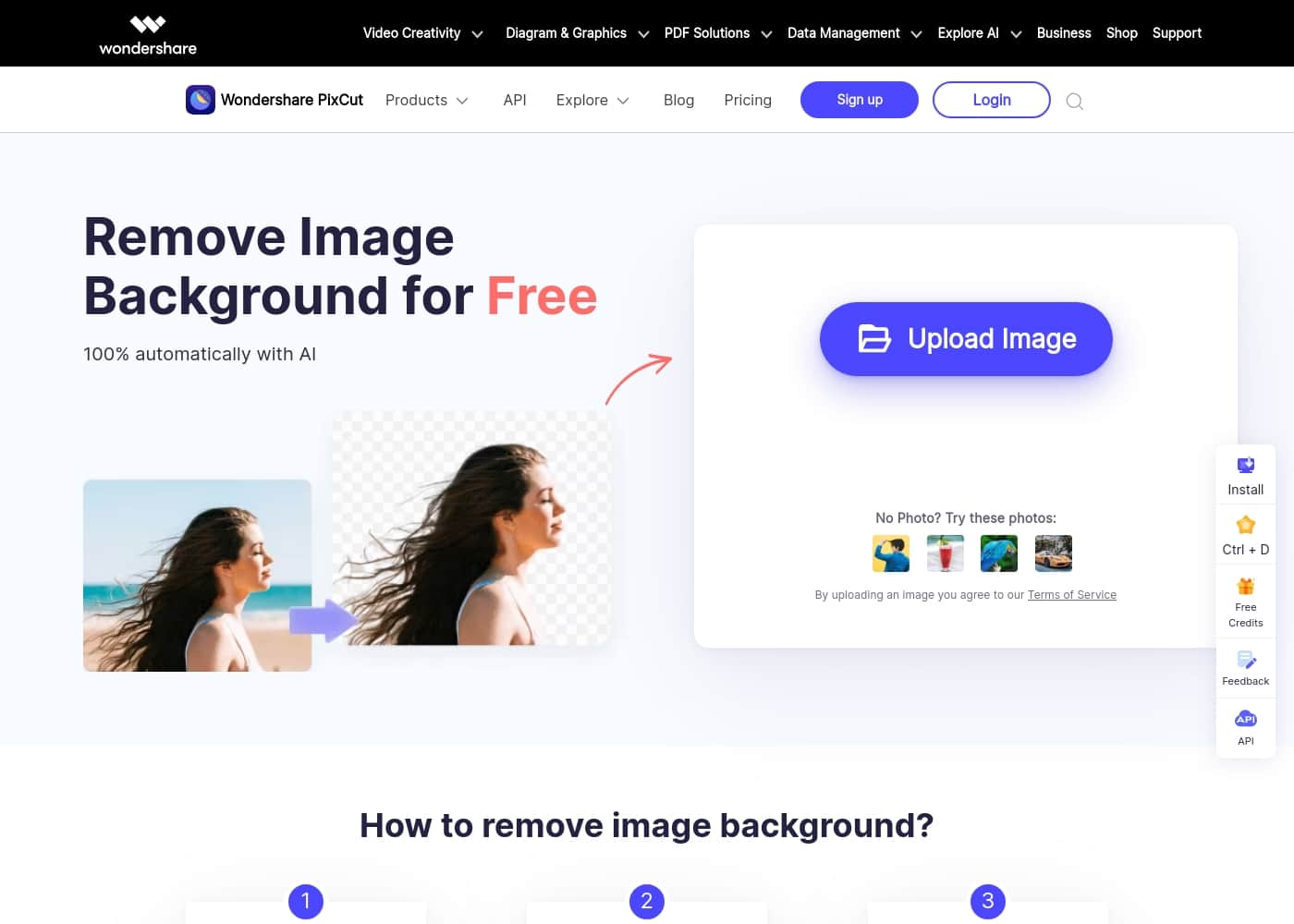
PixCut首页截图

At a glance

Quick overview for PixCut: rating, pricing summary, key features, and highlights.

Ciroapp 评论

2.5
Effective AI, but buyer beware.

PixCut provides quick, AI-powered tools for background removal and image scaling that many professional users will find valuable. However, we found recurring user reports detailing unauthorized charges and a failure to honor the 30-day refund promise. Overall, based on this severe trust friction, we advise caution despite the strong underlying technology.

优点

  • Pro:100% automatic AI background removal offers speed and accuracy.
  • Pro:Supports bulk processing for up to 20 images simultaneously.
  • Pro:Includes a powerful Photo Enhancer to enlarge images up to 8x.
  • Pro:API integration is available for customized applications and workflows.

缺点

  • Con:Widespread user reports of denied refunds, contradicting the stated guarantee.
  • Con:Users frequently cite unauthorized recurring charges and complex cancellation issues.
  • Con:Paid plan pricing is not transparent; specific costs require contacting the vendor.
  • Con:Some complaints mention software failure or system instability upon installation.
退款保证
Yes — 30 天
范围: $0+Free plan, Monthly subscription, One-time payment, Usage-based pricing
This section is a summary. Detailed sections about features, use cases, pricing, and reviews follow below.

PixCut评论、价格、功能、优缺点

Are you tired of spending hours precisely clipping backgrounds from photos? Removing image backgrounds is often tedious and frustrating. ✨ PixCut solves this core problem by using advanced AI technology to handle the entire process 100% automatically and for free.

PixCut 是什么?

PixCut is an intelligent photo editing utility designed to simplify complex visual tasks using artificial intelligence. Using the platform is incredibly straightforward. You simply upload your chosen image.

The AI engine instantly removes the background automatically. Finally, you can download the result image, which features a transparent background, making it ready for any new backdrop you choose. 💡 It's a fast, reliable solution for high-quality, clean images.

主要功能

100% automatic background removal powered by specialized AI.
Process up to 20 images simultaneously using the bulk removal feature.
Remove watermarks, objects, and text with content-aware filling.
Easily clean up image blemishes, scratches, and defects.
Photo Enhancer tool enlarges images up to 8x.
Enlargement maintains image clarity and original quality.
Result images are available with a professional transparent background.
Integrate the removal technology into applications using a dedicated API.
Simple three-step workflow: Upload, Automatically Remove, and Download.
Earn 30 free credits by inviting friends who sign up for the service.

使用案例

💡Automatically isolating foreground elements from complex photo backgrounds.
💡Processing up to 20 product photos simultaneously using the bulk removal tool.
💡Removing unwanted elements like scratches, defects, texts, or objects from edited photos.
💡Enlarging low-resolution images by up to 8x while preserving visual quality.
💡Streamlining e-commerce workflows by rapidly creating consistent product imagery.
💡Integrating AI-powered background removal directly into custom business software via the API.
💡Testing the core functionality for free using the five standard quality removals.
💡Cleaning up watermarks and other obstructions using content-aware filling.

PixCut 价格概览

价格范围
$0+
价格类型
Free plan, Monthly subscription, One-time payment, Usage-based pricing
退款保证
是 — 30 天

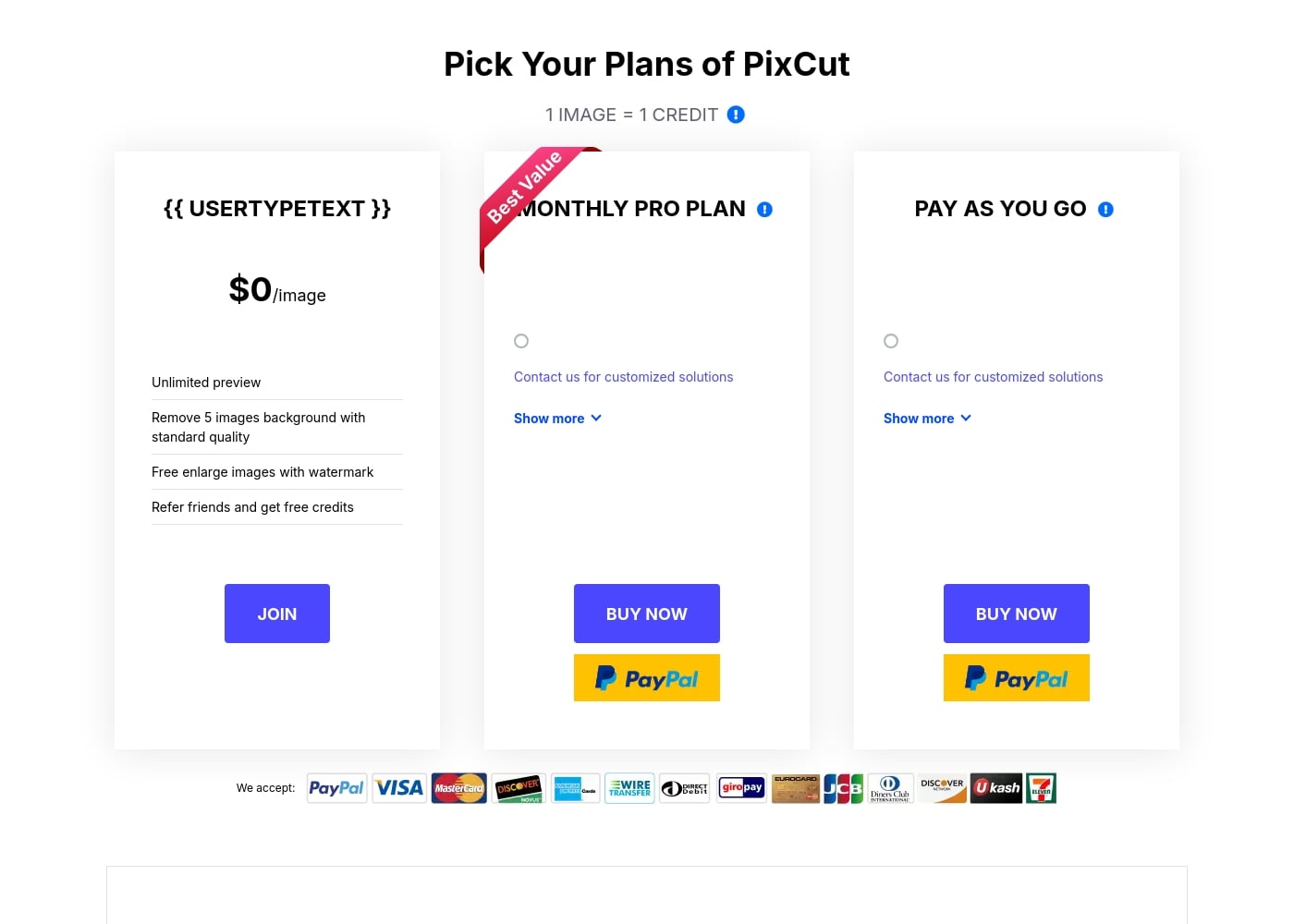
PixCut offers a free tier for basic usage, complemented by two advanced options: a Monthly Pro subscription and a flexible Pay As You Go plan. Prices for the paid plans are customized, requiring users to contact the vendor for a specific quote.

计划和定价

Free Plan

月度0
5 standard quality removals
  • Unlimited image preview
  • Remove 5 images background with standard quality
  • Free enlarge images with watermark
  • Refer friends and get free credits

Monthly Pro Plan

联系我们了解价格
Customized credit package
  • Best Value
  • Contact vendor for customized solutions
  • Unused credits roll over to the next month if subscription is maintained
  • 30-day money-back guarantee

Pay As You Go

联系我们了解价格
Customized credit package
  • Contact vendor for customized solutions
  • Purchase credits as needed
  • 30-day money-back guarantee
  • Secure payment handling

PixCut costs $0 per image for basic features and offers subscription and pay-as-you-go options whose pricing is not explicitly stated.

PixCut offers three primary ways to access its powerful background removal tools, balancing free functionality with professional paid services.

Free Plan

Price: $0 /image Websites Supported: Not explicitly stated Best For: Users who need basic testing and limited downloads. Refund Policy: Not applicable Other Features: Unlimited preview, Remove 5 images background with standard quality, Free enlarge images with watermark, Refer friends and get free credits.

This $0 plan allows you to test PixCut's core capabilities instantly. It's perfect if you only need standard quality background removals for a few images or want to see exactly how the software works before investing. You can also gain extra credits by sharing the service with friends and colleagues.

Monthly Pro Plan

Price: Not explicitly stated (Contact vendor for customized solutions) Websites Supported: Not explicitly stated Best For: Users needing continuous, high-quality download access. Refund Policy: 30-day money-back guarantee Other Features: Contact us for customized solutions, Unused credits roll over to the next month if the subscription stays active, Free software updates.

The Monthly Pro Plan is marked as the "Best Value" for customers needing consistent access to high-quality image processing. While the monthly pricing is customized, this subscription model is great because any credits you don't use this month will automatically roll over, provided you keep your subscription active.

Pay As You Go

Price: Not explicitly stated (Contact vendor for customized solutions) Websites Supported: Not explicitly stated Best For: Users with fluctuating or high-volume, unpredictable needs. Refund Policy: 30-day money-back guarantee Other Features: Contact us for customized solutions, Secure payment handling, Support available via live chat and email (24-hour response).

If your need for background removal is project-based or varies widely month to month, the Pay As You Go option is a flexible choice. This plan lets you purchase credits as needed without committing to a recurring monthly subscription, giving you complete control over your usage and scheduling.

PixCut offers a generous free tier where you can test the basic functionality right away. For any paid purchase, your investment is protected by a 30-day money-back guarantee, ensuring a risk-free experience. You can also manage, upgrade, downgrade, or cancel any subscription easily through your Account Center at any time.

用户评论

User feedback on Trustpilot is highly critical, with an overall score of 2.0. The vast majority of complaints are related to billing practices and customer service policies associated with the parent company, Wondershare.

Recurring feedback highlights unauthorized charges for subscriptions users attempted to cancel or did not consent to. Users frequently state that the company failed to honor the 30-day money-back guarantee, often declining refund requests immediately.

Several reviewers labeled the company a scam due to the severe difficulties encountered when attempting to stop recurring payments or close accounts. Furthermore, some users reported that specific software failed to function as advertised or caused system crashes.

🚩 Amidst these serious issues, a handful of reviews offered praise, specifically noting that customer service teams were helpful and quick to resolve technical problems related to downloads or software activation. Despite these positive support mentions, the central themes of cancellation difficulty and refund denial create significant trust issues for potential buyers.

其他地方的用户评价

Alex B.
· Trustpilot
1.0 / 5

这个软件在我的新笔记本上根本无法运行。收到下载链接仅两小时后我就申请退款,但他们立即拒绝了。他们只是一直发修复问题的说明,完全不理会书面的 30 天保证。

Mike W.
· Trustpilot
1.0 / 5

这感觉就像病毒一样,影响了我的浏览器,并在未经我许可的情况下为我开通了服务。我对这家公司及其做法完全没有信任。似乎没有简单或明显的方法来删除账户或停止不必要的收费。

还没有评论。

撰写评论

为PixCut撰写评论
0/100个字符
0/2000个字符

为什么要使用 PixCut?

Why should you choose PixCut over manual or standard photo tools? PixCut transforms image editing from a chore into a quick step, thanks to its powerful specialized features.

  • 100% Automatic Processing. The core task of background removal is handled entirely by AI, making the whole process swift and error-free right after you upload your photo.
  • 💡 Beyond Simple Removal. This tool offers more than just backgrounds. You can also utilize sophisticated content-aware filling to easily clean up images by removing specific elements like defects, scratch marks, texts, objects, or pesky watermarks.
  • 🚀 Scale Up Your Workflow. If you handle large volumes of photos, the bulk removal feature allows you to process up to 20 images simultaneously, greatly boosting productivity and saving valuable time.
  • Maintain Quality When Enlarging. If you need photos scaled up for printing or display, the Photo Enhancer allows you to enlarge your image up to 8x its original size without sacrificing the clarity or image quality.
  • 🛠️ Integration Ready. For developers and businesses, the background removal API offers a seamless way to incorporate this powerful technology directly into your own application with just a few lines of code.

PixCut truly excels by delivering speed and versatility. If you appreciate the quality of the results, you can easily earn free credits: invite friends to try the service, and both you and your friend will receive 30 free credits once they sign up. Start simplifying your image editing today! ➡️

准备好使用PixCut转变您的工作流程了吗?

PixCut 替代工具

Photo Background Remover 类别中的其他工具

常见问题

What exactly does one credit cover in the PixCut system?

One credit is required to download one high-quality result image with the background removed. Alternatively, one credit lets you download a single enlarged image without the PixCut watermark.

What is the size difference between standard-quality and high-quality result images?

Standard quality results have a maximum resolution of 250,000 pixels, such as a 625 x 400 image. High-quality results range from over 250,000 pixels up to 25 million pixels.

What happens if I don't use all my credits on the Monthly Pro Plan?

If you keep your Monthly Pro subscription active, any unused credits automatically roll over to the following month. This ensures you do not lose value if your usage fluctuates.

How can I cancel, upgrade, or downgrade my paid subscription?

You can manage your subscription status easily at any time through your Account Center. After unsubscribing, your account remains fully active until the end of the current settlement period.

If I use the background removal API, do I need to pay for access separately?

The official site confirms that an API is available and can be integrated with just a few lines of code. Pricing details for API access are not explicitly stated and likely require contacting the vendor for customized solutions.

What happens immediately after I successfully purchase a plan?

Within roughly ten minutes, you should receive an email containing a registration code. You can unlock all the features by signing in with your Wondershare account and activating the code.

How quickly can I expect a response from customer support?

Knowledgeable representatives are available via instant live chat and email. If you submit a request through the Support Center, they aim to provide an email response within 24 hours.

Can I redownload an image I’ve already paid for without using another credit?

Yes, re-downloading the same high-quality result image multiple times will not incur any additional credit costs.

What payment methods are accepted for purchasing credits?

PixCut accepts a wide array of payment methods. These include major cards like Visa and Mastercard, as well as PayPal, American Express, Discover, JCB, Alipay, and bank or wire transfers.

How does PixCut protect my personal and financial information?

They value your privacy and security. They use advanced encryption and robust fraud protection measures to safeguard your financial and personal data.

Is there a free trial or a way to test the high-quality resolution?

The free plan is essentially a trial; it allows for unlimited previews and the removal of five image backgrounds at standard quality. You can see the result before deciding to pay for the high-quality download.

Do I need to maintain a Monthly Pro subscription to purchase the Pay As You Go credits?

No. The Pay As You Go option allows you to purchase credits as needed without committing to a recurring monthly subscription plan.

准备尝试PixCut了吗?查看官方网站或价格。