MoniVisor

MoniVisor

Real-time computer monitoring for safety and optimal performance.

#2 dans Employee monitoring
2 阅读时间 · 更新时间 10/4/2025
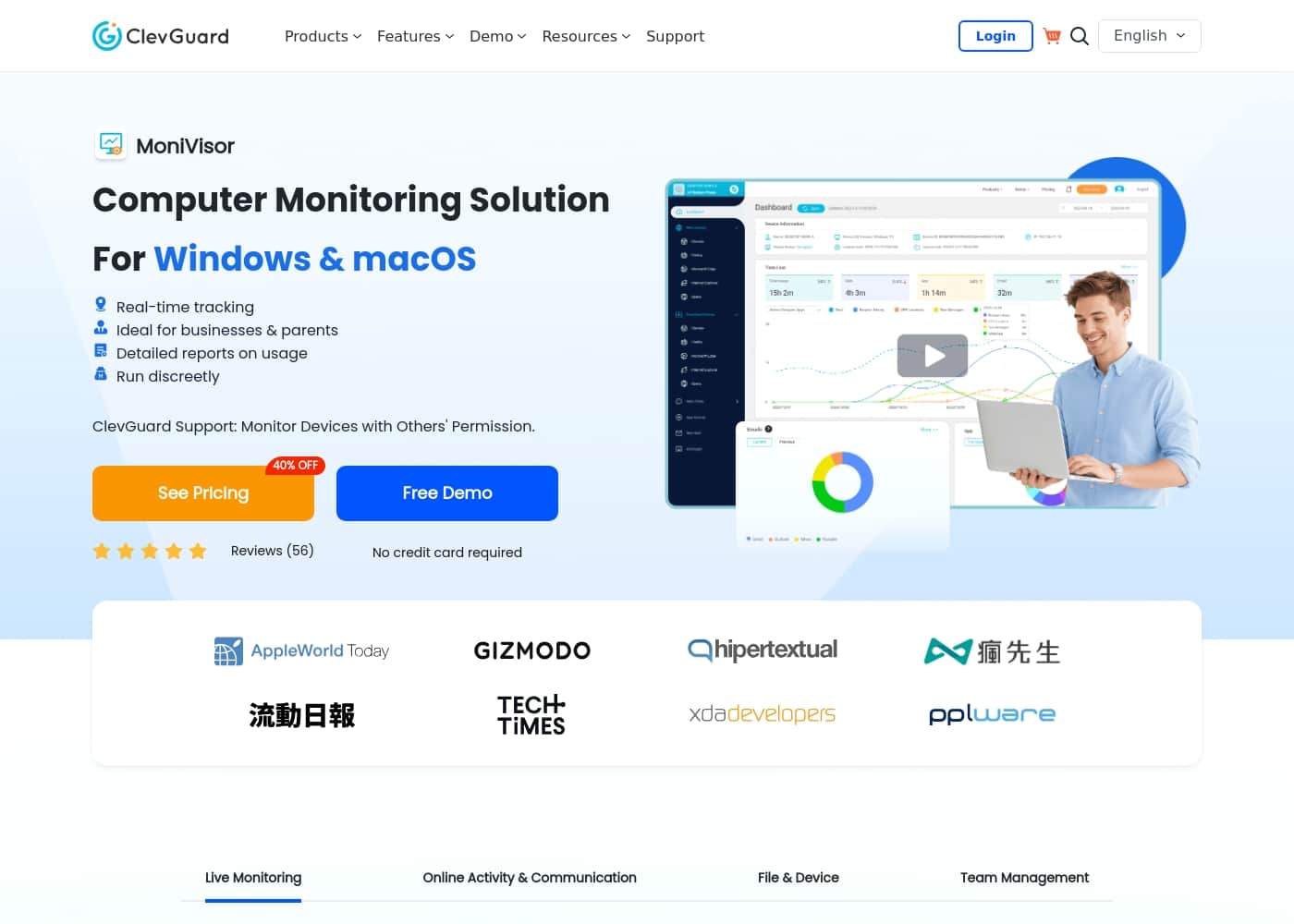
MoniVisor首页截图

At a glance

Quick overview for MoniVisor: rating, pricing summary, key features, and highlights.
免费试用
Yes
退款保证
Yes — 30 天
范围: $10.83–$129.99/monthFree trial, Monthly subscription, Yearly subscription, Per seat pricing
This section is a summary. Detailed sections about features, use cases, pricing, and reviews follow below.

MoniVisor评论、价格、功能、优缺点

Are you struggling to maintain visibility over digital activities or keep remote members accountable? MoniVisor addresses this common frustration by offering real-time tracking for Windows and macOS devices. ✨

Gain full control over online activities with instant access to live screen views and detailed reports. This ensures safety, boosts performance, and helps you take prompt action at the crucial moment.

MoniVisor 是什么?

MoniVisor is a comprehensive, safe, and reliable solution for monitoring computer usage on Windows and macOS. It operates discreetly in the background, providing detailed insights without noticeable indicators to the end user.

This feature-rich program is ideal for caring guardians protecting kids online and for employers managing remote teams or SMEs who need to boost productivity and streamline their workflow. It focuses on helping you achieve accountability and optimal performance across all environments. 💡

MoniVisor 主要功能

✨ Real-Time Live Screen Visibility

Gain full control over ongoing activities with real-time screen insights. Live screen monitoring helps you view current computer activities instantly. This feature ensures focus and helps you identify precisely what users are doing at any moment.

Combined with instant access to live screen views, you can take prompt action at the crucial moment. This ensures safety, accountability, and optimal performance across all your monitored environments.

✨ Tracking Key User Inputs and Activity

Stay on top of every detail with comprehensive logging of user inputs. Keystroke logging captures every keystroke to track detailed user input efficiently. This helps you detect any unauthorized actions immediately.

MoniVisor also monitors software usage, keeping track of all applications used and overall screen time. We record every login attempt and logout to ensure that only authorized users access your system. You also get access to the current location and past location history of monitored devices.

✨ Comprehensive Communication Oversight

Keep lines of communication open and stay completely informed about every digital interaction. MoniVisor tracks common communication platforms effortlessly.

Email tracking monitors all sent and received emails across Gmail, Outlook, and Yahoo. We also log conversations across popular instant messaging platforms. This helps you detect any inappropriate or suspicious behavior and ensures you stay updated on important exchanges. You can also keep an eye on browsing activities and download history to ensure safe web usage.

🔒 Data Security and File Handling Control

Safeguarding your sensitive data and controlling device usage has never been easier. We provide deep visibility into how data is handled on the target computer.

File activity tracking monitors file modifications, creations, copying, and deletions. This efficiently prevents data loss and alerts you to unauthorized changes within the file system. Clipboard history tracking also keeps a record of all copied content, giving you full transparency over information being shared.

MoniVisor logs all connected USB devices to safeguard your system against unauthorized data transfers. Additionally, we track all printing activities to maintain confidentiality and prevent unauthorized document handling.

✨ Streamlined Team and Workflow Management

Managing remote teams and multiple users becomes simple with MoniVisor’s specialized tools. We help you maintain productivity, stay organized, and ensure that everyone remains on track with dedicated oversight.

The Team Dashboard offers a comprehensive view of your team's activities. You can monitor and manage workflows efficiently from one user-friendly interface. Desktop time tracking helps you monitor time spent on computers to ensure efficient use of work hours and boost overall productivity.

For record-keeping, you can generate detailed reports using the data export function. This ensures that you have accurate records for further analysis, making sure no important detail is missed.

✨ Discreet Operation and Privacy Priority

Operate with confidence using a reliable and safe solution that prioritizes security and discretion. MoniVisor works discreetly in the background without noticeable indicators to the end user.

Our PC monitoring software disappears immediately from the target's desktop and task manager after activation, ensuring stealth monitoring. No notifications are sent to the user during this period. MoniVisor is a virus-free program that prioritizes your privacy protection and rigorous data safeguarding measures.

使用案例

📊 Boosting Team Productivity and Accountability

It’s often difficult to ensure that remote or distributed teams are maximizing their output. MoniVisor addresses this challenge by providing clear visibility into digital workflows. Managers can use the dedicated Team Dashboard to oversee activities and monitor desktop time accurately. This streamlined oversight helps you manage resources efficiently and ensure every team member stays focused on assigned tasks.

Expected outcome: Use detailed desktop time tracking data to ensure efficient use of work hours and streamline overall team workflow.

🔒 Safeguarding Sensitive Data from Unauthorized Transfer

Protecting confidential company information requires monitoring how data is handled on employee computers. MoniVisor keeps track of file movements and storage usage, helping you prevent data breaches before they occur. You can easily spot suspicious activity regarding file creation, copying, modification, or deletion.

To control physical device security, MoniVisor also logs all USB device connections. This simple step helps safeguard your system against unauthorized data transfers and external security threats.

🛡️ Ensuring Children's Online Safety and Activity Oversight

Caring guardians need tools to protect their children from online risks. MoniVisor offers real-time monitoring features that give parents immediate peace of mind. You can access live screen views to see current activities instantly and log all keystrokes to detect sensitive inputs or unauthorized actions.

It’s also simple to stay informed about their online interactions. You can keep an eye on internet history and log conversations across popular instant messaging platforms to detect any inappropriate or suspicious behavior without needing to hover over them.

📝 Auditing and Tracking Professional Communication Records

When internal audits or compliance checks are required, detailed communication records are essential. MoniVisor allows you to keep reliable records of all formal digital exchanges. It offers comprehensive email tracking for major services, including Gmail, Outlook, and Yahoo, monitoring both sent and received messages.

This robust record-keeping ensures you are completely updated on every online interaction, helping you maintain open communication lines and providing necessary evidence for detailed analysis and record-keeping.

Tip: Generate detailed reports using the Data Export feature for easy record-keeping and external analysis.

🕵️ Investigating Unauthorized Access and Document Handling

If you suspect misuse or unauthorized access to a monitored device, MoniVisor helps pinpoint the details. The software logs every successful and failed login attempt, confirming that only authorized users are accessing the system. You can also track printing activity to maintain document confidentiality.

This feature prevents unauthorized handling of physical documents by keeping a record of every printing job, providing full transparency over document flow.

MoniVisor 价格概览

价格范围
$10.83–$129.99/month
价格类型
Free trial, Monthly subscription, Yearly subscription, Per seat pricing
退款保证
是 — 30 天

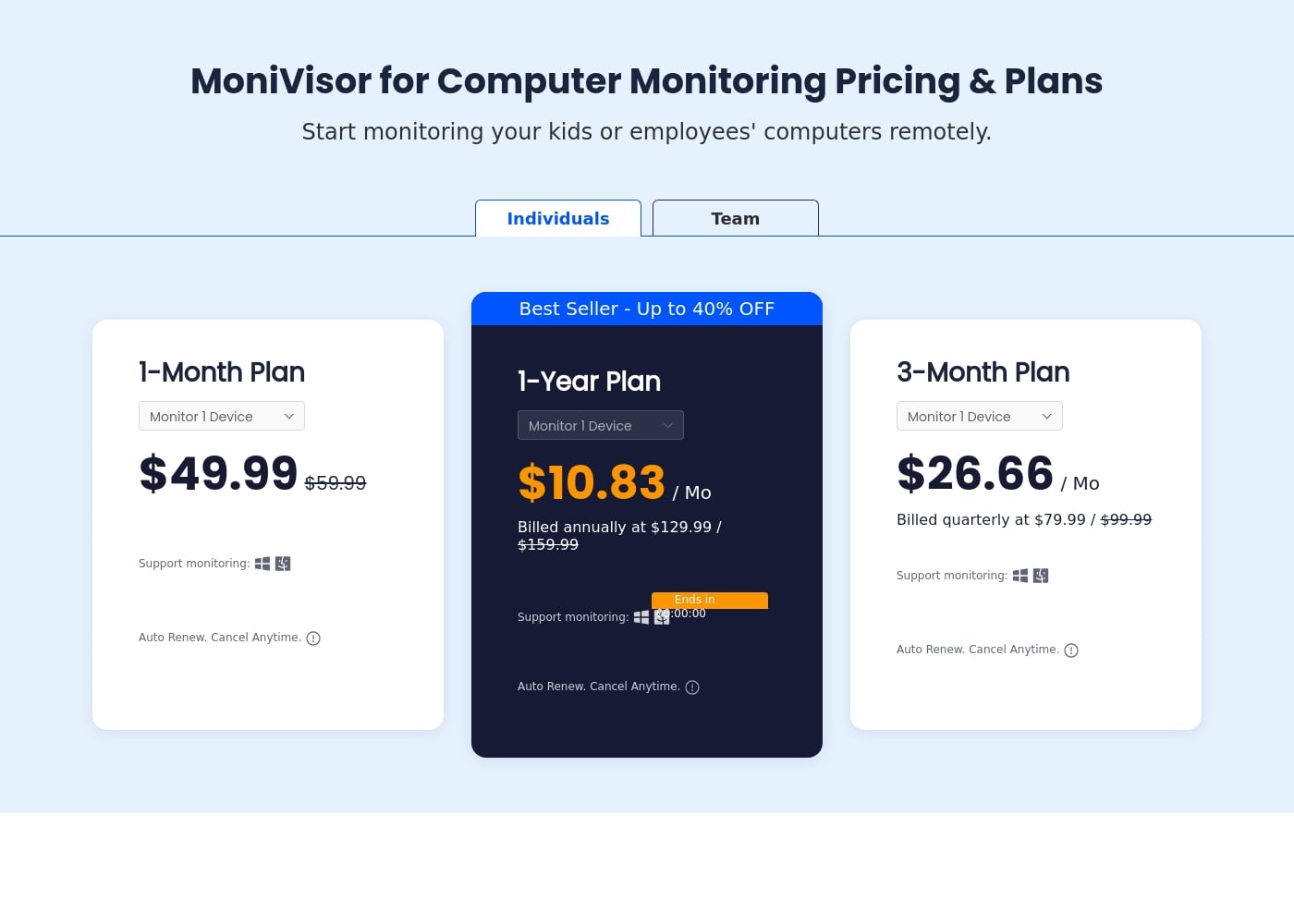
MoniVisor offers flexible computer monitoring plans starting at $10.83 per month when billed annually for individuals. Pricing is categorized into Individual plans for one device and Business plans that cover up to 20 devices.

计划和定价

Individual 1-Month Plan

月度$49.99
1 device
  • Monitor 1 Device
  • Supports Windows and macOS
  • Auto Renew. Cancel Anytime.

Individual 3-Month Plan

月度$26.66
1 device
  • Monitor 1 Device
  • Billed quarterly at $79.99 (discounted from $99.99)
  • Supports Windows and macOS
  • Auto Renew. Cancel Anytime.

Individual 1-Year Plan (Best Seller)

月度$10.83
年度$129.99
1 device
  • Monitor 1 Device
  • Billed annually at $129.99 (discounted from $159.99)
  • Save up to 40% OFF
  • Supports Windows and macOS
  • Auto Renew. Cancel Anytime.

Team 1-Month Plan

月度$59.99
1 device
  • Monitor 1 Device
  • Billed monthly at $59.99
  • Supports Windows and macOS
  • Auto Renew. Cancel Anytime.

Team 1-Year Plan

月度$13.33
年度$159.99
1 device
  • Monitor 1 Device
  • Billed annually at $159.99
  • Supports Windows and macOS
  • Ends in 00:00:00 (Time-limited offer)
  • Auto Renew. Cancel Anytime.

Team 3-Month Plan

月度$33.33
1 device
  • Monitor 1 Device
  • Billed quarterly at $99.99
  • Supports Windows and macOS
  • Auto Renew. Cancel Anytime.

Business Plan (Up to 20 Devices)

月度$129.99
Up to 20 devices
  • Monitor up to 20 devices with all features
  • All Features
  • Free Updates
  • Free Tech Support
  • 1-1 Sales Consultant

MoniVisor costs between $10.83 and $129.99 per month with five visible plans: Individual 1-Year Plan at $10.83/mo, Individual 3-Month Plan at $26.66/mo, Individual 1-Month Plan at $49.99/mo, Team 1-Month Plan at $59.99/mo, and Business (up to 20 devices) at $129.99/mo.

MoniVisor separates its pricing into Individuals and Team tiers, offering flexible billing cycles for both monthly and extended terms. You can choose a license that suits your device count and preferred payment schedule.

Individual 1-Year Plan

Price: $10.83 per month (Billed annually at $129.99) Websites Supported: Monitor 1 Device Best For: Parents or individuals needing long-term, cost-effective monitoring. Refund Policy: 30-day money-back guarantee Other Features: Up to 40% OFF discount, Supports monitoring Windows and macOS, Auto Renew with cancellation allowed anytime.

This is the best value option if you are an individual looking for continuous computer safety and monitoring throughout the year. Choosing the annual billing cycle provides significant savings when compared to paying month-to-month.

Individual 1-Month Plan

Price: $49.99 per month Websites Supported: Monitor 1 Device Best For: Testing the full feature set or short-term, flexible monitoring needs. Refund Policy: 30-day money-back guarantee Other Features: Supports monitoring Windows and macOS, Auto-renews monthly, Cancel anytime directly in settings.

Choose the 1-Month Plan if you need maximum flexibility without committing to an extended subscription term. It’s perfect for evaluating the product’s capabilities before securing a longer, discounted annual plan.

Business Plan (Up to 20 Devices)

Price: $129.99 per month (Discounted from $189.99) Websites Supported: Up to 20 devices Best For: Small businesses or remote teams requiring comprehensive monitoring, security, and dedicated support. Refund Policy: 30-day money-back guarantee Other Features: All Features Unlocked, Free Updates and Free Tech Support, Includes a 1-1 Sales Consultant.

The Business Plan is specifically designed for maintaining productivity and visibility across a distributed team. This tier unlocks premium support and provides all available features, helping to streamline your remote workflow management. If you need to monitor more than 20 devices in your organization, you should contact the MoniVisor sales team directly for custom pricing.

MoniVisor is committed to customer satisfaction; a free demo lets you try the core solution before making a purchase. All purchases include a generous 30-day money-back guarantee in case you are not completely satisfied. Subscriptions automatically renew for easy, continuous service, but you can cancel your plan easily at any time through the product settings. We accept common payment methods, including PayPal, Visa, MasterCard, and American Express.

用户评论

还没有评论。

撰写评论

为MoniVisor撰写评论
0/100个字符
0/2000个字符

为什么要使用 MoniVisor?

Choosing the right monitoring solution means selecting a balanced tool that offers transparency, security, and simplicity. MoniVisor stands out by delivering competitive, wide-ranging PC monitoring features through an intuitive online dashboard. You get clear, real-time data presented in a user-friendly interface. MoniVisor is also a virus-free, reliable program that prioritizes privacy protection and rigorous data safeguarding measures.

Here are compelling reasons to choose MoniVisor today:

  • Achieve Real-Time Visibility: Instantly view current activities with live screen monitoring and stay on top of user input using detailed keystroke logging.
  • 📝 Keep Lines of Communication Open: Track all received and sent emails (Gmail, Outlook, Yahoo) and log conversations across popular instant messaging platforms to stay informed.
  • 🔒 Safeguard Your Sensitive Data: Monitor file creations, copying, and deletions, and track all USB device connections to prevent unauthorized data transfers efficiently.
  • 📊 Simplify Workflow Management: Use the dedicated Team Dashboard to efficiently oversee team activities, boost productivity, and track time spent accurately on the desktop.
  • 🛡️ Operate with Confidence: Benefit from stealth monitoring, ensuring the tool disappears from the Task Manager and operates discreetly while providing free software updates and technical support. Try the free demo now! ➡️

准备好使用MoniVisor转变您的工作流程了吗?

MoniVisor 替代工具

Employee monitoring 类别中的其他工具

常见问题

Does the free demo offer full access, and how long can I use it for?

The website invites users to try a free demo before purchasing, but it does not specify the duration of this trial. The demo lets you test the core solution without requiring any credit card details beforehand.

If I purchase a plan, am I protected by a money-back guarantee?

Yes, all purchases include a generous 30-day money-back guarantee. If you are not completely satisfied with the product, you are eligible for a full refund.

What happens when my subscription term ends?

Your plan is set to auto-renew automatically for easy, continuous service. This includes benefits like major upgrades and premium support at no extra charge, ensuring your monitoring is uninterrupted.

How do I cancel my MoniVisor subscription if I no longer need it?

You can always cancel the auto-renewal feature at any time. This can be done easily by navigating to the product settings page within your account.

What specific instant messaging and communication platforms does MoniVisor track?

MoniVisor is designed to log conversations across several key platforms. This includes specific monitoring for WhatsApp, Telegram, Instagram, Facebook, Twitter, and Skype, alongside email tracking.

Is MoniVisor priced per-user or based on overall usage?

MoniVisor utilizes a per-device licensing structure. Individual plans monitor one device, while the Business plan allows you to monitor up to 20 devices under a single license.

If I need to monitor more than 20 devices, what should I do?

The Business Plan caps monitoring at 20 devices. If your organization requires tracking for a larger number of computers, you should contact the MoniVisor sales team directly for custom pricing.

Do I need physical access to the target device during the setup process?

Yes, you must access the target computer for the initial installation. The first steps involve downloading and installing the client program and the necessary Chrome extension directly onto that device.

What payment methods are accepted when purchasing a MoniVisor plan?

MoniVisor accepts a variety of common and secure online payment methods. You can pay using PayPal, Visa, MasterCard, American Express, and Discover.

What level of technical support is included with my purchase?

All customers benefit from free technical support and software updates. Our customer service team promises fast support and is available 24/5 to help you with any inquiries or problems.

Can I upgrade or downgrade my current plan to change the duration?

Yes, the platform allows you flexibility with your license. You are able to upgrade to a plan with a longer commitment or downgrade the license term based on your specific needs.

准备尝试MoniVisor了吗?查看官方网站或价格。