What pricing plans does Butter offer and how are they billed?
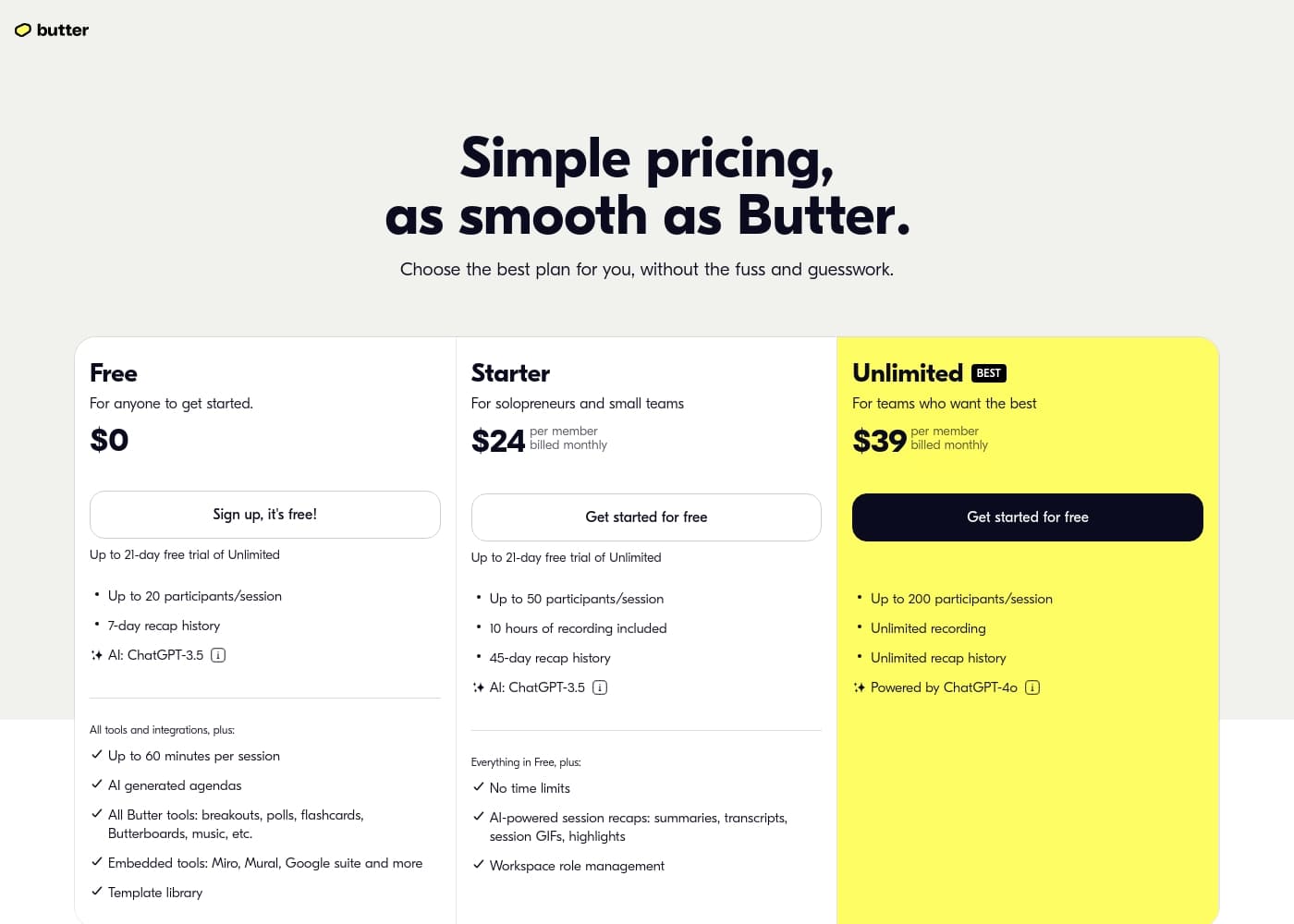
Butter offers Free, Starter, and Unlimited plans. Starter is $24 per member per month and Unlimited is $39 per member per month, billed monthly. The pricing page notes a 21-day Unlimited trial and mentions 3 months free on Starter and Unlimited in the table.
What are the participant limits and session lengths for each plan?
Free allows up to 20 participants per session with sessions up to 60 minutes. Starter supports up to 50 participants per session with no explicit time limit stated here. Unlimited supports up to 200 participants per session with no time limits.
What are the recap history limits on Free, Starter, and Unlimited?
Free keeps recap history for 7 days. Starter keeps recaps for 45 days. Unlimited offers unlimited recap history.
How do recording hours and overages work on Starter?
Starter includes 10 hours of recording. Recording hours reset monthly. If you exceed the included hours, you pay $3 per extra hour.
Do session participants count toward workspace member limits?
No. Anyone can join a Butter session via a shared link, and session participants do not count toward workspace member limits.
How do I upgrade or cancel my Butter plan, and are there discounts for large teams?
Upgrade or cancel from Plan & billing > Manage subscription in your workspace settings. Discounts are available for 20+ paid members.
What branding options are available on paid plans?
Paid workspaces let you brand sessions with your team logo, and you can add logos and wallpapers to sessions.
What support options are available and is onboarding included?
Butter offers a Help center, email support, premium support, and personalized onboarding for your team upon request.
What integrations or embedded tools does Butter support?
Butter supports embedded tools like Miro, Mural, Google Suite, and other integrations.
Who hosts Butter video meetings?
Video meetings on Butter are hosted by Agora.
How can participants join a Butter session?
Participants join via the shared invite link in a browser, or by using the Butter desktop or mobile apps.
Who is Butter best for?
Butter is built for facilitators, moderators, and hosts who plan, run, and recap collaborative sessions; it's well suited for workshops, training, bootcamps, courses, events, and interactive webinars.