Plesk vs ThreatDown
Plesk and ThreatDown aren't direct competitors—they solve different problems. Plesk is a server management panel. ThreatDown is an endpoint security service. The choice depends on whether you're managing servers or protecting devices.
Best for: Web agencies managing 20+ client WordPress sites, IT admins overseeing multiple cloud servers (AWS, Azure)
Best for: Businesses of 50+ employees needing managed security, IT teams without a dedicated security analyst
Proactive, layered protection with clear pricing.
We found ThreatDown offers a strong, proactive security model focused on prevention and hardening. Its tiered pricing is transparent and scalable, making it a solid choice for organizations wanting managed services or a flexible DIY approach. Overall, it's a reliable platform for building a more resilient digital environment.
优点
- Focuses on proactive hardening and threat prevention before execution.
- Offers clear, transparent tiered pricing that scales with device count.
- Provides flexible options from self-managed tools to fully-managed 24/7 MDR.
- Includes features like instant rollback and ransomware remediation.
缺点
- Top-tier custom pricing requires direct sales contact.
- Detailed feature differences between tiers are not fully listed here.
- External user reviews were inaccessible for this assessment.
关于Plesk
关于ThreatDown
ThreatDown is a comprehensive managed security service designed to protect your entire digital environment. 🛡️ It’s built for businesses that want a layered, proactive defense strategy rather than a reactive one. Think of it as a complete security shield, combining managed services with a DIY SOC (Security Operations Center) for flexible, powerful protection.
亮点
功能比较
功能概览
我们强调主要差异并为每个功能选择获胜者。
Core Purpose
Plesk manages servers. ThreatDown secures endpoints. They're built for different jobs.
Plesk is a control panel. It helps you manage websites, databases, and server software from one dashboard. You can handle updates, security, and performance. ThreatDown is a security service. It protects laptops, desktops, and servers from malware, ransomware, and other attacks. It includes monitoring and response. The key difference is proactive management versus proactive protection. Plesk organizes your work. ThreatDown defends your assets. For example, a web agency uses Plesk to deploy client sites. A hospital uses ThreatDown to secure patient data on all devices.
Dashboard & UI
Plesk offers a deep, technical dashboard. ThreatDown provides a security-focused console.
Plesk's dashboard is built for server admins. It shows site stats, resource usage, and tools for PHP, databases, and FTP. It's powerful but can have a learning curve. ThreatDown's console shows threat events, device status, and policy controls. It's designed for security teams to spot issues fast. Plesk gives you control over server components. ThreatDown gives you visibility into security events. An IT pro might live in Plesk daily. A security analyst would monitor ThreatDown constantly.
Security Features
Plesk includes basic server hardening. ThreatDown provides advanced, layered endpoint defense.
Plesk has built-in firewall, SSL management, and security extensions like ImunifyAV. It helps secure the server environment itself. ThreatDown offers payload analysis, machine learning, ransomware detection, and instant rollback. It protects endpoints before and after an attack. Plesk's security is server-focused. ThreatDown's is endpoint-focused with active response. Plesk might block a port. ThreatDown can isolate an infected laptop and restore its files.
WordPress Management
Plesk has a specialized WP Toolkit. ThreatDown has no WordPress features.
Plesk's WP Toolkit lets you install, update, clone, and stage WordPress sites. It includes automated testing and security scanning for WP. ThreatDown does not offer WordPress-specific tools. Its focus is on securing the device the WordPress site runs on. For WordPress-heavy operations, Plesk is clearly superior. ThreatDown protects the underlying infrastructure. A developer uses Plesk to deploy a new WP site in minutes. ThreatDown ensures the server hosting that site isn't compromised.
Managed Services
ThreatDown offers fully managed 24/7 security. Plesk is self-managed software.
ThreatDown's Elite plan includes 24/7 human-led monitoring and response. Experts hunt threats and remediate issues for you. Plesk is software you install and manage yourself. Support is available, but it's not a managed service. This is a major difference for teams without a dedicated security staff. A small business without an IT team might choose ThreatDown's MDR. A hosting company would manage Plesk themselves.
Pricing Structure
Plesk scales with servers and domains. ThreatDown scales with devices and commitment length.
Plesk prices range from $15.57 to $57.74 per month for VPS licenses. Costs depend on the number of domains you manage. ThreatDown starts at $276 per year for 5 devices. Pricing is per device, and longer commitments (3-year) save 20%. Plesk's cost is tied to your hosting infrastructure. ThreatDown's cost is tied to your employee count. An agency with 30 client sites might pick Plesk's Pro plan. A 50-person company might budget for ThreatDown's device-based plan.
Customer Support
Both have support, but ThreatDown offers MDR as a premium service. Plesk support is often criticized.
Plesk includes 24/7 support on standard plans. However, reviews frequently mention slow response times and billing issues. ThreatDown's Elite plan includes 24/7 MDR with expert analysts. Other plans have standard support levels not detailed online. ThreatDown's managed service includes proactive support. Plesk's support is reactive. Users report frustration with Plesk support. ThreatDown's MDR provides hands-on help.
Ease of Use
Plesk is complex but powerful. ThreatDown is designed for straightforward deployment.
Plesk requires server setup and configuration. Its dashboard is feature-rich, which can overwhelm beginners. ThreatDown is installed on endpoints. Its console focuses on security alerts and policies, which is simpler to navigate. Plesk has a steeper learning curve. ThreatDown is more accessible for non-admins. A sysadmin thrives in Plesk. An office manager can understand ThreatDown's alerts.
Scalability
Plesk scales by adding more domains to your plan. ThreatDown scales by adding more devices.
Plesk offers plans from 10 to unlimited domains. You upgrade your license as your client base grows. ThreatDown scales by adding devices to your subscription. You can adjust counts during purchase. Both scale well. Plesk scales with your business volume. ThreatDown scales with your company size. An agency grows by adding clients (Plesk). A company grows by hiring employees (ThreatDown).
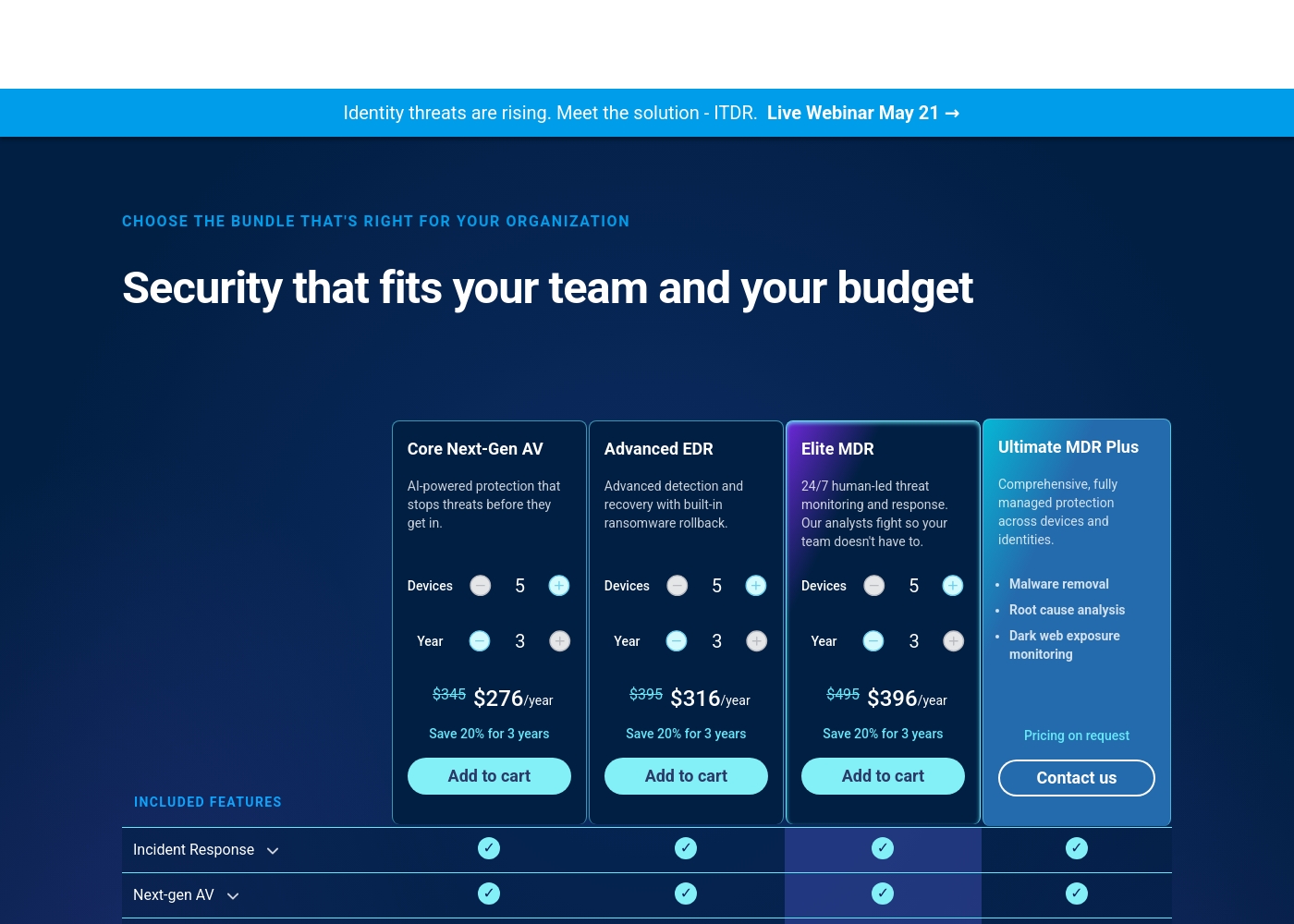
ThreatDown pricing: ThreatDown offers tiered security plans starting at $276/year for 5 devices on a multi-year term. Pricing is based on the number of devices and the length of your subscription commitment (1-3 years).
direct purchase is available for the first three tiers, while the top-tier plan requires a custom quote from the sales team. Each plan includes a core suite of protection tools with options for managed services and 24/7 human-led endpoint detection and response (MDR).
Pricing becomes more cost-effective with longer-term commitments, such as 3-year plans which offer a 20% savings compared to annual rates. Organizations can choose between self-managed AV and fully-managed security operations to fit their technical capacity and specific risk profile.
Pricing Notes
- Plesk offers a free 14-day trial with no credit card required.
- ThreatDown's pricing is based on device count and subscription length, with multi-year discounts.
- Plesk's cost is for server management software. ThreatDown's cost is for security services.
- ThreatDown's top-tier 'Ultimate MDR Plus' plan requires a custom quote from sales.
Pricing Head-to-Head
用户评论
We could not access external review snippets from Trustpilot or Capterra for ThreatDown due to access restrictions. Therefore, our review is based solely on the provided website information and pricing details. We cannot synthesize user sentiment or provide a summary of external reviews.
我们的判断
There's no single winner here—Plesk and ThreatDown are tools for different jobs. Choosing between them is like choosing between a hammer and a fire extinguisher. Plesk's superpower is unified control. It lets you manage dozens of websites, databases, and servers from one screen. The WordPress Toolkit is a standout feature, saving agencies hours on deployments and updates. ThreatDown's superpower is proactive defense. It hardens your perimeter, stops threats before they execute, and can even roll back ransomware attacks. Its managed services provide peace of mind for busy IT teams. The deciding factor is your primary need. If your challenge is managing complex web infrastructure, Plesk is the answer. If your biggest fear is a cyberattack disrupting your business, ThreatDown is the investment you need. Pick Plesk if you're a web agency or IT admin juggling multiple sites and servers. Pick ThreatDown if you're a business leader who wants to prevent security incidents and sleep better at night.
常见问题
Is Plesk a security tool like ThreatDown?
No, Plesk is a server management panel. It includes basic security features, but its core purpose is administration. ThreatDown is a dedicated endpoint security service with advanced threat detection and response.
Can I use Plesk and ThreatDown together?
Yes, they are complementary. You could use Plesk to manage a server and ThreatDown to secure the devices connecting to it. They address different layers of your IT stack.
Which is cheaper for a small team?
It depends on your needs. Plesk starts at $15.57/month for server management. ThreatDown starts at $276/year for 5 devices. The 'cheaper' option is the one that solves your actual problem.
Does ThreatDown manage my websites?
No, ThreatDown protects the devices (laptops, servers) from threats. It does not provide website or server administration tools like Plesk does.
Which has better customer support?
ThreatDown's paid MDR plans include expert-led monitoring and response. Plesk's support is frequently criticized in user reviews for being slow or unresponsive.
I only have WordPress sites. Which should I choose?
Choose Plesk if you need to manage, update, and deploy those WordPress sites efficiently. Choose ThreatDown if you're concerned about ransomware or attacks targeting the servers where those sites live.
准备好选择了?
这两个工具都有各自的优点。根据您的具体需求进行选择。