Net Nanny vs SpyBubble
Net Nanny 和 SpyBubble 使用截然不同的方法来实现监控目标。Net Nanny 是一种可见的防御卫士,专注于过滤内容并为儿童生成警报。SpyBubble 则侧重于隐身跟踪,并谨慎地被动记录设备活动。选择可见性还是隐形性,完全取决于您的具体监控需求。
Unreliable protection paired with hidden costs.
We note Net Nanny boasts impressive dynamic filtering features and competitive volume pricing for large families. However, recent user feedback highlights critical operational failures, extreme difficulty managing subscriptions, and severely problematic customer service interactions. Overall, we advise prudence due to concerning reports regarding recurring billing practices and software reliability across platforms.
优点
- Cost-effective protection for up to 20 devices annual plans.
- Includes dynamic filtering against adult content and sensitive material.
- Real-time alerts and visibility via the Family Feed feature.
- Full feature suite is included across all three annual pricing tiers.
缺点
- Software functionality is often unreliable (time limits fail, Mac freezing).
- Auto-renewal system is difficult or impossible to cancel online.
- Reports of severe bugs and inaccurate dashboard data tracking.
- Customer support is slow, unresponsive, and often unavailable.
Promises Fall Short of Performance
We note SpyBubble offers a clear pricing structure and includes a three-day trial, supporting Windows, Mac, and Android devices. However, user reports consistently reveal major issues regarding data reliability, security failures, and frustrating customer service. Overall, we cannot recommend this software until the significant performance issues, lack of reliable undetectable operation, and questionable refund practices are fully resolved.
优点
- Straightforward $24.95 entry price for single-device monitoring.
- Professional plan covers up to five different devices.
- Includes a valuable 3-day free trial period.
- Effective tracking of media, messages, and call logs (when the app functions correctly).
缺点
- Application frequently malfunctions, failing to update or provide complete logs.
- Target device can display obvious detection warnings, violating the 'undetectable' claim.
- Essential features like audio/video streaming are often reported as non-functional.
- The setup process is sometimes described as stressful or difficult.
关于Net Nanny
Net Nanny is widely trusted parental control software. It is consistently ranked as the Best Parental Control App. ✅ Millions of parents have trusted this software since 1996.
It’s designed to keep your kids safe from adult content when they browse online. The system allows children to use the internet safely while still being protected. It offers the visibility parents need today.
关于SpyBubble
SpyBubble is a monitoring application designed for effective tracking. It offers an easy solution for those who need to keep tabs on digital device activity. Several customers found that after initial setup, the app handles everything else. User reports show that it delivers expected results and sometimes exceeds expectations. Installation requires physical access to the device; note that it can't be installed remotely. 💡
亮点
功能比较
功能概览
我们强调主要差异并为每个功能选择获胜者。
核心目的
Net Nanny 侧重于主动过滤;SpyBubble 则私密地记录通信日志。
Net Nanny 是一款自 1996 年以来就值得信赖的家长控制过滤器。它拥有强大的动态网页过滤和广受欢迎的色情内容拦截功能。其主要目标是主动阻止儿童查看不适当的内容。 SpyBubble 是一款监控应用程序,专为收集数字日志和通信而设计。它优先跟踪短信和媒体以供审查。该工具侧重于收集证据,而非主动过滤。 核心权衡是即时内容阻止与全面的数据记录。Net Nanny 试图阻止危险材料;SpyBubble 则记录活动。 如果阻止年幼的眼睛看到不当内容是主要优先事项,那么 Net Nanny 是明确的赢家。
隐身监控
SpyBubble 声称 100% 不可检测;Net Nanny 是一款可见的保护性过滤器。
Net Nanny 在受保护的设备上作为已知的家长防火墙清晰可见。它的设计目的是充当透明的守卫,通过其存在来管理行为。 SpyBubble 宣传在后台以 100% 无法检测到的状态运行。收集到的数据会安全地发送到基于网络的控制面板供您访问。然而,用户评论表明隐身功能常常失效,会出现明显的警报。 区别在于透明保护与秘密监视。SpyBubble 提供隐身跟踪,但用户报告称性能存在问题。 如果谨慎是首要考虑因素,您必须仔细测试 SpyBubble 的 3 天试用期,以确认其真正的隐身能力。
实时警报
Net Nanny 提供即时危机警报;SpyBubble 没有任何主动保护功能。
Net Nanny 会积极监控武器或自杀等高度敏感内容的搜索情况。它会通过“家庭动态”功能即时提醒父母。这为干预提供了关键窗口期。 SpyBubble 只收集被动设备活动和用户通信的日志。它完全没有主动过滤或实时警报功能。 Net Nanny 积极尝试阻止儿童进入危险的网页区域。SpyBubble 只是跟踪他们进入风险在线空间的情况。 对于在紧急危机情况下需要快速干预,Net Nanny 强大的警报系统更胜一筹。
移动兼容性
Net Nanny 覆盖 iOS 和桌面;SpyBubble 仅支持 Android 和桌面设备。
Net Nanny 凭借其家庭保护通行证,为 PC、Mac 和 iOS 设备提供全面的支持。这有效地适应了多平台家庭的需求。但基础的 1 台桌面套餐不包含移动设备。 SpyBubble 明确仅列出了对 Windows、Mac 和 Android 操作系统的兼容性。这使得所有 iPhone 和 iPad 用户完全被排除在 SpyBubble 之外。 如果您需要在任何 Apple 移动设备上进行监控,Net Nanny 是唯一可行的选择。SpyBubble 完全侧重于非 Apple 移动设备监控。 需要涵盖 iOS 设备的家庭必须选择 Net Nanny 以获得必要的功能支持。
设备可扩展性
Net Nanny 可快速覆盖 20 台设备;SpyBubble 将监控限制在最多 5 台设备。
Net Nanny 为大家庭提供了强大的 20 设备家庭保护通行证。该大批量套餐将年费降低到每台设备不到 5 美元。这使得它具有极强的可扩展性。 SpyBubble 的专业套餐最多允许同时监控 5 台设备。这只适用于非常小的家庭或集中的个人监视需求。 Net Nanny 为大家庭提供了更优的经济性和更大的保护容量。每年 89.99 美元覆盖 20 台设备是超值的。 有很多数字设备的大型或发展中家庭应选择 Net Nanny,以实现成本效益和容量。
订阅模式
SpyBubble 提供月付制并有 3 天试用期;Net Nanny 需要全年预先承诺。
Net Nanny 要求客户预先承诺年度订阅。价格在每年 39.99 美元到 89.99 美元之间,具体取决于设备数量。不提供免费试用。 SpyBubble 按月定价,一台设备每月起价 24.95 美元。至关重要的是,所有套餐都包含一个有价值的 3 天免费试用期。 SpyBubble 提供了更低的即时支出和更方便的短期使用或测试。Net Nanny 通过其全年承诺套餐实现更深层次的成本节约。 不愿全面承诺的用户应首先考虑 SpyBubble,因为它提供试用期和月度灵活性。
通信日志
SpyBubble 高效记录短信和通话;Net Nanny 只关注网页搜索报告。
SpyBubble 在捕获离散形式的数字通信方面表现出色。它可以可靠地查看目标设备上的所有短信和通话历史记录。这对收集证据至关重要。 Net Nanny 主要关注网页内容过滤和通过“家庭动态”报告搜索活动。它不提供直接记录或捕获短信数据的功能。 如果监控通信内容至关重要,SpyBubble 具备所需的专用记录功能。Net Nanny 不提供此特定功能。 为确认短信日志中的可疑情况,SpyBubble 是专门的工具,前提是它能可靠运行。
安装过程
SpyBubble 需要强制物理访问;Net Nanny 的安装更灵活,以在线驱动为主。
SpyBubble 明确指出,必须对目标设备进行强制物理访问。在任何情况下都不能远程执行安装。 Net Nanny 的安装通常通过父母控制面板的安装链接在线启动。虽然需要设备访问权限,但该过程的限制性低于 SpyBubble 的规定要求。 SpyBubble 通过要求保证物理访问权限为进入设置了严格的障碍。 如果无法获得强制物理访问权限,SpyBubble 将不可能正确安装。
Net Nanny costs between $39.99 and $89.99 per year with three plans: 1 Desktop at $39.99, 5 Devices Family Protection Pass at $54.99, and 20 Devices Family Protection Pass at $89.99.
Let's explore which annual Net Nanny package works best for your family's needs.
1 Desktop
Price: $39.99 / Year (Currently discounted from $49.99) Websites Supported: Not explicitly stated (Filtering is dynamic) Best For: Single device use on PC or Mac Refund Policy: Not explicitly stated Other Features:
- Protect one desktop device
- Includes all Net Nanny features
- Supports Windows and macOS
- Protect one desktop device (PC or Mac)
- Includes all Net Nanny features
- Supported on Windows 10 & 11 and macOS 10.13 to 11.x
- Protect up to 5 total devices
- Includes all Net Nanny features
- Supports PC, Mac, and iOS devices
- Costs $11 per device/year
- 30% Off For A Limited Time
- Protect up to 20 total devices
- Includes all Net Nanny features
- Supports PC, Mac, and iOS devices
- Costs less than $5 per device/year
- Labeled 'Best Value'
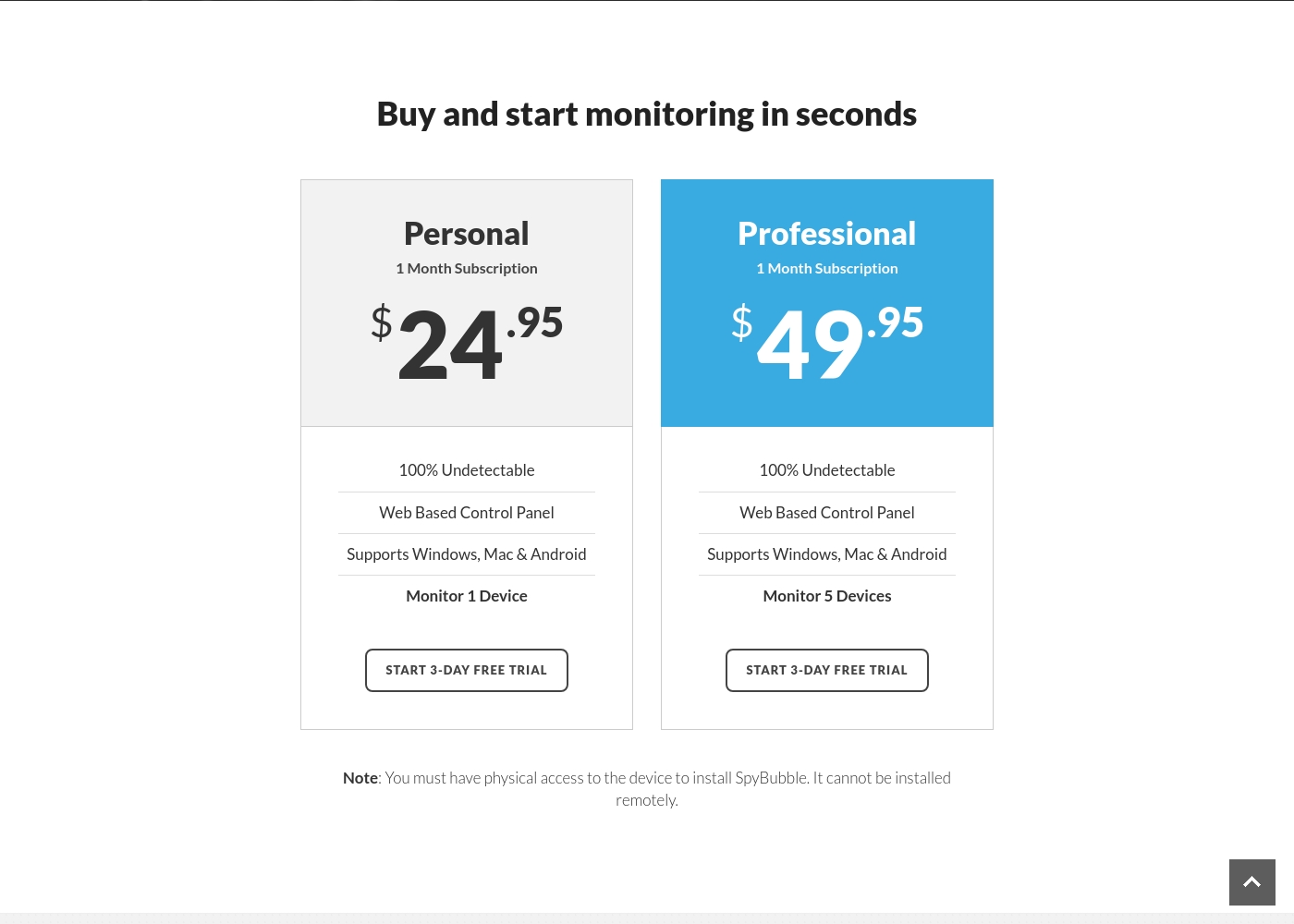
SpyBubble costs between $24.95 and $49.95 per month with 2 plans: Personal at $24.95, and Professional at $49.95.
You can choose between two straightforward monthly plans, depending on how many devices you need to monitor. Both options currently provide access to a 3-day free trial period.
Personal
Price: $24.95 per month Websites Supported: Not explicitly stated Best For: Individual device monitoring Refund Policy: Not explicitly stated Other Features:
- 100% Undetectable monitoring
- Web Based Control Panel access
- Supports Windows, Mac, and Android
- Monitor 1 Device
- 100% Undetectable
- Web Based Control Panel
- Supports Windows, Mac & Android
- Monitor 1 Device
- 100% Undetectable
- Web Based Control Panel
- Supports Windows, Mac & Android
- Monitor 5 Devices
Pricing Head-to-Head
用户评论
Net Nanny currently holds a very poor 2.1 rating on Trustpilot, reflecting widespread customer dissatisfaction. Users frequently report critical failures in core functionality and serious concerns regarding billing practices.
Recurring complaints revolve around system reliability; many users state the software does not work properly on modern devices, citing issues like apps ignoring set time limits, device freezes, and wildly inaccurate dashboard reporting (e.g., usage times ticking up five minutes per second). Beyond technical faults, customers vehemently criticize Net Nanny’s handling of subscriptions and auto-renewal.
The software doesn't work consistently after a restart; I always have to sign in manually. Since installing it, my Mac freezes frequently during downloads. I have not yet received any response from customer service about these issues.
The 3.0-star rating on Trustpilot reflects a stark divergence between user experiences. On one hand, a few users praised SpyBubble as the best tracking app they’ve used, highlighting its quick setup and effective acquisition of media, messages, and call logs.
They specifically noted the convenience of media tracking and reports updating fast. However, the majority of detailed negative feedback aggressively challenges the service’s core promises and reliability.
The app suddenly showed a red mirroring icon on the target phone, instantly making the monitoring obvious. My entire goal was foiled because the target became suspicious and changed devices. Customer service could not resolve this major security flaw or offer a useful solution.
我们的判断
在 Net Nanny 和 SpyBubble 之间做出选择,完全取决于您的监控理念。没有一个解决方案是完美的,但它们服务于截然不同的需求。您必须决定自己需要的是主动的内容预防还是秘密的活动记录。 Net Nanny 是保护未成年人上网安全的可见、安全至上的防御墙。它在动态网页过滤和强大的色情内容拦截方面表现出色。此外,Net Nanny 会就武器或非法药物等危险话题提供即时安全警报。20 设备家庭通行证为大型、设备众多的家庭提供了巨大的年度价值。 SpyBubble 专注于进行通信和设备使用的隐秘后台记录。如果您需要记录的证据,SpyBubble 会自动跟踪发送的短信和通话记录。其每月 24.95 美元起的定价以及包含的 3 天试用期是其主要优点。 iOS 支持和可扩展性等关键差异也是决定因素。如果您需要保护许多不同的设备,包括 Apple 和 Android,请选择 Net Nanny。仅当您绝对需要在最多五台设备上进行秘密通信日志跟踪时,才选择 SpyBubble。 我们推荐 Net Nanny 应对大多数家庭使用场景,因为它具有更优的覆盖范围和必要的积极安全功能。SpyBubble 仅适用于针对特定非 Apple 设备的短期数据记录,尽管存在可靠性方面的担忧。
准备好选择了?
这两个工具都有各自的优点。根据您的具体需求进行选择。